SL project news week 7 (1): Server deploys, viewer updates

Server Deployments for Week 7

On Tuesday February 12th, the Main channel (Second Life Server / SLS) received the maint-server package focused on crashes fixes which was  deployed in week 6 to LeTigre – release notes.

On Wednesday February 13th the three RC channels are scheduled to receive the following packages:

  • Bluesteel: retains the materials processing project code  – please see the SL Viewer section below for information regarding the current status of viewer development work for thi project – and should receive the same fixes and updates being deployed to the SLS channel (above) – release notes
  • Magnum: retains the interest list project code and should receive the same fixes and updates being deployed to the SLS channel (above) – release notes
  • LeTigre should receive a new maintenance server update to fix miscellaneous crash modes – release notes. This deployment also includes the following:
    • An improvement to the rolling restart notifications so that they appear in an alert format (as with manual region restarts) rather than an easily missed notification. This change will only be apparent in restarts following the code deployment restart (as per JIRA SVC-7759)
    • An avatar banned from a parcel can now select an object located in that parcel if they have ‘Return’ powers over that object (see JIRA SVC-496)
    • Instant messages are now truncated to 1024 bytes to prevent certain types of delivery failure. Currently, the IM database supports larger messages than the delivery system can handle. This change will enforce a limit of 1024 bytes when processing messages coming into the database as well as those being sent out.

As always, a forum thread has been created for discussions / feedback on the deployments.

SL viewer Updates

Beta Viewer

While the current beta release of the 3.4.5 code remains stable, problems are being reported in merging various project code updates with the 3.4.5 code base, some TPV developers are reporting issues attempting to merge the 3.4.5 code into their viewer builds, notably with Linux 64-bit and Windows, although the same issue does not appear to be occurring with Mac OSx.

In the meantime, one more 3.4.5 beta release of the SL viewer is anticipated during week 7.

CHUI

As noted in part 3 of the week 6 report, the CHUI project viewer is now largely on a par with the development viewer, although it has yet to be actually merged with the main viewer-dev code trunk. This is due to happen very soon. In week 6, Oz Linden commented that it is anticipated that CHUI will be the first of the upcoming projects to merge with the beta viewer code, and would then be in for a (quot) “Good long run” in beta. This week, it has been hinted that CHUI could actually have a lengthy run in both the development viewer and the beta viewer as final priorities are sorted out.

Server-side Baking Project Viewer

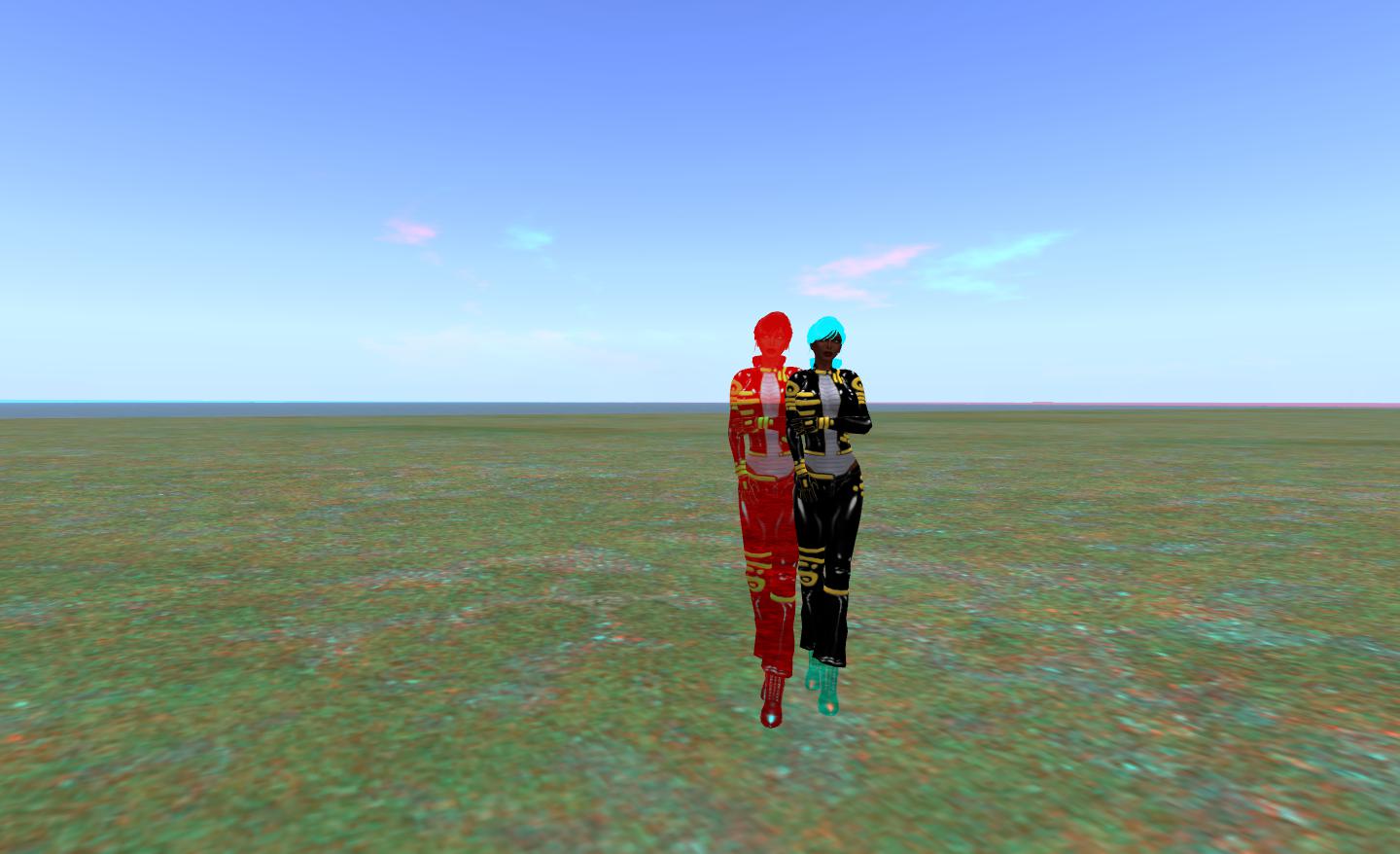
Problems remain in merging the SSB code with viewers using RLVa, although good progress is being made in addressing them, although they have yet to be merged-up to a TPV which supports RLVa and have a version under development using the SSB code.

In the meantime, the latest updates to the viewer code from the Lab were pushed to the project repositories on Monday 11th February, and a new version of the Sunshine project viewer for Windows emerged on Tuesday February 12th – Sunshine 3.4.5.270231, with Mac and Linux builds to follow.

Materials Viewer

Problems remain with the materials processing viewer-side code. Precise details are not clear, but the latest private (LL and project members only) Windows builds are being reported as being, “Conspicuously more unstable than the Mac builds”, in that they tend to crash when connecting to a materials-enabled server. Investigations into the problems (notably by TPV developers engaged in the project) are ongoing to try to locate the underpinning cause.

Materials processing: viewer issues still being resolved, so no public project viewer as yet

There are a couple more features to go into the materials viewer as well prior to it reaching a public project viewer status, but these are apparently being held-off until the current server interaction problems are resolved.

Experience Permissions

July saw the launch of the first phase of the Advanced Creation Tools, also referred to as experience tools. Following problems with an initial deployment of the tools in June, which resulted them being exploited as a means of griefing, the “first phase” of the release saw the tools implemented with existing permissions system in place, with the intention of updating the permissions system to allow the tools to be more fully used “in the future”. Since then, it has been something of a waiting game to see if / when the promised new experience permissions would be deployed, and my own last report on the general status of the permissions system being in December 2012.

Questions are still being asked at various LL meetings, he most recent being tabled at the Content Creation User Group on Monday 11th February. In reply, Nyx Linden indicated he would attempt to get an update from Falcon Linden, who is leading this project.

Object Inventory Issues

Some people may have encountered problems when trying to transfer a number of inventory items into a box (prim rezzed in-world) or similar. There are two known issues with this:

  • The first is (non-publicly viewable) JIRA BUG-383: “When HTTP Inventory is disabled, mass selecting a bunch of inventory items and attempting to add to an objects contents will fail”. This will apparently happen if the HTTP inventory setting in a viewer is changed without cache also being cleared
  • The second is (non-publicly viewable) JIRA SEC-1041, which is apparently (according to Kelly Linden) related to “An internal TCP error between sim and dataserver.” The problem manifests with the in-world error-message “Inventory creation on in-world object failed” on trying to transfer a large number of items (e.g. 50+) from inventory into the contents of a prim in one go.

As the JIRA on both of these issues are non-viewable, their status isn’t clear, other than the problems described in them can be reproduced. SEC-1041 is the more serious of the two problems and might result in a crash, although it will not result in physical damage to a person’s inventory.

Firestorm Q and A: 13:00 on the 13th

firestorm-logoJessica Lyon, project lead for the Firestorm team, has announced that there will be a limited capacity meeting on Wednesday 13th February at 13:00 SLT, to discuss the Firestorm project. The core part of the announcement reads:

Every once in a while, and probably not often enough, we host a Question and Answer session in Second Life for the Second Life community. The purpose is to give us the opportunity to update you all with what we are doing and give you the opportunity to have a say, ask questions you may have to the team, voice complaints, make requests and in general communicate with us directly. This Q&A will not be quite like our office hours. It will not be as formal, it will be far less structured, and it will not be streamed live.

Seating is limited to 70 avatars and is first come first serve. We will, however, try to record it and offer the recording for folks who couldn’t make it.

All are invited, fans and haters alike, people who use our viewers and those who don’t… everyone.
All questions are welcome, we only ask that language be kept PG and folks be civil to each other.

Again, note that the meeting will not be streamed live. The venue for the meeting is the Firestorm Office Hours meeting place on the Phoenix Firestorm support region.

Viewer release summary 2013: week 6

This summary is published every Monday and is a list of SL viewer / client releases (official and TPV) made during the previous week. When reading it, please note:

  • It is based on my Viewer Round-up Page, a list of  all Second Life viewers and clients that are in popular use (and of which I am aware) and which are recognised as adhering to the TPV Policy
  • By its nature, this summary will always be in arrears
  • The Viewer Round-up Page is updated as soon as I’m aware of any releases / changes to viewers & clients, and should be referred to for more up-to-date information as the week progresses
  • The Viewer Round-up Page also includes comprehensive links to download pages, blog notes, release notes, etc., as well as links to any / all reviews of specific viewers / clients made within this blog.  

Updates for the week ending: 10 February, 2013

  • SL Viewer updates:
      • Beta version updated to 3.4.5.270034 on February 6th –  release notes
      • CHUI development viewer reached release 3.4.6.270209 on February 9th
  • Kokua released version 3.4.425654 r6 on Feb 6th – core updates: Advanced Build Tools floater offers Imprduence layout and elements from Firestorm; Metropolis Metaverse added to OpenSim grid list – release notes
  • Cool VL updated on the 9th of February and again on the 10th to arrve at:
    • Stable version: 1.26.6.10
    • Legacy version (v2.6 renderer): 1.26.4.53
    • Experimental version: 1.26.7.10
    • Release notes
  • Lumiya released version 2.4.2 on February 4th – core update: mesh object suppor fixes –  release notes
  • Group Tools released version 2.2.16.0 on February 6th

Discontinued Viewers

  • Phoenix officially reached end-of-line for SL on December 31st – read more here
  • Zen viewer was withdrawn from the SL TPV directory and all repositories shutdown on January 27th, 2013.

Related Links

SL projects news week 6 (3): viewer and CHUI, SSB, materials

SL Beta Viewer and CHUI

As noted in part 2 of this report, a new beta release of the SL viewer was made on February 6th. The crash rates for this version, some 48 hours on from the release, are reported by Oz Linden as being “remarkably low”, with some 1400 users / half-a-million minutes logged against it to date. If this continues through the weekend, the chances are the code will go to a release version of the viewer early in week 7 (week commencing Monday 11th February).

If things go according to plan, there is likely to be one more 3.4.5 beta release prior to a merge taking place with the Communications Hubs User Interface (CHUI) code.

Currently, the CHUI code is now fully merged with the viewer-dev code, although it is slightly out-of-step with the beta code. Once the merge to beta has been made, and with everything else going on with the viewer, it is anticipated that CHUI will have “a nice long run,” as a beta release.

Server-side Baking and Pile-on Test Pre-announcement

Avatar bake fail
SSB: looking to solve avatar bake fail

Nyx Linden and his team continue to work on server-side baking (SBB), both on the server and the viewer side of things. An update to the project viewer and viewer code was made back on January 30th, and Nyx has indicated that another push is due early in week 7.

The major news on this project is that a pile-on test is in the planning stage. While dates and times have yet to be confirmed, this is being targeted for later in February on Aditi, and the Lab is looking to have people running a Server-side baking viewer (e.g. the project viewer or any TPV which has implemented the necessary viewer-side code) attend and help provide a thorough load test for the new code.

The test will require viewers to be enabled for certain types of data logging in order to ensure LL gather the relevant information. Details on what will be required will be passed on to those TPVs which indicate they can participate in the test. For those individuals wishing to help out, but whose preferred viewer has not enabled the SSB code by the time of the test, the LL project viewer will have the necessary logging options already enabled. Further details on the proposed test will be published here as they become available.

In terms of TPV integration, it has been confirmed that the SSB code changes for the viewer impact RLVa. Details of the overall impact is unclear, other than RLVa  is affected in several areas and Kitty Barnett is working to fix issues. However, this does mean that integration of the SSB code has slowed for some TPVs.

Materials Processing and Project Viewer

As previously reported, the server-side code is on the BlueSteel RC channel, and there are no apparent issues with the code which might prevent its wider distribution. There are still some issues to resolve with materials processing, which means that a project viewer may be delayed another week or so.

Some of the problems appear to have been network related. When testing recent versions of the pre-release materials viewer on a materials-enabled region of the Main grid, it was noted that they (quote) “significantly added” to the network load for the test region, impacting performance. These problems required additional investigation in order to resolve, and it is hoped that they have now been “wrestled to the ground”. There were also some reports of a couple of things still to be fixed in the UI, although it appears that, again, these have now been dealt with.

Given this, and while a publicly available project viewer appearing in week 7 is “not out of the question”, the Lab appear to be looking at week 8 (commencing Monday 18th February) as the week in which a materials project viewer will surface. In the meantime, the recommendation remains that TPVs do not pull code from the current materials code repository for integration into their own viewers.

The look of things to come: Materials Processing
The look of things to come: Materials Processing should have a public viewer available in the next two weeks

FMODex

Oz confirmed that the Lab now has FMODex working internally on both Windows and Linux, and passed on thanks to members of the Singularity team for their work in making this possible. The code is to be made available for wider testing by TPVs “Pretty Soon”TM.

As per my last update on the matter, it is unlikely that LL will be able to pre-build the code for TPVs, but the goal is to have something which is not “dramatically different” to how TPVs previously obtained the required code. However, with all that is happening at the moment, it is possible that those TPVs which haven’t already looked to using FMODex may continue “as is” with FMOD until some of the pressure is off in terms of other viewer projects which are rolling forward.

Related Links

Information source: TPV Dev meeting, Friday 8th February, 2013. There is unlikely to be an official audio recording of this meeting due to it being relocated due to ongoing issues with the Hippotropolis region.

SL project news week 6 (2): server deployment updates

Server Deployments – Week 6

The planned server deployments for week 6 occurred as anticipated:

  • On Tuesday 5th February, the Main channel received the server maintenance project deployed to LeTigre in week 5. This has miscellaneous minor bug fixes and new features – release notes
  • On Wednesday 6th February, the RC channels received the following:
    • BlueSteel: code for materials processing (project viewer still pending) – release notes
    • LeTigre: a new maint-server project to fix miscellaneous crash modes, and with minor performance improvements – release notes
    • Magnum: interest list code update to specifically address the bot / bandwidth problem reported on in last week’s update and also support for materials processing – release notes

Server Deployments – week 7

There is no advanced news on potential deployment for the week commencing Monday 11th February, 2013.

SL Viewer Updates

The beta viewer was updated on February 6th with the release of 3.4.5.270034. Please refer to the release notes for details of all changes and updates. The CHUI project development viewer also updated to 3.4.6.270114 on February 6th.

Updates – Issues and Other Bits

Bot / Bandwidth Issues

Speaking at the Server Beta user group meeting on Thursday February 7th, Maestro Linden indicated the ongoing bot / bandwidth issue related to the interest list code and as pointed to by Latif Khalifa and confirmed by Andrew Linden (reported in more detail here), appears to have been resolved. Commenting on the bug fix in the server deployment thread, Triple Peccable, who was one of those being badly impacted by the problem, comments:

Maestro and Andrew,

I wanted to report on the bot’s usage. Fixed!

Before this incident the bot’s “normal” usage was 5 MB / hr. That is so normal no one would suspect anything.

But now it is 1 MB / hr! It has never been that low before, ever.

The improvement might be from the interest list changes, but since the bot is parked 3300m up with a very limited draw distance, I think it is from this UDP bug fix, and will help with more than just bots. :smileyhappy:.

Estate Ban Issues

Two issues have been reported in relation to estate bans recently.

One is the use of LSL commands for estate moderation, as mentioned in the second part of my report for week 5. While it is not clear how widespread the issue is (the reports received so far appear to relate to four regions), it had been hoped that the code deployment to LeTigre might have fixed the problem, but tests with an affected region move to LeTigre showed this was not the case. However, Maestro Linden believes LL may have a match between the issue and a bug that was filed internally after  crash report fingerprints were browsed, so investigations are liable to continue.

In the second, Whirly Fizzle has reported an issue with the “GTFO” ban feature in Phoenix. While this adds the banned individual’s name to the banlist for an estate, the individual isn’t actually barred from accessing the estate. As such, it is thought that this issue might contribute to recent problems in people apparently circumventing estate bans, and is something which will not be rectified by the estate ban improvements currently being deployed by LL, as it is an issue within the Phoenix viewer code itself.

Region Crashes on Restarts

In addition to the restart performance issues related to physics memory use previously reported and updated in part 1 of this report, some regions are experiencing issues with the physics engine during a restart, with all scripting capabilities being disabled as the physics engine is overloaded. Scripting must then be re-enabled by the region owner / estate managers. A fix for this is being worked on, and should be available soon.

Vanishing Regions

Following the week 5 deployments, Alvid Majestic contacted me concerning issues with regions diagonally opposite Brocade, on the Mainland, failing to render in the viewer’s world view, and would not render until such time as a person moved into one of the regions immediately adjacent to it / moved into it.

Missing regions: Mullein and (beyond it) Ear fail to render from Brocade, which sits diagonally opposite them

This is not a new issue, having previously been reported in SVC-8130, although there was some confusion as to whether or not it had been resolved. Commenting on it in general at the Server Beta User Group meeting, Maestro Linden informed me, “It’s somewhat rare, but it was never officially fixed.”  As the JIRA is closed to comment, Shug Maitland has raised a forum thread on matter, so if you are witnessing the same issue on an ongoing basis, consider adding your comments there as well as raising reports.

Region Crossings

There has been mixed feedback to the results of the deployment of the new region crossing code across Agni.

Regular commentator on this blog, Wolf Baginski Bearsfoot has put together a report on his findings in the SL Server sub-forum, which builds on his initial impressions posted in this blog.

Some feedback given through the User Groups suggest that in some instances region crossings – such as with sailing – are improved, and at the Simulator User Group meeting on Tuesday 5th February, Simon Linden indicated LL were seeing fewer instances of stuck teleports.However, there have also been reports passed through the Server Beta group of automated cars on the Mainland encountering problems at region crossings while following Linden Roads and piling-up at the boundaries of regions such as Furness to Ravenglass, although instances appear to have calmed down. More updates on this as they come.

Lumiya: mesh, rlv and more

lumiya-logoLumiya has gone through a series of updates recently, cycling rapidly through versions 2.4.0 and 2.4.1 (the latter to fix an OpenSim teleport issue) on January 31st, and arriving at 2.4.2 on February 4th to fix some issues with mesh clothing uncovered by yours truly.

These releases see Lumiya introduces key features users have been waiting for, and start paving the way for future SL support. Taken together, the core updates comprise:

  • Support for mesh objects and clothing
  • Support for RLV
  • Support for server-side baking

Mesh Support

Mesh support works well with in-world objects, as the following image demonstrates.

A partial mesh house rendered in Lumiya (l) and a mesh enabled viewer (r). The inset images shows the hows as rendered in a non-mesh viewer

Mesh clothing was a little more problematic with the initial 2.4.0 / 2.4.1 release, for both rigged and non-rigged mesh clothing. While some would render correctly, other items would not, exhibiting issues with arms and / or legs, and even rendering as  being worn back-to-front.

Mesh rendering in Lumiya 2.4.0 / 2.4.1. sometimes things went a little ka-ka...
Mesh rendering in Lumiya 2.4.0 / 2.4.1. sometimes things went a little ka-ka…

The issue appeared to be with how the SL software treats both rigged and unrigged mesh. I’m not a technical expert (as most know), but was able to carry out a series of tests which gave Alina Lyvette, Lumiya’s developer, a start on carrying out her own investigations which resulted in her fixing the issue – hence version 2.4.2 appearing.

With the latest release, it appears the majority of problems have been solved, although there have been some reports of mesh attachments such as hair still failing to render correctly.

Certainly from my perspective, and while I admittedly have what is a far less than extensive mesh clothing wardrobe, the issues which all gave me problems while using the 2.4.0 and the 2.4.1 releases of Lumiya all now appear to be resolved, and my mesh clothing now all renders correctly for me, and I’ve had no problems with the likes of mesh footwear so far.

One side effect of this is that the mesh support has slightly impacted the positioning of avatar attachments with Lumiya. Alina has had suspicions that there might be a problem with attachments and the avatar skeleton which may affect Lumiya, and now the issue has been confirmed, it’s on her list of things to update.

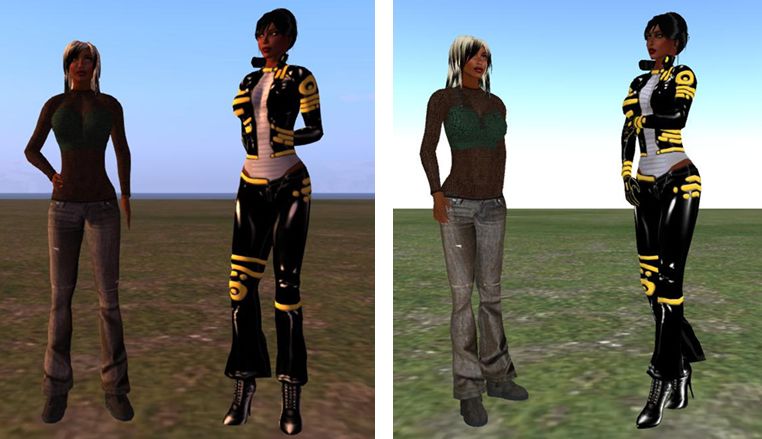
The magic of mesh in Lumia: a rigged mesh catsuit in Lumiya (l) and a regular viewer (r)

A new setting is also provided within Lumiya for users to define the quality of mesh rendering on their device  – useful if using an older, less capable GPU. The options can be found under 3D View on the Settings menu (device menu key > Settings), and comprise five settings: High Quality, Medium Quality, Low Quality, Lowest Quality and Disabled.

RLV Support

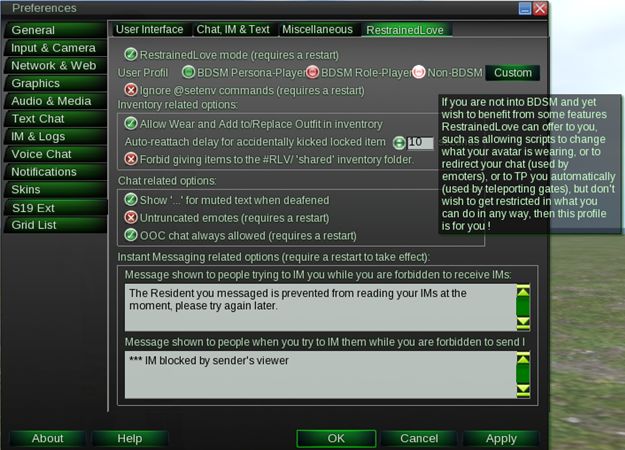
Lumiya, from version 2.4.0 onward, provides RLV / RLVa support. As with a traditional viewer, RLV must be explicitly enabled by the user via the Settings menu (device menu > Settings > Tap RLV enabled to check and turn on). Also, as with a traditional viewer, a restart is required once RLV has been enabled the first time.

Once enabled, behaviours are as seen with an RLV-enabled viewer: locked items are non-detachable; restricted options are removed from menu options; movement restrictions enforced etc.

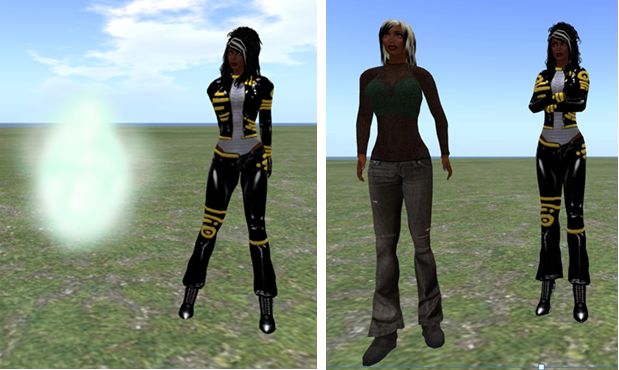
RLV in Lumiya: in the left two images, the 3D world view Settings menu showing how active RLV restrictions remove options (Inventory, Minimap) from that menu. On the right, two images showing the removal of the Detach option from the object menu for an RLV "locked" item
RLV in Lumiya: in the left two images, the 3D world view Settings menu showing how active RLV restrictions remove options (Inventory, Minimap) from that menu. On the right, two images showing the removal of the Detach option from the object menu for an item “locked” via RLV

RLV Support Notes

  • As Lumiya does not currently support particle rendering in the 3D view, chain links, etc., will not be rendered
  • Similarly, because Lumiya does not currently support windlight, any windlight controls / restrictions related to RLV will no be applied to the in-world view
  • There is currently no #RLV shared folder support
  • Disabling RLV in Lumiya will turn the functionality off without a need to re-log (all restrictions on detachment, menu options, etc., will be lifted).

Server-side Baking

Lumiya now provides support for Server-side baking (SSB, also referred to as avatar baking), and so is ready from when the new service is deployed to the main grid.

While there is a test area for SSB on Aditi (the Beta grid), I have encountered issues with logging-in to that grid using Lumiiya, and so have been unable to test and obtain images for this review.

Other Updates

Additionally. versions 2.4.0 through 2.4.2 add the following to Lumiya:

  • Avatar direction indicator added to Mini-map (a small arrow is displayed over your avatar, indicating the direction it is facing)
  • Animation requests are no longer auto-accepted
  • Fixed display of outfit folders in inventory
  • Fixed duplicate messages in chat
  • Fixed inventory appearing empty after teleport
  • Fixed broken teleports on OpenSim grids.

Feedback

Another series of updates which see Lumiya move even closer to matching viewer-based capabilities, making it even more a genuine alternative for those on mobile / tablet devices who wish to access Second Life / OpenSim while on the move. Both mesh rendering and RLV support are liable to be popular additions, and the server-side baking should stand it in good stead for upcoming changes to Second Life.

For those using an Android device, there simply isn’t a better means of access your virtual world.

Related Links