SL project updates week 35/1: server, viewer, unified snapshot floater and CDN

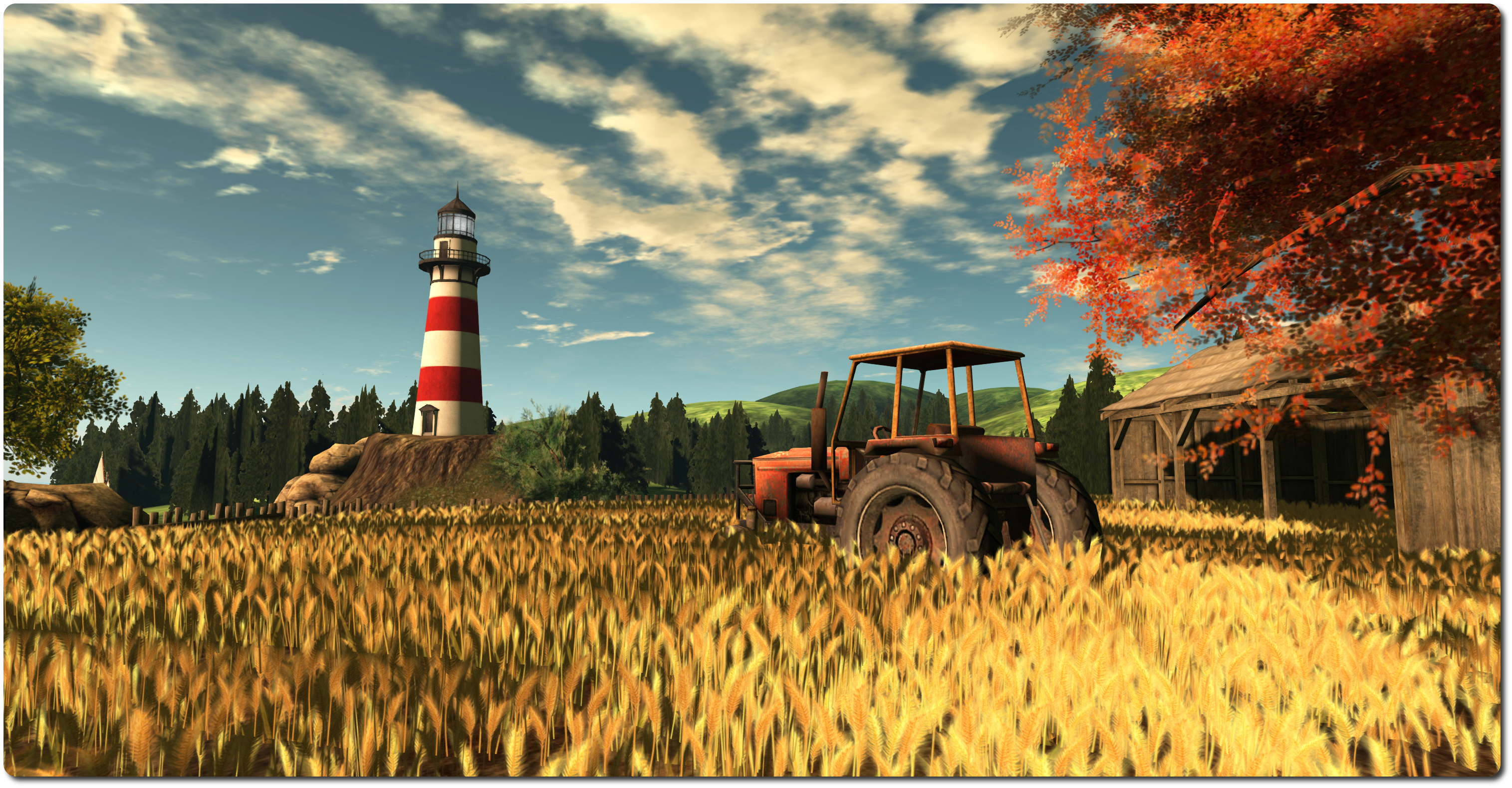
Matoluta Sanctuary, Sartre; Inara Pey, July 2014, on FlickrMatoluta Sanctuary, Sartre (Flickr) – Blog post

Server Deployments, Week 35

As always, please refer to the server deployment thread on the forums for the latest updates and information.

Main (SLS) Channel

On Tuesday August 26th, the Main channel was updated with the server maintenance release previously deployed to all three RC channels in week 34, which contains a single crash fix.

RC Channels

On Wednesday August 27th, all three RC channels should be updated with a new server maintenance package, which contains further crash mode fixes and, as indicated in the second part of my week 34 report, fixes for the following:

  • SVC-2262 – “Incorrect height value in postcard which sent from above 256m” (a postcard being a snapshot sent to e-mail)
  • A “re-fix” for BUG-6466 – “Numbers expressed in scientific notation and include a plus sign in the exponent are not parsed as JSON numbers by LSL”, which was thought to have been fixed a while ago, but which in fact resulted in BUG-6657 – “Valid JSON numbers like 0e0 no longer valid after 14.06.26.291532”, prompting the original fix to be rolled back.

SL Viewer

A new Snowstorm contributions RC arrived in the viewer release channel on Tuesday August 26th. The viewer, version 3.7.15.293295, includes a number of fixes for viewer issues and the new unified snapshot floater. As such, the list of contributions comprises:

  • OPEN-213 Broken header guard in llaudiodecodemgr.h
  • OPEN-217 Change to media_plugin_quicktime.cpp causes Windows compile to fail
  • STORM-2030 Rapidly clicking the refresh button in selected floaters may result in duplicate entries
  • STORM-2031 Display issues with Top colliders/Top scripts floater
  • STORM-2034 Support ‘older than’ when inventory filtering
  • STORM-2037 LSL syntax fetching for new keywords appears to be broken
  • STORM-2038 On the Edit tab of the build menu, clicking the area in between the Full Bright check box and the materials drop down box opens the color picker.
  • STORM-2040 Unified Snapshot floater
  • STORM-2076 Width spinner is broken in the Snapshot->Save to disk floater.
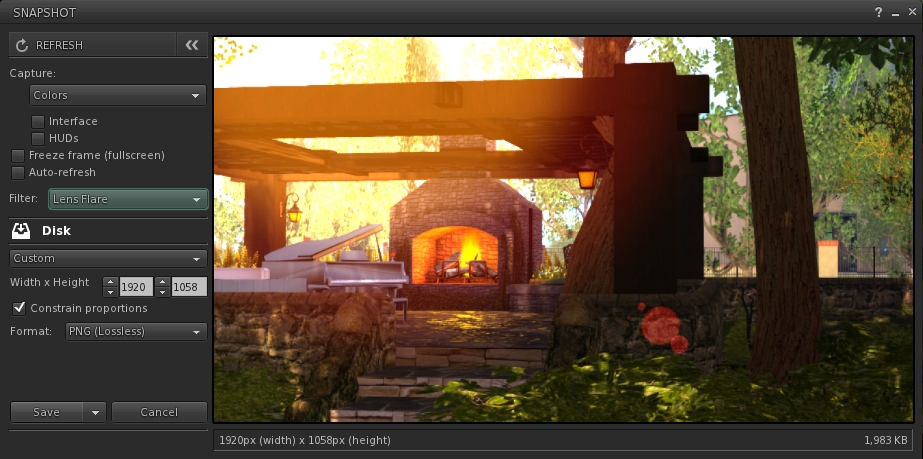
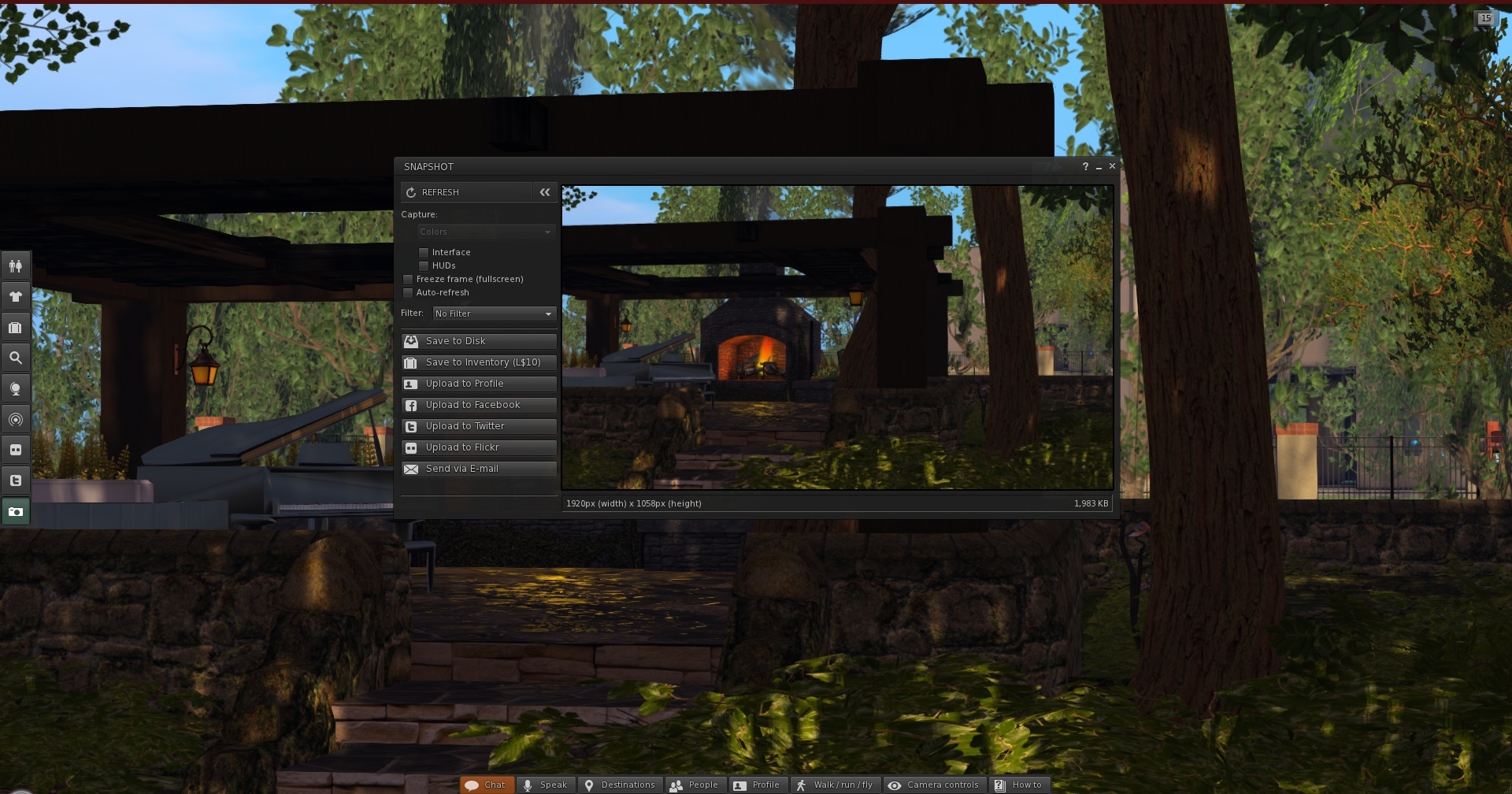
The new snapshot floater by Niran V Dean: note the button options for Flickr, Twitter and Facebook uploads
The new snapshot floater by Niran V Dean is now available in a new Snowstorm contributions RC viewer. Note the button options for Flickr, Twitter and Facebook uploads, the position of the filter option and the enlarged preview panel. Please refer to my preview of the floater for further details

The new snapshot floater provides an enlarged preview panel, plus buttons to access the Facebook, Twitter and Flickr upload floaters. However, what’s possibly going to be very popular among SL users is the ability to use the filter options with snapshots saved to inventory, disk or to e-mail – and the ability to use them on snapshots to be uploaded to the SL profile feed. Further information on the floater can be found in my preview article about it.

While there have been no changes to either the Experience Keys project viewer or the Oculus Rift project viewer, an update to the Experience Keys viewer is also anticipated soon.

Texture and Mesh CDN

Testing is continuing on the Aditi set-up to test the initial configuration of the proposed texture and mesh fetching CDN, and results are seemingly positive.As noted in my last reports, if successful, this approach will see texture and mesh fetching bypass the simulator entirely, being routed instead directly between the viewer and asset servers via the CDN, which should see improvements in the speed and reliability of such transfers.

Given the CDN nodes are located around the globe, they offer significantly faster response times than trying to reach the SL servers. For example: ping times to the SL servers from the East coast US or the UK can be measured at an average of around 110ms or 180 ms respectively; ping times to a local CDN however, have been reported at 10ms and 30 ms respectively.

The way the system works means that when a new asset (with a new ID) is created, it is initially held by the Lab’s servers. However, the first time the asset is called, it is delivered to the CDN nearest to the person calling it, and cached there, and once cached, is then served locally whenever called by anyone connecting to that CDN, thus making for faster delivery to the viewer.

Whirly Fizzle has been driving a lot of the tests, carrying out direct comparisons in texture fetching via the CDN and via the current method of running things through the simulator, and her results are promising:

The results from Whirly Fizzle's testing with the CDN and classi download mechanism for textures, using the test regions on Aditi - click for full size, or go here for the original document
The results from Whirly Fizzle’s testing with the CDN and classic download mechanism for textures, using the test regions on Aditi – click for full size, or go here for the original document

However, a couple of points need to be remembered when looking at these figures. Firstly, the work is still in its infancy, and there is a way to go before the Lab is in a position to announce anything is ready for prime-time use. The test environment, while producing valid figures, isn’t something that will scale particularly well, a fact which caused Oz Linden to comment at the Simulator User Group meeting that while the Lab does have a plan for building a scalable solution, hasn’t as yet actually been built.

An additional point worth noting is that while the test environment doesn’t require a special viewer (any viewer will work in the test regions on Aditi), any solution which will eventually be deployed will require viewer-side updates. To ensure that all viewers can leverage the new system as quickly as possible when both it and the viewer changes are ready, the Lab plans to release the viewer updates separately from everything else so that TPVs can quikcly merge them into their own viewers.

Even so, the Lab welcomes people testing the new set-up, as it helps them to gather more data. Details on the testing and the Aditi regions can be found in the Server Beta meeting agenda notes.

Oz is particularly excited about this work, commenting, “It’s something I’ve wanted to see done since I got here.”

Other Items

Not strictly an SL project update, but something related to SL project work.

Loki Eliot has posted a couple of blog posts related to Experience Keys / Tools. In the first, he provides notice that his Escapades Island has now been updated to use Experience Keys – which should make for some interesting fun! In the second, he provides some feedback on his dabbling with Experience Keys, highlighting one or two shortfalls which, while not devastating to the system, do point at least one area where the Lab might want to consider extending the permissions system (seating avatars, which might need a little careful thought), and on how things might be improved on the Oculus Rift side of things for those wanting a really immersive experience with Exp Keys.
Viewer release summaries: week 34

Updates for the week ending: Sunday August 24th, 2014

This summary is published every Monday and is a list of SL viewer / client releases (official and TPV) made during the previous week. When reading it, please note:

  • It is based on my Current Viewer Releases Page, a list of all Second Life viewers and clients that are in popular use (and of which I am aware), and which are recognised as adhering to the TPV Policy. This page includes comprehensive links to download pages, blog notes, release notes, etc., as well as links to any / all reviews of specific viewers / clients made within this blog
  • By its nature, this summary presented here will always be in arrears, please refer to the Current Viewer Release Page for more up-to-date information

Official LL Viewers

  • Current Release updated to version 3.7.14.292638 August 18th (formerly the Library Refresh RC viewer – contains an update to a large set of libraries used by the viewer to provide security, stability and consistency improvements to this and future viewers (download page, release notes)
  • Release channel cohorts (See my notes on manually installing RC viewer versions if you wish to install any release candidate(s) yourself):
    • No updates
  • Project viewers:
    • No updates.

LL Viewer Resources

Third-party Viewers

V3-style

V1-style

  • Cool VL viewer updated on August 23rd – Stable release to version 1.26.12.13 and Legacy version 1.26.8.71 – core updates: please refer to the release notes

Mobile / Other Clients

  • No updates.

Additional TPV Resources

Related Links

SL projects Updates week 34/2 server, texture / Mesh CDN, group chat

Santaurio, Cala del Barronal; Inara Pey, April 2014, on FlickrSantaurio, Cala del Barronal (Flickr) – blog post

Server Deployments week 34 – Recap

There was no deployment on the Main (SLS) channel on Tuesday August 19th. All three RC channels received the same server maintenance project  on Wednesday August 20th, aimed at fixing a crash mode.

There may be news on the crash mode fixed in the RCs once it has deployed to the Main (SLS) channel in week 35.

Upcoming Server Deployments

There will be a new server maintenance package deployed to the RCs in week 35, which includes a couple of visible changes:

  • SVC-2262 – “Incorrect height value in postcard which sent from above 256m” (a postcard being a snapshot sent to e-mail)
  • A “re-fix” for BUG-6466 – “Numbers expressed in scientific notation and include a plus sign in the exponent are not parsed as JSON numbers by LSL”, which was thought to have been fixed a while ago, but which in fact resulted in BUG-6657 – Valid JSON numbers like 0e0 no longer valid after 14.06.26.291532. prompting the original fix to be rolled back.

SL Viewer News

TPV developer Niran V Dean has been working on a new unified snapshot floater which encompasses the “standard” floater, plus the Flickr, Twitter and Facebook upload options, under STORM-2040. Those who use the most recently releases of Niran’s Black Dragon viewer will be familiar with the approach, as he initially worked on the idea in that viewer.

NiranV Dean has been working on a more unified snapshot floater, which is currently undergoing testing. It will hopefully appear soon
NiranV Dean has been working on a more unified snapshot floater, shown here in the viewer window, which is currently undergoing testing. It will hopefully appear soon (click for full size)

The work is now progressing to a point where we should be seeing the fruits of his labour in the near future. In the meantime, I’ve previewed the work as it stands at the moment.

Texture and Mesh Fetching CDN

As reported in my last TPV developer meeting update, the Lab is looking to move texture and mesh fetching to a content delivery network (CDN). If successful, this approach will see texture and mesh fetching bypass the simulator entirely, being routed instead directly between the viewer and asset servers via the CDN, which should see improvements in the speed and reliability of such transfers.  Explaining the new approach further at the Server Beta meeting on Thursday August 21st, Maestro Linden said,

The viewer currently fetches all meshes and textures through the sim, which gets them from the asset server, and the sim gives the viewer a ‘capability’ URL, which the viewer uses for fetching. However, with this change to use the CDN, the sim instead gives the viewer the URL of the CDN, and the CDN has hosts all over the world. 

It’s good for two reasons: 1) the sim isn’t burdened with texture/mesh transfers; 2) you’ll often have lower latency to the CDN than the sim, which means more speed.

Allowing for the fact the Lab is accessing the service through their own network (although the CDN is a commercial service), both Maestro and April Linden report it as being a noticeable improvement on things, with texture and mesh fetching having double the performance compared to the current means of fetching via the simulator. Initial results of testing from Europe show similar improvements.

The Server Beta meeting agenda has further information on new method for mesh and texture fetching, including details on the Aditi stress test regions (one for textures, one for meshes), and those wishing to try them out are invited to do so. No special viewer is required in order to carry out testing at present, and the agenda includes notes on what to do. Note that the test regions are set to no-build so that people don’t rez extra things that would skew results; they are also likely to be limited in terms of the maximum number of avatars able to access them at one time.

If / when the new approach is more broadly rolled-out, people will be able to see which service (CDN or via the simulator) they are using is to set Develop > Consoles > Capabilities Info To Debug Console. Those using the CDN will see the GetMesh, GetMesh2, and GetTexture URLs will all be  http://asset-cdn.aditi.lindenlab.com/, while those using the current method will see it give some URL pointing at the sim host. However, we’re still some way from seeing the new service deployed further than the Aditi test regions.

Should this work prove successful, and once it and other HTTP work such as pipelining, as being developed by Monty Linden, is completed, the Lab hopes that they’ll have a fast, robust series of HTTP services such that they can look to retire UDP texture fetching – although this will be some way down the road, and in the interim, UDP will offer people something of a fallback for texture fetching should they have issues with HTTP as the various new services are deployed.

 Skill Gaming Regions

Simon Linden reported that the first of the Skill Gaming regions has arrived on Agni (the main grid). Called Crunchy, it doesn’t have any gaming parlours or anything on it, but appears to be set-up for testing (such as accessibility). There are a few things going on there, most under the control of Gecko Linden. Also, and as pointed-out by Simon, the first skill games and operators have started to appear on the Lab’s Skill Gaming Participants wiki page.

Group Chat

Work has resumed on group chat after a brief pause, and the Server Beta meeting saw a very brief test take place. The aim of this was to test delays that have been introduced into the members list updates sent by the chat server.

As I’ve previously reported, one of the biggest issues of chat delays in group chat sessions is to do with the numbers of updates the chat server has to send as people join / leave session and log-in / out of SL, changing their online status within the groups they’re a member off. Recent changes to the code are intended to queue these updates and reduce the load they are placing on the servers, interrupting the flow of text messages.

The test was brief, but appeared to give Simon Linden enough information to be able to go back and poke at things some more.

Group Chat Server Issues

There have been further reports of group chat servers at times becoming non-responsive. This issue was initially raised in week 33, after the server supporting all group chats with a key starting with “b”. A further issue was identified at the start of week 34 affecting the server supporting all group chats with a key starting with “d”. While the Lab is aware of ongoing problems, there is also a request for JIRAs to be submitted on specific issues.

SL viewer to get unified snapshot floater

secondlifeUpdate, September 8th: The unified snapshot floater is now a part of the de facto release viewer.

Update, August 26th: The unified snapshot floater is now available in a release candidate viewer, version 3.7.15.293376. 

Niran V Dean is familiar to many as the creator of the Black Dragon viewer, and before that, Niran’s Viewer. Both viewers have been innovative in their approach to UI design and presentation, and both have been the subject of reviews in this blog over the years, with Black Dragon still reviewed as and when versions are released.

Once of the UI updates Niran recently implemented in Black Dragon was a more unified approach to the various picture-taking floaters which are becoming increasing available across many viewers. There’s the original snapshot floater, and there are the Twitter, Flickr and Facebook floaters offered through the Lab’s SL Share updates to the official viewer, which are now also available in a number of TPVs.

In Black Dragon, Niran redesigned the basic snapshot floater, offering a much improved preview screen and buttons which not only provide access to the familiar Save to Disk, Save to Inventory, etc., options, but which also provide access to the Flickr, Twitter, and Facebook panels as well.

He also submitted to the code to Linden Lab, who have approved it, and it is currently working its way through their QA and testing cycle and should be appearing in a flavour of the official viewer soon (see STORM-2040).

A test build of the viewer with the new, more unified approach is available, and I took it for a quick spin to try-out the snapshot-related changes. Note it is a work-in-progress so some things may yet be subject to change between now and release.

First off, the snapshot floater is still accessed via the familiar Snapshot button, so there’s no loking for a new label or icon. The Twitter, Flickr and Facebook floaters and buttons are also still available (so if one or other of them is your preferred method of taking pictures, you can still open them without having to worry about going an extra step or two through the snapshot floater).

Opening the new snapshot floater immediately reveals the extent of Niran’s overhaul – and as with Black Dragon, I like it a lot.

The new snapshot floater by Niran V Dean: note the button options for Flickr, Twitter and Facebook uploads

The increased size of the preview panel is immediately apparent, and might at first seem very obtrusive. However, when not required, it can be nicely hidden away by clicking the << on the top left of the floater next to the Refresh button, allowing a more unobstructed in-world view when framing an image (you can also still minimise the floater if you prefer).

Beneath the Refresh button are the familiar snapshot floater options to include the interface and HUDs in a snapshot, the colour drop down, etc., and – importantly – the SL Share 2 filter drop down for post-processing images. The placing of the latter is important, as it is the first clue that filters can, with this update, be applied to snaps saved to inventory or disk or e-mailed or – as is liable to prove popular – uploaded to the profile feed.

With the new snapshot floater, you will be able to add filters to the snaps you save to disk or inventory, or which you e-mail or upload to your profile feed
With the new snapshot floater, you will be able to add filters to the snaps you save to disk or inventory, or which you e-mail or upload to your profile feed – here is a snap being prepared to save to disk with the lens flare filter added

Below these options are the familiar buttons allowing you to save a snapshot to disk, inventory, your feed or to e-mail it to someone. click each of these opens their individual options, which overwrite the buttons themselves – to return to them, simply click the Cancel button. Saving a snapshot will refresh the buttons automatically.

Within these buttons are those for uploading to Flickr, Twitter or Facebook. These buttons work slightly differently, as clicking any one of them will close the snapshot floater and open the required application upload floater.

While this may seem inconvenient over having everything in the one floater, it actually makes sense. For one thing, trying to re-code everything into an all-in-one floater would be a fairly non-trivial task; particularly as Twitter, Flickr and Facebook have their own individual authentication requirements and individual upload options (such as sending a text message with a picture uploaded to Twitter, and the ability to check your friends on Facebook. Also, and as mentioned earlier, keeping the floaters for Flickr, Twitter and Facebook separate means they can continue to be accessed directly by people who use them in preference to the snapshot floater.

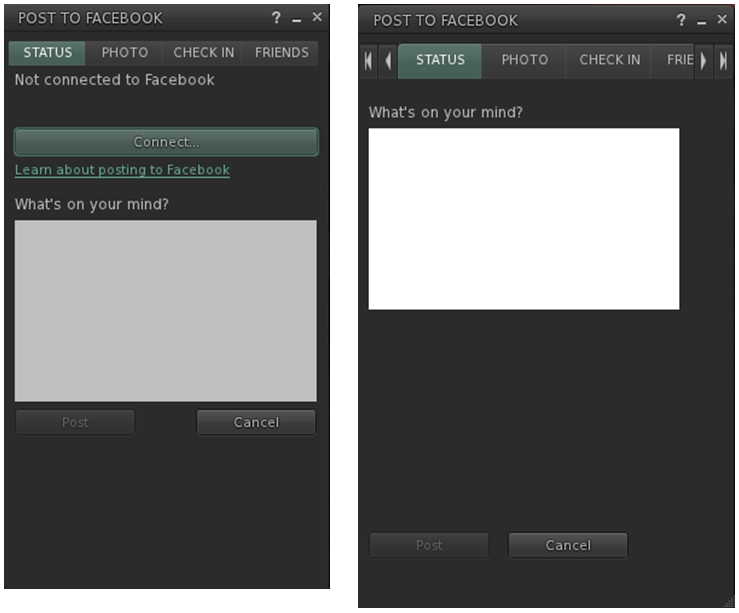
However, this latter point doesn’t mean they’ve been left untouched. Niran has cleaned-up much of their respective layouts and in doing so has reduced their screen footprints. The results are three floaters that are all rather more pleasing to the eye.

Niran's revised Facebook floater, left - note the new Connect button, removing a need for an extra tab; and the orginal floater  on the right
Niran’s revised Facebook floater, left – note the new Connect button, removing the need for an extra tab; and the original floater on the right

All told, these are a sweet set of updates which make a lot of sense. It may be a while longer before they surface in a viewer; I assume they’ll likely appear in a snowstorm update, rather than a dedicated viewer of their own, but that’s just my guess. Either way, they’re something to look forward to,

Kudos to Niran for the work in putting this together, and to Oz and the Lab for taking the code on and adding it to the viewer.

CtrlAltStudio offers preliminary Oculus DK2 support

CAS-logoDave Rowe, who develops the CtrlAltStudio viewer has announced he has some preliminary support for the Oculus Rift DK2 available in an alpha version of his viewer.

The viewer version – 1.2.2.41183 Alpha, dated August 19th, should also support existing DK1 headsets, but it doesn’t yet support head tracking for DK2 hardware.

Announcing the availability of the viewer in a blog post, Dave said:

I know some people are very anxious to try their DK2s in Second Life / OpenSim so I’ve released this alpha with some very preliminary DK2 support.

It works with the DK2 configured in extended mode: use the Windows key + right-arrow to move your viewer window onto the Rift’s display, then Ctrl+Alt+3 makes the window full screen and switches into Rift view.

Have I mentioned that this release is very preliminary? It does not work with direct mode yet as the current Rift SDK 0.4.1 Beta does not work in direct mode with OpenGL. Also, in this alpha, head orientation is tracked but not yet head position. Plus there’s no display of any UI. And Advanced Lighting Model must be turned on. For more details on usage, see the Release Notes.

I haven’t tested this alpha with a DK1 yet but it should in theory work. Note though that the mirrored windows mode used in previous viewer releases for the DK1 is and will not be supported by the new Oculus software.

Austin Tate has provided an overview of his experience with the viewer and the DK2, for those who would like more first-hand information.

Related Links


SL projects update 34/1: server, viewer, materials processing

L'Arc-en-Ciel, WinterFall, July 2014; Inara Pey on Flickr, on FlickrL’Arc-en-Ciel, WinterFall (Flickr) – Blog post

Server Deployments

As always, please refer to the server deployment thread for the latest news and information.

There was no deployment on the Main (SLS) channel on Tuesday August 19th. All three RC channels should receive the same server maintenance project  on Wednesday August 20th, aimed at fixing a crash mode.

SL Viewer Updates

The library refresh viewer, version 3.7.14.292638 was promoted to the de facto release viewer on Monday August 18th. This viewer contains an update to a large set of libraries used by the viewer to provide security, stability and consistency improvements to this and future viewers – release notes.

This leaves just the Experience Keys project viewer (due for a refresh in week 34), the Oculus Rift project viewer (due to undergo updates in the coming weeks following the Lab’s receipt of Oculus Rift DK2 headsets), and the RC / experimental log-in viewer in various visible viewer channels.

Group Ban Notifications JIRA

A couple of group ban issues have been raised on when and how notifications on ejection and banning are displayed by the viewer since the arrival of the group ban capabilities (or aren’t displayed, as the case may be) – see BUG-2054 and BUG-5928. Cinder Roxley has submitted code as a part of rectifying BUG-2054, and the Lab are looking and what they need to do to ensure consistent and logical notifications are given.

Materials and Related News

Materials Rendering via Basic Shaders

Geenz Spad contacted me over the weekend to point-out BUG-2077, a feature request that would enable all users that enable Basic Shaders to see a subset of materials functionality present in Advanced Lighting Model. Commenting on the JIRA, Geenz notes:

The performance impact won’t be noticeable on the vast majority of GPUs that support at least atmospheric shading and basic shaders, and should generally be much faster on systems that have trouble with ALM. On top of that, this should enable materials to work in water reflections and refractions to some extent.

However, he also notes a number of constraints:

  • Maximum number of lights will go unchanged
  • Projectors still will not work
  • Gamma correction will only be approximated.

In pointing the JIRA out to me, Geenz said, “A proposal has been submitted to LL regarding materials in basic shaders. I’ve started working on materials in basic shaders already, though work will be moving along slowly so definitely don’t expect this to done for a little while.”

At the same time, Geenz is also working on fixing projector reflections not respecting the environment intensity parameter (see BUG-2056). Currently, projector reflections are treated as specular reflections rather than environment reflections (see below). This fix would correct that.

BUG-2056:
BUG-2056: The image on the left shows projector reflections as they are seen today: overly brightly despite the environment intensity setting (in this case: glossiness 0; environment intensity: 20); the image on the right demonstrates how the reflections should appear with the same environment intensity (images: Geenz Spad)

Again speaking to me about the work, Geenz said, “This is something that I largely started working on while fixing the environment intensity bug on projectors.  Projectors didn’t seem to make a whole lot of sense in their previous state, and since we have enough information to actually do “glossy” reflections with projectors as it is, it made much more sense to just have glossiness tied to the existing glossiness material parameter.”

A further JIRA submitted by Geenz (see BUG-2067) proposes a means of improving the use of projectors to create surface “reflections”. Geenz provides the explanation thus:

Presently projectors have very strange behavior. Depending on a surface’s environment intensity, they get blurrier the more intense they are, and the reflections “fatten” depending on how intense the reflections on the surface are. This doesn’t really make a whole lot of sense.

Depending on how glossy the surface is, projector reflections should become sharper for higher gloss values and blurrier for lower values. On top of that, projector reflections shouldn’t “fatten” based upon intensity; this makes them unusable for decent looking reflections.

This feature makes use of the glossiness parameter to calculate the “gloss” of projector reflections.

Pojectors and glossiness: left = as things appear at present when projecting images onto glossy surfaces; right = as they would appear if Geenz's work is implemented
Pojectors and glossiness: top = as things appear at present when projecting images onto glossy surfaces; bottom = as they would appear if Geenz’s work is implemented (images: Geenz Spad)

Other Items

Mac Cocoa applicationShouldTerminate Issue

Cinder Roxley has pointed-out a problem with the Cocoa-specific applicationShouldTerminate function within the viewer, which she explains thus:

Say you are logged into sl, and you open appstore and there is an update that needs a restart to complete. Normally you click restart and it shuts down all apps completes the update and when you login your apps are reopened. Because the viewer is sending a bad value back to OSX, OSX will not close it, and it stops the restart from happening.

STORM-2053, submitted by Cinder provides a fix for this problem.

Mirror Reflections

Work is continuing to refine the SL mirrors project (see my report and JIRA (BUG-2055  initiated by Zi Ree of the Firestorm team). There has been some lively lively debate on the JIRA over the course of the last week. The more recent progress has been focused on getting mirrors to work with the Advanced lighting Model (ALM) active.

On top of everything else he’s doing, Geenz Spad has been providing pointers for some the work as well as demonstrating how mirror surfaces could benefit if they are made to work with materials, as shown in the images below.

How mirror reflections might benefit when working with materials: (L): A mirror sphere with a normal map applied; (c) a mirror sphere Mirror reflections and an environment mask applied; materials
How mirror reflections might benefit when working with materials: (L): A mirror sphere with a normal map applied; (c) a mirror sphere with environment mask applied; (r) the sphere with both a normal map and an evironment mask applied (images: Geenz Spad)

There is still a fair amount of work still to do before it is likely that the Lab look at any proposal arising from this. I’ll continue to update on progress as it is made, as I also hope to with Geenz’s work with projectors and materials as noted earlier in this report.