Following the release of Singularity 1.8.6 on Thursday September 4th, Replex, the viewer led by Latif Khalifa and based on Singularity, updated on Saturday September 6th to version 1.0.0.6229, the first full release of the viewer.
I reviewed an alpha version of Replex in June, when it slightly preempted the (then) upcoming Singularity release. This release keeps pace with the Singularity 1.8.6 release, offering the same capabilities. Replex-specific updates comprise:
Added new default Replex skin
Now provides Gemini and Silver skins
Windows 64 viewer now supports parcel media (QuickTime)
Media filter disabled by default
Replex is available in Windows and Linux 32-bit and 64-bit version, and a Mac version and is compatible with OS X 10.6 and newer, Intel CPUs. Note that the download page contain additional notes relating to the Linux version of the viewer.
I’ve not had the opportunity to take Replex for a thorough test drive, but the Alpha version was stable and nicely packaged, and I see no changes on that front with this release.
The Singularity team released version 1.8.6.6156 of their v1-style viewer on Thursday September 4th. The new release brings a hots of updates from the Singularity team, the official viewer and various TPV developers.
As well as implementing range of new features within the viewer, the release includes various updates to the UI – Preferences panel changes, floater panel updates, etc., and offers Singularity users the option to customise the buttons the viewer displays at the foot of the window.
The following notes highlight some of the key changes to the viewer. As always, for a full list of updates and changes, and for full details on all accreditation for such changes and updates, please refer to the Singularity 1.8.6 release notes.
Customise Your Toolbar Buttons
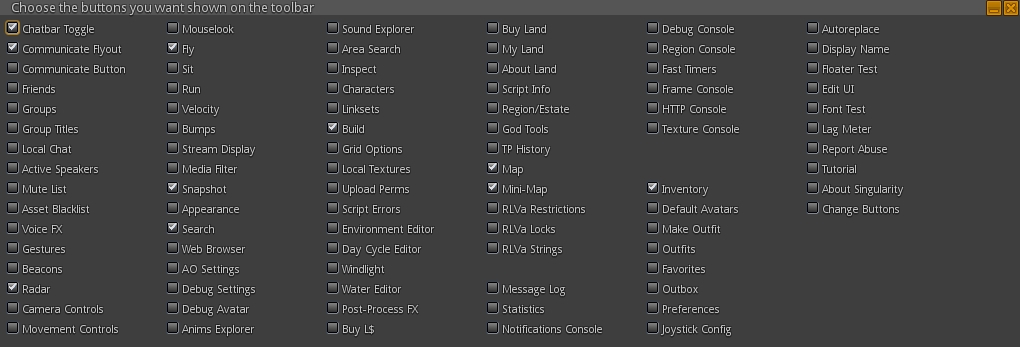
This release of Singularity brings with it the ability to add / remove buttons from the viewer’s toolbar, a-la 3.x viewers. Obviously, buttons are restricted to the bottom of the viewer, but this is liable to be of interest to users as it allows some degree of customisation in the UI. 80+ button options are offered, providing a comprehensive range of options and possible button combinations to suit your needs.
Singularity’s impressive range of toolbar buttons
Adding / removing buttons is a simple matter of opening the button chooser (View > Change Toolbar Buttons) and then checking those buttons to be displayed and unchecked those which are not wanted. The range of available buttons is impressive, and includes just about everything you’d ever likely want to see as a button. However, given the nature of the toolbar area itself, things can get a little crowded if you go nuts opening a tonne of buttons!
Preferences Updates
There have been a number of Preferences panel and tabs updates with this release, including:
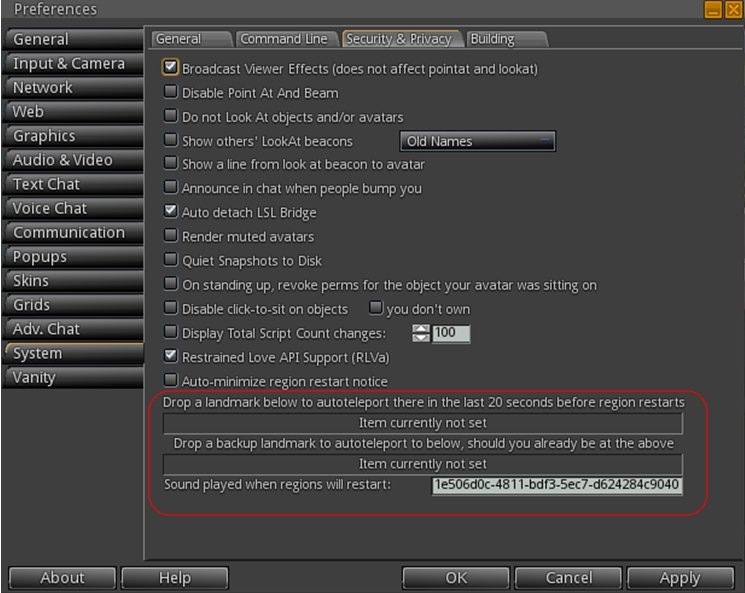
System > Security is now System > Security & Privacy, and includes the additional options:
Emergency Teleport (see below
An option to Render Muted Avatars
Announce in chat when people bump you
Lines from avatar to their Look At beacons
Customizable name display for Look At beacons
Input & Camera
Azerty keyboard support
Realistic Mouselook
Adv. Chat -> Chat UI
Format for names in lists
Autoscroll for automatic scroll to the bottom of chat when it gains focus
The default permissions floater has been overhauled, it now matches the one found in the official viewer, with permissions for each individual type of item are offered
Emergency Teleport
Even been logged-out of SL during a rolling restart due to being AFK, or been caught by a restart when you’ve missed the warnings? Well, neither need ever be a bother to you again with Singularity.
Version 1.8.6 see the arrival of the Emergency Teleport feature. Preferences > System > Security and Privacy includes two slots into which landmarks can be dropped. Should you be caught AFK during a region restart, Singularity will attempt to auto-teleport you to the first landmark in the final 20 seconds before the restart occurs. If that destination is unavailable, the second LM will be used in a further attempt to teleport you.
The Emergency Teleport LM slots
In addition, Singularity also includes the STORM-1980 screen shake and restart warnings, and there is an option to automatically minimise the latter in Preferences > System > Security and Privacy, which can be found directly above the Emergency Teleport LM slots.
Mini-Map Enhancements
Singularity 1.8.6 offers a range of mini-map enhancements, including:
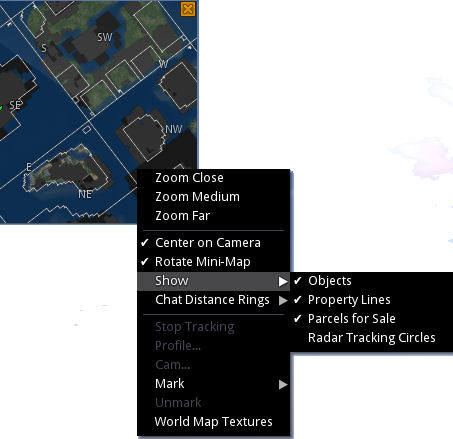
Show parcel boundaries and parcels for sale: mini-map menu: > Show > Property Lines / & Mini-map menu: > Show > Property Lines
The Mini-map parcel options and other menu options
Option to use world map textures: Mini-map menu > World Map Textures
Scroll zoom is now based on where your mouse is, if centering on camera is off
Option to show tracking circles around people selected on the radar while the radar is visible: Mini-map menu: Show > Radar Tracking Circles
Marking on the mini-map changes custom colouring of avatar tags (on a per session basis)
Implementation of the Exodus multiple selection tool:
On mouse-over, a circle is shown beneath your cursor, this is the effective range of right clicking to mark
Change the range by holding Shift while scrolling
Other menu functions invoked on right-click still only work on the closest dot to your mouse
Prim torture limits are now standardised in line with other viewers.
Build Updates
Version 1.8.6 brings with it a number of building updates, including:
Avoid problems when meshes with invalid joint names are encountered
Prim Alignment Tool updated
Object Import/Export enhancements, including improvements from Cool VL Viewer – support for Materials (specular and normal maps), Object Physics and Light Image.
Note that the majority of information in this article was gathered at the Server Beta User Group meeting on Thursday September 4th, the transcript for which is available here.
Server Deployments, Week 36 – Recap
On Wednesday September 3rd, the Main channel received the server maintenance project previously deployed to the three RC channels. This comprises crash mode fixes and fixes for the following:
SVC-2262 – “Incorrect height value in postcard which sent from above 256m” (a postcard being a snapshot sent to e-mail)
BUG-6466 – “Numbers expressed in scientific notation and include a plus sign in the exponent are not parsed as JSON numbers by LSL”, which was thought to have been fixed a while ago, but which in fact resulted in BUG-6657 – “Valid JSON numbers like 0e0 no longer valid after 14.06.26.291532″, prompting the original fix to be rolled back.
There were no planned deployments to the RC channels for week 36.
Week 37 Releases
There will be a Release Candidate channels deployment in week 37 (week commencing Monday September 8th), which will comprise crash fixes and bug fixes. Interestingly, one of the fixes will be to prevent Linden personnel from getting stuck in the new Skill Gaming regions – which Maestro jokingly describes as, “once that fix is out, I’ll no longer have an excuse to play cards all day 🙂 .”
CDN Work
Map Tiles
April Linden has been doing further refinements to the use of the CDN environment for map texture fetching on Aditi (see my notes from week 35). This work is liable to be moving to a main grid RC in the near future, and is being viewed as a “good dry run for using the CDN for texture and mesh fetching in the future”, according to Maestro.
Viewer Mesh Request Throttling
“During mesh fetch testing with the CDN, we realized that we were throttled by a viewer’s internal throttle,” Maestro said of the ongoing texture and mesh CDN testing currently underway on Aditi (again, please refer to my week 35 and week 33 reports). He went on:
The viewer ‘only’ requests 100 meshes/second because the simulator has a similar throttle for answering those requests, but with the CDN, the simulator’s throttle is irrelevant. Monty did a special build of his viewer (I’m not sure if the change was permanent) which removed the throttle, and I benchmarked an average of ~365 meshes/second on the CDN region with it. Which, in my mind, is approaching “fast enough” 🙂 .
This probably means that when the CDN work is completed (which will include viewer-side changes at some point), the viewer’s throttle will likely remain, but will be set higher and perhaps with a debug setting. “Because,” as Maestro said, “if mesh loading got way too fast, eventually you might have viewer performance issues from the insane download speed.”
Yuzuru Jewell (of Kane projects fame), has been carrying out tests from Japan, which saw his mesh load speed double via the CDN when using an unmodified viewer.
Other Items
HUD Detaching / Reattaching Following Teleport
This was first commented on in my week 32 meeting update, and referred to again in week 33 (both alongside BUG-6908). Commenting on the state-of-play with investigations into the issue, Maestro indicated that there is some thinking that it may have the same cause as BUG-7131 (Unexpected behaviour of on_rez event and llDetachFromAvatar() ), which is being looked into, although there is no news on a fix as yet.
Materials Rendering via Basic Shaders and Improving Projectors
In week 34, I carried news about Geenz Spad’s proposal for introducing materials rendering into basic shaders (i.e. so users would not necessarily need to have Advanced Lighting Model enabled in order to see materials), and to improve the functionality of projectors in Second Life.
The JIRA submitted for this work were respectively:
STORM-2077 – Add support for materials in basic shaders
STORM-2056 – Projector reflections do not respect the environment intensity parameter
The news on adding materials to basic shaders isn’t currently encouraging. The most recent comment from Marissa Linden (August 20th) states, “Moved to STORM. However our internal engineers do not believe that this can safely be implemented.”
Geenz’s work on projectors an glossiness: top: as test items currently appear in Firestorm. Bottom: as they appear in the test viewer
News is a little more positive with the projector work, with a test viewer having been built, offering those who are interested with an opportunity to play with the updated projector capabilities. There is also a test area on Hippo Hollow.
Strachan Ofarrel, known in the physical world as Dave Rowe, continues to enhance the alpha version of his CtrlAltStudio viewer for the Oculus Rift DK2 headset and windows.
Dave has been working steadily on adding DK2 capabilities to CtrlAltStudio for a while now, and this marks the third update to the DK2 Alpha version – officially called 1.2.2.41206 Alpha 3.
The Alpha 1 release, made on August 19th, added preliminary support for the DK2, then Alpha 2, released on August 25th, added positional head tracking. The Alpha 3 release adds initial viewer UI support, as Dave explains in his blog post announcing the release:
This alpha release of the CtrlAltStudio Viewer adds basic UI to the Rift DK2 display. This includes dialogs, avatar toasts, and floating text (i.e., the same UI as displayed with the DK1 in the 1.2.1 Release).
Other changes this release:
Added fade-to-black around the barrel distorted image edges.
Stopped showing the health & safety warning the second and subsequent times into Riftlook view.
Fixed barrel distorted images being displayed lower on the screen than they should be.
Fixed “landing” in the air when flying in Riftlook with an Xbox 360 Controller.
The blog post also contains a reminder that the Alpha version(s) is / are still preliminary, with Dave noting, “it does not work with direct mode and Advanced Lighting Model needs to be turned on. It is built using the 0.4.1 Rift SDK and should work OK with the 0.4.2 Rift SDK.”
Usage is the same as the previous alpha releases. With the DK2 configured in extended mode: use the Windows key + RIGHT CURSOR to move your viewer window onto the Rift’s display, then CTRL+ALT+3 to make the window full screen and switch into Rift view.
As with the previous ALpha releases with DK2 support, this version will install into its own directory, allowing it to be used alongside the release version (although it will obviously over-write Alpha 1 or ALpha 2, if installed).
Further information on the release can be found in the release notes.
As always, please refer to the server deployment thread for the latest information and updates.
On Wednesday September 3rd, the Main channel should receive the server maintenance project previously deployed to the three RC channels. This comprises crash mode fixes and fixes for the following:
SVC-2262 – “Incorrect height value in postcard which sent from above 256m” (a postcard being a snapshot sent to e-mail)
BUG-6466 – “Numbers expressed in scientific notation and include a plus sign in the exponent are not parsed as JSON numbers by LSL”, which was thought to have been fixed a while ago, but which in fact resulted in BUG-6657 – “Valid JSON numbers like 0e0 no longer valid after 14.06.26.291532″, prompting the original fix to be rolled back.
Note that due to the Labor Day holiday in the US, this deployment is taking place a day later than usual.
There are no planned deployments to the RC channels for week 36.
SL Viewer
There have been no changes to any of the SL viewers in the release and project channels since my last SL projects update. They remain as per the SL viewer section of my Current Viewer Releases page.
September 3rd we turn four! Hard to believe but it has already been 4 years since we started developing viewers! First the popular Phoenix viewer and now of course the crazy popular Firestorm Viewer. Firestorm is by far the most popular viewer used in Second Life and we have you to thank for that! After all… we couldn’t have done it without your support and encouragement! So as a show of our appreciation and with what is becoming a bit of a tradition for us… we have partnered with a couple of content creators to bring you some really cool free gifts AND organized a Rockin anniversary party with Rockin entertainment!
Things will kick-off at 13:00 SLT on Wednesday September 3rd, at the Phoenix-Firestorm support Island, where Mankind Trace (aka Seth Regan in the physical world) will be starting things with a live performance, and he’ll be followed by Firestorm’s Ed Merryman, who will be spinning the discs until the last avatar drops (which in 2013 added up to a 18+ hour party!).
Do keep in mind that the region’s capacity is liable to be limited, but people will be coming and going – so if you don’t get in the first time – try later!
To further mark the event, two special gifts will be on offer. The first of this is another Firestorm cat from KittyKats. This one is called FireBall, and like the 2013 kitty, is fully interactive – it can wander, follow and even be held – and comes complete with a party hat, engraved collar and a cute matching bed!
The Firestorm 4th anniversary KittyKat and custom bike from Desert Morning Motors
Also on offer for a limited time is a Firestorm themed Cafe style easy rider bike, donated by Desert Morning Motors. Inspired by the Classic American Motorcycles of the late 1930′s to the late 1960′s, and capture the spirit of the American chopper bikes. So get ready to be a Firestorm Easy Rider!
Locations for obtaining both of these limited-time gifts will be announced through the Firestorm blog on Wednesday September 3rd, and will doubtless be available at the party!
Which just leaves me to pass on congratulations and best wishes to Jessica, Ed, and the team on reaching their 4th anniversary!
 Following the release of Singularity 1.8.6 on Thursday September 4th, Replex, the viewer led by Latif Khalifa and based on Singularity, updated on Saturday September 6th to version 1.0.0.6229, the first full release of the viewer.