On Tuesday October 7th, the Main (SLS) channel was updated with the server maintenance package deployed to the three primary RC channels in week 40, which fixes a bug related to viewing parcel details in gaming regions
There are no planned deployments / restarts scheduled for the three primary RC channels of BlueSteel, Magum and LeTigre
On Wednesday October 8th, the Snack RC, which is currently being used with the CDN project, should receive the same server maintenance package deployed the Main (SLS) channel.
SL Viewer
On Monday October 6th, the new log-in screen viewer was promoted to the de facto release viewer, version 3.7.17.294959. This viewer offers a revised log-in / splash screen for both new and returning users, based on feedback gathered during A/B testing (release notes).
CDN Update
There is still no list of all the regions now running on the Snack RC and using the CDN for mesh and texture data retrieval, although Bay City – Sconset is one to add to any unofficial lists out there. It also appears that a number of Blake Sea regions may have been added to Snack, and are being blamed for region crossing issues.
The CDN service itself shouldn’t result in any worsening of region crossing issues, but Simon indicated that in moving regions onto the Snack Rc, the Lab, “inadvertently overloaded the servers on the Snack channel…. In this case, we picked a bunch of popular areas and put them all on the same machine, which was bad” (this overloading also might be related to BUG-7444 – note the comment from Maestro Linden). “We did get some very good info on how things get overloaded, however,” Simon added. “…And possible future work to keep us busy.”
In the meantime, it is still not clear when a wider deployment of CDN support might take place. However, there do not appear to be any major blockers to a possible wider deployment to one (or more) of the primary RCs. It will be interesting to see if anything is announced for week 42 (week commencing Monday October 13th).
Updates for the week ending: Sunday October 5th, 2014
This summary is published every Monday and is a list of SL viewer / client releases (official and TPV) made during the previous week. When reading it, please note:
It is based on my Current Viewer Releases Page, a list of all Second Life viewers and clients that are in popular use (and of which I am aware), and which are recognised as adhering to the TPV Policy. This page includes comprehensive links to download pages, blog notes, release notes, etc., as well as links to any / all reviews of specific viewers / clients made within this blog
By its nature, this summary presented here will always be in arrears, please refer to the Current Viewer Release Page for more up-to-date information
New Log-in Screen RC viewer updated to 3.7.17.294959 on October 3rd – simple and clean login screen for new users, and a corresponding update for returning users. (download and release notes)
Maintenance RC viewer version 3.7.17.294943 released on October 2 – a large number of maintenance fixes covering inventory, voice, privacy, rendering, sounds, texture animation and more (download and release notes)
Black Dragon updated to version 2.40.1 Beta on October 2nd – core updates: fixes, revisions, and tweaks resulting from initial 2.4 feedback, including revised world map (change log)
V1-style
Cool Viewer Stable Branch updated to version 1.26.12.19 and Cool Viewer Legacy Branch updated to version 1.26.8.77, both on October 4th – core updates: please refer to the release notes.
On Tuesday September 30th, the Main (SLS) channel received the server maintenance package previously deployed to the three primary RC channels (BlueSteel, Magnum and LeTigre), and which focuses on the Experience Tools project
On Wednesday October 1st, the three primary RC channels all received the same new server maintenance package which fixes a bug related to viewing parcel details in gaming regions.
The RC update was to fix BUG-7329 “RemoteParcelRequest cap returned by a skill gaming region does not exist (returns HTTP error code 404)”. In the official viewer, this capability is mainly used to show parcel script info, but some TPVs use it to show the parcel_id of parcels as well.
SL Viewer
The new log-in screen RC viewer was updated to version 3.7.17.294762 on September 29th, although it didn’t appear on the Alternate Viewers wiki page until either September 30th or October 1st.
A new Maintenance RC entered the viewer release channel on Thursday October 2nd. Version 3.7.17.294943 contains around 40 updates focused on voice, privacy, rendering, texture animation, avatar distortion, inventory management, sounds, and mouselook in Mac, together with a scripting crash fix and multiple UI fixes in script editor, Pay flow, chat, stats floater, edit menu etc. See the release notes (linked-to above) for details.
CDN News
Speaking at the Server Beta Meeting on Thursday October 2nd, Maestro Linden confirmed that there are now 28 regions using the CDN service for texture and mesh asset data. A full list of regions is still not available, but among the new additions are Morris, Dore, Ahern, and Bonifacio.
These regions are all running on the Snack RC. There is unlike to be any wider deployment to a larger RC in week 41 (commencing Monday October 6th), as the Lab is still fine-tuning their gathering data. However, there are still a few slots left on Snack for those wishing to have their regions added to it. Requests should be sent to cdn-test@lindenlab.com. Note that regions should be those with a relatively high texture / mesh count,
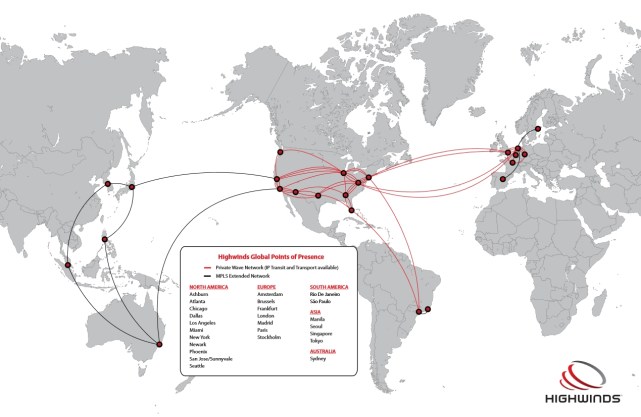
The CDN service being used by the Lab is operated by Highwinds Network Group, which the Lab has also been using in support of server-side appearance.
Highwinds supply their CDN service to a broad range of businesses, including a number of games companies such as Valve (Steam), Funcom, Meteor Entertainment, GameFly and Virgin Gaming. They operate 25 centres around the world, with 11 in North America, seven in Europe, 4 in Asia, one in Australia and two in South America, over their own network infrastructure, which they call “RollingThunder”, which peers with more than 1,600 provider networks worldwide and over 14,000 ASNs, and uses the anycast network addressing and routing methodology.
Highwinds data centres – click for full size, or see additional information via Highwinds here (image courtesy of Highwinds)
Group Chat
As I’ve previously reported, one of the biggest issues of chat delays in group chat sessions is to do with the numbers of updates the chat server has to send as people join / leave session and log-in / out of SL (which causes an update to their status in the group member’s list).
Some work has already been carried out in ways to reduce the volume of update messages being sent with the aim of lessening the impact they have on the flow of actually text messages, and Simon Linden is attempting to further refine this work, again with the agin of reducing the volume of update messages and their impact on group chat test messages.
The Server Beta User Group meeting on October 2nd saw a further test of his work in order for him to gather data on the effectiveness of these changes, and feedback on his findings will likely be given at one of the user group meetings next week.
On Tuesday September 30th, the Main (SLS) channel received the server maintenance package previously deployed to the three primary RC channels (BlueSteel, Magnum and LeTigre). This updated focuses on the Experience Tools project and includes the following updates:
llUpdateKeyValue() now correctly creates a key if it did not previously exist
Objects using experience permissions and llAttachToAvatar() are no longer automatically detached when leaving an area where the Experience is allowed.
On Wednesday October 1st, the three primary RC channels should all receive the same new server maintenance package which fixes a bug related to viewing parcel details in gaming regions.
SL Viewer
The SL viewer list remains as per my Current Releases page, namely:
Release viewer: version 3.7.16.294015 (formerly the Maintenance RC, promoted on September 22nd – release notes
RC viewerS:
Log-in release candidate viewer 3.7.17.294762 (September 25th), with the updated viewer log-in splash screens – download and release notes
Project viewers:
Benchmark project viewer version 3.7.17.294710 (September 10th) featuring the removal of the GPU table – download and release notes
Experience Keys project viewer version 3.7.16.293901(September 10th) – managing Experiences and for contributing content for Experiences – download and release notes
Oculus Rift project viewer version 3.7.12.292141 (July 22nd) support for Oculus Rift – download.
CDN Work
As noted in a separate report, the Lab has issued an update on various projects, including viewer changes and the CDN. At the Open-source User Group meeting on Monday September 29th,, it was intimated that Highwinds Network Group are the CDN operator, who supply CDN services to the likes of Valve (Steam), Funcom, Meteor Entertainment, GameFly, and others.
At present, there are 10 regions known to be using the CDN service, although additional regions may have been added to the Snack channel on Monday September 29th – we just don’t have an updated list of regions available.
Updated, Thursday October 2nd, 2014: Niran released Black Dragon 2.4.0.1, a “feedback update” containing a number of additions and revisions based on feedback received for the initial 2.4 release. These includes a revision to the world map, see the end of this review for details, and the Black Dragon 2.4.0.1 blog post for a complete list of revisions.
NiranV Dean released the latest version of his Black Dragon viewer on Sunday September 28th. Version 2.4 Beta, which is supplied in two flavours, a “normal” version, which comprises Niran’s additions and modifications to the viewer merged up to the Lab’s 3.7.15 code base (and is thus also referred to as version 3.7.15.33763) and a “current” version, which also has Niran’s updates and additions, but merged with the Lab’s 3.7.17 code (and is thus also referred to as 3.7.17.34052).
As well as emphasising this is a beta, with work still to come, Niran notes that the 3.7.17 version has not been thoroughly tested, and as such, may be subject to issues which might not be found in the 3.7.15 version. Keeping this in mind, for the purposes of this look at Black Dragon 2.4, I opted to go with the 3.7.17 version.
Note that this isn’t intended as an in-depth review of the viewer, but rather an overview of some of the more significant updates, together with some initial feedback.
Log-in / Splash Screen
This release of the viewer does away with the YouTube video which has been a feature of many of Niran’s viewer releases, and the log-in credentials area of the screen has been updated. Gone are the bold links to the right of the log-in area, replaced by a set of smart-looking buttons directly above the log-in credentials fields, with the Quit button ranged to the right and a link to the Black Dragon change logs to the left. A large, friendly CONNECT button has also been added below the credentials fields.
The old log-in credentials area for Black Dragon (top) and the cleaner, smarter new version (bottom) – click for full size
UI and Toolbar Buttons
The 2.3 release of Black Dragon, as noted in my last look at the viewer, saw some changes to the UI and to the toolbars, The “ink blots” effect within the UI are still there, but are more subtle in nature that the last release, although they have now found their way onto the various panel floaters as well, giving them a ragged look I personally found distracting; I found my eyes being drawn to the edges of any floater I opened, particularly if opened against a much lighter in-world background, rather than focusing on the options within it.
In my last overview of Black Dragon, I pointed to the new toolbar button placement area Niran had implemented, up in the top left corner of the viewer window, where one would normally expect to see the menu bar options. Buttons displayed in this area default to Niran’s “Tiny” size, and while it was a good use of available space, it could quickly become overrun if button labels are used rather than icons, or someone went daft placing buttons there, leading to the buttons wrapping themselves over two or more rows. More particularly, displaying the Navigation Bar / Favourites would result in the Navigation Bar clashing with any buttons placed there.
Niran has solved this latter problem in version 2.4 Beta by providing a new toolbar button. This is displayed by default when clean installing Black Dragon (or can be selected from the Toolbar Button floater). When clicked, it “opens” the Navigation Bar and Favourites, hiding the top button area (and also the Dragon menu, it must be said). The Navigation Bar has a corresponding button on the right-hand end which will hide them again.
The new toolbar buttons in Black Dragon 2.4 Beta
Two other new toolbar buttons with this release are the Teleport History buttons, which allow you to teleport back to the last location visited, or on to the next location (if any) in your teleport history. Again, these buttons are displayed by default during a clean install, or can be selected from the Toolbar Buttons floater.
Preferences and Panel Updates
The Preferences panel witnesses improvements in layout, with a number of outdated options (such as Niran’s own Navigation Bar buttons for editing the sky, etc.) removed, and a general improvement on font and colour contrasts against the darker background of the viewer’s UI which does much to assist readability. Those perhaps small, these updates do much to make scanning through the Preferences options a lot easier on the eye.
Specific improvements to Preferences see the following panels overhauled: General, Display, Sound and Media, Chat, Camera, Interface and Viewer. Some of these see layout overhauls, some include new options or updated capabilities – please refer to the change log for specifics.
Alongside the Preferences panel, a number of other panels have also been overhauled, including the: People floater (incl. the Group tab), appearance panel, Outfit selection panel, Picks, and Destinations floater. Please refer to the change log for a full list of updates and changes.
World Map
Please refer to the end of this article for notes on the black Dragon 2.4.0.1 update, which revised the world map to address some of the comments mentioned below.
The World Map gets a further update with the 2.4 Beta, which sees the layout once again resemble the World Map found in other viewers – albeit with the legend moved to the left side of the map this time, rather than along the top, where they are joined with the coordinates display and the option buttons. The search options remain to the right of the map, and slide into view when an additional Show Search button to the left of the map is clicked.
The revised Wolrd Map showing the legend and options moved to the left of the map, and the open search options to the right (displayed by clicking on the button)
Personally, the World Map legend in something I tend to set & forget. It’s the search options I use a lot more frequently, together with the coordinate fields and Copy SLurl options. I think I’m likely not alone in this, so if the World Map is to be revised, I’m surprised that no-one has made the legend the section hidden by default (if, indeed, anything really needs to be hidden) and left the more frequently used search options available for use, be they to the left, right, top or bottom of the map itself. It may not result in so much of a saving in screen (or map display) real estate, but I’d take convenience of use over having to click buttons to reveal slide-out options.
Updates for the week ending: Sunday September 28th, 2014
This summary is published every Monday and is a list of SL viewer / client releases (official and TPV) made during the previous week. When reading it, please note:
It is based on my Current Viewer Releases Page, a list of all Second Life viewers and clients that are in popular use (and of which I am aware), and which are recognised as adhering to the TPV Policy. This page includes comprehensive links to download pages, blog notes, release notes, etc., as well as links to any / all reviews of specific viewers / clients made within this blog
By its nature, this summary presented here will always be in arrears, please refer to the Current Viewer Release Page for more up-to-date information
Official LL Viewers
Current Release version updated to version 3.7.16.294015 on September 22nd (formerly the Maintenance RC viewer core updates: fixes for inventory and outfit management; appearance editing; group & group ban management; camera controls; multi-grid support for favourites; notifications management; stability, bug and crash fixes) (download page, release notes)
Benchmark project viewer version 3.7.17.294710 released on September 25 – core updates: removes reliance on the GPU table for determining the viewer’s initial graphics settings (download and release notes)