There was no Main (SLS) channel deployment on Tuesday, July 14th.
On Wednesday, July 15th all three RC channels received the same server maintenance package, comprising internal simulator fixes.
SL Viewer
Following the promotion of the attachment fixes viewer to release status, all three remain active release candidate viewer in the release channel were updated as follows:
The Viewer-Managed Marketplace RC viewer updated to version 3.8.2.303583 on Thursday, July 16th
The Maintenance RC viewer updated to version 3.8.2.303563 on Friday, July 17th
The Mesh importer RC viewer updates to version 3.8.2.303565, also on Friday, July 17th.
Viewer-Managed Marketplace
On Thursday, July 16th, the Lab announced that VMM is now “released” (even through the viewer is currently still at RC status), and that automated migration of those Marketplace stores which have not already converted to VMM will commence at 21:00 SLT on Thursday, July 23rd, and will continue at the same time on weekdays for a 12-hour period (21:00 – 09:00) until complete.
That the announcement has been made prior to the viewer being promoted, and that it was made apparently without any notification to TPVs (who had been trying to work closely with the Lab in getting people ready for VMM) has caused no small amount of upset on the Commerce forum thread opened when the announcement was made, some of which is understandable, particularly given the way TPVs have tried to work with the Lab in support of VMM, and this announcement have left those still in the process of trying integrate the code into their viewers with little time to actually do so and support their users with a VMM-enabled version of their viewer.
Experience Tools
In my week #28 report, I referred to a comment made by Simon Linden relating to Experience Keys / Tools concerning some work he’s been carrying out on the KVP database:
I’ve been working on updating the KVP code that runs on our server and had the most frustrating time integrating the newest version into our code … The code we have is dated and we should have better performance and stability with their latest.
The use of “their” and “our” code led to some questions at the meeting (unanswered at the time) as to what it might indicate. During the Server Beta User Group (SBUG) meeting on Thursday, July 16th, some clarification was given.
The “their” referred to by Simon is MongoDB, which is the database being used to manage the KVP store and key value pairs. The version the Lab had been / is using can only apparently search around 1,000 values per minute. The new version that Simon has been working on should apparently improve on this, hence his reference to performance and stability improvements (not to mention scalability).
On Friday, July 17th, Jessica Lyon of the Firestorm team issued a blog post updating users on the progress of the upcoming release, together with an appeal for assistance.
The last release of Firestorm – which I overviewed here – was officially referred to as a “beta” release, as it was rolled out at a time when further updates were expected from the Lab which would prompt a further Firestorm release, possibly in short order. In particular, Firestorm were waiting for the following “big three” from the Lab to reach release status with the Lab:
Experience tools, (which were promoted to release status by the Lab at the end of June)
The Project Big Bird fixes for viewer-side attachment issues (promoted to the official release viewer on Tuesday, July 14th)
Viewer-Managed Marketplace (which the Lab have just announced as “released”, ahead of the start of the automated migration process for Merchants, despite the viewer code still being at RC status at the time of writing).
While the Firestorm post doesn’t commit to a date when the new release might appear, but does make it clear that the release is coming soon. Also, as well as these particular updates, the blog post indicates it will include additional fixes and updates from the Firestorm team and contributors – including updates from Kitty Barnett for RLVa (one of the most frequently requested updates), and other goodies beside – such as updates to the Unified Snapshot floater.
For those not overly keen on the preview pane in the Unified Snapshot Floater (above left), the next release of Firestorm should see the return of the “old” snapshot preview (above right), with the option to freely switch between the two via the arrow button
As well as hinting at what is to come, the Firestorm post also includes an appeal for help, as Jessica explains:
There was a time when Linden Lab had the interface translated in multiple languages, and we did, too, since we are based on the Linden code. However, as time passed, new additions to the interface were added, and the translation of these interface elements fell behind. Today most translated language interfaces actually contain more English than the chosen language, and it is becoming more and more difficult to merge these half-translated UI elements with upstream code.
Because of this, the team have decided to discontinue and remove translations which might be regarded as “incomplete” and for which they do not have the internal expertise to correctly maintain. These comprise: Chinese, Danish, French, Portuguese, Spanish, and Turkish.
However, the team is will re-introduce any of these languages if there are people willing to commit to providing UI translations for them, and maintaining the translations long-term. As such, the Firestorm team is looking to hear from volunteers willing to do so. However, as Jessica notes:
UI translation involves more work than merely providing the terms for the correct language. Volunteers must be comfortable with editing and properly formatting xml files or should be able to learn how to do so.
If you have the necessary language and technical expertise, and are confident you can provide the required commitment to update and maintain a viewer translation for one of the languages listed above, please read the Translating Firestorm wiki page for further information, and then express your interest directly to the Firestorm team via e-mail to admin@phoenixviewer.com.
There was no Main (SLS) channel deployment on Tuesday, July 14th.
On Wednesday, July 15th all three RC channels should receive the same server maintenance package, comprising internal simulator fixes.
There were some issues with poor region performance following the week #28 Main channel deployment (see BUG-9647), but the majority of these appear to have been corrected with a region restart.
SL Viewer
On Tuesday, July 14th, the attachment fixes viewer (project Big Bird) was promoted to the de facto release viewer. Version 3.8.1.303130 has fixes for some attachment-related issues, particularly when multiple attachments are added or removed at the same time. Allegedly, no birds were harmed during the making of this viewer, although a parrot may have bitten an engineer’s finger…
Region Performance
Simon Linden: considering matters of region performance
While things may appear to be quiet in terms of new deployments, etc., the Lab are working on Second Life in a number of areas. One of these is in finding ways to improve region performance – such as through finding the means for a region to support more avatars, something Simon Linden was recently looking into.
During the Simulator user group meeting on July 14th, Simon indicated he was also looking at the abilities provided to region owners which might allow them to better specify what can and cannot be done within their regions in turns of things like object rezzing. in order to improve people’s experiences. “I’m looking at the balances we keep on regions between being permissive and locked down, and how that relates to the land usage,” he said during the meeting, before continuing:
So combat regions want fast and free rezzing, but that’s not appropriate for a music venue … venues don’t want free rezzing of objects, so someone can’t drop their griefer bombs. The big fuzzy goal is to make SL better. More specifically, it’s to make different types of regions run better. For example, there’s a bug now where rezzing can get backed up and delayed. This is really bad for combat rezzing arrows or whatever projectile. Part of the reason that happens is throttles and limits on rezzing … So maybe we should be able to set up combat region settings tweaked for that kind of performance, and an event venue might be tweaked to handle crowds best, and really lock down free rezzing and object entry.
This sparked a discussion on a range of performance issues and cases, including issues such as BUG-8974 and BUG-8946, as well as matters such as the inefficiencies evident in the asset handling system in general (this has also come into sharper focus with the arrival of Experiences, where KVP operations are handled by the same thread as asset handling), and the issues of agent script usage (script management doesn’t balance out and prevent someone from using far more than their share of script time). Ironically, during the meeting, a demonstration of this problem was given with the arrival of a griefer loaded with >9999 scripts – with the result that the region crashed.
Simon emphasised the discussion was just that – a discussion intended to explore ideas and options, rather than any firm commitment on his or the Lab’s part to make changes. With this in mind, some of the suggestions put forward were:
Land owner resource control for both rezzing and scripts for all region types (see BUG-3854)
An option to block rezzing an object over a certain draw weight to help stop people being able to rez graphics crashers
Possibly altering settings on mainland so that when purchased, it is not completely permissive and the new owner failing to understand what that can mean
A re-submission of BUG-2467 as a feature request, amended to “visible attachments”, so the Lab might re-evaluate the idea
One of the problems here is that there are a lot of settings which might be exposed in order to help land holders better protect / optimise their land, such that it could become a complex issue in user understanding if too many controls are made available. However, it will be interesting to see what might transpire in the future as the Lab continued to consider options.
Other Items
Receipt of illegitimate L$ and Account Locking
An old issue of individual harassment has started to re-surface in Second Life of late, which can lead to people’s accounts being locked. With it, someone pays another avatar in-world using fraudulently created Linden Dollars. This results in an automatic account lock being applied, and the recipient, even though they are an innocent party, finds they are unable to use the account while investigations proceed.
The problem here is that there is currently no way to prevent the receipt of any L$ payment; not even blocking an avatar can prevent them from making a payment to you.
As a result of the recent increase in this problem occurring (there have been numerous reports to the Lab’s support team on the matter), a request has been made for the Lab to consider adding an “accept” button for all incoming payments. This would allow people to review all such unsolicited incoming payments ahead of accepting them, allowing them to judge whether the payment is valid or not.
Updates for the week ending: Sunday, July 12th, 2015
This summary is published every Monday, and is a list of SL viewer / client releases (official and TPV) made during the previous week. When reading it, please note:
It is based on my Current Viewer Releases Page, a list of all Second Life viewers and clients that are in popular use (and of which I am aware), and which are recognised as adhering to the TPV Policy. This page includes comprehensive links to download pages, blog notes, release notes, etc., as well as links to any / all reviews of specific viewers / clients made within this blog
By its nature, this summary presented here will always be in arrears, please refer to the Current Viewer Release Page for more up-to-date information.
Official LL Viewers
Current Release version: 3.8.0.302622, June 30 – no change
Viewer-managed Marketplace RC viewer updated to version 3.8.1.303315 on July 9th – allows Merchants to manage inventory associated with Marketplace Listings from within the viewer (download and release notes)
Importer RC viewer version 3.8.1.303230 released on July 8th – provides a modified mesh uploader (download and release notes)
Maintenance RC viewer updated to version 3.8.1.303166 on July 7th – comprising some 50 updates, fixes and features (download and release notes).
Project viewers:
Notifications project viewer version 3.8.1.303211 released on July 8th – new Notifications floater separates incoming notifications into System, Transactions, Invitations, and Group. It provides a better way to view, interact with, prioritize and manage incoming notices for busy residents (download and release notes).
Black Dragon updated to version 2.4.3.6 on July 9th (Notifications update with rendering improvements – release notes) and then to 2.4.3.7 on Monday July 13th (Maintenance RC update – release notes).
V1-style
Cool VL Viewer Stable branch updated to version 1.26.14.0 on July 11th – core update: inclusion of VMM code into Stable branch (release notes); the Experimental branch temporarily removed in preparation for implementing the Lab’s CEF updates.
Mobile / Other Clients
Radegast updated to version 2.18 on July 9th – core updates: support for Group Bans and several smaller updates (download and release notes) .
The following notes are primarily taken from the TPV Developer (TPVD) meeting held on Friday, July 10th. A video of the TPVD meeting is included at the end of this report, with any time stamps in the following text referring to it. My thanks as always to North for the recording and providing it for embedding.
On Tuesday, July 7th, the Main (SLS) channel received the same server maintenance package deployed to the three RC channels in week #27
There was no RC deployments to the RC channels on Wednesday, July 8th, leaving all of the main grid on the same release.
An RC channel release planned for week #29 (commencing Monday, July 13th) will likely see some “db optimization around group stuff”.
SL Viewers
Viewer Updates
The Mesh Importer RC viewer updated to version 3.8.1.303230 on Wednesday, July 8th, with the Lab hoping this release fixes the majority of issues so far reported with that viewer.
On Thursday, July 9th, the Viewer-Managed Marketplace (VMM) RC viewer updated to version 3.8.1.303315.
Viewer Promotion Options
The above updates mean that all four RC viewers currently in the release channel (except the obsolete platforms viewer, which isn’t intended for update), are on a par with the current release version of the viewer (Experience Tools).
However, it is not currently clear which might be promoted to the de facto release version. Any decision on this will be made on the basis of crash rates and overall performance.
[04:13] That said, the VMM viewer has contained a series if XML file breakages with the translation options, and a change in the target formatting for translations also appears to have been changed in the VMM viewer. The Lab believe a fix for the XML issue is in the updated referenced above, although there appears to be some concern that problems still exist. If so, it is unlikely that this viewer will be promoted until issues have been sorted.
Notifications Project Viewer
Also on July 8th, the Lab issued the Notification project viewer, version 3.8.1.303211, which sees an overhaul of the way in which notifications – system, group, transaction, etc., are presented through the viewer. For further information on this release, please refer to my overview.
[08:10] As this is a project viewer, now is the time to test it and see if it is lacking functionality / options – the Lab will be far more willing to alter the code, should it be required, while the viewer is at a project status than they will be when it reaches RC, where the focus will be on fixing any bugs which may have slipped through.
Other Items
Changes to Linden Damage
[10:00] The Lab have again acknowledged that the recent changes to the way the official viewer handles avatar damage messaging are not ideal. In short, damage cannot be set it the parcel level only; also, the viewer does not display the health meter on damage enabled parcels, but people can be “killed” and teleported home – for a full list of issues, see BUG-9422. There may be further news on this in due course, as Grumpity Linden (recently returned from maternity leave) will be looking at the issues.
Interest List Issues
[14:00] Some people are reporting what appear to be interest list issues (e.g. items not updating correcting in your in-world view when camming around, etc.) – see the likes of BUG-7084 for further details. However,commenting on this, Oz Linden said:
If there are issues with that, we need repros, because we haven’t got them. And we also need to be able to isolate whether the problem is that the various interest list messages are not being delivered properly, or whether the problem is that the assets aren’t being fetched properly, which is independent of that [the interest list messaging].
Any issues that look as if they might be interest list related must be tested and reported using the official viewer, and not with any TPV.
Avatar Shape Issues
[25:04] There have been reports of avatar shape issues and “corruptions” (e.g. BUG-9487). The Lab have acknowledged that they may have an internal issues of a similar nature (and BUG-9487 has also been triaged), however, if the issue is different, the matter will be imported for further investigation. One problem here is defining what is meant by a “corrupted” shape. The asset itself is unlikely to be be affected, which means it could either be the local copy of the asset being somehow modified, or an incorrect pointer has somehow been created – all of which needs clears steps to repro in order to investigate and ascertain.
Attachment Issues
[20:23] As noted above, project Big Bird (version 3.8.1.303130 at the time of writing) is thought to correct the majority of viewer-side attachment issues. However, this does not mean that all such issues are fixed; some might be server-side, etc., Both BUG-7761 and BUG-6925 refer to specific issues that have been reported.
An important thing to remember here – again – is that issues like this need to be tested and reported using the relevant Linden Lab viewer, not a third-party viewer.
This is not the Lab being awkward over matters or trying to avoid issues. It is simply because if an issue can be consistently reproduced on the Lab’s viewer points to it being directly related to their code; if a TPV is used – and with respect to all TPV coders – it is not always possible to determine if a problem is a result of code the Lab have supplied, or something a TPV may have done in modifying the code / viewer to suit the needs of their users. Obviously, if it is the latter, fixing the problem is outside of the Lab’s reach.
Firestorm Update
[01:25 and 11:33] Firestorm are currently waiting on VMM and the attachments fixes (project Big Bird) to be merged into the Lab’s de facto release viewer, as these will allow them to push ahead with there own merges and testing in preparation for the next Firestorm release. However, given the Lab would prefer to promote a viewer to release status every other week (and allowing for Firestorm’s own testing), it could be around 6 weeks before Firestorm updates (although the team already have VMM, the attachment fixes and the maintenance RC updates staged ready for merging).
The release brought with it a rapid-fire implementation of the Lab’s new notifications update from LL, which comes a little ahead of the curve, given the Lab prefer their code to be integrated into TPVs once it reaches RC status, and can be regarded as somewhat more stable than might be the case with a project viewer release. However, the code is such that it is apparently easy to manage should updates be forthcoming as that project progresses.
In implementing the notifications update, Niran has made some subtle changes to the notifications floater itself, improving the overall layout, although the overall functionality is pretty much as offered through the Lab’s current project viewer. Rather than describe the functionality here, readers are invited to read my overview of the project viewer.
The other major update with this release of Black Dragon release is related to shadows and lighting, and specifically, the uncoupling of shadow rendering from draw distance.
Because shadow rendering has been bound to draw distance, shadows tend to fade away the closer they are to your draw distance limit, with the result that the further objects are away from you, the less well-defined their shadows appear / the less shadows may influence how they appear, with objects close to the edge of your draw distance sometimes appearing shadowless.
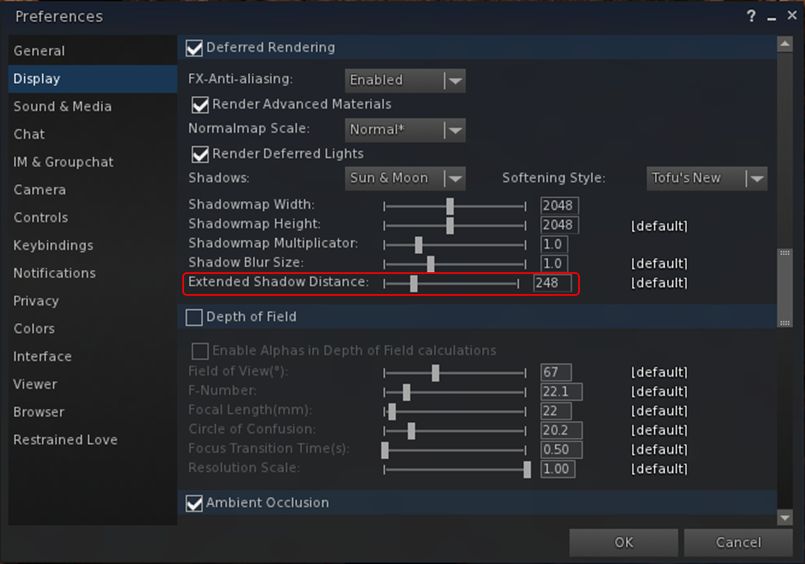
With this change, Niran has added a new slider to the Display tab of Preferences, allowing the user to independently set a “shadow rendering distance”, thus allowing a better rendering and representation of shadows independent of draw distance.
Black Dragon 2.4.3.6: the new shadow rendering distance slider in Preferences. A similar slider is also in the Machinima sidebar
The result is a much improved depth of view in-world, and greatly enhanced snapshots (see Niran’s samples accompanying the viewer’s release notes).
By-and-large, extending the shadow rendering distance shouldn’t result in any appreciable performance hit. However, there is a caveat, as Niran explains:
Increasing the shadow draw distance will reduce the overall shadow precision, because shadows are split into shadow clip planes, 4 shadow textures if you will, these shadow textures have a given resolution (which you can set in preferences), increasing the shadow rendering distance scales up all 4 planes equally, increasing the area one texture has to cover, reducing the precision in that area obviously. You could counter this by increasing the shadow resolution or multiplier, but that would impact frame rate.
A side benefit of this, as Niran notes, is that because volumetric lighting is calculated via the shadow clip planes and shadow maps, increasing the shadow rendering distance enhances the volumetric lighting effects in the viewer. Again, check the sample images Niran provides with the release notes.
Other updates in this release include:
Re-enabling of the experimental auto-hiding of the Textures, Sounds, Calling Cards, Landmarks, Notecards, Scripts, Photo Album, Animations, Gestures, Favourites and My Outfits folders in Inventory (debug: DebugHideEmptySystemFolders)
Disabling of the auto-hiding of empty folders by default
Improvements to SSAO defaults
Freeze world and mode toggling issues, as reported in STORM-2118, fixed and implemented in this Black Dragon release
Further RLVa updates.
As always, for the full range of changes / updates, please refer to the release notes.
 Matoluta Sanctuary (Flickr), March 2015 – blog post