Second Life on the go: Lumiya on Windows?!

lumiya-logoLumiya is an Android client for Second Life which is really quite remarkable. I’ve followed its development through these pages at length since it first appeared back in 2012, all the way through to the most recent 2.6 iterations; and while things have been quiet for a while, rest assured, development work is continuing, although developer Alina Lyvette has been very caught-up with physical world matters.

But did you know you can also run Lumiya on Windows*?

I suspect the responses to this question would be a combination of “No,” and “Why would I want it to?” The former is to be expected, and the latter not unreasonable; after all if you have a computer capable of running the Second Life viewer reasonably well why would you want to try anything else?

One possible “why” might be if you have a relatively low-end laptop you use when on the move, and would like to use it on occasion to access SL, but don’t want to meet the costs involved in running Bright Canopy’s (very excellent) service (which I’ve also covered in these pages), and would prefer something bigger than the average android device screen when accessing SL.

While I’ve not played at length with things, I did come across an Android emulator called Bluestacks which runs on the PC, and used to be available for Mac*. It makes running Lumiya on Windows a breeze in four easy steps:

  • Download and run the Bluestacks installer
  • Run the Bluestacks player and sync it to your Google Android account
  • Run Google Play and install Lumiya (note the app does have a one-off purchase fee if you have not previously installed it)
  • Launch Lumiya.
Running Lumiya via Bluestacks on a Windows notebook

There are a few things to note when running Lumiya in this way. Obviously, being built for Android, it is intended for touch screen use. While Bluestacks does a credible job of allowing mouse and pointer control and the use of keyboard controls such as the arrow keys and WASD, I tended to find that things did sometimes “stick”, prompting a return to the on-screen movement / camera focus keys (lower right corner of the screen).

Given Lumiya is running on a “standard” computer, it’s also easy to slip into the expectation that it will respond to things like ALT-camming when it obviously won’t – this is still an Android app running through an emulator, after all! Given this, it goes without saying that if you’re new to Lumiya, you have a lot to learn via the UI and options – feel free to use my reviews linked to above 🙂 .

Also keep in mind  that as Lumiya is an Android app, the graphics don’t have the same fidelity as the viewer, and running it through an emulator isn’t going to magically give you that kind of fidelity. If that is what you’re looking for when on the move and don’t have a good laptop, then Bright Canopy is your best option outside of a new computer / GPU.

Lum iya may not have the same graphics fidelity as a full viewer, but if your looking for something that can provide you with an in-world view while on the move with a laptop, running in on Bluestacks might be a viable option
Lumiya may not have the same graphics fidelity as a full viewer, but if you’re looking for something that can provide you with an in-world view while on the move with a low-end laptop and for whatever reason, don’t want to use Bright Canopy, running it in through the Bluestacks emulator might be a viable option

Also, as you are running through a laptop there might be a temptation to push Lumiya’s settings to the max. I’d actually suggest some caution here; your little laptop / notebook may appear to have more umph that an Android device, but you will take a performance hit in driving things too high.

Overall, I found running Lumiya on an Asus PCee 1201N to be pretty acceptable – certainly a lot less tasking than running a full-blown viewer. I wouldn’t want to do it all the time, but as an alternative and occasional means of access, it’s more than acceptable. The UI, intended for touch screens, works well with mouse and pointer, and while there were occasional niggles (sometimes I had to swap back to using the on-screen movement keys via mouse, for example), my biggest issue came down to trying to use conventional SL keyboard shortcuts simply because I was sitting in front of a keyboard!

Whether this kind of approach would appeal or not is down to the individual – but as noted above, if you are looking for the occasional access to SL from a low-end laptop / notebook whilst on the go and either don’t want to fiddle with the small screen of and android device or would prefer not to use Bright Canopy, then this might be an option for you.

Addendum, June 3rd: While Bluestacks was promoted as a “free” emulator, some 36 hours after installing it, I received a notification requiring a subscription payment of either US 2.00 per month or to install sponsoring games in order to keep using it to access Android apps.

*Note: Bluestacks used to offer an emulator for Mac systems as well. It’s no longer available through their own website, but can be obtained from this review on the TechApple website. However, as I’m not a Mac user, I have no idea how up-to-date it is compared with the latest Windows version of the emulator or whether it is a viable option.

Lumiya on Bluestacks was tested using an Asus PCee 1201N with 2 Gb RAM, Intel Atom 330 processor and Nvidia Ion 2 GPU  using shared memory. 

SL project updates 16 22/1: server, viewer

{Ville Par La Mer} / Royaume de Versailles; Inara Pey, May 2016, on Flickr {Ville Par La Mer} / Royaume de Versaillesblog post

Server Deployments

As always, for the latest information, please refer to the server deployment thread.

  • On Tuesday, May 31st, the Main (SLS) channel was updated with the same server maintenance package previously deployed to all three RC channels, which included a server crash fix.
  • On Wednesday, June 1st, all the RC channels should be updated with a new server maintenance package, comprising the addition of mnemonic names to be used in LSL scripts when attaching to the new attachment points on the Bento skeleton extensions and minor internal changes.

SL Viewer

There have been no changes to any of the viewer channels so far this week, leaving things as per the end of week #21:

  • Current Release viewer, version 4.0.5.315117 (dated May 11), promoted May 18th – formerly the Quick Graphics RC viewer download page, release notes
  • RC viewers:
    • Maintenance RC viewer, version 4.0.6.315551, dated May 23rd – a modest but useful set of 24 fixes and updates to the viewer
    • Inventory Message RC viewer, version 4.0.6.315555, dated May 23rd – removal of deprecated and unused UDP inventory messaging mechanisms from the viewer
  • Project viewers:
    • Project Bento (avatar skeleton extensions), version 5.0.0.315657, dated May 26th – this build includes the “reset Skeleton” option and additional slider updates
    • Oculus Rift project viewer, version 3.7.18.295296, dated October 13th, 2014 – Oculus Rift DK2 support
  • Obsolete platform viewer version 3.7.28.300847 dated May 8, 2015 – provided for users on Windows XP and OS X versions below 10.7.

Project Bento

As anticipated, Project Bento, the avatar skeleton enhancements project, was deployed to the main grid to mark the start of more widespread testing, on Tuesday, May 31st. You can find out more via the following posts:

Project Bento arrives on the main grid in Second Life

Project Bento, the Lab-initiated, collaborative project involving Second Life content creators to bring greater capabilities to mesh avatars and – potentially – rigged attachments – is now available on Agni, the Second Life main grid.

The news – not entirely unexpected, as the Lab has been gearing-up to make the move for the last few weeks – came via an official blog post on Tuesday, May 31st.

Project Bento has been in development for over a year, the initial phases of the work being carried out by the Lab behind closed doors, before a period of closed development involving a number of expert creators and tool makes – notably the Avastar team who produce the avatar plug-in for Blender, and Cathy Foil, who produces Mayastar, a similar plug-in for Maya. I was also invited to observe this initial work – my sincere thanks to Oz Linden for the opportunity – so that I could follow the project and report on its development, which I was able to start doing in December 2015, once the project had been publicly announced, and the project opened to greater input from content creators and animators.

Project Bento has involved staff from Linden Lab, notably Troy Linden, Oz Linden and Vir Linden, together with assistance from Alexa Linden, Simon Linden, Rider Linden, Aura Linden and others. It has also involved SL content creators including the folk from Avastar, Cathy Foil, Toady Nakamura, Siddean Munro and Flea Bussy
An early Project Bento meeting. The project has involved staff from Linden Lab, notably Troy Linden, Oz Linden and Vir Linden, together with assistance from Alexa Linden, Simon Linden, Rider Linden, Aura Linden and others. It has also involved the folk from Avastar and Mayastar as well as many content creators and animators

At that time, Bento introduced over 90 additional bones to the avatar skeleton, with no fewer that 30 being added to avatars hands to allow for finger manipulation, and another 30 to the head for facial expressions. To further support the new additions, new attachment points were added to the skeleton and – most recently of all – a good number of the bones (particularly those in the face) were hooked-up the viewer appearance sliders, allowing them to adjust elements of suitably rigged mesh heads, etc.

Net result: the ability for mesh avatars to be far more expressive and customisable than before, and much, much better support for non-human avatars. There’s also the potential for a wide range of other uses – such as Aki Shichiroji’s wyvern pictured below, or  rigged attachable pets – even the potential for gowns and other clothing to move naturally with an avatar’s movement.

Aki Shichiroji demonstrates a wearable wyvern utilising Bento bones for animation. Inset: the model under development at a Bento meeting.
Aki Shichiroji demonstrates a wearable wyvern utilising Bento bones for animation. Inset: the model under development at a Bento meeting (main image courtesy of Linden Lab)

Many of the possibilities for Bento are highlighted in a special promotional video released by the Lab and embedded at the end of this article, made with the full support for the creators who have been actively engaged in the project for the last 6-12 months.

It is important yo note that – as the official blog post states, this still a testing release of Project Bento: making it available to a wider audience than is possible when it is constrained to Aditi, and thus allowing further testing of things like overall simulator / grid performance with larger numbers of Bento avatars operating, looking out for other issues, etc., which may not have come to light during the Aditi testing, and also further refining and improving the viewer so it might progress to a release status.

Which brings up a further important point, again as the official blog post notes:

Anyone wishing to view the new content must be running the latest Bento Project Viewer.

If you encounter Bento avatars and are not using the Bento Project Viewer, you may see some strangely behaving avatar animations and meshes. If you’re using a very old (i.e. no longer supported) viewer, encountering Bento content may even cause a crash.

Some TPVs have already starting integrating the Bento code into experimental versions of their viewers. However, if you are testing Bento, working with content which leverages Bento capabilities, you are best off using the official project viewer for the purposes of bug reporting, etc.

There is also a Project Bento User Group wiki page for  those wishing to get involved in the project. However, please note that the meeting venue will likely be changing from Aditi to Agni now the project is available on the main grid.

Note, as well, that Project Bento is intended for use with mesh avatars and models – the capabilities are not intended to work with the default avatar form, as it was felt that attempting to do so risked potential content breakage and / or other issues which could impact the project.

Nevertheless, the new capabilities could herald a new era for mesh avatars within Second Life, with more realistic non-human avatars, greater dexterity with human-style avatars and even the potential for expressive, customisable mesh heads! So, welcome to the start of a new era for mesh avatars in Second Life.

Useful Links

2016 viewer release summaries: week 21

Updates for the week ending Sunday, May 29th

This summary is published every Monday, and is a list of SL viewer / client releases (official and TPV) made during the previous week. When reading it, please note:

  • It is based on my Current Viewer Releases Page, a list of all Second Life viewers and clients that are in popular use (and of which I am aware), and which are recognised as adhering to the TPV Policy. This page includes comprehensive links to download pages, blog notes, release notes, etc., as well as links to any / all reviews of specific viewers / clients made within this blog
  • By its nature, this summary presented here will always be in arrears, please refer to the Current Viewer Release Page for more up-to-date information.

Official LL Viewers

  • Current Release version: 4.0.5.315117 (dated May 11), May 18th – no change: formerly the Quick Graphics RC viewer download page, release notes
  • Release channel cohorts (See my notes on manually installing RC viewer versions if you wish to install any release candidate(s) yourself):
    • Maintenance RC viewer, version 4.0.6.315551 release on May 23 – a modest but useful set of 24 fixes and updates to the viewer (download and release notes)
    • Inventory Message RC viewer updated to version 4.0.6.315555 on May 23 – removal of deprecated and unused UDP inventory messaging mechanisms from the viewer (download and release notes)
  • Project viewers:
    • Project Bento (avatar skeleton extensions) updated to version 5.0.0.315657 on May 26 – this build includes the “reset Skeleton” option and additional slider updates  (download and release notes).

LL Viewer Resources

Third-party Viewers

V4-style

  • No updates.

V1-style

  • Cool VL viewer Stable branch updated to version 1.26.18.7 and the Experimental branch updated to version 1.26.19.9, both on May 28th (release notes).

Mobile / Other Clients

  • No updates.

Additional TPV Resources

Related Links

SL project updates 16 21/2: server, viewer, Bento

Frisland; Inara Pey, May 2016, on FlickrFrislandblog post

Server Deployments Week #21 – Recap

As always, please refer to the server deployment thread for the latest information and updates.

There was a fast-tracked security update deployed to the LeTigre RC channel on Friday, May 20th. This update was also deployed as a server maintenance package to the Main (SLS) channel on Tuesday, May 24th.

On Wednesday, May 25th, all three RC channels were updated with a server maintenance package which combines the security update plus a new crash fix.

The security patch was apparently a precautionary measure, rather than a response to an actual exploit

Week #22 Deployments

The current RC update should move to the Main grid on Tuesday, May 31st, and the RCs should all receive a new package comprising:

  • A fix for BUG-10979 [Bento] Scripted attachments attached to the new enhanced skeleton attachment points show as worn on “Invalid Attachment Point” in the script limits floater
  • More checks for per-agent script limit
  • Internal improvements.

More news on these last two to follow.

Project Bento

As noted in my Project Bento update, the plan is for the back-end of Project Bento to be enabled on the main grid during week #22, most likely on Tuesday, May 31st. This will allow content making use of the Bento extensions to the avatar skeleton to be uploaded to the main grid. However, Bento content requires viewer-side updates in order to render correctly. Currently these are restricted to the Bento Project viewer and those TPVs which have adopted the Bento code ahead of the curve.

This also doesn’t mark the end of the Bento project; at this point, enabling Bento on Agni, is to expose the capabilities to a wider audience of content creators and allow broader testing.

Bento Viewer

The Bento Project viewer updated to version 5.0.0.315657 on Thursday, May 26th. This version includes the following significant updates:

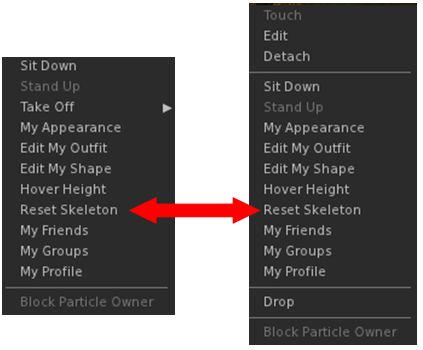
reset skeletionA “Reset Skeleton” option, intended to fix cases where an avatar is distorted in your world view as a result of incorrectly applied joint updates. For example, a non-human avatar may show as “crunched up” because it is still in a human pose. Note that this option should also work for non-Bento avatars when become deformed as a result of swapping shapes / forms / animations as well.

Right-clicking on the affected avatar (your own or another) and selecting Reset Skeleton from the avatar context menu should correct the avatar’s appearance in your view. As this is a viewer-side update, it will not affect how anyone else sees the affected avatar until they use Reset Skeleton. The Lab has requested feedback on the capability if it fails to work as intended.

The viewer also includes a few late-breaking changes to the slider support for mesh avatars, including jaw shape and head shape. Sliders that affect the scale of mPelvis now also alter mHindLimbsRoot, to better keep the front and hind legs synced up.

SL Viewer

Other than the Project Bento viewer update, the list for official viewers remains as per the first part of this report.


Project Bento User Group update 14 with audio

Project Bento – extending the SL avatar skeleton

The following notes and audio were taken from the weekly Bento User Group meeting, held on Thursday, May 26th at 13:00 SLT on Aditi. For details on each meeting and the location, please refer to the Bento User Group wiki page.

Note that this update is not intended to offer a full transcript of the meeting, nor does it present the discussion points in chronological order. Rather, it represents the core points of discussion, grouped together by subject matter were relevant / possible, whilst maintaining the overall context of the meeting.

Bento on Agni

A Bento Imp celebrates the upcoming Bento move to Agni

It had been hoped that back-end support for Bento would be enabled on Agni (the main grid) during week #21. However, things got held up while a fix was being pushed through QA (possibly the security fix which rolled to LeTigre and then to all channels this week?).

The Lab is now planning to enable Bento in week #22, most likely on Tuesday, May 31st.

A couple of points to remember with the move to Agni:

  • This isn’t in any way a “final” release of Bento, although the Skeleton and slider updates are now frozen (unless a really significant issue / bug is found. At this point, enabling Bento on Agni, which includes the ability to upload Bento items to the main grid, is to expose the capabilities to a wider audience of content creators and allow broader testing
  • Until the Bento code comes into wider circulation among TPVs, any mesh avatars, etc., rigged to the new bones will look deformed in non-Bento viewer, and may cause some viewer instability / crashes.

Details are still TBD, but one aspect of the move to Agni will be a further stress test to see how large numbers of Bento avatars impact performance, region crossings, etc. Details, including date and time will be made available in due course.

Date and Location of Next Meeting

With the deployment of Bento to the main grid, Bento User Group meetings will also swap over to Agni as well to encourage attendance. Details of where meetings will take place will be announced via the User Group wiki page and through the Bento forum thread.

With regards to the next meeting, due on Thursday, June 2nd, there is a Lab internal meeting taking place that day. It is therefore unclear if the Bento meeting will take place or will be cancelled (Vir would prefer for the latter not to happen, given the scheduled Bento deployment to the main grid). A decision on whether, when and where it will be held will again be made via the User Group wiki page, etc., once decided.

Project Viewer Update

The Bento Project viewer updated to version 5.0.0.315657 on Thursday, May 26th. This version includes the following significant updates:

reset skeletionA “Reset Skeleton” option, intended to fix cases where an avatar is distorted in your world view as a result of incorrectly applied joint updates. For example, a non-human avatar may show as “crunched up” because it is still in a human pose.

Right-clicking on the affected avatar (your own or another) and selecting Reset Skeleton from the avatar context menu should correct the avatar’s appearance in your view. As this is a viewer-side update, it will not affect how anyone else sees the affected avatar until they use Reset Skeleton. The Lab has requested feedback on the capability if it fails to work as intended.

The viewer also includes a few late-breaking changes to the slider support for mesh avatars, including jaw shape and head shape. Sliders that affect the scale of mPelvis now also alter mHindLimbsRoot, to better keep the front and hind legs synced up.

Updated Skeleton and Test Files

At the time of writing, the Bento test files have yet to be updated to reflect the most recent viewer changes. When this has happened, they will be linked via the Bento Testing page. Matrice Lavalle from Avastar and Cathy foil of MayaStar are working on getting the skeleton files updated for their respective plug-ins, and ensuring the are consistent with one another, something they hope have finished in the very near future.

Once this has been done, both Avastar and Mayastar will be updated, and will include collision volumes and some other weighting tweaks which should help improve slider behaviour when editing an avatar’s appearance.

Vir has started putting together a repository for supporting test models and animations which can be made available through the wiki Bento test page, so if there are other Bento creators / animators who have test models and files they would like to submit, he asks that they drop him a line.

There was also discussion on how to present the models to ensure those using different modelling tools (e.g 3D Max) can obtain a full set of bones with which to work.

Other Items

BVH File Interpreter

The Second Life BVH interpreter has apparently been updated so it will allow the upload of position data. However, if problems are found when doing so, the Lab requests a JIRA is filed to let them know,

Animation Exports and Mayastar / Maya

Mayastar is the skeleton plug-in Cathy Foil produces for Maya users (Avastar being the plug-in for Blender). Mayastar will current export  .BVH files with bone rotations for the entire skeleton, but translations for the mPelvis bone only. This works reasonably well with these restrictions, although it does have an issue with feet Cathy is currently looking to fix. As far as skinning, etc., is concerned, Maya works “pretty good”.

However, and in her own time, Aura Linden is working on an exporter for Maya which is intended to support export .ANIM files with both rotation and translation of all bones in the skeleton.

This should eliminate the need to sue two skeletons for Mayastar – one for rigging and one for animations. Subject to confirmation, the .BVH uploader may also have been updated to eliminate the need to use two skeletons.

Continue reading “Project Bento User Group update 14 with audio”