Project Espeon: Experience enabled sits in Second Life

Experience scripted force sits - a new project from the Lab (image courtesy of Linden Lab)
Experience scripted force sits – a new project from the Lab (image courtesy of Linden Lab)

Update: thanks to the efforts of one or more juveniles defacing the orginial, the proposal – originally referred to as a Google document in this article – has been converted to PDF format, and this article has been updated to reflect that fact, and how those with a genuine interest in the proposed capabilities can forward ideas and suggestions to the Lab.

Since the introduction of Experience Keys into Second Life to allow more convenient granting of permissions for the system to act on an avatar’s behaviour when engaged on a specific activity – such as a game or a tour – a commonly requested item has been the ability to for scripted forced sits to be made a part of the Experience process.

On Thursday, September 22nd, during the Server Beta user group meeting, Rider Linden announced he is working on just this capability – and that test regions are available on Aditi for Experience creators to test the capability as it stands.

The new LSL functions for Experience-enabled scripted forced sits form Project Espeon (after the Pokémon character). Rider has produced a proposal document on the new functionality, which can be read  in PDF format, which he introduces as follows:

With the advent of Experiences Keys we would like to be able to allow scripts being run as part of an experience to force an avatar to sit in a particular location.  This feature will be useful in an adventure game scenario where an avatar is forced to sit in a trap so that it may sync its animations with the avatar, or in an amphitheatre or classroom situation where a presenter wishes for all the other participants to remain seated.

We will add at least one new LSL script function that will force an avatar to sit on a particular prim and make adjustments to the existing llUnSit() function to perform the counter action.  

Within the document, Rider outlines the current APIs and functions related to sitting (llLinkSitTarget()llSitTarget()llSetSitText()llAvatarOnLinkSitTarget()llAvatarOnSitTarget() and llUnSit() ) which by affected by the new capability, before proposing a new series of APIs and behaviour changes to make Experience scripted sitting possible. At the time of writing this article, these new capabilities comprise:

  • llSitOnLink( )  – Function: integer llSitOnLink( key agent_id, integer link ); – mimic the behaviour of the rightclick “Sit Here” menu item.  The avatar specified by agent_id is forced to sit on the sit target of the prim indicated by the link parameter. If the specified link is already occupied the simulator will search down the chain of prims in the linkset looking for an available sit target, as per the diagram at the top of this article.
  • PRIM_ALLOW_UNSIT – to be added to llSetPrimitiveParams( ) – When set on a prim that is running a script as part of an experience an avatar that is seated on the sit target and has agreed to participate in the experience will be unable to stand, select another prim to sit on or teleport to another location in the same region (inter-regional teleports will act as normal).
  • PRIM_SCRIPTED_SITS_ONLY – to be added to llSetPrimitiveParams( ) – Agents may only be seated on this prim using llSitOnLink().  Attempts to do a manual sit will fail.  This flag applies even outside of an experience enabled region.
  • PRIM_SIT_TARGET – to be added to llSetPrimitiveParams( ) – The sit target if any defined for this prim.  If the active value is 0 the sit target is deactivated, if it is nonzero the prims sit target is set to the indicated offset and rotation. As with llLinkSitTarget(), these values relative to the prim, however unlike llLinkSitTarget() an offset of <0.0, 0.0, 0.0> may be explicitly set.

Note that the above is in summary only, please refer to the Google document for the complete specifics.

Test regions have been set-up on ADITI, the beta grid, and those interested in testing the capabilities should join the Second Life Beta group on Aditi for access. The test regions are: Leafeon or Umbreon or Sylveon, with test content is available on Leafeon. If you wish to have your own Experience added to the regions for testing, contact Rider via IM. Similarly, if you have any suggestions or ideas for improving the proposal document or the functions, should raise a JIRA.

With thanks to Whirly Fizzle.

2016 SL project updates 38 (1): server, viewer

Yasminia; Inara Pey, September 2016, on Flickr Yasminiablog post

Server Deployment: Week 38

There was no update on the Main (SLS) channel on Tuesday, September 20th. On Wednesday, September 21st, all three RC channels should receive the same new server maintenance package, containing further “minor internal changes”.

SL Server

As noted in my article at the time, on Thursday, September 15th, the Lab promoted the Visual Outfits Browser viewer to de facto release status.

Also as similarly reported here in a separate article, the  Bento viewer reached release candidate status on Wednesday, September 14th. This leaves the current list of official viewers as follows:

  • Current Release version: 4.0.8.319463, dated September 9th, promoted September 15th – formerly the Visual Outfit Browser RC viewer
  • Release channel cohorts (please see my notes on manually installing RC viewer versions if you wish to install any release candidate(s) yourself):
    • Project Bento (avatar skeleton extensions) RC version 5.0.0.319688 released on September 14th
    • VLC Media Plugin Viewer RC, version 4.1.1.319583, dated September 13th  – replaces the QuickTime media plugin in the Windows viewer with one based on LibVLC
  • Project viewers:
    • None.
  • Obsolete platform viewer, version 3.7.28.300847, dated May 8, 2015 – provided for users on Windows XP and OS X versions below 10.7.

2016 viewer release summaries: week 37

Updates for the week ending Sunday, September 18th

This summary is published every Monday, and is a list of SL viewer / client releases (official and TPV) made during the previous week. When reading it, please note:

  • It is based on my Current Viewer Releases Page, a list of all Second Life viewers and clients that are in popular use (and of which I am aware), and which are recognised as adhering to the TPV Policy. This page includes comprehensive links to download pages, blog notes, release notes, etc., as well as links to any / all reviews of specific viewers / clients made within this blog
  • By its nature, this summary presented here will always be in arrears, please refer to the Current Viewer Release Page for more up-to-date information.

Official LL Viewers

  • Current Release version: 4.0.8.319463 (dated dated September 9), promoted September 15 – formerly the Visual Outfits Browser RC viewer download page, release notes
  • Release channel cohorts (See my notes on manually installing RC viewer versions if you wish to install any release candidate(s) yourself):
    • Project Bento (avatar skeleton extensions) RC version 5.0.0.319688 released on September 14  (download and release notes)
    • VLC Media Plugin Viewer RC updated to version 4.1.1.319583 on September 13 – replaces the QuickTime media plugin for the Windows version of the viewer with one based on LibVLC (download and release notes)
  • Project viewers:
    • No updates.

LL Viewer Resources

Third-party Viewers

V4-style

V1-style

  • Cool VL viewer Stable branch updated to version 1.26.18.24 and the Experimental branch updated to version 1.26.19.26, both on September 17th (release notes)

Mobile / Other Clients

  • No updates.

Additional TPV Resources

Related Links

Project Bento User Group update 26 with audio + hints’n’tips

Bento: extending the avatar skeleton

The following notes and audio were taken from the weekly Bento User Group meeting, held on Thursday, September 15th at 13:00 SLT at the the Hippotropolis Campfire Circle. and chaired by Vir Linden. For details on the meeting agenda, please refer to the Bento User Group wiki page.

Note that this update is not intended to offer a full transcript of the meeting, nor does it present the discussion points in chronological order. Rather, it represents the core points of discussion, grouped together by subject matter were relevant / possible, whilst maintaining the overall context of the meeting.

RC Viewer Release

As indicated in an official blog post, and in this blog, the Bento viewer is now at release candidate status with the release of version 5.0.0.319688 – which can be obtained through the Alternate Viewers wiki page. This means that TPVs can now officially adopt the Bento code and release it in their own viewers. Cool VL Viewer already has Bento merged into its experimental branch, for example, and Firestorm has the code merged ready for their next scheduled release.

There are a number of small updates in the RC version of the viewer, chiefly typos in the sliders which were preventing them from having symmetrical effects. These affected the lip thickness slider, the square head slider, and the body thickness slider, together with a slight tail bone issue.

The RC Viewer and “Distorted Avatars”

If you opt to experiment with the Bento RC viewer and Beno demons etc., keep in mind that any Bento-enabled items to you wear will only appear as intended when viewed from another Bento capable viewer. Anyone using a non-Bento viewer see you is at best going to see things incorrectly positioned on your avatar, and at worse, see whatever you are wearing utterly deformed.

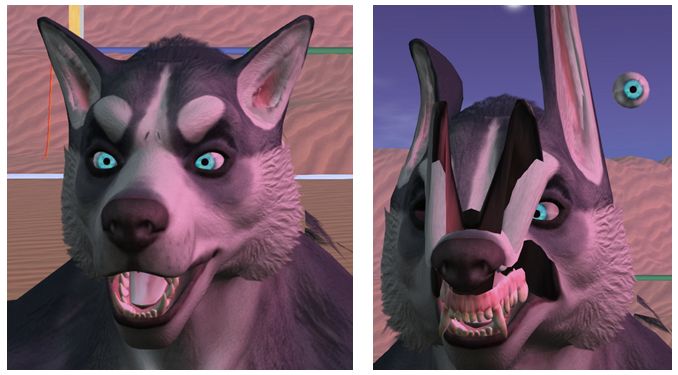
Bento creations will only appear correctly when viewed in a Bento-enabled viewer, as shown in these two pairs of images. On the left: a Bento head seen in a Bento viewer, then in a non-Bento viewer; On the right, a Bento avatar seen respectively in a Bento and a non-Bento viewer (click for full size)
Bento creations will only appear correctly when viewed in a Bento-enabled viewer, as shown in these two pairs of images. On the left: a Bento head seen in a Bento viewer (note; the jewellery is out-of-position on the first image as I didn’t bother repositioning it to fit the head for the photo) and then on a non-Bento viewer – note the head is now located in the small of my back (arrowed). On the right, a Bento avatar seen respectively in a Bento and a non-Bento viewer (click for full size)

Obviously, as the Bento code is more widely adopted and reaches release status, these issues will decline – but for now, if you’re using the Bento RC viewer (or other viewer with Bento support), do keep this in mind when venturing out in public.

In extreme cases, older viewer versions may crash if a Bento avatar / Bento content is encountered; but these cases should be rare. The Lab added code to the viewer some time ago to specifically prevent Bento updates from crashing the viewer, so as long as a viewer has these updates – as should be the case with all currently maintained viewers – it should not crash.

Reset Skeleton

reset-skele
The Reset Sketon option is available from the right-click context menus for both avatar name tags (l) and avatars (r)

There are occasions (when changing between avatars, for example) when those who are on a Bento viewer may see themselves or another Bento avatar distorted. This is due to variances in how appearance updates are received / handled (and even with non-Bento avatar models has in the past required a re-log to fix).

To overcome this in the Bento viewer, there is a Reset Skeleton option, which can be used on either yourself or other deformed avatars in your view. This can be found in the avatar name tag context menu, or the avatar context menu, either of which can be access by right-clicking on the name tag or avatar respectively.

Vir notes the solution is not ideal, but the only other way to fix such issues would be extensive re-working of the viewer code – and at least this approach avoids the need for a re-log to correct matters.

Time Frames for Release

Questions were asked on when the viewer might go to release. this is actually dependent on a number of factors, including:

  • The viewer’s crash rate compared with the current release viewer and other RC viewer in the release channel
  • Whether exposure to a wider audience of users uncovers non-bento bugs or regressions which require additional fixing
  • Relative priorities between Bento and other projects.

Avatar Vertical Position (height above ground) Calculation

This has been a running topic for some time. In short, a n avatar’s vertical position relative to the ground is determined by a complex calculation which involves using a number of joints running up through the body from the left foot to the skull. The idea is to present a consistent view of an avatar standing on the ground, rather than in the ground or over the ground. However, if any of the joints used in the calculation are changing position unintentionally when the calculation is made, it can result in the avatar seeming to bounce up-and-down (see here for more).

To help overcome these kinds of issues, Vir has now documented the body height calculation bones, and the details can be found here: Avatar body size

Joint Position and Volume Bones

collision-bones
Visualising volume bones

It’s been noted that zooming in on a Bento avatar or attempting to click on a part of the avatar can be difficult. This is generally because the collision bones are not set-up correctly. The positions of the volume bones can be seen using Advanced Menu > Avatar > Show Collision Skeleton.

This will overlay the avatar with a series of oval shapes (official viewer – other viewers may render the collision skeleton slightly differently) which show the position of the volume bones. The closer these match the shape an avatar (something which may not always be possible, depending on the avatar type / size), the easier it will be to zoom in on the avatar and / or click on it.

Tapple Gao’s avatar testing and visualisation kit of meshes and animations can also be used to show the collision skeleton.

Setting volume bone positions can either be done within the mesh model or via animation, although there was some confusion whether collision volumes now get included in joint offsets.

Continue reading “Project Bento User Group update 26 with audio + hints’n’tips”

VOB viewer reaches release status in Second Life

secondlifeOn Thursday, September 15th, the Lab promoted the Visual Outfits Browser (VOB) as the de facto release viewer, version: 4.0.8.319463.

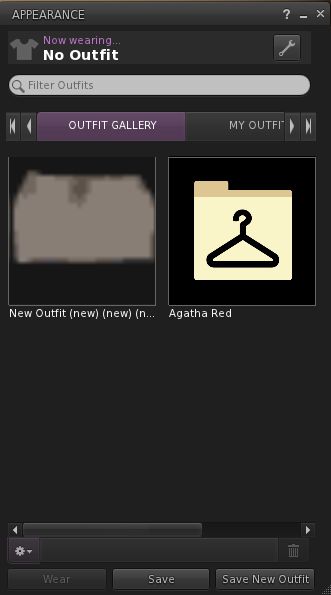
For those who missed my coverage of this viewer when it reached RC status, and simply put, the VOB viewer allows you to use the Appearance floater to capture / upload / select images of your outfits and save them against the outfits in a new Outfit Gallery tab within the floater.

The new Outfits Gallery tab (right-click your avatar > select My Appearance > Outfits Gallery) displays all of your created outfits as a series of folder icons, each one displaying the name of the outfit beneath it. You can replace these icons with an image of the outfit quickly and easily in one of three ways:

  • You can wear the outfit, then right-click on its associated folder icon and select Take a Snapshot (shown above left). This will open the snapshot floater with save to inventory selected by default, allowing you to photograph yourself wearing the outfit and upload the image to SL, where it automatically replaces the folder icon for the outfit
  • You can use Upload Photo to upload an image of the outfit your previously saved to your hard drive, and have it replace the folder icon
  • You can use Select Photo to select any image previously saved to your inventory (including any image supplied with the outfit in question, if appropriate), and use that to replace the folder icon for the outfit.
The Visual Outfits Browser viewer is another of the forthcoming updates mentioned in the official blog post, and you can read my overview as well
The new Outfit Gallery tab in the Visual Outfit Browser allows you to create photos of any outfits saved to My Outfits as thumbnails. You can then use the Appearance floater to scan your outfits to decide what to wear, and use the context menu to wear the one you want

When using the capability there are a number of points to keep in mind:

  • Both the Take a Snapshot and the Upload Photo options will incur the L$10 upload fee, with the images themselves saved in your Textures folder
  • In all three cases, link to the original images are placed in the outfit folder
  • This approach only works for outfits you’ve created using the Appearance floater / the Outfits tab. It doesn’t work for any other folders where you might have outfits – such is the Clothing folder.

Overall, it would seem that the VOB viewer has received favourable feedback by many of those who have used it during its time as a release candidate viewer. I confess, I cannot offer any real feedback, as I actually don’t used the Outfits folder that much. However, with its arrival as the de facto release viewer, expect to be seeing it in more TPVs (those which haven’t already adopted the code) as they continue to update.

Related Links

Bento project reaches RC status in Second Life

Bento: extending the avatar skeleton

OK, I admit I wasn’t expect this until next week, but on Wednesday, September 14th, the Lab  announced that Project Bento is now officially available as a release candidate viewer – version 5.0.0.319688 – which can be obtained through the Alternate Viewers wiki page.

And just in case anyone has missed all the Project Bento news, the best way is to catch-up through the official video. In short, Bento adds a wealth of new bones to the basic avatar skeleton (30+ to heads / faces and to hands alone!), making a wealth of new avatars (humans and non-human) and mesh wearables possible.

The reason I wasn’t expecting the viewer to get promoted just year is that the Lab also has a proof-of-concept viewer being tested, so I assumed any push to RC would come after a decision had been made on incorporating those changes (if they are to be adopted). So, not for the first time, I’m been wrong 🙂 .

The move to release candidate status doesn’t mean the project is at an end. There is still further work to be done as remaining bugs are fixed, etc  (so updates such as the slider locking in the proof-of-concept might yet arrive in the viewer). What it does do is three things:

  • Makes the viewer available to a wider audience through the Lab’s RC distribution mechanism, thus allowing any unforeseen issues in merging the Bento code into the current release viewer code (and which may be outside of direct Bento testing) to be identified and fixed
  • Potentially makes the viewer more widely available to content creators who may not have so far tried the viewer
  • Means that TPVs can now officially start incorporating the Bento code into their viewers (in fact, Cool VL Viewer has had Bento in its Experimental branch from some time, and Firestorm have also been working to merge the Bento code as well – but this shouldn’t be taken to mean there will be a new release of the latter in  the near future).

In keeping with the status of the Bento code, the Lab do ask people – particularly avatar content creators – to give the viewer a go,  and to file a JIRA against any issues found.

As noted above, Bento offers a range of opportunities for mesh wearable and avatar creators – you can see a couple of video exploring the AK and Catwa preview Bento mesh heads in my SL project update. Also, back in August, Vista Animations produced a video illustrating the potential of finger animations:

Then, of course, there is a huge range of non-human avatars: centaurs, “rideables”, winged creatures – all of which can be achieved a lot more efficiently through Bento than has previously been the case.

Teager's Bento Raptor using Bento bones
Teager’s Bento Raptor using Bento bones

So – get ready for the Bento Revolution!

Additional Links