The end of the year is once more approaching, which is often a time of reflection as we look back over the old before pausing to await the arrival of the new. It’s become something of a tradition in these pages for me to look back over the articles and coverage of the year’s events I’ve managed to write-up, and offer a chance to revisit the ups and downs and the good and the bad the last twelve months have brought us.
To keep things digestible, I’ve broken this year’s review into two parts. This one covers July to December. You can find January to June here.
Linden Lab released an update to the Oculus Rift project viewer. A I subsequently reported (see the article updates), people found it suffered significant issues, and appeared to be a step backwards. The JIRA raised for the viewer quickly grew. With a week, the Lab announced they were suspending work on Oculus Rift support in the viewer. CTRL-ALT-Studio offered to bridge the gap, but only on an interim basis.
Caledonia presented the penultimate part of her series on promoting Second Life events, and Draxtor delved into games in Second Life, through the work of Sergio Delacruz. Meanwhile, I received an invitation to find out more about the Helping Haven Community Gateway, before beaming aboard an avatar-sized replica of the original Starship Enterprise, courtesy of Cathy Foil.
Lumiya 3.0 arrived, with a host of goodies, including a new user interface. Rock Your Rack in support of the US National Breast Cancer Foundation was announced, as was the second fund-raising season for Team Diabetes of SL, while the 5th annual Shivers Unleashed music festival took place. The big news for the month, events-wise, was that PULSE SL, in support of the victims and families of those lost in the Orlando nightclub shooting had raised a staggering L$5.5 million.
Sansar
Ed Baig from USA Today presented a video spot about project Sansar. A little later, and as I reported, he later gave a matching write-up on the platform. Latter in the month, I looked at articles on Sansar from THE and Techcrunch.
Personal
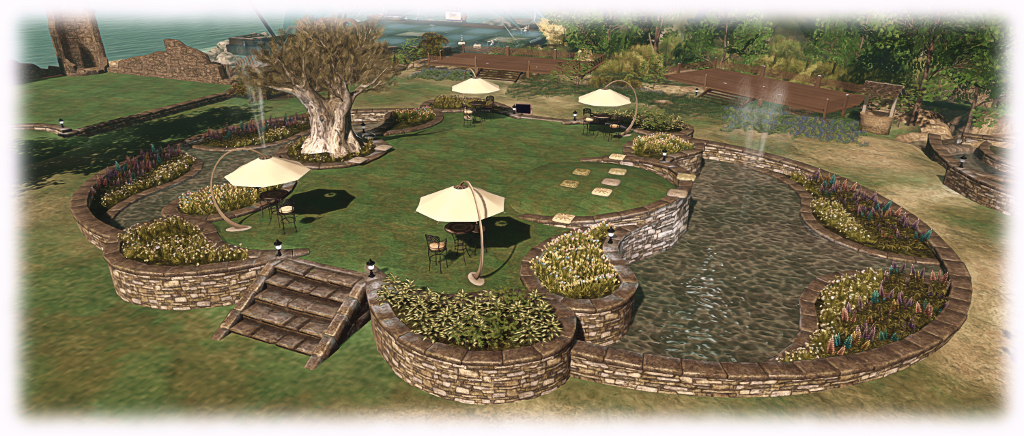
I completed a full redesign of Holly Kai Park, which included the Tiered Garden Wall product by Alex Bader, which was also put to use at home. I finally caught the stunning and award-winning animation The Tyger, by Radheya Jegatheva, son of SL’s own Jayay Zifanwe, on YouTube.
Windlight announced a re-branding to Kultivate, and the Lab blogged about recent SL updates and I added some additional info and links to more in-depth coverage in this blog, which included a look at the new Gaming Islands, designed to introduce users to Skill Gaming in SL.
Firestorm updated with Jelly Dolls (or Avatar Complexity to give the formal name for the capability), and I revisited Hitomi Tiponi’s work producing the Starlight UI Skins and goodies for the official viewer from the Lab. The latter announced the new Marketplace search, so long in beta, was finally live. I also picked up on Strawberry Singh’s request to highlight the issue of SL Marketplace full permissions goods scams.
Thanks to bots discovering it, the SL wiki went into lock-down for the second time in recent years, and while the Lab indicated they hoped to have things sorted “soon”, it remains locked as we reach the end of the year. More woes hit SL in August, and April Linden explained why.
Sansar
I produced the second in my Sansar Summaries, rounding-up all the news and information on the platform I’d been able to cull from the Lab, the media and other sources. August saw the Lab announce the first batch of Sansar Creator Preview invitations had been issued. However, what interested me more was the announcement indicated that “Sansar” was now officially the platform’s title – the “project” having been dropped.
Each week through the year, I try to get to as many in-world and other meetings held by the Lab to keep an eye on technical developments and updates which are in the works for the viewer and the simulator, relaying the notable items via my SL project updates. As such, I thought it might be interesting to look back at some of the technical changes and updates have come our way in 2016.
The Big Ones
There were obviously a number of fairly high-level updates which came our way, notably Project Bento, which gave us a lot of new bones and attachment points specifically for mesh avatars to make them more flexible and easier to animate. There’s a whole story behind that project which perhaps hasn’t been told in full, so expect to read more from me on it in the New Year 🙂 .
Then there was Avatar Complexity, or Jelly Dolls as it has been more popularly dubbed (initially by Whirly Fizzle after it was pointed out the term “Jelly Baby”, as initially used was in fact a trademark). Avatar Complexity is designed to reduce the often high cost of avatar rendering by the viewer, thus lightening the load on computers / graphics cards which might otherwise struggle.
A longer-term hope may have been that perhaps it would encourage people to consider what they are wearing and how it may affect others, and even get content creators to think more conservatively about their creations, and seek to optimise them for rendering. Whether either of these latter points might be / already have come about is nigh-on impossible to judge.
The Viewer
Both Project Bento and Avatar Complexity involved some pretty substantial changes to the viewer – Bento to the degree it warranted a version number boost. But they weren’t the only significant changes. There were also 6 new Maintenance viewers through the year, bringing with them over 250 fixes, updates and improvements. Besides these the following notable viewer releases / updates also appeared through the year.
Graphics Presets
Alongside of Avatar Complexity we gained Graphics Presets, another useful means to help improve viewer performance by allowing users to save different graphics set-ups for the viewer. This means, for example, we can have a preset for taking photographs, with all the more taxing graphics options – shadows, lighting, longer draw distance, etc – can be enabled, then have another for, say, shopping, where all the bells and whistles aren’t required, helping to improve viewer performance – and we can quickly change between them without all that tedious mucking about in Preferences.
Graphics Presets (also in most TPVs) allows you to create and save your own graphics presets to suit different requirements, and which can be quickly loaded and used with just a couple of mouse clicks
If you are on a system which can struggle at times because you have your graphics settings tweaked a little on the high side and you’ve not experimented with Graphics Presets, you might want to give them a try.
Visual Outfits Browser
The Visual Outfits Browser brought with it the ability to have images associated with your Outfits (if you use the Outfits capability). Feedback on this seems to have been mixed. Many like it, while many, equally, ignore it (and I’m among the latter category).
HTTP Updates
The viewer received a lot of new under-the-hood HTTP updates, including the removal of a considerable amount of deprecated and unused code, and a series of improvements for things like image, mesh and animation uploads, inventory manipulation, the Viewer Management Marketplace, LSL script compilation, Experiences management, etc.
Voice Updates
Voice has been worked on throughout 2016, with the Lab working closely with the Voice package provider, Vivox, to improve connectivity, overcome Voice quality issues, and removed many of the known exploits as possible to prevent thinks like a user in one region eavesdropping on a conversation being held in another region.
This work has involved changes to the viewer, changes to the simulator, changes to the Voice binary package supplied by Vivox (SLVoice.exe) and even changes to the Vivox servers (Voice is routed through their own servers).
LibVLC
As Apple dumped QuickTime for Windows with potential security vulnerabilities unpatched, The Lab adopted LibVLC for media handling in the Windows viewer (and will be moving to it win the Mac and Linux viewers when their have released their 64-bit viewers). The move overcomes most issues in trying to play back media in-world, however, licensing around the Advanced Audio Coding and MP3 formats, and the way things are packaged with LibVLC might leave TPVs with a headache or two.
Inventory Handling
Aura Linden worked on removing deprecated and unused UDP inventory messaging mechanisms from the viewer. This work is to be followed by the removal of back-end support for the removed message channels, and further viewer-side work on rationalising and refactoring the code handling inventory operations.
360 Snapshot Viewer
Whilst still only a project viewer, the 360 snapshot viewer is part of a viewer / simulator project to bring 360-dgree photography to Second Life.
Linux
One unpopular move was the announcement concerning Linux development going forward (although the Lab will be building a 64-bit Linux viewer).
The Simulator and Servers
The simulator software continued through its weekly deployments throughout the year, added bug fixes, security updates, feature requests and more each month. Listing everything that happened here would rapidly turn this article into a TL;DR. However, as well as the continued deployment of simulator code updates, 2016 saw the mechanism and tools used to build the simulator undergo update, as was (/is) the underpinning server operating system running the simulators.
Support for larger animation files was introduced, with uploads increased from 120Kb to 250Kb.
Group bans finally got a tweak so that those banned from a group whilst active in group chat would finally get booted from the group chat session as well.
Experiences got a new scripted sit capability, code-named Project Espeon.
Experience scripted sits came our way in 2016 (image courtesy of Linden Lab)
And, of course, we have the increases to Land Capacity (or LI or prims, however you like to think of it).
Aditi Inventory Syncing
A new process for syncing inventory between Agni (the Main grid) and Aditi (the beta grid) was introduced, eliminating the need for users wishing to have their Agni inventory fully replicated on Aditi having to change their SL password and then wait between 24 and 48 hours (sometimes longer) for their Aditi inventory to be synced with Agni. Under the new system, a process automatically merges a copy of users’ Agni inventories with their Aditi inventory based on their last log-in to the beta grid.
There were some teething problems with the new system when first introduced (and some people report there may still be hiccups), but on the whole the new process is a lot smoother than the old.
Web Services: TLS 1.2 and More
The Lab made the switch to TLS 1.2, which had the potential to impact people’s ability to buy L$ via the LindeX / through a browser and / or add payment info to their account if they were not using a suitable viewer or web browser.
There were also numerous changes to various web properties, including updates to the SL Marketplace, the retirement of SLurl.com, various security and infrastructure updates
Grid Status Page
The Grid Status page moved to a new provider and was overhauled to be hopefully more informative, and have a faster means of update.
2017 Expectations
The lab plays their cards close to their chests when talking about upcoming changes / updates / improvements to Second Life, but here’s a (short) list of some of the things we can reasonably expect to see in 2017:
64-bit versions of the official viewer (Windows, Mac and Linux).
Possible changes / tweaks to the avatar / object complexity calculations made by the viewer, such as it being able to more easily determine those avatars in its field of view it should not attempt to fully render (rather than waiting on information from the simulator to make that determination).
Further updates to the viewer build tools (e.g. VS 2015 for Windows).
Progress on the 360 snapshot viewer.
Further work cleaning-up and rationalising the viewer code.
Voice updates for both the server and the viewer.
Continued server deployments and improvements 🙂 .
You can follow my updates on SL technical developments and updates through the likes of my weekly SL project updates and weekly viewer release summaries (which also cover TPV releases).
This summary is published every Monday, and is a list of SL viewer / client releases (official and TPV) made during the previous week. When reading it, please note:
It is based on my Current Viewer Releases Page, a list of all Second Life viewers and clients that are in popular use (and of which I am aware), and which are recognised as adhering to the TPV Policy. This page includes comprehensive links to download pages, blog notes, release notes, etc., as well as links to any / all reviews of specific viewers / clients made within this blog
By its nature, this summary presented here will always be in arrears, please refer to the Current Viewer Release Page for more up-to-date information.
Official LL Viewers
Current Release version: 5.0.0.321958, dated December 1, promoted December 5 (no change) – formerly the Project Bento RC viewer download page, release notes.
While the No Change window was supposed to have come into operation on Friday, December 16th, there was indeed a deployment to the Main (SLS) channel on Tuesday, December 20th. It comprised the same server maintenance package as deployed to the RC channel in week #50, comprising internal logging changes.
The deployment means that all of the server channels on the main grid (Agni) are now running the same simulator version. As there are no planned deployments to the RC channels, all four channels should remain on this release until deployments resume after the holiday period.
SL Viewer
We might see a 64-bit project viewer appear during the week. However, at the time of writing, the list of viewers in the various pipelines remains as:
Current Release version: 5.0.0.321958, dated December 1st, promoted December 5th – formerly the Project Bento RC viewer.
Release channel cohorts:
Maintenance RC viewer, version 5.0.1.322219, dated December 9th – some 42 fixes and improvements + Bento support
Project viewers:
360-degree snapshot viewer, version 4.1.3.321712 dated November 23rd – ability to take 360-degree panoramic images – hands-on review
Obsolete platform viewer version 3.7.28.300847 dated May 8, 2015 – provided for users on Windows XP and OS X versions below 10.7.
Bento Support
With the release of Kokua for Second Life 5.0.0 and RLV 2.9.21 (see my article here), the following currently maintained viewers all have Bento support: Black Dragon, Catznip, Cool VL, Firestorm, Kokua for Second Life, Restrained Love. Alchemy is expected to update to include Bento “soon” and UKanDo is still awaiting a complete overhaul.
In terms of clients with 3D viewing capabilities, Radegast has been updated to support Bento, but the update is pending release. Lumiya for Android will have Bento support added “soon” (Lumiya 3.3 with Voice support released on Sunday, December 18th, and my review is available here).
Simulator OS Update
The Lab is in the process of updating the operating system on the simulator servers. At the moment the new OS version is installed on a number of regions on Aditi (the beta grid), including: Fire Ants 1, Fire Ants 2, Grasmere, Oak Forest, and Twilight Shores, not all of which are open to the public.
“This is one of those ‘features’ that might perform a bit better, but otherwise is a success if it behaves exactly like our current servers,” Simon Linden said at the Simulator User Group meeting on Tuesday, December 20th.
“We’re in the starting process of testing things. We have a lot of testing to do. [We’re] updating from an old version of Linux to a not-so-old version of Linux,” April Linden added. “Just to keep things moving. All the usual reasons. Performance updates, security, etc.”
Second Life hits a lot of low-level server code hard, including networking, memory and multi-processing. The overall hope is to have the newer revisions of the operating system will improve these. Expect this work to reach Agni in early 2017.
Group Chat
Group chat was long a bane of Second Life. In 2014/15 however, the Lab put a considerable amount of work into improving things, although some issues remain. One of these is that if an individual role outside of the default “Everyone” has a very high number of group members assigned to it (e.g. several thousand), it can dramatically impact things like group chat performance and can prevent the members’ list loading. One solution might be to delete the role (converting those in it to Everyone).
On Sunday, December 18th, Alina Lyvette released Lumiya 3.3, the Second Life / OpenSim Android client for smartphones and tablets.
The new update brings with it Voice chat via the built-in microphone on your device (or suitable Bluetooth unit connected to your device), the ability to upload images via your device, and additional VR support, including Google Daydream. The realise notes are available here.
Voice Chat
Voice chat for Lumiya 3.3 requires the download and installation of the free Voice plug-in app. Once you’ve downloaded and installed the plugin, the first step is to enable Voice:
Log-in via Lumiya.
Tap the menu icon (top left of the screen) and then tap Settings > Chat and Messages
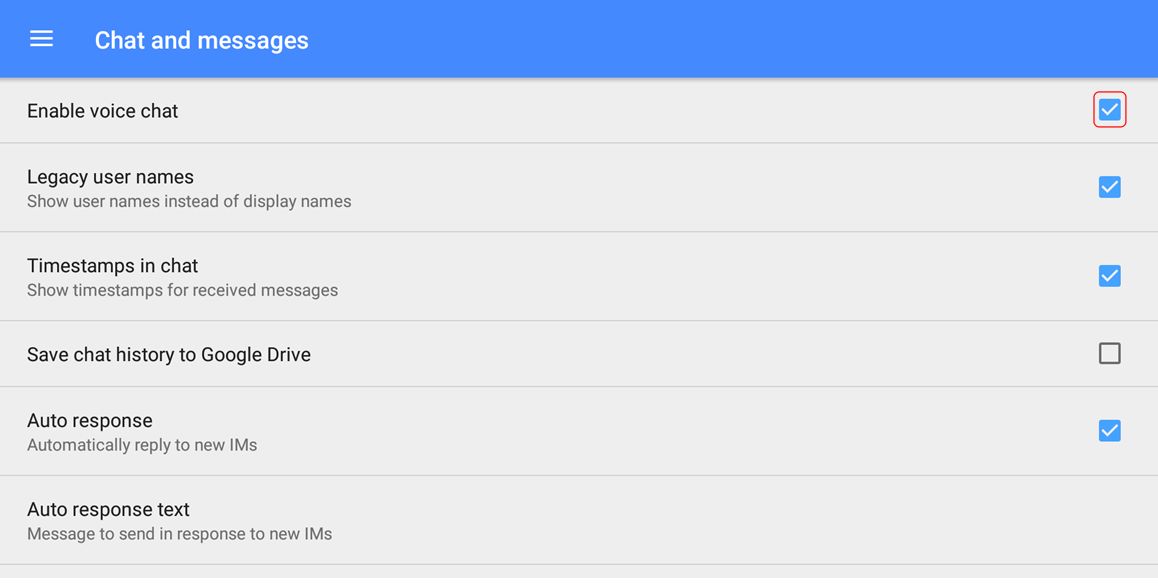
Tap Enable Voice Chat and make sure it is checked as enabled. To disable, tap the option again.
Enable Voice via Menu (top left of the Lumiya screen) > Settings > Chat and Messages > Enable Voice Chat. Tap again to uncheck and disable at any time.
With Voice chat enabled you can use voice for open chat, IM calls and via the 3D World view.
Open Chat
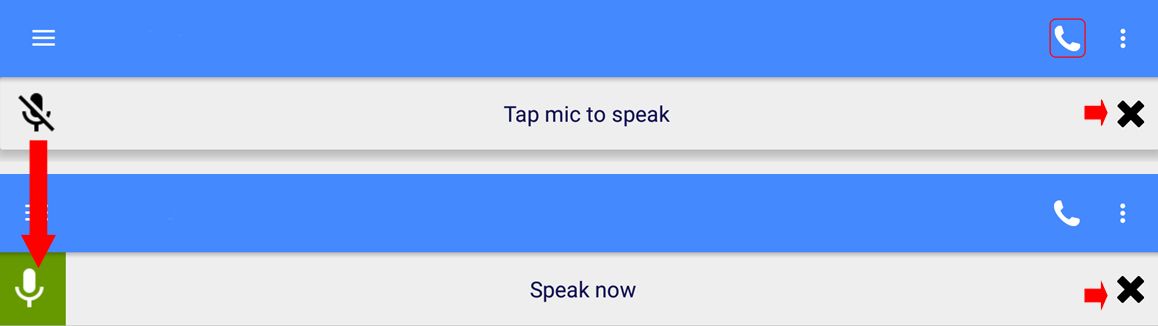
To initiate Voice chat in open chat, tap on Local Chat in Lumiya. then tap the telephone handset icon in the top right of the screen. This will enable your device’s microphone and display the open / close microphone bar. Tap the microphone icon to activate your microphone; the icon will turn green, indicating the microphone on your device is hot, and the bar will display the instruction to Speak Now.
The open / close device microphone bar as it appears in either state on the open chat, 3D world view or IM chat screens in Lumiya
Remember to tap the bar again when you’ve finished speaking to prevent any extraneous noises around you from being picked-up and transmitted in-world. To close the current Voice chat session at any time, tap the X on the right of the chat bar (arrowed to the right, above).
IM Voice Calls
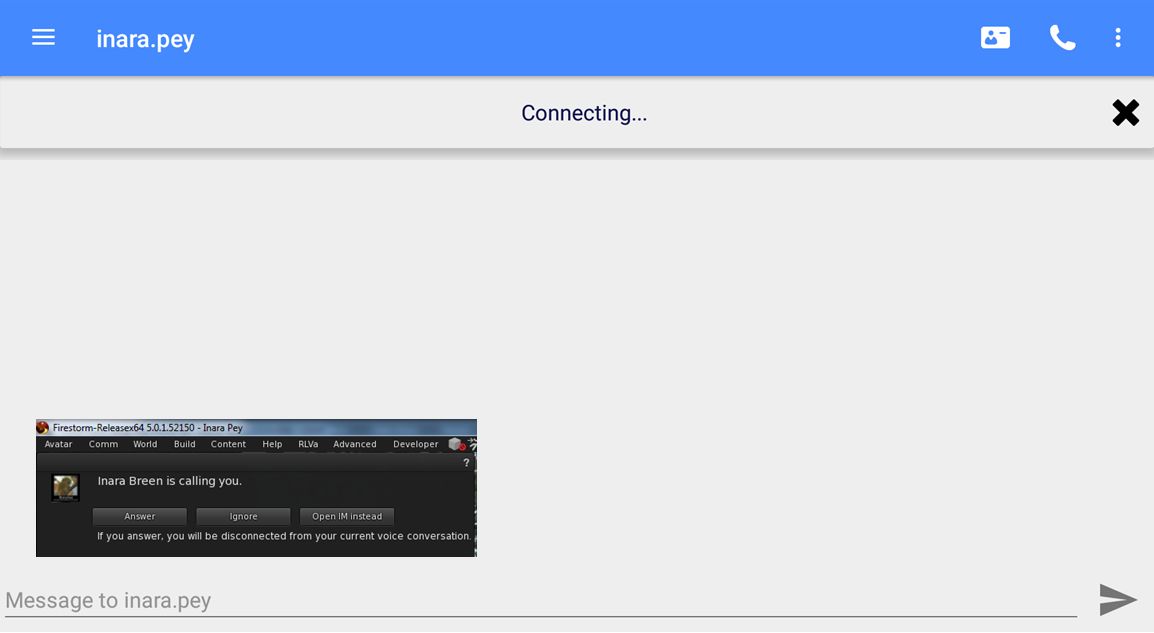
For an IM voice call, tap the name of the person you wish to IM (e.g. via the list of people nearby or your Friends list). When the IM window has opened, tap the telephone handset icon (top right.The microphone bar is displayed, with the message “Connecting…”. The person you are calling, assuming they are on a full viewer, will receive the usual Voice call message (shown inset, below).
Making a Voice IM call on Lumiya. The recipient – assuming they are on a full viewer will receive the usual notification (inset – click for full size)
If they accept the call, the microphone icon on the left of the bar will turn green, indicating they’ve accepted the call, and your microphone is now hot. Remember to tap the bar when you’ve finished speaking to prevent any extraneous noises around you from being picked-up and transmitted in-world.
If they reject the call, or opt to converse in IM via text, the microphone bar will vanish.
If they do not answer the call before the Voice connection times out, the microphone bar will vanish.
To end the call, tap the X on the right of the microphone bar.
Note that you can restart the conversation from the IM window by tapping the Action menu icon (three vertical dots, top right of the screen) and selecting Voice Chat from the drop-down. This will initiate a fresh call.
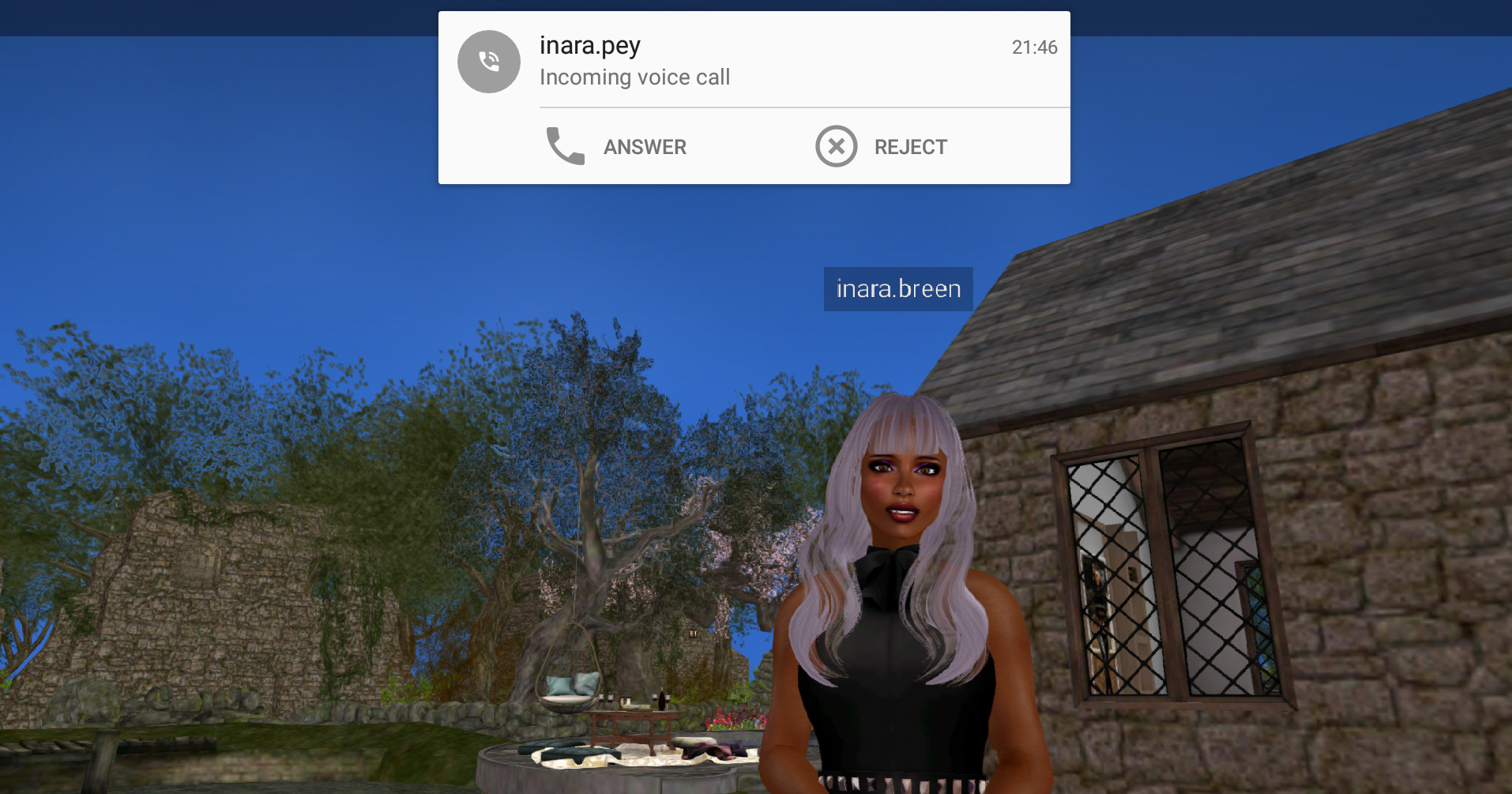
Should you be in receipt of an IM Voice call when using Lumiya, a drop-down will appear at the top of the window you are using, and you can opt to accept or reject the call. If you reject the call, but wish to converse via IM text and are not in the IM chat window, you’ll have to manually switch to the IM window for the person who called you.
When in receipt of a Voice IM call, a drop-down will be displayed at the top of the currently active Lumiya screen (3D world view shown)
If you accept the call, the microphone bar will be displayed, and your microphone will be hot. Remember to tap the bar when you’ve finished speaking to prevent any extraneous noises around you from being picked-up and transmitted in-world.
Project Bento – now a part of the Kokua Second Life viewer and the Restrained Love Viewer
Kokua and Restrained Life have become the latest viewers to update to v5.x status, with release of versions support the Project Bento code.
Kokua 5.0.0
Kokua 5.0.0..40327 for Second Life (release notes) appeared on Saturday, December 17th, bringing with it Bento rendering support, plus additional fixes and improvements:
FMOD Ex audio streaming libraries updated to version 4.44.64.
Avatar texture display now works.
Pie menu updates.
Pie menu “Sit here” response no longer ignores llSetSitText(string), and should now display the defined scripted target prompt (e.g. “Ride” or “Fly”, etc., rather than “Sit Here”).
Just in case there is anyone who missed it, Project Bento adds numerous new bones to the avatar skeleton to improve and enhance support mesh avatars (Bento does not work with the Second Life system avatar). This makes it easier to create and animate things like additional wings and limbs, and offers the opportunity for greater facial animations with mesh heads and faces, and even finger manipulation on mesh hands.
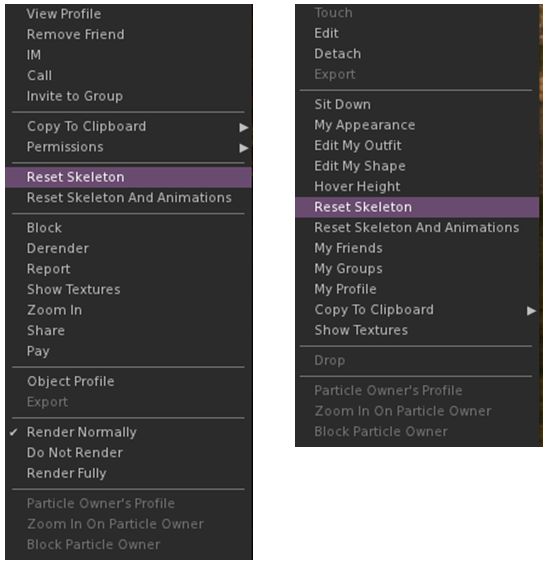
As with all Bento viewers, the visible viewer update is to the avatar menus (both right-click context and pie menu in the case of Kokua), where the Reset Skeleton and Reset Skeleton with animation options can be found.
Reset Skeleton options on Kokua 5.0.0 on the right-click context menus for other avatars (l) and your own avatar (r). With the pie menus they can be found under More > More > Reset (other avatars) and Appearance > Reset on your own avatar
These options have been added because sometimes, when changing between one mesh avatar and another, the basic SL avatar can become deformed, resulting in it looking squished, stretched, caught between two looks, or something else. This problem is generally the result of race conditions when the avatar’s appearance is being updated, and both of these buttons are intended to correct the problem – the option to reset animations being intended to fix deformations which may be due to animations also kicking-in incorrectly / at the wrong time as well, which may cause an avatar to deform.
Restrained Love Viewer
Restrained Love Viewer 2.9.21 (release notes), released on Friday December 16th, brings Bento support to that viewer as well. As with Kokua and other Bento capable viewers, this also sees the Reset Skeleton and Reset Skeleton with Animations options added to the right-click avatar context menus as the most visible sign of Bento support (outside of Bento meshes rendering correctly!).
In addition the update includes a minor change to RLV, with the “?” symbol no longer being used to identify a cheat inside emotes, as some emotes may end with genuine questions.