There was no deployment for the Main (SLS) channel on Tuesday, January 31st, although the regions on that channel were restarted in keeping with the Lab’s policy of restarting regions every 2 weeks, regardless as to whether there is an accompanying deployment.
On Wednesday, February 1st, all three RC channels should receive the same new server maintenance package. This includes a follow-up to fix BUG-3286 “Can’t move object” fail notifications, which was partially fixed in an earlier deployment. This release should also see some improvement in off-line IM and group notice delivery.
SL Viewer
The Maintenance viewer RC was updated on Monday, January 29th to version 5.0.1.323027 (dated January 25th). Otherwise, all other viewers in the current pipelines remain unchanged from the end of week #4:
Current Release version: 5.0.0.321958, dated December 1st, promoted December 5th, 2016 – formerly the Project Bento RC viewer
Project viewers:
Project Alex Ivy (LXIV), 64-bit project viewer, version 5.1.0.501863 for Windows and Mac, dated January 10th
360-degree snapshot viewer, version 4.1.3.321712, dated November 23, 2016 – ability to take 360-degree panoramic images – hands-on review – still pending completion of work on the 64-bit viewer, and no updates expected in the immediate future
Obsolete platform viewer, version 3.7.28.300847, dated May 8, 2015 – provided for users on Windows XP and OS X versions below 10.7.
Non-Player Characters
There has been an ongoing debate about implementing non-player characters (NPCs) in the form of “created agents” or “scripted agents” (essentially avatars), which can exist in-world without the need for a controlling viewer / client. See feature request BUG-11368 for more.
NPCs are not new to SL, and it had been hoped that Pathfinding (introduced in 2012) would lead to an uptick in their use. However, Pathfinding has never really received widespread acceptance / use, and still carried with it many of the limitations in using “bot” based NPCs – such as the need for each bot to have a direct connection to a managing viewer / client.
Scripted agents, by virtue of using the existing avatar system, coupled with being a new class of object would overcome many of the limitations and issues with the current approach to NPCs and other creature creations. However, implementing such a system is seen as a major undertaking, and one with some major hurdles to clear were it to become a project.
If agents (avatars) were to be used, for example, how can they be kept “alive” when there is no controlling client / viewer connected to them? At the very least a new class of hybrid avatar / object would need to be developed (complete with inventory support). If these agents are to be used to provide things like animals – horses, etc., – there is then potentially the problem of how to change the system so that one avatar can ride another (e.g. your avatar on the NPC horse avatar), and so on.
Currently, there is no planned project to take-on NPCs of this kind – but they are a repeated topic of conversation at Simulator User Group meetings, and it is an idea some at the Lab have been mulling over.
Next Meeting
Due to scheduling conflicts, the next Simulator User Group meeting will be on Tuesday, February 14th, 2017.
This summary is published every Monday, and is a list of SL viewer / client releases (official and TPV) made during the previous week. When reading it, please note:
It is based on my Current Viewer Releases Page, a list of all Second Life viewers and clients that are in popular use (and of which I am aware), and which are recognised as adhering to the TPV Policy. This page includes comprehensive links to download pages, blog notes, release notes, etc., as well as links to any / all reviews of specific viewers / clients made within this blog
By its nature, this summary presented here will always be in arrears, please refer to the Current Viewer Release Page for more up-to-date information.
Official LL Viewers
Current Release version: 5.0.0.321958, dated December 1, promoted December 5 (no change) – formerly the Project Bento RC viewer download page, release notes.
The notes in this update are taken from the abbreviated TPV Developer meeting held on Friday, January 27th, 2017. The video of that meeting is embedded at the end of this update. My thanks as always to North for recording and providing it.
SL Viewer
[01:19] There has been no movement with any of the viewer currently in the various pipelines during the week, leaving the list as:
Current Release version: 5.0.0.321958, dated December 1st, promoted December 5th, 2016 – formerly the Project Bento RC viewer
Release channel cohorts:
Maintenance RC viewer, version 5.0.1.322791, dated January 12th
Project viewers:
Project Alex Ivy (LXIV), 64-bit project viewer, version 5.1.0.501863 for Windows and Mac, dated January 10th
360-degree snapshot viewer, version 4.1.3.321712, dated November 23, 2016 – ability to take 360-degree panoramic images – hands-on review – still pending completion of work on the 64-bit viewer, and no updates expected in the immediate future
Obsolete platform viewer, version 3.7.28.300847, dated May 8, 2015 – provided for users on Windows XP and OS X versions below 10.7.
[01:48] There are two more branches for the Maintenance viewer updates in the offing. One is, as per Oz’s stated intent, a branch for rendering only fixes, the second will continue with the regular releases of Maintenance RC viewers with all other general fixes and updates.
64-bit Viewer
[22:55] The number of users on the 64-bit project viewer remains “small”, however, the Lab is pleased with the way most things in the viewer and viewer build process are working. There are still three major areas of work which need to be completed, outside of bug fixes, before the viewer can progress to release candidate (RC) status:
64-bit Havok for OSX: the binaries, etc., have been received from Havok, but have been built using Xcode 8. The Lab is therefore updating the Mac viewer build process to use Xcode 8 so that the Havok code can be incorporated.
Updated VLC and CEF support: this is in process, and in the case of CEF, will include a new wrapper (project Dullahan – link for those who are curious about the etymology of Lab project names) which will replace llCEF, making it easier to render web content through the viewer
The new viewer installation / update process: this is being overhauled to improve the installation and update of the viewer. In particular, it will include a check to ensure users have actually downloaded the correct version of the viewer for their system. For example, if you are on 32-bit Windows and download the 64-bit version in error, the installer will recognise this, and download and install the 32-bit version for you.
Note the above still only apply to Windows and Mac OSX.
Linux Viewer Status / Future
[30:21] Thus far, the Lab hasn’t progressed very far with Linux 64-bit, beyond building some of the libraries. The aim is still to have the third-party viewer development / open source community provide a strong level of support for Linux. However, it is recognised that the current way in which the Linux viewer is currently distributed makes it difficult for third-party support to be maintained.
In an attempt to improve things, the Lab is going to try to move away from using a TAR ball method of distribution to providing a .DEB file, which can be installed using standard Debian installation commands. This will involve changes to the Linux build process, which itself may highlight issues in producing the desired .DEB file. Where this is the case, the Lab will look to discuss and resolve issues with the TPV / open source community. It is hoped that this approach will result in a much improved and easier to manage mechanism for Linux viewer builds and distribution.
Other Items
Music Streaming Default Volume
[04:57] The first TPVD meeting for 2017 included a discussion on audio streaming autoplay found in the official viewer, and the problems this can cause new users. As a result of that discussion, the Lab agreed to revisit the default media volume setting in the viewer. This is now under discussion within the Lab.
Voice Issues
[06:06] While there is a Voice update coming down the line, people are reporting increasing Voice disconnection issues (see BUG-41288). Kyle Linden has been looking into the problems to try to identify where issues might reside, and it is a topic for discussion at the next Lab / Vivox meeting, in about a week. Oz Linden is also improving the code in the viewer to better monitor and report on Voice connections and issues so that they can be more easily identified; these updates will hopefully be in the upcoming Voice viewer.
Environment Maps
[12:53] At the end of the last TPV meeting, there was a convoluted discussion on environment maps and potential limitations. A JIRA feature request – STORM-2146 – has now been raised, outlining the specific issues with the environment maps, and what can be done to improve them to provide things like simulated environment reflections. Acknowledged as being a prime example of a really good feature request in terms of level of explanation given (including mitigating risk of content breakage), the topic was put aside for detailed discussion at a later date, to allow this meeting to focus on the 64-bit viewer and Linux.
Server-side Group Chat “Opt Out”
Firrestorm has a viewer-side implementation to mute all chat from a group, but a server-side capability is being requested
[17:53] This is a request to provide support for “opting out” (muting) from group chats without necessarily having to wait for it to start & closing the window (e.g. via a right-click option on the group list or in the group profile – a method taken by Firestorm in providing viewer side support for the capability).
The Lab is aware of numerous requests for such an option, together with numerous and different suggestions on how it might be implemented. Because of this, no firm decision has been made on whether or not to add such a capability, managed server-side, has been taken.
The advantage of server-side support is that rather than having the viewer just discard incoming messages seen as “unwanted”, the server will not send them in the first place. This is very much what the Lab would like to achieve, were the capability to be added.
E-mail Improvements
[39:37] Changes are coming to the way in which e-mails are managed / distributed by the Lab. Please see my separate report on what this means and verifying you e-mail address, if you have not already done so.
SL Wiki Editing and JIRA Viewing
[49:03] The Ls Wiki remains closed to general editing. Users with a genuine need to edit wiki pages they have previously helped maintain or have created, should file a support ticket or raise a JIRA requesting the are granted Edit rights, and why they are requesting them. The Lab is now maintaining a white list of approved users.
Similarly, TPV developers and open source contributors who cannot view JIRAs related to their work, etc. (“Permission Violation”), should e-mail Oz Linden to request broader access to the system.
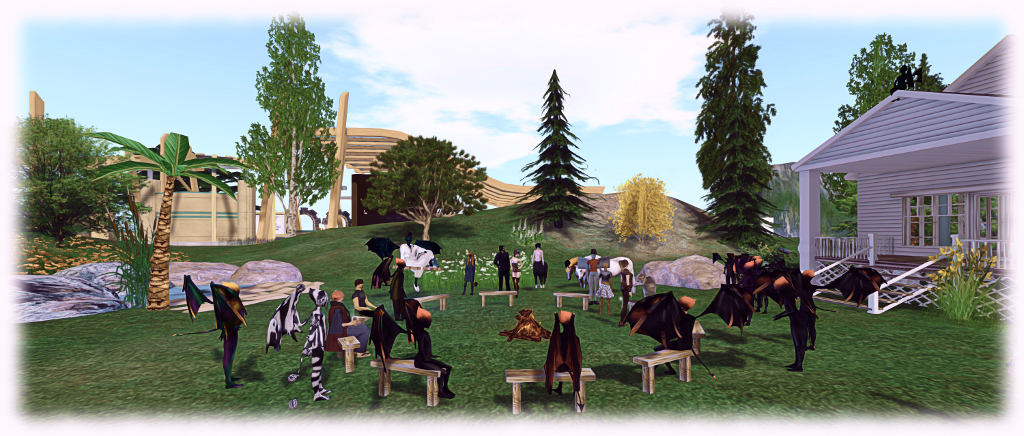
The Content Creation User Group has re-formed out of the Bento User Group, and is held at the Hippotropolis Campfire Circle. Imp costumes entirely optional 😀 .
The following notes are taken from the Content Creation User Group meeting, held on Thursday January 26th, 2017 at 1:00pm SLT at the the Hippotropolis Campfire Circle. The meeting is chaired by Vir Linden, and agenda notes, etc, are available on the Content Creation User Group wiki page.
Core Topics
Potential follow-on projects
Modelling for efficient rendering
Animations
Outfits
Follow-up projects
There has been no further progression on the potential follow-on projects from Bento (see my week #2 Content Creation Group meeting report for details of follow-ups).
In terms of the baked texture on mesh idea, the Lab has asked for specific content there “onion” meshes are used – and it has been reiterated this is most of the common mesh bodies and heads
There is still some confusion as to what may be causing the animation conflict issue. While it may be that changes will be made to the animation system in the future, as per the suggestions Vir forward previously (see the link above), the solution for now is to try to address the issue at a scripting level to prevent conflicts.
Modelling for Efficient Rendering
Medhue Simoni has been producing a series on the use of Level of Detail (LOD) to help with generating rendering efficient models in Second Life. Part 1 is embedded below, and Part 2 can be found here. A third part will be available soon, and hopefully, he and I will be producing a companion article in this blog once that part is available on-line.
Efficient modelling for Second Life has long been a problem within the platform, and something exacerbated by the arrival of full mesh support. Given this:
The Lab is considering revising the rendering cost calculations “at some point” to encourage people to consider more efficient models (e.g. making more use of normal maps to add detail to models where appropriate, rather than rely on always producing an extremely high poly count model).
It has been suggested that providing some basic indicators of what might be considered “reasonable” number – poly counts, proportionate scaling of LODs, etc. – for models could be produced, together with videos (by content creators with a solid understanding of the subject and Second Life) on efficient use of normal and specular maps
Using a normal map to enhance the detail on a low-polygon model. The image on the left shows a model of some 4 million triangles. The centre image shows a model with just 500 triangles. The image on the right shows the 500-triangle model with a normal map taken from the model on the left applied to it. Credit: Wikipedia
The discussion broadened to cover awareness among content creators as to what actually works and where falsehoods / misunderstanding lie. A cited example in the meeting was that of mesh clothing makers avoiding the use of normal maps because they want their clothing to look the “same” to everyone, even though doing so can severely impact the user experience for those on lower-end system, and thus discourage users from buying their goods.
.BVH Animations and Animation Playback
Animations can be uploaded to Second Life in one of two formats, .ANIM and .BVH. The latter are optimised as a part of the upload process, and this is proving to be a particular problem for Maya users when animating facial expressions. These require finer bone movements in the animation, which the optimisation process is filtering out, requiring Maya users to use exaggerated movements. Blender users can avoid the issue by using .ANIM, which does not pass through any form of optimisation / filtering.
While it is recognised that the thresholds used by the .BVH optimisation / filtering process may not be the best for very small bone movements, there are currently no plans to alter / refine the .BVH uploader. Nor is it really feasible to adjust the thresholds for hand and face bones, as this could have an adverse effect where these bones are re-purposed for other uses (as Bento is intended to allow).
There are two possible workarounds which may help with these issues for anyone using the .BVH format:
Swap to using .ANIM files, which do not go through any similar optimisation process. Unfortunately, this isn’t an option for Maya users, as there is current no .ANIM exporter for Maya, although Aura Linden is working on one in her own time, and is hoping to get time in about three weeks to sit down and finish it
Alter the frame rate of the animation itself – so rather than creating it at 30 fps, try 15 or 10 fps, depending on the animation.
There was also some confusion over the maximum file size for animations, as per my 2016 week #25 report, this was increased from 120 Kb to 250 Kb in June 2016. The wiki page on SL limits has now been correctly updated to reflect this. It’s also worth noting, as an aside, that animations will be moving to delivery via the CDN network in the future.
There was an extended conversation around Outfits and the Outfits folder. While much of this revolved around the Visual Outfits Browser option for Outfits, a couple of significant items were discussed.
The first was on the subject of saving gestures with outfits. As noted in my Bento update #26 and Bento update #27, gestures cannot be automatically saved with an outfit, but can be manually added as links / copies. However, Medhue Simoni has found a catch: should the outfit ever be re-saved, the gestures are removed. Expect a JIRA soon
A common request for the Outfit system to allow nested folders once more the ability was removed with viewer 2.1 (see VWR-19774), and while it was at the time noted as a possible “priority” item for consideration by the Lab, the topic has only recently again come up in internal conversations as a result of feature request BUG-41826. However, the amount of work involved to make it happen makes it unclear if the request will be accepted.
One request for Outfits which is unlikely to be acted upon, is to have links to other folders in addition to objects. This is seen as even more complex than allowing nested folders within the Outfits hierarchy.
Next Meeting
The Next Content Creation User Group meeting will be on Thursday, February 16th, 2017.
On Tuesday, January 24th, the Main (SLS) channel was updates with the same server maintenance package deployed to the RC channels during week #3. This includes a partial fix for (non-public) BUG-3286, “Can’t move object” fail notifications (fixes for regions/objects with longer names are pending), together with enhanced server logging and minor internal server enhancements.
There will be no RC deployment on Wednesday, January 25th – but the RC region will be restarted in keeping with the Lab’s new policy of restarting the channels every 2 weeks, regardless of whether or not there is an associated deployment.
The next RC deployment is expected to be week #5 (commencing Monday, 30th January, 2017).
SL Viewer
No changes since my last update. The status of viewers in the pipeline remains thus:
Current Release version: 5.0.0.321958, dated December 1st, promoted December 5th, 2016 – formerly the Project Bento RC viewer
Release channel cohorts:
Maintenance RC viewer, version 5.0.1.322791, dated January 12th
Project viewers:
Project Alex Ivy (LXIV), 64-bit project viewer, version 5.1.0.501863 for Windows and Mac, dated January 10th
360-degree snapshot viewer, version 4.1.3.321712, dated November 23, 2016 – ability to take 360-degree panoramic images – hands-on review
Obsolete platform viewer, version 3.7.28.300847, dated May 8, 2015 – provided for users on Windows XP and OS X versions below 10.7.
Camera Presets
As I noted in a recent TPVD meeting update, Jonathan Yap is working on a code contribution for the official viewer which will allow users to set and save their own preferred camera presets in the viewer.
The idea is that, like the graphics presets functionality Jonathan contributed to the viewer in 2016, users will be able to define their own placements for the SL camera around their avatar (e.g. an over-the-should view, a view from overhead, etc.), which can then be saved and selected / used as required. Jonathan has only recently started on the work – which has an associated feature JIRA, STORM-2145 – but that should hopefully change once various decisions have been made by the Lab.
Nvidia Driver 378.49 + 64-bit Viewer Bug
Nvidia release their 378.49 driver on Tuesday, January 24th, and it can cause an unusual bug / issue with 64-bit viewers. The problem was first noted on Firestorm 5.0.1 (see: FIRE-20774), but I have repro’d it on the Lab’s own 64-bit project viewer (version 5.1.0.501863 at the time of writing) and on Alchemy 4.0.0 (a crash issue had prevented comprehensive testing on Alchemy 5.0.0 at the time of writing).
The Nvidia 378.49 driver bug which can occur with 64-bit viewers when ALM is disabled
The issue only manifests when Advanced Lighting Model (ALM) is disabled in a 64-bit viewer, and renders the in-world view with an odd blue tinge which almost looks like the blue colour channel is impinging on the red channel. As noted in the Firestorm JIRA, enabling ALM can prevent the issues, as can toggling Glow off when ALM is disabled. See the Firestorm JIRA for workarounds, should you encounter the problem.
How the same scene looks in the same viewer (SL Alex Ivy 64-bit project viewer for Windows, version 5.1.0.501863 at the time of writing)
The issue was raised at the Simulator User Group meeting on Tuesday, January 24th, a JIRA for the issue on the Lab’s 64-bit project viewer is available on BUG-41294.
This summary is published every Monday, and is a list of SL viewer / client releases (official and TPV) made during the previous week. When reading it, please note:
It is based on my Current Viewer Releases Page, a list of all Second Life viewers and clients that are in popular use (and of which I am aware), and which are recognised as adhering to the TPV Policy. This page includes comprehensive links to download pages, blog notes, release notes, etc., as well as links to any / all reviews of specific viewers / clients made within this blog
By its nature, this summary presented here will always be in arrears, please refer to the Current Viewer Release Page for more up-to-date information.
Official LL Viewers
Current Release version: 5.0.0.321958, dated December 1, promoted December 5 (no change) – formerly the Project Bento RC viewer download page, release notes.