No significant news. A lot of back and forth on region crossings and whether they are “worse” and personal views on how they can be fixed.
Simulator Deployments
Please refer to the server deployment thread for the latest updates.
On Tuesday, October 14th the SLS (main) channel was updated with server release 2019-10-03T01:12:11.531528, previously deployed to an RC channel and comprising:
Fixes: BUG-227645 EEP issue; windlight no longer rendering properly.
Internal logging changes.
Improvements to simulator state saves, which should make rolls smoother.
On Wednesday, October 16th, a new server update, 2019-10-11T18:12:36.531693, should be deployed. This comprises all of the above updates plus the internal script improvements previously documented in these updates. This deployment will expand these updates (originally deployed to one RC on Wednesday, October 9th in release .531529) to all of the primary RC channels.
SL Viewer
The Vinsanto Maintenance RC viewer, dated September 17th, 2019 was promoted to de facto release status on Tuesday, October 15th. The remainder of the pipelines remained unchanged at the time of writing:
Legacy Profiles viewer, version 6.3.2.530836, September 17. Covers the re-integration of Viewer Profiles.
Project Muscadine (Animesh follow-on) project viewer, version 6.4.0.530473, September 11.
360 Snapshot project viewer, version 6.2.4.529111, July 16.
Linux Spur viewer, version 5.0.9.329906, dated November 17, 2017 and promoted to release status 29 November 2017 – offered pending a Linux version of the Alex Ivy viewer code.
Obsolete platform viewer, version 3.7.28.300847, May 8, 2015 – provided for users on Windows XP and OS X versions below 10.7.
Logos representative only and should not be seen as an endorsement / preference / recommendation
Updates for the week ending Sunday, October 13th
This summary is generally published every Monday, and is a list of SL viewer / client releases (official and TPV) made during the previous week. When reading it, please note:
It is based on my Current Viewer Releases Page, a list of all Second Life viewers and clients that are in popular use (and of which I am aware), and which are recognised as adhering to the TPV Policy. This page includes comprehensive links to download pages, blog notes, release notes, etc., as well as links to any / all reviews of specific viewers / clients made within this blog.
By its nature, this summary presented here will always be in arrears, please refer to the Current Viewer Release Page for more up-to-date information.
Note that for purposes of length, TPV test viewers, preview / beta viewers / nightly builds are generally not recorded in these summaries.
Official LL Viewers
Current Release version 6.3.1.530559, formerly the Umeshu Maintenance RC viewer, dated, September 5th – No change.
Release channel cohorts:
Voice Rc viewer, version 6.3.2.531587, released on October 8th.
The following notes are taken from my audio recording of the Content Creation User Group (CCUG) meeting, held on Thursday, October 10th 2019 at 13:00 SLT. These meetings are chaired by Vir Linden, and agenda notes, meeting SLurl, etc, are available on the Content Creation User Group wiki page.
Graphics Team
There are two new Lindens now on the rendering team – Euclid Linden, who has been with the Lab for around a month at the time of writing, and Ptolemy Linden, who has been a Linden for the last couple of weeks, again at the time of writing. Both will be working on various rendering projects which will include the Love Me Render viewer updates and also projects like the Environment Enhancement Project (EEP) – which is considered a priority in order to move that project towards release.
Euclid Linden goes full-on shark-man, while Ptolemy goes a little more conservative with a starter avatar
Viewers
No further updates thus far in the week. The hope is that the Vinsanto Maintenance RC viewer (version 6.3.2.530962 at the time of writing) looks to be in “good shape” for promotion, but currently requires a little more time in its release cohort.
This leaves the official viewer pipelines at the time of the meeting as follows:
Current Release version 6.3.1.530559, formerly the Umeshu Maintenance RC viewer, dated, September 5 – No Change.
Legacy Profiles viewer, version 6.3.2.530836, September 17. Covers the re-integration of Viewer Profiles.
Project Muscadine (Animesh follow-on) project viewer, version 6.4.0.530473, September 11.
360 Snapshot project viewer, version 6.2.4.529111, July 16.
Linux Spur viewer, version 5.0.9.329906, dated November 17, 2017 and promoted to release status 29 November 2017 – offered pending a Linux version of the Alex Ivy viewer code.
Obsolete platform viewer, version 3.7.28.300847, May 8, 2015 – provided for users on Windows XP and OS X versions below 10.7.
ARCTan
Project Summary
An attempt to re-evaluate object and avatar rendering costs to make them more reflective of the actual impact of rendering both. The overall aim is to try to correct some inherent negative incentives for creating optimised content (e.g. with regards to generating LOD models with mesh), and to update the calculations to reflect current resource constraints, rather than basing them on outdated constraints (e.g. graphics systems, network capabilities, etc).
Current Status
Work is progressing on building a predictive model based on the data LL has been gathering on mesh complexity, frame times, etc.
This model will be tested across a wider range of client hardware types and different ranges of settings.
The data thus far confirms that geometric complexity plays a large part in performance reduction, but also that there are a lot of other variables in play: rigged meshes are very different in behaviour impact to static meshes; some graphics properties can make a “big difference” in frame time, etc.
Details on the impact of textures has yet to be folded into the project.
Project Muscadine
Project Summary
Currently: offering the means to change an Animesh size parameters via LSL.
Current Status
Still largely on hold while ARCTan is being focused on.
Other Items in Brief
Mesh Uploader: a couple of points were brought up concerning the mesh uploader:
At the time mesh was introduced, materials were no supported; therefore, in the uploader there is code to discard tangent space (which can be used by normal maps). This means normals must be calculated in real time, causing both performance problems and inconsistencies between how normals appear in Second Life and how they appear in the 3D software used to create them. It’s been suggested this issue should be the subject of a Jira.
Allowing for the work on ARCTan, some see the uploader unfairly punishing on grounds of size and LI.
It what pointed out that a very large mesh that can be complex to render get hit with a high LI and high upload cost, but a very small object – which may still have tens of thousands of triangles – is not penalised to the same degree, even though it might be as costly to render.
The alternative suggested was to have costs based not on LOD boundaries & changes rather than a simple size / LI basis. The idea here being that the cost is more reflective of what is seen and rendered by the viewer, which is seen as “levelling” the playing field (if a small object has a really high LOD tri count, then it would incur higher costs, in theory making creators more conservative in how they construct their models.
It was pointed out that in some respects complexity / LODs are already being gamed (e.g. by having one high LOD model then setting the medium and low LOD levels to use the same low poly version of the model for both and avoid costs for a proper mid-level LOD model), and such an approach as suggested might further encourage similar gaming.
Vir’s view is that the issue is not really that tied to the uploader per se, but is more in the realm of overall cost calculations (although LOD models obviously impact upload costs). As such, ARCTan is really the first step in trying to deal with these kinds of issues, and may help alleviate some of the perceived imbalance seen with upload costs.
Materials and Bakes on Mesh: a request was again put forward for LL to provide materials support for Bakes on Mesh. This is not an easy capability to supply, because:
System layers for clothing do not have a means to support any materials properties.
The Bake Service has no mechanism for identifying and handling materials properties to ensure they are correctly composited.
Thus, in order to support materials, both the system wearables and the Bake Service would require a large-scale overhaul which, given all that is going on right now (e.g. trying to transition services to being provisioned via AWS services), the Lab is unwilling to take on.
A request was made to allow 2K textures to be displayed by Second Life under “controlled conditions”, the idea being that a single 2K texture could eliminate the need for multiple smaller textures. The two main problems here are:
There is already a propensity for people to use high-res textures across all surfaces, whether required or not on the grounds “higher must be visually better”, so allowing even higher resolution textures to be displayed could exacerbate this.
Given there is no real gate keeping on how textures are used in-world once uploaded, how would any “controlled conditions” on the use of certain textures actually be implemented (both technically and from a user understanding perspective)?
Fixes: BUG-227645 EEP issue; windlight no longer rendering properly.
Internal logging changes.
Improvements to simulator state saves, which should make rolls smoother.
2019-10-03T01:23:43.531529, comprising the same updates as above, with the addition of the internal script improvements previously deployed and subsequently rolled back.
An important point to note with this is that when release 2019-10-03T01:23:43.531529 has been deployed, any scripts that still exhibit the kind of communication issues indicated by the blog post will likely need to be altered by their creator to match the example scripts supplied in the blog post, or at least follow the communications process defined within it.
We’ve also learned a bit more about esoteric scripting behaviour; for example, if an event happens and it’s going to get picked up by multiple handlers, there is NO promises about the order they get it. And with communication or transfers between prims and objects, the big lesson is to make sure everything is ready with “hello” exchanges and confirmations that both sides are ready. It’s like passing a ball – make sure the other side is ready to catch it.
– Simon Linden
SL Viewer
The long-awaited Voice RC, version 6.3.2.531587, was issued on Tuesday, October 8th. Primarily intended to improve voice detection when you’re speaking, this voice includes the following fixes (non-public Jira reports):
BUG-227356 [Win] ‘SLVoice.exe’ starts an unexpected cmd window
VOICE-56 Voice is cutting out – seems like a threshold is too low
SL-11958 viewer-manifest should treat missing files as errors
The remainder of the official viewer pipelines remains as follows
Current Release version 6.3.1.530559, formerly the Umeshu Maintenance RC viewer, dated, September 5th – No Change.
Release channel cohorts:
Love Me Render viewer, version 6.3.2.531296, September 30th.
Ordered Shutdown RC viewer, version 6.3.2.530972, September 24th.
Vinsanto RC viewer, version 6.3.2.530962, September 17th.
Legacy Profiles viewer, version 6.3.2.530836, September 17th. Covers the re-integration of Viewer Profiles.
Project Muscadine (Animesh follow-on) project viewer, version 6.4.0.530473, September 11th.
360 Snapshot project viewer, version 6.2.4.529111, July 16th.
Linux Spur viewer, version 5.0.9.329906, dated November 17th, 2017 and promoted to release status 29th November 2017 – offered pending a Linux version of the Alex Ivy viewer code.
Obsolete platform viewer, version 3.7.28.300847, May 8th, 2015 – provided for users on Windows XP and OS X versions below 10.7.
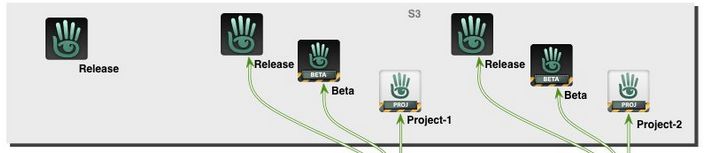
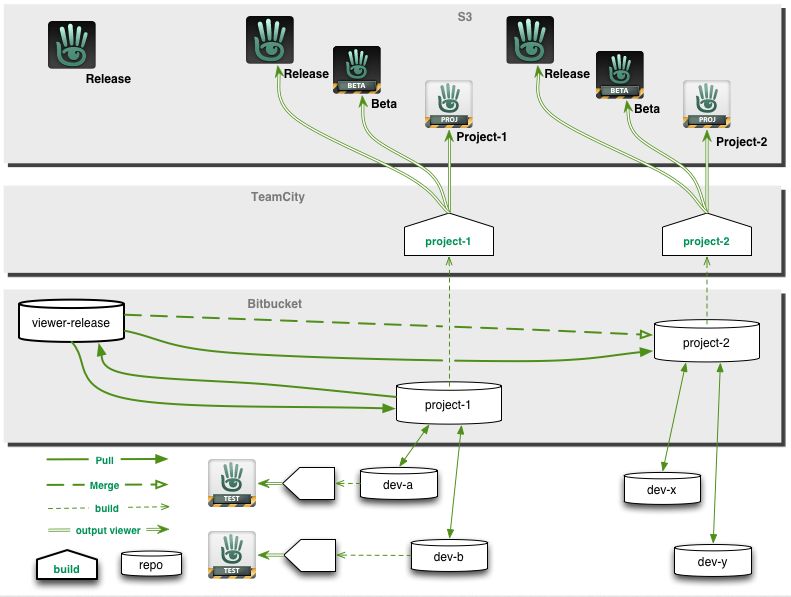
Part of the official viewer release process (see below for the full diagram). Credit: Linden Lab
Many of us are familiar with the Lab’s approach to viewer and simulator releases – but equally, many only have a passing understanding of what goes on. This was something reinforced to me as a result of in-world conversations I’ve had recently, so I thought I’d reach back to 2013, when I provided a guide to the viewer release process (see: New viewer release process implemented), and use that and some additional notes on simulator releases to try to provide and easy-to-follow overview of how the Lab manages official viewer releases and simulator updates.
The Viewer Release Process
Overview
Note: just to avoid any confusion, please remember these notes only apply to the official Second Life viewer supplied by Linden Lab (and which from the last Lab-derived comment on numbers (late 2016) I have could account for approximately 15%-20% of user usage).
The current viewer release process was introduced in July 2013 as a result of a number of issues occurring in 2012 that combined to produce a severe bottleneck in the Lab’s ability to make timely viewer releases and deploy everything from bug fixes to major new releases.
With it, the Lab can produce multiple versions of the viewer in parallel with one another, some of which may initially follow their own development / testing path independently of other versions, but which can, when they are ready, be tested for their suitability for promotion as the next de facto release viewer through direct monitoring of their performance and through comparison of that performance, one to the next.
The Viewer Release and Integration Process is intended to allow viewers to be better developed tested and prepared for release in parallel. Image credit: Linden Lab
Types of Official Viewer
The process achieves this by allowing viewers to be developed on a rolling basis, defined by project internally, and which eventually appear for public use in one of two “pre-release” versions, as it were: Project viewers and release candidate viewers.
Project viewers are generally viewers dedicated to a single new feature, capability or function within the viewer. They are essentially “first look” / experimental viewers designed to expose new features and capabilities (and any new viewer UI that might come with them) to users interested in them, who can then test and provide feedback (including bug reports) to the Lab, allowing the feature or capability to be refined and improved.
Release candidate (RC) viewers are viewers considered to be close to the point where they can be promoted as the de facto release viewer.
They might be former project viewers that have progress to a point where the Lab is considering formally releasing them, OR they might start as RC viewers in their own right without ever having been a project viewer.
It is these RC versions that allow the Lab to gather statistics on the behaviour of individual viewers in order to help determine their suitability for promotion to full release status.
Broadly speaking, whether a viewer starts its public life as a project viewer or a release candidate viewer depends on what it contains. A viewer containing a major new feature – such as Animesh, Bakes on Mesh or EEP, for example – will generally make an initial public appearance as a project viewer for the reasons noted above. Maintenance releases, hot fixes, and things like updates to the viewer rendering system will – in general – tend to appear directly as release candidate viewers.
No viewer ever goes directly from project status to a full release – all project viewers will go by way of progressing first to being a release candidate, then being judged as ready for promotion to full release status.
Where to Find Them and How They are Handled
Both types of viewer appear on the Alternate Viewers Page, but how they are handled is somewhat different – and this is one of the important aspects in understanding them.
Project viewers are largely “independent” viewer versions.
Users must opt to visit the Alternate Viewers Page and select, download and install one.
Each project viewer installs into its own dedicated location (although they share the same settings files and cache locations as the release viewer), so they can be run alongside the release version of the official viewer, if installed.
Release candidate viewers are considered as “alternative release viewers”.
Release candidates are assigned a “cohort number” the Lab believes will present a reasonable cross-section of users.
When a release candidate viewer is made available, the system automatically triggers the viewer update process among randomly selected users on the current official release viewer, moving them to the release candidate.
When the cohort number for a release candidate viewer is reached, it is no longer made available for automatic download / installation.
Once a user has been selected to receive a release candidate version of a viewer, they will continue to receive updates for that particular RC on a mandatory basis until it is promoted to release status – they will not be selected to receive other RCs (or updates to others RCs) until the RC they have been using in promoted to de facto release status.
The reason for doing this is to allow the Lab to monitor the performance of individual viewer release candidates and capture data on things like performance, stability, crash rates, etc. This data, together with bug reports, etc., filed by users is then used to determine an individual RC’s suitability for promotion to release status.
Alternatively, users can opt to manually install any RC viewer that interests them directly via the Alternate Viewers Page. Again, by default, any RC viewer installed in this way will overwrite any existing installation of the official release viewer (unless an alternative installation location is provided by the user), and the user will thereafter receive updates for that RC.
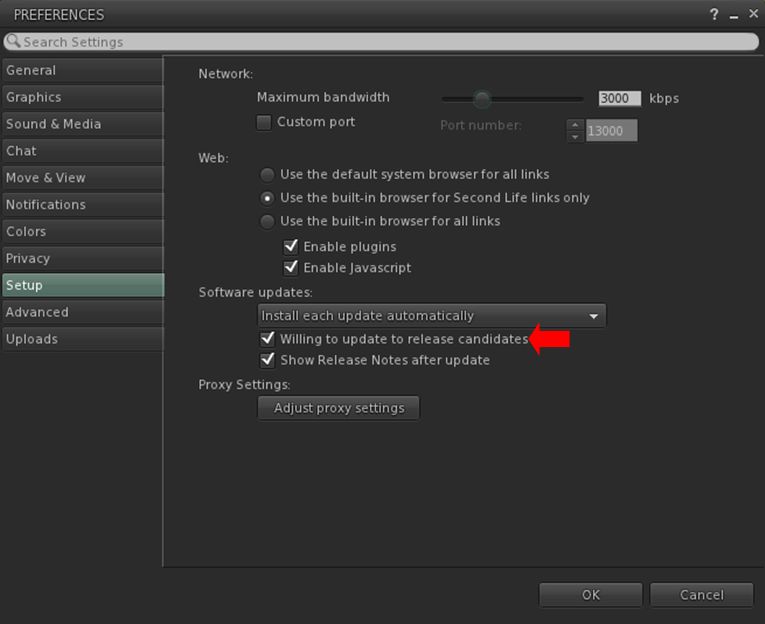
Note that users who do not wish to have RC viewers installed on their system can, if they wish opt out of the release viewer update loop from within their viewer, as shown below.
Users of the official viewer who do not wish to be involved in testing any release candidate viewers can opt out of the selection / download process by unchecking the Willing to Update to Release Candidates option in Preference. Note that having the option checked does not mean you will be subject to RC testing: users for each RC issued by LL are selected entirely at random from the poll of official viewer users.
How are Viewers Progressed to Release?
As noted above, project viewers follow defined path: they initially appear as a public project viewer, and then may go through multiple iterations of improvement, updates, added capabilities, bug fixes, etc., before they reach a point where the Lab determines they are ready for upgrade to release candidate status.
Release candidate viewers are more closely monitored by the Lab through their various cohorts, whilst similarly being subject to multiple iterations designed to remove bugs, help with performance, address further perceived shortfalls in functionality, etc., based on things like bug reports and feature requests from users.
While this approach means that multiple viewers can be developed, tested and readied for promotion to de facto release status, it often means that at any one time, there are several RC viewers vying for release. When this happens:
The Lab will select a viewer or promotion based on a number of factors, including stability, performance, number of remaining bugs / issues, the potential impact of said bugs issues, the urgency with which an RC needs to be released (e.g. an “late breaking” RC with a hot fix could well be promoted ahead of other RCs that have been available for longer) and so on.
Generally speaking, the Lab tries to promote no more than one RC to de facto release status every two weeks. However, depending on the overall state of individual RC viewers, the period between promotions can be longer.
Once a release candidate has been promoted to release status, the first order of business is to merge the code it contains into all over available RC viewers and then monitor them to see how they behave when built using the “new” release code, a process that also feeds back into determining which of them might next be promoted.
What this all Means in Summary
Simply, put, that official viewer and viewer updates can be produced on a rolling basis, with some starting as project viewers, others directly as release candidates, with the latter being objectively monitored both individually and in comparison with one another to determine which is best suited to become the next de facto release viewer.
Logos representative only and should not be seen as an endorsement / preference / recommendation
Updates for the week ending Sunday, October 6th
This summary is generally published every Monday, and is a list of SL viewer / client releases (official and TPV) made during the previous week. When reading it, please note:
It is based on my Current Viewer Releases Page, a list of all Second Life viewers and clients that are in popular use (and of which I am aware), and which are recognised as adhering to the TPV Policy. This page includes comprehensive links to download pages, blog notes, release notes, etc., as well as links to any / all reviews of specific viewers / clients made within this blog.
By its nature, this summary presented here will always be in arrears, please refer to the Current Viewer Release Page for more up-to-date information.
Note that for purposes of length, TPV test viewers, preview / beta viewers / nightly builds are generally not recorded in these summaries.
Official LL Viewers
Current Release version 6.3.1.530559, formerly the Umeshu Maintenance RC viewer, dated, September 5th – No change.
Release channel cohorts:
Love Me Render viewer, version 6.3.2.531296, released on September 30th.




 Inara Pey: Living in a Modemworld