Logos representative only and should not be seen as an endorsement / preference / recommendation
Updates from the week ending Sunday, May 9th
This summary is generally published every Monday, and is a list of SL viewer / client releases (official and TPV) made during the previous week. When reading it, please note:
It is based on my Current Viewer Releases Page, a list of all Second Life viewers and clients that are in popular use (and of which I am aware), and which are recognised as adhering to the TPV Policy. This page includes comprehensive links to download pages, blog notes, release notes, etc., as well as links to any / all reviews of specific viewers / clients made within this blog.
By its nature, this summary presented here will always be in arrears, please refer to the Current Viewer Release Page for more up-to-date information.
Note that for purposes of length, TPV test viewers, preview / beta viewers / nightly builds are generally not recorded in these summaries.
Official LL Viewers
Release viewer: Eau de Vie Maintenance viewer, version 6.4.18.558266, dated April 23, promoted April 29 – no change.
Content-wise, this was a short meeting, many of the usual attendees being absent, perhaps caught out by CCUG meetings over the last few months only taking place every other week, and this one following directly after Week #17’s meeting.
SL Viewer
There have been no further updates to the current crop of official SL viewers since the release of the Project UI viewer (see: Lab issues Project UI viewer aimed at new users), leaving the pipelines for the week as follows:
Release viewer: Eau de Vie Maintenance viewer, version 6.4.18.558266, dated April 23rd, promoted April 29th.
Release channel cohorts:
Project UI viewer, version 6.4.18.558718, issued May 3rd.
Love Me Render (LMR) 5 viewer, version 6.4.18.558365, dated April 22nd.
Maintenance 2 RC viewer – Fernet, version 6.4.18.558441, dated April 21st.
Project viewers:
Legacy Profiles viewer, version 6.4.11.550519, dated October 26th.
Copy / Paste viewer, version 6.3.5.533365, dated December 9th, 2019.
Project Muscadine (Animesh follow-on) project viewer, version 6.4.0.532999, dated November 22nd, 2019.
360 Snapshot project viewer, version 6.2.4.529111, dated July 16th, 2019.
General Viewer Notes
The current RC viewers – LMR 5 and Maintenance 2 – are currently awaiting new versions following their merges with the current release viewer code base. There has been a delay in testing due to members of the the lab’s viewer QA team being on vacation.
LMR 5 is now considered “complete”, so following the code merge, should be in a strong position to be promoted as the next de facto release viewer.
LMR 6, the next rendering focused viewer is still in development. So far a dozen bugs are being addressed to be a part of this viewer, and more are being added to the list. As such, it’s liable to be a while before this viewer appears as an RC.
It is hoped the Apple notifications fix viewer and the updated Voice viewer that helps with expected Voice drop-outs both available in the very near future.
Documentation and Resources
The core of this meeting focused on a a discussion about where “accurate” avatar skeletons can be obtained, as the current resources appear out-of-date (e.g. the Fitted Mesh resource page indicates the skeletons in the supplied link are pre-Bento), whilst the Bento page indicates one skeleton may be “broken”.
Whilst there are alternate reliable sources for skeleton information (e.g. via Machinimatrix), these are not always resources newer users may be comfortable using as they “are not Linden Lab” – even though the people responsible for them worked closely with other users and the Lab on projects such as Bento and helped define the Bento skeleton.
This highlights a particular issue in not having up-to-date “official” resources on matters such as content creation – which may in turn be a contributing factor in the development of poorly-made / poorly-optimised SL content. Two problems here are that:
LL does not have the resources to manage and maintain the entire SL wiki (and in fact there had been murmurs in the past about consideration being given to deprecating the wiki in favour of other sources, although this is currently not the case).
Due to issues of “bot griefing”, access to editing the SL wiki had to be restricted several years ago “pending” improved tools to prevent such events – but this has yet to happen. Therefore, it is much harder for users to help maintain the wiki, as tended to be the case in the past.
In Brief
Account / inventory syncing between Agni (the Main grid) and Aditi (the Beta grid) remains broken. No ETA on when this may be resolved, other than “watch the status page“.
The following notes cover the key points from the Web User Group (WUG) meeting, held on Wednesday, May 5th, 2021. These meetings are generally held on the first Wednesday of the month, with dates and venue details available via the SL public calendar. A video of the meeting, courtesy of Pantera, can be found at the end of this article.
General post-Uplift internal work is still continuing, but the end is coming into sight. Most of this work in non-user visible.
There is also some back-end / infrastructure changes in progress, which are again not visible to users, but are intended to “help in the future” in terms of deploying new feature, etc.
Housekeeping work on tools related to the lab’s management of the Marketplace and other web properties has been continuing.
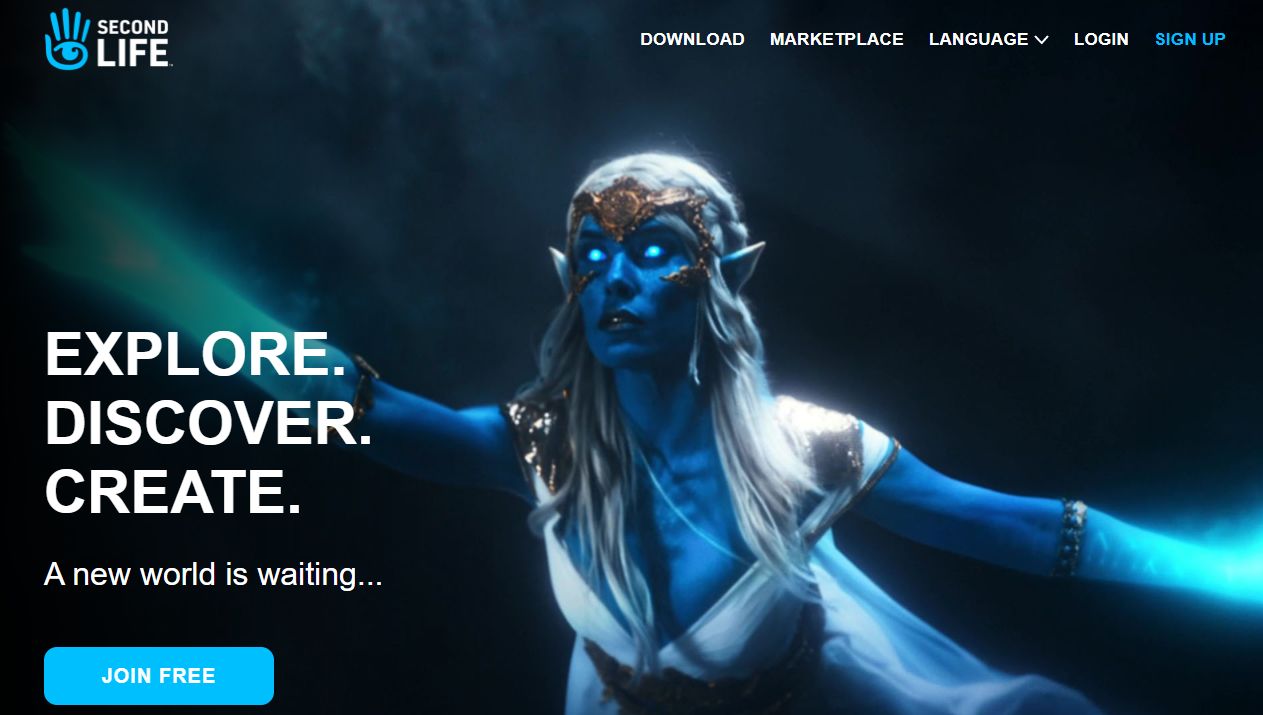
The revamped secondlife.com splash / join / login screen was revamped in April, and has been receiving a lot of (not always positive) feedback on the use of a person, rather than an avatar. My personal take on this is that:
a) The image is taken from the upcoming broadcast advert for Second Life, and thus is part of a broader strategy rather than a standalone decision, which some people seem to be missing.
b) Why not use a “real” person? After all, a good part of Second life is about setting your imagination free, so to me the image speaks to that and offers an enticement to click to find out more.
The secondlife.com splash page was updated in April, gaining a fair amount of attention in the process.
An issue with people receiving e-mail in a foreign language if they’d previously followed a link to an MP listing in that language has been fixed.
The issue of people being randomly logged-out of the Marketplace whilst browsing, trying to make purchases, etc., should now be fixed.
The April “limited Edition” Last Names (the OwO and UwU names) have been removed from the Last Names list. These apparently proved to be very popular, so the Lab is considering more such “limited offers” on names with a specific focus (these two having appealed to the furry community in particular).
The What’s Hot part of the Destination Guide has been revised so it actually lists places where avatars are actually at when the section is being browsed.
Keira Linden is putting together a plan for Marketplace updates based on feedback from merchants / users. This work will not be immediate, but will be commencing at some point in the (hopefully) not-too-distant future. Those with specific Marketplace feature requests in mind are asked to check the Jira before filing, as a fair number are already recorded and Accepted.
The App still did not make it back to Apple in April for their testing as a result of LL’s QA finding more issues that needed to be addressed internally.
They have not received a lot of TLC since they, and it is hard to determine how well they are used (I did provide a short tutorial on setting them up in 2018 after some updates had been made – see:Tutorial: creating Second Life Place Pages, for whatever that is worth).
There is interest at the Lab in probing hold well they are used, and how they might be improved (one issue with Place Pages is that while they have a search capability of their own, they aren’t actually referenced by any of the other common search tools, such as web search in the viewer, which tends to limit their visibility). Some suggestions are made in chat during the meeting.
In Brief
Names Changes / Last Names: it is possible that thought may be given to how the Premium member Name Changes / Last Names capability might be enhanced.
No further updates on Premium Plus, other than it is still percolating in the background.
The question was asked why LL originally stopped allowing last names in SL.
The short answer is that studies of users sign-ups revealed that having to pick a first and last name as part of the sign-up process resulted in a high volume of potential users failing to complete the sign-up process – possibly because people didn’t like being limited in their choice of last name.
The decision was therefore taken to remove the last name selection process and introduce Display Names, they idea being people could quickly sign-up with an account name of their choice, and then use Display Names to freely create their preferred avatar name.
OK, so it wasn’t quite such a short answer…
Further language localisation of properties such as the Marketplace is being considered.
The ability for a single account to hold multiple Marketplace stores has been the subject of multiple requests over the years (see feature request BUG-226927, for example). Whilst not on the Marketplace roadmap, Keira indicated a willingness to explore the idea.
Jira status “Ready for Development” – this started appearing in a swath of bug reports and feature requests fairly recently (both those in progress and those that many have been completed). It appears to be related to a issue with the cloning tool LL uses when producing a duplicate of a report from the public Jira to their internal Jira, and does not indicate a new workflow status for any given bug / request.
In fact, some reports said to be displaying a “Ready for Development” status appear to have reverted to the more usual “Accepted” in the last 24 hours.
The following notes were taken from the Tuesday, May 4th, 2021 Simulator User Group (SUG) meeting.
Server Deployments
At the time of writing, there had been no server deployment thread available for review.
Tuesday, May 4th saw simulators on the Main SLS channel updated with server maintenance package 558586, comprising internal fixes.
There does not appear to be any RC channels deployment set for Wednesday, May 5th.
Week #19 (commencing Monday, May 10th) should see an RC deployment that will likely include new LSL functions – its not clear if these are the llOrd, llChar and llHash options Rider Linden spoke about a few weeks ago.
Love Me Render (LMR) 5 viewer, version 6.4.18.558365, dated April 22nd.
Maintenance 2 RC viewer – Fernet, version 6.4.18.558441, dated April 21st.
Project viewers:
Legacy Profiles viewer, version 6.4.11.550519, dated October 26th.
Copy / Paste viewer, version 6.3.5.533365, dated December 9th, 2019.
Project Muscadine (Animesh follow-on) project viewer, version 6.4.0.532999, dated November 22nd, 2019.
360 Snapshot project viewer, version 6.2.4.529111, dated July 16th, 2019.
In Brief
Some private regions / estates appear to be undergoing random restarts on a roughly weekly basis and outside of the normal deployment rolling restarts. It’s not clear why this should be, but outside of verbal reports at the SUG meetings and forum comments, no JIRA has been raised as yet.
BUG-230677 “llSetAgentEnvironment transition doesn’t work” is an EEP issue that may be related to how the code handles “partial” sky settings on transitions. Further investigations are required.
Setting region chat range limits: this is a project that has been in progress for around a year (see feature request BUG-230677, and also my May 15th, 2020 TPV Developer meeting notes and notes from the May 26th, 2020 SUG meeting). Support for the capability has been in the simulator code for some time, but the viewer-side support is pending UI updates.
As has been indicated in various discussions and statements from the Lab – such as the Above the Book sessions with Grumpity, Brett and Patch linden at this year’s VWBPE event, one element of Second Life that the Lab is focused on is the new user experience.
This work involves various projects, including the on-boarding process and changes to the viewer to help new users get to grip with things, and on Monday, May 3rd, Alexa Linden announced the release of the Project UI viewer which includes a range up updates specifically aimed at new users.
According the Alexa’s forum post, the new viewer includes three core areas of update:
A new menu option called Avatar, and streamlined / revised right-click avatar context menus.
Improvements to the Inventory panel.
An updated Places floater.
However, there’s actually more to this viewer than the forum post reveals, so here’s a run-down of some of the documented changes and some of those that are missed out from the forum post – but which could actually be of greater interest to established users.
The Avatar Menu and Right-Click Avatar Context Menus
This is perhaps the most significant update to in the viewer. To quote from Alexa’s post:
Making SL easier for newcomers to learn can improve the chances that they will become long-term Residents. Growing the Resident community benefits everyone — more people to meet, more participation in events, and more commerce. The changes described below are the first batch of what we hope will be an ongoing series of usability improvements.
Avatar menus
With this release we introduce the Avatar top-level menu which brings together all avatar tools in one place. One of SL’s most important features is now more visible to newcomers. You’ll notice the avatar right-click menu has been streamlined as well.
Have you ever struggled to select an avatar attachment? It’s inside your avatar, it’s transparent, or it’s a mesh attachment that you just can’t grab. You can now touch, edit or remove an attachment using right-click from all Avatar windows and Inventory.
The Avatar menu and the revised right-click context menus are show below:
The new Avatar menu sits between the Me and Communicate menus brings together all of the frequently used avatar tools (l). Centre: the revised avatar right-click context menus seen when touching your avatar (top) or an attachment (bottom), and how they compare to the current versions of the menus (r)
Inventory and Places Updates
I’ve not a lot to say on the Inventory floater updates, so will leave that to Alexa’s forum post. The changes to Places and how landmarks are handled, again as specified in the blog post, are also straightforward, although there are a few additional points to note:
The new panel also sees the gear button moved to the top of the panel, and provides a new set of fairly self-explanatory options:
Teleport.
View.
Show on Map.
Copy SLurl.
The original Expand and Collapse options from the gear button have been moved to a separate drop-down menu button, with the delete option moved to a its own Trash button.
The Project UI viewer’s updated Places panel (l) and the release version
Other Menu Updates
The new Avatar Menus means there have been revisions to the Me and communicate menus as well, with avatar-related options (such as the Choose and Avatar option moving from Me to Avatar (and renamed Complete Avatars).
The revised Me and Communicate menus (with the blue bands) compared to the current release viewer – click for full size, if required
As well as these, there are other small tweaks – World Menu now has a My Linden Home … option. Clicking this will open up the in-viewer browser and take the user to the Linden Homes page:
Premium members with a Linden Home will see the page relating to their home.
Premium members who do not have a Linden Home and Basic Members will see the Linden Home selection page (and Basic members will go forward to the Premium sign-up page).
Note also, that using this menu option (as with others in the viewer that use the built-in browser to access Second Life web pages) may trigger single sign-on, and require you log-in to the SL web properties.
EEP Updates
One of the biggest complaints with the Environment Enhancement Project (EEP) has been use use of trackball options to position the Sun and Moon, with many voicing their preference for “a slider like Windlight”. To address this, the UI Project viewer implements two sliders for positioning the Sun and two for the Moon across all of the EEP settings floaters. These are:
Azimuth – which might be thought of as the east / west position of the Sun or Moon (technically, azimuth is more than this, but it’ll do for these notes).
Elevation – the position of the Sun or Moon over or under) the horizon, relative to azimuth.
These sliders are tied to the Sun / Moon movement using the trackball systems, allowing both to be used as preferred.
The Sun & Moon tabs on Fixed Sky and the Day Cycle floaters now include Azimuth and and Elevation sliders for positioning the Sun / Moon, and similar sliders can be found on Personal Lighting
Rapid-Fire Feedback
Overall, this is a reasonable set of changes; they do enough to streamline things in places without being a potential source of confusion for established users; the changes are for the most part logical – although I do have a couple of reservations.
On the plus side, bringing together the majority of avatar tools into a single menu makes a lot of sense. But I do wonder if having menus called “Me” and “Avatar” side-by-side might not be a little confusing for new users (e.g. “Huh? Wassa difference? Why two menus for my avatar?”). The use of the “avatar” menu name is liable to cause a small amount of consternation with Firestorm, as that viewer already use it in place of “me”, but c’est la vie.
I was also surprised to see that the Linden homes page has yet to be updated for Basic members – it still features photos and a video of the old 512 sq m Linden Homes. Given the newer Homes are more attractive (and have now been with us for a while), and the aim of this viewer is to help make engagement with SL more attractive to new users, linking to information that is pretty much out-of-date and doesn’t actually reflect the more common Premium offering seems a little disjointed.
Elsewhere, I like the ability to touch / select attachments – particularly worn mesh – made more accessible. Catznip introduced such a capability a few years ago, and I can’t help but wonder if seeing it now in the official viewer might be the result of a code contribution from that viewer.
It’s also good to see the Lab respond to requests with EEP, and hopefully the new sliders will help those who find the trackballs a little confusing – although I don’t doubt the labelling might cause a little confusion (“why not east and north?”).
I understand the updates to the learning / social islands will be coming along in summer – although I’ve no idea if these will see further tweaks to the viewer as well. as well. In the meantime, it’ll be interesting to see how this Project UI viewer develops over the coming months.
Logos representative only and should not be seen as an endorsement / preference / recommendation
Updates from the week ending Sunday, May 2nd
This summary is generally published every Monday, and is a list of SL viewer / client releases (official and TPV) made during the previous week. When reading it, please note:
It is based on my Current Viewer Releases Page, a list of all Second Life viewers and clients that are in popular use (and of which I am aware), and which are recognised as adhering to the TPV Policy. This page includes comprehensive links to download pages, blog notes, release notes, etc., as well as links to any / all reviews of specific viewers / clients made within this blog.
By its nature, this summary presented here will always be in arrears, please refer to the Current Viewer Release Page for more up-to-date information.
Note that for purposes of length, TPV test viewers, preview / beta viewers / nightly builds are generally not recorded in these summaries.
Official LL Viewers
Release viewer: Eau de Vie Maintenance viewer, version 6.4.18.558266, dated April 23, promoted April 29 – NEW.
Release channel cohorts:
No updates.
Project viewers:
Project UI viewer, version 6.4.18.558718, issued May 3rd..





 Inara Pey: Living in a Modemworld