The natural beauty of oYo’s art in Second Life

Club LA and Gallery: oYo

Opening on Saturday October 13th, 2018 on the mezzanine level at Club LA and Gallery, curated by Fuyuko ‘冬子’ Amano (Wintergeist) is an exhibition of photography by  oYo (Oyona). Offering a mix of landscape and avatar studies, it encompasses a sublime sense of “natural” photography that has enormous depth  and, in the case of many of the images, considerable narrative substance.

For the exhibition, the mezzanine area has been converted so as to give a feeling of being outdoor – almost somewhere very close to the sea or up on moorland. Open sky forms the walls and ceiling, while the floor is a mix of scrub grass and shrubs through which sharp tongues of rock poke forth.

Club LA and Gallery: oYo

Within this space 22 photographs are arranged, mixing monochrome with full colour with the majority presented in softer tones and finishes that adds an extra dimension to them. What is striking about many of the photos is oYo’s use of camera placement and angle; the construction of many of the avatar-centric images are such that while carefully composed and comported, they actually have the sense of being spur-of-the-moment shots, pictures captured through happenstance rather than design and pose.

This is immediately evident on arriving on the mezzanine. To the left of the entrance sit What Do You Expect?, Take Care and Emo (all seen in the top image). All three have been composed to present a specific focus and emotional response. But through the use of lighting, shadow, angle, soft focus, it is as if each was caught entirely by chance: a camera being used and raised in mid-conversation or when the subject was least expecting it.

Club LA and Gallery: oYo

Thus the story within each of them becomes broader, encompassing the “person behind the lens” as much as the subject and setting: what was going on immediately before the picture was taken? What words were being exchanged? were both parties in Take Care aware that this was perhaps the last photo one would take of the other, a natural falling of shadow as the image was taken now serving to add to the stirring of emotion and memory whenever the taker of the photograph looks at it?

The landscape photos offered in the exhibition demonstrate a similar seasoned and skilled eye for composition, colour, tone and framing, all of which generates a narrative well beyond the photo itself. This is again evident from the very first image seen on entering: Le Rivage (again seen in the top image, on the left). A marvellous close-up of cormorants offered in monochrome and soft focus, the framing perfectly captures the moment at which some of the birds start to demonstrate agitation, wings spreading perhaps aware of the not-too-distant photographer. But so does it bring to mind the story of how it came to be taken: the careful manoeuvring downwind of the birds, edging over sand and rock or through wet marsh, constantly aware that push things too far, and the birds will take flight; then the use of a telephoto lens, perhaps crouched uncomfortably…

Club LA and Gallery: oYo

Time and again this storytelling comes to the fore in so many ways: the happy-go-lucky, out-of-the-window “holiday” shot of Saint-Martin, to the lonely beauty and pathos  – again both in front of and behind the lens of Tout Refaire (second image from top in this article).

These are all images that are rich in life and emotion as well as offering an unforced guide to the art and artistry of photography. Most definitely an exhibition to be seen. The formal opening will take place at 13:00 SLT on the afternoon of Saturday, October 13th, and the exhibition itself should be open through the first half of November.

SLurl Details

Alo’s Black and Colours in Second Life

DiXmiX Gallery: Black and Colours

Opening on Friday, October 12th, 2018 at 12:00 noon SLT is a new installation by Alo (Aloisio Congrejo). Black and Colours is being hosted in The Womb, the recently revamped exhibition space at DiXmiX Gallery. And I have to say, that it is a curious piece.

Lacking liner notes from the artist, the installation is a multi-faceted piece entirely open to interpretation. Within the darkened hall is a mix of 2D the 3D elements, some of which are presented more-or-less as “traditional” photos; others appear to be 3D images offered 2D images; some are strongly abstract in nature while others mimic a polarisation approach similar to that found used by 3D movies to present what appears to be 2D art in 3D. All of which adds up to a richly diverse installation.

DiXmiX Gallery: Black and Colours

As might be expected from reading the title of the installation, there is a deliberate play through between black and the use of colours – most notably red and yellow, together with that other neutral – white. This is itself highly effective in drawing the eye into the installation, while the linear aspect in much of the art adds a geometric dimension to the entire installation that allows the wall mounted elements (together with the figures that might be close to them) to both exist independently to one another, and yet also be bound together by the white-on-black pattern of lines on the floor.

This subtle linking may well not be initially apparent, the eye perhaps initially being drawn to a colourful, strongly abstract free-standing scene within the hall. At first looking like paper shapes patterned in swirls and lines of black-and-white or red-and-black, skewered by red, yellow and black pins forced into the floor, these shapes are transformed by camming around them into  what might be dancing couples caught in a complex set of tangos performed to unheard music.

DiXmiX Gallery: Black and Colours

This abstract element is bookended on either side along the length of the hall by Alo’s photo images, which I confess to finding the most eye-catching. Furthest from the floor sculpture is a series of enticing white-on-black images of a near-naked woman. Marvellously lit, this series of images looks almost 3D in its execution, each of the images emphasising a different element of her pose: full body, booted legs, gloves arms with turned-away head between… In their midst is a further version of the image set behind 3D elements, all of which combine to suggest – from a distance, 2D art projected as a 3D piece.

The other display is a subtle and complex set of images of a woman’s head which I strongly recommend camming across slowly to fully appreciate them. Each is a layered construct, designed to mimic a polarised 3D effect, something which comes into focus (quite literally) as the camera faces them and glides from one side to the other. Not only does this highlight the “polarising” element, it also brings forth the subtle shift in colour tones used within the images.

DiXmiX Gallery: Black and Colours

I confess I have absolutely no idea how to interpret or quantify Black And Colours – or even determine if it needs interpreting in any way; I also admit there are elements to the piece that escape my ability to quantify. But this does not diminish  Black and Colours in any way; it simply means this is a piece very open to personal interpretation throughout, and thus an installation that should be witnessed first-hand.

SLurl Details

2018 SL UG updates #41/2: CCUG summary

A simple 5-minute (including uploading the textures) demo of EEP, replacing the Sun and Moon with Mars and Jupiter respectively, then adjusting their respective sizes &; putting them in the same quadrant of the sky

The following notes are taken from the Content Creation User Group (CCUG) meeting, held on Thursday, October 11th, 2018 at 13:00 SLT. These meetings are chaired by Vir Linden, and agenda notes, meeting SLurl, etc, are usually available on the Content Creation User Group wiki page.

Environmental Enhancement Project (EEP)

Project Summary

A set of environmental enhancements, including:

  • The ability for region / parcel owners to define the environment (sky, sun, moon, clouds, water settings) at the parcel level.
  • New environment asset types (Sky, Water, Day that can be stored in inventory and traded through the Marketplace / exchanged with others.
    • Day assets can include four Sky “tracks” defined by height: ground level (which includes altitudes up to 1,000m) and (optionally) 1,000m and above; 2,000m and above and 3,000m and above, plus a Water “track”.
  • Experience-based environment functions
  • An extended day cycle (e.g a 24/7 cycle) and extended environmental parameters.
  • There are no EEP parameters for manipulating the SL wind.
  • EPP will also include some rendering enhancements  and new shaders as well (being developed by Graham Linden), which will allow for effects such as crepuscular rays (“God rays”)
    • These will be an atmospheric effect, not any kind of object or asset or XML handler.
  • The new LSL functions for finding the time of day according to the position of the windlight Sun or Moon have been completed, and are more accurate than the current options.
  • EEP will not include things like rain or snow.
  • It will still be possible to set windlight local to your own viewer.

Resources

Current Status

  • Testing still in progress on Aditi, with test parcels for users still available.
  • Test region: Aditi EEP Testing (secondlife://Aditi/secondlife/EEPTesting/128/128/23).
    • Parcels cost L$1, but as Aditi funds are provided by Linden Lab, you are not paying for anything with your own money.
    • You MUST be using the EEP test viewer why trying to purchase a parcel on the test region – if you are using any other viewer, your purchase will time out.
  • Feedback via Jira (bugs and requests) and / or through comments on the forum feedback thread.
  • An update to the project viewer is expected soon.
  • Graham Linden is continuing to work on the shader support.

Bakes On Mesh

Project Summary

Extending the current avatar baking service to allow wearable textures (skins, tattoos, clothing) to be applied directly to mesh bodies as well as system avatars. This involves viewer and server-side changes, including updating the baking service to support 1024×1024 textures, and may in time lead to a reduction in the complexity of mesh avatar bodies and heads.

This work does not include normal or specular map support, as these are not part of the existing Bake Service, nor are they recognised as system wearables.

Resources

Current Status

The update to the Bake Service to support 1024×1024 textures has run into problems. Anchor Linden is working on fixes for the issues, and once these have been implemented then the viewer should receive and update as well.

Animesh

Project Summary

The goal of this project is to provide a means of animating rigged mesh objects using the avatar skeleton, in whole or in part, to provide things like independently moveable pets / creatures, and animated scenery features via scripted animation. It involves both viewer and server-side changes.

Resources

Current Status

  • The RC viewer updated on October 8th to version 6.0.0.520211. It had been hoped with would be the last RC version, but issues mean this will not be the case.
  • Performance issue:  BUG-225584 and forum thread. This is related to the new dynamic bound box used with Animesh. Vir is working on the issue, and Beq Janus from the Firestorm team has been involved in investigations as to the degree of potential impact. There have been one or two sensationalist blog headlines – best to read the forum thread and the bug report.
    • Part of the thread has spun away into handling attachments on Animesh. While this is not a part of the initial Animesh release, hopefully the discussions can be split off into their own thread.
  • Imposters issue: Animesh objects can imposter independently to avatars. This can result in an avatar rendering normally when seen by others, but any attached Animesh being impostered (or possibly vice-versa).
    • This is being fixed so that an Animesh attachment will now have the same imposter setting as its parent avatar. The update will be in the next RC update.
  • There is a Mac-specific graphics issue that can result in Animesh objects vanishing from the scene when crossing a region. This is also being worked on.

Animesh and the Marketplace

  • There has been some preliminary discussions in the Lab on how to make Animish distinguishable / locatable on the Marketplace (e.g. categories, etc.).
  • No decisions as yet, but the Lab is interested in feedback at CCUG meetings or through the Animesh feedback thread.
  • Problem here is the risk of confusion cross-over. Do trees animated via Animesh require their own sub-category under “Animesh”, should they have  an “Animesh” style sub-category under trees and shrubs (itself already a sub-category of Home and Garden >: Landscaping)?
    • There’s also the question of what to call an over-arching category: “Animesh” is a truncation of “Animated Mesh”, and has been used within the project, etc., but those unfamiliar with the project might be confused by it; so might “Animated Mesh” be preferable? A problem here is “Animated Mesh” itself is a little ambiguous in meaning.
  • Triangle counts have been suggested as an alternative, but this requires some form of automated count system for items uploaded to the MP, which in turn would require significant changes to the MP tools.
    • Even if a tri count could be auto-generated, would people take more notice of it or a given LI?

In Brief

  • A portion of the meeting was taken up with Blender / Maya specific conversations on bone placement for making taller avatars or for use in things like snakes and ropes.
  • There was some discussion on altering the axis rotation in the mesh uploader to match the likes of Maya and Substance Painter. As Vir noted in the meeting, there are an array of potential improvements that could be considered for the uploader – but as yet, a specific project hasn’t been defined to it – and any such project would likely be open for creator input.
  • Support for additional material maps: there has been various discussions (in the forums, etc), but SL supporting additional material maps – roughness, metalness, displacement, etc. Nothing official is on the table from the Lab,  but earlier in 2018, Kitty Barnett did some experimenting with displacement maps with the Catznip viewer – although this should not be taken to mean this is something that will be supported by Catznip or other viewers.
    • Vir hopes that Graham Linden will be able to give some thoughts on expanding material maps support in the future CCUG meeting.
Displacement maps, experimented with by Kitty Barnett earlier in 2018, might – if they could be implemented – add further depth to surfaces. For example: top left – a prim wall with a brick texture; top right: a prim wall with a texture and normal map applied, as we’re used to seeing in Second Life – some depth is added to the cement grouting between the bricks etc. Bottom centre: the same prim wall with the same texture added, but now using a displacement map: note the greater apparent depth between bricks and cement grouting, etc (highlighted).


SL Marketplace update: wish lists and favourites

via Linden Lab

After  pause of a couple of weeks when a last-minute hitch held up deployment, the latest Marketplace update rolled out during week #41, with the Lab blogging about it on Wednesday, October 10th, 2018.

It’s an update that sees a trio of new features added to the MP, all of which have been the subject of numerous requests – wish lists and favourites / follows. The update also includes a number of bug fixes.

For this article, I’m looking purely at the wish list and favourites options:

  • Wish lists:
    • Add items you’re not ready to buy to your personal wish list.
    • Make purchases from your wish list.
    • Share your wish list with friends (so they can buy you rez day gifts, etc.).
  • Favourites:
    • Add favourite items to a personal list for easy relocation.
    • Make purchases from your list.
    • Add favourite products to your wish list.
    • Add favourite stores to your list (use them to check on new releases more easily).
    • View one of your favourite stores from the list.

Adding Items to Your Wish List and Favourites Lists

Individual items are added to your wish list   / favourites list by viewing them in the Marketplace and then click on the Add to Wishlist or Add to Favourites options, located on the right of the item display.

Individual items can easily be added to your personal wish list or favourites list

Add A Store to Your Favourites

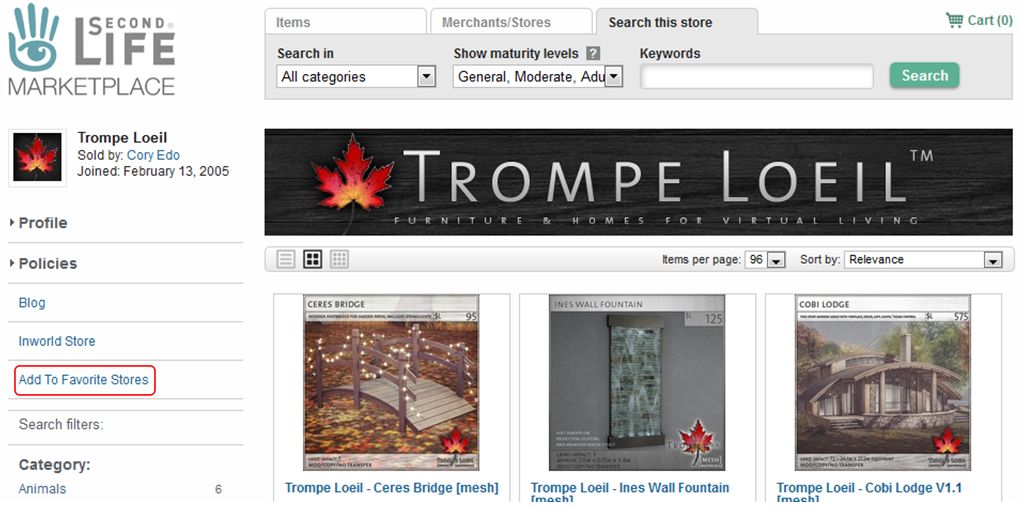
To add a store to your favourites, open the store’s main page in the Marketplace, and click the Add To Favourite Stores option on the left of the store’s main page.

Adding a Marketplace store to your Favourites

Viewing Your Favourites

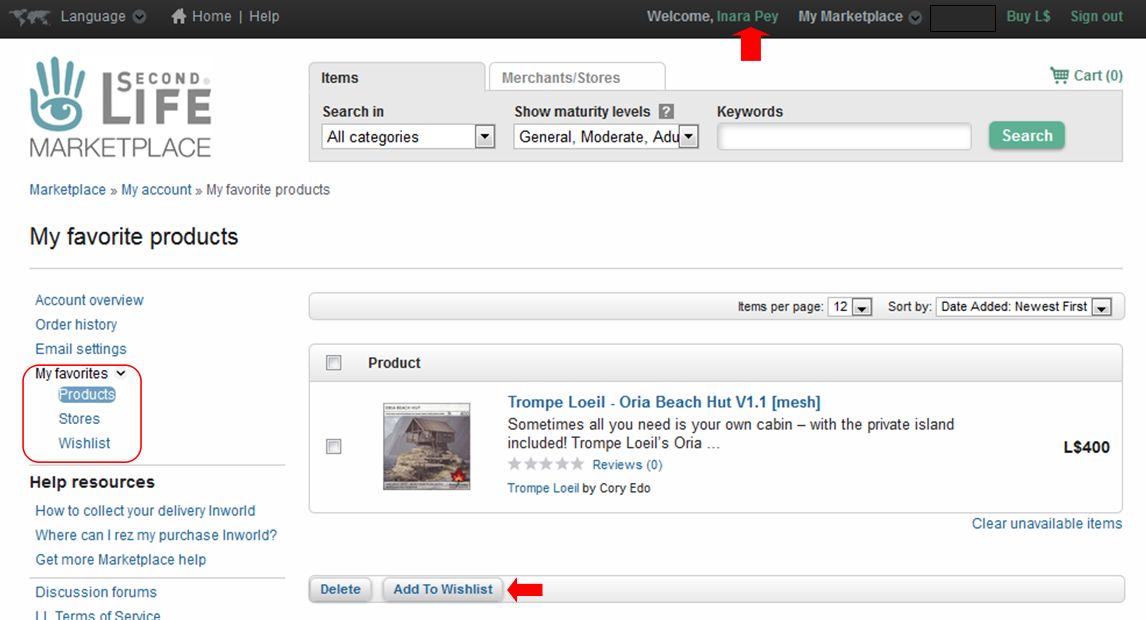
You can view your favourites whilst on the Marketplace by clicking on your account name (top right) to go to your account page, then clicking the My Favourites drop-down, which will display the options: Products (favourites), Stores, Wishlist. The Products page will open by default, but may be blank if you have not selected any favourites.

You can access your lists from your Marketplace account page : click your account name at the top (arrowed) then click the My Favourites drop-down (circled, left). This will display the list options and open your Products (favourites) page (shown). Note the Add To Wishlist button, arrowed at the bottom.

With these lists:

  • Clicking on an item in the Product or Wishlist pages will take you to the Marketplace listing for that item.
  • Stores in the stores list will be displayed with up to four of their most recent releases.
  • Clicking on a store in the Stores page will (unsurprisingly) take you to the store.
  • Listed items / stores can be removed individually or in bulk by clicking on the check box on the left of an item / store and then clicking the delete button.
  • Favourite items can be added to your wish list via the Add To Wishlist button on the Product page.
  • You can share your wish list with friend using a dedicated URL:
  • You can view your wish list or list of stores directly using the following URLs:


Time on a Black Bayou Lake in Second Life

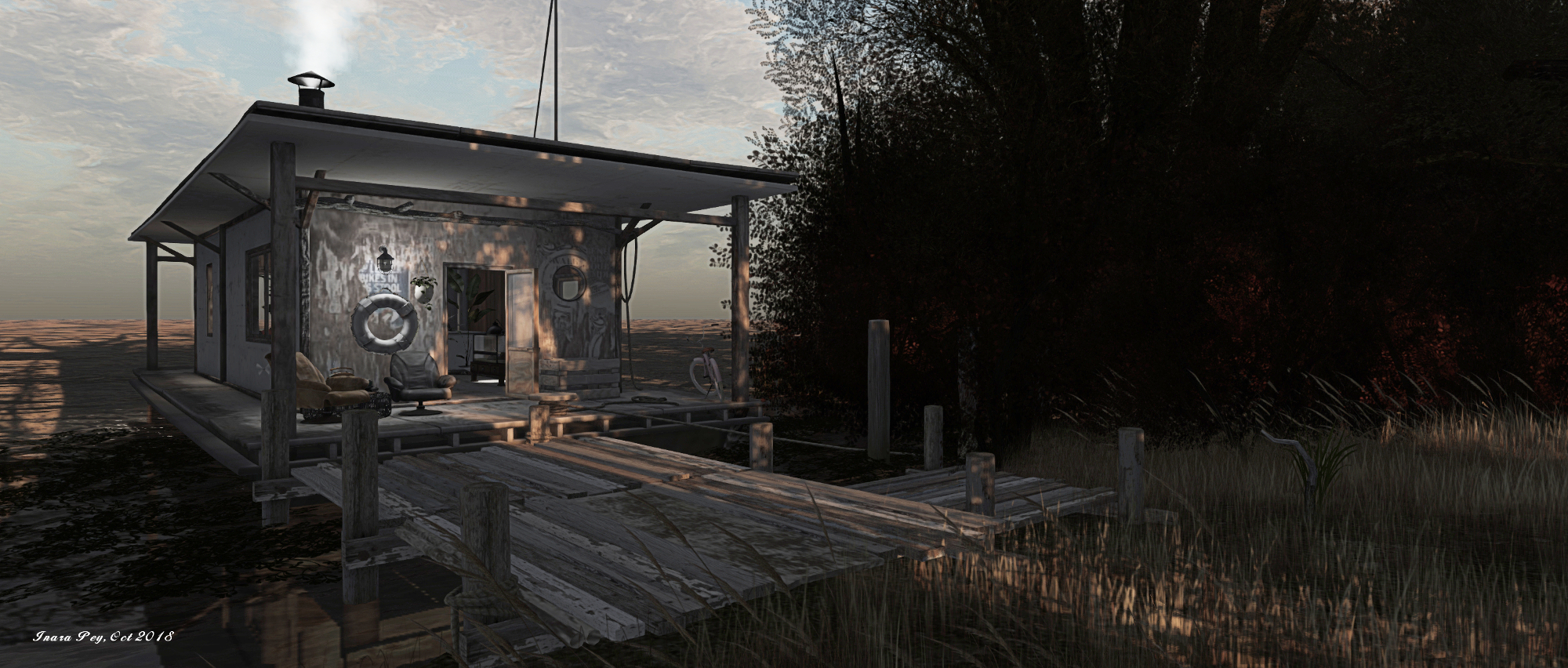
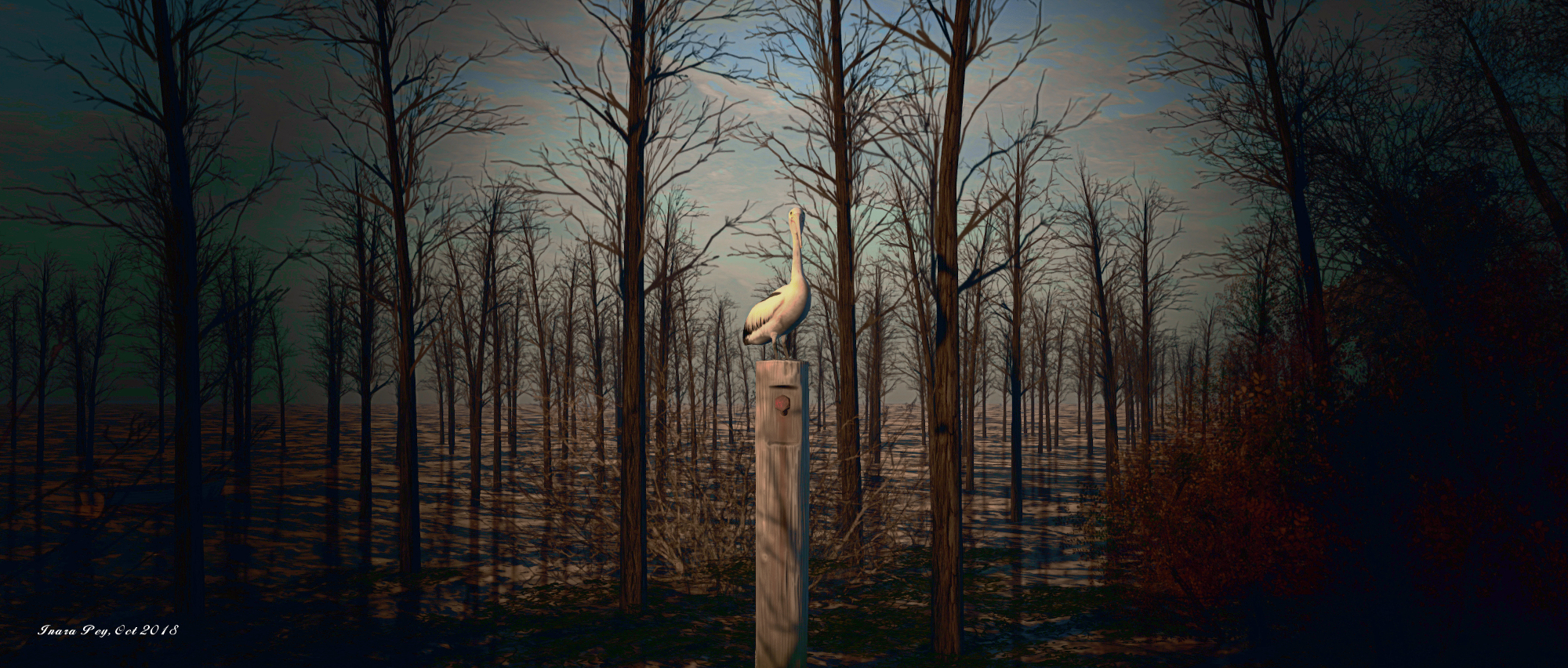
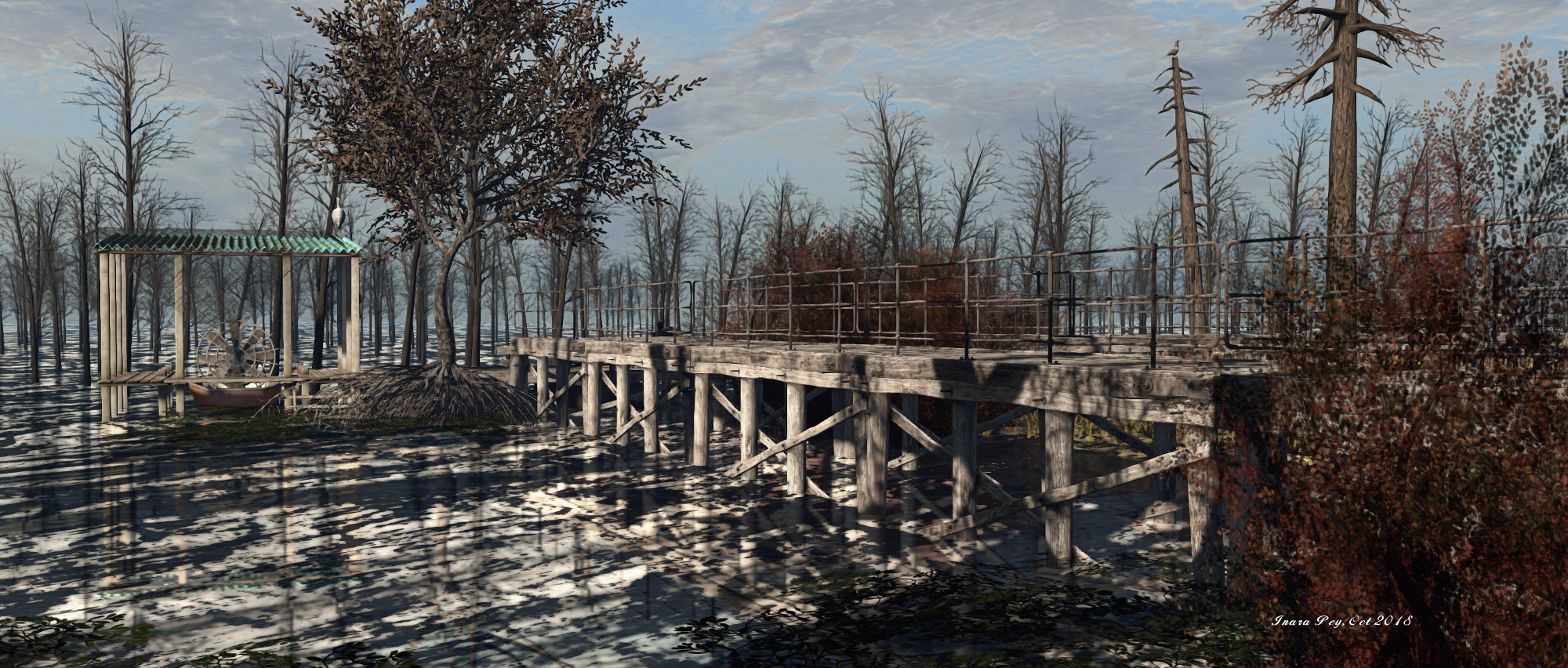
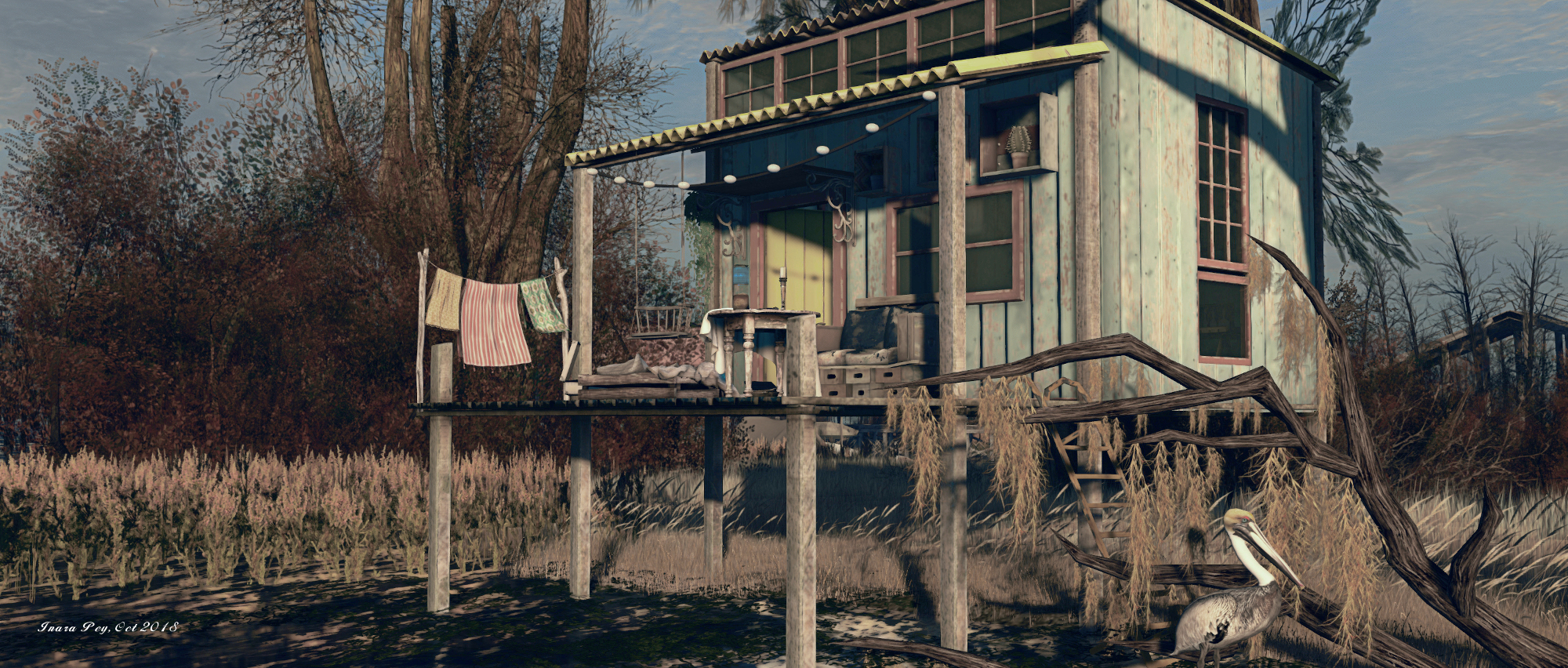
Black Bayou Lake; Inara Pey, October 2018, on FlickrBlack Bayou Lake – click any image for full size

Update: Black Bayou Lake has closed. The SLurls have therefore been removed from this article.

Jade Koltai and Serene Footman have a reputation for designing stunning regions (see my reviews of Furillen, Khodovarikha, La Digue du Braek and Isle of May to give you an idea, if you’re unfamiliar with their past work). Their designs are  generally inspired by locations to be found in the physical world, and are always a stunning and photogenic mix of beauty, presentation and personal interpretation that are a must-see.

Such is the case with their latest offering, Black Bayou Lake, which recently opened in October. We were alerted to it by friend and photographer AJ (AnyaJurelle). “It’s beautiful!” AJ informed me via IM. “Really well put together!”  And she’s not at all wrong.

Black Bayou Lake; Inara Pey, October 2018, on FlickrBlack Bayou Lake

As is always the way with Serene and Jade, they not only design a region – they provide extensive background information on their inspiration and thoughts on the design through the Furillen website. Doing so adds considerable depth to their designs, and makes visiting any of their regions both visually informative and stimulating in the way they can reveal far off places to us. This is once again the case with this region.

Black Bayou Lake  is located in Ouachita Parish, Louisiana. The lake is part of an 800 acre nature reserve which seethes with wildlife: there are many species of bird, insect, reptile and fish, along with a variety of trees such as cherrybark oak, cedar elm, ash, hickories, willow oak, shortleaf pine, loblolly pine, mockernut hickory and post oak. It’s a stunning place, which attracted us because we had not yet tried designing a sim that consists mainly of water.

– Serene Footman describing the inspiration behind Black Bayou Lake in Second Life

Black Bayou Lake; Inara Pey, October 2018, on FlickrBlack Bayou Lake

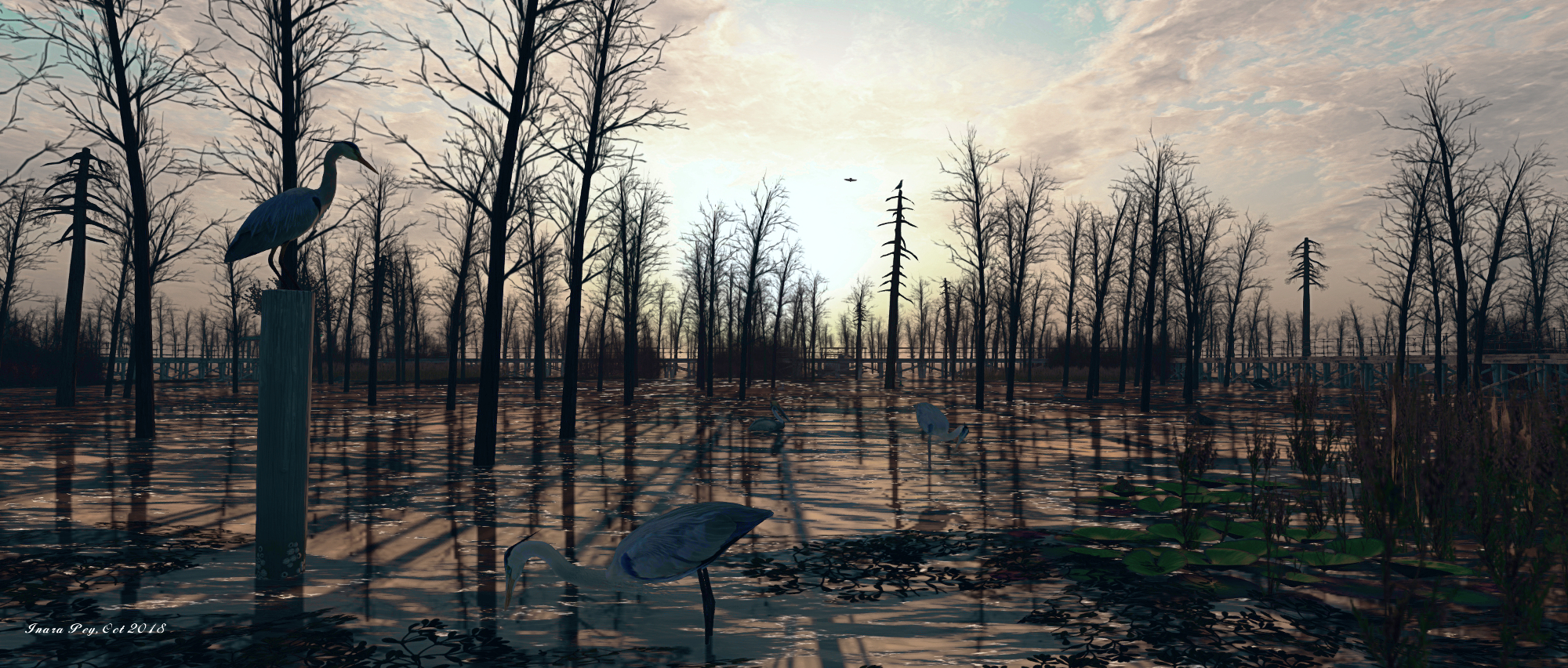
Serene notes that not only is the lake alive with wildlife and flora, it can also – thanks to the may denuded trees found in its waters – be a somewhat creepy place. All of this is perfectly captured in the region design, which casts the lake under a darkening, cloud-laden sky, just as the mist is rising through the tall grass and reeds. It’s a perfect look and feel for the time of year, but such is the design of the region it is perfect for photographing under a broad range of environment settings, and I opted to go with a little more daylight with the images here.

To try to describe this raw beauty of this location would be pointless; it has to be seen to be appreciated, such is the love and care with which it has been designed and everything within it has been curated to present a genuinely immersive setting that carries the visitor into the heart of the Louisiana swamplands, revealing both their natural and man-made beauty whilst incorporating many touches we all tend to associate with bayou life, courtesy of natural history programmes and fictional films.

Black Bayou Lake; Inara Pey, October 2018, on FlickrBlack Bayou Lake

The natural beauty is fully evident in the mix of and water in this wetland. Trees and mangroves rise from the water and cling to the more solid grassland areas, the tall grass mixing with reeds along the water’s edge to make is difficult in places to discern where dry ends and wet begins. Birds and water fowl can be seen and heard throughout (it’s absolutely essential a visit has local sounds enabled!), while alligators patrol the waters as a warning to would-be waders.

The man-made beauty comes in the ramshackle nature of the buildings to be found scattered across the land. Run-down, some with once-bright paint now dried and fading with the passage of time, they are both a reminder of the poverty that can be found within the bayou and the pride those living there can take in their lifestyle and ways: airboats, also looking a little aged, sit with engines in pristine working order and fish dry outdoors  in a sign of independent living.

Black Bayou Lake; Inara Pey, October 2018, on FlickrBlack Bayou Lake

One of the cabins also encompasses the mystique of the bayou so beloved of fiction. Within its walls are the paraphernalia of the occult: a pentagram marked on the floor, voodoo dolls suspended from the sealed, tarot cards on (or dancing over) a table where  crystal ball sits… It’s a place hidden behind shrubs among the gnarled fingers of tress pointing to the sky, hiding but nevertheless waiting to be found.

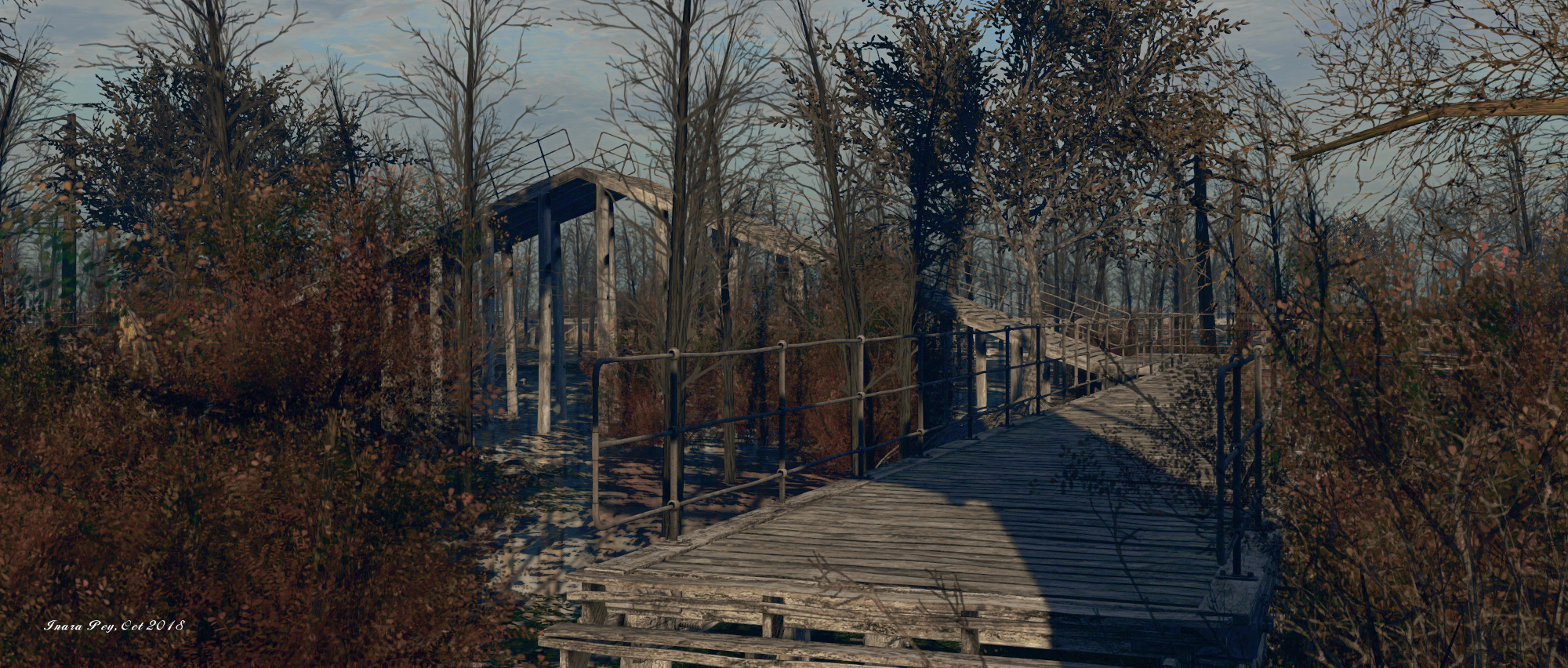
A major feature within the physical Black Bayou Lake, as Serene notes in his blog post, is a raised walkway that allows people to venture out over the lake. This has a distinctive inverted V section rising above the surroundings, and Jade and Serene have included their own version of the board walk, complete with its unusual V section as a part of this design.

Black Bayou Lake; Inara Pey, October 2018, on FlickrBlack Bayou Lake

Wonderfully atmospheric, with careful attention to detail and plenty to discover and photograph, Black Bayou Lake is another visual feast from Serene and Jade. It will, however only be around for a short time – so if you are planning an excursion, do not leave it too long before going.


2018 SL UG updates 41/1: Simulator User Group

Destiny Gardens; Inara Pey, September 2018, August 2018, on FlickrDestiny Gardens – blog post

Server Deployments

As always, please refer to the server deployment thread for updates.

  • There was no deployment to the SLS (Main) channel on Tuesday, October 9th, 2018. This remains on server release 18#18.09.20.519894.
  • At the time of writing, no deployment to the three RC channels are listed for Wednesday, October 10th, leaving them on server release 18#18.09.24.519940. However, during the meeting, Simon suggested a deployment might be made.

SL Viewer

The Animesh RC viewer updated to version 6.0.0.520211 on Tuesday, October 8th. This update includes the following updates / changes:

  • SL-966 scale and position offset limits are now enforced for Animesh objects. The current scale limit is 64m, offset remains at 3m
  • SL-1290 Issue with animations not rendering if they were stopped and started while host object is selected.
  • SL-9673 some HUDs collapse to low LOD when zooming.
  • SL-1350 Animesh angle offset lags when linked to rotating prim
  • SL-9773 attached Animesh objects visible in mouselook when “show me in mouselook” is unchecked.
  • SL-1291 Animesh selection highlights not showing in edit mode.

Note it does not contain fixes related to the performance loss issue reported in BUG-225584, and noted in my previous TPD meeting summary.

The remaining viewers in the pipeline remain unchanged from the end of week #40:

  • Current Release version 5.1.9.519298, dated September 5, promoted September 26. Formerly the Rakomelo Maintenance RC viewer – No change.
  • Release channel cohorts (please see my notes on manually installing RC viewer versions if you wish to install any release candidate(s) yourself):
    • Spotykach Maintenance RC viewer, version 5.1.10.520176, October 4.
    • Estate Access Management (EAM) RC viewer, version 5.2.0.520057, September 28.
    • BugSplat RC viewer, version 5.1.9.519462, September 10. This viewer is functionally identical to the current release viewer, but uses BugSplat for crash reporting, rather than the Lab’s own Breakpad based crash reporting tools.
    • Love Me Render RC viewer, version 5.1.8.518751, released on August 20.
  • Project viewers:
  • Linux Spur viewer, version 5.0.9.329906, dated November 17, 2017 and promoted to release status 29 November – offered pending a Linux version of the Alex Ivy viewer code.
  • Obsolete platform viewer, version 3.7.28.300847, May 8, 2015 – provided for users on Windows XP and OS X versions below 10.7.

In Brief

  • Region Crossings: see BUG-214653. In brief, several issues are related to message handling between server(s) and viewer. Assorted solutions have been suggested, with Simon linden noting, “Yeah at some point we may want to totally re-do that sequence of messages and get rid of all UDP traffic. It would probably be a little slower but having a more solid sequence would be better.”
  • BUG-216320 “Error when retrieving grid statistics page via llHTTPRequest”: this has been an issue since May, 2018, it had been hoped that the OS update would fix it, but currently there is still one component that needs to be updated in order to fix the issue.
  • The anticipated end date for the simulator OS update, which is key to the work in moving things to the cloud, is the end of 2018 or early 2019. After which there are the back-end services to update.