A Fairelands Journey: the domes of Agra Adara

Fantasy Faire 2020: Agra Adara

Beyond the borders of Heliodor the lands changed. Verdant grass and trees gave way to scrub, then rock and sand. As they changed, so did the say above, turning to the pale blue of burnished steel, the Sun hot and painful to the eyes. Hard and unwelcoming, these were lands that gave birth to doubt and the desire to turn back from our path and seek again the haven offered by the elves of Heliodor once more. 

But onward we strove, company and horses wilting in equal measure under the heat of the Sun and huddled against the cold nights that awaited at the end of each day. We were drawn by the mystical promise of Agra Adara, and when its golden domes and slender minarets rose through the horizon’s haze, we all could not help but be lifted in spirit and pace, despite the Sun’s heat until at last we came to the gates of the city as it sat between the seas of sand and water.
Fantasy Faire 2020: Agra Adara

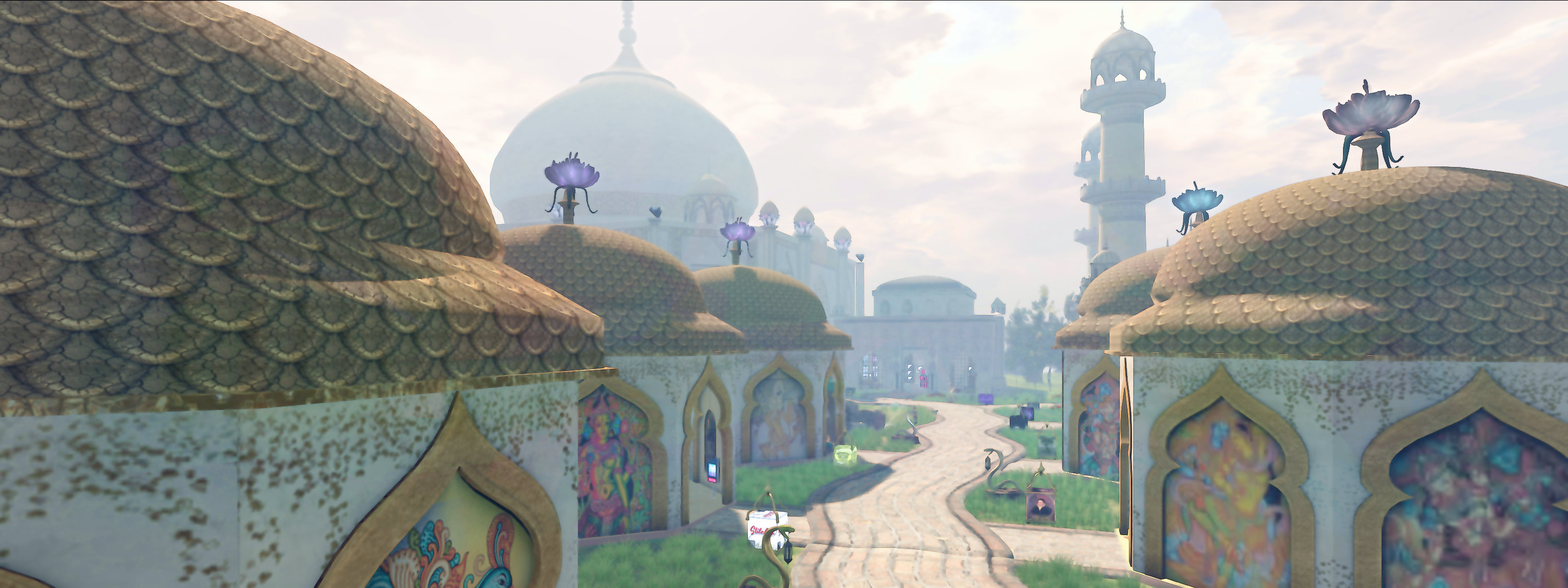
Standing as a beacon of light in the surrounding darkness of desert and sea, Agra Adara is a place that defies description for those who have not seen it. Scarce have I found a place more strange to my eyes: the peoples here be-robed in white or bright colours even to their heads, their skins warmed brown by the Sun, their eyes bright stars filled with greeting, their houses and buildings natural palaces of cool air, rich carpets and tiles that carried the heat of the body away through the very soles of our boots.

The gardens surrounding these snow-white buildings offered a rich sanctuary from the trials of journeys by land or across the inland sea. As rich and verdant as those of Heliodor, Elemaria or the other realms through which we had passed, these gardens lay cut by channels of water built by hand, and by natural pools. Thus Agra Adara is more than an oasis – it is a haven for life, watched over by the strange – to mine own eyes at least – animal and man-gods of the ancient peoples who formed it.

Fantasy Faire 2020: Agra Adara

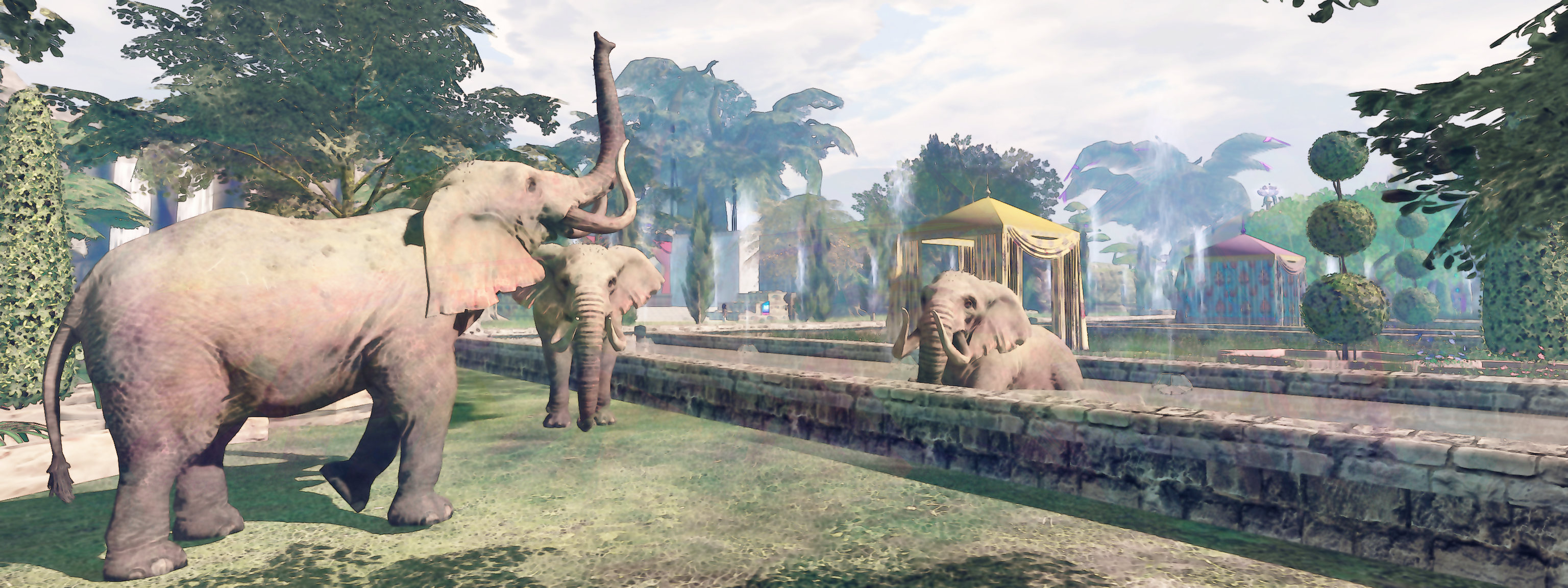
Never have a seen a place so rich in life – the people, the deer, the rabbits, the dogs and the most magnificent horses I have ever seen, tall and proud, with blankets instead of saddles. It was on these marvellous beasts that I and three of my companions were given a tour of the gardens on our second day in this most renewing of places. Dressed in the light robes and headdresses of out hosts, we followed paths through the long grass to discover the decorated gardens where the deer roamed, and thence out to the pools beyond where we were greeted by the wonderful site of elephants that raised their trunks in greeting.

It was here by day we could rest and renew our spirits and by night witness such dance and entertainment as we have never witnessed – but not for ourselves or the other travellers, traders and merchants drawn to Agra Adara’s jewel , but for the people of the city itself. Filled with an inner light and a lightness of heart, they dances for one another, for their love of life, weaving tales of the history of the world as they saw it, celebrating those strange gods who had helped them to found this golden-domed city and caused it to flourish.

For me, this was a place I could so happily have settled, the richness of history and depth of beauty called to my heart, the dance caused me to want to learn more of the legends of the gods and men who gave the city form. and so I counted each day within Agra Adara, hoping the ship that would carry onward might be delayed by yet another, so my time here could continue.

Fantasy Faire 2020: Agra Adara

Agra Adara by Eldowyn Inshan & Katz Republic, sponsored by United InshCon & Bad Katz, Camp Italia, Eagle’s Photo Studio. Featuring stores by: ChangHigh Art, CKit Falconry, DCKM & Rogues Echo, Dragons Arise, Dreamcatcher, .: Eclectic Stars :., Grumble, Hawker’s House & Dragon Forge Weapons, John Dee’s Emporium, Little 2 Large, Lyrical Bizarre Templates, Mirage Treasure Co., Sakka’s Studio, Shaman’s Hut, Stitched, and TFF – Tayren’s Fantasy Fashions.

Total raised by the end of the Faire’s eighth day: L$7,695,927 (US $30,783).

SLurls and Related Links

Fantasy Faire regions are rated Moderate.

2020 Content Creation User Group week #18 summary

The Getaway – Nutmeg, March 2020 – blog post

The following notes were taken from my audio recording and chat log of the Content Creation User Group (CCUG) meeting held on Thursday, April 30th 2020 at 13:00 SLT. These meetings are chaired by Vir Linden, and agenda notes, meeting SLurl, etc, are are available on the Content Creation User Group wiki page.

Unfortunately, my recording software crashed some 2/3rds of the way through the meeting (and I was afk, so didn’t spot it), so I missed recording around the last 15-20 minutes of the discussions.

Jelly Dolls / Avatar Rendering

  • As noted in my week #16 CCUG summary, Vir has been looking at the jelly doll rendering code, which is not well optimised (e.g. it still draws rigged attachments) and it handles some operations inconsistently (e.g.setting an avatar to never render is actually more processing expensive that simply leaving it jelly dolled).
  • One of the things Vir has been experimenting with is displaying Jelly Dolls as monochrome system avatars sans rigged mesh and attachments.
  • An issue with this approach  is that non-human avatars use animations to reposition bones and joints, when can result in the system avatar looking very weird, even in monochrome. Vir has therefore been focused on finding a way to pause the animations when a non-human avatar is jelly dolled, and just running something like one or two of the default animations from the system locomotion graph.

In brief

BUG-228564 -Feature Request: New object property “Intangible”

This is possibly a duplicate request (those listed on the Jira are for different functionality, so not true duplicated), requesting an option to make certain in-world objects “invisible” to the viewer’s ray casting, so they they do not react to mouse clicks, but the objects beyond can.

Such a capability would be useful where semi-transparent objects are used to imitate sun beams or fog or rain, etc., otherwise block the ability to click on objects (e.g. seats, etc.), they surround / are in front of. However, such a change would require both viewer-side and back-end changes so, even if the Jira isn’t a duplicate of an existing request and is something LL accept, it is unlikely to be worked on until after the cloud uplift work has been completely, simply because it will require the introduction of a new object property on the simulator side / back end.

Education / Awareness

Much of the meeting was a general discussion on how to better inform / educate creators and users on the benefits of optimised content, and exactly what can impact things like perceived SL performance.

The major crux of this discussion came down to providing better documentation / information that both creators and users could be pointed to (e.g. more detailed information on mesh creation, including topics such as LOD generation, tri counts, use of maps, etc. for the former; clearly-worded instructions and benefits of using tools like ARC, etc., in the viewer to improve performance, etc., for the latter).

  • It was pointed out that LL have limited resources for the production of comprehensive best practices, and that perhaps the best sources for these might be creators themselves.
  • As the SL wiki is currently closed to general editing, those who have a specific desire to edit wiki pages / build articles can request access by sending an e-mail outlining who they are and why they want access to: letmein-at-lindenlab.com.

Once upon a (Greenie) time in Second Life

Once Upon A Time celebrates the Greenies

Back in the early years of Second Life, the platform attracted many businesses and organisations to its shores. One of these was UK-based Rezzable Productions, who at their peak in early 2009, operated around 40 regions in-world. Founded by Jonathan Himoff (Rightasrain Rimbaud in-world), Rezzable quickly established a reputation for building some of the most engaging content available in-world at the time. Perhaps the most famous of their creations – and one of the first they created  – was the world of the Greenies.

These were a horde of (literally) Little Green Men who, whether from a tiny world or the result of a Douglas Adams-esque miscalculation of scale, had arrived on Earth to find themselves dwarfed by everything around them. Undeterred, they set out to explore this strange realm, which was offered as a gigantic, region-wide house, where they ended up getting involved in all sorts of mischief. Such was the scale of the house, SL avatars were not too much bigger than the Greenies, and so were able to witness their escapades first-hand.

Presented as a series of vignettes throughout the house, some one them semi-interactive, the Greenies and their adventures captured people’s imaginations. So popular did they become that the house was a must-see destination for incoming Second Life users (helped by the fact that Rezzable were also a part of the Lab’s original SL Gateway programme, and so could direct their own incoming traffic to their regions, including the Greenies). Interest was further maintained by Rezzable periodically adding assorted games to the environment, alongside of new Greenie vignettes.

Sadly, all this came to an end in June 2010. The previous year, Rezzable had announced their withdrawal from SL in favour of their own dedicated, open simulator based grid, Heritage Key. They allowed the Greenies to remain in Second Life for almost a year after the announcement, but in that June of 2010, the little green folk loaded up their flying saucers for the last time and departed Second Life.

A Greenie eye view of the Once upon A Time house

Since then, the legend of the Greenies has been celebrated in Second Life in many small ways – Greenie-like characters have on occasion popped-up in rides at things like SLB celebrations, for example. And now there is a new opportunity to recall their time here. It comes in the form of Once Upon A Time, an installation built by Justice Vought, owner of the excellent :Oxygen: (see: Getting some :oxygen: in Second Life) and admitted Greenies fan.

Having opened on April 29th, Once Upon A Time offers visitors the chance to enter Justice’s take on the giant house where the Greenies could once be found (you even do so through a mouse hole, just like the original – just follow the teleport prompts and arrows from the landing point, and keep an eye out for the cheese in the alley). Sadly, there are no original Greenies to be found inside – they are subject to copyright, after all; instead, the rooms offer visitors the chance to explore Greenie-style, and recreate some of the (mis)adventures the little green folk had.

Long-time resident Rug Halberd gets into the spirit of things with a Greenie avatar, posing with some of the toys

This is a place to be explored carefully, because there are many interactive elements – balls can be rolled, Dominos knocked down, poses to be found (so very much in the style of the Greenies (although again sadly, no sugar “baths” or playing on frying pans – but you can jump into the kitchen sink and float around on a sponge, Greenie style or find yourself paddling in the loo … among other things; I’m not going to spoil it all!).  As such, the secret really is to mouse-over everything.

And don’t confine yourself to a floor-level exploration. Be prepared to jump / fly onto the tables, bed and other furniture.

Playing see-saw in the kitchen – Greenie style

Throughout, there are many touches that offer reminders of the the original Greenies build. Food is spilt in places, electrical wiring offers opportunities for some shocking times, an iron (sans quished Greenie sitson the ironing board, an Atari games console sits waiting to be wrestled with, and so on. For those wishing to recall the Greenies directly, the TV above the bedroom games console presents a host of original Greenie photos Justice pulled together from his own archives and from friends.

Anyone who can remember the Greenies in Second Life is liable to find Once Upon A Time a memory-filling visit. Whilst it is something of a unique build, it contains all that is required to bring back happy memories of spending time in Rezzable’s original and watching the Greenies at play. And while the little aliens themselves may not be present, anyone who has a Greenie avatar really should consider digging it out and wearing it during a visit!

SLurl Details

A touch of Vintage Lace in Second Life

Vintage Lace, April 2020 – click any image for full size

Vintage Lace is the Homestead region designed and held by Delinda Dench and Second Life photographer Skip Staheli, which we recently had occasion to visit.

This is a peaceful, easy setting, largely designed by Delinda and representing an open, rural location nestled between surrounding islands and offering a rolling, slightly rugged landscape. The landing point sits on a bridge spanning an inland body of water, itself connected to those around the island by two narrow channels.

Vintage Lace, April 2020

Pointing east-to-west, the bridge offers two route for commencing exploration. Which you take is a matter of choice, but given there are few properly defined paths, which way you go is up to you: the natural lie of the land means that all routes through and around the region all eventually meet up.

Westwards, the bridge points towards a deck built over a corner of the lake, and a short wooden walk that leads to the local beach as it sits between high rocky shoulders. Eastwards, and after passing under a little avenue of trees, the bridge points the way to the island’s windmill and land split by one of the two channels connecting the lake with the surrounding waters. A small summer house sits just above the stream, the remnants of a a garden area on the low sloped behind it, just a few mossy flagstones and an old fountain being all that remain.

Vintage Lace, April 2020

Across the arching curve of the stream, a small chapel sits part-way up another hill. The gabled gates, flagstoned bank below it, and the ruin of an old gate suggest that there once may have been a bridge or other crossing linking the chapel with the old garden, but now a fallen tree trunk a little further around the curve of the stream provides the single ground-level crossing point. This provides, in equal measure, access to the chapel, a picturesque waterfall that tumbles into a deep pond and a cottage atop another hill.

The latter is one of two homes on the region, the second being diagonally across the island to the north-west. The route between the offers a fair walk across the region, passing by way of the central windmill. This route also leads past a wood and rope bridge that connects the main island with a massive block of rock that rises from the east side bay. This offshore tower is cut on one side by a path that switch backs up to its almost flat top and the camp site retreat it offers – although a stay there might be dampened by a highly localised downpour.

Vintage Lace, April 2020

All of the properties on the island, the two houses and the windmill, are fully furnished. Like the landscape around them, they offer plenty of scope for photography – but I would point out that the windmill and house to the north-west sit within their own parcels may actually be private homes (given the region itself is generally private), so please be respectful.

Photography is very much the secret behind the design of Vintage Lace. While it flows together as a complete landscape, so too can it been seen as a series of individual locations designed with and eye for photography – be it in the overgrown garden or alongside the horses wandering close to the windmill or on the decks or in the summer house or up on the high ridge and its rocky crossing over the second of the lake’s two outflow streams. Thus, the details throughout are many-fold, and opportunities for both avatar and landscape photography rich.

Vintage Lace, April 2020

I believe I’m right in saying Vintage lace will remain open through until May 4th – although I now cannot find the note where I think I read it. So, if you’re an SL traveller and have yet to see it, I recommend finding the time to do so before the region is closed once more.

SLurl Details

JudiLynn India: abstracted beauty in Second Life

Kultivate The Loft: JudiLynn India

Currently open at Kultivate’s The Loft Gallery, curated by Johannes Huntsman, is an exhibition of art by JudiLynn India.

An abstract painter in the physical world, having studied graphics design at the Tyler School of Art, Temple University, Philadelphia, JudiLynn has been a part of Second Life since 2010 as both an artist and an engaged member of the broader Second Life community of users.

Kultivate The Loft: JudiLynn India
I’ve been drawing since I could hold a crayon. After the turn of the century, I decided to focus my creativity on acrylic and digital painting and have totally enjoyed the journey. My work embodies my spirit and personality. My goal is to allow you to experience the image with your own mind’s eye. My work is entirely intuitive. I get lost in the layering of texture and colour. Occasionally, I will include figurative work if my spirit is so presented with the composition.

– Judilynn, discussing her work

For her exhibition at The Loft, Juilynn presents some 22 pieces in a larger format, with a further 10 in a slightly smaller format on a single wall (grouped into two theme of 5 pieces each).

Together, they represent a cross section of her digital acrylic and wet paint work, and all of them offer insight into her creativity as an abstract artist and her ability to offer a captivating mix of form, depth and colour. Each piece naturally calls on the eye and mind to appreciate them and call forth the forms they might suggest. These might be anything from an autumn sunset through a woodland glade to distant nebulae – or perhaps people dancing and coastal waves or distant mountains.

Kultivate The Loft: JudiLynn India

A further aspect of Judilynn’s work is the depth of emotion present within so many of her pieces: primal colours that suggest the baser responses like rage; softer colours and forms prompting calmer, more introspective responses. These are also intensely tactile pieces, calling on the observer to want to reach out and touch them, to be a part of them; this adds a further sense of connection to each piece – one that potentially flows through any purchases that might be made, making them very personal possessions.

All of the pieces in this exhibition are uploads of Judilynn’s physical world art, more of which – for those who would like a piece on their wall at home – can be purchased her on-line gallery and shop.

Kultivate The Loft: Judilynn

SLurl Details

Speedlight: Gold capabilities and recent updates

via Speedlight

Speedlight, the browser based / Android Second Life client, continues to be developed and updated, with new or improved capabilities being added almost weekly. The following is a round-up of some of the more recent updates, and well as some I’ve not previously mentioned, including the Gold-only Mass IM tool.

Transfer Gold Status between Avatars

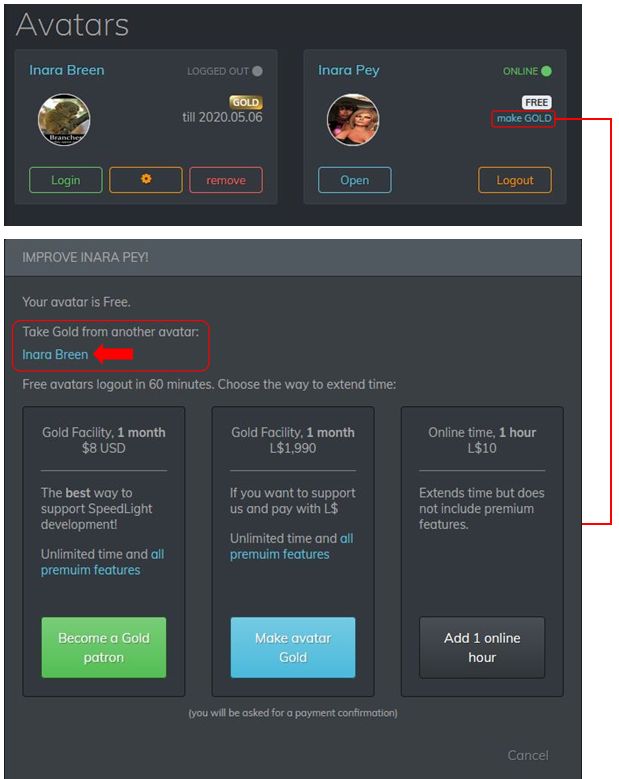
If you have two or more avatar accounts connected to your Speedlight account, one of which is Gold status, you can now transfer that status between your avatar accounts. Handy if you find you suddenly need a second account to briefly have the advantages of Gold, but not sufficiently long enough to justify an additional subscription or for becoming a Speedlight Patreon member.

To move your Gold status between avatar accounts:

  • Log-in to Second Life via your Speedlight account and then log-in to Second Life with the account that is not Gold.
  • Click / tap on the Make Gold option on the right of your avatar box.
  • The Gold upgrade screen is displayed. This now includes the name(s) of any Gold avatar accounts you already have under the title Take Gold From Another Avatar.
  • Click on the avatar name from which you want to transfer Gold status.
  • The Gold status will be removed from that account and conferred on the account you are using. Note that no confirmation is given, but the current logged-in account will list itself as being Gold.
Swapping Gold status between accounts

Word View

Rendering Updates

April 22nd, 2020 saw a series of updates to the rendering system generating the 3D world view. These include:

  • In-world objects are now load quickly in low quality, then get a higher quality when you look at them.
  • The distance fogging can be turned off if preferred.
  • The draw distance can be adjusted.
  • Linden Water level is correctly displayed.
  • Multiple performance improvements / fixes.
  • Updated scene information panel that can be toggled on / off.
  • UI touch joystick now allows walking and rotating.
  • Gold only: seated avatar mannequins are now rendered.
  • Overall 3D UI is more compact.

Updated Scene Information Panel

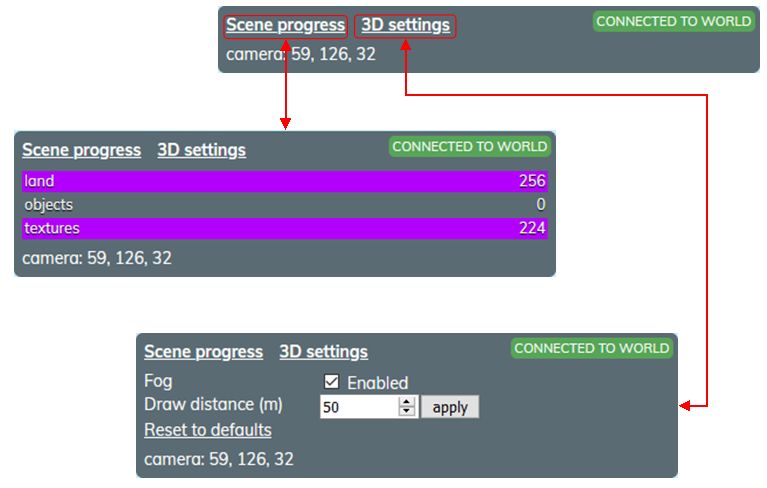
The world view information tab has been updated, and comprises four core elements:

  • The Scene Progress display link (generally open by default). When open, displays the land, object and texture load data.
  • The 3D Settings display. When open allows you to:
    • Toggle the distance fogging on/ off.
    • Increase / decrease your draw distance (default 50m).
  • Your connection status:
    • Green – you are connected to the region simulator.
    • Red – you are not connected to the simulator and will need to relog.
  • The current region coordinates of your camera.
The Scene Information panel and options

Notes on this panel:

  • It can be expanded  / reduced by clicking on one or other of the scene process or 3D settings links.
    • One click will toggle from one to the other.
    • Clicking on the same link twice will either expand / close it or close / expand it, depending on its initial state.
  • Be careful with setting the draw distance too high; this could place additional data transfer load on your connection to the rendering server.

Accessing Avatar Profiles in World View

An option I’ve not previously covered in discussing the 3D world view is the ability to view another avatar’s Profile directly in the world view.

  • Click / tap on the avatar.
  • The avatar’s Profile opens on the right edge of the world view.
  • The Profile buttons will function as follows:
    • The Send IM and Notecard buttons will switch you to the IM window in the client.
    • The Pay L$ will switch you to the L$ and transactions window in the client.
    • Offer Teleport and Offer Friendship will open an invitation in the world view.
Another avatar’s profile can be displayed in the world view by clicking on the required avatar mannequin

Send Note Cards via IM

Introduced on April 16th, Speedlight’s Note Cards from IM allows you to:

  • Send a note card directly from an IM session.
  • Reply to a received note card in an open IM session with a *new* note card.

Sending a Notecard Using IM

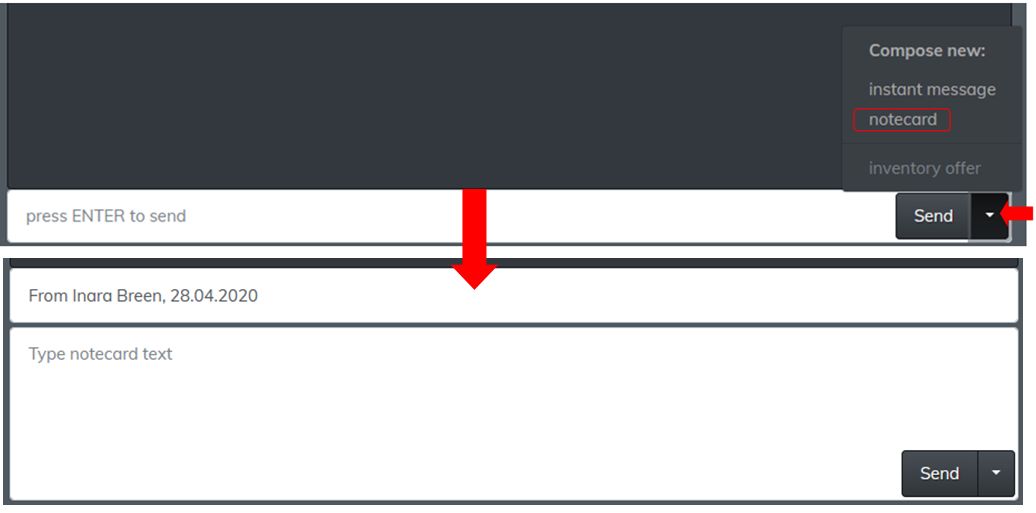
  • Open an IM session with the person to whom you want to send a note card.
    • Note that you can already be chatting with them, and simply wish to send additional information.
  • Click / tap on the down arrow to the right of the Send button at the bottom of the IM display to open a list of options.
  • Click / tap  on notecard.
  • The text input area will expand to display:
    • The note card title field, which will default to “From [avatar name] [time stamp].
    • The body text area.
  • Change the title as required, and use the text entry field to write the contents of the note card.
  • Click / tap Send to deliver.
The send a note card from IM capability

Reading the Replying to Note Cards via IM

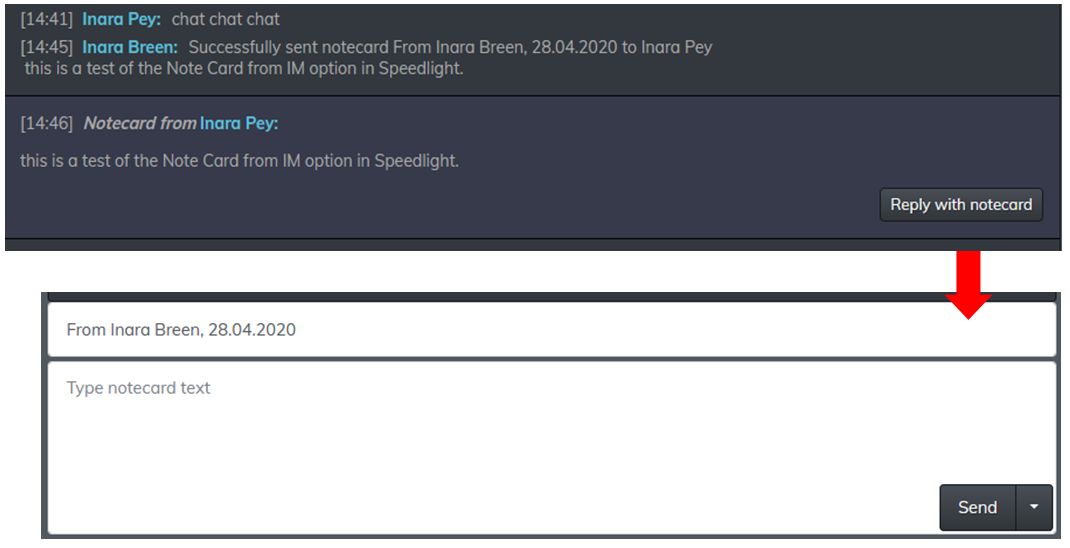
Should you receive a note Card via an open IM session, the text of the IM will be displayed in the main IM window, as shown below. A button displayed at the end of the note card text that allows you to reply using a fresh note card..

Receiving the text of a note card in IM, and replying using a note card

Again, the note card fields at the bottom of the IM window should be filled out as requires, and the Send button used to send it.

Gold Only: Mass IM Tool

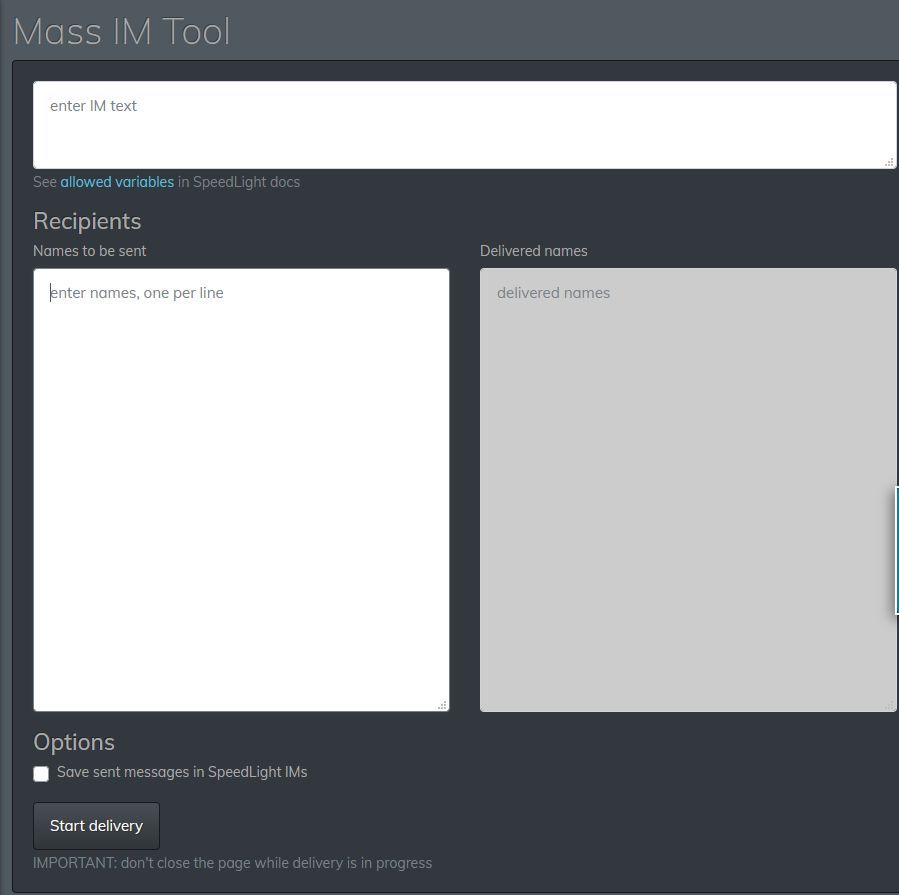
This is not a new feature to Speedlight, but this is the first opportunity I’ve had to review it. In short, it does exactly what the title implies: allows you to send a single IM to multiple recipients.

Accessed via the IM option in the left side menu, Its use is self explanatory as well:

  • Enter the message in the top field.
  • Add a list of intended recipients in the lower left field, one name per line (this must be avatar names, not group names).
  • If required, check / tap the Save Sent Messages to Speedlight IMs to save a copy of the message to your IM logs.
  • Click /tap the Start Delivery button.
  • As the IM is delivered to each name on the list, a confirmation of delivery is displayed in the lower right text field.
    • You’ll also receive a notification on the status of each delivery.
The Speelight Mass IM option (Gold only)

Observations

The ability to transfer a Gold membership between avatar accounts is an excellent move for those who may occasionally need to have an alt access the more advanced world view available to Gold accounts, or to remain on-line without hourly re-logs. Similarly, the notecard updates in the IM options makes Speedlight even more flexible as a communications tool.

The world view rendering performance improvements should also be a welcome update for Gold members (I didn’t notice and particular increase for free accounts, but that might have simply been my connection). I did find the the problem of the avatar not stopping walking once in motion, as reported in my April 8th Speedlight update, to still be present; while I’ve heard two other users say they’ve had the same problem as well, I’ve no idea how widespread it might be.

That issue aside, Speedlight  – while still very much in an beta stage of development – continues to progress. Watching the Discord server channels for the client, I’ve been impressed with the degree of communications from the team responsible for Speedlight, and their willingness to engage with users.

Related Links