A return to Tonarino in Second Life

Tonarino, February 2021

On February 1st, we dropped in on Tonarino, the Full region held and designed by 秋元のん (n0rik0). At the time, the focus of our visit was the region’s sky platform, Nekomachi Street (see: The cats of Tonarino in Second Life), but I noted we also hopped down to see what had changed within the region’s ground level design since our last visit in December 2019 (as recorded in Tonarino: an oriental curio in Second Life), and I promised to provide an update.

Well, truth be told, first looks tended to suggest not a lot had changed; the majority of the region is still given over to a large landmass in part cut through by the single line of a railway track that terminates abruptly alongside a little station building, while a small stream slices through the bedrock. Around both lies a landscape suggestive of the outskirts of a town somewhere; the kind of place most people only see whilst rapidly passing through with barely a thought for those whole live there.

Tonarino, February 2021

However, further examination revealed to us that things had changed since December 2019 – although obviously I cannot say quite when they changed; and changed enough to provide a reason for further exploration and looking around.

In this, the most noticeable change lay to the north-west. where the land rises in rocky steps to overlook the rest of the region and particularly overshadows the local school.

Tonarino, February 2021

When we visited in 2019, I noted this was the home of a temple sitting within  a small garden area and overlooking a large traditional Japanese house occupying a shoulder of rock below it. Well, the temple is still there, complete with its little refreshment stand for those needing sustenance after the climb up to it or after a period of sustained prayer. However, and if memory serves, it has now descended from the uppermost table of rock upon which it once sat, to occupy the same elevation as once was occupied by the large house.

Instead, the high table of rock that was once home to the temple is now a lookout point with vending machines and seating. Below it, the walled house has also gone, replaced by a group of restaurant stalls sharing a common outdoors space for patrons, who can be entertained by two more of the remarkable juggling cats by 丸角の人 (shiro0822), who also make up the inhabitants of Nekomachi Street up on the sky platform.

Tonarino, February 2021

I admit, I’m not totally convinced about the nature of the food being served in one of the restaurant stalls, given it is being prepared and offered for consumption by red-faced little demons, so the fact the area also has a little shrine of its own sitting within a bamboo fenced enclosure is perhaps handily placed for those wishing to ward of any wicked spirits that may have been delivered to them with their meal! The shrine and its Torii gate also mark the path to where a stone stairway descends the snowy slopes between the little houses that cling to them, offering a further route back to (or from) the lowlands.

Elsewhere are other subtle changes. One of the private islands to the west side of the island has been removed; elements within the building site have changed (although overall progress on whatever is to be built / installed appears to be a little slow!) an there is what appears to be some work to be finished off behind the school, although visitors can still cross the footbridge and visit the café – although I’m not sure if the quizzes there are still being held.

Tonarino, February 2021

What I find particularly engaging with Tonarino is the manner in which it naturally suggests it is a work-in-progress, so to speak, with the excavator and building blocks in a cleared field, etc..  At the same time the careworn look of the buildings and houses give them a lived-in feel that suggests that while they may be less than pristine, they have the comfortable look and feel to those living within the little town.

Certainly Tonarino remains a place with plenty of opportunities for photography under almost any environment settings, and which – again like so many careworn places in the physical world – has little spots of beauty that suddenly leap out at you as you explore. And that very much retains it as a place worth looking at.

Tonarino, February 2021

And for those who wish to see Nekomachi Street’s marvellous cats, just look for the kitty dancing at the mouth of a road tunnel. Pat his head gently and he’ll get you there 🙂 .

SLurl Details

February 2021 WUG summary

The Web User Group meeting venue, Denby

The following notes are taken from my recording of the Web User Group (WUG) meeting, held on Wednesday, February 3rd, 2021. These meetings are generally held on the first Wednesday of the month, with dates and venue details available via the SL public calendar.

When reading these notes, please keep in mind:

  • This is not intended as a chronological transcript of the meeting. Items are drawn together by topic, although they may have been discussed at different points in the meeting.
  • Similarly, and if included, any audio extracts appearing in these summaries are presented by topic heading, rather than any chronological order in which they may have been raised during the meeting (e.g. if “topic X” is mentioned early in a meeting and then again half-way through a meeting, any audio comments related to that topic that might be included in these reports will be concatenated into a single audio extract.

Web Properties Updates

  • Core work remains clean-up post the transition to services to AWS.
    • Most of the issues arising from the Uplift project for the various web properties (e.g. Marketplace, Destination Guide, etc), appear to have been resolved, although the destination Guide still has a couple of issues to be fully resolved.
  • Once this has been completed, work will resume on sorting through the web “to do”list (which includes incoming bug reports and feature requests in readiness to start working through items.
  • There have been some additional non-user visible updates to some web properties.
  • As of the end of December 2020, there were three software toolsets LL use in relation Second life (none of them user-facing) awaiting a transition to AWS, as of the start of February, one of these has yet to be transitioned.

Single Sign-On

  • Linden Lab is starting to roll-out single sign-on for web properties (not to be confused with two-factor authentication, which is still being planned, but is not ready for deployment).
  • This will mean that users with multiple accounts will only be able to sign-in to different properties on a per account basis.
  • There will be a formal LL blog post to explain this further in due course.

Mobile Client

  • Linden Lab is dealing with some bugs, so no significant news arising from the past month.

Last Names

  • The Lab is hoping to have a new batch of Last Names available for around Valentine’s Day, which will include Valentine’s-themed last names.
  • There is some talk of also providing “normal” last names (for some definition of “normal”, given the likes of  “Aphelion”, “Birdwhistle”, “Dankworth”, “Izzard” and “Posey”, among many others are all considered “normal” where I come from!).
  • For new batches of Last Names, LL tend to select from the list of suggestions that came about from the 2019 Last Names competition, then add a mix of names they’ve selected.
  • It is also hoped that Last Name updates will happen more “regularly” in the future.

In Brief

  • There has been intermittent delays in getting items delivered from the Marketplace ( which can last up to several minutes) over the last week(ish). The issue has been hard for LL to reproduce, although they have been aware of it and had tried to make adjustments.
  • BUG-229713 “Marketplace listing status updates are not being updated between the web and the viewer” and BUG-230107 “Marketplace Listings window in the viewer does not update” have been confirmed by LL as an issue, and the issue is to be investigated.
  • Profile feed: there had been a series of issues of late (images failing to upload, posts failing to appear, etc.), but as of February 2nd, these should have been resolved. Anyone still experiencing problems should contact support / raise a bug report.
  • LL are continuing to consider how to improve the new user experience, and have been seeking feedback on what established users see as the “main” problem new users face. In addition, it was notes that in order to better understand new user problems when on-boarding, the Lab:
    • Has regular internal workshops where staff go through various aspects of being a new users (e.g.building an entire mesh-based avatar from scratch) to better understand the complexities lies, and where particular pain point might be.
    • Has staff spend time within new user environments (the learning / social islands, etc.)..
    • Has some of the user-led mentor groups to assist with the on-boarding process through the social and learning islands.

Next Meeting

  • Wednesday, March 3rd, 14:00 SLT.

Speedlight: a round-up of recent updates

via Speedlight

I’ve fallen behind in my tracking of Speedlight, the browser / Android / iOS Second Life client. There are several reasons for this – most of them down to me & time (or lack thereof), although I admit a couple of issues with the application have also kept me from using it. With regards to the latter, I’d like to offer a doff of my virtual hat and a “thank you” to the Speedlight Live Chat support mechanism and Speedlight Support Manager QuincyJohnes (that’s a name you have to love for it’s little play on things) for getting me sorted in very short order.

There have been numerous changes to Speedlight since my last article in July 2020 (see: Speedlight: group functionality and other updates), some of which are more under-the-hood than user visible, and there are several more in the pipeline. As such, this piece is offered as a quick round-up of things for those interested in Speedlight but who also haven’t yet had cause to use it, or like me, haven’t used it in a while.

Account Changes

  • Since November 22nd, 2020, Speedlight has no longer requires a dedicated user account to access the service.
  • While the option to create an account remains, new and existing users can now sign-in to Speedlight using any one of the following services on which they have an account: Google, Facebook, Apple or Discord.
  • Note that this is signing-in to the Speedlight service; it is not about logging-in to Second Life itself via Speedlight – you will still need to use your SL user name / password for this.
  • In addition, Speedlight on iOS supports FaceID log-in (again to the Speedlight service, not to Second Life).

IM Updates

  • User name is now displayed as well as display Name.
  • Long-tap / right-click options to pin IMs, mark them as unread, close an IM session or view the other person’s Profile.
    • Pinned IMs will appear with a red dot alongside them, at the top of the list of current / recent IN exchanges.
Speedlight IM exchange options – long tap (iOS / Android) or right click (browser) on avatar name in IM list to display
  • General improvements to link parsing in IMs, and improvements in reading off-line IM reading, starting IMs, etc.

Autoresponder

Speedlight now incorporates the ability to set-up and use auto responses to incoming IMs, accessed via IMs Autoresponder

  • Two options are available:
    • Autoreponse to be set when Speedlight logs you “Away”
    • Autoresponse when you are at your keyboard but do not wish to be distracted by responding to IMs immediately.
  • Each option has a default message than can be edited to suit your needs.
  • The relevant check box must be tapped / clicked in order to apply either / both settings, AND the Save Settings button tapped / clicked.
  • When initially set, the top of the Autoresponder panel will display “settings saved”.
  • In addition, the IM option in the left menu will display a red-bannered AUTO, which will also display the number of newly-received IMs.
  • Those sending you an IM will be sent an autoresponse based on your settings / status the first time they IM you (the message will not be repeated each time they IM you while they have the tab / panel to you open).
Speedlight Autoresponder options. Via IMs Autoresponder

Note: You can set the time your status will automatically switch to AWAY via Settings → General → Time to “Away” (default: 15 minutes). This option can also be accessed by tapping  / clicking the Configure option under the “Away” autoresponse field in the autoresponder panel.

Group Support

  • In my last update, I  noted the expansion of Group related capabilities in the browser version of Speedlight (e.g. search, view and send group notices, leave a group, invite someone to a group). Since that time, these capabilities have been extended to the Android and iOS versions of Speedlight.
  • It  is now possible to see your active group in the Groups list and change your active group via the Group Info panel.
Speedlight: identifying and changing your active Group
  • In addition, Speedlight now provides the ability to view Group roles, with the promise that the ability to edit them (by those with permission to do so) will follow in due course.
Speedlight: view Group roles

Pop-Up Notifications

Speedlight: notifications with interactions

Pop-up notifications are now available in all versions of Speedlight (i.e. IM, friendship offer / request, teleport offer / request).

  • Requests / offers requiring a response will include suitable buttons (see right).
  • IM pop-ups will include the text of the IM, but you’ll have to go to the IM screen to open and reply to the message (tapping / clicking the pop-up will not automatically open IMs).

General Updates

  • Ability to copy / paste location SLurl in Summary panel.
  • Multi-line chat input supported in all versions.
  • L$ and Transactions:
    • There is a “New recipient” warning for transactions.
    • The page now displays a list of recent recipients.
  • 3D World rendering:
    • Chat overlay in 3D world view available to all users, Gold and Free.
    • Interactions (long touch / right-click) on objects available to Free as well as Gold users.
      • Options are Touch (dialogue menu), Sit, Stand.
      • Dialogues are displayed in the top right of the 3D rendering panel.
  • Gold (subscription / payment) user updates for 3D view:
    • 3D  world view walk autopilot added to replace on-screen joystick.
    • In-world object touching with single click/tap.
    • In-world object touching using a pop-up menu.
    • Improved 3D GUI.
  • iOS version:
    • Now available via the Apple Store for anyone (Gold and Free).
    • Price is £22.99 (approx. US $31.37 / €26.09.
    • Price includes 1 free lifetime Gold membership with limited time offer on up to 3 avatar accounts.
    • Note price is set via Apple pricing / commission requirements.

Future Updates

Work continues to update Speedlight across the board, with feedback also being sought from users concerning features. A major update – with no time-frame on delivery at present – is an overhaul of the 3D rendering to provide full avatar rendering in the world view, rather than the current stick figures.

Upcoming avatar rendering. Credit: Speedlight team

Feedback

Not all of the above are necessarily “new” updates for Speedlight – as noted, I’m playing catch-up. However, it’s fair to say that those I’ve particularly highlighted increase the usability of the client, although things can remain a little rough in places – such as with 3D rendering, which even allowing for the aspects outside of Spreedlight’s direct control, still has a good way to go. But, as I’ve mentioned before, such a capability didn’t simply happen overnight with the likes of Lumiya – so further time needs to be allowed for further improvements to the capability beyond things like better avatar rendering.

For those who simply need mobile access to SL without necessarily needing 3D rendering, Speedlight continues to build out solid functionality, marking it as an effective communications  tool (chat, IM, Group, Friends),  with good transaction capabilities, and a basic set of inventory options (that will also hopefully be built on). And if you’re on iOS, remember you don’t have to purchase the App version; it is possible to run Speedlight through a browser on a mobile device via the website. Certainly, given its current capabilities, Speedlight could potentially give the Lab’s upcoming iOS / Android communications App some strong competition.

Related Links

2021 SUG meeting week #5 summary

Silent Night, December 2020 – blog post

The following notes were taken from the Tuesday, February 2nd, 2021 Simulator User Group (SUG) meeting.

Server Deployments

At the time of writing,the release notes for the week had yet to be produced. However, Rider Linden summarised the state of play as follows:

We unfortunately found a bug in last week’s RC so did not promote it to SLS today. We instead will be rolling a new and shinier version back to the RCs tomorrow.
Also in tomorrows release the simulator will try and be “nicer” about how often it sends notifications about privileged script calls being made in an experience. It won’t send more than 1 per event per experience per agent every 30 seconds. So, calling llGetCameraPos followed by llGetCameraRot will only generate a single notification. There is an additional key now in the LLSD that comes down from the simulator “EventCount” that will tell the viewer how many times that particular event had occurred.

– Rider Linden

SL Viewer

The Dawa Maintenance RC viewer, version 6.4.12.555248, was promoted to de facto release status on Monday February 1st. All other official viewer pipelines remain as follows:

  • Current release viewer version 6.4.11.551711, formerly Cachaça Maintenance RC viewer promoted on November 12 – No Change.
  • Release channel cohorts:
    • Project Jelly viewer (Jellydoll updates), version 6.4.12.553798, January 7, 2021.
    • Custom Key Mappings project viewer, version 6.4.12.553437, January 7, 2021.
  • Project viewers:
    • Love Me Render (LMR) 5 project viewer, version 6.4.12.553511, issued on January 7, 2021.
    • Simple Cache project viewer, version 6.4.11.551403, November 12.
    • Legacy Profiles viewer, version 6.4.11.550519, October 26.
    • Copy / Paste viewer, version 6.3.5.533365, December 9, 2019.
    • Project Muscadine (Animesh follow-on) project viewer, version 6.4.0.532999, November 22, 2019.
    • 360 Snapshot project viewer, version 6.2.4.529111, July 16, 2019.

In Brief

  • The lab is working to correct the on-going issues with Group chat (notably BUG-229936 “Group Notices not expiring after 14 days” and BUG-230116 “Sorting group notices by date disconnects the viewer”. A fix for the former should be available very soon, and does not require a simulator-side update (it’s a back-end fix).
  • What’s the difference between a viewer crash and a disconnect?
    • The Lab see a “crash” as being “my viewer exited without displaying any message”.
    • The viewer exiting SL with a message to the user (such as “you have been disconnected”) is not regarded as a viewer crash.
  • A change intended to fix BUG-228783 “llSitOnLink() is not generating Notifications nor logs in Events in the viewer”, and which improves notifications in general (including for llTakeControls), resulted in breaking a work-around for BUG-8265, affecting certain weapons in SL. This should be resolved following the February 3rd RC deployments.

Dya’s Little Jordan in Second Life

Dya’s Little Jordan, February 2021

The start of February saw me hop over to tour Dya OHare’s latest design at her homestead region after receiving an invitation from her to do so. It’s a setting that sees Dya move away from the Americas, which have been a focus for her last two designs (see:  Dya’s Scent of the Caribbean in Second Life and Dya’s Southern Twilight), and instead turn to the Middle East for inspiration.

As its name suggestions, Dya’s Little Jordan is a take on the Kingdom of Jordan, and it has quite a lot to offer Second Life photographers. However, I’ll state up-front that, thanks to past idiocy on the part of some visiting Dya’s builds, group membership (L$300, so not a fortune) is now required to access Dya’s region, so do keep that in mind. I’ll also confess that Jordan isn’t a country with which I’m overly familiar outside of reading about it, so I have no idea whether the entire setting is drawn from actual places to be found in that country, or just parts of it are, and the rest is down to Dya’s imagination.

Dya’s Little Jordan, February 2021

The landing point is located in a small waterfront area, the open waters before it suggestive, perhaps of the Dead Sea rather than the river Jordan itself. Here, with a souk to attract tourists, the promise of coffee and sea food all separated from the water by a curtain of palm trees, visitors might wander or sit, boats bobbing on the water just across the road.

The southern end of this road ends at a small motel, the hard surface giving way to a beach backed by a number of house built to traditional designs, but with modern trappings that include – for one at least – a swimming pool. Behind these houses sits a more desert-like landscape that runs eastwards away from the town, and northward behind it.

Dya’s Little Jordan, February 2021

A second road cuts through this desert, vanishing into a tunnel on the east side of the region, where an off-region surround takes over, extending the rugged landscape off to the horizon. Between the hills and the town, this desert area offers several points of interest, from dun-coloured houses belonging to the local livestock farmers, and the region’s take on the Al-Khazneh mausoleum in Petra, which lies tucked away behind curtains of rock that form narrow defiles that must be travelled to reach it.

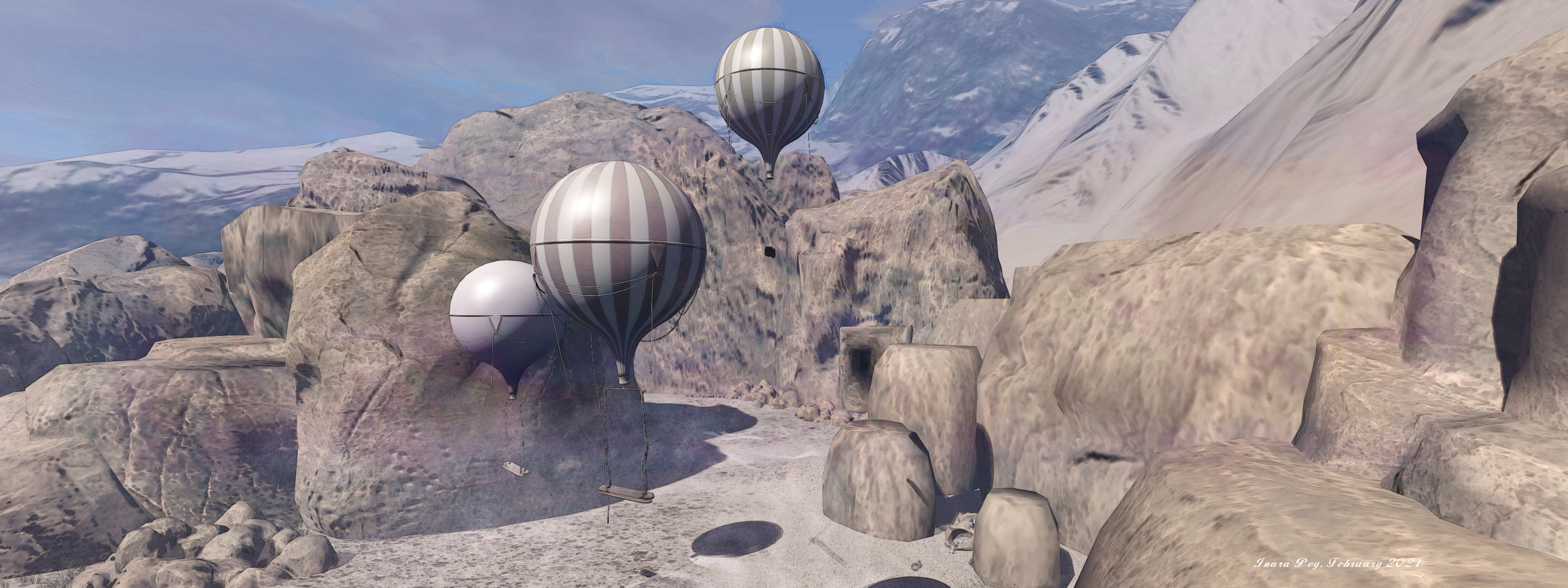
Elsewhere awaiting discovery is a camp site of traditional tents and, a little surprisingly, a trio of balloons that float within wind-blown sands and offer swings on which to sit as little shooting stars whip past. Goats and sheep are to be found across the landscape, together with a small train of  dromedary camels.

Dya’s Little Jordan, February 2021

Those who fancy may also find camel rezzers that allow them to take a ride around the region, whilst for the less adventurous, a little jeep rezzer offer the means to go for a drive and a bicycle rack at the information centre will provide visitors with a pedal bike. Dya also allows those with wearable horses, etc., to mount up and see the region by hoof or wheel. The information centre also provides a very short introduction to the Kingdom of Jordan, for those who would like to know a little more about the country, but who don’t necessarily want to wade through the minutiae of a Wikipedia entry!

As with all of Dya’s region builds, Little Jordan is very easy on the eye and the viewer. There are numerous things to see and enjoy, and a good number of opportunities for photography. Should you opt to enter the mosque, however, do follow the examples at the entrance and remember to remove your shoes!

Dya’s Little Jordan, February 20221

SLurl Details

Anouk Lefavre at Kultivate in Second Life

Kultivate Signature Gallery: Anouk LeFavre

Now open through most of February at the Kultivate Signature Gallery is an exhibition of Second Life landscape photography by Anouk Lefavre.

There is something intensely fascinating about Anouk’s images. Gently post-processed, they have the look and feel of having been painted. The colours are perhaps a little heavier than watercolours, but are lighter than oils, so presenting her work as sitting between the two in a balance that is in itself captivating.

Kultivate Signature Gallery: Anouk LeFavre

More than this, however, the the colours Anouk looks for in her images, together with her framing, means that her pieces are more than images of the places she has records, they are statements of the natural beauty of those places that draws you in. To quote SL photographer Brysen Miller when discussing Anouk’s work:

Truly thought provoking artwork, deep in rich colour tones [and] amazing capture that really make you feel as though you are there. Absolutely brilliant.

All of this is demonstrated in full in the twenty images offered at the Signature Gallery. Nineteen of them are landscape images, with the 20th touching on Anouk’s other focus for photography: avatar studies. All are pieces guaranteed to hold the attention and, with the help of their titles, offer individual narratives that provoke the imagination.

Kultivate Signature Gallery: Anouk LeFavre

However, I admit that of all the images presented, I found myself particularly drawn to the two central images, located on the second and upper floors of the gallery.Neatly split into three panels, they offer a form of latter-day triptych, the breaks between the panels offering an almost chapter-like view of each when viewed left-to-right, whilst equally presenting the complete picture / story when viewed as a whole, the divides between their panels barely interrupting the views they offer.

Which is not to say I in any way dismiss the other pieces; far from it – as noted above, all of them have a marvellous visual appeal.  It’s just that the triptych pieces would make for an ideal centrepiece in a home with a suitable fireplace and wall above it, while I am particularly drawn to the tighter focus and presentation of Behind Screen Memories.

Kultivate Signature Gallery: Anouk LeFavre

But whether drawn to Anouk’s work because of her use of colour, or for the way she balances land and water in creating a scene or for the way she breathes natural life into an image, this is a selection of pieces that will both please the eye and gladden the mind with thoughts of warmer happier days to come.

SLurl Details