2022 TPVD meetings week #23: PBR materials; textures

Village of Ahiru, April 2022 – blog post

The following notes were taken from the video recording by Pantera (embedded at the end of this piece, my thanks to her as always for recording the meetings) of the Third-Party Viewer Developer (TPVD) meeting on Friday, June 10th, 2022 at 13:00  SLT. These meetings are chaired by Vir Linden, and dates for them can be obtained from the SL Public Calendar.

Important: as from this meeting, the TPV Developer meeting has moved to a four-week schedule.

Please note that this is a summary of the key topics discussed during the meeting and is not intended to be a full transcript of either. However, the video does provide a complete recording of the TPVD meeting, and timestamps to the relevant points within it are included in the notes below.

Available Viewers

[Video: 1:23-2:39]

There have been no viewer updates through the week, leaving the current list of public official viewers as:

  • Release viewer: version 6.6.0.571939 – formerly the Performance Improvements viewer, dated May 25th – no change.
  • Release channel cohorts (please see my notes on manually installing RC viewer versions if you wish to install any release candidate(s) yourself).
    • Nomayo Maintenance RC (Maintenance N) viewer, version 6.6.1.572179, June 1.
    • Makgeolli Maintenance RC viewer (Maintenance M) viewer, version 6.5.6.571575, May 12.
  • Project viewers:
    • Performance Floater project viewer, version 6.5.4.571296, May 10.
    • Mesh Optimizer project viewer, version 6.5.2.566858, dated January 5, issued after January 10.
    • Legacy Profiles viewer, version 6.4.11.550519, dated October 26, 2020.
    • Copy / Paste viewer, version 6.3.5.533365, dated December 9, 2019.

General Viewer Notes

  • The Performance Improvements viewer has had a couple of “significant issues” raised against it, which are being pulled into the Maintenance RC channels for resolution. One of these might be BUG-232200 (extreme mouse sensitivity based on DPI), although no specifics provided at the meeting.
  • The Legacy Profile project viewer (finally) looks like it may be getting some attention in the near future, in the hope it can move forward to RC status at some point.

Additional Materials Support / PBR

[Video: 2:58-5:28]

Summary

Note: please also refer to my recent (April / May) CCUG meeting summaries.

Two area of work are currently in progress.

  • One element of work is to provide “full” Physically Based Rendering (PBR) materials support utilising the glTF specification.
    • This work is currently focused on implementing a new materials asset type that will allow materials surfaces created utilising the PBR workflow to be imported to SL and then applied to their desired object face(s).
  • A parallel piece of work is adding sport to SL for reflection probes to update the generation of the environment maps (because the current cube mapping used by SL is limited and would not work will with PBR).

Current Progress

  • Simulator-side support for reflection probes is being added, together with updates to the EEP system in support of the changes. This work is being implemented so that (hopefully) viewers without the necessary rendering updates will not see any “breakages” to the environment as the simulator work progresses through Aditi to Agni.
    • These updates are currently on Aditi on the DRTSIM542 channel (Materials 1, Rumpus Room, Rumpus Room 2, Materials Adult).
  • LSL support for this work still TBD.
  • There is now a test version of the viewer for the materials work available through the SL Discord server #content-features channel.
  • A glTF importer will “hopefully be ready in the next week or so”, although it will be a work-in-progress,

Texture Rendering Improvements

[Video 5:30-18:15]

  •  There is a texture streaming overhaul in progress. This changes the number of threads used in texture decoding and how the decoding on the background threads is handled, and should see a noticeable improvement in texture rendering when available & incorporated into viewers.
    • This work will likely be available ahead of the materials work mentioned above, but it has not been determined if it will form a dedicated project / RC viewer or be folded into a Maintenance RC.
    • TPV developers who may have been working recently on the texture threads, may want to take note of this and listen to this portion of the video, given that a number of threads have been removed o eliminate conflicts.
  • Part of this work is focused on trying to get a “good honest answer” from the operating system running the viewer as to how much video memory is actually free for the viewer to use.
    • In general (and despite the VRAM slider) the official viewer typically uses between 512 MB and 2GB of video memory (when available on a system), but runs into trouble trying to balance using anything over 512 MB with the 512 MB “limit”, thus causing issues of texture thrashing.
    • This work will likely see the removal of said slider as well.
  • Once completed, these changes should see the viewer work more “cooperatively” with other applications running on a client system:
    • As video memory is required by other programs, to the viewer will relinquish it; as video memory becomes available, so the viewer will attempt to use it.
    • As video memory is relinquished, the viewer will attempt to “intelligently” unload textures – such as those in the background/occluded, those far away, etc., to reduce the amount of visible texture blurring / unblurring as textures are unloaded /reloaded.
  • This work will hopefully benefit the viewer across all operating systems, although there are issues around getting Mac OS to report the amount of free video memory, and AMD GPUs are also proving a little difficult in their reporting of memory use.
  • The structure being used for the Windows enquiries can be found here.

In Brief

  • [Video 22:50-27:52] Discussion on alpha masking on avatars / rigged mesh, including reports on some content with transparent rigged meshes appearing broken as a result of changes to the draw order.
    • A lot of the reported breakage appears to be the result of creators “cranking the handle” to achieve results, without actually fully understanding either what they are doing or how the viewer’s rendering system works.
    • The changes being made now are part of trying to make the draw order more logically consistent with a view “maybe someday” being able to explicitly set the ordering priority for the draw order.
  • [Video 28:11-36:00] Advanced Lighting Model (ALM) vs. non-ALM (aka “forward rendering”). LL are strongly leaning towards getting rid of the non-ALM rendering path, providing it can be shown that this does not adversely impact performance (e.g. ALM runs roughly as well as non-ALM for those using the latter) on the broad cross-section of hardware most commonly operated by SL users.
    • This may raise concerns among the minority on metered connections (as it will increase the amount of data crossing their network in handling materials, etc.), so consideration is being given to including a “data saving mode” into ALM that will prevent the sending for materials data.
    • Another problem is that of general education. A lot of people still think that enabling ALM means they “must” run with shadows enabled (which does cause a significant performance hit), without realising they can disable shadows from Preferences → Graphics the Shadows drop down. De-coupling automatic shadows enabling from ALM may help rectify this.
    • Similarly, local lights can be a performance hit with ALM as the number can be unlimited, as opposed to the cap of six rendered lights under non-ALM rendering), so the suggestion is to have a slider to allow the user define how many local lights are rendered in their view under ALM.
    • [Video: 38:22-39:48] removing the non-ALM rendering path would also mean the removal of the Atmospheric Shaders checkbox, the avatar cloth checkbox (which user generated content cannot access anyway), the Bump Mapping and Shiny (low, medium high) drop-downs,
  • [Video: 36:10-40:04] The Performance Improvements Floater viewer (still at Project viewer status at the time of writing, and not to be confused with the Performance Improvements viewer now at release status) makes some changes to graphics pre-sets:
    • The object mesh detail is not always set to Low (as per some TPVs already).
    • Changes to max no of non-impostor avatars is based on the graphics quality slider.
    • The core benchmarking for setting all pre-sets has been revised.
    • This work is all part of the “auto-FPS” improvements that for a part of the Performance Improvements Floater viewer.

Date of Next Meeting

Friday, July 8th, 2022.


The artistry of Melina Sue in Second Life

NovaOwl Sky Gallery: Melina Sue, June 2022

Now open through until Sunday, July 31st, 2022 is the most captivating exhibition of mixed media art it has been my delight to visit. Hosted within the Sky Gallery at NovaOwl, operated by Uli Jansma, Ceakay Ballyhoo & Owl Dragonash, the exhibition features the work of Melina Sue (MelinaSue1).

Set across two levels within the skybox is a selection of art that spans the digital divide, offering images, drawings and paintings from the physical world, together with avatar studies and wildlife pictures captured from within Second Life that is collectively utterly engaging in its richness and diversity.

A long-time resident of Second Life (having originally joined in 2009), Melina Sue describes herself as “a multi-discipline, mixed media artist”, a description that fall far short of her creativity, her eye for composition, colour, narrative, pose and lighting, and her innate ability to capture the very essence of life within her work.

NovaOwl Sky Gallery: Melina Sue, June 2022

Enter the main level of the gallery and you enter a place where Africa touches upon India’s rain forests, where gazelle, lion, elephant – and tiger – roam under a night-time sky (make sure you use the gallery’s Shared Environment settings). On the rock walls bounding three sides of this grass hollow are arranged images from Second Life: three large format avatar studies of equally enormous richness and that depth of life mentioned above, and three wildlife pictures.

Touching on elements of fantasy, all three portraits contain within them their own narrative that extends well beyond their frames, but which still as individual pieces that can be appreciated for their own beauty – with Inside Me offering a powerful resonance as to the strength of a woman. Between two of them, the wildlife pictures do more that offer images of the animals within them – but carry us to the Serengeti itself; placing us on the grasslands to witness first-hand the movement of gazelle, giraffe and elephant.

NovaOwl Sky Gallery: Melina Sue, June 2022

On the upper floor, reached by way of a ramp passing two further avatar studies, is another display of Melina’s art, which brings together paintings from the physical world, mixed media pieces from Second Life, and the most engaging drawings containing beloved pets and true life studies. These latter pieces are a continuation of a display of art on the lower floor, arranged around Melina’s signature. Click this and – if you have media enabled – you can witness her bringing a painting to life.

More than this, this selection of studies offer an introduction to Melina’s art in a manner we can all share: as a working artist, she offers both the opportunity for us to purchase her work to hang in our physical world, and will accept – subject to discussion – commissions to produce portraits of humans and our pets. For those who would like a professional photographic portrait of their avatar – or a painting of same – the info board alongside the display provides her rates, whilst more of her work can be viewed on her website.

NovaOwl Sky Gallery: Melina Sue, June 2022

A truly gifted artist, and a genuinely engaging exhibition.

SLurl Details

Looking at the SL Performance Improvements Viewer

via Linden Lab

The Performance Improvements Viewer has been the default release viewer from the Lab for the last couple of weeks, and the code is starting to find its way to TPVs. This is a viewer specifically designed by LL to provide a smoother user experience in terms of things like rezzing / rendering times, better FPS.

The viewer represents a lot of work on the part of the Graphics team to improve data handling (including moving various data elements between threads, removing low update processes to their own threads rather than having them stall the main rendering threads, etc., all of which is intended to make the viewer feed more responsive as you move / teleport around SL.

As such, I decided to try a series of basic comparative tests between the Performance Improvements viewer, a version of the official viewer without the code updates and Firestorm (as my TPV of choice at the moment), just to gain a rough indication of how the changes made to the viewer perform. These tests comprised:

  1. Logging-in to my Home location with empty caches, recording the time from clicking the log-in button through to everything loading in my field of view.
  2. Logging-in to my Home location with it locally cached on my hard drive.
  3. Completing a walk around my Home location, recording FPS at the same 9 locations, three times each with Shadows OFF and Shadows ON, and taking an average of all the FPS times recorded.
  4. Teleporting to a busy region (15+ avatars) that is not pre-cached locally (but should be cached at my nearest CDN node(s), given it is a place I visit daily).
  5. Re-teleporting to the same location, now locally cached.
  6. Completing the same walk around the selected location, recording FPS at the same 5 locations, three times each with Shadows OFF and Shadows ON, and taking an average of all the FPS times recorded.

The table below summarises my findings:

Firestorm SL Viewer – No Improvements Code SL Performance Improvements Viewer
Home log-in uncached 42.06 sec 27.94 sec 24.00 sec
Home log-in cached 22.34 sec 21.98 sec 20.00 sec
Home walk – no shadows 25.5 FPS 34.5 FPS 53.57 FPS
Home walk – shadows 17.4 FPS 21.4 FPS 42.8 FPS
Uncached location TP 55:41 sec 49.37 sec 44.27 sec
Cached location TP 46:61 sec 35.03 sec 17.57 sec
TP location – no shadows 28.9 FPS 29.25 FPS 45.54 FPS
TP location – shadows 13.5 FPS 22.8 FPS 38.8 FPS

Obviously, there is always going to be a lot of subjectivity in such tests like these, which are dependent upon factors such as the specs of the system running the viewer(s), what else is running at the same time, Internet connectivity with the SL services and to the nearest CDN node, etc. However, in carrying out the comparisons above, I attempted to achieve something of a common basis by:

  • Using the same settings across the three viewers (e.g. camera and graphics pre-sets; the same RenderVolumeLOD factor; the same attached EEP settings for a consistent environment; the same complexity setting & max no. of non-imposters, etc.) – with the acknowledged caveat that the Performance Improvements viewer would automatically default to Shadows ON for me, based on my system’s capabilities, so needed some adjustment during some tests.
  • Ensuring all tests were carried out back-to-back to minimise extensive changes due to avatars of different complexity coming  / going / moving around.
  • Closing all other apps I had been running on my PC to maximise the available resources available to all of the tests.

In addition, and for completeness (and as requested by Lance in the comments) – here are my system specifications – which are also available in the link on the right column of this blog.

But even while subjective, I think the results tend to speak for themselves, and there is no denying the qualitative frame speed increase with the Performance Improvements viewer, particularly with shadows enabled.

How quickly these updates are adopted by TPVs is down to their release schedules; but for the official viewer, this marks the first major release of updates intended to improve performance that is currently in flight, with the Performance Improvements Floater viewer (which includes the Lab’s take on auto-FPS function functionality similar to that found in Firestorm) currently at product viewer status.

The Performance Improvements viewer can be downloaded via the Viewer Download page, and the release notes are here.

Within the Void in Second Life

The Void, June 2022 – click any image for full size

In May, Cube Republic passed me a Landmark to a place I’d never heard of – The Void – A Full region designed by Ninavah Snowflake and home to The Void and Minttea in-world stores. As I’m curious about stores that offer places to visit outside of their central business, I found time to take a look – and found something of an engaging, innovative setting.

Before going further, I’d like to stress a few things:

  • This is a review of the public spaces of the region, it’s neither a recommendation of endorsement of the products sold in either store, none of which I’ve viewed, much less purchased.
  • To access the region, you need to join the region (you will be offered the chance to join on trying to teleport view the SLurl given in this piece). This is necessary as the Experience runs the interactive elements within the region.
  • Some of the teleport and other effects use both light and motion, so those sensitive to bright / flashing white light or rapid motion / flashing should take care.
  • Make sure you have Advanced Lighting Model (ALM – Preferences → Graphics → make sure Advanced Lighting Model is checked).
The Void, June 2022

Accepting the Experience (if you haven’t already) will deliver you to the initial Landing Point; just follow the arrow to the portal and walk through it (be warning: flashing effects!) to arrive at the main hub. This is a setting where geometry is king, and which carries within it hints of Tron and Tron Legacy. Rendered almost entirely in black and white, this artificial landscape exists as islands over a grey body of water, below which machines sit.

Above the water, the setting is dominated by a gigantic cube rotated through 45º degrees to rest on edge on one of the flat islands. Limned in white neon-like light as with the rest of the setting, it is home to the Void / Minttea main store lobby and teleports, and sits flanked by two far more modest islands – one the home of Atherium, and the other, the Portals – which will be the focus of the rest of this piece.

The Void, June 2022

Three teleport disks are ranged before you on arrival, each clearly labelled. However, they are not your usual touch / sit teleports; they are instead collision-triggered. Walk onto / close to one of them and your avatar will be caromed into the air with a vivid, screen-saturating flash and somersaulted through the air, camera capturing the move from several angles. This can be a little unsettling the first time, but you will arrive at your destination safely.

Atherium is pretty much a Traffic Trap – visitors are asked to register with an obelisk that put me in mind of the MCP in the original Tron (albeit without the CGI and lights) and either remain close by or within the region as a whole in order to win the opportunity to pick from a (long) list of rewards.

The Void, June 2022

The Portal island, however, offers the opportunity to walk through three additional portals to further locations. These are:

  • Archive: enter a dark world where a console lit by two arrows pointing in opposite directions awaits. Approach it, and the room around you will turn white, revealing which computer-like objects hang overhead, together with scrolls of hieroglyphs. Use the arrow’s to “page” through the scrolls and touch a scroll to gain a dialogue of diary entries that form an evolving story – each entry will appear in local chat when selected.
  • Muses: a field of green under an azure sky of white fluffy clouds; a place to relax.
  • Dreamscape:   The most engaging element: walk the bridge across a misty void to the far wall. Touch the wall and enter the Chamber of Muses. Touch the device at the centre to rez a number of scenes – and watch the chamber literally spin them into being (with a certain amount of bright light / flashing).

Finding your way back from any point is simply a matter of finding the archway (Portals) or teleport disk.

The Void, June 2022

Immersive, unusual, and cleverly scripted / presented, The Void makes for a visually impressive, unique visit, whether or not you are hunting for movement  / flight / swimming assistance or other avatar accessories.

SLurl Details

2022 SUG meetings week #23 summary

Perpetuity, April 2022 – blog post

The following summary notes were taken from the Tuesday, June 7th, 2022 Simulator User Group (SUG) meeting. It forms a summary of the items discussed and is not intended to be a full transcript. A video of the entire meeting is embedded at the end of the article for those wishing to review the meeting in full – my thanks to Pantera for recording it.

Server Deployments

See the server deployment thread for any updates.

  • On Tuesday, June 7th, the SLS Main and Event channel servers updated to simulator version .572237, which includes fixes in support of the upcoming Premium Plus capability.
  • Wednesday, June 8th should see the RC channels will be restarted without any code deployment.

Available Official Viewers

There have been no official viewer updates at the start of the week, leaving the current crop as:

  • Release viewer: version 6.6.0.571939 – formerly the Performance Improvements viewer, dated May 25th – No change.
  • Release channel cohorts:
    • Nomayo Maintenance RC (Maintenance N) viewer, version 6.6.1.572179, June 1.
    • Makgeolli Maintenance RC viewer (Maintenance M) viewer, version 6.5.6.571575, May 12.
  • Project viewers:
    • Performance Floater project viewer, version 6.5.4.571296, May 10.
    • Mesh Optimizer project viewer, version 6.5.2.566858, dated January 5, issued after January 10.
    • Legacy Profiles viewer, version 6.4.11.550519, dated October 26, 2020.
    • Copy / Paste viewer, version 6.3.5.533365, dated December 9, 2019.

In Brief

  • Region crossing issues were raised, with some defining them as “the” immersion-breaking issue of SL – a claim that is subjective, based one a person’s particular. Responding to the problem, Rider noted that what is needed is a top to bottom evaluation on the entire transfer protocol. This will take resources that are working on other projects.
  • The above led to further discussions on the issue of vehicles hitting a parcel ban  / ban lines are “bounced” (see: BUG-231802 “Prevent vehicles from entering parcels their riders cannot access”). This work is still pending. However, it in turn saw a general discussion on overly-aggressive security orbs, vehicles, fire-breathing chickens and parcel bans in general, with different viewpoints expressed, per the video, in which it was noted the above Jira won’t help with aggressive orbs.
    • An issue of point here is an property-holder’s right to protect their privacy either on the ground or in skyboxes) versus the ability for vehicle users to pass through (particularly by air) to travel through multiple connected regions.
    • The problem is, trying to regulate orb systems so that, for example, all conform to a minimum time delay before ejecting trespassers, would have to be retro-active, and next to impossible to ignore.
    • BUG-225227 “Report Cause of Teleport to Scripts” entered the last part of the conversation, and looks like it will be put back in the “under consideration” queue for feature requests.
  • BUG-227303 “collisions makes a script stop running and revert its mono status” was brought up for the Lab’s attention once more.
  • BUG-6477 “Feature Request: Script operational function or constant for allowing all functions using list inputs to typecast list values to expected types”

Loss, life and strength, Alone in Second Life

Nitroglobus Roof Gallery: Mihailsk
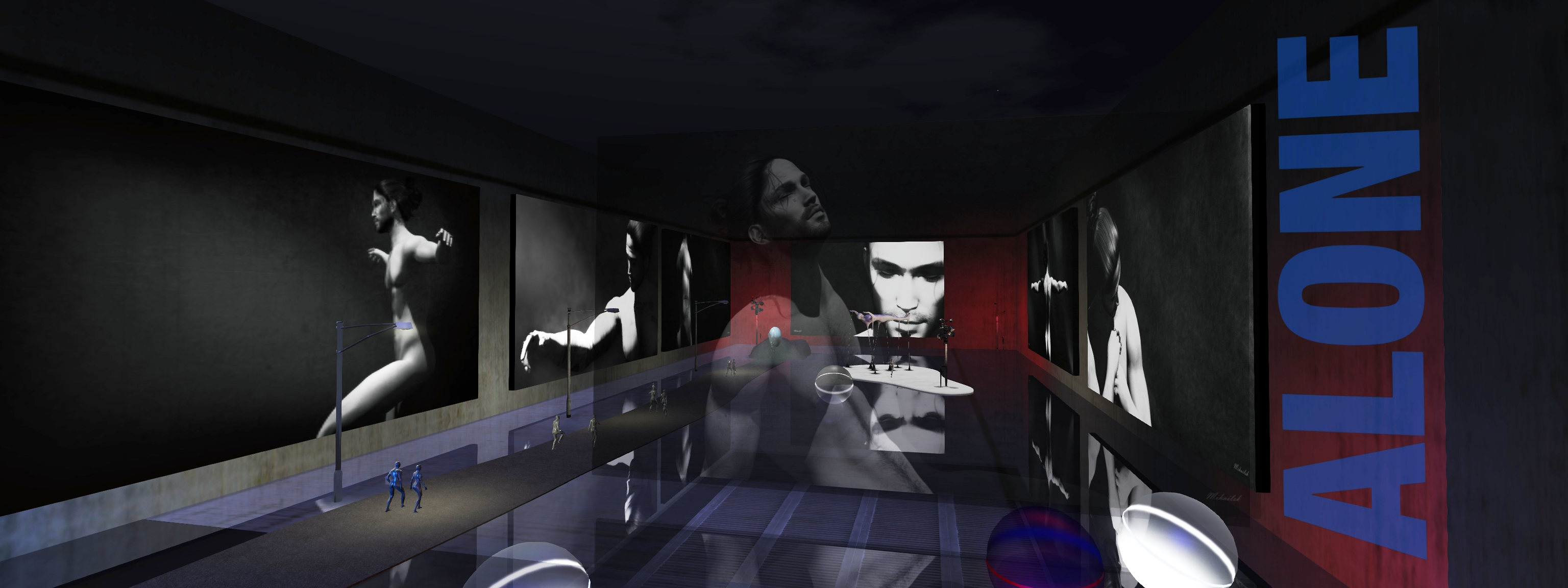
There are moments in life when you feel like you are losing everything; the laughter, the joy, in short the colour disappears from your life. You are ALONE, nude, mourning about what you lost. You have to find the strength to stand on your own feet again and find the light in the darkness that surrounds you.

– Mihailsk, June 2022

With these words, Greek photographer-artist and observer of life Mihailsk introduces guests to his exhibition Alone, which forms the June exhibit at Dido Haas’s Nitroglobus Roof Gallery. As might be gathered from his intro, this is an exhibition that leans into darker feelings and emotions: loss and loneliness, depression and hurt, whilst also offering a sense of hope beyond the shadow and pain.

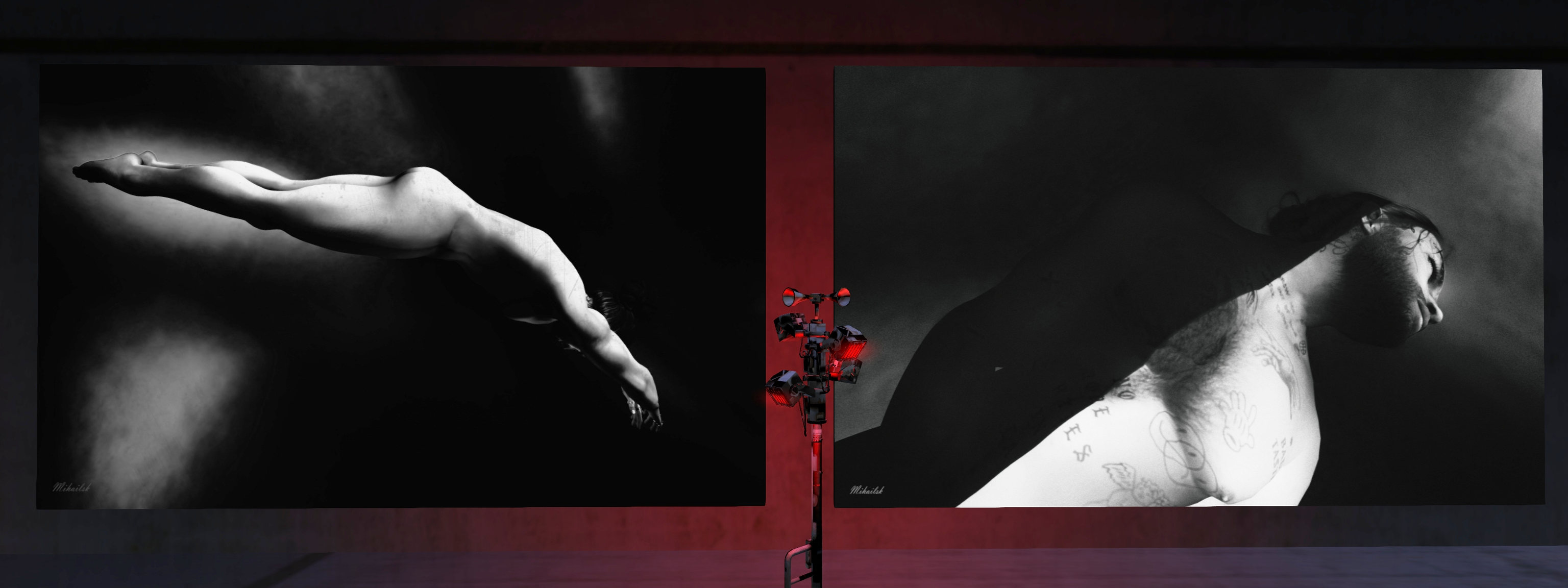
The fourteen pieces Mihailsk presents are extraordinary in the depth of life they each offer. All are finished in black and white, using deep shadow and nudity to tremendous effect. But while nudity is present, it is not excessively NSFW, (although caution might be best employed with a couple of the pieces). Nor is its presence in any way gratuitous; rather, it is essential to the exhibition’s theme and tone.

Nitroglobus Roof Gallery: Mihailsk

This is because – as Mihailsk notes – nudity is the most physical manifestation of helplessness / being alone. When nude, we have nothing by which to hide our condition; we are literally and metaphorically laid bare to the world and our scars are openly visible; scars that are not necessarily physical, but certainly emotional (and represented here by the tattoos, marks and drawings present on Mihailsk’s torso and face). Thus its use within these images is a literal expression of naked emotion.

Similarly, the use of shadow and monochrome project feeling and mood. The shadows are perhaps most obviously representative of depression, feelings of darkness, loss and being lost. At the same time, the use of shadows to obscure eyes (together with eyes being closed) speaks again to sorrow, loss, and emptiness.

Contrasting with this is the use of light, both directed and visible. Through the pieces, whether indirect and lighting Mihailsk’s body and face, or direct in the form of beams of light falling across him or the presence of a ceiling light, give a sense hope for the future, and happier times will come again. More particularly, its presence within the images literally pushes back against the darkness, bathing Mihailsk in a sense of warmth, a visual reference to the fact that bad times do come to an end and that – to borrow from another expression – our darkest times come just before the brightest.

Nitroglobus Roof Gallery: Mihailsk

This hope is further expressed through pose. Nowhere is the figure slumped or huddled; instead, the poses all contain one or more suggestions of strength: a muscular outstretched arm, a seated back that is straight, not curved in defeat; the fluid movement of dance, and so on. Thus, they further add to the sense of hope for the future, that our inner strength will allow us to survive and to move forward as we seek the light of better times.

Accompanying the art are two quotes from Greek writer and poet Anastasios-Pandeleïmon Leivaditis and Belgian poet and novelist Eleanore Marie Sarton, both of which perfectly encapsulate the spirit of the exhibition. This can be found on the gallery wall, while lighting by Adwehe has been provided to add further atmosphere to the piece (make sure Advanced Lighting Model is enabled).

Rich in metaphor, meaning and very real emotion, Alone is an exhibition of enormous personal depth, but which offers a richness of feeling that it resonates strongly with anyone who has experienced one or more periods of loss and / or darkness.

SLurl Details