SL20B Lab Gab Special: Grumpity and Mojo Linden – summary notes + video

via Linden Lab
On Tuesday, June 27th, 2023, Linden Lab streamed a special session of Lab Gab featuring  Grumpity Linden, Linden Lab’s Vice President of Product, and Mojo Linden, the Lab’s Vice President of Engineering.

The session was built around announcements and updates relating to various initiatives and product developments. Note that the following is not a direct transcript of the entire session, but is intended to record the key points discussed.

Table of Contents

For ease of reference, timestamps are provided to the relative points within the video where specific topics are discussed, allowing readers who prefer to listen to the comments directly to be able to do so.

A Little Background

[Video: 0:45-2:43]

Grumpity Linden: heads up Second Life Product team, where she has overseen a shift to growth, a stronger, more balanced economy, movement towards better community cohesion, and an overall forward-looking approach. She originally started at LL whilst working for The Product Engine, and was involved in the development of Viewer 2 (as designed by 80/20 Studio), prior to joining LL full-time in 2014. As the Vice President of Product, she is responsible for coordinating the various teams involved in bringing features and updates to Second Life, liaising with legal, financial and compliance to ensure features and capabilities meet any specific requirements in those areas, and so on; work which can involve looking at specifics within various elements of the overall SL product, such as UI design and layout, etc.

Mojo Linden: joined the Lab in 2021 at the Vice President of Engineering. A 20-year veteran of the gaming industry, he has been responsible for launching numerous games across multiple genres and platforms, and has a strong understanding of platforms, architectures, and product development and technical capabilities. In his role at the Lab, he has shown enormous openness and candour in seeking to increase the platform’s functionality and performance, and in pushing to expand SL’s capabilities.

Performance Improvements  and Technical Debt

[Video: 2:48-5:38]

  • Performance improvements in both the viewer and on the simulator / back-end has been a focus for the last two years, and remains a focus now.
  • The PBR [Physically-Based Rendering – also a see below] project will not only deliver better rendering and better looking world, it includes a range of viewer-side performance improvements – such as removing the viewer limitation on the amount of video memory it can use on a GPU under Windows, allowing for  better texture loading.
  • There is work in progress to update the simulator code to run on a 64-bit architecture, which will lead to further server-side performance improvements.
  • A challenge with improving SL is its 20-year lifespan, which means that while it has been updated throughout, it still has a high degree of technical debt in terms of the age of some of the code and services, due the fact that many technologies and capabilities didn’t exist when the platform was being built, etc.
  • Enhancing and improving the platform is therefore a balancing act between introducing new technology, new features and new capabilities whilst also working to ensure the underpinning code and continues to work as expect, and the back-end systems and services can be updated to work in “more modern ways”.

Product Roadmap 2023

[Video: 5:47-17:19]

In Brief

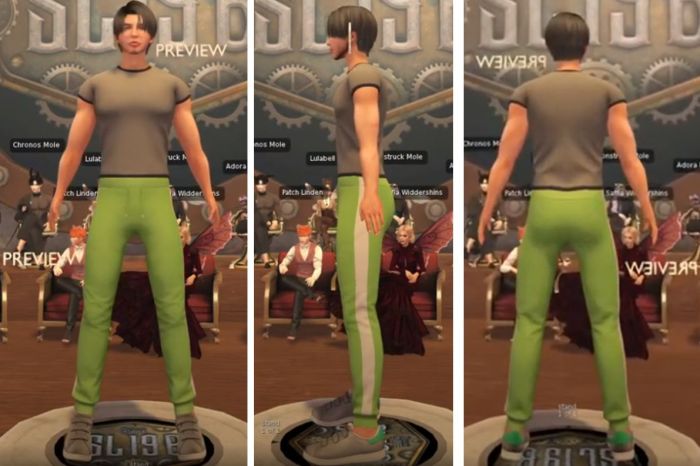
  • The upcoming New User Experience / Senra-brand mesh avatars – for more details, see my summary of Patch Linden’s Lab Gab session, together with the supporting web-based avatar customisation process [also see below for more].
  • The SecondLifeTime membership offer  – see: Linden Lab launches SecondLifeTime Premium and SecondLifeTime Premium Plus. In brief:
    • 200 SecondLifeTime Premium memberships for a one-off payment of US $749 for life and featuring all the benefits available to Premium subscribers.
    • 20 SecondLifeTime Premium Plus memberships for a one-off payment of US $1,749 for life and featuring all the benefits available to Premium Plus subscribers.
  • The launch of the first Linden Homes theme for Premium Plus – see: Looking at the Linden Premium Plus Homes Ranch theme in Second Life.
  • Updates and improvements to the “Land Journey”.
  • Further Marketplace updates and improvements, including making the MP mobile-responsive.
  • Further improvements to the updated Destination Guide.
  • Back-end systems updates (e.g. the architecture update, noted above), which may not always be user-visible.

Second Life Mobile

[Video 7:43-13:30]

Rendering in the SL Mobile app / viewer – screencap via the June 2023 development video from Linden Lab
  • Development work is continuing, with an emphasis on performance and rendering (for example: the capabilities of the hardware running SL Mobile is assessed to see if it can render with shadows enabled).
  • The user interface has been revised and improved, and the overall aim remains to provide an immersive an experience as possible, and provide users with an many of the capabilities found within the viewer as makes sense to include in a mobile device.
  • Work will continue in adding features and capabilities and refining SL Mobile over the next two quarters.
  • The current time frame for releases is:
    • Limited “private” alpha testing towards the end of 2023.
    • Broader user beta testing in 2024.
  • A new development video update was presented during the session.

Social Casino

[Video: 15:16-17:19]

  • Background: a low-key announcement (via Twitter) of a new format of casino launched by Linden Lab allowing casino-type games to be played without wagering L$ directly or offering prizes in L$ which can be later cashed-out, and thus “not gambling”.
  • Seen by LL as a means to provide users with a further opportunity for social engagement and entertainment, based on the idea that casino-style games and environments are popular social mediums in the physical world.
  • This has been a complex programme to work out, including the legal aspects, and has been made possible through Mojo Linden’s wide-ranging experience working for the likes of Double Down.
  • The experience is to be enhanced during the coming year with more in the way of prizes (e.g. transferring game chips for No Copy / No Transfer items), leader boards, and a grater variety of games.
  • The overall idea is to showcase the idea and encourage communities in Second Life to develop their own “social casinos” along similar lines.

Second Life Inventory Updates

[Video: 25:33-26:27]

  • A project has been underway to update the Inventory database schema to pave the way for the addition of a range of new features.
  • The first of these are the abilities to associate thumbnail images with Inventory items and folders, and to open individual inventory folders in their own windows.
Inventory Extensions in the Inventory Extensions project viewer: Item and folder contents preview images (l) and the Single Folder View (r)

The New User Experience

[Video: 17:25-20:22]

The New Welcome / Community Hubs

[Video: 17:25-18:26]

  • The first in a new series of Welcome  / Community Hubs designed to help incoming new users to get started in Second Life and provide them – and established users – with the opportunities to mingle, participate in games and events, seek assistance from mentors, etc., was recently launched alongside the Motown Experience (see: Linden Lab and Motown: a new approach to user on-boarding in Second Life).
  • The project has involved multiple teams / departments at the Lab, and is regarded as a “labour of love”.
  • There are plans to further enhance this approach to Welcome Hubs and to expand them to other communities / experiences.
The Second Life Welcome Centre sitting adjacent to the Motown Experience

New Avatar Customisation Flow

[Video: 18:36-20:22]

  • Alongside the Senra NUX avatars, the Lab will be launching a new avatar customisation flow for new users.
  • This will initially be web-based, and part of the sign-up flow, allowing incoming users to customise their avatars as the come into Second Life.
  • This will then be expanded so that the Senra avatars and the core clothing / accessories developed for them by Linden Lab will form a part of the Second Life library within the viewer’s inventory, and thus available to all users.
  • The improved avatar customisation flow will also be added to the viewer
  • As indicated by Patch Linden, there will be a dev kit + licensing agreement for creators wishing to produce and sell products into the Senra ecosystem as it develops, to hopefully provide broader choice for those using the Senra avatars.

Physically Based Rendering (PBR)

[Video: 20:33-22:09]

  • Background: a wide-ranging project to introduce PBR capabilities to Second Life using the Kronos glTF 2.0 specification.
    • The current project is to introduce glTF materials into Second Life, and this is now at Release Candidate status both in the viewer and on the Main grid (that latter on a limited basis at the time of writing).
    • It means some significant updates to rendering within Second Life, and offers notable improvements. Part of this work involves the introduction of Reflection Probes into Second Life to allow for better surface reflectivity in objects, etc.
    • A follow-on project from this work is already underway, allowing the “traditional” textures using a Second Life terrain to be replaced with glTF materials.
    • A further follow-on project is looking to  allow the controlled use of planar mirrors in-world, with real-time reflections (including avatars).
    • I attempt to provide updates to this project through my Content Creation User Group (CCUG) meeting summaries.
    • CCUG meeting are open to all users interested in content creation, and details of meetings can be found via the SL Public Calendar.

  • This project does introduce changes to content creation workflows (e.g. lighting and highlighting should not be baked into colour maps; rather full use should be made of the PBR maps (ambient occlusion, roughness, etc), and well as better workflow integration with established tools such as Adobe Substance 3D Painter.
  • The viewer is expected to remain in RC for an extended period, in part to allow the back-end support to be fully deployed on the Main grid, but also to allow for extensive testing by as wide a cross-section of content creators and general users as possible and the fact it does introduce a substantial change to the Second Life lighting model. Thus, LL want to offer as much time as possible for people to adjust to the viewer and also to report bugs, etc.

SL’s Future

[Video: 31:00-33:00]

  • In broad terms over the next 10 years: available to more platforms, becoming more of an “everyday companion” rather than being constantly tethered to a desktop / laptop environment.
  • Potentially new and different (to today’s) usage and use cases for SL as a result of it being more broadly available through different platforms, and how users view it as a platform / tool / entertainment, etc.
  • Continuing to innovate, having appeal to users and communities, foster community building, etc.

In Brief

  • [Video: 22:17-23:24] VR headset support:
    • Reaching a point where headsets can be supported is seen as a series of steps – such as improving the graphics (notably frame rates), looking at what needs to be considered in terms of UI, etc.
    • There are no fixed time frames linked to this work, nor are there any plans for partnerships with headset manufacturers.
    • It is more a case that the Lab is “interested” in headset support and that plans are in a gentle processes of formulation, rather than anything directly headset-related being actively worked on.
  • [Video: 23:34-25:24] LL and AI tools (Chat GPT, large language models (LLMs), etc.):
    • Could be used to make some engineering tasks more automated / productive, but not to the extent of replacing personnel at the Lab.
    • Various tools (such as Chat GPT) are already being leveraged in some testing.
    • In terms of customer data and feeding that into AI tools to assist with training, engineering, etc., it was noted that there are numerous, wide-ranging laws and requirements as to how customer data is handled [e.g. the GDPR, which although an EU set of regulations, does have a global impact], and LL itself has a long-standing history of not exposing real-world customer data. As such, simply feeding customer data into something like an LLM is not an option.
  • [Video: 26:29-28:10] BUG-232037 “Avatar Online / Offline Status Not Correctly Updating” – this is a long-standing issue and source of frustration.
    • Various fixes have been implemented to reduced the incidence of the issue, and more and on the way [including one which at the time of writing is with the Lab’s QA team].
    • There is no time frame as to when the issue will fully be resolved, but it will continue to be worked on. LL admits it is something of a black eye for them.
    • Currently, the suggested workaround is to locate an “empty” region (one with no / minimal avatars) and can use that as a point of log-in the issue should not occur.
    • Updates on this issue, when available, are given through the Simulator User Group meetings, and are reported on in my weekly SUG meeting summaries, for those interested.
  • [Video: 28:15-28:57] LSL scripting updates:
    • Small-scale updates are being routinely deployed (see: Coming Soon: Server Release 2023.06 [now deployed]).
    • There is an ambition / desire to implement larger projects, but the best way to implement these and the time frame for doing so is subject to internal discussions.
  • [Video: 28:58-29:47] Mac Support: LL remains dedicated to supporting MacOS, but it is admitted that support does tend to lag behind Windows development, and that there are performance issues, etc., still to be address within MacOS which may have been more fully addressed on the Windows platform.
  • [Video: 29:47-30:55] Audio improvements: while there are no specific projects on the table at present, there have been internal discussions at the Lab about improvements to SL’s in-world audio capabilities, sparked in part by the arrival of the engineers who transferred over to SL from High Fidelity.


2023 SL SUG meetings week #26 summary

Ethereal City Estate – Ethereal City Noir, May 2023 – blog post

The following notes were taken from the Tuesday,  June 27th Simulator User Group (SUG) meeting. They form a summary of the items discussed and is not intended to be a full transcript. A video of the entire meeting is embedded at the end of the article for those wishing to review the meeting in full – my thanks to Pantera for recording it.

Meeting Overview

  • The Simulator User Group (also referred to by its older name of Server User Group) exists to provide an opportunity for discussion about simulator technology, bugs, and feature ideas.
  • These meetings are conducted (as a rule):
  • They are open to anyone with a concern / interest in the above topics, and form one of a series of regular / semi-regular User Group meetings conducted by Linden Lab.
  • Dates and times of all current meetings can be found on the Second Life Public Calendar, and descriptions of meetings are defined on the SL wiki.

Server Deployments

  • On Tuesday, June 27th, the simulator release 580543 was deployed to the SLS Main channel, placing all of the simhosts across the grid on the same release. This release includes:
    • PATCH method now enabled through LSL HTTP for both send and receive.
    • HEAD method now allowed through llHTTPRequest.
    • Linkset Size has been increased from 54 to 64m to match maximum prim size.
    • llGetAgentInfo can now detect scripted agent status.
    • See this official blog post for more.
  • On Wednesday, June 28th, the PBR Materials simulator code, currently on a limited Main grid deployment (Preflight channel only, I believe), will be updated. All other RC channels will be restarted without any changes to their simulator versions.

Viewer Updates

The Second Life Project Inventory Extensions viewer, version 6.6.13.580656, was issued on June 26th – see my overview for more.

The remaining viewers in the pipeline are:

Changes to How Asset UUIDs are Assigned

Right now when assets ids are assigned it is simply generated. We’re going changing that a bit. We’re going to start trying to de-dupe new assets. So if you were to upload to identical pictures of Kevin Bacon they would both end up with the same asset ID.

– Rider Linden

  • This is a major change to be deployed in an upcoming simulator release.
  • It will apply to textures, notecards, scripts (possibly gestures).
  • UUIDs for rezzed objects will remain unique.
  • The change also will not affect any UUIDs the viewer makes
  • The reason for this change is the Firestorm Bridge – which saves the same LSL script when it is created.
  • Refer to the latter half of the video below for further details on the discussion.

In Brief

  • Teleports:
    • Some are reporting increases in teleport failures, possibly the result of a failure mode wherein the simulator from which an agent (avatar) is departing closes the connection with the receiving simulator before the teleport has completed.
    • BUG-234022 “Teleport just before to change state will prevent the change state to occur” has also been filed, relating to issues with large scripts within worn attachments failing to correctly update on teleport / logging-in.
  • BUG-232037 “Avatar Online / Offline Status Not Correctly Updating” has seen some work put into it (currently with the Lab’s QA team) which many held ease the problem once it reaches a deployment status.
  • A general discussion on scripting issues – please refer to the video for details.

† The header images included in these summaries are not intended to represent anything discussed at the meetings; they are simply here to avoid a repeated image of a rooftop of people every week. They are taken from my list of region visits, with a link to the post for those interested.

Second Life Mobile: Video update from the Lab, with summary

SL Mobile demonstration by Grumpity Linden – a screen capture from the June 2023 development video from Linden Lab
On Tuesday, June 27th, Linden Lab released a new video highlighting the development work for Second Life Mobile App. This video is embedded below, with what follows intended to form a short summary of comments made on the work during the SL20B Lab Gab session with Grumpity and Mojo Linden (and for which I’ll have a text summary available soon.

Key Points

  • Development work is continuing, with an emphasis on performance and rendering (for example: the capabilities of the hardware running SL Mobile is assessed to see if it can render with shadows enabled).
  • The user interface has been revised and improved.
  • The overall aim remains to provide an immersive an experience as possible, and provide users with an many of the capabilities found within the viewer as makes sense to include in a mobile device.
  • As it is, SL Mobile provides:
    • Chats and IM capabilities.
    • Friends on-line information.
    • Destinations / Places.
    • Teleport capabilities.
    • Groups and Group chat functionality.
    • High-quality rendering.
    • Avatar navigation via an on-screen joystick (only visible when in use).
  • Work will continue in adding features and capabilities and refining SL Mobile over the next two quarters.
  • The current time frame for releases is:
    • Limited “private” alpha testing towards the end of 2023.
    • Broader user beta testing in 2024.
  • Further news and updates will be made available as and when there are updates to share.
Rendering in the SL Mobile app / viewer – screencap via the June 2023 development video from Linden Lab

The Video

The new video – embedded below – provides insight into the work carried out since the last update / video released at SL19B, and highlights some of the purposes LL sees SL Mobile being put to. Note that elements such as the UI as seen in the video are subject to possible change as the product develops.

Looking at the Second Life Inventory Extensions Project Viewer

Inventory Extensions in the official viewer: Item and folder contents preview images (l) and the Single Folder View (r)

On Monday, June 26th, Linden Lab issued the Inventory Extensions project viewer, offering two new inventory features intended to make browsing inventory and inventory folders and ascertaining what they / their contents are a lot easier. An official blog post accompanied the new viewer, and this post is intended to offer a little meat an bones on that post for the curious.

The new capabilities comprise:

  • Inventory Previews (previously referred to as Inventory Thumbnails):
    • The ability to take images of individual items within inventory (clothing, body parts, accessories, attachments).
    • Have these images persistently linked to the item (unless intentionally deleted or changed) and displayed when the mouse pointer is hovered over the item in question.
    • The ability to use your own images, either from inventory or uploaded through the preview tool, which can be persistently associated with the item when the mouse pointer hover over it.
    • The ability to create and include images for other inventory asset types such as Calling Cards (e.g. a photo of the person to whom the card relates),  EEP Settings, Landmarks (e.g. a photo of a location), Notecards, Gestures, Scripts, etc.
    • The ability to associated images with an entire folder (e.g. a photo of a complete outfit contained in a folder).
    • There is no fee associated with creating such preview images, whether taken using the in-viewer tool or when uploading your own image via the tool (note the fee will be applied still if you use the Build → Upload Image option).
    • Merchants and creators can add previews to their delivery folders and items, and these will be automatically displayed on mouseover with the item / folder.
  • Single Folder view: the ability to see the contents of a single inventory folder in its own window.
  • As far as I’m aware, these previews should not place any overhead on inventory loading.

Please note: at the time of writing, these features are only available via a project viewer available via the Alternate Viewers page, and thus should be regarded as being for testing purposes, and they may be subject to further iterations / changes between now and when they do review a de facto release status. Those trying the viewer are encouraged to file any bugs they may find via the Second Life Jira.

Inventory Previews

Creating a Preview via the Preview Snapshot

  • Select (and wear / display, as applicable) the item for which you wish to create a preview image. In this example, I’m using a hairstyle.
  • If you are creating a preview of an item of clothing or other wearable, you might want to pose your avatar (although this obviously isn’t essential).
  • Position your camera so you are ready to take your preview image.
  • Open your Inventory and locate the item for item for which you wish to create a preview image and right-click on its name to display the Context Menu. Select Image… from the menu.
  • This will open the Change Item Image floater.  To take a preview image directly, click on the Use Snapshot Tool button on the floater (second button from left, with a camera icon).

Creating an Inventory Preview Image of of of my hairstyles

  • When using the Snapshot Tool, clicking the button will open the Item Snapshot floater:
    • Use the Take Photo button to refresh the preview of the image about to be taken, if required.
    • When you are satisfied with the preview image, click Save.
    • The preview image will be generated and automatically associated with the inventory item.

Viewing A Preview Image

  • In Inventory, hover the mouse over an item.
  • If there is a preview image set for it, it will be displayed whilst the mouse remains over the item.

Hovering the mouse pointer over an item in Inventory will display any preview image associated with it

Buttons on the Change Item Image and Item Snapshot Floaters

The image below provides additional descriptions for those buttons on the Change Item Image and Image Snapshot floaters which might not be obvious at first glance.

The buttons on the Change Item Image and Image Snapshot floaters 

Additional Notes

  • When using the Upload From Computer and Use Texture (e.g. a snapshot saved to inventory or other texture in inventory) in the Change Item Image floater, there is no need to take an additional snapshot using the floater – once displayed in the floater, the image will be associated with the item.
  • To create an image for an entire folder in inventory (such as an outfit), follow the steps for Creating a Preview via the Preview Snapshot, but right-click on the folder itself to select Image… from the Context Menu.

Using the Preview option with an outfit (l) and a Landmark (r)

Single Folder View

This option allows you to see the contents of a single inventory folder in its own window.

  • Locate the required folder in inventory.
  • Right-click on it to display the Context Menus and select Open in a New Window.
  • The contents of the folder are displayed in a new floater:
    • Any items with associated preview images have said images displayed in the upper part of the floater.
    • Items without any associated preview image are listed in the lower portion of the floater.

The Single Folder View (aka open folder in a new window)

General Notes

There have been some claims that the Inventory Preview is an attempt by LL to move in on popular products such as CTS Wardrobe; however, these claims are not really accurate. This kind of inventory preview has long been requested for the viewer, whereas CTS and similar are geared towards web-based inventory organisation (and may require the use of RLV), whilst offering a more rounded feature-set in terms of tagging and other capabilities. As such, they are not in any way invalidated by the release of this functionality, and there are those who may find such systems remain more attractive as an option.

That said, the Lab’s inventory preview is a useful feature, and one that will hopefully be used by content creators as well as by users in general. The single folder inventory view is also useful, although I have a minor niggle over consistency of naming (if the capability is called Single Folder View, how about calling it that in the Context Menu?).

Currently, and as noted above, both features are still in development, and hence only available through the Alternate Viewers page at present, and may be subject to change. Depending on what, if any, changes are made, I may revisit this viewer and provide a further piece on it once it reaches de facto release status.

SL20B Lab Gab Special: Patch Linden – summary notes

via Linden Lab

On Monday, June 26th, Linden Lab streamed a special session of Lab Gab featuring Vice President of Product Operations, Patch Linden.

The interview was built around questions submitted by users in the wake of the announcement of the session, together with those asking during the session via the live and  asked via You Tube audiences.

Notes:

  • The following is a summary, not a full transcript of everything said.
  • Timestamps to the video are included within each topic / sub-topic.
Table of Contents

About Patch Linden

[Video: 5:09-14:10]

  • Originally a Second Life resident and business owner who joined the platform in 2004, and became a Linden in September 2007.
  • Initially worked as a support agent and then as a support liaison. From there he moved to the Concierge team, eventually becoming that team’s manager.
  • Shifted focus to the role of Operations Support Manager for a year, then moved to the Product group, the team responsible for defining the features, etc., found within Second Life.
  • At Product he developed the Land Operations team, which includes the Linden Department of Public Works (LDPW).
  • In 2018, he established the company’s support office in Atlanta, Georgia, and in 2020 he oversaw the move to larger office space in Atlanta, interrupted by the COVID-19 pandemic.
  • In 2019 he was promoted to Vice President, Product Operations.
  • Together with Grumpity, Mojo and Brett Linden, he forms the leadership team overseeing Second Life’s continued development.
  • In his management team role, Patch continues to oversee all of the Lab’s user support operations (some 5 teams), including the LDPW.

Premium Membership and Linden Home Announcements

[Video 1 – 20:07-25:44]

Premium Membership Benefits

  • No specific announcements on additional benefits, but this is something LL are constantly reviewing to see what fits with the overall structure of Premium and Premium Plus.

SecondLifeTime Memberships

  • Two limited-time offers.
  • SecondLifeTime Plus:
    • All of the features of the current Premium
    • Limited to 200 users.
    • Once-time charge of US $749.
  • SecondLifeTime Premium Plus:
    • All of the features of the current Premium Plus
    • Limited to 20 users.
    • Once-time charge of US $1749.
  • Requests must be made via support ticket.
  • It may take time for requests to be responded to.
  • Please see this blog post or this official announcement for more.

Linden Homes

[Video: 14:25-20:06]

  • The next Linden Home theme to be released with the the Ranch Theme, which is dropping as a part of SL20B.
    • These are for Premium Plus subscriptions only, and have a 2048 sq m land parcel.
    • There are 7 styles within the theme.
    • They have a land impact of 703 LI.
    • The will not be subject to region request support tickets until July 10th.
    • See my blog post on the theme for more.
  • The next release after this is code-named “Thousand Island” – which is a hint as to the theme – and the code-name derived from salad dressings (coming off the back of “ranch” – geddit?).
  • [Video: 1:10:23-1:10:58] The Linden Homes web pages will be updated so that if you already have a Linden Home, it will be possible to see if a theme you’d like to switch to is currently available, rather than having to abandon your existing home in order to see the list of available themes via the web page .

Premium Plus Ranch Theme – June 2023

New User Experience (NUX)

[Video – 25:58-35:40]

New Starter Mesh Avatar

  • These were previewed at SL19B but are still to be released.
  • In the interim, the avatars have undergone further testing and approvement.
  • The project now has an overall brand name  – Senra (which fits with the Linden branding, given the latter is a tree and Senra is a genus of plant).
  • Alongside the new avatars, LL has developed a full line of clothing, accessories and attachments, which will be released at the same time as the avatars.
  • A devkit with licensing agreement, for creators wishing to support the new avatar ecosystem and producing clothing and accessories they may wish to sell into that environment, is also in the final stages of preparation for release.
  • These avatars and their clothing / accessories lines (both from LL and creators) will be featured in the new Welcome Hub shopping areas (see below).
  • The entire system is almost now ready for release, and is just waiting on a couple of pieces to be put into place. One of these is on the web side of SL, where incoming new users will be able to select an avatar and customise it .

A preview version of the new, single mesh (head-to-toe) avatars now under the Senra brands, as originally unveiled at SL19B in June 2021 

New Welcome / Community Hubs

  • The new Motown Experience and the additional regions are a new Welcome Hub Experience.
  • It comprises multiple regions built around a central Welcome Area, which is part of the renewed Mentor programme.
  • Please see my blog post Linden Lab and Motown: a new approach to user on-boarding in Second Life.
  • This will be the model for future Welcome / Community Hubs.
  • The shopping area within the Hub idea will include times for the NUX Avatar described above, feature other items aimed at new starters, with stores being periodically rotated for different creators.
  • Within the current Hub, the Motown Experience will continue to be expanded in terms of events and offerings.
  • Other partnerships along this line are under consideration, and may be seen Soon™.

Initiatives in Development: TV Show Partnership

[Video: 35:41-37:00]

  • As noted above, the new Welcome Hub features a partnership with Capitol Record Group via their Motown label.
  • This is the latest in a series of partnership with external organisations (Adult Swim, Zenescope, Film Threat, etc.).
  • These are likely to continue.
  • Currently, development is in the works to see Second Life featured in a “fairly significant TV show” which is currently airing (at least in the US, if not on streaming services in general – details were not made clear – and about to enter its 2nd season). Within it, SL will have a “pretty prominent placement”.

Mainland Development

[Video: 49:59-54:26]

  • Due to the volume of work the LDPW is committed to, there have been changes in priority for various projects, meaning resources do get swapped between projects according to demand.
  • However, there are a number of Mainland initiatives underway, which may not always be particularly visible, but which are proceeding as resources allow (e.g. ongoing work to improve the Second Life Railroad (SLRR) and Mainland roads infrastructure).
  • As the page is turned with regards to the old Linden Homes themes and mini-continents, it is anticipated that more Mainland-focused work and activities will come to prominence. For example (and allowing for their historical value) Mainland Hubs might be given an update / refresh in the future).
  • In addition, it is likely that new features such as the upcoming PBR Terrain project (see: 2023 week #20: SL CCUG meeting summary: mirrors and PBR terrain – this blog, and Sneak Peek: Shaking Up the Terrain with Physically-Based Rendering – official blog, for details), although it was noted that care with this would have to be taken in how this is done to ensure full and proper consistency across regions and parcels.
  • Mainland residents with ideas for Mainland improvements can (preferably) submit them as Feature Requests through the  Second Life Jira, although they can be accepted via a Support ticket.

General Q&A

  • General observations in opening comments:
    • Linden avatars may at times be carrying a tablet. This is apparently clickable and related to the Bellisseria / Mainland passport system (run via the Bellisseria Bureau of Bureaucracy – residents who have a BBB passport can touch an Linden’s tablet and obtain their “passport stamp”.
    • The inclusion of Adult themed regions at SLB20B and the Shop and Hop was a conscious decision to express all of SL’s diversity at a milestone event.
  • [Video: 40:19-42:55] Last Names:
    • Will previously-offered Last Names be brought back? – Probably not, unless the name generates an exceptional number of requests for it to be brought back – and even then it would mean reversing a public statement that “used” Last Names would not be re-featured.
    • Will the cadence of new Last Name options be increased? – releases have largely been with an event / seasonal focus (with some themed offerings as well). It is unlikely this will change.
  • [Video: 43:00-45:40] Adult Linden Home Regions:
    • This has been requested from time-to-time.  However, as:
      • Adult activities / furnishings are permitted in private homes within Moderate Regions (+ Parcel Privacy can be invoked),
      • And additional research by the Lab suggests there is not a general request for residential places with Adult activities can be acted on in public,
      • It is not seen as offering benefit at present, at least in terms of replicating the current themes of Linden Homes within Adult-rated regions.
    • That said, this doesn’t preclude the potential for a special “Adult Theme” of Linden Homes within their own regions, were sufficient demand to arise. There are just no plans in the works for anything like this at present.
  • [Video 45:49-47-29] Zindra / Horizons:
    • Is Zindra (the Adult continent) ever going to be “finished” (in regards to shape, coastlines, etc)?
      • Yes. There are plans to add on to the Adult continent. However, this may not be done utilising the current Zindra “theme”.
      • Rather there are plans in development which may result in a complete overhaul / update of Zindra (at least in terms of the core builds by the LDPW).
    • Is it possible to order Private regions attached to Zindra or the Adult Horizons regions? – Yes, but with a caveat:
      • LL operate the Community Land Partnership Programme (CLPP), and requests for Private regions to join with LL continents as a whole (including Zindra and Horizons) must comply with the requirements of this programme.
  • [Video: 47:47-49:50] Can users consult with LL directly over issues of ToS, copyright, and other policies?
    • The best route for general enquiries / questions on matter of TOS and other SL policies as enforced by LL is via Support, who can generally answer general questions and provide assistance with navigating the policies to gain a clearer understanding.
    • However, Support (and user-facing LL staff in general) cannot consult on legal matters or provide any form of legal advice or recommendations, although very specific questions might be escalated to the Legal Dept for feedback.
    • Where matters of TOS / Community Standards  / violations are concerned, users should file these via the Abuse Report mechanism.
  • [Video: 54:55-58:34] The SL20B Sweepstakes:
  • [Video: 58:46-1:03:39] Demographics over the years:
    • There have been shifts in demographics over the years, some of which are clearly visible in-world, thanks to the changing face of content creation (e.g. from hobbyists happy to bang prims together to semi-professional mesh creators).
    • There have also been other shifts that have been visible – from the technically curious and engaged to the more socially-seeking users (in terms of making connections, seeking social events, etc.).
    • Demographics and changing patterns as a whole are something the Lab tracks as a part of efforts to try to encourage more people to enter SL and become engaged with it.
    • This will continue in the future as LL continue to seek to engage and draw and keep SL vibrant and active as a platform. It may include casting back to older initiatives and trying them again (hence the recent informal Twitter poll by Alexa Linden on Teen Grid and perhaps bringing that back), if it is believed they might work – not that a return of Teen Grid is currently in the works.

Linden Lab launches SecondLifeTime Premium and SecondLifeTime Premium Plus

via Linden Lab


Update: following the publication of this article, Linden Lab published their own official announcement blog post.

On Monday, June 26th, Linden Lab announced a pair of “limited availability lifetime memberships”, wherein Second Life users have the opportunity to make a one-time payment to Linden Lab in return for a “lifetime” membership to Second Life based on either the Premium Account type or the Premium Plus account type.

Offered as a part of the Second Life 20th Birthday celebrations, these memberships are described by Linden Lab as follows:

For Second Life’s 20th birthday, we will be offering a limited number of lifetime memberships for both Premium and Premium Plus! This will give Residents who upgrade to this membership type the benefits of a Premium or Premium Plus membership for the lifetime of their account! You can see a comprehensive list of what Premium and Premium Plus Memberships are being granted on a first come first serve basis. 

– Part of the LifeTime Memberships announcement

In short, these accounts:

  • Feature a one-off payment.
  • Provide all of the benefits applicable to either the Premium Account subscription package or the Premium Plus Account subscription package, depending on which LifeTime membership is applied for.
    • The currently list of benefits for each account type can be found here.
  • Cost:
    • US $749.00 at the time of upgrade for SecondLifeTime Premium.
    • US $1,749.00 at the time of upgrade for SecondLifeTime Premium Plus.
  • Are limited to:
    • 200 applications for SecondLifeTime Premium.
    • 20 applications for SecondLifeTime Premium Plus.
  • Will remain in effect:
    • Even if the account holder cancels their membership – if they re-join later, they will be able to continue with their Second LifeTime membership.
    • As long as Second Life remains operational.
  • Due to there nature, LifeTime memberships:
    • May not be available to upgrade to other account types (e.g. from SecondLifeTime Premium to Premium Plus). However, requests for upgrade can be submitted via support ticket for case-by-case review.
    • Will not be available for downgrade, but will become the base-level membership account type for the holder.
  • Are being granted on a first-come, first-serve basis.

For further details, visit the official support announcement page.

How To Apply

Applications can be made by Support Ticket only.

  • Go to the Second Life Support portal.
  • Click the orange Submit A Ticket button on the top right of any page of the support portal, and sign in if you have not already.
  • In the support ticket form, select the ticket type Account Issue, and choose Request SecondLifetime Premium Account from the second drop down that appears.
  • Select which membership type you would like – SecondLifeTime Premium or SecondLifeTime Premium Plus.
  • Check the box that states, I accept the fee. This will be required for support ticket submission, and will allow your membership to be processed as quickly as possible.
  • Fill out any additional necessary details in the description section (e.g. if you have recently renewed either your Premium or Premium Plus subscription, add the date of renewal) and click Submit.
  • Allow up to 10 business days for Second LifeTime membership support ticket requests to be processed.