On Friday, June 8th, 2018, Linden Lab announced that estate / region holders can now restart their region directly from their Second Life dashboard at secondlife.com, via the My Estates page.
The option to be able to restart their regions remotely is a capability private estate and region owners have been requesting for some time, as the Lab acknowledge in their announcement:
We’ve been listening to the feedback from our Private Region owner community and we know that sometimes it’s impractical or even impossible to access your region in-world to perform the more traditional in-viewer region restart using the Region/Estate menu. With this new feature, Estate Owners can pro-actively select and restart their regions directly from the website without needing to log in-world and travel to each region individually.
Private estate holders can now restart their regions view their Second Life dashboard
When using the capability, estate / region owners should make note of the following, as stated in the Lab’s blog post:
Since we know that sometimes the reason a region cannot be accessed easily in-world is due to active griefing scenarios, we have also included the ability to restart the region in safe mode, in which the region will be brought back up with all the scripts, physics, and collisions disabled, making it possible to enter and remove any lingering item that may be causing issues. To see the new features available to you as a private Estate Owner, just log in to SecondLife.com and visit your Land Manager page.
Please refer to the Lab’s blog post for further information on this update.
On May 25th, 2018 the European Union’s General Data Protection Regulation (GDPR) comes into force. While an EU regulation, the GDPR not only applies to organisations located within the EU but it will also apply to organisations located outside of the EU if they offer goods or services to, or monitor the behaviour of, EU data subjects.
Earlier in May, the Lab issued a blog post providing an initial outline of their compliance with the GDPR, which covers both Second Life and Sansar. In that post they promised they would provide further details on how EU citizens can exercise their rights under the GDPR. On May 24th, they issued an e-mail summarising updates to their Privacy Policy. The e-mail reads in full:
We value our relationship with our community and your privacy. We have updated our Privacy Policy to increase transparency and comply with the European Union data protection law known as the General Data Protection Regulation (GDPR), which goes into effect on May 25, 2018. We encourage you to read our policies in full, but here are some highlights of what’s changed:
We provide additional details about the types of data that we collect, the ways in which we use it, and the measures we take to keep your data safe,
We added information about new choices and controls for users to manage their privacy, and
We added information about user’s rights regarding their privacy.
The updates to our policies will go into effect on May 25, 2018. If you have questions, please contact us at privacy@lindenlab.com.
Thank you for being part of the Linden Lab community!
The Linden Lab Team
The specific sections of the Privacy Policy that have been updated are:
On May 25th, 2018 the European Union’s General Data Protection Regulation (GDPR) comes into force. While an EU regulation, the GDPR not only applies to organisations located within the EU but it will also apply to organisations located outside of the EU if they offer goods or services to, or monitor the behaviour of, EU data subjects.
The GDPR applies to all companies processing and holding the personal data of data subjects residing in the European Union, regardless of the company’s location. As such, it not only Linden Lab, who hold data on Second Life and Sansar users in the European Union, it can also impact those operating a business through Second Life and who collect data on customers which is stored outside of the servers operated by Linden Lab.
In preparation for the enforcement of the GDPR, on May 9th, 2018, Linden Lab issued a preliminary blog post on their compliance with the GDPR, which covers both Second Life or Sansar.
GDPR, in a nutshell.
Put simply, the GDPR puts in place new requirements for the collection, maintenance, and use of personal data for residents of the European Union (EU) and European Economic Area (EEA). It’s an important evolution in privacy practices, and one we’ve already started to account for: if you notice, our existing Privacy Policy already discloses the type of personal data we collect from you, how we use and limit any sharing of your data, and your rights to control our use of your personal data.
What you can expect.
In coming weeks, we’ll provide more information on how EU residents in Second Life can best exercise their rights under GDPR. In some cases, you may take actions through your account dashboard (to modify your personal data, for instance). In others, it may be necessary to file a support ticket and verify your identity (to better protect your privacy).
– Linden Lab May 9th blog post on the upcoming GDPR
The GDPR defines personal data as, “any information related to a natural person or ‘Data Subject’, that can be used to directly or indirectly identify the person.” This includes, but is not limited to: IP addresses, on-line identifiers (including avatar names), e-mail addresses, photographs, as well as the more usual name, address, bank details, medical data, etc.
In addition to defining requirements for how such data should be managed and protected by organisations gathering it, the GDPR also specifies a number of rights to Data Subjects who have their personal information stored by companies and other entities. These include, but are not limited to:
The right to be informed: Data Subjects have the right to know what data is being collected, how it’s being used, how long it will be kept and whether it will be shared with any third parties.
The right to access: generally speaking, organisations are required, within one month of receipt of a formal request, to provide a copy of any personal data concerning the requesting Data Subject.
The right to rectification: a Data Subject can formally request that inaccurate or incomplete information relating to them is updated, and the update must be made within one month (exceptions can apply).
The right to be forgotten: a Data Subject can request the erasure of all personal data relating to them in certain circumstances (e.g. it is no longer necessary to hold it; if the data was unlawfully processed or it no longer meets the lawful ground for which it was collected). However, there are certain exceptions to this.
(In addition, the GDPR defines: The right to object (to data being gathered); The right to restrict processing; The right to data portability; and Rights related to automated decision making including profiling.)
For those running businesses through Second Life or Sansar which use services – web sites, computers, etc., – outside of Second Life for the collection and storage of personal information on their EU Second Life / Sansar customers, the GDPR might have significant import – and exposure to the risk of fines. For such businesses, the Lab’s advice is clear and straightforward:
If you collect or process personal data of EU residents on a website associated with Second Life or Sansar, or create or make use of programs that retain information about Second Life or Sansar users or their computers, you may also have obligations under the GDPR. You should consult with your legal counsel for advice regarding your site(s) or program(s).
– Linden Lab May 9th blog post on the upcoming GDPR
To help people get to grips with GDPR, if they haven’t been aware of its arrival, the Lab offer a series of links to articles and FAQs. To these I would add:
At the April 20th, 2018 town hall event, Linden Lab CEO Ebbe Linden confirmed that as a part of pivoting Second Life’s revenue generation away from a heavy reliance on land, the Lab are looking at introducing a range of Premium account options which will have different levels of benefits associated with them – see here for more (includes an audio extract of his comments).
While details have yet to be finalised, Grumpity Linden spoke to some of the ideas under consideration at the Web User Group meeting. Because her comments are likely to be of interest beyond that meeting, I’ve provided a transcript of her comments, with an audio recording, below.
to précis Grumpity’s comments:
The Lab is looking at a range of Premium subscriptions, not just the single tier we know at present.
As per Ebbe’s original comments, how many and what they might each comprise is still TBD.
The over-arching idea is to make premium options so attractive, it would be “insane” to ignore them.
Simple examples of additional benefits being looked at is guaranteed access to in-world events / early access to in-world events, but overall, the Lab is looking at a broad range of benefits and (in the case of Basic accounts) limits.
With regards to Basic accounts, the Lab’s view is:
There are many things within Second Life which come at a cross to everyone’s in-world experience, but which are offered on an “unlimited” basis to Basic account holders – this may change.
Despite rumours circulating on the forums, there are no plans to prevent Basic account holder from rezzing things in-world.
The Lab wants to provide a Basic account experience sufficient to give incoming users an understanding / flavour / taste (call it what you will) of all aspects of Second Life, while encouraging those who engage with the platform motivation to move to a subscription tier.
The coming changes are not about curtailing any use of Second Life or limiting what people can do or “nickel and diming” everything that can be done within Second Life. they are about giving people more reasons to go Premium, make them happy / excited about premium opportunities, and hopefully of driving revenue generation.
Obviously, it would be nice to have more in the way of specifics – and these will come it time. As has been noted, it is still somewhat early days in what is being considered / planned, and I (and others) will obviously be reporting on things as the plans are made more public.
In the meantime, for those interested, here are Grumpity’s comments, and the audio recording of those comments as made at the April 25th, 2018 Web User Group meeting.
What’s coming on the premium tiers? We are looking at all of the existing premium benefits, we’re also looking at what is included with Basic accounts. Our goal is to make a basic experience that allows you an introduction to all areas of Second Life.
So I saw some fascinating speculation on the forums, and I don’t believe we’ve ever considered not allowing Basic members to rez. That would be probably insane on our parts, because this would take away from an integral part of Second Life.
But there are certain things that impact everyone’s experience on one hand, and are completely unlimited to a Basic account on the other.
So we’re looking at different ways of putting in limits that will actually improve everyone’s experience, give basic accounts a sufficient taste of what it is like but also; honestly, our goal is that if you’re committed to Second Life and you’re invested in Second Life, the Premium benefits are such that it would be insane not to be Premium. And that’s the end goal.
And we’re looking at all sorts of limits, and we’re also looking at higher Premium levels that give you even more things. Like you could get into events even before all the other people, and you’d be guaranteed to get into the hair fair or something.
I can’t give away specifics, because this is so far away, and then when we announce you guys will be, “Oh, this is old news!” So, we’d like to hold some stuff back. But our goal is to make you happy; it’s not to make your lives miserable and to nickel and dime you at every turn. It is to make Second Life more profitable and successful by making our residents happy [and] also by making new residents’ introduction to Second Life smoother.
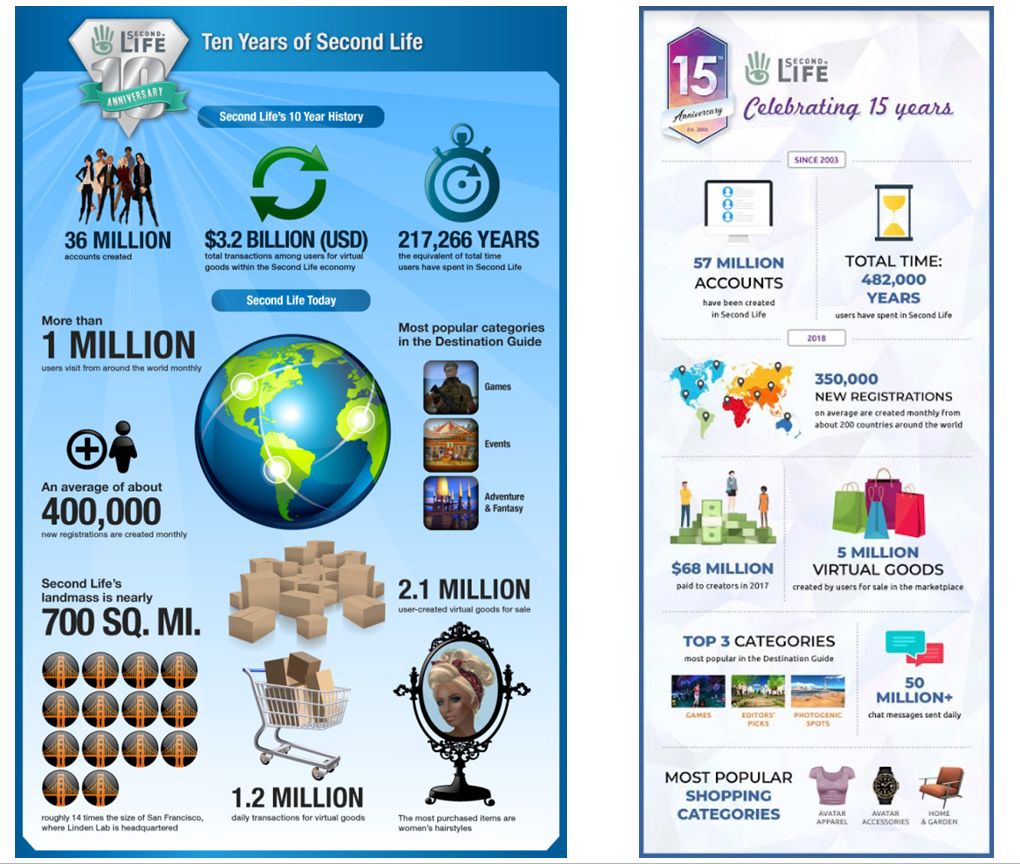
On Monday, April 23rd, Linden Lab issued an infographic on the state of Second Life as the platform approaches its 15th anniversary. The last time the company did this was, I believe, for the platform’s tenth anniversary in 2013.
Both infographics obviously offer a potted view of Second Life which some might choose to take as spin – but casting the platform in a positive light is what PR is about. More than that, when all is said and done, the figures do go some way to showing the platform is still a vibrant place with a healthy economy and a (broadly speaking) positive engagement on that part of active users.
The “spin” element might be seen in elements such as the number of accounts created in Second Life: a total of 36 million between 2003 and 2013, and a further 21 million in the last five years (for a total of 57 million since 2003, when SL formally opened its doors to the public at large). These figures sound impressive, but when push comes to shove, “accounts created” is a pretty meaningless figure. What really matters is the number of active accounts operating within Second Life; and the fact is that over the years these have been dropping – perhaps not by the amounts some might think – although it is admittedly hard to pin things down to a precise figure.
Similarly, the number of new user registrations (400,000 reported in 2013 and 350,000 reported in 2018) doesn’t add up to a major indicator of SL’s health – but, in fairness nor do they indicate any kind of major decline, despite the 50,000 drop over the intervening period between the two infographics. But really, the issue with Second Life is not the number of sign-ups achieved, but the number of retained active users the platform obtains.
Side-by-side: the 2013 (SL10B) and 2018 (SL15B) infographics. But how useful are they?
Perhaps of more value, to a degree, are figures like the total hours users have spent engaged in the platform. in 2013, this cumulative total for 10 years was stated as an equivalent of 217,000 years; for the 15th anniversary it is put at 482,000 years. What these show is that while the number of active users engaged in Second Life may have shrunk somewhat (notably since its peak in around 2008), those still engaged in the platform are between them potentially spending more time logged-in to the platform than they were five years ago.
Why this might be is open to speculation; but one group of reasons could be that the time an effort Linden Lab has put into improving the overall Second Life infrastructure, making batter use of technology, improving the performance of much of the platform (simulators, back-end systems, etc.), and the work put into enhancing user-facing capabilities, which have collectively encouraged people to spend more time in-world now than five years ago.
This increase in time spent engaged in the platform has other potential benefits as well – such as in increased economic activity. This is somewhat indicated by the 2018 infographic, which indicates that Second Life creators and land holders cashed out some $67 million in 2017. During sessions such as Lab Chat, and other public meetings, it had been indicated that the amount cashed-out by users in 2015/2016 was around $60 million; so it would seem that overall, the SL economy is experience an upturn, albeit a modest one. The strength of the economy might also be indicated by the rise in the number of virtual goods for sale: 2.1 million in 2013 and a stated 5 million in 2018 – although I point to this increase with the caveat that items for sale doesn’t necessarily translate directly into increases in goods sold.
Given that the 2018 infographic would tend to indicate overall engagement in the platform among engaged Second Life users has increased, the economy has apparently undergone something of a growth as well, it’s perhaps understandable why – as per the recent town hall meeting – there is now a much stronger emphasis within the Lab to pro-actively try to grow the user base going forward – and some interesting approaches are being tried.
So, what of the issues of active user numbers and new user accounts? It is true that Second Life is experiencing shrinkage in the number of active users. However, a degree of perspective is required when discussing it. At its peak in around 2008, SL averaged around 1.1 million active monthly log-ins. Today, it is lower – but by how much? That’s a tough nut to crack.
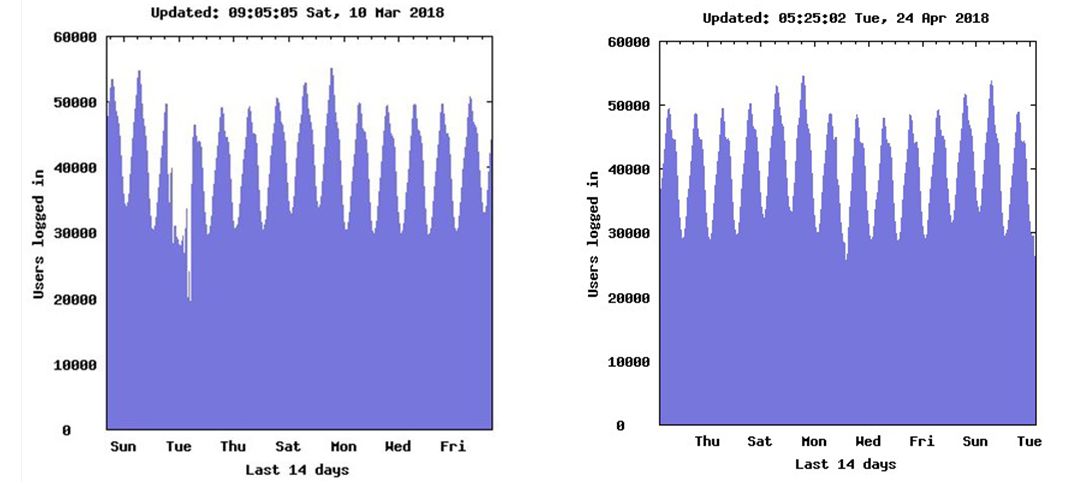
One of the few sources of real data we have comes from the SL Statistical Charts Page put together many years ago the most respected Second Life blogger (whose insight is genuinely missed), Tateru Nino, which is still active today. Among other things, it provides a series of breakdowns of concurrent log-ins – current and over set periods of times. These tend to collectively show that by-and-large average concurrency is between 30,000 and 50,000. Even when taking the bottom end of this range as the daily “average”, it still yields around 900,000 active monthly log-ins. That’s just 200,000 from the platform’s peak.
Second Life average concurrency is around 30,000-50,000 per day, as illustrated by these two 14-day extracts from Tateru Nino’s Statistics Charts, deliberately collected just over a month apart from one another
Of course, it might be argued that some of these concurrent log-ins are alt accounts or possible bots and so “don’t count”. But how large a figure is that likely to be? It’s impossible to know. Some factor it as being more than one-third, which might not be a wholly unreasonable figure; however, a counter-point to this is that just because someone is logged-in on two accounts doesn’t mean they’re not actively contributing to things like the economy through both of those accounts; so while it might be argued such activities reduce the total user count, it may not negatively impact the platform’s economy. Similarly, and where there are no empirical numbers available, it is fair to say that bot usage today is a lot less prevalent than when SL was at its peak; thus while their influence cannot be completely discounted, they are likely to have less of an influence on concurrency today than a decade ago.
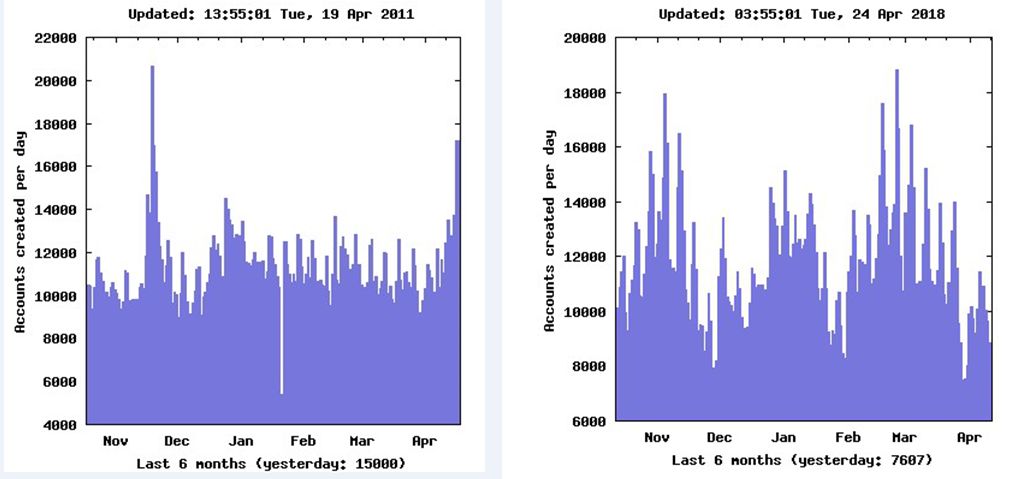
The most interesting aspect of the figures is perhaps those of sign-ups As noted above, the Lab notes a decline in monthly sign-ups of around 50,000 since 2013. Looking at Tateru’s data for 2011 (the nearest 6 month period to 2013 I have archived) and 2018, shows the average daily rare of sign-up hasn’t varied overly much across the years – although arbitrary daily figures can show more of a variation.
Sign-up across 2 6-month periods, in 2011 and up to April 2018. The averages for both are not too far apart
Both the infographic and Tateru’s stats would again point to the Lab’s optimism around growth, indicating as they do that while daily sign-ups have dropped somewhat over the years – Second Life potentially still generates interest, not all of which can be put down to existing users creating thousands of alt / bot account daily. The problem is, as noted earlier, getting more of those sign-ups converted to active, retained users.
Overall, the current infographic reveals that while there is undoubtedly room to grow the numbers of active users, and despite the downplaying of monthly active users by some, Second Life is still a healthy platform for both users and the Lab when it comes to generating revenue – and the weight of virtual goods tends to point to the Lab’s hopes to re-balance their own revenue generation away from such a heavy reliance on land tier as having merit.
More to the point, it does demonstrate that, despite all the fears about the arrival of Sansar, etc., as Second Life approaches a celebration of it’s fifteenth anniversary, it still offers a richness and depth that can keep us all engaged with it.
Strike the pose: Ebbe and moderator Xiola Linden at the first Town Hall session, Friday, April 20th
On Friday, April 20th, Linden Lab hosted two Town Hall meetings at which questions were put to the Lab’s CEO, Ebbe Altberg. Those wishing to ask questions were asked to submit them via the forum threadA Conversation with Linden Lab CEO Ebbe Altberg, although outside of the core meeting, Ebbe took time to answer questions from the audience present at the event.
Some 200 questions were asked, many of which were technical in nature. As many of the subjects of these questions were no things Ebbe could respond to directly, the decision was made to have the Lab’s subject matter experts address them directly through the forum thread itself after the Town Hall meetings, a process which may take several days to complete. So, if you did ask a technical question that wasn’t raised at either Town Hall event, be sure to check the thread to see if an answer in provided there.
The following is a transcript of the core questions and answers offered at both sessions, with audio extracts provided as reference.
These notes don’t follow the chronological flow of the sessions, as I’ve attempted to group subjects by topic for more concise reference.
Due to the nature of the event, some questions of a similar nature were asked at both sessions, which elicited very similar answers in each case. Where this is the case, I have generally provided the answer which – in my opinion, admittedly – offers the most information.
Similarly, Ebbe’s opening comments at both events followed similar lines, so I have only provided a transcript of the remarks made at the first session.
Questions are given in bold.
The “back to summary” links will take you back to the blog post summary of the session, and can be used by those who prefer to “subject hop” rather than work their way through the entire transcript.
The Short Form
For those who prefer, the following is a bullet-point list of the core questions asked, gathered into the same topic headings as the transcript notes. Links are given to the relevant part of the full transcript for those who would prefer to read / listen to the complete answers / comments.
Note: due to the nature of WordPress internal text anchors and scrolling, you may have to scroll up a little after jumping to a specific topic, in order to see the question.
Opening Comments – First Session
Linden Lab remains committed to Second Life, which is managed by a dedicated team covering Product, Engineering, Support, Marketing, etc. Jump to topic.
The Lab remains focused on growth, for Second Life as much as Sansar; Sansar does not signal the end of Second Life, nor are there plans to “transition” SL users to Sansar.
A lot of focus is on pivoting LL’s Second Life revenue generation away from a land-based model to one more balanced between land tier and other fees. Jump to topic.
Major effect and investment in being put into moving all of Second Life to a cloud based infrastructure, which will hopefully bring benefits. This should be seen as a sign of commitment to SL. Jump to topic.
Revenue: Land, Fees, Subscriptions and Compliance
Note: this section includes answers to questions about upcoming US SEC regulation changes and the incoming EU GDPR, which were primarily responded to in terms of compliance data management.
Land costs following the move to the cloud. – Land costs many not dramatically change, and revenue rebalancing has the potential to do more. Cloud benefits potentially more technical in nature, but may offer some fees benefits. Jump to topic.
How can Linden Lab sustain itself on a free-to-play basis? – Free-to-play, revenue and subscriptions: Free-to-play accepted norm in the industry and not changing with Second Life. However, as part of a re-balancing of revenue generation, what can be done on a free-to-play basis versus what might be possible through subscription options is being considered. Jump to topic.
Can you explain how LindeX and transaction fees are constantly increased with no perceived added benefit to users?
Providing an economic model that globally allows people to pay money into it and withdraw money from it requires regulatory compliance a state, federal and global levels, and this costs.
Increases in transaction fees, along with subscriptions, etc., may offer a means to reduce the cost of SL land.
What is the Lab’s policy on user data protection? – taken very serious, vis: compliance (above), LL does not participate in any business models that feature the use of user data. Jump to topic.
Have you considered charging for additional accounts, say US $10 per account? – Not come up, will pass it on to the team.
Are there going to be adjustments to Premium accounts? – Yes, and considerable work is being put into this by the Product team to determine the types of Premium account / subscriptions should be offered and what their individual benefits should be. Jump to topic.
Will the changes to Premium accounts also see changes to how arrears are handled, e.g. not lock accounts out? – time is provided for people to catch up on payments. Jump to topic.
Will any reduction in land fees apply to Skill Gaming regions? – in time, hopefully, yes. Jump to topic.
Technical / Project Questions
Will there be updates to Lab-owned in-world infrastructure – InfoHubs, themed private regions, etc? – already in hand. Jump to topic.
What are the plans for Second Life on Mobile? – It’s under discussion, but no firm plans, with a hope there might be a good business case to move in that direction. Jump to topic.
Will the return of Last Names allow people to freely choose their last name, or will it be ‘choose from a list’?
Also see my audio updates from Oz, Grumpity and Patch Linden on the return of Last Names – comments referencing that post are including in parentheses in the following bullet points).
Pre-made list (but suggestions on last name options may be sought from the community to help with refreshing the list with new options).
Will also be able to change your first name.
Will involve a fee (in US $) and might be a Premium benefit.
As a warning to creators: if you script items to identify avatars, don’t use names, use the avatar Agent Key.
No time frame as yet on when it will be rolled out.
Might be a Premium-only benefit; if available to all, Premium may have a specific advantage (TBD) over Basic.
When will Animesh Bakes on Mesh and Windlight EEP be available? – No precise dates, but Users actively involved in testing. Hopefully in the next couple of quarters. Jump to topic.
Will the Teen Grid ever come back? – Not being discussed. Probably better to work on ensuring proper controls in place to allow people to use the one grid. Jump to topic.
What is the Lab’s commitment to the open source project? No change. Can’t really take it back and wouldn’t want to due to TPV synergy. Jump to topic.
Will any features from Sansar be back-ported to Second Life, such as the rendering engine or Marvelous Designer support? – rendering engine, no. Marvelous Designer support – possibly a question for the Second Life team. Jump to topic.
Will my.secondlife.com [Profile feeds] be improved to help make connections a-la Facebook? – connections and building communities are important, but whether my.secondlife.com is a part of that is unclear, as there are other potential channels. Jump to topic.
Would it be possible to spin-up a second instance of a region being rebooted, and transfer avatars to it and maintain traffic, rather than forcing them to teleport elsewhere / log off, and then letting the original just shut down? Jump to topic.
When is Second Life going to be optimised to run well on high-end client systems with good Internet connections and graphics? Jump to topic.
New Users and the On-boarding Process
Is Linden Lab planning to advertise Second Life to attract new customers and keep the population size healthy and sustainable? – this is a constant effort, and the Lab is investing time, effort and money into the entire end-to-end on-boarding process to not only maintain, but to hopefully grow, SL’s user base. Jump to topic.
What are Linden Lab’s plans to bring-in new users and incentivise past users to return? – partially answered above, plus the improvements to the platform, the content users continue to make, etc. Jump to topic.
General Topics
What is the Lab’s view on adult content and the future of adult content? – No change. Jump to topic.
Will there be more sessions like the Town Hall or like Lab Chat after SL15B? – There are in-world technical meetings, but the hope is to have more general in-world meetings and discussions going forward. Jump to topic.
How do you compare the Oasis [from Ready Player One] as an educational place with Second Life? – Second Life is probably the closest to the Oasis in the world today and has a broad range of uses and involvement which is inspiring. Jump to topic.
Do you see Second Life lasting for another fifteen years? – Yes; Second Life is still successful on many levels, so why not keep it going?
Can you give a positioning statement between Sansar and Second Life? – two products with some similarities, but also significant differences, each managed by a separate teams. Jump to topic.
What have you found to be the biggest challenges for Second Life with regards to your planned vision, and how are you overcoming those challenges? Jump to topic.
 On Friday, June 8th, 2018, Linden Lab announced that estate / region holders can now restart their region directly from their Second Life dashboard at secondlife.com, via the My Estates page.


 Inara Pey: Living in a Modemworld