Sansar R28, the Ready, Aim, Fire! Release

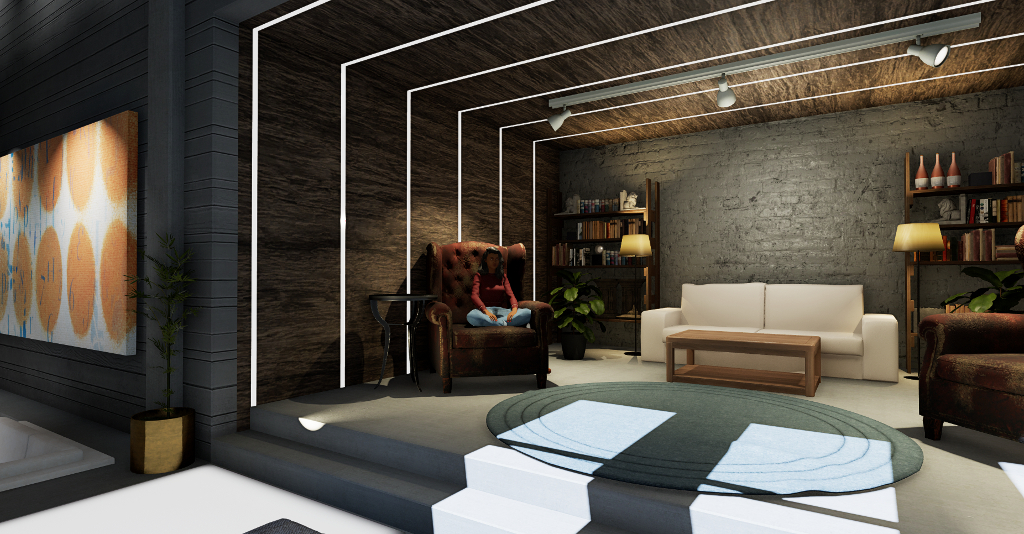
Sitting in my Home Space – one of the new elements in Sansar

On Tuesday, December 11th, Linden Lab issued the Ready, Aim, Fire! (aka R28) update for Sansar, the last planned release for 2018.

Interaction is very much a theme for this release, as is helping new users feel more at home, as well as providing a point of entry when logging-in to Sansar at the start of a session. The release also includes a very long list of scripting updates, some of which are to support the new interactivity functions.

This article is designed to provide an illustrative summary of the release, but do note the lack of an VR headset and controller on my part means that any features described in detail here are looked at from the Desktop Mode.

At the time of writing, there were no release notes available, only a release blog post. Whether this actually constitutes the release notes or not, I’m not sure – so a check on the Sansar Help page might be in order to see of any release notes appear. Similarly, in checking the scripting API documentation, it appeared this documentation was also awaiting update. so again, a check should be made for the addition of information on the new API elements and script updates.

Initial Notes

  • As with the majority of Sansar deployments, this update requires the automatic download and installation of a client update.
  • Updates in this release mean that on logging-in for the first time following the update, users will be placed in their Home Space after selecting their updated avatar.

Home Space

I’ll start with Home Space, a new “home location” so to speak. All users are dropped into Home Space, which resembles an open-plan skybox like apartment with three “rooms”, either when logging-in to Sansar for the first time or at the start of a new session (so in the latter regard it both appears as the back-drop image when logging-in to Sansar and replaces being dropped into the Atlas at the end of the log-in process).

As a physical environment, you can walk around your Home Space, sit on the chairs (albeit it using the teleport > /sit “cheat” and – for new users in particular – offers a starting point for the new UI tutorial (see below for more on this).

Images of the new Home Space taken in Sansar’s new “mouse look” view, showing the various areas. Note the “under construction” teleport portal, also shown enlarged in the last image, that will link Home Spaces to an upcoming new social hub experience. click on any image to view slide show

Note that Home Space is only accessible (for the time being?) when logging-in to Sansar at the start of a session; there’s no option to go back to it once you’re entered an experience, unless you re-log. Should you edit your avatar’s appearance (Create > Style My Avatar) from within an experience, you will still go to look Book and then back to the spawn point for the experience at the spawn point, as per previous Look Book behaviour.

Within The Home Space there is a hint of things to come: on one wall, and marked as “under construction” is the entranceway to the upcoming “Social Hub”. Reached via automatic teleport, this will be a new experience people can jump to and mingle, again with the intent to make it easier for newcomers to meet others. Some of the objects in the Home Space can also be grabbed, allowing basic interactivity to be tried – although the random nature of the tutorial pop-ups perhaps makes this a little hit-and-miss.

UI Tutorial

The new UI Tutorial is designed to help new users start to understand the Sansar Client UI (although it will also display for existing users logging-in to R28 for the first time). The tutorial comprises a selection of pop-up displays to controls and yellow hover tips that are displayed within the client. These can be displayed in both the Home Space and within initial experiences a new user visits.
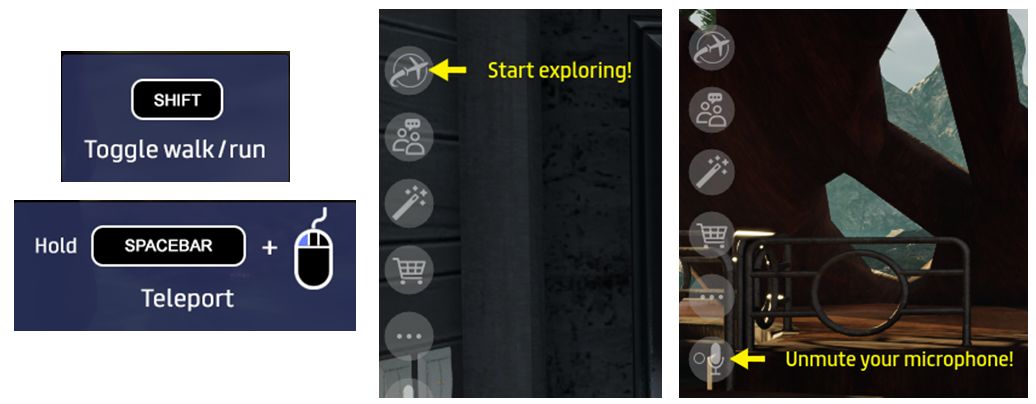
Some of the UI tutorial pop-up (left) and tool tips displayed for new users. The pop-ups appear at the bottom centre of the UI window

The tutorial – while a good idea – seemed to be somewhat random. It’s wasn’t until my fourth log-in, for example, that I saw the pop-up for grabbing items. While not vital, given there are objects in the Home Space that can be grabbed, making this a little more predictable (coming up with the Walk and Teleport pop-ups, perhaps?) would perhaps be more useful.

Emote Menu and Emotes

New to both Desktop and VR modes for Sansar is the Avatar Emote menu. Access via the Socialise button (or CTRL-E in Desktop Mode), this displays a “dial” pop-up, with the available emotes (aka gestures or animations) on the right, and any emotes you may have already used in your current log-in session displayed on the left (if you have not used any emotes, this area will display an alarm clock like icon).
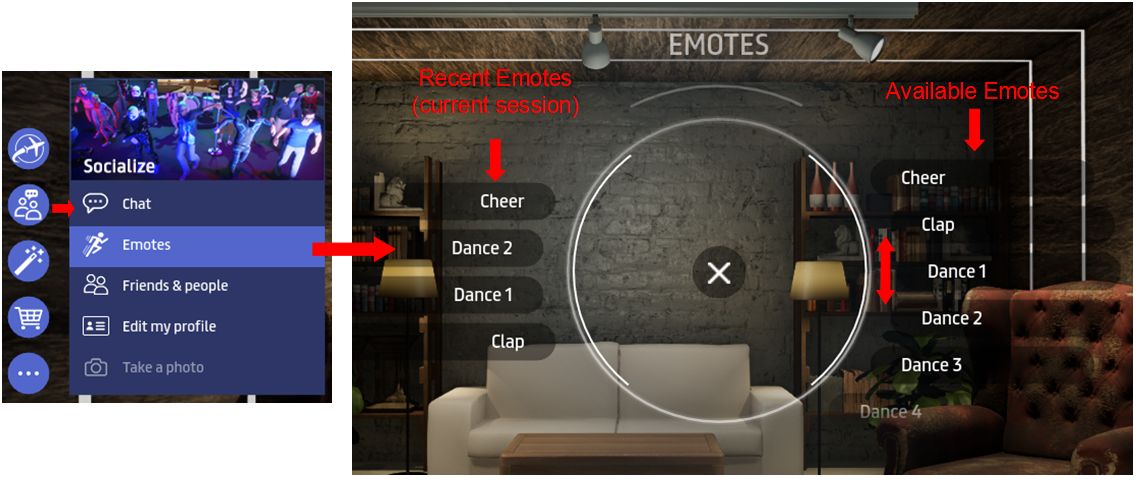
The new Emotes Menu. Note that Recent Emotes (on the left), are only displayed if you have used one or more emotes in the current session

Emotes are selected from the right of the menu, by scrolling up / down through them and clicking on the desired option. Recent emotes (if displayed) are accessed the same way. For VR users, an added bonus is that moving your head or arms will no longer cancel a playing emote (just walk forward, as per Desktop mode).

Note that the chat commands (“/sit”, etc.) are still fully supported, as is the ability to assign custom emotes to replace the default options.

Continue reading “Sansar R28, the Ready, Aim, Fire! Release”

Sansar launches on Steam

Sansar on Steam. Courtesy of Linden Lab

As anticipated following last week’s community feedback hour / product meeting, Sanar has officially launched on Steam – although at the time of writing, there has been no official press release on the Lab’s corporate site.

Instead, the announcement came via a Sansar blog post, and a tweet via the official Sansar Twitter account.

As of today, December 5th, we are officially live on Steam!

We wanted to give a huge thank you to our current community who have been so supportive, and to extend a warm “Welcome” to all our new community members joining us from Steam!

You can find us on Steam as an Early Access Game, where we’re free to download. Even better, you’ll get to enjoy all the benefits of Steam as a social platform for gamers including full access to our Steam Community Hub!

– From the Sansar blog post announcing the launch

As the blog post notes, Sansar is being made available on Steam’s early access programme – a move the Lab hopes will help Steam users’ expectations regarding the platform and the fact it is still in development.

The Sansar page on Steam Early Access

The Sansar page on Steam includes a promotional video and a series of images from Sansar. In addition, and to underline the platform’s status, there is also a Q&A element, which addresses a number of questions, including:

Why Early Access?

“Sansar is a place where you can hang out with friends, play games, explore new worlds, and share incredible creations, but we can’t do that without you! Being in Early Access is important to us to make sure we’re hearing directly from the community on what you’d like to see and do in Sansar. Come join us!”

Approximately how long will this game be in Early Access?

“We plan on staying in Early Access until Sansar is the very best it can be. We’re constantly making improvements, and we’re eager for your feedback.”

How is the full version planned to differ from the Early Access version?

“We want Sansar to be the place where people can connect with communities and celebrate what they love through immersive virtual experiences, interactive events, customizable avatars, and easy creation. That’s why we plan to develop even more features around socialization, interactivity, personalization, and creation – elements that enrich the social experiences our platform enables. Plans will change based on your feedback, and we’re always listening and learning.”

What is the current state of the Early Access version?

“Right now, Sansar lets you host and attend virtual events, play games, explore user-created experiences, and buy and sell merchandise in the Sansar Store. Meet friends for a watch party and tailgate. Buy clothing and accessories for your avatars, or objects for the virtual experiences you build.”

The sansar.com log-in page now allows web log-ins using Steam account credentials (l). Sansar and Steam integration allows logging-in to Sansar using a user’s Steam credentials (r)

The launch blog post also has some important words for existing Sansar users (or those who have already created a Sansar account). these include:

  • Existing users can still access Sansar directly from their downloaded version of the client, and use all the capabilities with it, including creating new accounts; they do not have to use Steam to log-in.
  • However:
    • Existing Sansar users with a Steam account can add Sansar to their Steam account and launch it from there it they wish
    • Or if they are logged into Steam and opt  to launch Sansar via Steam, they will be prompted to log-in to Sansar with the account of their choice (Sansar, Steam or Twitch).
  • There will be no direct merging of Sansar and Steam accounts (“at this time”).
  • User with an existing Sansar account can continue purchasing Sansar Dollars using the payment information they have on file with Linden Lab.
    • However, users signing-up for Sansar via Steam must use their Steam Wallet to purchase Sansar Dollars.

The Sansar website gives full details on how to integrate Steam and Sansar accounts to get the most out of both. Once integrated, it is possible to access the Sansar Community on Steam directly through the Sansar client:

Accessing the Sansar community on Steam through the Sansar client (Shift-Tab) – requires Sansar / Steam integration for existing Sansar users / download of the Sansar client via Steam for Steam users

It will be interesting to see how this all goes for the Lab. Several years ago, there was an attempt to add Second Life to Steam, which didn’t go so well. However, the Lab believe they have learned some important lessons as a result of that process,  and the Sansar presentation through Steam does appear to be somewhat more integrated.

Sansar 2018 Product Meetings #48: Steam and release 28

LOOT Interactive NASA Apollo Museum

The following notes were taken from the Sansar Community Feedback hour held on Thursday, November 29th. A video of the meeting is available on the official Sansar Twitch channel, and timestamps referencing that video are provided in the text below.

Note that the entire discussion is not summarised here – general questions from the 47 minute point onwards are not included – please refer to the video for these. The focus of this article is the upcoming availability of Sansar on Steam and the the December R28 release.

Sansar On Steam

[3:00-5:44] If all goes according to plan, Sansar will be available on Steam from the end of week #49 (week commencing Monday, December 3rd). The platform has already gained initial approval from Steam, and should gain final approval during the early part of the week.

As I’ve previously noted, Sansar will be on Steam as an Early Access programme. As well as the client being available, there will be a dedicated forum and group on Steam.

Reminder: SandeX Closing

A reminder that as a part of making Sansar available on Steam, the SandeX will be closing on Tuesday, December 4th, 2018, and S$ to USD conversions will move to a fixed conversion rate model.

Please refer to Sansar extends to Steam; Lab to end SandeX for more on this.

“Sokoban” Puzzle Challenge

[5:48-8:40] To mark December, the Sansar team is going to be running a series of challenges through the month. These are intended to be fun items, rather than anything to be taken too seriously, and the first up is the Ugly Christmas Sweater Challenge. As the make implies, this is for clothing creators to make an ugly Christmas sweater and upload it to the Sansar Store. For those who can’t make clothing, some sweater templates may be placed on the Sansar Store that can be obtained, textured and used as entries.

Some of the Ugly Christmas Sweater challenge entries

[9:31-12:00] The second challenge is the Sokoban Puzzle Challenge.

Sokoban (“warehouse keeper”) is a puzzle video game in which the player pushes boxes or crates around in a warehouse, trying to get them to storage locations. An experience based on the game has already been created in Sansar, and users are being asked to create and submit their own levels t add to the experience – read Make A Sokoban Challenge for full details, including how to design and submit levels.

Upcoming Features for the R28 (December) Release

The following updates should be part of the R28 Sansar release, which is currently scheduled for some time between the 10th and 13th December 2018 – so it will be available after the Steam launch.

Teleport to a Friend

[15:59-17:35] This is being updated so that it will not work when trying to teleport to a friend in an unpublished experience, and will not show the experience name if you are in an unpublished experience and someone tries to teleport to you.  These fixes are temporary in nature, as they will not scale, so the Lab will be looking to make further changes to Teleport to a Friend in the future to prevent stalking.

Remember, this feature will teleport your avatar to the spawn point of the same experience as a friend, not directly to that friend.

Chat Updates

[17:39-19:00]

  • Nearby Chat and direct messaging (IMs) will have timestamps with the next release.
  • It will be possible to start a direct message (IM) with a friend from the Chat App without having to open the People App.
  • Japanese, Chinese, Korean, Russian and more will also be supported when typing.

[19:03-19:35] Some in VR have noticed the Chat App panel is “too far away” for them to comfortably reach and grab, forcing them to lean forward when trying to manipulate it.

Home Spaces

[22:24-23:35] The room in which avatars are placed when entering Look Book is to become a Home Space, and will include some light customisation options. The Home Space option will be developed over time to present users with a friendlier environment than the Atlas.

The Look Book “room” is set to become more of a Home Space environment with the next Sansar release, with some initial light customisation options

New User Experience

[24:09-25:28]  The next release will include some client UI “tutorialisation” for new users. This will include various call-outs identifying various parts of the client UI, but these will also be visible to established users the first time the client is run after the release has been deployed.

For the rest of on-boarding, new users will be dropped into the Home Space in the default grey avatar, and will have a list of recommended experiences (based on population within the experiences) they can be sent to.

Continue reading “Sansar 2018 Product Meetings #48: Steam and release 28”

US comedians in line-up for new Sansar series

Image courtesy of Linden Lab

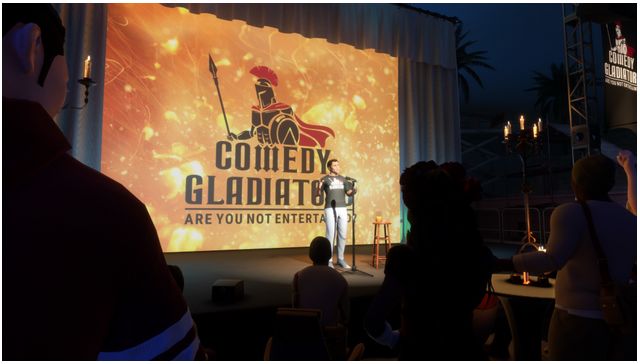
On Wednesday, November 28th, Linden Lab announced a new series for Sansar: Comedy Gladiators, hosted by American comedian and television personality, Steven Hofstetter, which Linden Lab describes as:

A live comedy showcase that lets anyone, anywhere step directly into a comedy club for the night. The series will allow fans to do everything in VR that they would do at a real-life comedy club: purchase tickets in advance, shop for custom merchandise and memorabilia, even order drinks.

– From the Linden Lab announcement

Steven Hofstetter – Hosting and participating in Comedy Gladiators

The first event in the series is scheduled for 19:30 Pacific Time (US) on Monday, December 10th, and will feature the talents of Ben Gleib, Maz Jobrani, Alonzo Bodden, and Mary Lynn Rajskub – perhaps best known on television for her role as Chloe O’Brian in the action thriller series 24.

Comedy Gladiators represents a number of firsts for Sansar.

It is the first ticketed event on the platform. Ticketing is a capability the Lab have been developing for a while for Sansar, with the idea that in time, experience creators will be able to sell tickets to events held within their own experiences.

For Comedy Gladiators, tickets are offered for sale through the Sansar Store at US $4.99 through until December 5th, and then US $9.99 thereafter, up to the event itself. I would anticipate that in the future, experience creators will be able to sell their tickets the same way.

Another interesting factor with Comedy Gladiators is that it mixes the ability to purchase both virtual and physical through the Sansar Store – in this case, copies of Hofstetter’s latest book, Ginger Kidd – with the virtual goods including t-shirts, beer mugs.

Finally, the series is potentially the first large-scale showcasing of Sansar’s “Avatar Broadcasting” feature. This allows performers and presenters working from a single stage / experience in Sansar to reach a potentially unlimited audience through multiple linked instances of the event.

Every day, I get emails and DMs from fans who want to see a live show, but they live in parts of the world I’ll probably never tour in. VR allows those fans to not only see a live show, but feel like they’re part of a bigger community.

– Comedy Gladiators host, Steven Hofstetter

It’s not clear where else the event is being advertised – in checking various websites, including Hofstetter’s own, I didn’t come across any direct adverts. However, the media have picked-up on the event, with reports in the likes of  Variety, with the original press release being reproduced in multiple on-line media covering business, VR, and entertainment.

The Lab is clearly hoping for big things from this move, with Ebbe Altberg noting:

By bringing these commercial opportunities into VR, Sansar is taking virtual events to a whole new level – enhancing and expanding on what’s possible in-person. We look at Comedy Gladiators as the first ripple in a larger wave – the first event of many more that bring entertainers into VR.

– Ebbe Altberg, Linden Lab CEO

The line up for the first Comedy Gladiators: Mary Lynn Rajskub, Ben Gleib, Maz Jobrani and Alonzo Bodden

It’s not clear how often this series will take place, or whether this first event is simply experimental. However, it is a daring move to bring something new and different to VR, and to extend the concept of social VR within the realm of entertainment.

One potential stumbling block is the comparatively low uptake of VR headsets; given Comedy Gladiators is being promoted as a “social VR event”, without very clear underlining that Sansar can also be enjoyed as a desktop activity, there is a risk people might avoid the opportunity to join the audience even if advertising does reach a wide audience due to the misapprehension that a VR headset is a requirement.

On a personal note, I am also curious as to the origins of this series – Comedy Gladiators is a monthly live event held in Bristol,  UK – which I believe is where Sansar’s community manager, Eliot, originally hails from…

With thanks to Wurfi for the heads-up.

Pfaffenthal 1867 – from Second Life to Sansar

Fort Thüngen, part of the Pfaffenthal 1867 estate

In July 2015, I wrote at length about Pfaffenthal 1867, a 5-region role-play environment and historical project accurately recreating the City of Luxembourg, circa 1867, and founded by Second Life resident Hauptmann Weydert (Weydert), also known as Pit Vinandy in the physical world.

At the time of my 2015 article, Weydert / Pit and his team were very much focused on the immersive opportunities presented by their environment. Thanks to the fledging work Linden Lab carried out in trying to bring Oculus Rift compatibility to Second Life, Pfaffenthal 1867 was at that time featured as an exhibit hosted by the Luxembourg City History Museum, which gave visitors the opportunity to visit and explore the virtual recreation of Luxembourg using the Oculus Rift or via desktop.

Pfaffenthal 1867, July 2015

In this, the exhibition was part of a broader outreach by the group, with Pit also hosting workshops on virtual environments involving the general public and schools, in association with the Fortress Museum in Luxembourg and the Luxembourg National Museum of History and Art.

I mention all of this because at the start of November, 2018, I dropped into a new experience in Sansar. Called  simply 1867, it is the work of Pit and his team, working under the VR Creative banner, presenting both the next step in Pfaffenthal 1867’s development and an opportunity to renew and further the work in presenting immersive, educational historical recreations to the public.

It’s an ambitious project – possibly the most ambitious experience yet attempted on Sansar. The aim  is to make full use of Sansar’s massive 4km on a side virtual space and offer a fully immersive historical environment for both social and educational use, with high-resolution topographical maps being used to build-out the experience in stages.

1867 in Sansar – a work in progress

Despite being in the early stages of development – many of the buildings that have been placed are little more than blocks awaiting surface detail (or complete replacement) – 1867 is already being promoted to the people of Luxembourg.

Since the start of November, for example, the project has been the focus of a series of weekday sessions at the Forum Geesseknäppchen, a campus occupied by a number of academic institutions in Luxembourg City. As reported by one of the city’s daily newspapers, the Lëtzebuerger Journal, the sessions are intended to encourage local interest in, and potential involvement with, the project, and will continue through until December 14th, 2018.

“We clearly see this as a collaborative project that is about to gradually create this world of 1867,” Vinandy emphasises. Therefore, he expects a strong participation as soon as the project is publicly available. In addition, he hopes for a lively participation of home owners and companies who want to see their part of the city represented.

Virtual Time Travel, Lëtzebuerger Journal, November 2nd, 2018

1867 in Sansar – a work in progress

In this, 1867 doesn’t sound that different from the public outreach undertaken with Pfaffenthal 1867, however, the opportunity to present richer, more immersive educational opportunities as well as a social VR experience is very much the driving force behind the Sansar development, again as the  Lëtzebuerger Journal notes:

Vinandy sees particular interest for students, students and historians who can fully immerse themselves in the past “For example, we want to specifically invite teaching staff to take their school classes on a journey through time,” he says.

Virtual Time Travel, Lëtzebuerger Journal, November 2nd, 2018

1867 in Sansar – a work in progress

In order to focus on the project – and as revealed by Jo Yardley in a tweet while I was working on an earlier draft of this article (one pending an opportunity to chat directly with Pit about both 1867 in Sansar and the wider work of VR Creative) – Pfaffenthal 1867 is to be shut down in its entirety from Monday, November 26th, 2018.

This news has been greeted with some surprise, given that Sansar itself has yet to gain lot of capabilities needed for it to become a more rounded immersive experience – such as richly interactive non-player characters or working forms of transport such as trains, horses that can be ridden and boats, all of which would certainly enrich a setting like 1867.  However, these will come in time, and it is going to take time to properly build-out 1867. As such, I doubt the lack of such capabilities or the lack of period clothing are really issues for the project’s development – although the lack of them could initially discourage Second Life users who have engaged in Pfaffenthal 1867 from dipping more than a toe into Sansar and 1867.

What might be of greater concern is how well such a vast setting loads at the client end as it starts to be fleshed-out to the level of detail found in Pfaffenthal 1867 in Second Life. With some quite modest experiences in Sansar already being quite hefty in download size and load time, something on the scale of 4km on a side could prove to be a significant challenge unless Linden Lab have some clever means of more pro-active steaming and loading / caching still to come.

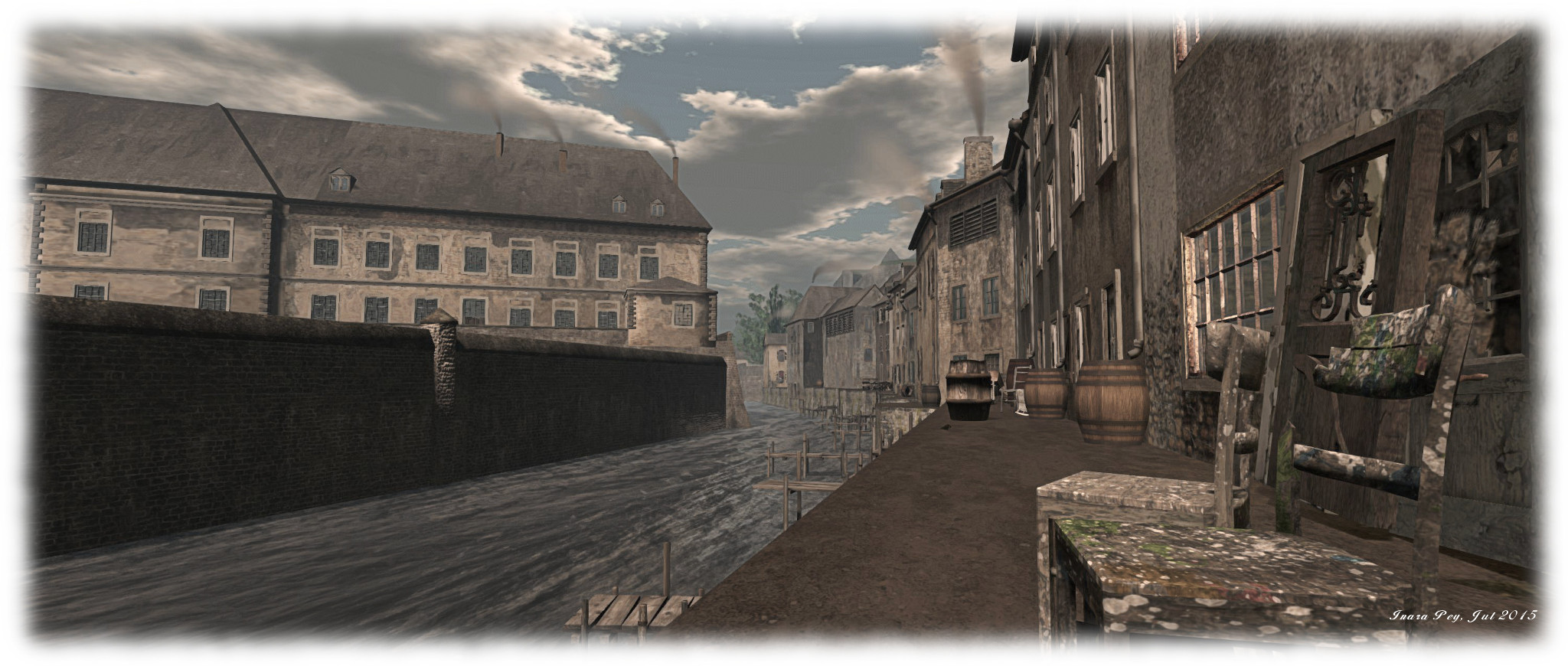
The Virtual Pfaffenthal; Inara Pey, July 2015, on Flickr
Pfaffenthal 1867, July 2015

But, time will tell on that. In the meantime, if you have enjoyed previous visits to Pfaffenthal 1867 and would like to say farewell before it vanishes, can do so between now and Monday, November 26th, 2018. For those in the Second Life 1867 group, and who missed the in-world announcement, there will be a farewell party on Saturday, November 24th, starting at 10:00 SLT, at Café Neuen.

I’ll also hopefully have more on the 1867 project in Sansar as the work progresses, including the outcome of that conversation with Pit.

SLurls and Additional Links

2018 Sansar Product Meetings #45: Look At Me release

Nirvania

Look At Me Release Feedback

  • Typing indicator:
    • Requests have been made to remove the box around the dots and just have the flashing dots when someone is typing.
    • It was also requested that the indicator not pop-up when typing “/” commands for emotes – but as was pointed out, the system has no way of knowing what is being typed until after it has been sent, making it difficult for the indicator to ignore “/” when input.
    • Other UI interactions can also incorrectly cause the typing indicator to appear over an avatar, which the Lab are looking to refine.
  • VR virtual keyboard:
    • Enhancements are already being planned – such as a “emote wheel” to make selection of emotes easier and not reliant on the commands being typed.
    • The Lab would like further feedback on the keyboard and how it might be improved, or options that might be added, if some of the keys should be re-organised, etc.
    • There have been instances where people opening the VR virtual keyboard in (first person view) have found their avatars unexpected walking forward without any of the keyboard buttons being touched.
  • Voice Reset issue: along with the new options to test microphone levels, there is an option to reset the voice stream. However, reports are that when used, the voice stream fails to reconnect.
  • Settings: it’s been noted that in VR, Settings > Control, no longer displays the VR controller options; users only get the desktop keyboard options.
  • UI Buttons:
    • Requests have been made to make them switchable between the left and right sides of the client window, depending on individual user preference.
    • There have also been concerns raised that on very high-resolution (e.g. 4K) screens, the buttons are very small and hard to see.
  • First person avatar view in VR: a preference for seeing the avatar hands an arms when using things like the revised client button set on the left wrist  has been voiced. Eliot noted that the default blue hands are used to cater for avatars that do not have hands and arms (e.g. they have tentacles), so they have a frame of reference when tying to use menus, etc.
  • Hi-Res Texture Streaming: a request was put forward to allow users to select whether or not they want to use the hi-res texture streaming when loading an experience. The point here being that some games – those against the clock, for example – might be dependent upon the scene being fully loaded and ready to go when the user is placed within it.
    • The lab noted there are some tweaks to make to the texture loading, and that in general, there is more to be done to the scene loading to improve load times.
  • Crash issues: there have been a number of crash issues associated with the release (and experienced at the start of the meeting). The Lab is gathering logs, etc., and investigating causes.

Custom Emote Issues

This is something the Lab is aware of. It’s also complex to describe but easy to witness. if someone has a custom animation enters an experience, other avatars of the same gender that are already using the same emote, or attempting to use the same emote, will adopt the same custom animation as playing on the new arrival.

So, for example, if a female avatar enters a room with a “floating” animation they’ve assigned to the “/sit” gesture, any other female avatar using “/sit” will also start to float, even if they previously had their own custom animation assigned to “/sit”. The effect is also cumulative: avatars will switch to play the last custom animation assigned to the emote, until such time as they reset through Look Book.

It’s been suggested that whatever bug causes this be annotated so that in future it might show how animations might be shared in certain situation (such as a “dance bomb” in a club hat could be triggered by (say) the DJ to get everyone doing the same dance – the Time Warp, anyone?).

Other Discussion Points

Avatar Deformations

People in VR are experiencing issues with their avatars being deformed in certain situations. For example, a tall male using the female avatar can find the avatar deform or adopts odd shapes, even after the height has been adjusted, almost as if the avatar is “too small” for the person using it. Another seems to give avatars massively broad shoulders, resolved by re-logging. The Lab is aware of these issues and investigating them. If anyone does encounter such issues, the request is to make clear notes on what they were doing  (steps taken) when the problem occurred and file a bug report.

Animation Preview

It’s been noted that there are some glitches with the animation preview capability, such as preview recordings now always playing back on the Sansar Store, or the entire preview playback glitches while playing.

New User Experience

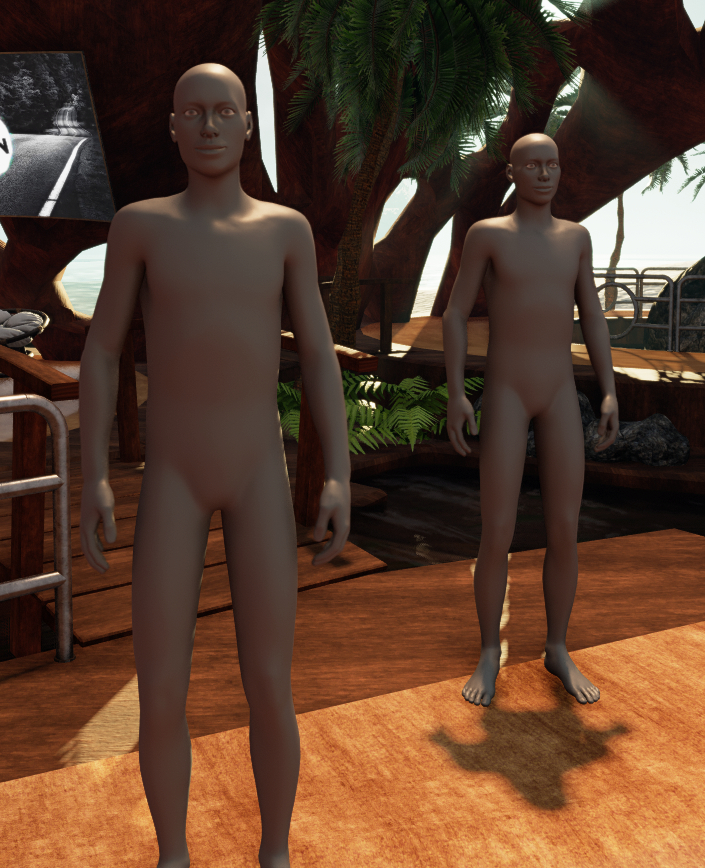
The new default avatars

A part of the new user experience was deployed with this release. In short this:

  • Automatically assigns a unique account ID (seen after the @ symbol in name tags), base on the avatar name + a numeric sequence.
  • Delivers new users directly to a populated experience with a new default grey avatar.

It was mentioned at the meeting that new users will receive a tutorial on the client to get them started when first entering Sansar.

However, it was not clear in the discussion as to whether or not the tutorial aspect has been deployed with the Look At Me release. My own testing suggests it has not: while I was delivered to a populated experience with the new default avatar (see image, right), there was no associated tutorial. While I have reached out to LL to try to confirm the tutorial’s status, at the time of publishing these notes, I had not received any reply.

In Brief

  • Will Sansar support full body tracking? In time, yes, but not on the immediate horizon. The Vive trackers are helping with this, allowing data on hip and foot movements to be collected for use with IK, but Oculus is some way behind in their tracking systems.
  • Currently, when the Chat App is opened and there is available text, it will default to the top of the text (i.e. the oldest comment), rather than scrolling to the bottom of the chat and the most recently made comments. This is a known issue, and part of a number of bugs in the App the Lab will be addressing.
  • Rotating rigged and animated meshes: again requested, to help with bringing NPCs to life. This is apparently “on the list” but seen as a big task.