Sansar: February release and Product Meeting week #9 w/audio

Schwefelstein Pass

On Thursday, February 28th, Linden Lab released the C’mon Get Happy release. This is rather a small update compared to previous releases. The full release notes are available, and highlights of the release key features might be summarised as:

  • Save and sell a collection: creators can now pull a group of objects from a scene and save it back in their inventories as a single object.
    • All script relationships and relative positioning for the objects will be stored in that single object, making it easy to drag and drop a collection of items in a scene or sell it in the store.
    • Note the objects will not be linked: when placed back into a scene, they will remain a group of individual objects. This will be coming in a future release.
  • Smoother gifting: there is a new notification to let receivers know that they received Sansar Dollars from another user.
  • Draw distance limit: creators can now define an object’s draw distance limit from the properties panel. The draw distance defines the distance at which an object starts to render in the scene.
    • For example, if an object’s draw distance limit is set to 10 metres, the object will no longer be visible when a user in an experience is beyond 10 metres from the object.
    • This is currently set to infinite by default, so creators are asked to implement it when building their scenes.
  • Extended limits on uploaded Avatar items: the proximity limits on clothing, accessories, and hair are expanded, with the Axis Aligned Bounding Box (AABB) area increased by .1m left/right and .3m front/back.
    • This means that the AABB area is now min(-0.9m, -0.9m, -0.05cm) max(0.9m, 0.9m, 2.2m).
    • This change does not affect emotes nor custom avatars.
  • New avatar reference files: the avatar reference files are now noted as being updated and can now be found here.
  • Emojis have been added to chat.
    • The font used is Segoe UI Emoji, which is not supported by Windows 7. Users on that operating system will see an X in a box whenever an emoji is used.
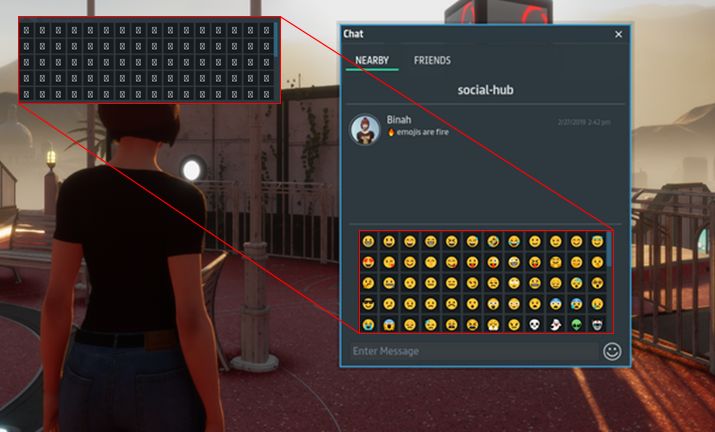
The Emojis panel can be pulled up using the smiley icon to the right of the text entry field. Users on Windows 7 will see this as a panel of “empty” boxes (as shown in the inset, top left)
  • Two key bug fixes for the release are:
    • Servers should spin-up faster when trying to access an experience which has no-one in it.
    • Chat should no longer scroll to the top when opening the chat panel.

Again, for the full list of updates, please refer to the release notes.

Product Meeting

Sansar as a World

This is something that has been mentioned in recent product meetings – the shifting to emphasise Sansar as a “World” rather than as a collection of discrete experiences. Commenting on this at the product meeting, Landon  McDowell, the Lab’s CPO, explained the reasoning behind this thus:

We asked ourselves what was really missing from Sansar and what we wanted to add to it, and one of the things that kept coming up consistently is … one of the magical things in Second Life is it feels like a world. It feels like place … and when we designed Sansar, we didn’t really implement that; it was a design decision. we wanted the individual worlds to stand alone, and be disconnected and independent … [Now] we feel that lack of place … is something that we’re personally missing and something we want to add into Sansar.

– Landon McDowell, Linden Lab CPO

Questing and Gameplay

The focus of the February 28th Product Meeting was on the updating Quest / rewards / achievements system that has been the subject of recent Product Meetings. This is seen as being both a means to help on-board new users to Sansar and – linked to the above – as a means of providing a capability that can allow grater gaming  and questing with common roots across experiences, thus helping to give a feeling of continuity between them.

Part of this is what the Lab is calling Directed Play, which is liable to start appearing over the next couple of releases (March / April), as outlined by Stanley, the Director of Product for Sansar and Aleks Altberg:

  • The first pass at a quest system. This will initially be a basic approach of complete a task / achieve an objective, and receive a reward.
  • This will initially feature quests formulated by the lab, so will be player focused, but over time will be opened out to allow creators to build using the tools.
  • For the initial release, as it will feature game play from the Lab, the rewards will be small Sansar dollar amounts, as these are the easiest thing for the Lab to offer.
    • The system will be broadened such that when Creators are able to use it, they will be able to offer items as rewards  – accessories, clothing, custom avatars, etc.
  • The ability for creators to use the system and offer rewards will hopefully be made available in the spring / late spring of 2019.
  • Longer-term, the Lab is also thinking about progression systems, e.g. experience points / levelling system or achievements.
    • These are again being considered in terms of both how the Lab might use them and how creators can incorporate them into their experiences.
    • This work might start to be surfaced in the summer of 2019.
  • The first quest that will be deployed in the March release is the previously mentioned “tutorial quest”, specifically aimed at new users. This will take them through the basics of walking, talking, running, interacting with objects, etc.
    • Ultimately, it will push new arrivals into the Social Hub, which will include a new area focused on quests, and tentatively referred to as the Quest Giver.
  • The Quest Giver will have a couple of further quest provided by the Lab:
    • A scavenger hunt spread over some of the experiences provided by Sansar Studios, where player have to locate various Easter Eggs and return them to the Quest Giver.
    • A guided tour approach to various Sansar Studio experiences, with landmarks participants must visit.
    • Both formats will include rewards on completion.
  • One thing the Lab does not want to get into, outside of some “premium” content they will produce, is building quest style content over and over. The focus is very much on producing a set of tools that can be leveraged by content creators whilst providing users with a consistency of use across different types of quest.

Q&A Session On The Quest System
  • Will creators be able to assign and store data against players (experience points (XP), etc)?:
    • The plan is to have a global XP system that works across all of Sansar, but this has not been fully defined. However, the idea is to allow content creators to contribute towards it.
    • This does not prevent creators using their own system if they so wished.
    • One issue is that anyone can be a creator and anyone can be a player, therefore the system has to be robust enough to avoid being gamed, and this is one of the reasons the Lab is approaching the XP system carefully.
  • Will creators be able to gift questors with rewards automatically?: Yes, but creators are asked not to think of it as “gifting”, and don’t want users to have the expectation of a reward dropping into their laps on completion of every task.  Rather the idea is to make these games an overall quest that results in a rewards being given (i.e. a product the creator might otherwise sell in their store).
    • More broadly, the gift capability will remain separate to the quest system and the concept of rewards.
  • Will it be possible to build experiences that only user reaching certain XP levels can enter? Possibly, but the Lab has not got to the point of considering this type of specific requirement as yet.
  • Will it be possible to assign animated characters (NPCs) as quest givers? Eventually, yes.
  • Will it be possible to branch quests (e.g. complete task A, then either go on to B or C, rather than having to complete B then C)?
    • Initially, where quests are related, there will be a linear progression: if you want to do quest B, you must complete quest A.
    • Longer term, branching might be possible, as the Lab is still putting ideas together (hence requesting feedback through this PM).
    • Where quests are not related, it is possible to participate in more than one (so if quests X, Y and Z stand independently to one another and have no requirements one to the next), a user can be involved in all three simultaneously.
  • Will creators be able to set-up and run multiple instances of popular quests they create and track usage, etc? Not initially; but if it becomes necessary, the Lab will consider it.
  • Will it be possible to have objects that can only be obtained / used by players reaching a certain level? Once the levelling system is introduced, mostly likely yes, but objects like that would require explicit scripting on the part of the creator.
  • Will players be able to pick up items and add them to a local inventory (“backpack” or similar) to carry around and use as required, rather than being limited to just carrying things by hand? Potentially, by means of scripted support.
  • Will there be a “quest list” or “log” for users to track what quests they participated in, and their current progress within quests? Yes, and this will be part of the initial release.
  • Will quests be limited to individual experiences or run across multiple experiences? Initially, the system will be focused on quests within individual experiences. However, it will be expanded to support quests across multiple experiences.
  • Why should creators build games outside of the quest system if the Lab is going to be building and promoting its own games?
    • The intent for the Lab (as noted in the audio above) is not for the Lab to be in the market of making content and games. Their involvement is more to test the tools (e.g. the native UI elements), ensure they work and can do what is expected of them before passing them over to creators to start using them.
    • The quests built by the Lab can also function as a means to introduce incoming users to the quest system and how it works, so they will be familiar with the basics before they enter quests built by creators.
  • Will the system allow creators to set a limit on the number of players in a quest, e.g. set their quest so only one or two or just a small group can participate at any one time? Not something currently on the roadmap, but as the idea has been a common request, something to allow this might be added in the future.
  • Can creators / users still do their own thing if they don’t want to use this system? Yes. It’s just another set of tools creators can use if they so wish.
    • Similarly, users do not have to participate automatically. All quests will be opt in.
    • Those opting-in to a quest will gain access to the native UI elements the lab is building for quest players (and which will be available to creators to use when the system is opened out).
  • Will the system include a heath system? Not in the initial releases.

Other Items

  • Why isn’t Sansar built on Unity? Because it was a conscious decision to build a dedicated engine the Lab could manage and extend without being dependent upon a third-party supplied engine that is geared towards trying to support multiple markets.
    • That said there is no reason why user-generated content cannot be used on either platform, and the Lab has been considering a Unity import mechanism (see my previous PM summary notes).
  • Will avatar locomotion include climbing as well as jumping and crouching? No plans for climbing, sliding or things like it at present. Jumping and crouching are the current focus for locomotion additions.
  • Can a slider be added for transparencies to allow opaqueness to be adjusted on objects? Not directly, but can be achieved by setting the materials and using an alpha on the object / face.
  • Will experience concurrency be increased? This is being worked upon, and the goal is to raise the ceiling on avatars in an individual instance of an experience to 100, hopefully be mid-2019.
  • Will Sansar have a particle system? A popular request, but currently on being worked on, although it is a goal for the future.
  • Will there be a “Universal” inventory system usable across all experiences? Again, a goal, but not for the immediate future.
  • Will Sansar allow adult content? There are currently no plans to allow adult content.
  • Custom animations for sit points: still at least a couple of releases away.
  • Private grouping (e.g. allowing private voice calls or text chat between 2 or more users): something the Lab wants to provide, but currently a question of resources and priorities.
  • Object parenting: might be out in the next release for the Edit mode, but this will not include run-time parenting of objects in run time.
  • Windows Mixed Reality support: still no plans to officially support WMR headsets.
  • Ticketing system: the ticketing system has been used for a number of LL organised Sansar events. A new, more robust ticketing system is currently being built, and it is hoped to make that available to experience creators so they can use it with their events.
  • Site-to-site teleporting:  the next release should include the ability to set-up teleports that deliver users to a specific point within an experience

Sansar 2019 Product Meetings week #8

Tomb of Naktamon (“TT341”)

The following notes were taken from my recording of the Sansar Product Meeting held on Thursday, February 21st. The full official video of the meeting is available here. Note that in the video, not all comments can be heard.

There was no formal theme for this meeting, which took the form of a general Q&A session, and in these notes I’ve focused on questions and statements relating to the Lab’s thinking / planning with Sansar, rather than on specific issues individuals might be encountering in using the platform.

Could Sansar Support Import from Unity? Platforms such as High fidelity, VR Chat and even AltSpace VR have import mechanism that can work with Unity to allow scenes built within that tool to be imported and converted so that their own internal tools set can be used to edit / fine tune the scene. Could this be done with Sansar?

  • Being able to export / import scenes in this manner as viewed as potentially making Sansar more popular with creators. For example: if X builds a scene in Unity knowing they can use some set of SDKs that allows them to export the principal models within the scene (including rotation, placement, perhaps even material surfaces, etc), it might encourage them to share their work across multiple platforms.
  • There have been some simple tests, and a problem has been the volume of discrete asset  (.OBJ) folders created on export, and which then have to be individually imported. It is thought this might be down to a mix of scene complexity / scene construction in Unity.
  • While not audible in the video, Garth from the Sansar support team offered to look at any samples sent to him to test.

More on the Sansar Avatar:

  • Avatar scaling is still being discussed at the Lab, and no decision has been taken on how uniform scaling will be implemented. However the hope is that if an avatar is correctly rigged to the skeleton, it will be possible to scale any avatar proportionally up / down.
    • Any functionality for avatar scaling will most likely appear in the second half of 2019.
    • It might be possible to implement an interim means to allow larger / smaller avatar through the VR height mechanism used to visually scale the world around the avatar, but this needs investigation and testing.
  • It’s been suggested that LL should encourage (provide?) Mixamo support for the Sansar skeleton so that custom avatar creation & weight painting for Sansar could be made more accessible to creators.
    • Garth from the support team is actually working with some creators wishing to use Mixamo with Sansar.
  • Documentation updates:
    • The avatar reference and MD import pages have been updated.
    • The former represents a consolidation of information previously split across a number of pages. However, the .FBX files have also been updated, and should be re-downloaded.
    • The latter reflects minor changes in the MD import process
  • Facial expressions and speech: Sansar uses Speech Graphics to drive a lot of the facial aspects on the Sansar avatar: expressions, mouth, jaw and lip movements and speaking. This means:
    • Care has to be taken to ensure facial deformations preserve animations and speech movements without braking them.
    • Consideration has to be given to what facial bones must be rigged in custom avatars to again preserve that naturalness of movement when speaking, whilst allowing non-human characters.
  • Avatar movement options:
    • Jumping is being actively worked on and should be appearing in Sansar soonTM.
    • Crouching is also been developed, but is somewhat behind jumping in terms of readiness.
    • Avatar flying is not something currently being worked on.
  • Look Book clothing inventory: LL are evaluating how to improve the Look Book clothing inventory. Ideas include:
    • Having items of the same type replace one another, rather than being worn together (so skirt B will replace skirt A, rather than being worn with it).
    • The entire presentation of the inventory is being reconsidered to make locating and selecting items easier. This might include adding things like clothing categories to the inventory display.

Vehicles: there is a “lot of work” in progress to enable vehicle functionality in Sansar.

  • This includes defining object hierarchies, joint to allow avatars to be attached to a moving object and ride on it. Such a capability is unlikely to appear before at least Q3 2019; however.
  • “Pilotable / drivable” vehicles (i.e. vehicles directly under an avatar user’s control, rather than moving along a scripted path) are still much further out.

VR 3rd Person Camera Control:

  • The ability to manually zoom the camera in and out and track with the avatar whilst in VR is being worked on.
    • However, the Desktop mechanism for 3rd person view uses automatic geometry avoidance (so the camera avoids being placed in walls, etc., as the avatar moves around confined spaces). This requires the camera to make sudden adjustments to its position
    • When using this same mechanism in VR 3rd person, these sudden camera adjustments have induced nausea, so LL are looking for the best way to handle camera placement in 3rd person VR.
  • A suggestion has been made to make the geometry avoidance in Desktop mode a toggle on/off capability, and this is seen as a good idea by LL.

Quick Questions:

  • Gravity updates: nothing currently on the roadmap to allow for gravity axial rotation (e.g. to allow walking on walls / ceilings). However, this is something LL would like to add at some point in the future.
  • Mirrors: thought is being given to how to provide some form on mirror capability in the Home Space area to allow people in VR to see themselves and gain familiarity with how their avatar looks and moves. Mirrors that can be built and placed in scenes / experiences is not something on the current roadmap.
  • Model scaling: why is the scaling of model up/down limited to a scale of 0-10? Mainly to prevent really high poly count models being massively scaled up and impacting experience performance, or objects being scaled down to a point where they start causing havoc with collisions (most models only work well within a given size range based on their default size). As such, the scale is intended as a means to have creators be mindful of the models they build and their intended scaling  / triangle budget to prevent others over- or under-sizing their models when used in other scenes.
  • R29 script breakage: the R29 release introduced a particularly bad issue that could result in experience servers crashing. In the haste to fix this with a release update, certain tests may have been bypassed, rsulting in the observed bad script behaviour. Work is in progress to try to resolve the breakage.
  • Importing of MD zippers, buttons, etc:  (e.g. buttoning up or unbuttoning a shirt) not currently on the roadmap, but it is possible these features will be made available in the future, although this does depend on the MD developers providing a means for Sansar to take and use the options
  • Linking objects: this is being worked on, but will not function in the manner of SL linksets.
    • One mechanism will be the ability to select a group of objects in a scene and take them back to inventory as a single item (but once pulled back into a scene, they will all be individual objects once more).
    • Another option will be the ability to define / use “joints” between two objects to join them together.
  • Web Browser: there are currently no plans to add a web browser to the Sansar client (Steam users can always pull up the Steam overlay that includes a browser capability).
  • Customisable Home Spaces: being considered, but probably not going to be on the roadmap much before the end of 2019.
    • What is being considered, but no dates against it, is the ability to invite others into your own Home Space.
  • Sansar Store improvements: not high on the list of priorities, but LL do want to offer improvements at some point, including more information to merchants in their dashboards

Sansar 2019 Product Meetings week #7 w/audio

Villain Training Facility 23 – Ravioli

The following notes were taken from the Sansar Product Meeting held on Thursday, February 14th. The full video of the meeting is available here.

Following the February 7th Product Meeting, during which Ebbe Altberg indicated that avatar enhancements would be a focus for Sansar development for at least a part of 2019, this meeting focused on the sansar avatar, and upcoming changes.

Note that audio extracts are included below. However, these are not necessarily representative of the chronological run of the meeting; where appropriate, I have attempted to concatenate comments from Lab personnel by topic, in order to hopefully present a more logical follow to statements while (again hopefully) avoiding placing any of the statements out-of-context.

Lab-Driven Improvements

System Avatars

  • The overall style of the avatar is to be revamped as well so that Sansar avatars are generally better looking to start with. This will include numerous updates and the in-house name for the work is “avatar 2.0”.
  • Bone deformations are viewed as a preferable means to adjust avatar features by a simply “tugging” on them rather than having to use sliders all the time (a-la Second Life).
    • There will likely be maps on the body itself which will be click-to-drag, allowing cheeks to be fattened, the collar bones adjusted, etc.
  • Sliders (existing and new) will then be available for more fine-tuning of changes.
  • The deformation / slider updates will likely be made to the avatar face first, then expanded to include the avatar body.
  • A height slider and / or a means of uniform scaling is to be added to allow for taller / smaller avatars.
  • The next release will see the AA/BB bounding box on the avatar adjusted to 90cm all around.

Custom Avatar

  • There will be an immediate push to enhance the capabilities for custom avatars.
  • The first element of this will be to allow clothing – specifically clothing created using Marvelous Designer to be used on custom avatars.
    • This will include the use of a Gizmo-like tool (as seen in the Edit mode for placing and rotating objects in a scene) to help with the rotation and place placement (+scaling) of MD clothing on custom avatars.
    • It is hoped this support will be available in the April release.
  • A question was raised about someone creating an avatar that effectively “takes over” from a system avatar, simply because it is so widely used.
    • The Lab has no problem with this, as long as custom avatars are correctly rigged to the system avatar skeleton.
    • If a custom avatar proves popular enough, the Lab might even consider offering to make is a system avatar.
    • The hope is that creators will offer more non-human custom avatars (see also general comments, below).
  • The Lab is also looking to give custom avatars greater exposure to users coming into Sansar.
    • Many incoming users aren’t even aware that custom avatars are available in Sansar
    • This would be restricted to free custom avatars provided by creators, however,
    • It would be a means for creators to promote their work, and the Lab would provide creators details for those custom avatars featured in the avatar picker.
    • These avatars would be rotated on a regular basis (although the precise time frame as yet to be determined), so as to give participating / selected creators equal exposure over time.

Attachment Points and Accessories

Lab hopes to:

  • Provide more variability in attachments.
  • Make attachment points adjustable (to avoid issues of sunglasses floating above heads on small avatars, etc.).
    • The IU mechanism for doing this has yet to be determined, but might take the form of a Gizmo-like tool (or could be something completely different).
    • This would also be designed to allow attachments to be worn more freely. For example, as well as sunglasses being worn in front of the eyes, they can be positioned by the user as if pushed up on top of the head.
  • Open the attachment system to support custom avatars.
  • Support custom skins as a part of the “avatar 2.0” work, but this will initially be limited to just system avatars.
  • Allow tinting for hair / skins / nails / eyes for the current system avatars, potentially in the next couple of releases.
    • “multi-tints” (e.g blond hair darkening to red tips) will not be supported.
    • This will likely be removed once the “avatar 2.0” work is released, as this will utilise a different skin type utilising sub-surface scattering shaders, and tinting does not work particularly well with this approach.

However, animated attachments are not on the immediate roadmap.

General Discussion

  • The talk of enhancing the avatar system and extending capabilities to custom avatars sparked a discussion on the benefits of keeping to a single “format” of avatar utilising not only the same skeleton, but also the same UV maps, and allowing multiple custom avatars, each with a unique set of uv maps.
    • The former would allow makers of skins, tattoos, make-up, etc., to participate equally in the market without the name to worry about developing for specific avatar models.
    • The latter would potentially offer a wider choice of avatars to users, but makes supporting them with accessories such as skins potentially more complex for both creators and users (vis., the complexity of supporting multiple mesh body types in Second Life).
  • A ground offset capability / means for avatars to wear high heels is not currently on the roadmap.
  • Custom avatars and avatar accessories have an issue when creating the thumbnail image for the Sansar Store (in short: the model has to be uploaded twice). LL are aware this is not a good work flow, and will be looked into.
  • New user process: more outline information was given, including:
    • Offering new users improved options for avatar selection.
    • Accepting or declining until later the tutorial process and quest approach (as per my previous PM notes).
    • Extending the tutorial capability into avatar customisation.
    • Providing MD clothing in the individual avatar inventory to expose it to news users sooner.
  • Improved animations (e.g. the ability for avatars to properly hold a gun, to go through the actions of reloading it, etc.). These are being discussed at the Lab, but no project or time line for their introduction as yet.
  • However, various aspect of game play are to be enhanced over the next couple of releases, including the ability for avatars to jump or crouch, and improvements to Desktop mode (e.g. improved aim / throwing capabilities).
  • A little further out (a few months), the Lab plan to start looking into providing a proper mechanism for avatars to ride vehicles.
  • Avatar inventory – the ability to have some form of inventory an avatar is “carrying” (so they can draw a sword or gun when it is needed, or consult a map, etc.), is being considered.
    • One thing that cannot be supported right now is the ability to swap clothing. This requires the use of the Look Book, and the architecture will not support this.
    • What may be supported, possibly by the end of 2019, is the ability to swap avatars without needing to go to the Look Book (so if you have a fully dressed avatar clothed in A.B,C, and another clothed in X,Y,Z, you can swap between them without having to go to the Look Book, but you won’t be able to swap “jacket A” for “jacket “X” on your current avatar without going to the Look Book).
  • Respawning in an experience at the same point from which we entered Look Book (rather than back at the experience’s main spawn point): this is being worked on, and will be coming SoonTM.


Sansar 2019 Product Meetings week #6

The Sansar Games Room by Sansar Studios

The following notes were taken from the Sansar Product Meeting held on Thursday, February 7th. The full video of the meeting is available here. This meeting was attended by Ebbe Altberg, so the primary discussion points were around Sansar as seen from the CEO’s standpoint, with some riffing (or should that be Ebbing?) on ideas.

R29 Feedback

The R29 Release was made on Tuesday, February 5th (see here for more). This has largely been positively received. The ability to spawn teleport portals has largely been favourably received, although some experience creators would like an option to block it (to avoid cheating in games, etc.). Ebbe Altberg also expressed some dissatisfaction with it (how it looks, where it appears, what is required to spawn it, etc.), so this could well be changing in the future.

There were some issues with the release, and as a result an update was deployed on Friday, February 8th with fixes for:

  • Frequent crashing issues caused by various factors.
  • Some experiences appeared darker or brighter based on the user’s video card.
  • Unexpected text inputs and modals with no input options may appear when saving store-bought items back into the inventory in edit mode.
  • Saving an object back to inventory that contains an inventory cluster resource would contain unlicensed info and cannot be sold.

Avatar Turning

The latest release has re-enabled a left-handed snap-turn capability for those in VR (the F5 key). This appears to be related to some aspects of VR control  (e.g. a “basic” and “advanced” control mode, although one of them hasn’t really been followed through on.

Strafing vs Avatar Turning

There was further debate on strafing vs. avatar turning. In Sansar, as with SL, the camera is generally positioned behind the avatar and facing in the same direction as the avatar. However, when walking left or right, rather than turning to face the direction of travel, the avatar “strafes” sideways by default with the camera still behind them (see below), unless a mouse / right-click combination is used to turn the avatar / camera.

The default “strafing” motion in Sansar – see as confusing for some new users

While common among various games, this is causing confusion for incoming users (including those from Steam). A suggested solution is to keep the current “strafing” motion the default action, but add a capability to have the avatar / camera turn automatically that users can enable, if preferred.

Ebbe’s Comments

Immediate Focus for the Lab

There are two key areas that the Lab will be focusing on for Sansar over the next (roughly) six months.

“Day Three retention” – increasing the number of users engaging in Sansar beyond their first one or two exposures to the platform.

  • The introduction of the Home Space / social hub apparently increased “day three” retention by some 50%.
  • The quest / rewards / achievements system being considered / developed (see my previous Product Meeting notes) is a part of this work.
    • As per those notes the idea is to boost interest in the platform by propelling users into a space where they are doing and earning things whilst also making friends and discovering other places in Sansar as along the way.
    • This system will over time be opened up to allow experience creators to also leverage it / participate within it, but this will not be possible straight off the bat.
    • First step is for LL to build the required infrastructure needed to provide such a system (back-end tools, possible HUD system, etc.), and then get things running.

Avatar enhancements – LL acknowledge there is a lot can could be done to improve the Sansar avatar (.e.g. attachments on custom avatars, MD clothing on custom avatars, skinning, bone deformation, and so on). Some of these may be small-scale projects, others more complex. Time is being given to determining the order in which this work is to be handled and how it should be progressed, which includes seeking feedback from creators.

Avatars will likely be the first element in Sansar to get a level of Detail (LOD) implementation.

One aspect of avatars related to user retention is providing a flow by which incoming users can easily see and understand how they can access the Sansar Store and buy avatar accessories / custom avatars, how they can use the items they have brought on their avatar, etc. It’s not directly clear to first-time users that any of this can be done, and so thought is being given to making it clearer.

Other Points of Discussion

“Sansar is A Virtual World”

The idea that Sansar is a virtual world was a concept that LL has steered away from, referencing it as a “platform for virtual experiences”.

“World” was seen as problematic, as it suggests a wholly contiguous space, a-la Second Life, which Sansar clearly isn’t. It was also hoped that by positioning Sansar as a “platform”, it would maximise the platform’s appeal to a broad cross-section of audiences. However, the Lab are now viewing Sansar as a “world”. This will feed back into into things like user retention, how some capabilities are implemented in Sansar in order to give consistency of expectation / function / immersion across experiences), etc.

An example of the latter is teleport portals. On the one hand, the Lab would like to see these use more for moving between experiences, but on the other they are currently immersion breaking, due to the experience load screen being displayed. Ergo, attempts might be made to try to lessen the impact of scene / experience loading when teleporting between experiences.

Thought also needs to be given to balancing how far experience creators can limit “expected” functionality within Sansar (e.g. preventing free camming or teleport portal spawning) without confusing users. One suggestion is to add icons to the Sansar client to indicate when core options are disabled at experience level (as with Second Life). Ebbe Altberg appeared unfavourable to this idea, citing people don’t look at the icons – something I would personally dispute; if people are made aware of the icons, they will refer to them.

Atlas Sorting

The Atlas initially sorts experiences in a complex manner. In the first place, those experiences currently being visited are listed. After that, a number of factors come into play to determine the listed order of experiences (has the experience had a high volume of traffic recently? what’s the number of likes it has received? etc.).

This has led to some experiences generating regular traffic being pushed down in the Atlas listing in favour of those that have a “one-time” spike in visitors who only stay for a few minutes. LL is aware of this issue, and is working to adjust the algorithm used to sort the experiences ordering in the Atlas (outside of those currently with visitors) help expose those generating steady traffic engagement much earlier in the default listings.

However, a major effort isn’t being put into refining the Atlas overall, as LL would rather have people moving between experiences and discovering places to go from within Sansar (e.g. using portals to link experiences) rather than hopping between immersion and the Atlas.

Collaborative Building

When the Edit mode was moved server-side it was seen as the “first step” towards collaborative building in Sansar. This is still something LL want to provide, but with the focus on user retention, enabling people to work easily together within Sansar’s Edit mode has now slipped to “some day”.

In Brief
  • Nvidia bug: the Lab has a workaround for the bug in the latest Nvidia drivers that is affecting some Sansar users. It’s not clear whether this fix will be released as part of a patch release or the next major release.
  • There is a bug that means that if avatars in the scene are not moving (e.g. they are seated), they may not be seen by those entering the experience until such time as they do move.
  • As well as LOD capabilities, more intelligent use of textures, etc., to reduce the number of draws, and other back-end changes that can be made to help improve performance within experiences, LL also hope to provide creators with more tools that will inform them and help them to make performance-related choices when building their scenes.

Sansar R29, The Places You’ll Go release overview

R29 – Portals! Credit: Linden Lab

On Tuesday, February 5th, Linden Lab issued the latest release for Sansar: The Places You’ll Go  (aka R29). This article is designed to provide an illustrative summary of the release, but do note the lack of an VR headset and controller on my part means that any features described in detail here are looked at from the Desktop Mode. For additional details on the release, please refer to the R29 release notes.

Initial Notes

As with the majority of Sansar deployments, this update requires the automatic download and installation of a client update, particularly as it involves changes affecting the Sansar avatar system.

Client Save Account Credentials

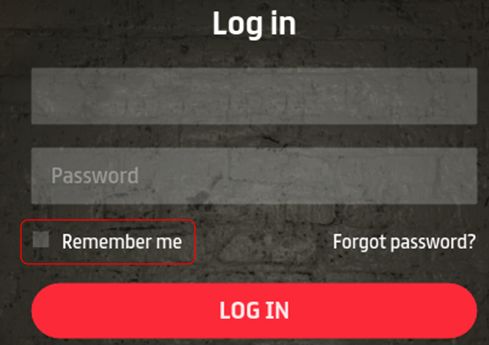
The Remember Me function has changed, and might be inconvenient for people using more than one account to log-in to Sansar (so perhaps disable it?)

With R29, the Remember Me account credentials option has been revised.

  • When checked, your current account credentials are automatically saved so that if you close the client via the top-right X, the next time you launch the client, you will be automatically logged-in to your Home Space or to an experience directly, bypassing the client log-in screen.
  • To display the client log-in screen with Remember Me enabled, you must log out via the More Options > log out function.
  • Uncheck Remember Me if you use more than one account to access Sansar, and wish to avoid having your last-used log-in credentials automatically re-applied to log you in to Sansar.

Custom Animations Re-Assignment

Due to bug introduced in a previous avatar upgrade, a custom animation may have overridden a non-emote animation. So for this release, users must re-assign custom animations to their desired emotes to see the desired results (one time update only).

Group Teleport

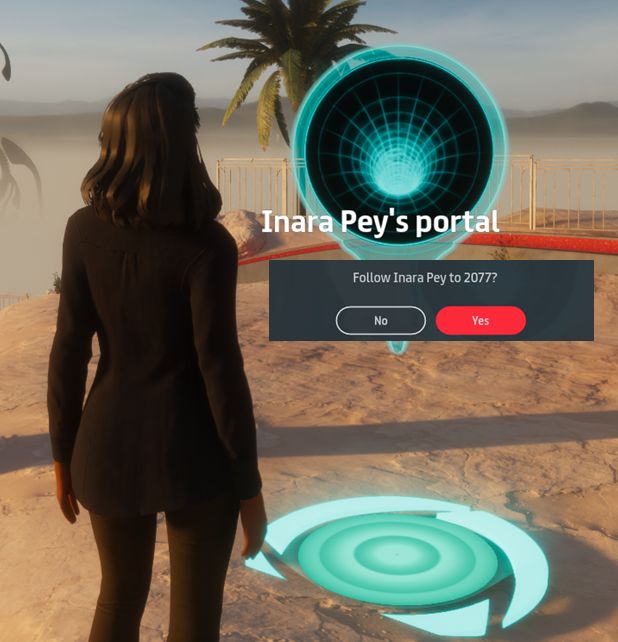
You can now generate your own teleport portals to other experiences using the “/portal” command and a valid experience URL. Hovering the mouse over the portal will display the owner’s name. Clicking on it will ask whether or not you wish to teleport to the selected experience.

R29 introduces a new teleport portal capability that can be used when exploring / showing Sansar with / to friends.

Simply type “/portal” (minus the quotes) followed by an experience URL, and a short-lived portal will appear in front of you, and will remain in place until it times-out after about 2 minutes. During that time, anyone touching the portal will be asked if they wish to teleport to the selected experience. If they select Yes, they will be teleported. Simples.

Notes:

  • You can only have one active teleport portal at a time. Calling another will immediately delete the one currently visible.
  • Teleporting between experiences is still via the experience load screen (as with the Atlas and static portals).
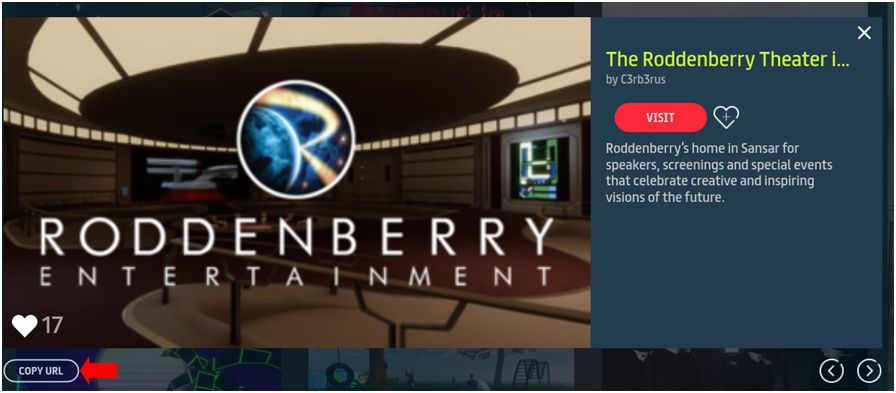
  • Remember, you can obtain the URL for an experience via the in-client Atlas (GO > Find Places to Go (Atlas)), by clicking the Copy URL button in the pop-up for the desired experience.
You can obtain the URL for an experience via the in-client Atlas (GO > Find Places to Go (Atlas)), by clicking the Copy URL button in the pop-up for the desired experience

In-Client Atlas Auto-Select

The in-client Atlas search now has an auto-select function that will  attempt to list experiences based on what you’re typing in.

Note that this select experiences on various criteria (e.g. experience and creator name and more), so depending on the combination of characters used, you might get some unexpected results.

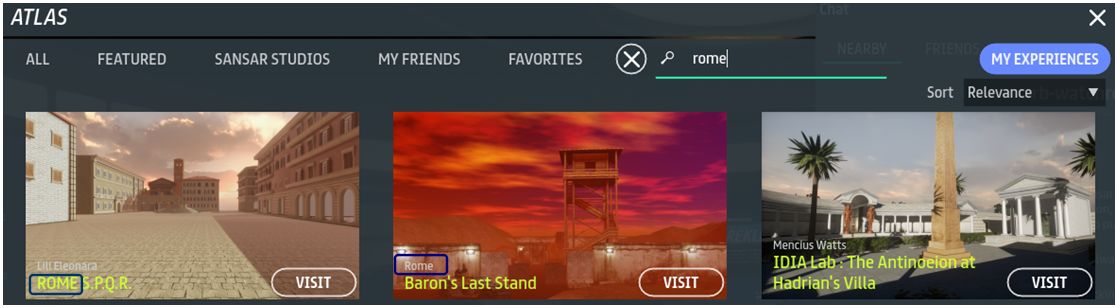
The in-client Atlas auto-select will offer experience suggestions based on entered text. However, selections can be based on experience name (l) creator name (c) and … something else entirely (metadata?) – note while “Roman” in purpose, the experience on the right does not feature “rome” in the experience or creator names. Click for full size

VR Updates

The R29 release sees:

  • An updated VR IK system: hand movements should not lag so much against actual hand movements.
  • A new height calibration UI: this includes options to calibrate your height automatically, manually input your height, and remember your height (pull in the last available setting).
  • Shop via VR: VR users can now access the Sansar store and shop.
R29: shop via VR. Credit: Linden Lab

Scripting Updates

  • Script performance in events improved.
  • Simple Scripts have been moved to Scene Script Libraries.
  • New scripts added to the script libraries.
  • New Object Script Library.
  • Added a Store Listing script to users’ inventory.
  • Added three new APIs:
    • Haptic Pulse API – lets a script fire a haptic vibration, so that a controller holding a gun, for example, would vibrate once you pulled the trigger.
    • Sit Event API – notifies other scripts when an avatar sits or stands. Meaning: if you wanted to make a whoopee cushion noise each time a person sits in a specific chair, you absolutely could.
    • Media Action API – Allows media actions to be performed on media surfaces. More specifically, it enables interaction with Twitch’s Mature Stream “Start Watching” button.
  • Please check the scripting API documentation for full information on scripting updates.

Avatar Save Performance Improvement

A new hidden surface algorithm should offer much improved performance when saving an avatar after making appearance changes in the Character Editor.

Feedback

A more modest update in terms of user-visible changes, when compared to recent releases. However, a long list of known issues resolved within it (see the release notes for details). Some nice updates for VR users, but it is the in-world teleport capability for groups that is liable to be particularly welcome.

The new functionality for Remember Me, while handy if you are a sole user of Sansar, feels clunky if you use more than one account with the platform. If you have it enabled, you must remember to perform a “hard” log-out via More Options in order to get back to the client’s log-in screen.

In this respect, it does question why not simply have Remember Me set to record the last-used credentials in the log-in / password fields? Sure, this requires an extra click on the log-in button to access Sansar (and so is perhaps less “seamless”). But conversely, it is both how most clients tend to work and potentially a lot more convenient for those who switch between accounts (although you now have to re-enter your account password).

Sansar 2019 Product Meetings week #5: release R29 summary

Scurry Canyon shooting game by FullSpectrum

The following notes were taken from the Sansar Product Meeting held on Thursday, January 31st. The full video of the meeting is available here. These notes highlight information pertaining to the upcoming R29 release, and user engagement discussions.

Upcoming Release Highlights

Emotes  / Animations Fix: there is an issue with the current release that can see some odd behaviour with animations, particularly for those in VR. There will be a fix for this in the next release, however, it will mean that users with custom animations will have to re-assign them to their perferred emotes. This will only have to be done once.

Teleport Portal Feature: the next release will include a new chat-driven teleport portal feature. This allows a limited time portal to be created in an experience that can be used by anyone to teleport to another experience. The command will take the format “/portal”, and the portal will exist for around 2 minutes.

So, for example, if you are with friends in an experience and decide you all want to visit Aech’s Garage, one person in the group can type:

/portal https://atlas.sansar.com/experiences/sansar-studios/ready-player-one-aech-s-garage

The rezzed portal can then be clicked on by those wishing to use it to transfer to the other experience until the portal times-out and vanishes. Should this prove intrusive, the Lab will consider adding an option for experience creators to block the capability, if required.

VR IK Improvements: updates to the IK system should mean that hand movements will not lag so noticeably behind actual hand movements when in VR. This is part of work to improve overall IK responsiveness.

R29 should also see the removal of the height calibration menu and storing a person’s height when using VR. There will still be options for setting it, if required (such as when a headset is being used by two different people); but where the headset is only used by the one individual, once height is set, it will be saved, and it will no longer be necessary to re-calibrate in different sessions. In addition, it will also include the ability to manually adjust the recorded height.

Hidden surface removal algorithm: this should seem significant improvements when selecting / updating your avatar looks (the in progress spinner shouldn’t appear for quite so long – the reduction in time estimated to be from the current 20-30 seconds to around 7 seconds.

Edit Server Fixes: R29 will include a number of Edit Server fixes. It is hoped these will help reduce the number of Edit Server disconnects experience creators can be faced with when working on a scene. This work is part of the overall effort being put into stability across the entire platform.

User Engagement

Avatar Movement / Controls

There have been complaints (and still are) about various aspects of Sansar’s control options (many of the complaints on Steam, for example, target the “non-intuitive” set-up of the VR  hand controller options).

One area of frustration many have is in avatar movement. In SL, for example, using the D key will orient the avatar and camera so the avatar is clearly facing the direction it is walking in. In Sansar, the camera will remain in place as the avatar walks to the left or right, giving what can be an odd “strafing” slide to the camera until it is re-oriented.

The problem here is which sort of controls are best: it might be argued that the “strafing” approach is something common in games, while the SL approach is more “non-standard”. However, users coming via Steam seem to be experiencing issues with turning their avatars when walking. So, the lab is seeking feedback on how best to consider possible improvements.

Quest / Progress System and user Engagement

To help new users, LL are working on a “quest / progression” system for Sansar.

  • Initially this will be a tutorial style option for new users, designed to take them through a basic quest and learn to use the basic controls (VR and keyboard), carry out tasks (pick things up, use them, drop them, teleport, etc), complete with some form of rewards / progress system that will deliver them to their Home Space on completion.
  • It will likely include a “come back and do this later” opt-out to allow people who are joining Sansar to attend a specific event (e.g. a show or performance) to log-in and get directly to the event, rather than being diverted into this on-boarding process.
  • Over time, the Quest / progress system will be opened out to experience creators, so they can embed it within their own games / quests, offer their own rewards / prizes (initially via the store), etc.
  • This system will (eventually) include infrastructure and capabilities that will include: information on the current quest a user is playing; how far they have progressed; what their upcoming task(s) is / are, etc.
  • Ideas put forward by both the Lab and creators at the meeting) for quest / game environments that might be built on this system include:
    • Hunts of some description, which also might be across multiple experiences, should experience creators have their builds included and add rewards to the quest.
    • Escape Room style games.
    • Story-based quests  – mysteries to be solved, etc.
    • More social-style games were also suggested, such as board games, card games, etc., that can easily be played by a group of friends.

For new users, there needs to be a clear distinction between goals and achievements. For example, Making 10 new friends might be considering an (unadvertised?) “achievement” within a quest, were a new user happen to do this as they played it; but it would not be a stated goal of the quest (as in, “you must now gain 10 friends in order to proceed to the next level”). This is to avoid new users lobbing multiple friend requests every time they come across other people and possibly annoying them. However, going to X, solving Y / overcoming Y to receive Z from the store, would be a goal / reward.

Another idea put forward is a system of badges / medals that can be received through repeated engagement in the platform. This type of system is used within Steam and is apparently popular there, and High Fidelity utilise a similar system as well.

Platform Promotion: VR AND Desktop Accessibility

One issue seen with Sansar gaining new users is that it is frequently perceived as “VR only” (this is a common form of feedback among Second Life users – I’ve seen it in comments on this blog).

In 2018, the Lab adjusted some of their advertising to de-emphasise the VR aspect of Sansar (such as removing some of the VR bias from the Sansar.com homepage); but conversely, there are still events that are promoted with this bias – Comedy Gladiators being a case in point (e.g. Comedy Gladiators, from Comedian Steve Hofstetter, Takes Live Entertainment to New Heights with Real-Time Ticketing & Physical Merchandise Sales in VR – Linden Lab press release, November 29th, 2018).

It’s been acknowledged by the Lab, that more needs to be done to emphasise the fact that Sansar can be enjoyed directly from the PC desktop without the need for a VR headset.

In Brief

  • Simple Scripts: it is widely felt these are under-utilised by experience creators. One issue is the lack of detailed documentation / tutorial material to go with them. This is apparently being addressed by the Sansar team.
  • 3D Mouse systems: following repeated requests from creators and machinima makers, initial steps have been taken to investigate whether support can be added to Sansar.
  • Other points of discussion, such as bugs, questions on specific aspects of content creation, etc., can be obtained by watching the video.