Gen Con: sneaking a peek in Second Life

Part of the VRazeTheBar Gen Con Experience Welcome Centre, reproducing the Indiana Convention Centre entrance, which is replicated in full within the event regions

It’s now just a week before GenCon 2020 opens its on-line and virtual doors to gamers. The largest tabletop-game convention in North America by both attendance (almost 70,000 in 2019) and number of events, Gen Con features everything from traditional pen-and-paper games to computer games by way of role-playing games, miniature war games, strategy games, board and card games, to live-action role-play – and more.

Traditionally held over four days in down town Indianapolis, Indiana, where it is focused on the Indiana Convention Centre, Gen Con has – like so many other large scale gatherings – been forced to change tack for 2020, courtesy of the SARS-CoV-2 virus, and as I noted in Coming to Second Life: Gen Con “the best four days in gaming”, for 2020 Gen Con will be taking place on-line across a number of platforms – and it will also be going virtual with a presence within Second Life.

Called VRazeTheBar Virtual Gen Con Experience, the Second Life event is being developed by solution provider VRazeTheBar, who are in working closely with Gen Con to ensure the convention is fully and strongly represented in-world.

Given it is both a week since my first report on the event and just a week from opening, event organisers Alesia Clardy (AleisaPM in-world) and Ron Clifton (RCArchitect in-world), respectively VRrazeTheBar’s Creative Director and Technology Lead, allowed me to hop back and see how things are coming along.

We’ve made some minor changes since we last chatted. The Welcome Centre will now be remaining in its own location on Mainland, rather than moving here, and will remain open for folk who are not registered for the event, or who misplace where they are supposed to be. We’ll have guides there to provide assistance to visitors throughout the four days of the event. Second Life users will also be able to visit it for information on registering for the event and then getting to the main event regions.

– Alesia Clardy (AleisaPM in-world), VRazeTheBar

Part of the VRazeTheBar Gen Con Experience: the Fantasy games area
Taking place over the four days of Thursday, July 30th through Sunday August 2nd, VRazeTheBar Virtual Gen Con Experience features a full schedule of activities for gamers and attendees spread across four regions collectively divided into themed areas defined by altitude, with levels on the ground, at 500m, 1,000m and 1,500m.

The latter is devoted to gaming areas, the level split between sci-fi, fantasy, steampunk, medieval, and renaissance areas built around a central arrival, greeting area.

We’ll be running the games here. some will be open to whoever wants to play, others will be lead by our Second Life event Games Masters (SLeGMs). When an SLeGM activity is in progress, access will be restricted to the registered players and the GM and Host. When not in use for a specific game, attendees will be free to wander through through and explore – we even have some horse rezzers for those wishing to try their hand at riding in SL!

– Alesia discussing the 1500m level at the VRazeTheBar Gen Con Experience

Part of the VRazeTheBar Gen Con Experience: a table-top game in the Medieval area

Meanwhile, at the 500m level, is a reproduction of down town Indianapolis, a place where those who regularly attend Gen Con in the physical world can feel at home, relax and generally socialise. The build includes a reproductions of the convention centre that is the focal-point for the physical world event, and the Union Station, where social activities take place.

To help people get in the mood for the main event, the VRazeTheBar will be hosting a pre-convention dance for registered attendees on Friday, July 24th, between 17:00 and 19:00 SLT. It will take place in the Union Station building in-world,  and fancy dress is encouraged with prizes for the best costume / best look. The event will also be live streamed as a part of GenCon Online’s pre-event activities.

Getting around so large an environment could be confusing for those unfamiliar with Second Life, so the VRazeTheBar team have utilised Second Life Experience keys to establish easy, HUD-based teleporting. Arrivals within the regions will receive an invite to join the experience and receive the HUD, which will be auto-removed when they leave / log-off, as per any other experience, and replaced automatically on their return.

Part of the VRazeTheBar Gen Con Experience: a part of the Sci-Fi area (the “Inara Pyramid”! – no, nothing to do with me, rather part of a link to the TV series Firefly

As I noted last time around, attendance at the event requires registration through the Gen Con website – and this includes Second Life users. Registration is mostly free, although there is a nominal US $2.00 fee for some special events, mandated as a part of Gen Con Online’s registration requirements. Whilst visiting VRazeTheBar Gen Con Experience, attendees will have the opportunity of picking up an in-world Gen Con tee shirt, a backpack and other goodies.

I’ll have a further update on things, including details of the opening event and the special guest who will be attending ahead of the opening next week. In the meantime, once again my thanks to Alesia and Ron for their time and attention.

However, if you’d like to learn more before then, tune-in to Lab Gab at 11:00am SLT on Friday, July 24rh, when Strawberry Linden will be chatting to Alesia and Ron – read more here. Or, if you prefer, hop over the the Welcome Centre!

Links and SLurl

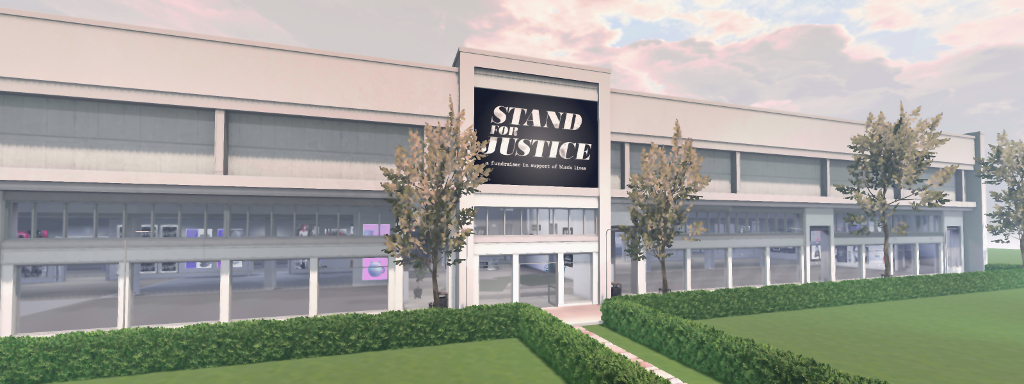
Stand for Justice: US $11K+ for BLM-related charities

Stand for Justice

At the start of June 2020, and thanks to a post by Linden Lab, I learned about Stand For Justice, an Second Life event organised to raise funds for the charities Black Lives Matter, Black Visions Collective, Campaign Zero, the National Police Accountability Project, and a Split Bail Fund benefiting 38+ bail funds across the United States (see: Stand for Justice in Second Life).

Over 100 SL brands and stores joined the event, with 100% of all sales to be donated equally among the supported charities and organisations. The event closed its doors at the end of June, and during the first part of July, the funds raised with cashed-out from Second Life and distributed to the supported charities. On July 16th, the organisers announced the final pay-out of funds raised had been made.

In all, a total of US $11,159.64 was raised by the event, after process credit fees. However, by the time the event closed and donations were ready to be made, the Black Visions Collective has ceased accepting funds. A poll of Stand For Justice group members was therefore taken for alternate charities to whom a donation could be made, resulting in the nomination of the National Institute for Criminal Justice Reform, a non-profit organisation providing technical assistance, consulting, research, and organisational development in the fields of juvenile and criminal justice, youth development, and violence prevention.

The five donations came to US $2,231.93 each. A full breakdown of payments and receipts can be found on the Stand for Justice website, and the actual transfers of funds from the Stand for Justice account to the charities was recorded via a You Tube live stream.

Additional Links

The beauty of steam machines in Second Life

Kondor Art Centre: Hermes Kondor, July 2020

The Tejo Power Station, located in the Belém district of Lisbon, Portugal, is regarded as one of the most beautiful examples of Portuguese industrial architecture from the first half of the 20th century.

Occupying the site of a thermoelectric plant first built in 1909 on the banks of the Rio Tejo, the building as it is seen today was first built in 1941, and provided power to the city through until the early 1970s, undergoing expansion over that time.

Kondor Art Centre: Hermes Kondor, July 2020

Encompassing architectural styles that run from art-nouveau to classicism, the power station was declared a major Portuguese heritage centre in 1986, and in 1990 became the home of the Electricity Museum, celebrating its role in bringing electrical power to Lisbon. It is in this capacity that Hermes Kondor visited it, along with his camera, returning with photographs of the building’s machinery, some 28 of which his has placed on display at the Kondor Art Centre.

And while this may sound like a boring subject – believe me it is not. The bunkers, pressure chambers, pipes, valves and metal walkways of the station’s machinery within the museum have been lovingly restored and maintained, and Hermes has captured all of this in incredible detail.

Kondor Art Centre: Hermes Kondor, July 2020

Through an exquisite use of depth-of field, macro focus, angle, framing and light, Hermes presents these machines and their individual part as living entities. From threaded nut to valves to pressure vessels to the complexity of the larger machines, the crisp detail found within each photograph is stunningly exceptional.

Displayed within a modern skybox setting that itself has a clean industrial feel to it and that perfectly complements the art on display, this is a genuinely engaging exhibition that fully captures the history and beauty of these remarkable machines.

Kondor Art Centre: Hermes Kondor, July 2020

SLurl Details

Glitch Social in Second Life

Glitch Social, July 2020 – click any image for full size

Note: Glitch Social has closed; as such SLurls are removed from this post.

Glitch Social is a public space developed by KaidenTray, owner of the Glitch brand, and who is also a region designer / Second Life photographer. Located on a 1/4 region parcel within a Full region, it is offered as beach-front hang-out for people to enjoy, complete with a range of activities to partake and places to simply sit down and relax.

The landing point is located towards the southern edge of the parcel and sits above a fast-flowing stream and right on top of a little picnic area with a bonfire that may or may not be lit when you arrive. The stream is an odd little beast, lying as it does on a raised arc of land than falls away it either end such that the stream appears to be following both eat and north before dropped down into a depression fed on its far side by more waterfalls, and south and west to were it splashes down a lip of rock into a much wider, deeper pool of water that is also served by a series of large falls erupting from the surrounding rocky hills.

Glitch Social, July 2020

This large pool offers the first hint of recreational options in the parcel. Once you’ve passed the black bear and her cub as they stand on the far side of the stream, a structure somewhat like a diving board  extends an arm over the water, dangling various rope climbs abov the waves, with poses available on them with a right-click. Rubber rings also float on the water for those who fancy a dip.

Just behind the landing point and hidden from it by bushes, a set of stone steps wind up the hill from the grassy knoll between “diving board” and picnic area. Rising along the slope in a gentle arc, it offers a way up to a large house and yard. While this may at first seem to be a private dwelling, it actually appears to be open to the public: a sign on one of the other routes up to it from the beach – of which more anon – offers a welcome to visitors as they approach the front yard area of the house.

Glitch Social, July 2020

A sprawling setting, the house squats rather uncomfortably on mesh landforms (and in one place is in need of a measure of support as it does so!) surrounded by a mix of gravel, vegetable garden, wild grass and chickens. The house is comfortably furnished, again with opportunities for couples and groups to gather, sit and chat indoors or out, those opting for the latter possibly coming under the watchful eyes of a heron perched at the edge of the large stone pond sitting on the front gravel.

Despite its elevation, the house is set far enough back on is perch so that a screen of weeping willow and maple trees hide it from the beach below, and vice versa – although admittedly the high dormer roof of the house does raise itself sufficiently enough to be seen through the trees and bushes from below. Three tiers of stone steps connect the front yard of the house with the beach, these being the way up to the house marked by a welcoming sign mentioned earlier.

Glitch Social, July 2020

A third way from / to the house sits on its north side, where a rock path slopes down to a cinder path and boats docks. The path pushes through a narrow ravine of rock to link up to a meadow sitting back from the beach as it curves east and north around the land. The north western end of the docks are marked by a squat lighthouse that appears to be hiding behind a tall shoulder of tock, rather than giving warning of its presence.  Alongside of it, the cinder track turns sharply inland to climb up the hill before the cliffs, passing between them and the house.

The top of this climb is marked by a café / music venue built over a shelf of rock and looking down onto the large pool – so much so, in fact, that the daring can use the platform extending over the water from one side of the venue’s deck to do some spectacular high diving into the waters. For those less inclined to daring-do, the deck and café offer a further place for relaxation and passing the time.

Glitch Social, July 2020

With bumpers boats available in the waters by the beach, a camp site in the meadow and little details tucked away here and there, Glitch Social has much to recommend it, all wrapped in pleasing sound scape.

2020 Simulator User Group week #30 summary

Frogmore, June 2020 – blog post

The following notes were taken during the Simulator User Group meeting of Tuesday, July 14th, 2020.

Simulator Deployments

Please refer to the server deployment thread for news and updates:

  • On Tuesday, July 21st, the majority of the grid was updated with server maintenance update 544832, designed to resolve issues with some internal service updates, chat range improvements and capability improvements.
  • On Wednesday, July 22nd, the should be a single RC deployment comprising “a few internal changes (mostly logging)”. At the time of writing, the server deployment thread had yet to be updated with the release notes reference.

SL Viewer

The Tools Update viewer, version 6.4.5.544639, was promoted to de facto release status, Friday, July 17th. This viewer uses the new viewer build tool chain, but does not include any user-facing updates outside of bug fixes.

The remaining official viewer pipelines remain as follows:

  • Release channel cohorts (please see my notes on manually installing RC viewer versions if you wish to install any release candidate(s) yourself):
    • Arrack Maintenance RC viewer, version 6.4.5.544465, July 6th.
    • Love Me Render RC viewer, version 6.4.5.544028, June 30th.
  • Project viewers:
    • Custom Key Mappings project viewer, version 6.4.5.544079, June 30th.
    • Mesh uploader project viewer, version 6.4.4.543141, June 11th.
    • Copy / Paste viewer, version 6.3.5.533365, December 9th, 2019.
    • Project Muscadine (Animesh follow-on) project viewer, version 6.4.0.532999, November 22nd, 2019.
    • Legacy Profiles viewer, version 6.3.2.530836, September 17th, 2019. Covers the re-integration of Viewer Profiles.
    • 360 Snapshot project viewer, version 6.2.4.529111, July 16th, 2019.

Further Regions in the Cloud

Following from the announcement concerning Ahern and Morris on Aditi, the beta grid, being in the cloud (see my previous Simulator User Group update),  most / all of Blake Sea has been cloned to Aditi and is now running in the cloud, specifically for the purposes of  region crossing tests with vehicles.

Again, just to emphasise, this is Aditi, the beta grid, only (at least one person has reported on region crossings on Agni (the main grid) in relation to this announcement). For more information, refer to my blog post Blake Sea in the cloud on ADITI.

Blake Sea is now on Aditi and running in the cloud for those wishing to test vehicle region crossings

What is Simulator “Sleep Time” and how are Scripts Processed?

The viewer provides a set of stats related to both itself and the simulator your user is on (CTRL-SHIFT-1). Most of the stats proved in this window are relatively self-explanatory, although some can cause confusion or can be misrepresented. One area of confusion  – what is simulator “sleep time”  – was raised in the forums recently, and Rider Linden took the time to explain it and a couple of other things in the stats panel. As his reply may help others, I’m including it in full here:

The short answer is that sleep time is the mean amount of time in ms per simulator frame that the simulator has spent idling over the last minute.
The long answer is that the simulators attempt to keep a constant number of processing frames (one cycle through the main loop) per second. This number is displayed in the statistics window as Sim FPS. This value is not the same as the Viewer’s FPS. When the Sim FPS starts to fall below 45 you will begin to see lag events like delayed movement and rubber banding, among other symptoms.
A single frame should take about 21ms. (21ms * 45) = ~1 second (less about 50ms overhead). If a single simulator frame takes less than that 21ms we need to add a few extra ms in order to maintain the constant rate. This extra time is reported as “Sleep Time” and tracks closely to “Spare Time”.
Every frame on the simulator is divided into a number of phases. The big ones are network message processing, advancing the state of the physics simulation, processing agents in the region and updating their interest lists, and executing scripts.
The amount of time allowed per frame to execute scripts is capped. The simulator will attempt to execute all the scripts in the region in that allotted time slice, if it can not make it all the way through the list it will stop and pick up where it left off on the next frame (this gives you the “Scripts Run %” statistic.) Since the time for script execution is capped you can see situations where the % of scripts executed per frame begins to fall even though there is idle time reported on the simulator.

Rider Linden, July 23rd, 2020

Blake Sea in the cloud on ADITI

Blake Sea is now on Aditi and running in the cloud for those wishing to test vehicle region crossings

Following from the announcement concerning Ahern and Morris on Aditi (the beta grid), being in the cloud – see my Simulator User Group update of July 14th, 2020 – it has been announced that most / all of Blake Sea has also now been cloned to Aditi, and is also running on AWS cloud servers.

The came via a forum post by Mazidox Linden on Monday, July 21st, and the move has been made so that those who use boats and aircraft can carry out region crossing tests.

We’ve now expanded the number of regions we’re running in the cloud on Aditi to include the entirety of the Blake Sea mainland regions. For those of you who aren’t familiar with Blake Sea, you can use the following entry points to log in on Aditi and rez a vehicle to start exploring:
Blake Sea – Japan (secondlife://Aditi/secondlife/Blake%20Sea%20-%20Japan/207/248/22)
Blake Sea – Beagle (secondlife://Aditi/secondlife/Blake%20Sea%20-%20Beagle/207/208/13)
Blake Sea – Mainbrace (secondlife://Aditi/secondlife/Blake%20Sea%20-%20Mainbrace/211/241/16)
Blake Sea – Atlantic (secondlife://Aditi/secondlife/Blake%20Sea%20-%20Atlantic/245/219/16)
Objectives:
Test region crossing code (particularly using vehicles) between cloud simulators on the same host, and cloud simulators on different hosts.

– Mazidox Linden, July 21st

Again, just to emphasise, this is Aditi, the beta grid, only (at least one person has responded to the thread referencing Blake Sea region crossings on Agni, the main grid).

Those wishing to try boat / aircraft region crossings can do so by logging-in to Aditi and teleporting to the locations given above. you can also use Blake Sea – Half Hitch on Aditi for rezzing boats and seaplanes can be rezzed.

When testing, be aware that crossings between these regions can be unpredictable – so please do report your experiences via the forum thread, and with the following points in mind, as also indicated by Mazidox:

  • Some regions can cause you to “bounce off an invisible wall” at the region border, even though you are able to see into them.
    • Please report instances of this occurring in the forum thread, including the name of the region you were in, the region you were trying to enter, the date, and the time.
  • Some regions will not show up at the edge of your current region, even though they are adjacent.
    • Again, please report instances of this occurring in the forum thread, including the name of the region you were in, the region that failed to appear, the date, and the time.
  • HTTP-out for LSL scripts is disabled on cloud-based regions, as is sending e-mails via LSL scripts. Please do not report either, as both are currently working as intended.

to Access Aditi

If you have not logged-into Aditi before, you should file a support ticket requesting access.

Once your ticket has been responded to, you can log-in to Aditi via any Second Life viewer using to SL account name and password:

  • Launch the viewer.
  • If the grid selection option is not displayed, press CTRL-SHIFT-G.
  • Select Beta Test Grid (Aditi) from the drop-down (see below).
  • Enter you log-in credentials.
Use the Grid selection option in any viewer to access the beta grid
  • To return to the Main Grid select Second Life Main Grid (Agni) at your next login

Note: when you log-in, your inventory may not reflect your inventory on the main grid (so you may not have your desired vehicle available, for example), and you’re need to wait for your inventory to be duplicated from Agni (the main grid).

The inventory copying process is automatic, and occurs at approximately 06:00 SLT daily. Simply by logging-in to Aditi you will have flagged your inventory to be updated the next time the copy process is run, so you should not need to wait more than 24-hours for your Aditi inventory to properly reflect your Agni inventory.

Further information on Aditi can be found on the Preview Grid page of the SL wiki.