Artful stories, teleporting, and supernatural secret agents

Seanchai Library

It’s time to highlight another week of storytelling in Voice by the staff and volunteers at the Seanchai Library. As always, all times SLT, and events are held at the Library’s home at Holly Kai Park, unless otherwise indicated.

Sunday, October 14th 15:00 Stories at the Park

Winter’s Colours: The Art of Lu

Join us at Holly Kai Gallery as Caledonia Skytower reads stories inspired by pictures on display in the Art of Lu, an exhibition of the remarkable art of LuAnne Anatine in Second Life.

A professional illustrator and digital artist in the physical world, Lu Anne produces some of the most stunning art to be seen in Second Life, producing her art through a fascinating mix of traditional and digital mix of mediums. For example, she produces a base drawing or painting in graphite or water-colour, then scan the images into her computer where she paints them digitally using a Wacom Cintiq tablet and a number of programs.

Stories at the Park allows writers from across Second Life to visit the exhibitions at Holly Kai Gallery and then write 100-word stories (“drabbles”) or poems on one or more of the pictures that inspire them, and which are then presented at the event, either read by the writer or one of the Seanchai Library team. All stories are then published on the Holly Kai Park blog.

So, why not join us at Holly Kai Gallery for the latest Stories at the Park? Come early and see Lu Anne’s painting ahead of the event, or stay later and explore them after!

Monday, October 15th 19:00: The Infinitive of Go

Gyro Muggins reads John Brunner’s 1980 novel about matter teleportation and dimensional shifts.

Dr Justin Williams and his collaborator, Cinnamon Wright, develop a form of instantaneous teleportation in which the departure and arrival points appear “congruent” with one another, allowing objects to be instantly moved from one to the other in a transfer process termed “posting”.

The system works flawlessly with inanimate objects, and when a situation arises requiring an urgent diplomatic solution arises, Williams is called upon to transfer a courier from the USA to an embassy in a foreign location. But something goes wrong: on his arrival, the courier is armed – yet he carried no weapon on his departure – and further demands he be given a countersign by those at the embassy – when no such arrangement had been made. Believing the mission to be compromised, the courier shoot himself, and the package he is carrying self-destructs.

In order to prove he did not sabotage the system, Williams has himself posted – only to find that while he feels unchanged, the world around him has changed in the most subtle of ways. As time goes on, Williams – with the help of a doubly altered Wright – realises that the teleportation device is moving its subjects between parallel universes. It is also apparent that some of those arriving in the dimension in which he now exists have far more knowledge about what is going on.

The question is, is it the system that is causing people to move between universes, or ir it something more subtle?

Tuesday, October 16th 19:00: Ghost Stories from Home

With Caledonia Skytower.

Wednesday, October 17th, 19:00: The Jennifer Morgue

Corwyn Allen reads the second volume in the Laundry Files by Charles Stross.

Bob Howard is an IT expert and occasional field agent for the Laundry, the branch of Her Majesty’s Secret Service that deals with occult threats. In this second outing, Bob Howard finds himself dragged into the machinations and conspiracies of megalomaniac multi-billionaire Ellis Billington, The Black Chamber and The Laundry…

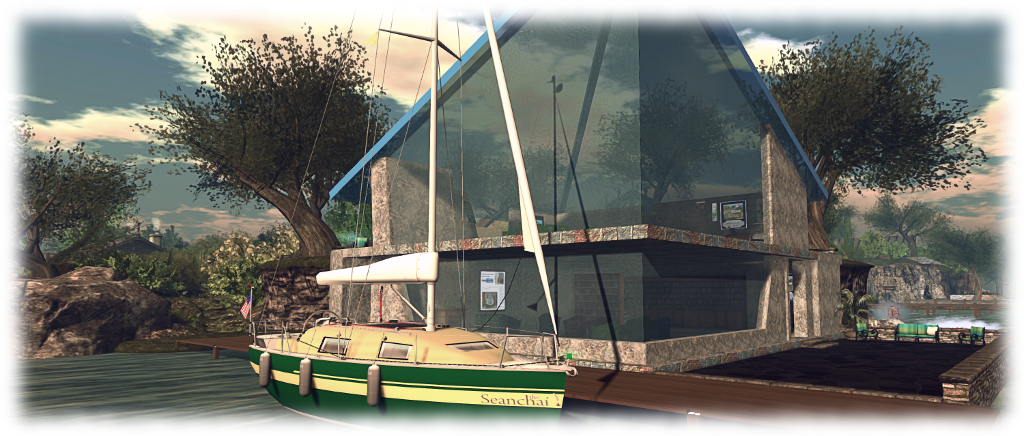
Dressed in a tuxedo (what else for a globe-trotting British Secret Agent?) and sent to the Caribbean, Bob must infiltrate Billington’s inner circle via his luxurious yacht. His mission? Prevent the Billington from violating a treaty that will bring down the wrath of an ancient underwater race upon humanity’s head.

Offering a wonderful pastiche on both the world of James Bond and a wonderful mimicking of Ian Fleming’s style of writing, Stross produces a novel that also evokes Lovecraftian overtones that is delightfully entertaining to read. In true Bond style, Bob is (reluctantly) partnered with an American agent – in this case a stunningly beautiful woman who also just happens to be a soul-sucking succubus from another dimension. Which, being the case, marks Bob’s mission somewhat differently to those of Bond: not only must he stop the bad guys and come through this at best shaken, he must totally avoid being stirred towards getting the girl…

Thursday, October 18th

19:00: Doorbells at Dusk

With Shandon Loring. Also presented in Kitelyhop://grid.kitely.com:8002/Seanchai/144/129/29.

21:00 Seanchai Late Night

Contemporary Sci-Fi with Finn Zeddmore.


Please check with the Seanchai Library’s blog for updates and for additions or changes to the week’s schedule.

The current charity is Feed a Smile.

The natural beauty of oYo’s art in Second Life

Club LA and Gallery: oYo

Opening on Saturday October 13th, 2018 on the mezzanine level at Club LA and Gallery, curated by Fuyuko ‘冬子’ Amano (Wintergeist) is an exhibition of photography by  oYo (Oyona). Offering a mix of landscape and avatar studies, it encompasses a sublime sense of “natural” photography that has enormous depth  and, in the case of many of the images, considerable narrative substance.

For the exhibition, the mezzanine area has been converted so as to give a feeling of being outdoor – almost somewhere very close to the sea or up on moorland. Open sky forms the walls and ceiling, while the floor is a mix of scrub grass and shrubs through which sharp tongues of rock poke forth.

Club LA and Gallery: oYo

Within this space 22 photographs are arranged, mixing monochrome with full colour with the majority presented in softer tones and finishes that adds an extra dimension to them. What is striking about many of the photos is oYo’s use of camera placement and angle; the construction of many of the avatar-centric images are such that while carefully composed and comported, they actually have the sense of being spur-of-the-moment shots, pictures captured through happenstance rather than design and pose.

This is immediately evident on arriving on the mezzanine. To the left of the entrance sit What Do You Expect?, Take Care and Emo (all seen in the top image). All three have been composed to present a specific focus and emotional response. But through the use of lighting, shadow, angle, soft focus, it is as if each was caught entirely by chance: a camera being used and raised in mid-conversation or when the subject was least expecting it.

Club LA and Gallery: oYo

Thus the story within each of them becomes broader, encompassing the “person behind the lens” as much as the subject and setting: what was going on immediately before the picture was taken? What words were being exchanged? were both parties in Take Care aware that this was perhaps the last photo one would take of the other, a natural falling of shadow as the image was taken now serving to add to the stirring of emotion and memory whenever the taker of the photograph looks at it?

The landscape photos offered in the exhibition demonstrate a similar seasoned and skilled eye for composition, colour, tone and framing, all of which generates a narrative well beyond the photo itself. This is again evident from the very first image seen on entering: Le Rivage (again seen in the top image, on the left). A marvellous close-up of cormorants offered in monochrome and soft focus, the framing perfectly captures the moment at which some of the birds start to demonstrate agitation, wings spreading perhaps aware of the not-too-distant photographer. But so does it bring to mind the story of how it came to be taken: the careful manoeuvring downwind of the birds, edging over sand and rock or through wet marsh, constantly aware that push things too far, and the birds will take flight; then the use of a telephoto lens, perhaps crouched uncomfortably…

Club LA and Gallery: oYo

Time and again this storytelling comes to the fore in so many ways: the happy-go-lucky, out-of-the-window “holiday” shot of Saint-Martin, to the lonely beauty and pathos  – again both in front of and behind the lens of Tout Refaire (second image from top in this article).

These are all images that are rich in life and emotion as well as offering an unforced guide to the art and artistry of photography. Most definitely an exhibition to be seen. The formal opening will take place at 13:00 SLT on the afternoon of Saturday, October 13th, and the exhibition itself should be open through the first half of November.

SLurl Details

2018 Sansar Product Meetings week #41

The following notes are taken from the Sansar Product Meeting held on Thursday, October 11th. These Product Meetings are open to anyone to attend, are a mix of voice (primarily) and text chat. Dates and times are currently floating, so check the Sansar Atlas events sections each week. The meeting was hosted by Eliot, and well attended by members of the Sansar product team, with Ebbe also dropping in.

Release Process Flow: Overview

The various teams working on Sansar are developing and refining multiple features and aspects of the platform, and periodically, a feature freeze is called.

  • This occurs roughly 2-weeks from the planned deployment date for the next release.
  • At this point the decision is made on which features are developed and stable enough to include in that release, and no additional features tend to be added to the release after the feature freeze.
  • Those features assigned to the release then go through extensive testing and bug squashing.
  • The amount of bug fixing, etc, required determines whether the release ships on the target date or slips.

While dates are not set in stone, this cycle means that for the next release, R27, the feature freeze date in October 17th, 2018, and the planned release date in October 31st, 2018.

Release 26: Thumbs Up

General Points

  • New VR hand gestures: the current Vive controller will support the hand clenching gesture; however, as noted in the release notes and my R26 overview, full Vive support for all of the new hand gestures will likely come with support for the new Vive hand controllers.
  • Galen has developed two scripted elements to support the new broadcast capability:
    • The first is a simple trigger volume that can be used for things like stage settings, etc. An avatar standing in the trigger volume will have their voice automatically broadcast throughout the experience.
    • The second is a broadcast script that can be configured to work as required within a scene.
    • Linden lab will be providing simple scripts to support broadcasting as well.
  • Panel readability in VR: there have been requests that the various client panels now visible in VR (e.g. chat, settings) be given a transparent background so they don’t block the world view so much.  However, these requests are countered by those who felt that having the chat panel fairly transparent (as it was during the initial release) made reading text difficult. For their part, the Lab believe what they have with the panels may be the best solution.
  • There appears to be a bug in the scene object drop-down that can lead to something other than the desired object being selected. This has been noted by the Lab, but at the time of the meeting the status of any fix was unknown.
  • A major under-the-hood change made in R26 is to the way the camera’s focus is handled. While this is now much improved, there are edge-cases that need to be tweaked. Examples of this:
    • If an avatar’s name tag is displayed by hovering over it, and an attempt is made to right-click and drag the camera around when the mouse pointer is over the name tag, the camera may not actually move.
    • When selecting objects in the scene-object drop-down, it can be possible to point to one object, but actually select another on clicking.
    • When renaming an object, clicking the anchor the cursor in the text entry field may result in the rename dialogue vanishing.
    • As there is no mechanism to push updates to customers, items updated in this way must be re-purchased at present.
  • Chat copy / paste has been lost in both VR and Desktop mode, this should be corrected in the next release.

Permissions Licensing

  • Materials editing: the decisions to disable in-scene materials editing on purchased legacy objects and the need to make new objects full perm in order to allow in-scene materials editing have both been criticised. Both decisions may yet be subject to revision.
  • Some creators have already started re-listed their items on the store to enable the save to inventory capability introduced with R26.
    • Only re-listing is required to enable this; items do not have to be completely re-uploaded and listing.
    • The process is put the item into a scene, take in to inventory, set the permissions against it, then upload it to the store.
  • It been requested that the Lab provide a means of flagging or tagging items on the Store (and in inventory – which might be harder) to indicate they are legacy (and therefore outside of the new permissions / licensing system). For example, a tag on Store listings to say “legacy Content” or similar, and / or legacy items in inventory appearing in a different colour – e.g. red.

R27 Release (October)

Not many details as yet, as the freeze features date hasn’t been reached. However, the release will hopefully include:

  • Sprint set via settings button.
  • Custom animations upload.

Other Items

  • A point release is being worked on. This may include a fix for an issue whereby assets added to a legacy scene can inherit legacy permissions (those enforced prior to the R26 release).  This release may also include fixes related to the use of folders in scene editing and  other fixes.
  • Twitch channels: when watching a Twitch channel from within Sansar, all avatars watching the stream count as individuals on the stream count.
  • IK issues in VR: when using VR it is still possible to end up with an avatar looking like it is a professional contortionist (or trying to impersonate a pretzel). The Lab is still working on the IK system to prevent this.
  • Setting avatar height / reach arm length: a recent change was to introduce an “arm stretch” movement that is tied to the scaling of an avatar. The result is intended to have the avatar’s height, reach, arm length more close match the user’s actual height, reach and arm length.
    • This help ensures a naturally sense of proportion between user and avatar, for comfort of movement, etc.
    • It has specifically been done to allow avatar scaling in the future – so movements will continue to feel natural in whatever size of avatar is being used, and arm reach will appear correctly proportioned to body size, etc.
    • It does mean there will be a difference in perspective: when inside an experience with a small avatar, the space will appear to be much larger than when using a big avatar.
    • A side issue with this is that the stretch movement has to be performed whenever a headset is worn.The Lab is looking to improve on this, so the movement only has to be performed once, or in specific situation (e.g. when seated or standing).
  • Private messaging. Currently, to find out who is sending a private message, all private messages must be opened. This has been reported and a fix is in the works.
  • Exporting own models: currently, it is not possible to export models from Sansar. With the introduction of the licensing system with R26, it may in the future be possible for creators to export their own models they’ve uploaded to Sansar to help deal with issues of local loss of creations, etc. This currently isn’t a priority for the Lab to develop.
  • Materials editing on uploaded clothing: this has been requested so as to avoid the need to repeatedly upload an item when making adjustments to it. The request will be looked into.
  • The desktop throw animation has been tweaked, and now makes it difficult to simply drop an object after picking it up, and is proving somewhat unpopular.
  • Combining multiple objects into a single unit for resale: how this will work is still under consideration at the Lab. The idea currently being considered is to utilise a folders based approach: saving multiple items (complete with all the local transforms and scripts and associations they have) and extract that back to inventory, then offer the folder on for sale through the Store. People buying the folder would then be able to place it in their scene and see the objects exactly as they were when “packaged”.

Alo’s Black and Colours in Second Life

DiXmiX Gallery: Black and Colours

Opening on Friday, October 12th, 2018 at 12:00 noon SLT is a new installation by Alo (Aloisio Congrejo). Black and Colours is being hosted in The Womb, the recently revamped exhibition space at DiXmiX Gallery. And I have to say, that it is a curious piece.

Lacking liner notes from the artist, the installation is a multi-faceted piece entirely open to interpretation. Within the darkened hall is a mix of 2D the 3D elements, some of which are presented more-or-less as “traditional” photos; others appear to be 3D images offered 2D images; some are strongly abstract in nature while others mimic a polarisation approach similar to that found used by 3D movies to present what appears to be 2D art in 3D. All of which adds up to a richly diverse installation.

DiXmiX Gallery: Black and Colours

As might be expected from reading the title of the installation, there is a deliberate play through between black and the use of colours – most notably red and yellow, together with that other neutral – white. This is itself highly effective in drawing the eye into the installation, while the linear aspect in much of the art adds a geometric dimension to the entire installation that allows the wall mounted elements (together with the figures that might be close to them) to both exist independently to one another, and yet also be bound together by the white-on-black pattern of lines on the floor.

This subtle linking may well not be initially apparent, the eye perhaps initially being drawn to a colourful, strongly abstract free-standing scene within the hall. At first looking like paper shapes patterned in swirls and lines of black-and-white or red-and-black, skewered by red, yellow and black pins forced into the floor, these shapes are transformed by camming around them into  what might be dancing couples caught in a complex set of tangos performed to unheard music.

DiXmiX Gallery: Black and Colours

This abstract element is bookended on either side along the length of the hall by Alo’s photo images, which I confess to finding the most eye-catching. Furthest from the floor sculpture is a series of enticing white-on-black images of a near-naked woman. Marvellously lit, this series of images looks almost 3D in its execution, each of the images emphasising a different element of her pose: full body, booted legs, gloves arms with turned-away head between… In their midst is a further version of the image set behind 3D elements, all of which combine to suggest – from a distance, 2D art projected as a 3D piece.

The other display is a subtle and complex set of images of a woman’s head which I strongly recommend camming across slowly to fully appreciate them. Each is a layered construct, designed to mimic a polarised 3D effect, something which comes into focus (quite literally) as the camera faces them and glides from one side to the other. Not only does this highlight the “polarising” element, it also brings forth the subtle shift in colour tones used within the images.

DiXmiX Gallery: Black and Colours

I confess I have absolutely no idea how to interpret or quantify Black And Colours – or even determine if it needs interpreting in any way; I also admit there are elements to the piece that escape my ability to quantify. But this does not diminish  Black and Colours in any way; it simply means this is a piece very open to personal interpretation throughout, and thus an installation that should be witnessed first-hand.

SLurl Details

2018 SL UG updates #41/2: CCUG summary

A simple 5-minute (including uploading the textures) demo of EEP, replacing the Sun and Moon with Mars and Jupiter respectively, then adjusting their respective sizes &; putting them in the same quadrant of the sky

The following notes are taken from the Content Creation User Group (CCUG) meeting, held on Thursday, October 11th, 2018 at 13:00 SLT. These meetings are chaired by Vir Linden, and agenda notes, meeting SLurl, etc, are usually available on the Content Creation User Group wiki page.

Environmental Enhancement Project (EEP)

Project Summary

A set of environmental enhancements, including:

  • The ability for region / parcel owners to define the environment (sky, sun, moon, clouds, water settings) at the parcel level.
  • New environment asset types (Sky, Water, Day that can be stored in inventory and traded through the Marketplace / exchanged with others.
    • Day assets can include four Sky “tracks” defined by height: ground level (which includes altitudes up to 1,000m) and (optionally) 1,000m and above; 2,000m and above and 3,000m and above, plus a Water “track”.
  • Experience-based environment functions
  • An extended day cycle (e.g a 24/7 cycle) and extended environmental parameters.
  • There are no EEP parameters for manipulating the SL wind.
  • EPP will also include some rendering enhancements  and new shaders as well (being developed by Graham Linden), which will allow for effects such as crepuscular rays (“God rays”)
    • These will be an atmospheric effect, not any kind of object or asset or XML handler.
  • The new LSL functions for finding the time of day according to the position of the windlight Sun or Moon have been completed, and are more accurate than the current options.
  • EEP will not include things like rain or snow.
  • It will still be possible to set windlight local to your own viewer.

Resources

Current Status

  • Testing still in progress on Aditi, with test parcels for users still available.
  • Test region: Aditi EEP Testing (secondlife://Aditi/secondlife/EEPTesting/128/128/23).
    • Parcels cost L$1, but as Aditi funds are provided by Linden Lab, you are not paying for anything with your own money.
    • You MUST be using the EEP test viewer why trying to purchase a parcel on the test region – if you are using any other viewer, your purchase will time out.
  • Feedback via Jira (bugs and requests) and / or through comments on the forum feedback thread.
  • An update to the project viewer is expected soon.
  • Graham Linden is continuing to work on the shader support.

Bakes On Mesh

Project Summary

Extending the current avatar baking service to allow wearable textures (skins, tattoos, clothing) to be applied directly to mesh bodies as well as system avatars. This involves viewer and server-side changes, including updating the baking service to support 1024×1024 textures, and may in time lead to a reduction in the complexity of mesh avatar bodies and heads.

This work does not include normal or specular map support, as these are not part of the existing Bake Service, nor are they recognised as system wearables.

Resources

Current Status

The update to the Bake Service to support 1024×1024 textures has run into problems. Anchor Linden is working on fixes for the issues, and once these have been implemented then the viewer should receive and update as well.

Animesh

Project Summary

The goal of this project is to provide a means of animating rigged mesh objects using the avatar skeleton, in whole or in part, to provide things like independently moveable pets / creatures, and animated scenery features via scripted animation. It involves both viewer and server-side changes.

Resources

Current Status

  • The RC viewer updated on October 8th to version 6.0.0.520211. It had been hoped with would be the last RC version, but issues mean this will not be the case.
  • Performance issue:  BUG-225584 and forum thread. This is related to the new dynamic bound box used with Animesh. Vir is working on the issue, and Beq Janus from the Firestorm team has been involved in investigations as to the degree of potential impact. There have been one or two sensationalist blog headlines – best to read the forum thread and the bug report.
    • Part of the thread has spun away into handling attachments on Animesh. While this is not a part of the initial Animesh release, hopefully the discussions can be split off into their own thread.
  • Imposters issue: Animesh objects can imposter independently to avatars. This can result in an avatar rendering normally when seen by others, but any attached Animesh being impostered (or possibly vice-versa).
    • This is being fixed so that an Animesh attachment will now have the same imposter setting as its parent avatar. The update will be in the next RC update.
  • There is a Mac-specific graphics issue that can result in Animesh objects vanishing from the scene when crossing a region. This is also being worked on.

Animesh and the Marketplace

  • There has been some preliminary discussions in the Lab on how to make Animish distinguishable / locatable on the Marketplace (e.g. categories, etc.).
  • No decisions as yet, but the Lab is interested in feedback at CCUG meetings or through the Animesh feedback thread.
  • Problem here is the risk of confusion cross-over. Do trees animated via Animesh require their own sub-category under “Animesh”, should they have  an “Animesh” style sub-category under trees and shrubs (itself already a sub-category of Home and Garden >: Landscaping)?
    • There’s also the question of what to call an over-arching category: “Animesh” is a truncation of “Animated Mesh”, and has been used within the project, etc., but those unfamiliar with the project might be confused by it; so might “Animated Mesh” be preferable? A problem here is “Animated Mesh” itself is a little ambiguous in meaning.
  • Triangle counts have been suggested as an alternative, but this requires some form of automated count system for items uploaded to the MP, which in turn would require significant changes to the MP tools.
    • Even if a tri count could be auto-generated, would people take more notice of it or a given LI?

In Brief

  • A portion of the meeting was taken up with Blender / Maya specific conversations on bone placement for making taller avatars or for use in things like snakes and ropes.
  • There was some discussion on altering the axis rotation in the mesh uploader to match the likes of Maya and Substance Painter. As Vir noted in the meeting, there are an array of potential improvements that could be considered for the uploader – but as yet, a specific project hasn’t been defined to it – and any such project would likely be open for creator input.
  • Support for additional material maps: there has been various discussions (in the forums, etc), but SL supporting additional material maps – roughness, metalness, displacement, etc. Nothing official is on the table from the Lab,  but earlier in 2018, Kitty Barnett did some experimenting with displacement maps with the Catznip viewer – although this should not be taken to mean this is something that will be supported by Catznip or other viewers.
    • Vir hopes that Graham Linden will be able to give some thoughts on expanding material maps support in the future CCUG meeting.
Displacement maps, experimented with by Kitty Barnett earlier in 2018, might – if they could be implemented – add further depth to surfaces. For example: top left – a prim wall with a brick texture; top right: a prim wall with a texture and normal map applied, as we’re used to seeing in Second Life – some depth is added to the cement grouting between the bricks etc. Bottom centre: the same prim wall with the same texture added, but now using a displacement map: note the greater apparent depth between bricks and cement grouting, etc (highlighted).


SL Marketplace update: wish lists and favourites

via Linden Lab

After  pause of a couple of weeks when a last-minute hitch held up deployment, the latest Marketplace update rolled out during week #41, with the Lab blogging about it on Wednesday, October 10th, 2018.

It’s an update that sees a trio of new features added to the MP, all of which have been the subject of numerous requests – wish lists and favourites / follows. The update also includes a number of bug fixes.

For this article, I’m looking purely at the wish list and favourites options:

  • Wish lists:
    • Add items you’re not ready to buy to your personal wish list.
    • Make purchases from your wish list.
    • Share your wish list with friends (so they can buy you rez day gifts, etc.).
  • Favourites:
    • Add favourite items to a personal list for easy relocation.
    • Make purchases from your list.
    • Add favourite products to your wish list.
    • Add favourite stores to your list (use them to check on new releases more easily).
    • View one of your favourite stores from the list.

Adding Items to Your Wish List and Favourites Lists

Individual items are added to your wish list   / favourites list by viewing them in the Marketplace and then click on the Add to Wishlist or Add to Favourites options, located on the right of the item display.

Individual items can easily be added to your personal wish list or favourites list

Add A Store to Your Favourites

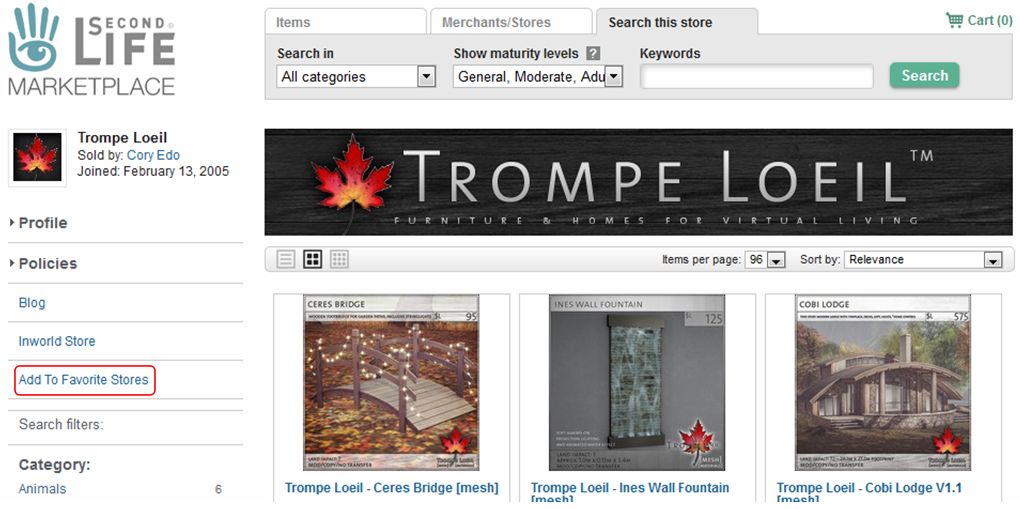
To add a store to your favourites, open the store’s main page in the Marketplace, and click the Add To Favourite Stores option on the left of the store’s main page.

Adding a Marketplace store to your Favourites

Viewing Your Favourites

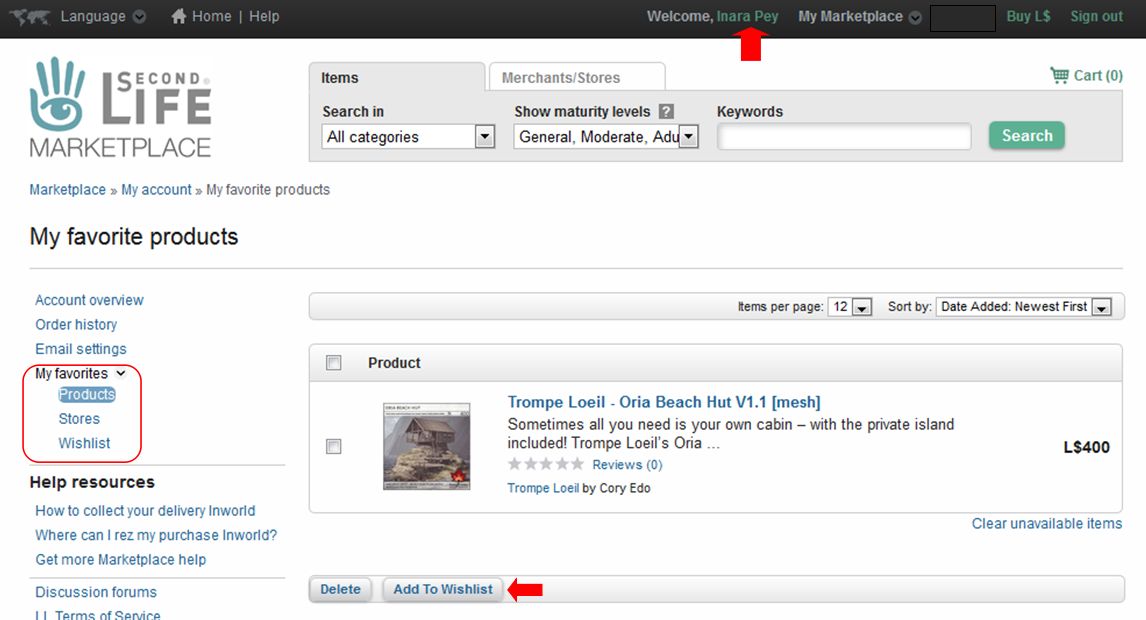
You can view your favourites whilst on the Marketplace by clicking on your account name (top right) to go to your account page, then clicking the My Favourites drop-down, which will display the options: Products (favourites), Stores, Wishlist. The Products page will open by default, but may be blank if you have not selected any favourites.

You can access your lists from your Marketplace account page : click your account name at the top (arrowed) then click the My Favourites drop-down (circled, left). This will display the list options and open your Products (favourites) page (shown). Note the Add To Wishlist button, arrowed at the bottom.

With these lists:

  • Clicking on an item in the Product or Wishlist pages will take you to the Marketplace listing for that item.
  • Stores in the stores list will be displayed with up to four of their most recent releases.
  • Clicking on a store in the Stores page will (unsurprisingly) take you to the store.
  • Listed items / stores can be removed individually or in bulk by clicking on the check box on the left of an item / store and then clicking the delete button.
  • Favourite items can be added to your wish list via the Add To Wishlist button on the Product page.
  • You can share your wish list with friend using a dedicated URL:
  • You can view your wish list or list of stores directly using the following URLs: