
The following notes are taken from the Sansar Product Meetings held at 4:00pm PST on the afternoon of Friday, January 19th, 2018. These Product Meetings are open to anyone to attend, are a mix of voice (primarily) and text chat, and there is currently no set agenda. The official meeting notes are published in the week following each pair of meetings, while venues change each week, and are listed in the Meet-up Announcements. and the Sansar Atlas events section.
Ebbe Altberg and Paul (aka Pierre), Alex and Nyx Linden from the Sansar product team joined meeting host Jennifer for the event. Audio extracts from the meeting are included below for reference to key points in the discussions. Note that some subjects were discussed at different points in the meeting, and so some of the audio extracts here represent a concatenation of the different points at which a particular topic may have been discussed.
Web Atlas – Concurrency Indicators
The Web Atlas has been updated with a new search category – Popularity – and concurrency indicator. When selected from the sort drop-down menu (see below), the Popularity option orders the listed experiences in a tab by current real-time use, so those with avatars actually visiting them will be listed first.
In addition, those experiences with avatars in them have a concurrency indicator in the top left corner of their thumbnail image. This is a near real-time indicator that the experience is in use at the time it is seen in the Atlas.
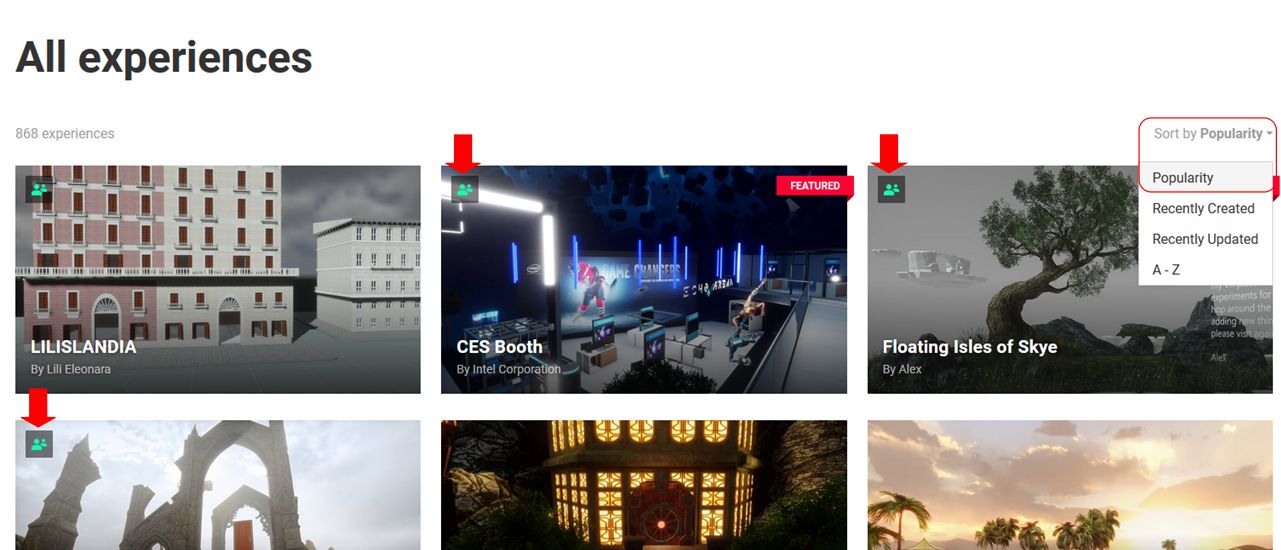
The popularity search option and the concurrency indicator will be added to the client Atlas, possibly as an update in week #4. Both present a first step in presenting users with more information on popular experiences and in helping them locate spaces which have a “social” presence in Sansar.
Sansar Store Tags
It is now possible for creators to tag items when creating Sansar Store listings, and the Store Guidelines have been updated to reflect this.
January Release
The January 2018 release, referred to internally at the Lab as “Release 17” (the Fashion release having been Release 16), is primarily code / performance focused. In particular this update includes:
- Bug fixes.
- Performance improvements – for example, the amount of data sent to the client for avatar and dynamic object animations has been reduced by some 60%, which will hopefully make things more fluid for users in busy experiences.
- An experience loading progress bar has been coded, although the scene loading page has yet to be revised to show it, and it is hoped this will be in Release 17, or deployed shortly thereafter.
User Sign-up / On-Boarding Process
The Sansar product team believe the current sign-up / on-boarding process for Sansar (see here for the basics) is too complex. It is hoped that a more streamlined sign-up process will form the nucleus of the February 2018 release, and that these updates, together with the Atlas popularity ratings / indicators, will make it easier for incoming users to sign-up and start finding experiences where they can meet and interact with other Sansar users.
Under discussion at the Lab is whether or not to create a dedicated “on-boarding” experience towards which incoming new users could be directed following sign-up, rather than just leaving them to find their way around the Atlas. This would not be part of the February release, and could be more of an exercise in testing which route – via sign-up and then Atlas, or sign-up and “learning / tutorial” experience – is preferred by in-coming users / helps improve retention levels among new users.

One issue with providing any “centralised” on-boarding experience is how will it sit with user-created experiences? Part of the idea with Sansar is not to have a central / main “gateway” into the platform (as is the case with Second Life), but to allow experience creators to develop their own gateways directly to their own experiences (e.g. through a dedicated web presence, a corporate website, or via Facebook or Twitter, etc.). So, how do any on-boarding experiences supplied by the Lab fit with these routes of access?
Should a user signing-up to Sansar through a specific experience gateway be “diverted” to a Lab-created learning experience and then dropped into the experience they were signing-up to join? If so, how exactly should that work? Should they simply be dropped into the experience they were expecting, and be left to work it out for themselves / complete any tutorial options provided by the experience creator?
There’s also the question of how deep does any on-boarding experience have to go – can things be made easier to understand through the client itself – keeping the UI straightforward, offering on-screen indicators for controller buttons options when required, etc?
Mentors / Greeters
A suggest was made to have a “learning welcome” space where volunteer “Sansar ambassadors” (akin to Second Life mentors) can spend time helping new arrivals gain familiarity with using the Sansar client – the atlas, settings, walking, running, chatting in text, IMing, etc.
In response, Ebbe noted that – contrary to anecdotal views in Second Life – having mentors (either at their own welcome environments or those at the various Community Gateways in operation around Second Life) does not actually lead to any greater levels of retention among new users than the self-teach environments that have been presented to incoming users over the years. However, the is a willingness to experience with methods – with the use of AI-driven NPCs or the provision of some kind of “learning HUD” also being mentioned as possible options to help new users.
Events
Pierre reiterated his comments from the previous Product Meeting, that additional tools to help creators / users mount and promote their own experiences will be appearing in the very near future. This is again seen as a component in helping to drive user interest in Sansar.
Avatar and Fashion
Currently, the Sansar avatar is not – outside of the head / face – customisable other than with clothing and accessories. As recorded in my 2018 week #2 notes, there are plans to enhance the degree of customisation available within the avatar, starting with the head, and then with work on the body. This led to concerns on how additional avatar customisation capabilities might impact clothing design. Animator and creator Medhue Simoni in particular laid out his concerns in a video on the matter, which apparently became the subject of discussion at the first Sansar Fashion Product Meeting (which I was unable to attend), with it being indicated that the Lab’s Fashion Team had watched the video, taken note of the concerns raised etc.
As the avatar is enhanced, there may well be a need for clothing designers to go back and re-rig clothing created outside of Marvelous Designer (MD), although it should be possible to re-simulate MD clothing over a changed avatar body shape once this capability has been enabled with Sansar.
In the short-term for Fashion, there will be an update to fix the UV issues people are experiencing with MD, wherein the export to Sansar is using a different UV space to the export to other formats. However, the avatar customisations capabilities will be added gradually over a longer period of time.
To help compensate for the avatar updates, requests have been made for a deformer mechanism to be added to Sansar to allow rigged mesh clothing to more easily adjust to the avatar shape (and changes to it – think Fitmesh is Second Life as a broad idea), while potentially avoiding the need for clothing to be supplied in a range of sizes. This may not be so easy to introduce.
However, and whether it will be possible to implement or not is still unknown, the Lab is trying to determine if, where different clothing sizes are required, the platform itself can auto-generate different default sizes rather than the designer having to upload them all (e.g. if a designer uploaded an item in a “standard medium” size, the “standard large” and “standard small” sizes would be auto-generated from it).
One of the things the Lab wants to do is keep the fashion creation flow relatively straightforward, and avoid placing too many requirements on designers. They are therefore keen to avoid things like morph-based solutions and blend shapes (thus negating designers having to implement a whole series of body morphs into their designs or having to run through some conversion process to handle blend shapes, etc.).
Continue reading “2018 Sansar Product Meetings week #3 – with audio”




 Inara Pey: Living in a Modemworld