The Machinima Expo 6 was held on November 17th. As reported in this blog, the Expo, which features machine of all genres drawn from a variety of platforms and software tools, showcasing them to a global audience.
This year again saw strong representation from Second Life, with entries from the likes of Steve G. Hudek, Hypatia Pickens, Draxtor Despres and Joe Zazulak.
In all eleven films were nominated for awards, to be voted on by a special jury from outside of the machinima community. Three went on to win Jury Prizes: The Amazing, Fantastical, Electrical Adventures of young Tesla Episode #2, by Mark Pleasant (platform: iClone); Remember Me by Kate Lee & Sherwin Liu (iClone) and Civil Protection: The Tunnel by Ross Scott (Half-Life 2 / Source).
However, it was Tutsy NAvArAthnA’s Narcissus, the only nominated film to have been created in Second Life, which won the jury’s Grand Prize.
Narcissus, as the name suggests, is a retelling of the classic tale of Narcissus and Echo, from Ovid’s Metamorphoseon libri. It’s a moving piece, beautifully composed and which stands as a magnificent example of machinima at its best, and well-deserving of the jury’s recognition.
For those wishing to see all four prize-winners, there are available on the Machinima Expo 6 blog (click on the images to view the films), and all the showreels and jury reels will remain available on the Expo’s uStream channel until November 24th.
I’ve mentioned previously in this blog that I’m an unashamed fan of Rebeca Bashly, so when I found out via Ziki Questi that Rebeca has a new exhibit in Second Life, time had to be set aside to visit it.
Invisible People is a stunning piece which pokes at the social conscience within us. It is simple enough in explanation, but as with all things, simplicity hides a complex structure.
Scattered around La Citta Perduta (the Lost City) on the region Land of Glory are twenty-one little vignettes. Each features a character or two, sometimes three, engaged in various activities. Some are lounging on or against railings, some are seated, some are shuffling along or engaged in various activities from feeding or scaring pigeons to spraying graffiti on walls. All have one thing in common: they are textured such that if you align your camera correctly, they fade into the background of the scene behind them.
This takes a little practice, and aligning things comes easier with some of the sculptures than with others. It’s also fair to say the finished effect can also rely on your choice of lighting, windlight-wise, so you might what to have a little play when you visit – the region’s default lighting isn’t always the best. Also, depending on the steadiness of your hand, the impact of lag (and either end of the connection) and the vagaries of working with the camera and camera controls, you might also want to turn off basic shaders while fine-tuning the position of your camera on a given character and then re-enable them before snapping your shots. However, the finished result is worth the effort, not just because of the sense of achievement you get when things are lined-up, but because the very act of trying to align things draws you into each scene, and – for me at least – results in seeing it from an entirely different perspective.
“This is a story, presented thru camouflage body art,” Rebeca tells us through the introductory notecard. “About all those people that you pass by on the streets every day and never notice them…” And this is where, perhaps, our social conscience is pricked.
“Invisible people” is a term which is often used to describe those is society we so often “don’t see” (or prefer not to see) or contemplate. The infirm, the elderly, the disabled, the homeless, the underpaid. As well as presenting a unique and engaging piece of visual trickery through the careful application of textures, this is a piece which actually underlines the way in which we do so often, individually and collectively, turn a blind eye to those is society we might prefer not to think about.
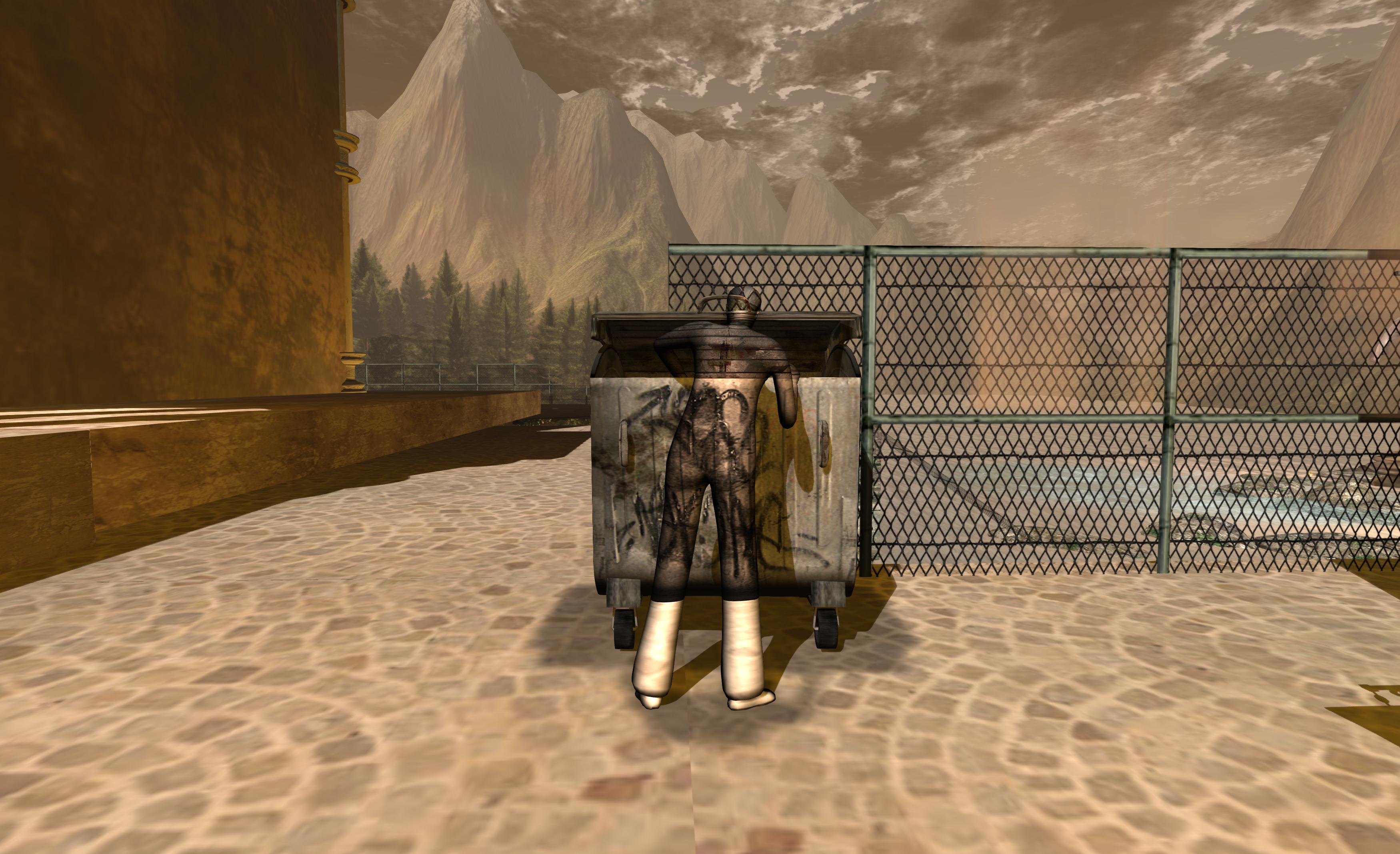
Each of the little vignettes raises questions as to what it is we’re actually seeing. Some appear to be straightforward, such as the couple kissing on the steps or the young boy rushing to startle the pigeons in the square. Others, however, carry perhaps something of a different message. Is the man curled on the bench resting, or is he lying there for want of nowhere else to sleep at night? And what of the man with his head inside the dumpster? Is is dumping something or looking for something? Then there’s the young girl leaning against an alleyway wall and beneath a lamp, is she merely awaiting a friend or a client? Is the old woman carrying her shopping in her oversized bag, or her entire life?
These possible subtexts gives Invisible People a powerful voice which, for me at least, reaches beyond the visual appeal of the pieces. indeed, it might be said that the latter is simply a means of drawing the observer into each of the scenes, opening our minds as to what each actually might represent or how it might be interpreted.
Certainly, in my case, and as I explored the streets of the lost City, discovering each of the little vignettes in turn, I found myself thinking more and more of one song in particular.
Invisible People is open now, and for those who can photograph all 21 of the sculptures as they are intended to be seen, Rebeca is offering a personal gift. It’s a wonderful, thought-provoking piece and well worth taking time to visit. Recommended.
This summary is published every Monday and is a list of SL viewer / client releases (official and TPV) made during the previous week. When reading it, please note:
It is based on my Viewer Round-up Page, a list of all Second Life viewers and clients that are in popular use (and of which I am aware) and which are recognised as adhering to the TPV Policy
By its nature, this summary will always be in arrears
The Viewer Round-up Page is updated as soon as I’m aware of any releases / changes to viewers & clients, and should be referred to for more up-to-date information
The Viewer Round-up Page also includes comprehensive links to download pages, blog notes, release notes, etc., as well as links to any / all reviews of specific viewers / clients made within this blog.
Updates for the week ending: November 17th, 2013
Official LL Viewers
Current Release version updated on November 12th to version 3.6.10.283403 (dated November 6th) – formerly the Maintenance RC viewer comprising finer access control for estate/parcel owners; CHUI: toggle expanding conversations by clicking on icon; GPU table update + more (download page, release notes)
GPU Table Update RC updated on November 16th to version 3.6.11.283787 – GPU table updates only, no functional changes (download and release notes)
“Project Interesting” RC 3.6.11.283895 released on November 14th – more viewer-side control of which objects are loaded in memory at any given time; more aggressive scene caching; faster scene load when visiting a region never previously visited; expanded performance metrics (download and release notes)
UKanDo updated on November 14th to version 3.6.10.27888 – core updates: LL 3.6.10 code base; SLShare (Facebook) integration, updates to area search, toolbar button icon updates, Advanced Build Options floater, + more (release notes)
Release notes (both) core updates: FMOD Ex updated to v4.44.26; added Advanced menu option to save both default and current settings globally and per-account; Improved shared media handling; Backport of minor speed optimisation to alpha rendering from Singularity; numerous updates and improvements & pruning of dead code
Singularity updated on November 14th to version 1.8.4.5433 and then on November 16th to version 1.8.4.5434 after an issue with the camera controls was discovered in 1.8.4.5433 – core updates: materials and updated particle rendering support (ribbon, glow), Google Breakpad for crash reporting; assorted menu updates; inclusion of context menus; + more; Windows 64-bit release (release notes)
Text Clients
Group Tool updated on November 7th to version 2.2.23.0.
On Monday November 18th, Firestorm will commence blocking older versions of the viewer from accessing Second Life.
This is a move that has been coming for some time, and has been announced on a number of occasions through the Firestorm blog, through Firestorm user meetings and Q&A sessions, and which has been repeated through various blogs, including mine.
As it is, there are a good number of users still running versions of Firestorm that pre-date the introduction of Server-side Appearance (“avatar baking”) and some which even pre-date mesh rendering. Not only does running such versions lessen the user experience and increase the workload Firestorm support volunteers have in trying to assist people on older versions of the viewer.
Nor are the Firestorm team doing this entirely off their own backs. For obvious reasons, the Lab would like to see more users benefiting from the broad range of improvements which have already been rolled-out to SL (and those still being deployed in terms of further viewer-side updates), including SSA, interest list updates, improvements to the rendering pipe, improvements to viewer / server communications, and so on, all of which should improve the user experience, even for those on older hardware.
Given that Firestorm does have the lion’s user of active users, just under 65,000 of whom are still logging-in to Second Life on versions of the viewer pre-dating the more recent SL updates such as SSA, the easiest way to encourage them to update is to block older versions of the viewer.
Many Firestorm users are still on versions pre-dating SSB and mesh rendering
This being the case, once the block comes into force, it means only users on Firestorm 4.4.0 through to the current version(s) will be able to access Second Life. As such, from November 18th, the following versions of Firestorm will be blocked from Second Life (numbers of people still using each version given in brackets):
4.3.1.31155 (40,451)
4.2.2.29837 (14,120)
4.2.1.29803 (60)
4.1.1.28744 (3334)
4.0.1.27000 Beta (4585)
3.3.0.24882 maintenance release (606)
3.3.0.24880 hotfix release (571)
3.2.2.24336 (881)
3.2.1.24179 (166)
For those who feel they may be unable to run later versions of Firestorm, the recommendation is to give a later version a go and to contact Firestorm support teams for assistance or try the Firestorm troubleshooting wiki pages, as issues encountered may be fixable. For those who have genuine issues in trying to run later versions of Firestorm, Linden Lab’s Third-party Viewer Directory offers a list of self-certified alternative viewers you might want to try.
For further information, please refer to the Firestorm blog announcement.
Please note: I cannot address technical questions relating to Firestorm through this blog. Please contact the Firestorm support groups if you have specific technical questions.
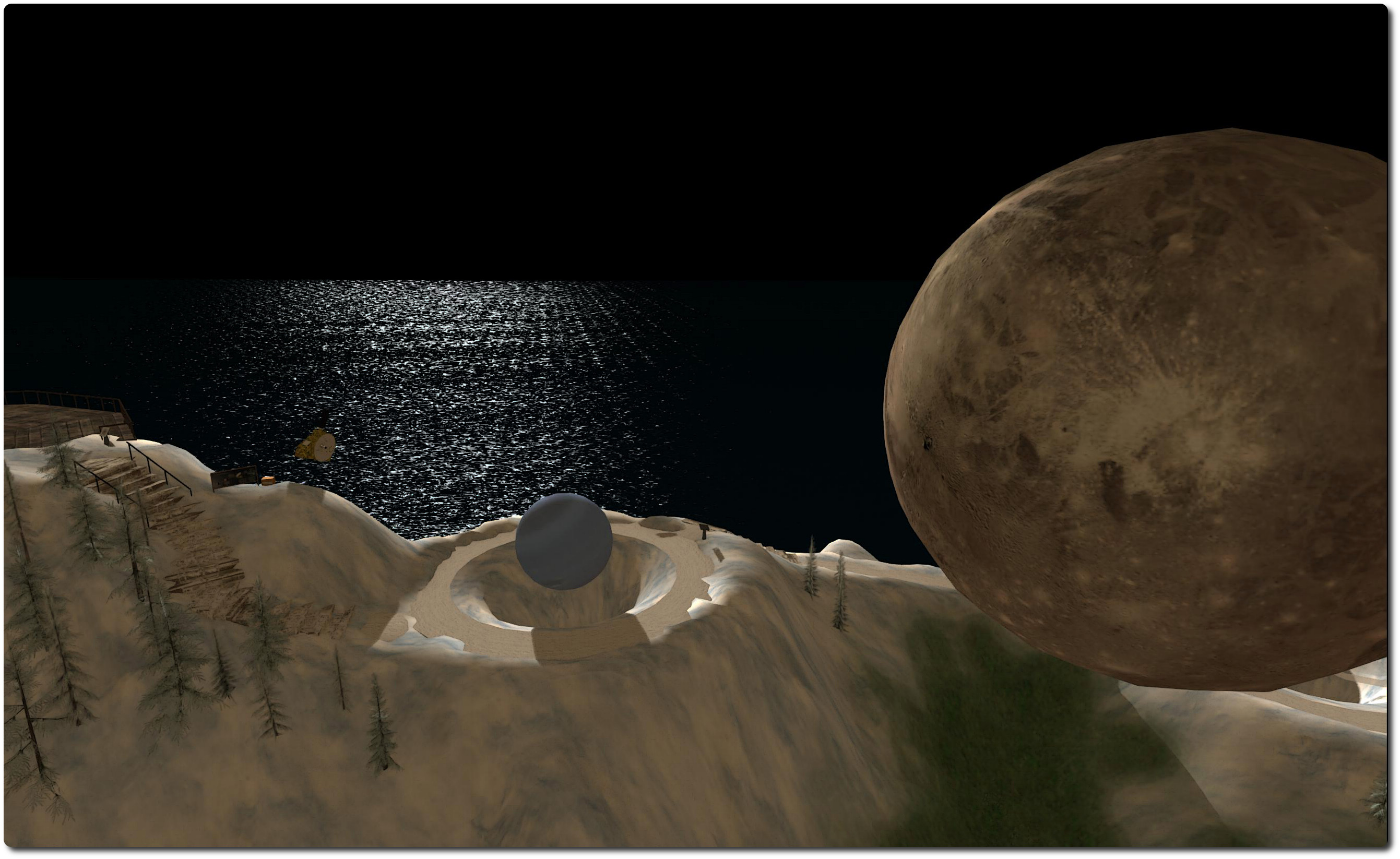
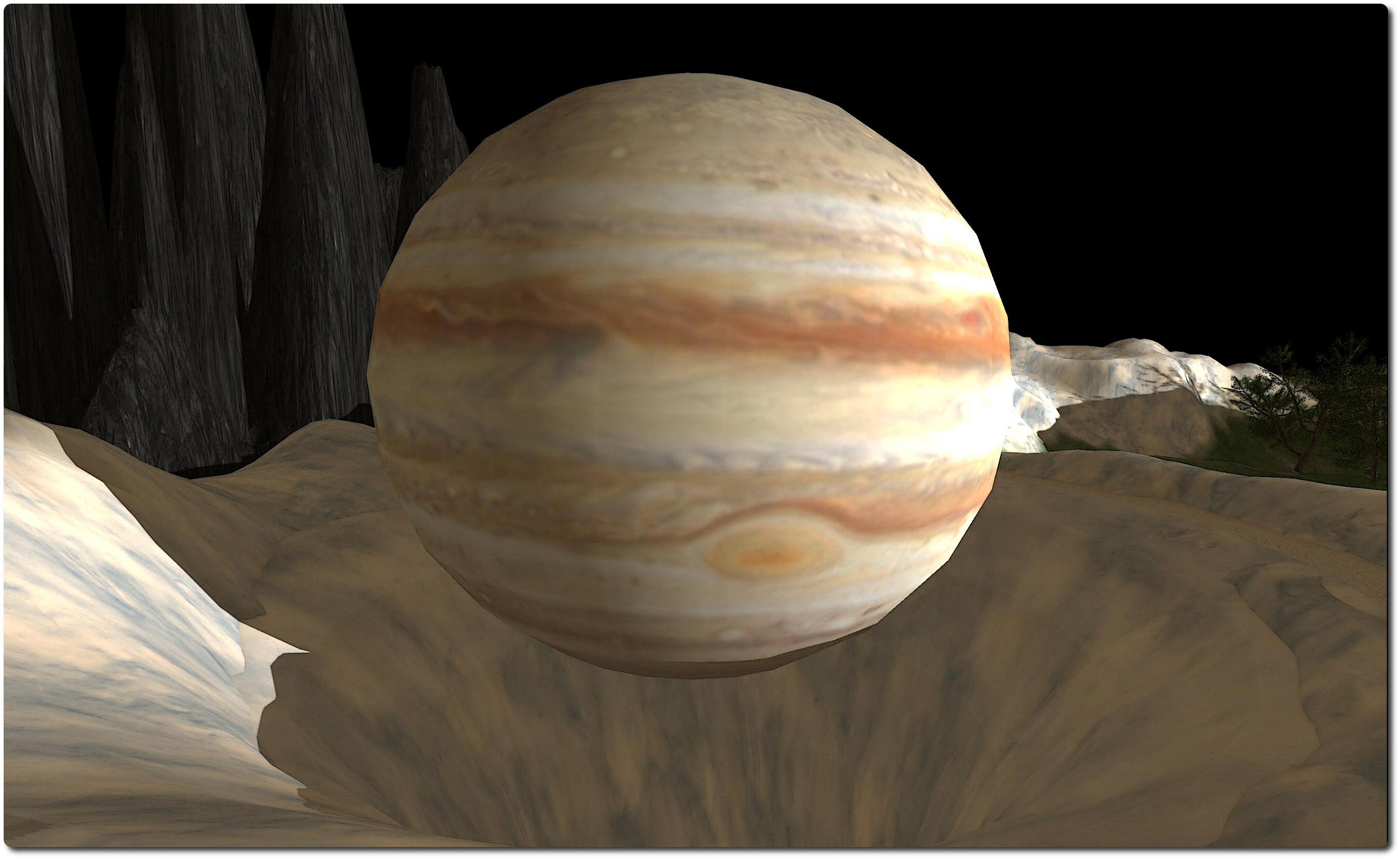
Trton, the largest moon of Neptune, with its parent planet in the background, part of the Oceania Planetary Park
Opening on Saturday November 16th as a part of the Linden Endowment for the Arts Artist In Residence series, Oceania Planetary Park is the work of Kimika Ying.
Designed as an educational and informative piece, the installation provides visitors with a journey through the solar system – and more. The basic concept is simple to grasp, but actually hides a wealth of detail; as such, the visitor needs to have a little patience, a good hand for moving the camera around and a good eye for spotting things.
You arrive more-or-less at the centre of the region, which has been landscaped as a park surrounded by hills. You’re actually standing on a disc representing the Sun, and a path winding away from it leads you through the parkland and past each of the planets in the solar system in their order of distance from the Sun, winding slowly up towards an observatory sitting up in the hills.
While the distances between the planets are not to scale, the models of the planets most certainly are, allowing the visitor to grasp the huge scale of the outer gas giants of the solar system when compared to the rocky inner worlds. The rotation of the planets is also to scale as well, with one minute of real-time representing 24 hours. This makes it possible to compare the familiar rotation of the Earth with the heady rotation of massive Jupiter, which spins on its axis every 9.9 hours, giving rise to the huge banded weather systems and turbulence visible in its dense atmosphere.
A further sense of scale can be obtained by keeping an eye out for the various moons of the planets which have been included, and which are also orbiting to a scale time of 1 minute to 24 hours. To see some, you have to carefully zoom out and pan around. In the case of Mars, however, you’ll have to zoom-in to the planet relatively closely to see tiny, tiny Phobos and Deimos, both likely captured asteroids, zipping around the planet, little more than dots compared to the bulk of the planet.
Phobos, the innermost of the two, is just some 9,377 kilometres above Mars, and zips around the planet in a little of seven and a half hours. So fast is Phobos’ orbit that, contrary to what logic might seem to dictate, it is slowly falling towards Mars as the result of gravitational tidal forces. At some point, Phobos will reach the Roche limit and well break up, showering the surface of Mars with its remains. Deimos, on the other hand, is further away from Mars (around 23,460 km) and orbiting more slowly than the planet is rotating. This mean tidal forces are having the opposite effect, slowly boosting Deimos away from Mars so that it will eventually break free of the planet’s hold on it.
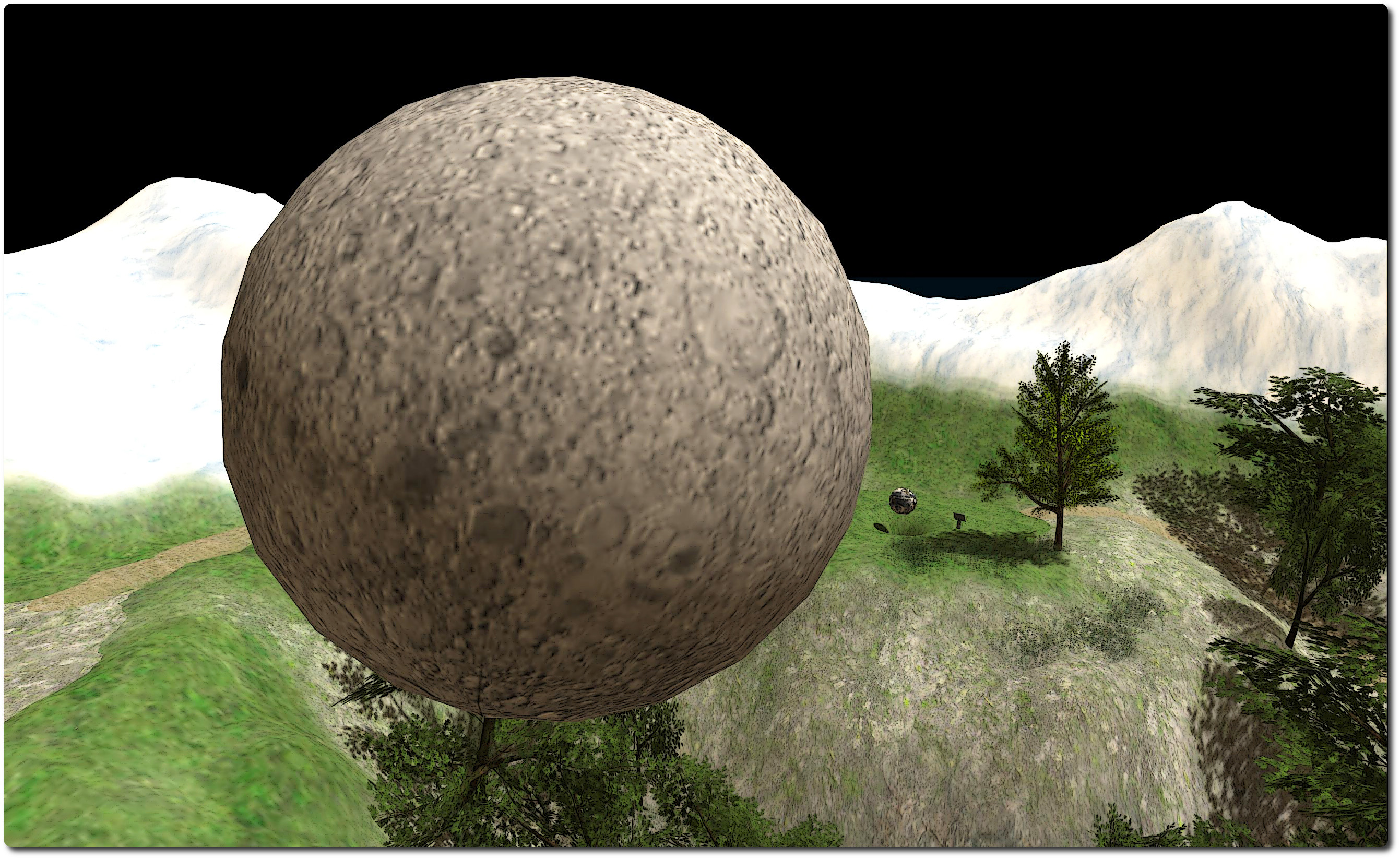
The far side of the Moon (often wrongly referred to as the “dark side” of the Moon) and below, the Earth
As the distances between moons and their “parent” planets are to scale, you’ll have to look a little further afield in order to see some of them, as noted above. Such is the case with our own moon, pictured above, and with Neptune’s Triton, seen in the picture at the top of this piece, which is nique among the large moons of the solar system as it is in a retrograde orbit about its parent. As you approach Jupiter, keep an eye out for Io, the most volcanically active place in the solar system, and the closest of the Galilean moons to their parent planet. When you do find a moon, try clicking on it; a link to additional information may be offered to you.
There are further touches here not to be missed. Each planet has its own information board which will give you a wealth of information on each planet, complete with links to external resources. The gravity well of each planet is neatly represented by a depression in the ground under it, making for a further means of comparison. As you pass the planets, you may also note that texturing may appear to be missing on parts of them. It isn’t. Blank areas denote those parts which remain unseen by human and / or robotic eyes in our explorations of the solar system.
The path ends at the doors of the observatory. Just outside of this sit tiny Pluto and Charon, the largest of its five known companions.
Update: Singularity 1.8.4 was updated with release 1.8.4.5434 on November 16th, after an issue with the coamera controls was discovered in the 1.8.4.5433 build. Not other changes were made, and the functions / updates described in this overview remain current for the the 1.8.4 release.
Thursday November 14th saw the release of Singularity 1.8.4.5433, which brought to the v1-style viewer a 64-bit Windows version to sit with the existing 32-bit Windows version, and alongside the 64-bit Linux offering.
The new release adds a good number of Lab-driven updates to the viewer, including materials processing support (which has been available in various pre-release / alpha versions of Singularity for a while), inclusion of Google Breakpad for better crash reporting, support for the GetMesh2 capability for improved mesh object downloading and inclusion of support for the new LSL particle options. The release also brings with it a host of TPV updates and improvements, either from the Singularity team or which have come by way of other viewers.
The following is a rapid-fire overview for the release, rather than an in-depth review. As always, for a complete list of updates and changes together with all attributions for originators / contributors, please refer the official release notes.
Materials, Particles, Breakpad
Materials arrives in the Singularity release viewer
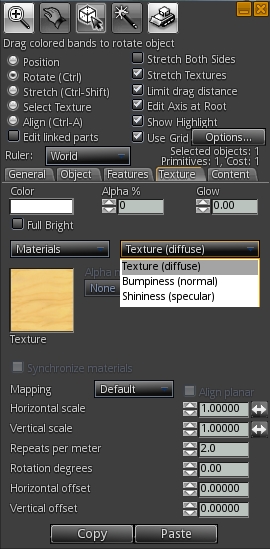
Materials processing support has been available for a while with pre-release and alpha versions of Singularity, and with 1.8.4.5433, they arrive in the release version. For those familiar with using materials (diffuse, normal and specular maps), the Texture tab on the Build floater presents the expected options in a familiar layout.
A couple of nice additions with materials are the Synchronize Materials check box in the main build floater, and the carry-through of the UUID field from the texture picker to the normal / specular map pickers. The former makes it a simple one-step process to keep parameter changes between the different maps on the face of an object in synch, while the latter makes it easy to apply maps using their UUID if known.
The particles support sees Singularity able to support the latest particle parameters, including ribbon particles and particle glow. However, while testing the viewer, I found that it does not appear to support the particle muting capability LL also introduced, whereby right-clicking on a particle stream will mute the corresponding emitter.
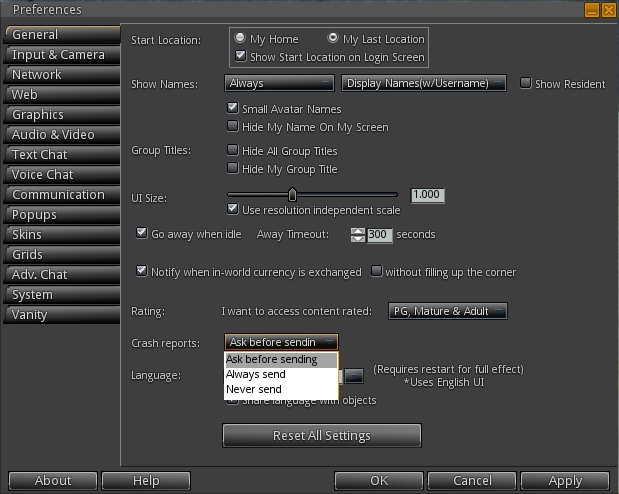
The Google Breakpad crash reporting system is enabled by default on first installing release 1.8.4. Providing such reports allows a TPV team to better understand and deal with potential crash modes within a viewer and identify and eliminate potential errors which can result in crashes, and users are therefore encouraged to keep the option enabled. However, if you don’t wish to send any reports, or don’t wish to be asked prior to a report being sent should you crash, you can change the crash reporting setting through a drop-down menu in Preferences > General (shown below).
Google Breakpad enables crash reporting to the Singularity team, and can be configured through the Preferences > General tab
Menu Updates
Singularity adds some nice little touches to the use of the pie menu, and adds the option to switch between using the pie menu and context menus.
Shift-clicking on the central “hole” in the pie menu will either step you back through levels (if you have been using the More > option), or close the pie menu
The pie menu can be displayed when in Mouselook by holding the ALT key and right-clicking. It can be cleared by holding the ALT key and left-clicking
For those who, like me, prefer context menus, they can be enabled in place of the pie menu via Preferences > System > Use Context Menus instead of Pie Menus.
Other Updates of Note
This release of Singularity also includes the following updates:
Inclusion of the latest fixes for the latest ATi/AMD Catalyst drivers
Addition of the default camera presets to the Quick Preferences panel
Several improvements to the instant message panels
Improved reliability of the texture cache
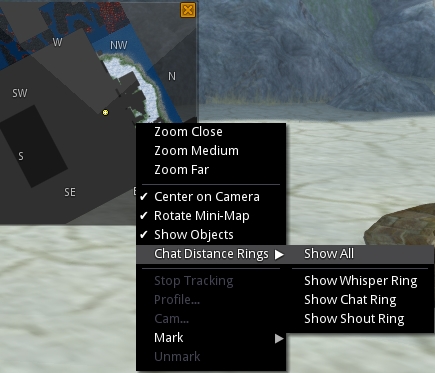
The mini-map gets updated with additional options on the right-click menu
Mini-map updates:
right-click option to hide or show objects
Ability to show Whisper, Chat and Shout range rings (hat rings aware of OpenSim chat range settings)
MiniMapPrimMaxAltitudeDelta and MiniMapPrimMaxAltitudeDeltaOwn debug settings added to allow customisation of objects displayed on the mini-map based on proximity
Linden tree animations re-enabled (Advanced > Rendering > Animate Trees)
Clicking on clock toggles display of local time
Grid URLs can be entered directly into the login panel’s grid field, bypassing the need to open the Grid Manager
OpenSim / Aurora sim updates, including:
Support for variable-sized regions
More OpenSim conformity
Issue with teleport failures and saving scripts taking a very long time on OpenSim regions run in the same simulator instance fixed
And more, again, please refer to the release notes for details and for the code attributions of all updates.
Windows 64-Bit
The 1.8.4 release of Singularity sees the arrival of a Windows 64-bit version. There is a known issue with this version of the viewer, which lacks support for the Quicktime plugin, so certain types of parcel media will not play. However, this does not affect streaming music and media on a prim (MoaP).
While my tests are far from conclusive, I have spent time running the 64-bit version on the SL Aditi (beta) grid and have encountered no problems or crashes.
 The Machinima Expo 6 was held on November 17th. As reported in this blog, the Expo, which features machine of all genres drawn from a variety of platforms and software tools, showcasing them to a global audience.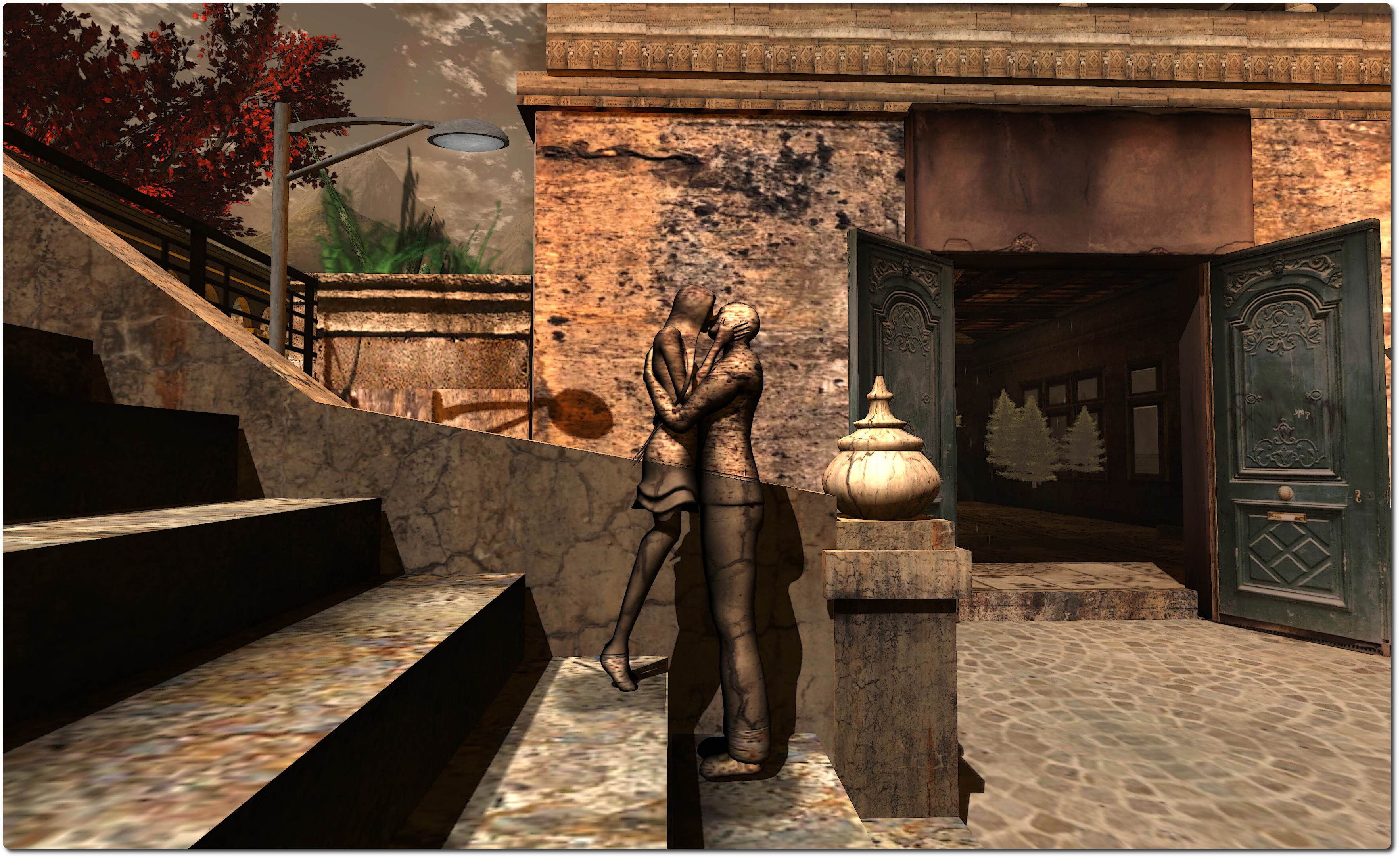





 Inara Pey: Living in a Modemworld