Disability and Virtual Worlds: New Frontiers of Appropriation

Virtual AbilitySaturday October 26th will see three well-known figures from Second Life sit as a panel at the Association of Internet Research (AoIR) conference, which takes place in Denver, Colorado between October 23rd and October 26th.

Together. they will be presenting Disability and Virtual Worlds: New Frontiers of Appropriation, and the event will take place simultaneously in real life and Second Life on Saturday 26th October, commencing at 09:30 SLT. Following their initial presentation, all three panellists will be answering questions from both their real life and virtual audiences.

The three researchers are:

BoellstorffTom Boellstorff (Tom Bukowski in SL), a professor of anthropology at the University of California, Irvine. His interests have included the anthropology of sexuality, the anthropology of globalization, the anthropology of virtual worlds, Southeast Asian studies, the anthropology of HIV/AIDS, and linguistic anthropology.

The winner of the 2009 Dorothy Lee Award for Outstanding Scholarship in Ecology of Culture, Media Ecology Association, his has authored several books, including Coming of Age in Second Life: An Anthropologist Explores the Virtually Human, (Princeton University Press, 2008), the result of two years fieldwork in Second Life, living among and observing its residents in exactly the same way anthropologists traditionally have done to learn about cultures and social groups in the so-called real world. He has also co-authored Ethnography and Virtual Worlds: A Handbook of Method (Princeton University Press, 2012) a concise, comprehensive, and practical guide for students, teachers, designers, and scholars interested in using ethnographic methods to study online virtual worlds, including both game and non-game environments.

davisDonna Davis (Tredi Felisimo) is a strategic communications professor at the University of Oregon who specialises in mass media & society, public relations, strategic communication, virtual environments and digital ethnography.

Her research focuses on Second Life culture and the influence it has on our physical lives, which is currently centred on individuals with Parkinson’s disease. Within Second Life she founded and runs Frantastica, which is located alongside the Creations (for Parkinson’s) Park region, and is dedicated to the research and support of individuals touched by Parkinson’s Disease.

KruegerAlice Krueger (Gentle Heron) is the president and co-founder of Virtual Ability Inc, a 501(c)(3) non-profit corporation based in Denver, Colorado, which is dedicated to empowering people with a wide range of disabilities  by providing a supporting environment for them to enter and thrive in on-line virtual worlds like Second Life.

Virtual Ability operate a number of regions within Second Life, centred on Virtual Ability Island, and offer a range of programmes for those with disabilities who enter Second Life, as well as providing in-world residential opportunities, events, activities, and talks and presentations on a range of subjects which are geld throughout the year and are open to all.    

Those wishing to attend the panel in-world can do so at the Sojourner Auditorium, Virtual Ability Island. Voice + text transcription will be available.

The Sojourner Auditorium, Virtual Ability Island -
The Sojourner Auditorium, Virtual Ability Island – setting for the in-world presentation by Tom Boellstorff, Donna Davis and Alice Krueger on Disability and Virtual Worlds: New Frontiers of Appropriation, Saturday October 26th, 09:30 SLT

Related Links

CtrlAltStudio: Bringing the UI to your Oculus Rift

CAS-logoStrachan Ofarrel (Dave Rowe in RL), has issued an update to the experimental version of his CtrlAltStudio viewer with Oculus Rift support. It’s an update those with the Rift SDK and headset are likely to find interesting, as it includes some initial work on bringing the viewer’s UI to the Rift.

Version 1.1.0.34332 (Alpha 4 release) of CtrlAltStudio appeared on Wednesday October 23rd, and Strachan was kind enough to poke me about it.

It’s important to note that this is only a first pass at things, so if you have a headset, keep in mind what you see of the UI may change as Strachan  tweaks things further. Commenting on the work, Strachan himself says:

I originally wasn’t intending to do any UI as I thought Linden Lab’s viewer with Rift support would have been released by now, but it hasn’t been and there’s a pressing need for at least some UI so I’ve added some as a stop-gap measure.

The viewer UI in Oculus Rift: preliminary work undertaken by Strachan Ofarrel in CtrlAltStudio (image courtesy of Strachan OFarrel / David Rowe) – click to enlarge

There are some limitations with this first pass in that the menu bars and toolbars are not yet displayed in Riftlook, and for those who prefer the Pie menu, right clicking on in-world objects will only display the context menu (no Pie). Even so, this is an impressive start to the work of enabling the UI, and does much to increase people’s ability to interact with the world when using the Oculus Rift.

In order to use UI elements effectively with the headset, Strachan recommends users:

  • Turn on Show User Interface In Mouselook and Enable Context Menus In Mouselook (both under Preferences > Move & View > View)
  • Consider enabling Show Chat In Bubbles Above Avatars (Preferences > Chat > General).

He notes that with the above settings enabled, shortcuts can be used to show / hide dialogue boxes (e.g. CTRL-I for showing / hiding inventory), which again significantly adds to the usability of the viewer when in Riftlook. He also reminds people to use the cursor to left-click interact with windows and right-click interact with in-world objects, and that cursor movement can be defined / refined in Preferences > Graphics > Display Output.

The Display Output options for when Using Oculus Rift: note the new depth slider and the options to define / refine camera / cursor movement

As well as adding preliminary UI capabilities to Riftlook, this release of the CtrlAltStudio Alpha version also brings with it a range of updates and fixes, including:

  • Some adjustment of the depth at which the Riftlook UI is displayed
  • Enabling the display of avatar toasts and floating text in Riftlook
  • Esc in third-person Riftlook will return you to Riftlook first-person (instead of having to exit then re-enter Riftlook)
  • Esc in flycam Riftlook with SpaceNavigator will return you to Riftlook first-person
  • Entering / leaving stereoscopic 3D display mode now recorded in the program log
  • Work-around added to get stereoscopic 3D working with AMD Radeon on Windows
  • Added “–riftlook” command line parameter that toggles into Riftlook after a successful login
  • Fixed OpenSim “4096 bug” that limited the range of hypergrid teleporting
  • Fix to ensure view remains in Mouselook when TPing or when an alert dialog pops up, if UI is turned on in Mouselook
  • And more: please refer to the release notes for this version for a complete list of updates, changes and fixes, together with the correct attributions for those contributed by others.

Sadly, I don’t have the Oculus Rift SDK, so can’t speak first-hand has to how things look. So if you do have a headset, why not pop over to the CtrlAltStudio website and download this version of the viewer and take it for a test run? Strachan would doubtless appreciate all constructive feedback received!

At the time of writing, the viewer is only available for Windows, but the Mac OSX  version is promised soon – so be sure to check back with the CtrlAltStudio website if you’re a Mac user.

Related Links

Of collaboration, rafts and Gaia

PosterCollaboration in Second Life is not new, it goes on in many ways and in all corners of our virtual cosmos. Nevertheless, it’s always interesting to see what results when several minds come together in order to create something new.

With this in mind, I hopped over to the Linden Endowment for the Arts recently, where two new installations opened during the last week. Each involves multiple artists working to a common theme (albeit a very broad theme in the case of one!), and each of which has, in the eyes of this beholder at least,  produce very different reactions to one another.

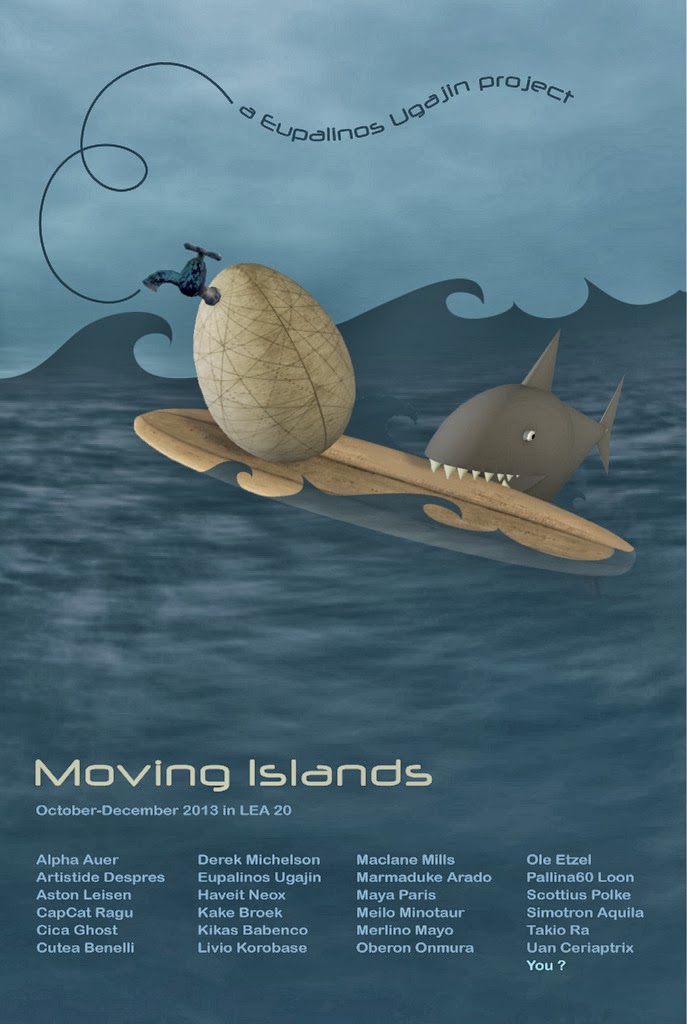
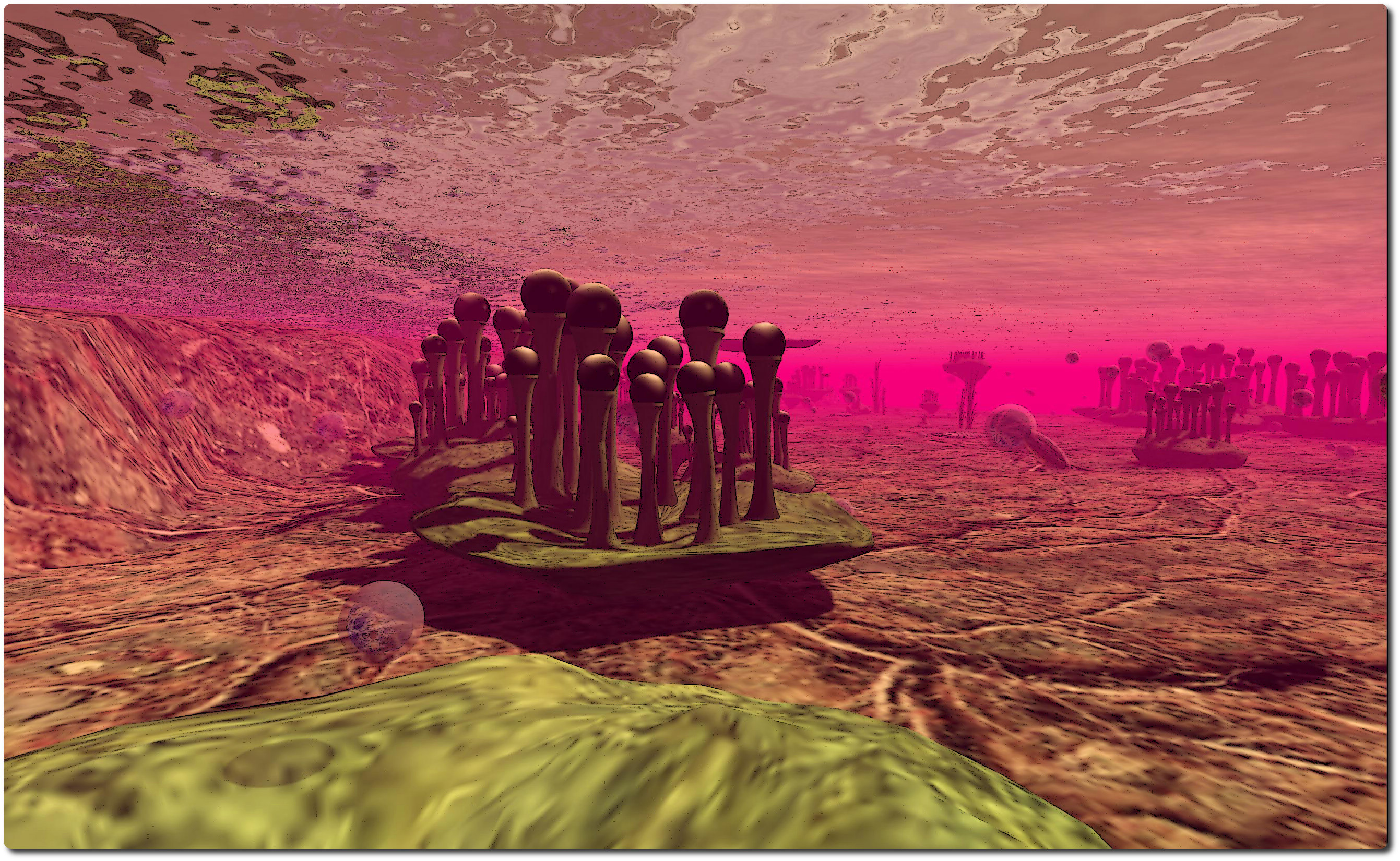
Moving Islands [Rafts] sees Eupalinos Ugajin bringing together  no fewer than 24 of SL’s artists (click the poster, left to see the names) to create a piece that freely interprets the central theme of moving islands or rafts, with Derek Michelson providing assistance with scripting and Takio Ra with sounds. The result is a collection of remarkable pieces which are eclectic, quirky, fun, different, provocative, interactive, and more.

With twenty-four participating artists already involved, and the chance for more to be added (Eupalinos is still open to accepting ideas and submissions for artists – even you, as the exhibit’s poster indicates), this is a very busy installation – yet it is not by the same measure crowded. The space above and below water (not all of the islands  / rafts are floating) has been used to the fullest, and there’s a lot to see (be sure not to miss the world’s first deep-sea diving … cow!). Do make sure you have sounds on as you move from piece to piece, and you may also appreciate the streamed soundtrack compiled by Eupalinos – all four hours of it!

Rafts-3_001
Moving Islands [Rafts] – Maya Paris
This is very much an interactive installation as well; objects and pieces are always on the move (which makes taking snapshots interesting!) and there are places you can sit and be a part of things – giving another twist to the exhibit’s poster noting you can join the exhibition…

It’s not really fair to single out individual elements in a work like this – especially when some of my favourite artists are featured; but I confess to adoring Meilo Minotaur’s undersea “forest”, and Pallina60 Loon’s Nautilus and its accompanying Steamfish had me smiling, if over-exercised after riding on it!

Moving Islands [Rafts]
Moving Islands [Rafts] – Meilo Minotaur
This is an installation you’ll want to take time exploring; some of the artists have provided note cards describing their works, but I felt it more interesting to let each speak for itself. Eupalinos has also compiled a note card listing all of the artists’ websites / Flickr streams, all of which are worth visiting as well. He’s also provided a link to a Dropbox of images for those who wish to make use of it.

Another of the pieces in Moving Islands is Haveit Neox’s Mythic Rafts, which pictures the aftermath of the destruction of the Earth as a result of humankind’s history. “A raft survives the big flood after the polar ice caps had melted,” reads the note card for the piece, “No landmasses were high enough to poke through the new ocean. The Earth had been stretched beyond its limits – pulled apart at the seams.” Given the underlying theme of loss and destructions, It’s something of an interesting (if entirely unintentional on the part of the artist) link to the piece which forms the second part of this review.

Moving Islands [Rafts]
Moving Islands [Rafts] – Oberon Onmura
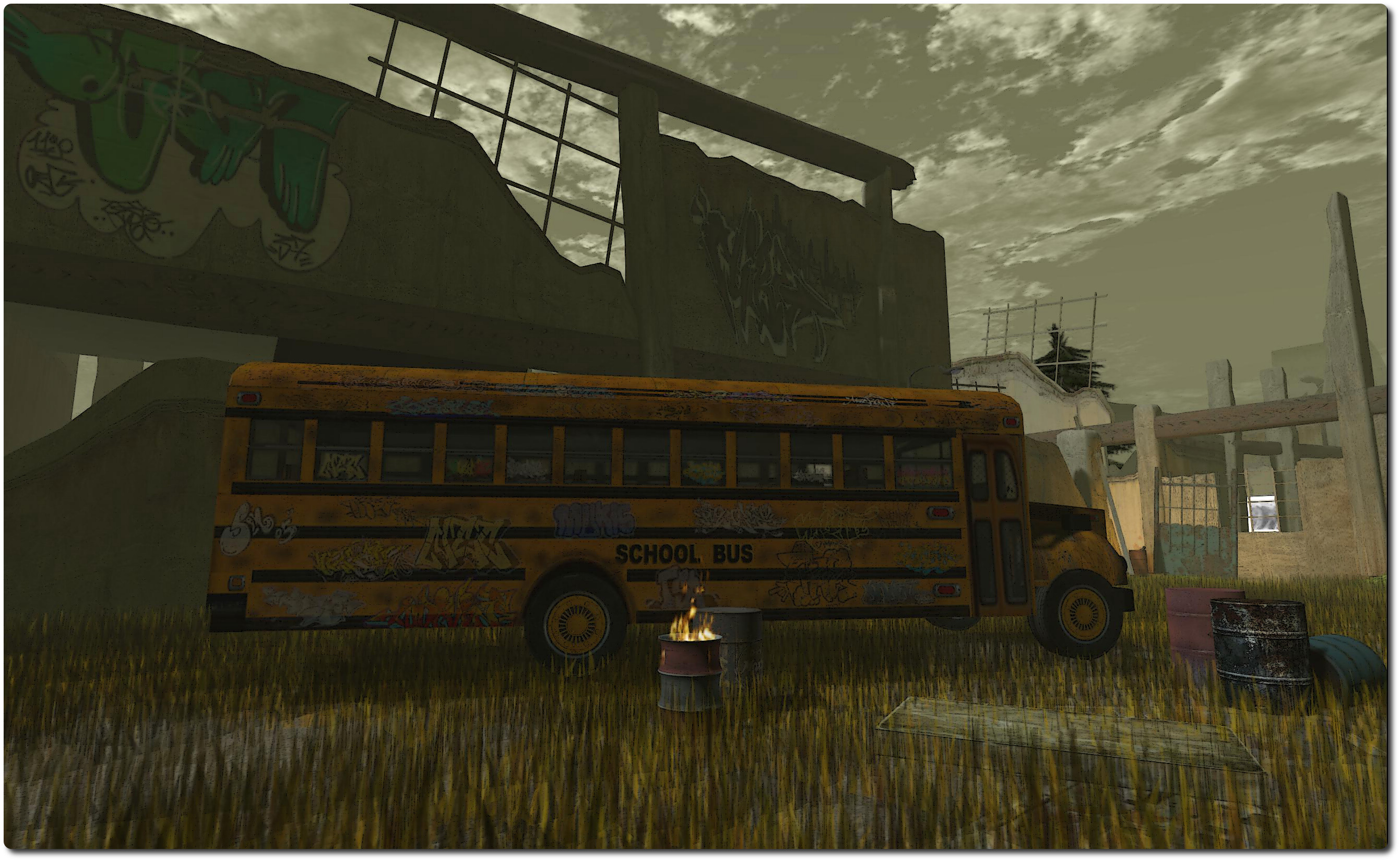
Destruction, decay and ending seem to be the focus of  The Gaia Theory Project, which also pened this month at the LEA. Presented by the Tanalois Group and the torno Kohime Foundation, and directed by Aloisio Congrejo, Tani Thor and Nino Vichan, this installation brings together a total of eleven artists in what is designed to be an interpretation of the Gaia Theory. And therein lies a problem.

As already noted, the installation is very much directed toward themes of destruction and decay, with extinction, loss and death also featuring. Yet the Gaia Theory is about the organic and the inorganic interacting in a complex system which helps maintain the conditions for life  to exist on the planet. So by focusing on just one side of the equation – desctruction and decay, etc., – the installation comes across as decidedly lopsided; where’s the re-birth, the growth, the renewal?

The Gaia Theory Project
The Gaia Theory Project – Tani Thor

There also appears to be something of a negative towards humanity’s role in things which is presented here, The contributions of man appear limited to toxic waste, the extinction of animals, urban decay, etc. Again, it’s not uncommon in discussions around the subject of Gaia for humankind to be referred to as a parasite responsible for upsetting the balances proposed by the hypothesis. However, it again lends a bias to the installation which some might say is at odds with Gaia Theory when taken as a whole – as Ziki Questi argues in her considered review of the installation.

All that said, there is nothing wrong with using art to raise awareness of the destructive forces – natural and man-made – at work in the world today is a valid activity (especially where humanity’s more destructive or environmentally damaging efforts are concerned. Were this the intent with this installation, I’d venture to say it succeeds. However, as an exploration of Gaia Theory, I can’t help feel that it largely (with one or two small exceptions) falls wide of the mark.

The Gaia Theory Project
The Gaia Theory Project – Kicca Igaly

Both Moving Islands [Rafts] and The Gaia Theory Project will remain open through to the end of December 2013.

Related Links

Postscript: following the publication of this review Melusina Parkin, one of the collaborators in The Gaia Theory Project contacted me as to her own approach to the piece, which she has presented on her own blog. If you’re planning to visit the installation, I recommend you give her piece a read first.

Lab confirms “SL mobile” beta programme

secondlife

Update October 26th: As noted in the comments, it appears that the new client may be using the OnLive streaming service / application. This has been reported in a recent comment on the forum thread linked to in the article, and also in a further thread on the subject.

Linden Lab has been issuing an e-mail to a limited group of users inviting them to sign-up to be a part of a beta test for a Second Life client for mobile devices.

The e-mail, which has been popping-up in user’s in-boxes for the last day or so, reads:

We’re looking for enthusiastic beta testers to evaluate a version of Second Life designed for mobile devices.

Sound interesting? Then simply…

  1. Visit  [link removed] to create a FREE account with <link removed to be safe>, then
  2. Visit  [link removed] to complete a 5-minute questionnaire

You have to finish both steps to be considered for the beta.

We’ll email those selected when the program begins and check in periodically over the next couple of months to get their feedback. 

This is your opportunity to be among the first to try a new mobile version of Second Life, and we hope you’ll help us to make it a great product with your input.

Thank you for your consideration!

Linden Lab

Some concern had been raised on the SL forums as to whether the e-mail was genuine or not. While some were able to confirm it was indeed genuine. However, just to be clear, I contacted Peter Gray, the Lab’s Director of Global Communications, and to ask whether the Lab would be prepared to point to any specific platforms they’re looking at (iOS, Android, Windows Mobile, etc). He replied saying:

The email you’re referencing did indeed come from Linden Lab. The originating address is related to the system used to send the messages out, and there was initially an unfortunate problem with links, which has since been resolved.

It’s too soon to share details about this service that would bring Second Life to mobile devices (as you can see, we’re beginning a limited beta test), but we’re hoping that with the help of some enthusiastic beta testers, things may progress to a point where we can share more information with the community at large soon.

Do note that the beta programme is via invitation only; there is no public sign-up page available – so don’t go looking for one! Also, not all of those responding to the e-mail will necessarily be selected to participate in the programme.

Lumiya for Android has been the ground-breaking mobile client for Second Life and OpenSim since its launch at the end of 2011

Getting SL onto a mobile device has been a much demanded option. As I reported in April 2012, Comverse had a stab at getting SL onto the iPhone back in 2008, complete with graphics. Back then, it required an intervening server in place and didn’t get too much further than an initial proof-of-concept.

However, mobile devices have come some way in terms of power and capbilities, although until now all moves in the mobile arena have been left to third-parties, with text-focused clients such as LittleSight and Mobile Grid Client on the Android platform, and Pocket Metaverse on iOS, and of course the incredible Lumiya for Android with its rich graphical capabilities and which I routinely cover in these pages.

It’ll be interesting to see exactly what the Lab have put together, and the code they’ve used – home-built, or perhaps using something like Unity3D? Time will tell!

SL project updates week 43 (1): Server releases, interest list

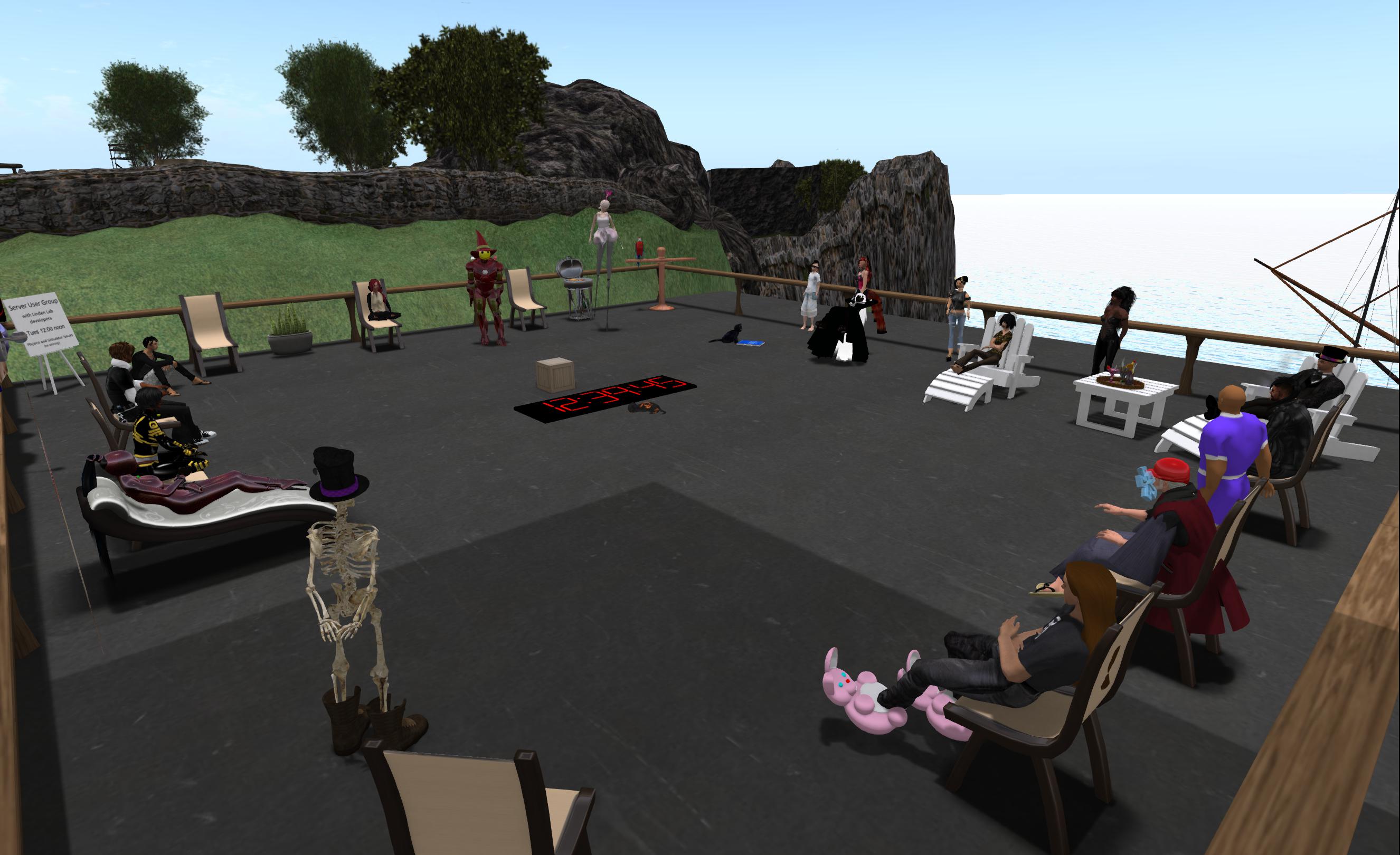
Simulator UG meeting, Tuesday Octber 22nd, 2013
Simulator UG meeting, Tuesday October 22nd, 2013

Server Deployments – Week 43

As always, please refer to the week’s forum deployment thread for the latest news and updates.

Second Life Server (Main Channel) – Tuesday October 22nd

The Main channel was updated with the server maintenance project that was previously on all three RC channels.  The package includes:

  • A fix for “Group member access to parcels fails when ‘Sell passes to’ is enabled”
  • Fixes for two region crossing issues:
    • “‘Ghost’ avatars and vehicles sometimes appear to an observer at the sim border”
    • “Vehicles which exit a region with a passenger are incorrectly auto-returned and become ‘ghost shapes’ in the physics engine”
  • Extremely high Avatar Render Weights reported to the server are now capped at 500,000
  • A performance issue fix for avatar loading speed in the experimental ‘viewer-interesting’ viewer.

Second Life RC BlueSteel, RC Magnum, and RC LeTigre – Wednesday October 23rd

There are no updates planned for the three RC channels, as a result, there was no rolling restart across the RCs.

SL Viewer Updates

The Google Breakpad RC was removed from the viewer release cohorts at the end of week 42.

Interest List Viewer

The interest list RC viewer is once again delayed.  Commenting on it at the Simulator User Group meeting on Tuesday October 22nd, Andrew Linden indicated the hoped-for schedule for its appearance is before the end of the month, but there is something of a low confidence level in the estimate.

Apparently, there is still a performance issue to be dealt with (whether this is the same issue Richard linden mentioned in discussing the interest list viewer at the TPV developer meeting on Friday October 18th is unclear). Also, it seems that the recent issues of objects steadfastly refusing the render in the interest list viewer without a relog  – thhought to have been resolved in week 42 – have also regressed into the viewer code with recent builds.

The issue of prims failing to render in the Interest List viewer, as demonstrated by Whirly Fizzle in the images above and once thought to have been solved, has apparently returned to haunt the code in recent builds, helping to further delay the appearance of the viewer as a release candidate.

Andrew also clarified that the definition of objects which are cacheable by the viewer has been revised such that it is now objects which have not changed outward appearance or transformed in the last two minutes, rather than the one minute Richard Linden indicated, so as to allow for temp-on-rez objects (otherwise additional logic would have been required to check on these). The changes to the definition also mean that some scripted objects which have certain script calls in them, but which do not change appearance as a result of the calls, can also now be cached by the viewer.

As an adjunct to the interest list viewer discussion, Andrew indicated his “before / after” video for scene loading has received the “Torley treatment”, and the results are “impressive”. This is for the changes already implemented server-side, and which should already be visible to people without the Interest List viewer. There’s no date as to when this video may make its public debut.

Other Items

LSL Control for Materials

There have been renewed enquiries for the introduction of scripted control for materials. This has been requested in the past, and was always considered “out-of-scope” for the initial release of materials. A (further?) JIRA has been raised on the topic (MATBUG-359), but is light on suggestion on what might be required, etc.

Those Lindens attending the meeting (Andrew, Kelly and Simon) could see the advantages of extending LSL to handle materials (and Brooke Linden has indicated she feels the JIRA is a valid request). However, how best to achieve this, and the time-frame in which it might be achieved (not just in terms of a technical approach, but also in terms of the Lab’s internal priorities and workload) are unclear at this point.

Both and Andrew and Kelly felt that requiring the normal / specular maps to be in the object contents might be a means by which to both enable and constrain the use of LSL manipulation of materials because of the lack of permissions associated with UUIDs  and concerns of misuse. While no promises were made as to whether the work would proceed, Simon Linden suggested a further step would be to lay out a clearer proposed API and the exact behaviour required for manipulating materials via script. Andrew also indicated he has a “few” LSL calls to add, so he’ll try to take a look at the materials system o see how hard it would be to give script access to it.

llGetObjectDetails() and keyframe animation states

Simon Linden indicated that there has been some talk within the Lab of adding some new parameters to llGetObjectDetails() which would return an object’s keyframe animation states, so it would be possible to get the step number, state (paused, looping, ping-pong, etc.). Again, if / when this might appear is unclear; Simon appeared to be putting the idea out for feedback from the meeting attendees.

UKanDo a whole lot more with 3.6.8

logoConnor Monaron released an updated UKanDo viewer on Saturday October 20th. Version 3.6.8.27869 brings the viewer up-to-date with the latest viewer release code from the Lab, including the “hot fix” to prevent crashes for those using the latest AMD Catalyst drivers (13.9, 13.10, and 13.11), and adds a lot of useful nips, tucks, tweaks and additions.

Download and Installation

The Windows installer remains unchanged at 28.7 MB in size, and installation was, as with the first version of the viewer I reviewed, smooth and without incident.  I ran a completely clean install out of curiosity, and the viewer again installed without a hitch, and AVG Pro didn’t hiccup over things like the voice plugin, etc.

Improved UI

One of the things I found a little hard with UKanDo last time around was the UI colours. The white-text-on-blue-buttons was not always easy to read (for me, at least on my 1440×900 monitor). I’ve no idea if the issue was widespread, or if Connor felt the same, but 3.6.8.27869 sees buttons with black text / icons by default (text turns white when the button is active), which I do find easier on the eyes.

Buttons and Placement

Version 3.6.8 brings with it a couple of new buttons – Quick Tools and Area Search (both of which are looked-at below), and sees UKanDo gain improved toolbar button alignment. As with some other TPVs buttons on the bottom bar can now be ranged to the left or right, and buttons to the left or right of the screen can now be ranged to the top or bottom – kudos, Connor!

Quick Tools

UKanDo Quick Tools
UKanDo Quick Tools

This release brings with it a Quick Tools floater (and associated toolbar button), which is similar to the “Quick Prefs” floaters found in other TPVs, providing rapid access to things like Draw Distance, Bandwidth, Max Avatars, Particle Count, the Windlight presets and so on. The list of options isn’t as extensive as some TPVs provide, but what is here is more than enough to allow users to make rapid-fire adjustments to core settings when necessary – such as when operating in a crowded environment.

Also with this release, and found in the Quick Tools, as well as in Preferences > UKanDo > Miscellaneous, is the ability to set Windlight cross-fading when moving between different Windlight environments / changing Windlight settings.

 Area Search

Another popular TPV capability is that of area search: being able to locate a specific object within a region using a range of criteria – object name, creator name, etc.  This makes its debut in UKanDo version 3.6.8.27869, and is likely to be a welcome addition among users. It can be accessed either via a dedicated menu button or via the UKanDo menu or by pressing ALT-A.

Area Search comes to UKanDo

Context Menu Updates

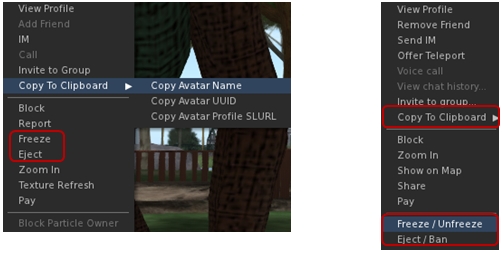
A couple of the context menus in UKanDo get updates as well. The right-click avatar context menu sees options added to copy an avatar’s name, UUID or Profile SLurl to the clipboard. Additionally, and in the case of estate owners / managers / parcel owners, the avatar context menu includes options to Freeze / Unfreeze and Eject / Ban where appropriate.

Options to copy an avatar's name, UUID or profile SLurl can now be found of the right-click avatar context menu (l) and context menu in the Nearby tab of the people floater (r). In addition, both menus can offer estate owners / managers / parcel owners options to freeze / eject avatars
Options to copy an avatar’s name, UUID or profile SLurl can now be found of the right-click avatar context menu (l) and context menu in the Nearby tab of the people floater (r). In addition, both menus can offer estate owners / managers / parcel owners options to freeze / eject avatars

These options are also available in the right-click context menu within the Nearby tab of the People floater (with the freeze / ban options only appearing for estate owners / managers / parcel owners).

Other Additions, Tweaks and Touches

  • RLV is updated to 2.8.5.8
  • Toolbar Buttons floater New “Close” button
  • World Map New “Clear Selection” button
  • Help->UKanDo Support Group menu option will either open the group profile or, if you are a member of the group, start group chat
  • Allow Media to Auto-play is defaulted to off
  •  Play Sounds from Gestures is defaulted to off
  • Option to allow Chiclet bar and/or Notifications to be placed top or bottom right
  • Viewer gives audible warning when trying to shift-drag while in edit linked parts/select face mode & object remains locked in place
  • Plus more – see the release notes

Feedback

Version 3.6.8.27869 represents a tidy set of updates and tweaks to UKanDo. The addition of Area Search is liable to be popular, as is the arrival of a Quick Tools floater. I personally like the additional button ranging options (I like my toolbar buttons over to the right of the screen and out-of-the way), and the ban / eject additions to context menus may well prove useful to some!

Performance-wise, this version of UKanDo is right up there with the last, and faces-off very well compared to the SL release viewer upon which it is based. In my PC, with ALM enables, ambient occlusion and shadows (Sun/Moon + projectors) enabled, and a couple of others on my home region, I was again hitting an average FPS of around 68-70.

I did find one or two things at odds in my version compared to the release notes (RenderVolumeLODFactor is reported as defaulted to 4.00, but in my clean install, I found it set to 1.25), but these were very minor issues and easily fixed. One thing I would recommend, however is that the icon for the Quick Tools button is revised. It is currently the same as the icon used on the Preferences button, and when operating with the buttons in Icon Only mode, it could lead to confusion.

I’d still like to see the media filter added to UKanDo, just for the added comfort when wanting to fiddle with media on other land; having something like Will Weaver’s Phototools appear in UKanDo would also be a blast – but these are purely personal preferences. As it is, UKanDo is a perfectly useable viewer, and for those looking for something sitting between the SL viewer and TPVs with all the bells and whistles, it’s worth taking a look at.

Related Links