Following-on from the announcement made in week 25 that the SL Marketplace payment system would be “moving” to the Second Life payment system, a further brief Commerce forum post has been issued confirming the move has now been completed.
The forum post indicates that users will be able to pay for goods with Linden Dollars (as has always been the case), or select a new payment method. and includes links to the following resources:
- Shopping in the Second Life Marketplace (Knowledge Base)
- The Second Life payment system FAQ.
What Has Changed
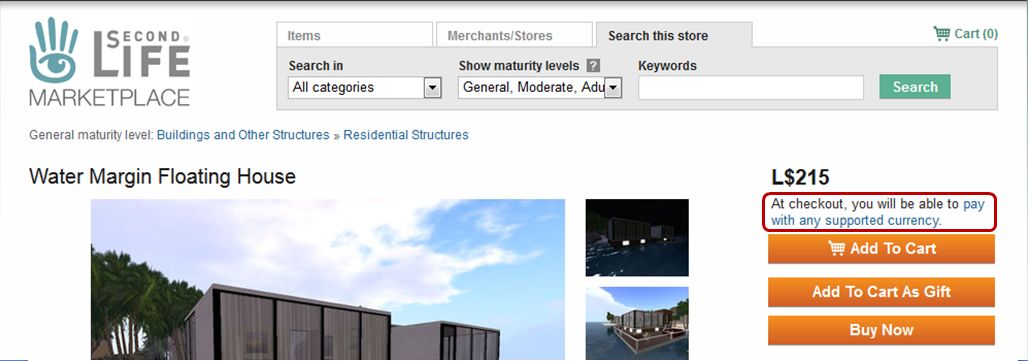
There are some changes to the SL Marketplace as a result of this update:
- When viewing items in the Marketplace, only the LS price is displayed by default. There is no longer any USD price
- All items now include a note that “At checkout, you will be able to pay with any supported currency“, directly under the L$ price. The link will display the Accepted currencies and payment methods section of the Billing page in the Knowledge Base, which lists the credit / debit / charge cars recognised by Linden Lab and the currencies in which payments can be accepted using them.
The other major change can be seen when clicking on the Checkout button from your shopping cart. This takes you to the Second Life Cashier Page, which lists the items you are purchasing, unit price for each and the total payable.
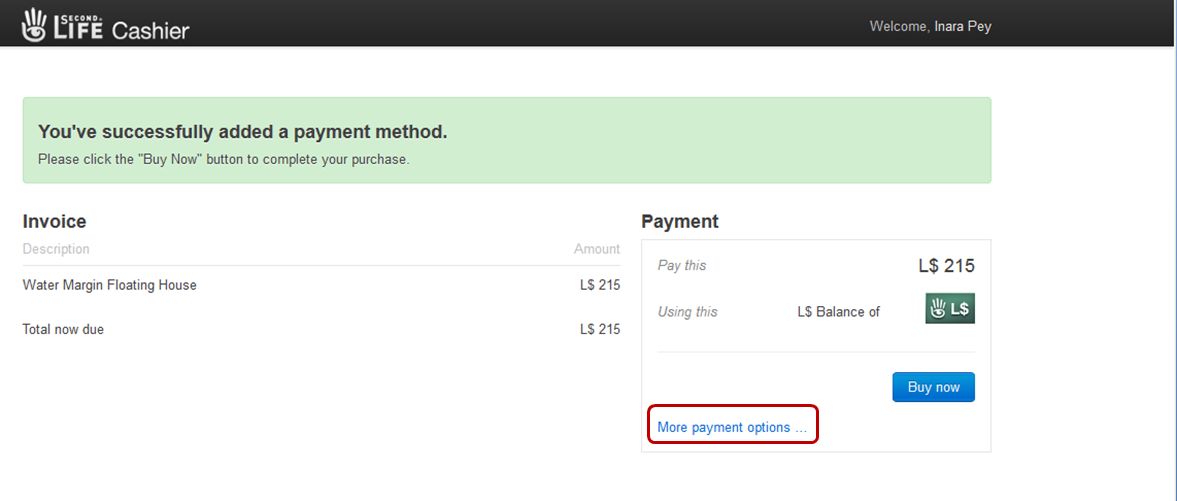
To the right of this is the amount payable and your current payment method, and a link allowing you to add more payment options.
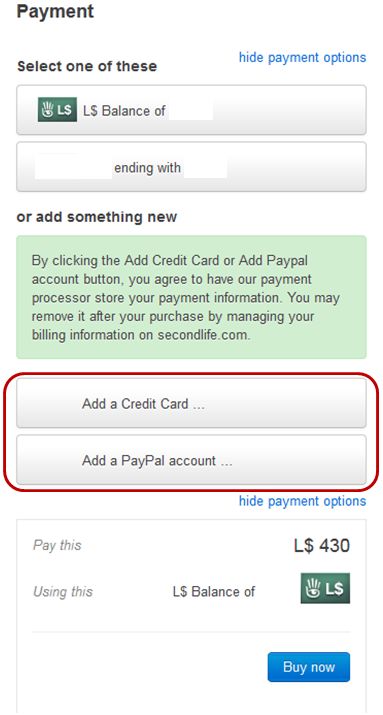
Clicking on this link expands the Payment section to display:
- Your current payment options
- Buttons for adding additional payment methods (credit card, etc., or PayPal).
If you wish you use an existing alternate payment method, simply click on the required button in the upper section of the expanded screen.
To add an additional payment method, click on the required method (note the green-background text above the payment option buttons) and follow the on-screen instructions.
When you are ready to complete the transaction, click the Buy Now button.
Note: I’m not sure if, after selecting and using an alternative payment option, this becomes your default option for all future payments (and thus appearing the “Using this” section of the Payment box of the Cashier Page. This is because I use L$ for all my Marketplace purchases, and have no wish to use an alternate payment method I have registered with the Lab.
Related Links
- Marketplace Now Uses Second Life Payment System – LL, June 24th
- Marketplace to Move to Second Life Billing Engine – LL, June 18th
- Shopping in the Second Life Marketplace – SL Knowledge Base
- Second Life payment system FAQ – SL Knowledge Base
- LL announce “Marketplace to move to Second Life billing engine” – this blog, June 19th
With thanks to CS Pfeffer for the nudge about the forum update.

 Inara Pey: Living in a Modemworld
They have a slight glitch in their page redirects– once you complete a purchase, there is no way to return to the MP item page. There is an option to “Return to Product Page” which would be very helpful, IF it worked. Rather than returning you to the MP item page, it takes you to the “thank you for shopping…”. Veddy veddy frustrating if you shop as I do, and like to return to the MP item page for some reason. And grrrrr…on my computer, the process is horribly slow now, with buttons not responding, very slow loading… here’s hoping they get these little annoyances worked out soon.
LikeLike