
On November 17th, the Firestorm team made a beta release of their latest update to Firestorm in order to offer users access to the new Group Services updates for managing large groups. At the time, it was indicated that the “full” release would occur in early December.
Keeping to their word, the team released 4.3.1.31155 on December 3rd, which includes everything featured in the beta release, and a few more goodies besides.
Given I’ve already given a comprehensive review of the beta release, this article will be focused primarily on the updates made between it and 4.3.1.31155 – although there will be some overlap.
As always, please refer to the Firestorm release notes for full details on credits, etc., for code contributions to the viewer, and for details of known issues and problems (known issues carried over from the LL code can be found here).
Download and Installation
As noted in the last review, the download .EXE is big – 40MB, which is unsurprising given that Firestorm packs so much into it. Installation – at a least for Windows users – is where the first set of changes occur, and it is worth recapping on these for people who have not installed the beta release:
- A pop-up requesting whether or not the user wishes to have a Windows Start menu entry created for Firestorm during installation
- Addition of the version string and estimated installed size to the installer
- Addition of new OS detection code to warn if Windows Service Packs are not up-to-date and to prevent Firestorm being installed on Windows XP with
- Publisher data, Phoenix URLs and Firestorm icon for the Firestorm entry in the Windows uninstall list
- Automatic deletion of all previously installed skins to reduce issues arising from an unclean install
- Addition of a DETAILS button in the installer pop-up window to allow the installation to be reviewed.
Havok Sub-licence
As noted last time, Firestorm has now signed a Havok sub-licence agreement with Linden Lab. This means that Firestorm is now available in two flavours – one for SL and one for OpenSim grids, with the SL version having both the –loginURI capabilities and the Grid Manager functionality removed.
This change means that Firestorm is now able to access the new LL-supplied Havok libraries, allowing the viewer to immediately include the pathfinding navmesh visualisation tools (as covered in my review of the beta release), and which could allow Firestorm to switch over to using the official LL mesh uploader code in the future, should they so wish, rather than using the current HACD code for mesh uploads.
For those using OpenSim, Firestorm 4.3.1.31155 can be downloaded here, and I’ve included an update on the OpenSim-specific updates to the viewer at the end of this article.
One point to note is that it is possible to use the OpenSim version of Firestorm on SL – the only difference is the OpenSim flavour of the viewer will not be able to access the SL Havok libaries or use any functionality associated with them.
Updates from Phoenix
Further updates from Phoenix have been added to Firestorm 4.3.1 in addition to those found in the 4.3.0 beta:
Texture Comment MetadataWhen opening any texture, this will display the uploader name with a link to their profile together with the date / time the texture was uploaded. If permissions are sufficient, it will also display the asset ID on the texture preview floater.
Progressive Draw Distance (PDD)A popular Phoenix feature, when enabled, this causes Firestorm to use a progressive Draw Distance stepping after a teleport, to help improve rezzing times. The Firestorm version includes an option to cancel stepping in progress if Draw Distance is manually changed (Preferences > Firestorm > General).
More Phoenix-like default settings for Phoenix ModeThe following Phoenix-like behaviours have been added to Firestorm when running in the Phoenix mode (selected via the Firestorm log-in splash screen):
- “Resident” is not trimmed off legacy names
- L$ balance changes will be shown in nearby chat instead of toasts
- Received Items folder is shown as a normal Inventory folder
- Firestorm will now send accept/decline responses for inventory offers after the according button has been pressed and not if the item has been received at the receiver’s inventory already
- Group and IM notifications are now sent to the nearby chat console (v1-style) instead of toasts (v3-style)
Legacy Search
Firestorm 4.3.1.31155 re-introduces the V1-style “legacy” search capability for those who prefer it to the V2/V3 web-style search functionality.
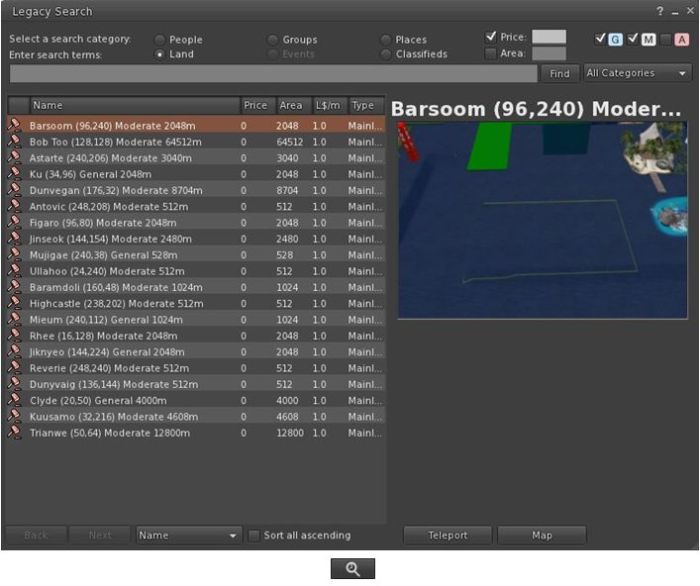
Provided by Cinder Roxley, the legacy search option is currently available via a menu option (Content > Legacy Search) or via a dedicated toolbar button, and works for all search categories except Events, which will be added in a future update.
Documentation on the search function is available via the Firestorm website.
Phototools, Windlight and Snapshots Updates
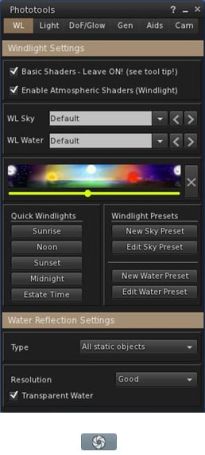
Phototools is a suite of floaters which bring together a range of controls, debug settings and options available within the viewer into a single, cohesive set of options aimed at the SL photographer and machinima artist. I’ve covered them in detail previously, and provided a further update in my last Firestorm review. With this release of Firestorm the Phototools floaters (Phototools and revised Camera floater) can be accessed via a menu option: World > Photo and Video.
Alongside of these comes a windlight update of some 100+ presets for water and sky developed by Phototools developer William “Paperwork Resident” Weaver.
These additional presets can be accessed either via the Fixed Sky / Water presets menu option (World > Environment Editor > Environment Settings) or via the Phototool floater (shown right). All of the Phototools presets have “Phototools” at the start of their name.
Also, the Flickr tab on the Firestorm snapshot floater includes Katharine Berry’s update which add the parcel name to the location option.
 Inara Pey: Living in a Modemworld