AO, AO, it’s off to walk we go…

AOs – Animation Overriders – have been part and parcel of Second Life since not long after the dawn of time (or at least not long after someone figured out how to lose the duckwalk by one means or another).

Today, AOs are a fact of life in SL and come in many forms: some just handle the “basics” – walks, sits, stands; others combine functions, providing a one-stop solution for walks, sits, stands, dances, poofers and other little toys. Most run through scripted HUDs, some run via the client itself. Some handle just one set of animations, some can be configured with multiple sets of animations, driven by notecards; some even allow drag-and-drop. Beyond this there is a whole range of scripted attachments which may also contain a wide variety of animations, often for specialised use, but which also might contain walks, sits, and the like. Finally, and most recently, we have the rise of client-side AO systems, some of which have differing capabilities to one another.

It’s a bewildering plethora of approaches – although in the case of HUD systems and client-side AOs, most use the same core system of animation interpretation, the famous ZHAO (2) format.

As to advantages and disadvantages, all systems suffer from them to one degree or another. Client-side AOs for example, can override scripted animations, resulting in an avatar appearing to jerk around or behave strangely as the two animation clash.  Some AOs can be script-heavy – at least in terms of the number of scripts they contain; this can lead to finger-pointing by those with an eye on public or client-side script counters, regardless of how  efficient the scripts may actually be in terms of resource use.  Recent developments in Client-side AOs mean that drag-and-drop is fully supported – no need to send time and effort configuring notecards; the downside is, each TPV supporting the system tends to require a dedicated set of links within your inventory – so if you do swap between Viewers (using one for RP, another for photography, for example), then this can become a source of annoyance.

Now it appears that Linden Lab are considering the question of AOs, and whether to develop an approach of their own. This has been hinted at in the number of user group meetings, and is now the subject of debate over on the SLU forums.

Some have taken LL’s interest – expressed through Oz, as a sign that the Lab are looking towards a client-side implementation of some form of AO (perhaps animation controller  might be a better description) with the Viewer. However, as Adeon Writer notes in opening the discussion, LL have both the client and the server at their disposal, so are relatively free to approach the issue from any number of angles without being exclusively tied to a client-side solution.

A variety of ideas have been suggested in the SLU thread – some of which run very close to capabilities found in the latest client-side AO system; whether this is because people are happy with that system and wish to see it replicated, or whether it is because some are unaware of the client AO capabilities, is unclear. One idea that has gained support is for having a “wearable” attachment that allows animations to be associated with specific avatars have also been put forward (so you have one associated with your “normal” avatar, another if you have a “pixie” avatar, another for your “tiger” avatar, and so on), with an edit capability similar to any other wearable editor.

The problem here, of course, is that not only are there many potential routes towards a solutions – there is also the veritable minefield LL must tread simply due to the widespread use of scripted AOs and HUDS.  If they are seen to be doing anything that is  perceived to be about to “break” or “compete” with existing content, regardless of how wrong such perceptions might be, they are liable to find themselves being chased up a tree faster than a cat with an oversized dog on its tail…

Those at the Lab are obviously aware of this and it’s liable to be a reason why the matter hasn’t been dealt with before; despite claims to the contrary, the Lab is actually loathe to knowingly break content. It’s also most likely why Oz is taking time to understand the flavours of client-side AO used by TPVs in order to find out what works, what doesn’t, and how LL can work alongside existing HUD systems.

However you look at it, it is fair to say that something needs to be done to improve the current means by which AOs – client-based or HUD-based work. Neither is, from the perspective of the new user, a particularly elegant solution and requires something of a learning-curve in order to understand. Developing an alternative that is both easy to grasp, and which offers a high level of functionality for the sophisticated user, however, isn’t going to be a simple matter – if only because we all have differing needs from an AO, and the needs of the novice user don’t always sit well with the needs of the seasoned user.

For my part, I long ago gave up the use of an AO HUD in favour of a client-side solution, as the latest AO found in most v3.2-based TPVs offers me the greatest flexibility, occasional clashes with scripted animations notwithstanding. However, I do have the advantage in having several pre-prepared ZHAO-2 notecards, so switching over to (and switching between) client-side AOs is relatively simple. Given that the AO also supports multiple configuration cards, switching between sets is also easy. Which is not to say this approach is perfect; two of my irritations with it remain:

  • There’s the aforementioned inventory bloat when dozens of duplicate links are added to my inventory each time I opt to use an AO notecard with a Viewer equipped with a client-side AO
  • There is no persistence between relogs when running multiple AOs – the client will default to the first AO notecard / set in the list, regardless as to whether I’ve set a default or not.

Personally, I’d like to see a well-implemented animation control system from LL; they have the resources at their disposal to develop something that works fast and well and can meet the widest range of requirements from ease-of-use through to minimal resource demands. Perhaps even one that is extensible and takes into account purpose-based uses such as within combat environments (although that might well tread on a lot of toes). It’s not going to be an overnight thing – again, full kudos to Oz for feeling matters out on the technical side. It’ll be interesting to discover what – if anything – does develop down the road, and whether we will see anything emerge from LL in terms of AO system development / implementation.

Linden Lab obtains right to sub-licence Havok engine

Linden Lab has recently acquired the right to sub-licence the Havok physics engine technology used within their Viewer. This has resulted in the Lab issuing new guidelines to third-party Viewer developers wishing to incorporate advanced Viewer capabilities developed using the Havok technology within their offerings.

The guidelines read in part:

The technology is provided in the form of an autobuild package ‘llphysicsextensions’ containing header files and the required library. This does not directly expose the Havok APIs, but a set of higher level interfaces specific to the viewer. Sources for the wrapper itself will not be open source. The llphysicsextensions package includes all features that use Havok (currently convex decomposition and features related to navigation mesh for pathfinding).

This move is already a subject of debate among TPV developers and the OpenSim community, because the sub-licence associated with the guidelines appears to place clear restrictions on TPV developers, notably in clause (b) of the Conditions to Grant, which reads:

(b) Sublicensee must require the Third Party Viewer to connect only to servers owned or operated by the Company; [i.e. Linden Lab]

So if a TPV developer wishes to work on both Second Life and OpenSim, they’ll have to look at options very carefully, as Maria Korolov points out in Hypergrid Business.

Within Second Life, there is concern as to what this may mean for some TPVs – specifically those utilising GPL rather than LGPL. Such Viewers appear to be effectively excluded from applying for a sub-licence. While this will not prevent such Viewers from accessing Second Life, it does mean that they’ll be excluded from using code that implements the Havok capabilities. The requirement for TPVs wishing to obtain a sub-licence being required to be publicly listed on the Third-Party Viewer Directory may also have a negative impact in some quarters.

The flip side to this, however, is that it means Havok physics will effectively be in the Viewer itself, which could pave the way to many new enhancements and capabilities within Second Life. As such, it is far to say that the move to sub-licence the Havok engine is less about LL attempting to restrict Viewer development per se (the apparent attempt to push out V1-based Viewers not withstanding), but rather to provide a means by which they can integrated what is effectively a closed-source, licenced product (Havok) into what is essentially an open-source project (the Viewer) without breaking the terms of their agreement with Havok.

The program itself is not available as yet, and discussions within the community are ongoing, with TPV developers aiming to seek further clarification from Linden Lab on possible impacts on their work – again, specifically where OpenSim support is concerned.

Related Links

Received Items: the good, the bad and the “$%^&*!”

So, as I was updating the Viewer Round-up for this week, I thought I’d have a run with the new Received Items Beta launched last week.

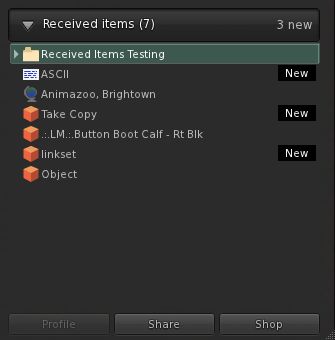
Those familiar with Direct Delivery testing will already be somewhat familiar with Received Items – it is a section of the Inventory floater wherein anything purchased from the Marketplace will show up. However, the overall functionality has now been extended so that anything you obtain or receive by way of a “new” inventory item will pop-up within it.

To test the new functionality, you’ll need to run one of the following versions of the official Viewer: the Beta (3.2.9.249510 or later), Development (3.3.0.248913 or later) or the Direct Delivery Project Viewer (3.3.0.249395 or later). For testing, I used the latest Beta, 3.2.9.249510, which has been available since before the Received Items Beta was announced, but which has the Received Items capability available within it.

You’ll need to be on the Beta grid (Aditi) to carry out the tests, and will need to visit one or more test regions, as detailed in the Received Items Beta wiki page and my original blog post on the subject.

Where to Find the Panel

I’ve read reports of people having problems finding Received Items. It should appear as a “button” at the bottom of your Inventory floater. Clicking the “button” will open-out the panel.

Opening Received Items

If, for any reason, the button is not apparent within your inventory floater, try this (with thanks to Innula Zenovka):

  • Go to the Fast Return test region on Aditi (this is the LIGHTER GREEN area within the GC Test 9 region)
  • Rez a prim and wait for the auto-return to send it back to you – it’ll take around a minute
  • Open your inventory floater and the Receive Items “button” should now be visible – click on it to open it as described above, and your prim should be sitting inside it

I spent an hour or so playing in the test regions to see what Received Items does / does do, and here’s a summary of my findings, together with some broader observations and feedback.

Situations where there is no change to current behaviour

  • Rezzing an item from inventory – the item will still return to its originating folder when you TAKE it back
  • Taking a copy of a rezzed object you own will still return it to your Objects system folder
  • Trying to rez / build in a no rez area will generate the usual warning without anything being rezzed / returned
  • Trying to move an in-world object into a parcel with NO OBJECT ENTRY set: item will be blocked and the usual pop-up displayed

Situations where Received Items IS used

  • Creating a new object or linkset and taking it to inventory
  • Taking a copy of an object belonging to someone else (permissions allowing
  • Purchasing / taking anything from an in-world object (prims set to give / sell, Vendor systems, etc.)
  • Anything returned to you manually by someone else, or via parcel auto-return
  • Anything someone else gives you in-world
  • Items sent to you while off-line
  • Multiple items in a single delivery (e.g. items from a suitably scripted giver or passed to you via folder)
  • Anything you purchase via SLM or which is brought for you as a gift.

Other points of note

  • When receiving items via a transfer when on-line, you will still receive a pop-up notification – but without the ACCEPT button, which has been replaced by SHOW – clicking this will open your inventory floater and the Received Items panel. The remaining options, DISCARD and BLOCK remain unchanged
  • If you are offline when an item is sent, you’ll still get a notification sent (which will appear when you log-in and get sent to your e-mail, if you have IM forwarding set-up) as per current behaviour
  • Recently received items tagged as “New” (click to enlarge)

    Recently received items will be tagged as “New” in Received Items, helping with identification (right)

  • Received Items provides almost the same degree of functionality for items it contains as the rest of your inventory. However:
    • You cannot directly rename items (i.e. right-click and select RENAME from the menu), although you can select the item’s Properties and rename it from there, if permitted
    • You cannot paste a copy of an object into Received Items (but you can obviously paste it into your main inventory panel wherever you like)
  • If you delete items from Received Items and they will go to your Trash, as usual. However, if you subsequently restore an item from Trash that was in Received Items – it will go to the most appropriate folder in your inventory (so a notecard will be restored to Notecards, a landmark to Landmarks, etc.)

Received Items as a Folder

Received Items seen as a folder in the RECENT tab (click to enlarge)

For those that like to use the RECENT tab in inventory, it is worthwhile pointing out that Received Items also appears here as a folder (although there is no corresponding folder in the main inventory view). The folder view has the same functionality as the panel, but offers an alternative way of viewing incoming items. The major difference between the two is, when viewed as a folder in the RECENT tab, Received Items does not display “New” against recently received items.

However, this will only last during your current SL session – as soon as you log-out from SL, the “Received Items” folder will vanish from RECENT, just like everything else, leaving you with just the Received Items panel to peruse the next time you log-in.

On the good side

Providing a single “point-of-entry” for new items coming into inventory may well ease the process of understanding how works inventory and getting newcomers started on good inventory husbandry and may encourage those who don’t engage in inventory  housekeeping to do so… Which is not to say this new approach is without issues or necessarily preferable. Right now, it has to be said the negatives outweigh the positives.

On the poor side

There is no hierarchy to Received Items: Outside of items that are received into folders via their delivery mechanism (e.g. SLM or a scripted object), Received Items presents a “flat” view of incoming goods. This is liable to create a headache for some.

For example, many in the rental business put-out “for rent / sale” signs on their vacant parcel, and may add trees and other bits and pieces – up to and including houses and sim extenders on the parcel as well. Some or all of these get returned by the new tenant when the parcel is rented – and until now have gone to the Lost and Found folder, where they can be easily identified and disposed of.

But under the new system, all this now gets lumped-in with everything else the Estate Owner / Manager is receiving as well. This could get very onerous in terms of sorting through stuff and separating the wheat from the chaff.

There is no capability to sort / order / filter items: Obviously, the intention is for Received Items to be routinely cleared-down by users on receipt of incoming goods, no matter what the source. However, there are going to be times when – even with the best intent in the world, the Received Items panel is going to run the risk of getting choked  – such as in the case of estate management as mentioned above, or where information is specifically requested via notecard (such as requests for product help) and so on. Even someone being away from SL on vacation for a week or to could come back to find their Received Items brimming. As such, it would be nice to offer people the ability to sort / order / filter contents.

Creates an artificial divide in inventory: The Received Items panel does tend to split inventory into two, and unless it is clearly and properly explained to the likes of new users, it could end up creating as main problems as it is intended to solve, particularly if new users are no encouraged to use it as intended, but simply allow incoming items to reside in the panel. Communication is the key here – and that’s not really LL’s strongest suit.

(Currently) does not appear to solve the capped IM problem: I have read from feedback elsewhere, but have been unable to verify myself, that this new approach doesn’t presently overcome the problem of goods failing to be delivered if IMs are capped. Whether this is because the code itself doesn’t contain a “fix” for doing so, or whether it’s actually not working as hoped, I can’t say. However, this is causing concern, and may still need to be addressed.

Opinion

There has been a lot of negative feedback from users on this new approach. Whereas Received Items was accepted for the forthcoming Direct Delivery system, people are questioning why everything now has to go into Received Items, rather than the more intuitive approach we currently have.

I personally can see both sides of the coin: as an established user, I’m very familiar and comfortable with the current behaviour – notecards coming in go to Notecards, landmarks to Landmarks, and so on. As such, I can only see this approach as being something of a step backwards – and I’m someone who is pretty obsessive about keeping my inventory sorted.

However, for new users, then the system – again with the caveat of “as long as it is properly explained” – offers a much easier-to-understand approach to the receipt of goods and items. At least initially. There is also the fact that it does present (or should eventually present) one consistent mode of behaviour for new items entering inventory – and consistent can be often be good.

The problem really is that this approach is one in which – yet again – established users appear are being faced with something that is definitely less intuitive and potentially useful than the current system in order to “improve” matters for the ever-elusive new user. Even for those (like me) who are obsessive about keeping inventory sorted, this approach adds an irritating additional level of management, simply because we do now have to faff around moving various received items around that once pretty much took care of themselves in the first instance.

As such, Received Items does run the risk of leaving people with the impression that the existing user community simply doesn’t figure in LL’s thinking, and how we use SL on a daily basis simply isn’t really understood. I could say more on that topic, but Saffia Widdershins already has, and very eloquently.

Related Links

Visual Auto-mute: a farewell to ARC/ADW upsets?

A new set of functions has been released by LL as a changeset, and is starting to find its way into SL Viewers.

Essentially, this functionality allows you to set thresholds above which avatars with a very heavy load (high-res textures, complex attachments (multiple prims, flexi prims, sculpts, and what have you), etc., – but not scripts, which are a completely different kettle of fish) will not be rendered by your Viewer. Instead, such avatars will appear as “grey ghosts”, similar to when they’ve been muted; however, IMs and chat can still be exchanged. This should theoretically reduce the load placed on the Viewer and a your system in terms of rendering, and lead to an improved SL experience.

It’s important to note that the functions only affect how such avatars are rendered in your world-view; they will still render normally in their own view, and for anyone who hasn’t set thresholds / has higher thresholds than you. Also, your avatar will remain visible in your view, no matter how you set the limits.

The thresholds are governed by two functions, initially released by LL as a set of debug settings:

  • RenderAutoMuteByteLimit – Maximum bytes of attachments before an avatar is automatically visually muted (0 for no limit)
  • RenderAutoMuteSurfaceAreaLimit – Maximum surface area of attachments before an avatar is automatically visually muted (0 for no limit)

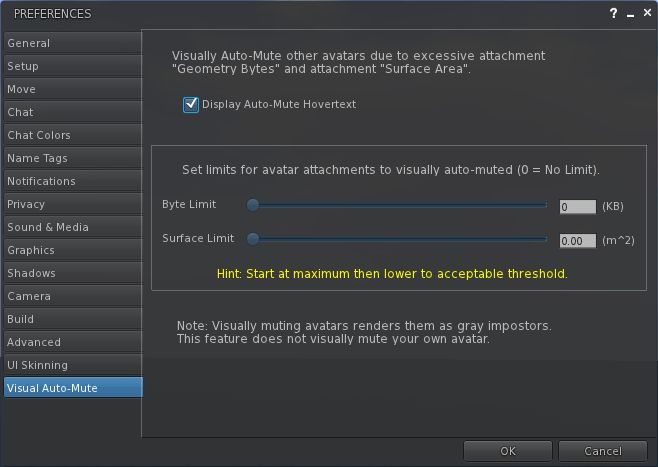
These currently require numerical values to be entered. However, it is possible that they’ll find their way into at least some Viewers as Preferences options, possibly using sliders. Zena Juran has already opted for this approach with the latest release of the Zen Viewer (below).

Visual Auto-mute as presented in the Zen Viewer

The functions are supported by a new addition to the Develop menu: Render MetaData->Attachment Bytes. When active, This displays a set of figures over / near avatars, which can be used to help you to determine the byte and area thresholds you should set.

Rendering Metadata->Attachment Bytes display enabled

The approach has already come in for considerable discussion on the SLU forum, where opinion seems to be weighted towards the favourable.

Certainly, it can’t be denied that avatars can impact Viewer performance enormously, so any moves that enable the user to have a greater degree of control over what is hurting their SL experience is potentially a good thing. But lag is a very sensitive subject – as anyone who has encountered upsets in the past due to people using ARC as a Big Stick can testify.

This approach would appear to be a lot more beneficial than something like ARC and its successor, Avatar Draw Weight (or ADW) are concerned, as it should hopefully reduce the amount of finger-pointing and hostility that goes on when people have arbitrary figures in red floating over their heads like a glaring accusation of wrong-doing.

It’s also somewhat friendlier than the other alternative to “blocking” “overloaded” avatars: that of audio mute, which denies any communications capabilities where some might be preferred and which can, if done on a group basis, leave a poor soul ostracised in silence with no idea why.

There are, however, some drawbacks. On the minor side, it is possible that setting the options when entering a popular venue may well result in you finding one or more friends around you turn into grey ghosts  – or that you end-up greyed-out in their view. This might in turn result in strained relations, but shouldn’t really be anything reasonable people can get past – and even joke about privately.

This isn’t necessarily a “one size fits all” solution as well; it is possible that, depending on the type of venues a person visits (in terms of popularity popularity, nature of the activities carried out, etc.), the thresholds may need adjusting from time-to-time in order to gain the best benefits / compromise in terms of performance benefits and visual appeal. This may limit the scope to which the new functions are used, as people are not always willing to fiddle around with sliders as they teleport around SL.

It also needs to be remembered that avatars aren’t the only load placed on the Viewer, and using functions like these might not help tremendously when moving around an environment that has dozens upon dozens of high-resolution textures all over the place (such as a store or mall). In this regard, the effectiveness of the system needs to be balanced against alternative approaches (such as the use of avatar imposters, or by simply turning-down your draw distance and turning down / off various options within the Viewer Preferences) in order to improve one’s in-world experience.

The biggest question-mark over the new controls, however, is that of effectiveness. If the results of playing with the new options is an improvement of a couple of fps in overall performance and/or a very slight improvement in rendering time, then it is unlikely that they are going to gain a lot of traction. But if people see a demonstrable improvement in their overall experience, then it is liable that the functions are going to prove more popular.

That said, anything tha moves us further away from the finger-pointing extremism that has been the plague of ARC /ADW, has to be a step in the right direction, doesn’t it? One possible benefit from this approach is a greater awareness and consideration of just how one’s own avatar might be impacting other people’s experience within SL, simply by seeing that it exceeds the thresholds one is setting against other avatars.

Well, one can hope, can’t one?

Taking stock of Inventory: LL ask for feedback

ProductTeam Linden (who he/she? is it Rhett in disguise?) has posted to the Technology Forum about a new option for presenting Inventory within the Viewer. Apparently, when the Viewer was split between the Basic and Advanced modes, moves were made to try to improve / simplify inventory presentation, but they never made it to a final cut of the Viewer.

Now they have, and Linden Lab is asking for feedback. The announcement reads in part:

For new users, managing and understanding inventory is often challenging. Drag and drop over large inventories can be problematic and daunting. New users are often confused about the meaning of certain system folders.

Today we have released a Project Viewer beta that includes this simplified presentation of inventory as an option. Before we consider any widespread changes to inventory, we want to know what you think about the Simple Inventory UI, noting that the target user is someone just starting out.  

The Simple Inventory UI offers new users:

  • A simple display presenting only one folder at a time
  • Improved wayfinding and findability
  • Faster load of inventory items

The article then invites users to download a Project Viewer which includes the new Inventory presentation, and to provide feedback (via the SL forum), with any bugs that are found logged in the SINV Project JIRA. In doing to, the article notes:

It’s important to note that Simple Inventory was intended for Basic mode before Basic and Advanced modes were merged. It is still experimental and so it is unclear how it will function with extremely large Inventories, so if you have a large Inventory we don’t recommend using Simple Inventory as your only view. 

There are also some incomplete features and some known issues, again as LL note.

So, what is it like? As I have a fairly extensive inventory that (if I say so myself) is well-managed and ordered that I’m in no mood to mess with, I tapped my CTA (Crash Test Alt) on the shoulder and took the Project Viewer for a spin.

Quick Tour

The Viewer has an initial release number of 3.2.8 (248008), and installs into is own folder but shares the standard cache and user folder locations as all other SL installations. Once started, the Viewer has the same funky blue/teal UI as the DD Project Viewer – so I assume this is to provide a simple means of recognising that you’re running a Project Viewer. Otherwise, the Viewer looks and behaves like a “normal” release.

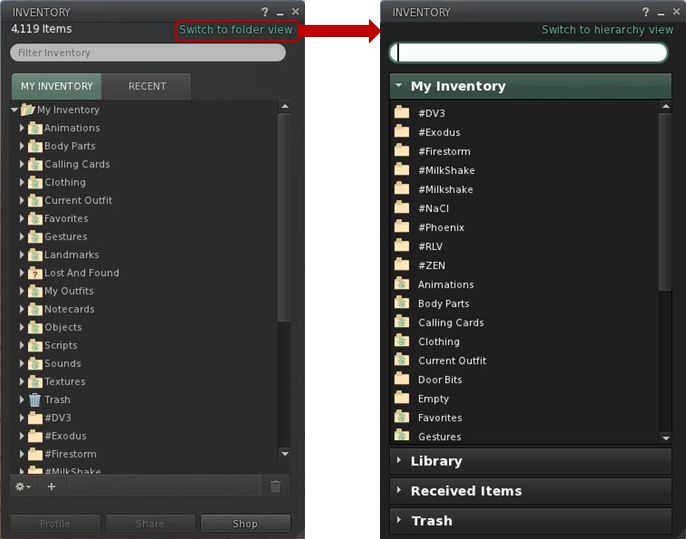
Opening Inventory initially reveals a familiar panel (for those that use the official Viewer), but one with a new SWITCH TO FOLDER VIEW link in the top right corner (below left). Clicking this brings-up the revised layout (below, right).

Inventory: from hierarchical view to folder view

Key points of the new layout:

  • Inventory is divided into clear sections: MY INVENTORY, LIBRARY, RECEIVED ITEMS (for the forthcoming Direct Delivery) and TRASH
  • You can have more than one section open at a time
  • Sections can be resized by hovering the mouse at the bottom of an open section so the cursor changes to a double-headed arrow. Click and hold the left mouse button to drag the sections beneath the open section up/down
  • Within a section, folders and contents are listed alphabetically (so system folders do not appear at the top of MY INVENTORY by default, and folders are not sorted to the top when mixed with objects)

As the view is not intended to be hierarchical, there are no arrowheads to the left of folders or any ability to open them within the displayed panel. Instead, opening a folder is now achieved in one of two ways:

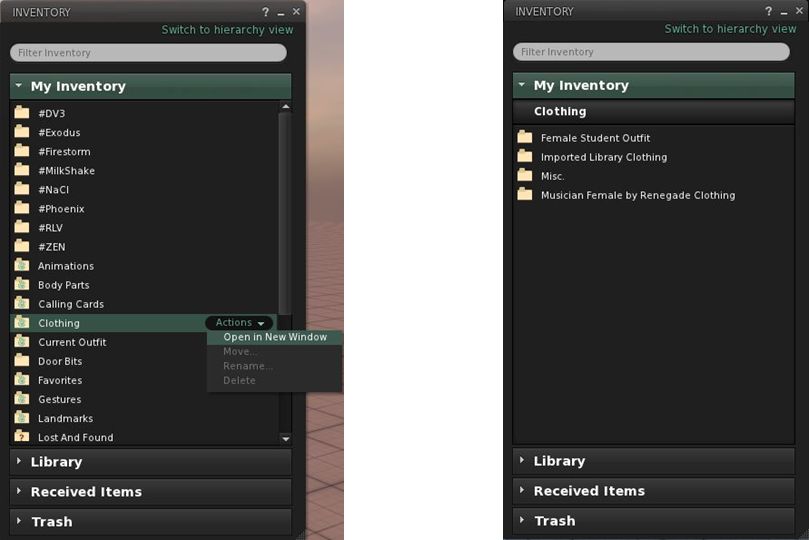
  • You can hover the mouse over a folder to highlight it with an ACTIONS option. Clicking this will displays context menu from which you can select OPEN IN NEW WINDOW (below, left)
  • You can double-click on the folder and have a new view of the contents slide neatly into the existing panel, replacing what was already there.

Note that to prevent accidents, system folders automatically have the options to move, rename or delete them disabled.

Whether you opt to open folders in a new window, or display them in the existing panel, the end result is the same in terms of what you see (below, right).

Opening folders: either hover the mouse over the folder and Click ACTIONS for a menu (l) or double-click a folder. The contacts will be displayed (r)
Inventory breadcrumbs

If you opt to drill down through your folders by opening each in a new window, then navigating back and forth is a relatively simple matter of swapping between windows and closing those you’ve finished with.

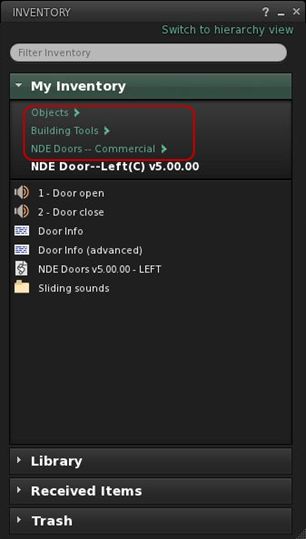
However, the system also makes it possible you to navigate up / down a set of nested folders within a single panel by adding breadcrumbs to the top of the panel (right) as you open each successive folder, allowing you to navigate back up the tree. At the same time, hovering the mouse over MY INVENTORY will reveal another ACTIONS option from which you can elect to go BACK TO TOP FOLDER.

Once in a folder, items can be highlighted and the ACTIONS menu used to manipulate them (e.g. wear, move, rename, delete) – again displayed options are context-sensitive (so if you are wearing an item, that option is not displayed, for example).

You can move items around your inventory in several ways:

  • Use the ACTION menu to select MOVE for an item / folder. This opens an additional window in which you can navigate to your desired destination (double-click through the required folders), before clicking MOVE TO SELECTED FOLDER to finish the task
  • You can also simply drag-and-drop items / folders within a panel
  • You can drag-and-drop between inventory windows
  • You can drag-and-drop between sections (between RECEIVED ITEMS and MY INVENTORY, for example) – the destination section does not have to be expanded in order to do so.

A couple of things I did notice during testing were that a) worn items are not highlighted / indicated in any way and b) there is no option to remove / detach a worn item. There also appears to be a bug, as selecting WEAR appears to ADD the selected item to your avatar, rather than replacing anything already worn – my CTA ended up clumping around in two pairs of boots….

Feedback and Thoughts

I don’t really have any issues with the functionality presented here per se. It works OK, the overall layout within a panel is fine, and (known issues and bugs notwithstanding), it all works pretty much as expected. There do appear to be some issues that do need addressing, however, and as LL asked for feedback on the system as presented (and allowing for the fact it is only an initial iteration, here’s mine:

  • Add the ability to see what is actually being worn or is attached to the avatar within the Folder View
  • As most people are likely to be moving folders from RECEIVED ITEMS to MY INVENTORY, it would make sense to move RECEIVED ITEMS above LIBRARY, to reduce the chances of a mis-click dropping items into the Library section
  • As currently supplied, the functionality is perhaps a little too limited – no ability to create sub-folders, for example, so the ability to organise one’s inventory is  restricted to drag-and-drop into whatever is already there
  • Don’t be afraid of using menu options at the top of the inventory panel (File, Create, Sort, etc.) – they are lot more intuitive for users new or established than having options buried behind obscure “+” symbols and cog-wheel icons.

Also, if it is intended provide both views (Hierarchy and Folder) within the inventory panel of the a release Viewer at some point in the future, then I’d also suggesting ensuring that the top-level folder presentation is consistent between them (i.e. scrap the “system folders to top” default in favour of an alphabetical listing for the Hierarchy View), as this will assist familiarity in switching between views.

Thoughts

Candidly speaking, this alternative presentation comes across as yet another Linden curate’s egg. On the one hand, it cannot be denied that there are issues around how the inventory panel functions (the “high-speed scrolling” that can occur when trying to move an item from one folder to another, for example), and that things could be improved in terms of presentation. On the other, this approach is perhaps a little too simplistic to make a valid judgement at this point; too much functionality has been stripped away. Looking at it in the form presented, it’s hard to see the direction in which it’s liable to grow (if any) – which I think may be the issue LL are having, hence the low-key call for assistance.

I also cannot help but think LL “misunderestimate” new users here. While people are new to SL, it’s doubtful they are new to computers and things such as file management tools like Windows Explorer and the Mac Finder. After all, they’ve managed to find their way online, navigated the web to the SL website, found the Viewer download link, downloaded the Viewer, found the installer on their computer and installed it… As such, is understanding the nuances of inventory management that big an issue for them? I’m not convinced.

That said, there are undoubted benefits in some aspects of what is presented here: a “flat file” view may well be more to some people’s liking (providing it is better integrated with a hierarchical view as well), and the use of a pop-up “move” window could be preferable to some than relying on drag-and-drop – and it’s good to provide alternatives. I just can’t escape the feeling the perhaps LL are missing an opportunity. Given most people are liable to be familiar with the likes of Explorer and Finder, why not grab the bull by the horns and make inventory more approachable by presenting it in a similar manner to those tools – perhaps a two-panel display, with scrollable hierarchical view to the left, open folder view to the right with the associated drag-and-drop capabilities?

I’m not saying it would be easy to do (or even necessarily a short-term development). but were it possible to achieve, I’d venture to suggest it would meet with significant approach from established and new users alike.

I’ll certainly be keeping my eye on this to see how things develop. In the meantime, and given feedback is being sought, if you’ve not already taken a look at the Project Viewer, I’d encourage you to do so & pass your thoughts / suggests to LL via the forum.

Lab fails to align itself

Update 16th January: Charlar has added a comment to the JIRA that clarifies LL’s position on the alignment tool and puts concerns into perspective. The comment further makes it clear that from LL’s position, the opportunity to see the tool included in the official Viewer is far from closed, and Oz indicated in his comment from yesterday.

Update 15th January: The JIRA mentioned below has been re-opened, and Oz has requested any developers willing to take the alignment tool further to contact him directly. This clearly shows that the Lab is aware of feelings on the matter and are trying to meet people half-way, and full kudos to them on this. Qarl (Karl) has declined to update the code, but has stated it’s in the public domain, and others are welcome to do so.

Earlier in the month, Karl Stiefvater (do I still need to introduce him as the creator of the parametric deformer?) submitted an earlier piece of code he’d created – the prim alignment tool – to Linden Lab under a code contribution agreement.

I didn’t cover the contribution at the time, as Tateru had it very well covered. However to recap: Karl, formerly Qarl Linden, now Qarl Fizz, submitted the code to LL by way of a “Thank you” for a generous donation someone made towards the deformer project, as you can read on his website as well as Tateru’s blog (Tateru having steered the donation in the right direction).

The alignment tool does precisely what it says on the box: it aligns prims, as Karl’s own video demonstrates:

No fuss, no bother. It’s not a one-size-fits-all solution that is designed to fit every possible situation where prims (or linksets or objects)  may need to be aligned, and it is not intended to be. However, it does provides a major benefit for builders in dealing with a specific set of issues that can  otherwise be time-consuming to overcome. As such, it has been adopted by a number of TPVs, where it has proven to be highly popular.

But it has been rejected by Linden Lab under the original JIRA raised on it some 2 years ago by Nalates Urriah. As Lance Corrimal (himself the developer of the Dolphin TPV which uses the tool) and Tateru on her blog point out, the reason for the rejection appears to be primarily because the tool doesn’t perform tasks it was not designed to do and is thus “incomplete”.

The rejection notice as posted on the JIRA reads:

Thanks for making this effort. Alignment and snapping are an area where there are useful enhancements to be made.

However, we are not able to accept this contribution as it is.

These are the primary issues we found which resulted in that decision:

  • The feature should support the same modes as the other manipulation modes.
    • It does not work for non-mod permission objects. This functionality should work for all objects that the user can manipulate in-world.
    • It only supports World snap mode, not Reference and Local modes, unlike all our other manipulation modes
  • It packs and aligns to the face of the object bounding box. If objects are not cubes and do not share the same alignment, or aren’t aligned with the world coordinates (see above), the result of the operation is unexpected. Ideally the operations would use the actual shape of the object for aligning and packing.
  • There are also some coding implementation style issues that would need to be addressed. These can be covered in more depth after the functionality is dealt with.

In it’s current form, this is usable for purely prim-based builders under specific circumstances. It’s less useful for building with non-cube prims, mesh, sculpties. It’s minimally useful for building when the structure is not facing a global direction (ex: North, South, East, West). It’s not usable by non-building residents who need to place and organize purchased items.

LL obviously have the right to reject code that they feel is not in their best interests, or in the interests of the Viewer or their users. That’s a given and is fair enough. As such, and being of a generous nature, I have to say that there might be some mileage in some of the reasons given for the rejection (Jonathan Yap actually raises a couple of points within the JIRA). But, and again being fair to all, the rejection equally comes across as little more than nit-picking.

Take, for example, the remark that, “It’s minimally useful for building when the structure is not facing a global direction (ex: North, South, East, West).” On the surface, this might appear reasonable – until one remembers that the same is pretty much true for building as a whole in the Viewer at present – as anyone who has encountered prim drift can ably testify.

Then there is the comment, “There are also some coding implementation style issues that would need to be addressed. These can be covered in more depth after the functionality is dealt with.” This reads as not only nit-picking, but also to be putting the cart before the horse.

If Karl is in fact committing some basic errors in his approach to coding for the official Viewer, surely these should be addressed before embarking on any major functionality changes (were they to be agreed upon), in order to circumvent the risk that such “style issues” don’t lead to yet another rejection down the road?

Some have commented that the entire rejection smacks of a “not invented here” mentality. That may be the case, equally, there may be issues within the code as submitted we’re not privy to and which the note in the JIRA isn’t really helping to make clear. Even so, seeing this rejection I have to confess to being left with an uneasy feeling as to how the deformer tool is to be judged by the wider audience within LL. Time will tell on that, however.

As far as the alignment tool is concerned, I’m with Tateru on the matter and calling “time” on any hope of seeing it incorporated into the official Viewer, for precisely the reasons she states.

With thanks to Tateru Nino