“Strewth! There’s a bloke down there with no strides on!”

Oz Linden has announced that due to a change to the inventory transfer protocol, a new inventory patch has been issued by LL.

Commenting on the patch, Oz states: ““We’re going to be deploying changes to the inventory backend soon that improve robustness and performance, but in testing those changes we found that existing viewers relied on certain things being strictly ordered.  With the new backend, that assumption does not always hold true.

“Changeset d327dcc8ae51 from viewer-development implements the viewer change needed to avoid race conditions.  It should be straightforward to apply to any viewer, and is safe to release before the changes are deployed (it is compatible with the services as they are now).”

The exact deployment date for the actual change to the inventory transfer protocol is unclear – longer than days, but less than a month. However, TPV developers are being encouraged to implement the patch sooner rather than later.

Commenting on the impact of not implementing the patch, Oz says, “I believe that there is no known risk of inventory loss or damage without the patch, but it is true that some operations can result in accidental nudity, which some users might be unhappy about.”

One side effect of this is that the patch will not be applied to the official 1.23.5 Viewer code by LL, and so that Viewer has been removed from the Viewer download page of the wiki. However, developers supplying Viewers based on the V1 code base will be able to port and apply the patch to their own code.

With thanks to Tateru Nino.

Comparative Viewer frame rates

Last week, Pserendipity Daniels left a comment on comparing Viewer performances which got me thnking. As I said in my reply, coming up with an objective means of comparing the performance of various Viewers is a little difficult, as so much as client-side dependent (hardware) while some is also down to your network connection.

However, I decided to take those Viewers I’ve actively used over the last 12 months (as opposed to reviewed and put to one side), and see what I could come up with by way of a very basic and simple means of comparing Viewer performance that might address Pep’s question without me getting bogged down in anything complex (which would probably go right over my head anyway…).

So, the two tables below represent my findings based on Viewer frame rates – which I appreciate aren’t the only measure of a Viewer’s performance (but they are the one most looked at). There are further notes below the tables on how I set-up and ran my “tests”.

Jan 6th: Tables updated to reflect the fact that Niran’s Viewer has been using the 3.2.6 code base since release 1.01. Also, Nalates Urriah has carried out further analysis on these figures.

370m altitude – click to enlarge

Average ping rate for sim: 167ms (averaged across all eight Viewers)

22m altitude – click to enlarge

Average ping rate for sim: 174ms (averaged across all eight Viewers)

Key

  • “High” = graphics set to the SL “High” setting (Ultra in the case of Phoenix), shaders ON, all Deferred Rendering options for lighting & shadows and ambient occulsion (or equivs) OFF
  • Deferred  = deferred render ON, but ambient occulsion / shadows OFF
  • Ambient = deferred render ON, ambient occulsion ON, shadows OFF
  • Shadows = deferred render ON, ambient occulsion OFF shadows ON
  • Ambient + Shadows = deferred render on, but ambient occulsion / shadows ON
  • Numbers in brackets refer to the official Viewer release I believe each TPV is based upon.

Test Environment

To try and give as level a playing field as possible for the tests, I attempted to create a “test environment”, namely:

  • Tests were run after a completely clean reinstall of the listed Viewers (original installation and all associated files / folders uninstalled / deleted)
  • All Viewers were configured alongside my nVidia Control Panel in accordance with this tutorial from the Shopping Cart Disco blog (with thanks to Innula Zenovka for pointing it out)
  • All other major graphics and network settings within the Viewers were set to the same criteria (e.g. Draw Distance set to 300m; network bandwidth set to 1500kbps, etc.)
  • Where possible (and with the exception of Firestorm and Phoenix) the UI was set-up the same: same buttons, same locations, and not other floaters / panels were open, and any group chat sessions active on logging-in were terminated
  • The same avatar with the same attachments was used with each test (with a Draw Weight of 112,986), with the same camera defaults
  • I used the same regions for all Viewers tested, each with 4 other avatars in the regions during the tests. One region was a skymall shopping area, the other a residential sim at ground level (which actually had the same 4 other avatars present in it for all tests!)
  • The same test was used for each case: Teleport to an arrival point; allow rez time, then walk a set route for around 3 minutes, monitoring fps rates
  • Recorded frame rates are based on a roughly-calculated average, rounded up or down to the nearest whole number, as appropriate.

Hardware and network connection

The hardware used for the tests comprise my usual PC and nework connection:

  • Windows 7 32-bit with SP1; Intel Q6600 CPU 2.4Ghz; 3Gb RAM; ASUS motherboard (no idea of the model); nVidia Ge9800GT with 1Gb on-board RAM (driver: 8.17.12.8562 15-10-2011); Viewers running on 320Gb SATA drive @ 7200rpm
  • Netgear DGN2200 (wireless between PC and router)
  • Internet connection averaging a ping of 43ms to the preferred test server, with a download speed of 9.55Mbps and 1.02Mbps upload (speedtest verified).

Notes

  • I don’t pretend that either the methodology or the results are particularly scientific, and underline that they are at best indicative – and even that’s strongly caveated
  • Frame rates varied somewhat from those recorded in my reviews (obtained using a basic alt avatar & on a variety of sims)
  • On my home sim, when alone, SL 3.2.6, Exodus and Milkshake all exceed 60fps in “High” mode at altitudes above 300m; on the ground all achieve rates in the high 40s
  • Niran’s Viewer has achieved higher rates in Beta then with release 1.03, which Niran notes as being a “test” release. Unfortunately, the 1.02 release will not run on my PC at all, so I’ve been unable to test it
  • SL 3.2.6, Exodus, Milkshake and Niran’s all demonstrate considerably faster sculptie rendering than the other Viewers on my PC (sculpties rarely initially rez as a sphere or disk, but simply “pop-out” fully formed a few seconds after other prims).

Obviously, there are other factors that weigh-in on Viewer choice, and it is actually possible to have a worthwhile in-world experience with what might be regarded as low frame rates (I’ve been running Firestorm with shadows enabled since before Christmas, with an average frame rate probably around 12fps (allowing for averages between locations) for example). In the case of Niran’s Viewer and Exodus, the graphics enhancements may well provide more of an incentive for use than straightforward frame rates. Certainly, the quality of rendering on Niran’s Viewer is signifcantly better when optimised than the majority of other Viewers (although it really hits my GPU hard!).

So, in conclusion, you’re free to interpret these results as you see fit; how much value they represent is questionable. As always, individual experences may vary wildly from my own (particularly those of you fortunate enough to run a higher-specfication CPU / GPU combination). However, as a finger-in-the-air reference point for my own reviews, the tables may have value, and I may maintain them…

Again, to be clear: I’m not claiming the test is designed to be either empirical or scientific – please do not take it as such.

Have a Parametric New Year!

The New Year brings with it news that the mesh parametric deformer project has reached an Alpha code release.

The news broke via a Metareality podscast, and follows-on from the previous weeks’ podcast in which Karl Stiefvatar (Qarl Fizz in SL, formerly Qarl Linden) was about to make an Alpha push of the code.

In discussing the release, Karl states, “I should specific immediately that it’s not done; but the heavy lifting part of it is – the tricky 3D math, the place to integrate into the render pipeline,etc, etc, is … So I’ve giving it to you now in this form so that you can give me feedback, because there are decisions that need to be made now that we should make together.”

You can read the background to the project via my conversation with Max Graf.

Karl has released a video demonstrating progress to date, which is available on his website and YouTube:

The video itself is both informative and impressive; demonstrating the deformer working on a standard avatar and on “mesh avatars” human & non-human  (so using it, you can now increase the body fat of a mesh avatar if you so wish). Additionally, the deformer works with the Linden-Lab implemented avatar physics as well – again including non-human avatar meshes.

The code does have a couple of additional caveats at present, one of which is that changes applied to an avatar are applied to all meshes attached to the avatar; this is fine where clothing is concerned; but as Karl points out, if you have something like a gun attached to your avatar, you don’t want it to resize as well; so he suggests boolean function may be required to determine which meshes are affected by the deformer – and this may additionally require input from Linden Lab.

Karl openly encourages LL and TPVs to incorporate the code in order to allow users such as clothing designers to experiment with it, as feedback is now the key.

Those wishing to add the code as it stands – and bearing in mind Karl’s warning that this is only an Alpha release can also find it on his website.

A JIRA (SH-1716) has been opened to deal with the deformer code itself, on which a number of baseline questions on the deformer are asked and answered by Karl himself (to reference frame for the project), and within which further questions and feedback is encouraged. Karl specifically asks that you use this JIRA, and not his website for feedback – and as an extension to this, it is suggested that the original parametric deformer JIRA is not used for feedback relating to the code.

SH-1716 already has interesting discussion-points within it, relating to preferred models on which to base the deformer, how to address the question of a boolean function to handle “rigid” attachments (such as the aforementioned gun) – and indeed whether any boolean is in fact required, or whether the matter can be handled via other means. Therefore anyone with a technical interest in the project would do well to give the JIRA a look, bearing in mind Oz’s pleas on the subject of wider discussion (although given the complexity of the subject, one would think that forcing a split in questions & feedback & wider issues could result in something of a fracturing of information on project).

Niran’s Viewer

Those really keen to see the deformer in action might want to download version 1.03 of Niran’s Viewer, which already incorporates the code, but note that NiranV regards this as an experimental release, and the code will likely be removed from the next release.

Viewer 3 release: snapshot floater in and installer fixed

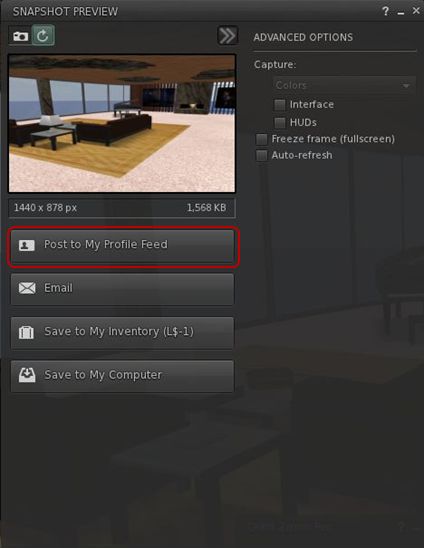
Viewer 3 has had a release slipped out. Version 3.2.4.246439, dated December 8th, brings with it the long-awaited (for those not using a recent TPV or either the Beta or Development versions) updated snapshot floater, allowing you to send snapshots directly to your web profiles feed.

I’d actually missed this release, if it did surface around the 8th, which is a little ironic, as I’ve been trying to keep a weather eye on Viewer 3 updates, but admittedly have had my attention elsewhere in the run-up to Christmas and also trying to put a few upcoming blog posts in order as well.

Installer loses Viewer number

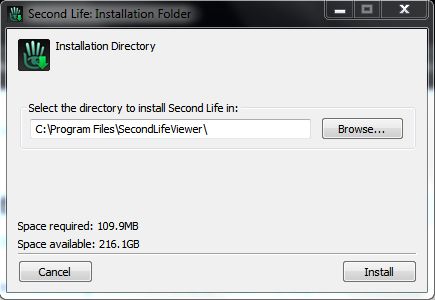
Another change that should make Tateru a little happier 🙂 – is that the installer now simply calls the Viewer the “SecondLifeViewer” (on Windows at least, I can’t speak for other O/s versions of the Viewer) and installs into a folder of that name – the version number is now gone. I can’t speak for the issues on disconnects or those of grpahics issues, but I am assuming it has the OpenGL fixes included (which would, I believe, roughly fit the release date).

Sadly, the click-to-walk still results in mouse steering being, as we say in England, arse-backwards.

I’ve not looked too deeply at the release for other updates, but those using it should have been prompted to update if running an older version; although (again with Windows release at least), because of the install location name change, you need to uninstall the prior version yourself afterwards.

Snapshot floater makes it to a release version of the Viewer, complete with profile feed option


Viewer 3.x to get a speling cheker

Spelling checkers are something TPV users tend to take for granted; or if you’re a Guardian reader, quite possibly for grunted (sorry, a little English humour….). We’ve been able to bask in the glory of having our misspellings highlighted ready for us to correct (or in some instances, had them auto-corrected, depending on the sophistication of the checker code itself). Those using the official Viewer, however, haven’t been so lucky.

But that is about to change. Enter Storm 83. A year plus old, barely watched or voted upon, and now a coming soon feature. So as Oz comments on the JIRA, “Everyone thank Kitty for volunteering to contribute this feature!” Kitty being Kitty Barnett, who is the assignee for the project, and who has been a prolific contributor to TPV code, including RLV/a.

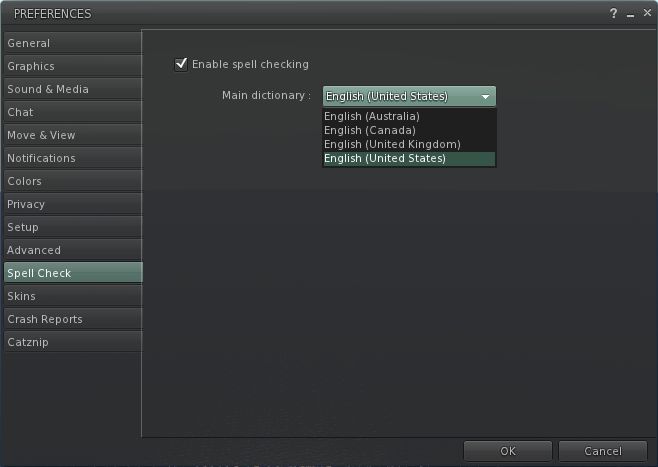
It’s not clear exactly how the feature will be integrated – different TPVs have added it in various tabs within Preferences. However, if we take Kitty’s own Catznip Viewer as a lead (given it is based on Viewer 3), one might hazard a guess and say that rather than being hidden away inside Preferences, as is the case with come TPVs, the Spell Check option will get a tab of its own.

With Catznip the spelling checker is very straightforward: simply tick the check box to enable. American English is the default, but other options are available from a drop-down menu. Spelling errors are then underlined in red in chat, and right-clicking on them will display a nice little menu listing alternatives as well as an option to add the word to a custom dictionary, should you prefer. One suspects the Viewer 3 functionality will be similar.

I’ve no idea whether the dictionary will include the ability to download other language dictionaries, a-la the likes of Phoenix and (shortly) Firestorm. I’ll hopefully take a closer look once the code reaches a Development Viewer or enters the Beta code base.


Viewer 3: further releases

Viewer 3.2 continues with almost weekly releases. The 3.2.1 (244864) release went public of the 15th November brings the release viewer almost up-to-par with things recently seen in the Beta and Development Viewers, namely:

  • Chat translation options – in time for the Google free API end-of-line, although the debate over Bing fees is liable to continue
  • Destination Guide open by default
  • New Neck and Centre attachment points.

However, there is still no revised snapshot floater.

The Viewer also includes a number of crash and performance fixes, together with a bag full of minor bug fixes and corrections.

In the Development branch, the Viewer reaches 3.2.4 (245302). There are no obvious release notes with the Development version (empty wiki page), and no obvious UI updates. I assume the release carries more in the way of bug fixes, etc.

Performance-wise,  the new releases (3.2.1 & 3.2.4) offer something of a performance boost on my usual hardware set-up: Viewer frame rates are constant in the mid-30s when on sims with a handful of others but still falls on its bum when shadows, etc., are enabled (to roughly 1/2 the frame rates of Firestorm, and roughly 1/3 those of Exodus). This gives rise to noticeable “stutter” when panning the camera particularly.

Both the new release and the latest Development versions continue to run significantly better in Linden Home regions than Firestorm (again on my set-up). I’ve yet to encounter a single disconnect in these regions when using the official Viewer, whereas, as I’ve mentioned, disconnects and crashes are a fact-of-life when running Firestorm in many of these regions. Frame rates for the 3.2.1 while in Linden Home regions were also significantly better than with the 3.2.0 release of the viewer – 18-20 fps, rather than single digits sitting around the 3-5 fps mark.

I’m not sure where the OpenGL fixes stand – it is hard to get along to Viewer meetings; there is a “dedicated” development stream for fixes to this issue, but I have no idea if these fixes are making their way back to the main Development -> Beta -> Release flow.

The Viewer installer and executable still have yet to be corrected: as far they are concerned, people are still installing and running “Viewer 2”. Tateru Nino raised this point recently (and tbh, I hadn’t actually noticed until she did). I don’t find it an irritant myself, but it is mildly amusing.

The mouse movement / click-to-move reversal is still there however. For those unfamiliar with the problem: up until now (unless using the Basic Viewer mode), you could steer your avatar using the forward / back keys and by pressing and holding the left mouse button with the pointer over your avatar; moving the mouse left / right would move your avatar in the appropriate direction.

With SINGLE CLICK ON LAND set to MOVE TO CLICKED POINT sees this reversed – move the mouse to the right, and your avatar moves left.  There’s a JIRA out to request a fix to issue.

Beta-wise, no changes have been made, and the release number remains as per last week.

Overall, 3.2.4 (Development) looks pretty stable, fast and comfortable to use. As I’m not affected by the OpenGL issue, I’m completely unable to comment on how it fairs on impacted graphics cards, and will have to leave that up to someone else. Otherwise, and pending the official release of the OpenGL fixes, these releases may indicate the “radical” element of the Viewer UI change is coming to an end, and it’ll be more a case of polishing things in terms of small enhancements and bug fixes.

And on that subject, if anyone from LL is still reading this blog – there are a few JIRAs on the new UI besides the one linked to above. You might want to point your colleagues towards :).