SL projects update week 17 (1): Server releases, SSB/A, particles

Server Deployments – Week 17

SLS Main Channel

On Tuesday 23rd April, the SLS Main channel received the update package deployed to the three Release Candidate channels in week 16, primarily comprising the new server-side LSL Animation Override capabilities, complete with a fix for BUG 2164, wherein the new capabilities could conflict with built-in animation poses in chairs, etc., as discussed in my week 15 updates.  This deployment additionally includes the slight region performance improvement when there are no pathfinding characters present. Release notes are available.

Release Candidate Channels

On Wednesday 24th April, the RC channels should receive the following updates:

  • BlueSteel and LeTigre: should gain a new project which brings preliminary server-side support for experience permissions – release notes
  • Magnum: should gain a new server maintenance project.  This update brings some new minor features to LSL, and fixes some crash modes – release notes

So the long-awaited experience tools / advanced content creation tools permissioning system looks to be finally on its way, a little under a year since an exploit caused them to be withdrawn after their initial deployment.

Viewer Updates

Development Viewer Updates

The SL development viewer has been through a rapid series of updates over the last few days of week 16 and the start of week 17, with version 3.5.2.2744 released on Monday April 22nd. While release notes are not available, it is thought it includes (among other things), the fix for music stuttering every few seconds when using FMOD EX, as submitted to LL by Latif Khalifa  (see OPEN-173).

Particle Project Viewer Soon (?)

It appears a new particle project viewer may be on the horizon in the near future. If it does appear, it is likely to be primarily aimed at testing a new capability to help deal with griefing attacks which use particle emitters. Speaking at the Simulator User Group meeting, Simon Linden said:

We’re doing some testing and may get a project viewer out, which would allow you to test it and (I believe) let other viewers check out the source code. This is right-click on a particle, and it kills the generator … We’ve tossed around a few ideas about blocking particles in other ways but definitely want to get these first steps out the door.

This sparked further discussion on ways and means to help stop particle griefing, which has been on the increase across the Mainland of late. However, given that particles are a viewer-side effect, “stopping” them is actually easier said than done from a server-side perspective. One idea which gained some interest, if it is feasible, would be a block of any particle emitters belonging to an avatar banned from a region / parcel.

In the meantime there are means of stopping the viewer from rendering all particles – such as CTRL – Alt – Shift – +, or going to Preferences > Graphics > and dropping the Particle Count slider to zero. These again only work in your own world view, and while not always ideal, do present an option.

Asked if such a particle project viewer might include the new LSL particle capabilities already deployed server-side, Simon could only say, “Hopefully yes … I’ve been working on getting that chunk of code solid for the last few days. Unfortunately it’s pretty easy to crash at this point and so it’s not ready for consumption.”

The particle ribbon effect  is a particle which repeats the texture horizontally, and can follow the object creating them, which offers a lot of potential uses, as which forms a part of the new particle capabilities – soon to be seen within a project viewer? – Time will tell.

Server-side Baking / Appearance

The viewer-side code for SSB/A is starting to appear in more TPVs:

  • Cool Viewer has had SSB/A support in the “Experimental” branch for a while, and this moved to the “Stable” and “Legacy” versions on April 20th – see the Cool VL website and release notes
  • Singularity released version 1.8.0 with SSB/A support on April 21st, which I’ve reviewed
  • Firestorm released version 4.4.0 with SSB/A support on April 22nd, which I’ve reviewed
  • Kukua has had an experimental / development version since the start of April (version 3.5.1) which also incorporates SSB/A.

The status of the SL beta viewer with the SSB/A code will take place around the middle of week 17, when a decision taken as to whether to incorporate the code into the SL release viewer or run a further beta release. The expectation is that the code will move to the release channel unless a last-minute significant issue is found within the code which prompts a further run in beta.

Assuming the code does make it to the release channel, it is likely that a release viewer will appear early in week 18 rather than late week 17, due to the time required to test and QA a build.

SUN-72 – Fix Submitted

One issue which is known to exist within the current beta release of the SSB/A viewer code and which has caused considerable problems is SUN-72 – if you have inventory items with special characters (including the likes of asterisks) in their names, they will fail to load. Similarly the use of accented characters (e.g. such as René) in things like chat log path names, the logs are not saved.

Nicky Dasmijn of the Firestorm team developed a patch for this specific problem which is already incorporated into the recent Firestorm 4.4.0 release, and which has been contributed to, and accepted by, the Lab for integration into the SSB viewer code. Hopefully, it should be appearing in the next SSB viewer release, whether beta of SL release viewer.

Sun-38 – Avatar / z-offset

As noted in my last major update on SSB/A, the ability to offset an avatar’s height on-the-fly to accommodate various animations (e.g. kneeling), or to adjust an avatar’s height when sitting / walking of floors, etc., and which will effectively be “broken” as reported in  SUN-38, remains an issue for many.

While the Lab have produced an alternative approach which addresses some issues around avatar height offset using new appearance sliders, and which Nyx Linden and others have been continuing to tweak, there is no solution on the horizon for maintaining any form of on-the-fly adjustment; nor does the proposed solution work with no-mod shapes, as noted when I first  reported on the “fix”.

During the Content Creation User Group meeting on Monday, April 22nd, a request was made for the Lab to not shut-down the existing baking service until such time as  SUN-28 is “solved”, which prompted Nyx to comment:

SUN-38 is not currently considered a blocking issue for our initial release. It’s on our list to investigate, but we don’t have a patch or update immediately. There is a new hover parameter, which should work for attachments that affect your avatar, but the bug reported is also discussing the need to adjust the offset on the fly without changing wearables. Having both the new and the old system enabled is not an option … We are investigating options, but it is not a hard requirement for the initial release.

Continue reading “SL projects update week 17 (1): Server releases, SSB/A, particles”

SL projects updates Week 16 (3): server, viewer, and Aditi summaries

Server Deployments week 16

  • On Tuesday April 16th, the SLS Main channel received Monty Linden’s HTTP updates, which were deployed to BlueSteel and LeTigre in week 15, after having previously been on Magnum for testing – release notes
  • On Wednesday April 17th, the three Release Candidate channels (BlueSteel, LeTigre and Magnum) all received the same package after a planned deployment to BlueSteel and LeTigre had to be abandoned due to scheduling issues. The package deployed included the new server-side LSL Animation Override capabilities, including a fix for BUG-2164 wherein the new capabilities could conflict with built-in animation poses in chairs, etc., as discussed in my week 15 updates. The Magnum release are linked to for reference.

Following the SLS Main channel deployment there were a number of reports of significantly higher ping rates with regions being reported on the deployment thread, which prompted Monty Linden to comment, “There was a significant networking event today that has cleared.  Back to normal at this point…” Other than this, and reports of animation issues, which again may have been the result of server-side work, the deployments appear to have rolled-out smoothly and without significant issue.

SL Viewer Summary

Materials processing: the project viewer gained a further update on April 17th, with the deployment of release 3.5.1.274082, which includes bug fixes and some work on alpha masks. The bug fixes are hard to relate to public MATBUG JIRA items, as they all reference NORSPEC issues, which is LL’s internal materials JIRA reference. A further update to the project viewer is anticipated on either Friday 19th April or Monday, April 22nd.

Materials porject viewer: second update now available, third update to follow soon.
Materials project viewer: second update now available, third update to follow soon.

Server-side Baking / Appearance: speaking at the OpenDev meeting on Wednesday 17th April, Oz Linden indicated that SSB will have at least “one more spin” in the beta viewer before appearing in the SL release viewer. A further update was made to the SL development viewer (3.5.2.274273) on Thursday April 18th, so the beta update is liable to be appearing very shortly.

Further viewer updates: once SSB moves to the release viewer, it is likely that the FMODex update will move into the beta viewer; this should also include a fix for the issue with the Mac version of the viewer wherein it crashes whenever headphones are unplugged (and which, incidentally, is the most widely reported crash issue with the Firestorm viewer).

Aditi Issues

While Aditi has received attention recently in order to overcome logging-in and inventory issues, it still as a way to go before everything is “fixed”. Commenting on this at the Beta Server meeting on April 18th, Monty Linden commented, “[The] beta grid is going to get some attention in the login/inv area. But [I] don’t have a date. The problems are (mostly) understood.”

The password-change-to-update-your-Aditi-inventory might be changing as things are looked at and further updated / corrected. Commenting on this at the Beta Server meeting as well, Simon Linden said, “That trigger was done as a quick-and-easy way to stop having to ask a Linden to import your account.”

In discussing the asset system and inventories, Simon re-iterated that while there is a central asset system, it is really one very large storage system, and that, “The real magic isn’t the asset system, it’s your inventory database. Your inventory is what says which assets are yours.” It is syncing the inventory databases between Aditi and Agni which had become an issue, and also somewhat labour-intensive for LL but for the password change trigger.

Monty, with tongue firmly in cheek, suggested an alternative as to how the inventory / asset system works: “Inventory is recorded onto Post-ItTM notes and optically scanned at rez time.” Which, on reflection, is likely to confirm suspicions many have had!

Other Items in brief

Monty Linden
Monty Linden

HTTP Work

The next round of HTTP work is still being defined within the Lab. When asked what this might comprise, Monty replied, “Mesh download is going to get attention. It currently shotguns our services without really performing well.”

He went on, “Might do an experiment or two with pipelining. – but no promises, still setting priorities.”

It is the last remark which is important: things are still being decided in terms of further work and priorities where HTTP work is concerned. This was further underlined again by Monty when he indicated that “phase 3” of the work (the immediate follow-on to the last block of work) may well be “all viewer-side”, given that the initial work (texture fetching) was primarily viewer-side work and the last batch of work was exclusively server-side. So this appears to be a case of wait and see which route he and the Lab opt to take.

Advanced Creation Tools Permissions

July saw the launch of the first phase of the Advanced Creation Tools, also referred to as experience tools. Following problems with an initial deployment of the tools in June, which resulted them being exploited as a means of griefing, the “first phase” of the release saw the tools implemented with existing permissions system in place, with the intention of updating the permissions system to allow the tools to be more fully used “in the future”. Work on the new permissions system was stalled for a number of months, but has recently been getting more attention and work. The current situation appears to be that the permissions system may well be ready, but those working on the project are still, “sorting out how and when that’s going to be made available.”

Diagonal Region Rendering Issues

While fixes have been deployed to assist with issues with regions sometimes taking a long time to correctly handshake and cache with one another following a restart, this issue of regions which are diagonally opposite one another sometimes failing to render remains. Simon Linden had indicated that a potential fix for this issue was with QA as long ago as week 8; however it appears that the work may have hit problems or actually be stalled. In replying to a comment on the forum deployment thread relating to the issue, Maestro Linden replied with a simple, “Correct, that bug has not been fixed”.

No fix yet; status unclear


SL projects update week 16 (1): SL viewer, materials, SSB and other bits

SL Viewer Updates

There’s no movement on the release viewer, and likely won’t be until Server-side Baking moves to it, having finally arrived in the Beta viewer on April 12th (see below). The Development viewer was also updated on April 12th, with the release of version 3.5.2.273873, which includes both SSB and CHUI updates.

Materials Project

An update to the materials processing project viewer was released on Friday April 12th – 3.5.1.273855 – with a series of bug fixes included in it. There are further updates on the way, with the next release due around the middle of week 16, which will have further bug fixes and, hopefully, some Alpha mode updates as well. Commenting on the latter at the Content Creation User Group on Monday April 15th, Geenz Spad said, “Actually just got normal maps working on alpha blended objects, and trying to get everything else working on them as well.”

One fix currently pending is that for MATBUG-16, Changing one material, or setting causes another material texture to be lost. This is an issue which can happen as a result of several factors. For example, setting a normal or specular map for one face of an object can result in maps already applied to other faces of an object either being removed or replaced with the most recently added map. The same issue can occur when applying a setting such as glossiness to one face of an object using materials.

MATBUG-16 demonstrated using 2 deiffuse maps and their associated normal maps. (l) the prim with a diffuse map added to one face & with the "stone" normal map still showing for all faces. (r) the normal map add
MATBUG-16 demonstrated using 2 diffuse maps and their associated normal maps. A prim previously set with a stone diffuse map and associated normal map has a green diffuse map applied to one face – the normal map is unaffected (l). However, when the normal map is updated, it changes for the entire prim (r)

This problem doesn’t happen every time mixed materials elements are used on object faces, but can occur when adding multiple materials elements to an object in quick succession. “There are a couple of problems there,” Oz Linden said while discussing the problem at the Open-source Dev meeting on Monday, April 15th. “The updates to the server are happening faster than it will allow, which is one problem. The other is that the updates are not applied locally as smoothly as they should be.”

Tonya Souther, who re-worked the Build floater for materials processing added, “Yeah, that bug has been driving me batty ever since I first did the UI. And I think that’s due to the design of the system…the UI has to ask the server for the material separately, and apply the values retrieved from it to the UI components when they arrive. That ‘s the only way that the UI won’t get out of sync with the actual values stored on the server … I just need to find a way to make the delay not apparent to the user and handle changes that come along in that period.”

For now, the answer seems to be that if you experience any issues with normal / specular maps vanishing or being replaced when using multiple maps / effects across different faces of an object, then allow a short pause between adding the various maps / effects so the viewer and server can keep pace with your work.

Elsewhere, Geenz Spad, one of the architects of the materials processing system, has started a new blog series on materials, Second Life Materials:  A Content Creator’s Guide. In the first part of the series, he answers the question, What’s a material? In the next installment, he promises to take a look at some of the tools which can be used to create normal maps.

Server-side Baking

The viewer Server-side Baking /Appearance code reached the Beta viewer in week 15 with the release of 3.5.1.273869 on April 12th. The initial stats apparently show it is doing well, crash-wise, but the status of incoming bugs is currently unclear. However, it still looks as if the code is currently on course for around a two-week stint in the beta viewer prior to moving to the release viewer channel.

A key bug fix for the system has been SUN-57, which now allows multiple layer of clothing to be worn / swapped on regions which are not running the SSB server-side code (on Aditi), which removes a potential road block from server-side code deployment (remembering that for a time during the server-side deployment, updated viewers must support both the old and new avatar baking services).

The SUN-57 issue, as defined by Whirly Fizzle: left - Outfit A from her My Outfits folder replaces whatever she was previously wearing, and appears correct; centre - after a relog, she repalces Outfir A with Outfit B, and again, everything appears correct; right - she replaces Outfit B with Outfit A, but her skin fails to bake correctly, the head and legs showing the skin associated with Outfit A, the torso still showing the skin from Outfit B (shown naked for clarity) - images courtesy of Whirly Fizzle / JIRA SUN-57
The SUN-57 issue, as defined by Whirly Fizzle, which saw issues occurring in avatar baking using a viewer supporting the upcoming “new” SSB/A service and changing outfits on a region only supporting the current avatar baking process, which saw outfits and skins failing to update correctly following changes. Reportedly now fixed

There are still no definitive timescales for any Agni deployment for SSB/A. As previously reported in this blog, it is still unlikely that any major deployment operations will commence prior to the SSB cove reaching the release viewer.

Other Items

I recently blogged about Oculus Rift and  speculation as to whether it would see use in Second Life. On April 7th, Jon Brouchoud blogged on why SL would be a “killer app” for the headset – an article which has seen widespread reprinting / referral in SL / Opensim related blogs. While I have no particular opinion either way as to Oculus Rift / Second life (although how it will work with the SL UI does intrigue me), I have to admit the following video demonstrating Oculus Rift had me smiling from ear-to-ear. It’s not really related to Second Life, but it is well-worth watching.

SL projects update week 15 (1): Server and viewer; materials and land impact

Upate April 10th: The BlueSteel / LeTigre package did not deploy as planned due to problems getting the updates completed in time. The Magnum package therefore deployed to all three RC channels.

Server Deployments Week 15

Second Life Server (Main) Channel

There was no planned deployment to the Main channel on Tuesday April 9th. The next scheduled deployment will be in week 16 (week commencing Monday April 15th). This was because there were bugs found in both of the RC releases from week 14 which the Lab wanted to resolve rather than having them propagate across the grid.

Release Candidate Channels

All three Release Candidate channels remain on the same releases as week 14, the only updates to be deployed on Wednesday April 10th being:

  • BlueSteel and LeTigre (currently running the new server-side AO capabilities) – should receive  a design change to improve compatibility between the new animation override system and other scripted objects that animate avatars (such as poseballs). This may be in response to a JIRA – BUG-2164 – being raised in relation to conflicts between the new AO capabilities and poseball systems
  • Magnum (currently running Monty Linden’s HTTP updates) – should receive a fix to correct a crash mode.

As always, there is a forum discussion thread for the week’s deployments.

SL Viewer Updates

CHUI – Communications Hub User Interface – Flickering Issue

The CHUI merge with the SL release viewer has brought with it an increase in the ATI/AMD issue of clickable links in the viewer’s UI flickering when anti-aliasing is enabled (BUG-1560, relating specifically to cards running the 12.10 (or later) Catalyst). This tends to happen with links in the chat window, but may also affect the selection box surrounding items in the inventory floater.

Those encountering the problem should consider raising a bug report.

Materials Processing – Land Impact

The most notable update to the SL viewer has been the release of a project viewer for materials processing. The viewer is available on the SL wiki Alternate Viewer page, and the code is available on Bitbucket. However, due to the work still going into the project, both come with caveats:

  • It is still very fragile
  • It is still subject to change in various ways
  • It should not be used on content you care about – particularly if said content is MODIFY / NO COPY
  • It is not recommended that TPVs integrate the code into their release viewer at the moment due to the fact the code will be changing (and there is not SSB merge as yet).

The release of the viewer has also brought with it something of a concern.

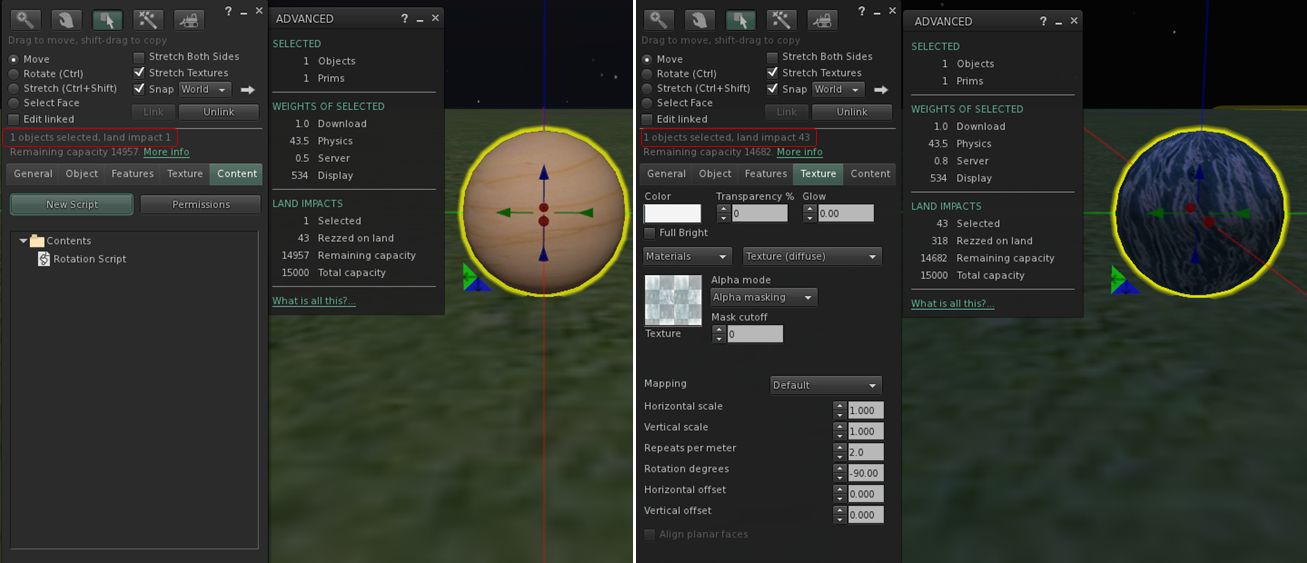
Qie Niangao has been carrying out further tests with the Materials Processing project viewer, and has come up with evidence that aspects of the material system can result in objects experiencing sudden (and potentially large) Land Impact value changes. Specifically use of the Alpha Masking and Emissive Mask options when working with alphas can have unexpected results – which is not to say that the result are not unexpected behaviour from LL’s perspective.

Qie describes his discovery in MATBUG-13, is which he offers the following exercise:

  1. Create a sphere. Hollow it 95%. Add a simple rotation script.
  2. Set the Alpha Mode to Alpha masking. Note that the land impact is now 43. “More info” shows the extra weight attributed to Physics.
Using the Alpha Masking and Emissive Mask Alpha Mode options with tortured prims (in this case a hollow sphere) into the "new" LI accounting system
Using the Alpha Masking and Emissive Mask Alpha Mode options with tortured prims (in this case a hollow sphere) can lead to a inflation of LI for an object

Qie goes on to note that cutting or squashing such an object can have an even more dramatic impact (path cutting the sphere in half, for example, can push LI to 1348, while squashing it almost flat can lead to an LI of 154).

Commenting on the JIRA, Maestro Linden notes:

This is expected behavior. When a material is added to an object, it is enrolled in new prim accounting. A 50cm, 95% hollow sphere has 43.5 physics cost when using a ‘prim’ physics representation. This high cost is caused by the high complexity physics shape. See https://wiki.secondlife.com/wiki/Physics_Optimization for a guide about how to reduce physics cost.

It is interesting to note, however that the same prim using Alpha Blending retains the same physic cost, but only generates a LI of 1. As Alpha Blending is essentially the way alpha layers are currently handled by the system at the moment, Qie’s theory – which I agree with – is that the existing system as been somehow “grandfathered-in” to the LI accounting system.

Continue reading “SL projects update week 15 (1): Server and viewer; materials and land impact”

Materials project viewer released

Update: subsequent to this article being published, the Lab issued their own blog post on the new project viewer.

Linden Lab released a project viewer for materials processing on Monday April 8th, to go with the server-side support already released.


Materials Processing video demonstration

This is very much an “alpha” status viewer, and as such comes with a series of caveats, including:

  • The viewer is still very fragile
  • It is still subject to change in various ways
  • It should not be used on content you care about – particularly if said content is MODIFY / NO COPY.

As Oz Linden wryly commented at the Open-source Dev meeting where the release was announced, “Regular attendees may notice some small changes in my raft…. I had to reconstruct it because I messed it up playing with this viewer (mostly my fault).” So, if you plan to download and play with the viewer, be warned!

For information on the materials project, please read my overview.

The download itself is available on the Lab’s Alternate Viewers wiki page.

Related Links

SL projects update week 14 (3): Viewer releases, server-side AO

Server Deployments – week 14

On Tuesday April 2nd, the Second Life Server (SLS or Main) channel received the interest list update which has been running on the Magnum RC channel for weeks 12-13, together with fixes for the following issues:

  • BUG-1779 – Updates for objects that are out of view are delayed for a maximum of 5 seconds, at which point they will be sent
  • BUG-1795 – “Agent appears in incorrect position to other agents after being moved by a sim teleporter”
  • BUG-1814 – “No object updates from vehicles after some region crossings” – yes, the vehicle region crossing bug fix reaches the Main channel (and should be on BlueSteel and LeTigre following the RC deployments on Wednesday 3rd April).

Deployment release notes.

On Wednesday April 3rd, the Release Candidate (RC) channels received the following updates:

  • BlueSteel and LeTigre received the same package as week 13, which includes the new Animation Override LSL capabilities together with the following:
    • The changes deployed to the Main channel on Tuesday April 2nd
    • A fix for BUG-2134 – “Avatar pre-jump is sporadic”
    • Release notes are available (BlueSteel link)
  • Magnum received Monty Linden’s new server-side HTTP updates – release notes.

SL Viewer

There has been some activity within the various viewer channels, and the promise of more to come.

The Communications Hub User Interface (CHUI)

CHUI has now reached the  viewer release channel with LL issuing viewer 3.5.0.273444. This release includes both the new CHUI UI for conversations, etc., as well as a lot of additional refactoring of code. A blog post has accompanied the launch, complete with Torley’s original video on the interface.

Server-side Baking Viewer Code

The viewer-side code for Server-side Baking / Appearance (SSB) reached the SL development viewer with the release of version 3.5.1.273529. With CHUI now in the release viewer, SSB should also be appearing in the SL beta viewer view shortly.

Materials Processing

“Materials is actually making great progress,” Oz Linden reported at the Open-source Dev meeting on Wednesday April 3rd. He went on to say the latest work on the code is showing promise and was due to go to LL’s QA department. If things go well with QA, it is possible that a project viewer could finally be emerging from the darkness. However, as Oz again warned this will only happen when, “We’re confident that 1) it won’t do any serious harm, and 2) it’s not so terrible that it’ll give the project a black eye.”

Nevertheless, things are moving.

Server-side Animation Override Capabilities

New server-side AO capabilities coming soon
New server-side AO capabilities: LSL functions now being deployed to main grid

While the new Animation Override LSL capabilities have only just rolled-out BlueSteel and LeTigre, the server has actually supported overriding animations for over a year; it has just lacked the required LSL functions and some bug fixes. This means that if you use the new capabilities on either BlueSteel or LeTigre, any animations you set will continue to work across the entire grid until you log out.

In noting this at the Server Beta user group meeting on Thursday April 4th, Kelly Linden went on to say:

The new override functions do not allow setting by UUID. My original version (well over a year old) set by integer constants. However there was some desire internally to make the system more flexible, to allow for different states or modifying the state machine diagram, and for that string constants were used. Right now those string constants are converted to integer constants for use in the existing internal state machine.

In other words, the system allows animations to be specified by name (string constant), making the capability somewhat more user-friendly than might have been the case has UUIDs for animations been required. The the string constants are converted to integers for handling by the server’s state machine (the “engine” for animations on the server-side) means that it should be possible for the state machine to be updated in the future without potentially breaking content using the capabilities.

In answering a question on the lack of support for animations such as idling and typing, Kelly again explained that some animation types are not supported by the state engine. These are either handled within the viewer (idling) or elsewhere in server (typing), as such they fall outside the new AO capabilities. Swimming is also excluded, although Kelly couldn’t remember if that is handled viewer-side or elsewhere in the server.

HTTP Updates

Monty Linden’s ongoing HTTP work reached the Magnum RC channel. For those interested in monitoring SL’s port usage, Monty provided a quick summary in response to a question on texture fetches posted to the deployment thread:

The Texture Console speaks truth for texture fetches, either http or udp.  If that is quiet while this transport is going on, it’s something else …. and here are some rules that will determine the traffic:

  • Port 12046 but textures are quiet => mesh fetches
  • Port 12043 (corrected, was 12042) => other HTTP services (“Capabilities”)
  • UDP port 12035, 13000-130XX => simulator communications

Related Links