SL project updates 16 23/1: Server, viewer, TLS 1.2

Gates of Melancholy; Inara Pey, June 2016, on Flickr Gates of Melancholyblog post

Server Deployments

As usual, please refer to the server deployment thread for the latest information.

  • On Tuesday, June 7th, the Main (SLS) channel was updated with the same server maintenance package, comprising the addition of mnemonic names to be used in LSL scripts when attaching to the new attachment points on the Bento skeleton extensions and minor internal changes
  • On Wednesday, June 8th, all three RCs should be updated with a new server maintenance package comprising “minor internal changes”.

SL Viewer

There have been a number of viewer updates and appearances in the various viewer channels.

Maintenance RC Viewer

The Maintenance RC viewer was updated to version 4.0.6.315924, on June 2nd. The update includes a series of additional fixes and a more descriptive set of release notes to describe the changes.   In particular, there are a new series of fixes for the recent release of the Avatar complexity / Graphics Presets viewer release, comprising:

  • A fix for some cases of invisible avatars due to JellyDolls feature.
  • A fix for the Appearance update being broken due to COF version getting out of synch. It will now be … *nsync.
  • A change so that Invisiprims are now preloaded and will remain transparent, not grey or black.
  • The Maximum Complexity setting will be set to recommended setting on first run. A Default preset will be added based on recommended settings, but not applied, so your current graphics settings are unaffected.
  • A “Show original” menu item has been added to the Appearance/Wearing tab.
  • A fix for an unhandled error when deleting empty list of graphics presets.

For the full list of updates, please refer to the release notes.

VLC Media Plugin Project Viewer

Released on June 3rd, the VLC Media Plugin viewer, version 4.0.6.316087, sees the Quicktime for Windows media plugin for the playback of media types such as MP3 MPEG-4 and MOV, replaced by one based on LibVLC (https://wiki.videolan.org/LibVLC/).

Note that is change is for Windows only at present, and is due to Apple discontinuing QuickTime for Windows support, leaving vulnerabilities within it.

Currently the Mac version of the viewer is unaffected, as Apple still support QuickTime on that platform. However, it will be updated to use LibVLC in the upcoming 64-bit versions of the official viewer.

Visual Outfits Browser Project Viewer

The Visual Outfits Browser (VOB) project viewer, version 4.0.6.316123 appeared on June 6th. Simply put, it allows you to use the Appearance floater to capture / upload / select images of your outfits and save them against the outfits in a new Outfit Gallery tab within the floater. See my overview of the viewer for further details.

Remaining Viewers

All other viewers currently remain unchanged from week #22:

  • Current Release version: 4.0.5.315117, dated May 11th, promoted  May 18th, and formerly the Quick Graphics RC viewer
  • Inventory Message Viewer, version 4.0.6.315555, dated May 23rd – removal of deprecated and unused UDP inventory messaging mechanisms from the viewer
  • Project Bento (avatar skeleton extensions), version 5.0.0.315657, dated May 26th – includes the “reset Skeleton” option and additional slider updates
  • Oculus Rift project viewer, version 3.7.18.295296, dated October 13, 2014 – Oculus Rift DK2 support
  • Obsolete Platform viewer, version 3.7.28.300847, dated May 8th, 2015 – provided for users on Windows XP and OS X versions below 10.7.

There is an update in progress for the Oculus Rift viewer, but no time frame on when that might appear. Currently, both it and the Obsolete Platform viewer are TLS 1.2 compliant (see below), so it will be interesting to see what happens with them both over the coming few weeks.

TLS 1.2

Linden Lab has issued a further reminder that as from June 15th, all Second Life users must be using a viewer and / or web browser that supports TLS 1.2 in order to make use of the Second Life WEB cashier services for L$ transactions (e.g. to send, receive, or exchange L$).

Actively maintained web browsers and viewers (official and TPV) should support TLS 1.2. However, older versions of third-party viewers and those viewers which have not been updated in recently, may not support it.  Users are therefore advised to visit https://www.howsmyssl.com/ with their browser and, if they are using an older version of a viewer, the viewer’s internal web browser, to check whether their browser / viewer supports TLS 1.2.
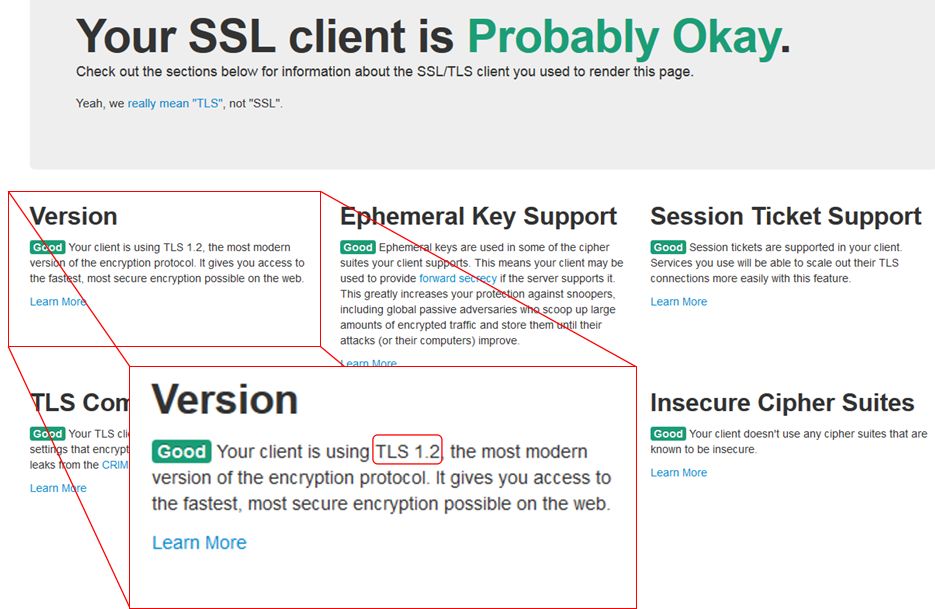
Use How's My SSL? to confirm whether the versions of the web browser and SL viewer you are using are TLS 1.2 compliant.
The Version notification in the top left of the How’s My SSL? web page will indicate whether your web browser and / or viewer (via its built-in web browser) is TLS 1.2 compliant.

As has been previously noted, this isn’t an arbitrary change on the part of the Lab. It is in response to an ongoing  set of regulatory / compliance requirements (as explained by the PCI Security Standards Council) which are global in scope.

Visual Outfits Browser and VLC Media project viewers

secondlifeThe Lab has recently released two new project viewers, the VLC Media Plugin viewer,and the Visual Outfits Browser viewer.

As they are both project viewers, they are not in the viewer release channel, and must be manually downloaded and installed via the Lab’s Alternate Viewers wiki page. Also, as they are project viewers, they are subject to change (including change based on feedback), and may be buggy.

The following notes are intended to provide a brief overview of both. Should you decide to download and test either, please do file JIRAs against any reproduceable issues / bugs with them, please do file a JIRA, giving as much information, including the info from Help > About Second Life and any log files which you feel may be relevant.

Visual Outfits Browser

The Visual Outfits Browser (VOB) viewer,  version 4.0.6.316123, appeared on Monday, June 6th. Simply put, it allows you to use the Appearance floater to capture / upload / select images of your outfits and save them against the outfits in a new Outfit Gallery tab within the floater.

Creating outfit thumbnails
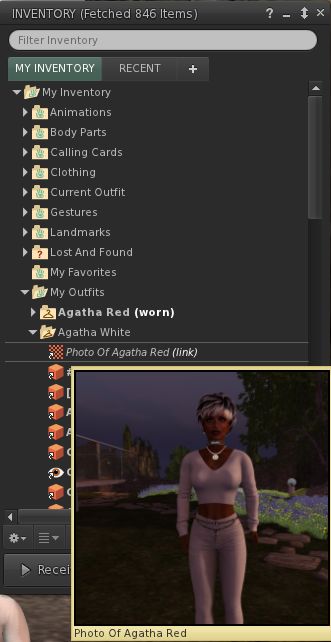
The new Outfit Gallery tab in the Visual Outfit Browser allows you to create photos of any outfits saved to My Outfits as thumbnails. You can then use the Appearance floater to scan your outfits to decide what to wear, and use the context menu to wear the one you want

The new Outfits Gallery tab (right-click your avatar > select My Appearance > Outfits Gallery) should display all of your created outfits as a series of folder icons, each one displaying the name of the outfit beneath it. You can replace these icons with an image of the outfit in one of three ways:

  • You can wear the outfit, then right-click on its associated folder icon and select Take a Snapshot (shown above left). This will open the snapshot floater with save to inventory selected by default, allowing you to photograph yourself wearing the outfit and upload the image to SL, where it automatically replaces the folder icon for the outfit
  • You can use Upload Photo to upload an image of the outfit your previously saved to your hard drive, and have it replace the folder icon
  • You can use Select Photo to select an image previously saved to your inventory, and use that to replace the folder icon for the outfit.

When using the capability there are a number of points to keep in mind:

  • Both the Take a Snapshot and the Upload Photo options will incur the L$10 upload fee, with the images themselves saved in your Textures folder
  • In all three cases, link to the original images are placed in the outfit folder
  • This approach only works for outfits you’ve created using the Appearance floater / the Outfits tab. It doesn’t work for any other folders where you might have outfits – such is the Clothing folder.

VVOB-2Feedback

How useful people find this is open to debate; I actually don’t use the Outfits capability in the viewer as I find it clumsy and inefficient for my needs. However, it would seem that pointing people towards the appearance floater in order to preview outfits, when most of us tend to work from within our inventories, would seem to be somewhat counter-intuitive.

As such, it’s hard to fathom why the Lab didn’t elect to include something akin to Catznip’s texture preview capability within the VOB functionality. This allows a user to open their Inventory and simply hover their mouse over a texture / image to generate a preview of it (as seen on the right).

Offering a similar capability within the VOB viewer would, I’d suggest, offer a far more elegant and flexible means of using the new capability than is currently the case*. Users would have the choice of previewing outfits either via the Outfits Gallery tab in the Appearance floater or from within Inventory.

There are also a number of wardrobe systems available through the Marketplace. While these may require RLV functionality and come at a price, they may still be seen as offering a more flexible approach to managing and previewing outfits. As such, it will be interesting  to see how the VOB capabilities are received by those with very large outfit wardrobes.

VLC Media Plugin Viewer

As Apple recently announced they are no longer supporting QuickTime for Windows and will not be offering security updates for it, going forwards, the Lab is looking to remove all reliance on the QuickTime media plugin, which is used to play back media type likes MP3, MPEG-4 and MOV, from its viewer, and replace it with LibVLC (https://wiki.videolan.org/LibVLC/).

This project viewer – version 4.0.6.316087 at the time of writing – replaces QuickTime with LibVLC support for the Windows version of the viewer only. The OS X viewer is currently unchanged, as Apple are continuing to support QuickTime on that OS. However, the Lab note that they will eventually also move the OS X version of the viewer to use LibVLC as their 64-bit versions of the viewer start to appear, as the QuickTime APIs are Carbon and not available as 64bit.

*I’ve been informed, and hadn’t appreciated, that this approach can be graphics memory intensive – see FIRE-933.

SL project updates 16 22/1: server, viewer

{Ville Par La Mer} / Royaume de Versailles; Inara Pey, May 2016, on Flickr {Ville Par La Mer} / Royaume de Versaillesblog post

Server Deployments

As always, for the latest information, please refer to the server deployment thread.

  • On Tuesday, May 31st, the Main (SLS) channel was updated with the same server maintenance package previously deployed to all three RC channels, which included a server crash fix.
  • On Wednesday, June 1st, all the RC channels should be updated with a new server maintenance package, comprising the addition of mnemonic names to be used in LSL scripts when attaching to the new attachment points on the Bento skeleton extensions and minor internal changes.

SL Viewer

There have been no changes to any of the viewer channels so far this week, leaving things as per the end of week #21:

  • Current Release viewer, version 4.0.5.315117 (dated May 11), promoted May 18th – formerly the Quick Graphics RC viewer download page, release notes
  • RC viewers:
    • Maintenance RC viewer, version 4.0.6.315551, dated May 23rd – a modest but useful set of 24 fixes and updates to the viewer
    • Inventory Message RC viewer, version 4.0.6.315555, dated May 23rd – removal of deprecated and unused UDP inventory messaging mechanisms from the viewer
  • Project viewers:
    • Project Bento (avatar skeleton extensions), version 5.0.0.315657, dated May 26th – this build includes the “reset Skeleton” option and additional slider updates
    • Oculus Rift project viewer, version 3.7.18.295296, dated October 13th, 2014 – Oculus Rift DK2 support
  • Obsolete platform viewer version 3.7.28.300847 dated May 8, 2015 – provided for users on Windows XP and OS X versions below 10.7.

Project Bento

As anticipated, Project Bento, the avatar skeleton enhancements project, was deployed to the main grid to mark the start of more widespread testing, on Tuesday, May 31st. You can find out more via the following posts:

SL project updates 16 21/2: server, viewer, Bento

Frisland; Inara Pey, May 2016, on FlickrFrislandblog post

Server Deployments Week #21 – Recap

As always, please refer to the server deployment thread for the latest information and updates.

There was a fast-tracked security update deployed to the LeTigre RC channel on Friday, May 20th. This update was also deployed as a server maintenance package to the Main (SLS) channel on Tuesday, May 24th.

On Wednesday, May 25th, all three RC channels were updated with a server maintenance package which combines the security update plus a new crash fix.

The security patch was apparently a precautionary measure, rather than a response to an actual exploit

Week #22 Deployments

The current RC update should move to the Main grid on Tuesday, May 31st, and the RCs should all receive a new package comprising:

  • A fix for BUG-10979 [Bento] Scripted attachments attached to the new enhanced skeleton attachment points show as worn on “Invalid Attachment Point” in the script limits floater
  • More checks for per-agent script limit
  • Internal improvements.

More news on these last two to follow.

Project Bento

As noted in my Project Bento update, the plan is for the back-end of Project Bento to be enabled on the main grid during week #22, most likely on Tuesday, May 31st. This will allow content making use of the Bento extensions to the avatar skeleton to be uploaded to the main grid. However, Bento content requires viewer-side updates in order to render correctly. Currently these are restricted to the Bento Project viewer and those TPVs which have adopted the Bento code ahead of the curve.

This also doesn’t mark the end of the Bento project; at this point, enabling Bento on Agni, is to expose the capabilities to a wider audience of content creators and allow broader testing.

Bento Viewer

The Bento Project viewer updated to version 5.0.0.315657 on Thursday, May 26th. This version includes the following significant updates:

reset skeletionA “Reset Skeleton” option, intended to fix cases where an avatar is distorted in your world view as a result of incorrectly applied joint updates. For example, a non-human avatar may show as “crunched up” because it is still in a human pose. Note that this option should also work for non-Bento avatars when become deformed as a result of swapping shapes / forms / animations as well.

Right-clicking on the affected avatar (your own or another) and selecting Reset Skeleton from the avatar context menu should correct the avatar’s appearance in your view. As this is a viewer-side update, it will not affect how anyone else sees the affected avatar until they use Reset Skeleton. The Lab has requested feedback on the capability if it fails to work as intended.

The viewer also includes a few late-breaking changes to the slider support for mesh avatars, including jaw shape and head shape. Sliders that affect the scale of mPelvis now also alter mHindLimbsRoot, to better keep the front and hind legs synced up.

SL Viewer

Other than the Project Bento viewer update, the list for official viewers remains as per the first part of this report.


SL project updates 16 21/1: server, viewer

Holly Kai Park: picnic area
Holly Kai Park: picnic area – blog post

Server Deployments Week #21

As always, please refer to the server deployment thread for the latest information and updates.

There was a fast-tracked security update deployed to the LeTigre RC channel on Friday, May 20th. This update was also deployed as a server maintenance package to the Main (SLS) channel on Tuesday, May 24th.

On Wednesday, May 25th, all three RC channels will be updated with a server maintenance package which combines the security update plus a new crash fix.

SL Viewer

A new Maintenance RC viewer entered the release channel on Monday, May 23rd. Version 4.0.6.315551 includes a modest but useful set of 24 fixes and updates to the viewer.

The Inventory Message RC viewer updated to version 4.0.6.315555 on May 23rd. This viewer sees the removal of deprecated and unused UDP inventory messaging mechanisms from the viewer code. This update sees the RC merged with the Quick Graphics release viewer.

The remaining official viewer remain unchanged from the end of week #20:

  • Project Bento (avatar skeleton extensions), version 5.0.0.314884, dated May 5th – this build contains several updates related to joint offsets and meshes and slider changes
  • Oculus Rift project viewer, version 3.7.18.295296, dated October 13, 2014 – Oculus Rift DK2 support
  • Obsolete platform viewer version 3.7.28.300847 dated May 8, 2015 – provided for users on Windows XP and OS X versions below 10.7.

Other Items

Visual Outfits  Browser

The Visual Outfits Browser viewer, which I last mentioned in February, is still moving forward, and might be approaching either project viewer or RC viewer status. It is designed to provide a means by which users can store and browse images associated with their outfits in inventory, simplifying the act of identifying an outfit prior to wearing it.

Those wishing to build it themselves can do so via the public code repository.

Note this viewer isn’t intended to work like popular RLV-driven wardrobes, where you can browse images of outfit then click on one to wear it; rather it is more of a visual aide-memoire on what he imaged outfits look like.

Aditi Issues

There has been some improvement on Aditi following the issues reported in week #20. BUG-16714 has been resolved, and it is hoped that several other database-related issues have been rectified.

Avatar Complexity and Graphics Presets in Second Life

Avatar Complexity provides users with the adbility to
Avatar Complexity is a means to help people who may suffer from performance issues in crowd areas

On Wednesday, May 18th, Linden Lab promoted the long-awaited Quick Graphics viewer to de facto release status. This viewer includes two important new features:

  • The updated Avatar Complexity settings
  • The ability to create, save and load different groups of graphics settings quickly and easily.

Avatar Complexity

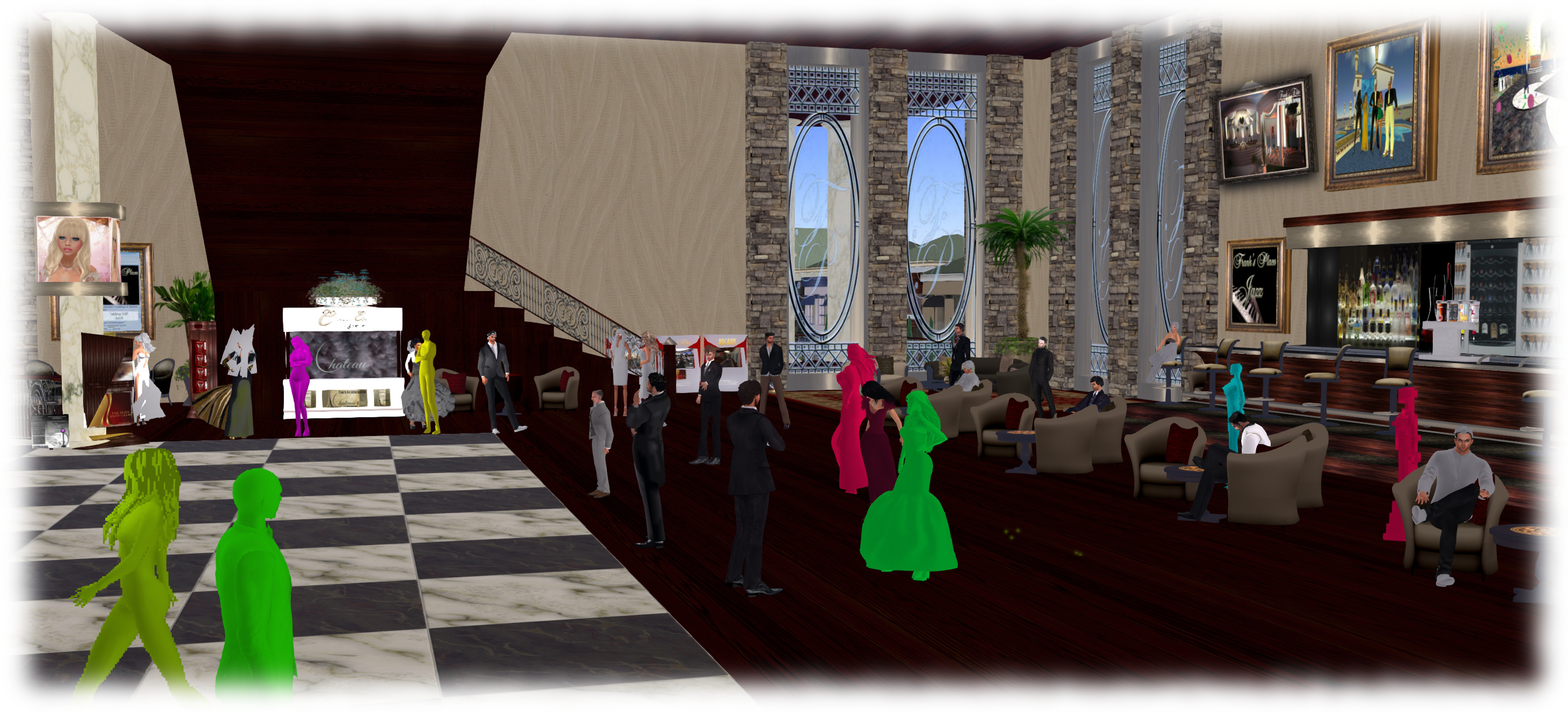
As avatars can often be the single biggest impact on the viewer in terms of rendering, particularly in crowded places, so  Avatar Complexity adds a new slider to the viewer which can be used to set a level above which avatars requiring a lot of processing will appear as a solid colour – the casual term to refer to them being “Jelly Dolls” – greatly reducing the load placed on a system compared to having to render them in detail, so improving performance.

The idea is that you can adjust the setting according to circumstance, so that when in a crowded area with lots of avatars, you can dial down the Avatar Complexity setting, found in Preferences > Graphics (and in the Advanced Settings floater), with the result that more of the avatars around you are rendered as solid colours, reducing the load on your graphics card and system, thus improving performance. Then, in quieter areas, the setting can be dialled back up, allowing more avatars to fully render in your view.

Note: this only applies to other avatars in your world view: your own avatar will always fully render in your view.

The Avatar Maximum Complexity slider sets a threshold on avatar rendering by your viewer. Any avatars in your view exceeding this value will be rendered as a
The Avatar Maximum Complexity slider sets a threshold on avatar rendering by your viewer. Any avatars in your view exceeding this value will be rendered as a “Jelly Doll”, sans attachments

If you have a good system with a high-end graphics car, you can set the value on the slider quite high and thus ensure all avatars render fully for you wherever you are.

Note: You can sett the Avatar Maximum Complexity to “No Limit”. However, this is not entirely recommended. some irritants in Second Life still use worn graphics crashers to overload GPUs and crash the viewer. If you set Avatar Maximum complexity to “No Limit”, then such tools, should you ever encounter an irritant using one, will still be effective; so it’s better to set a reasonable high value, leaving your viewer with a cut-off point which should defeat their efforts in crashing you.

There are a few other points to note with Avatar Complexity:

  • You can opt to always render or to not render avatars around you, regardless of your Avatar Maximum Complexity setting by right-clicking on them and selecting your desired action from the context menu
    You can opt to always render or to not render avatars around you, regardless of your Avatar Maximum Complexity setting by right-clicking on them and selecting your desired action from the context menu

    To help you understand how complex you own avatar is, every time you change your appearance, each time you change the appearance of your avatar, a small notice with your new complexity value will appear in the upper right of your display for a few seconds

  • The complexity value of your avatar is transmitted to each simulator as you travel around Second Life. In return, you’ll get a brief notice in the upper right of your screen telling you approximately how many of those around you are (or are not) rendering you because of your complexity
  • If you have a friend or friend you wish to see fully rendered no matter how low you dial Avatar Maximum Complexity (while out at a club, for example, where it may be beneficial to set a lower complexity threshold), you can right-click on those individuals and select “Render Fully” from the context menu
  • Similarly, and if you prefer, you can selectivity render avatars in your view as grey imposters, by right-clicking on them and selecting “Do Not Render” from the context menu.

Note: Both “Render Fully” and “Do Not Render” will only apply during your current log-in session; the options are not persistent between re-logs.

To help people understand Avatar Complexity, the Lab has produced the following:

  • A blog post to accompany the promotion of the Quick Graphics viewer to release status
  • An Avatar Complexity Knowledge Base article
  • A video tuTORial, which I’ve embedded below.

https://www.youtube.com/watch?v=PxWrqd0o3dc

Continue reading “Avatar Complexity and Graphics Presets in Second Life”