Hands-on: Second Life 360-degree snapshot viewer

Credit: Linden Lab
Credit: Linden Lab

On Wednesday October 26th Linden Lab announced the release of the 360o snapshot viewer, which I’ve had the good fortune to be able to play with for the last week.

The viewer is still very much under development, and has been released as project viewer with a number of caveats against it as development continues. Essentially, it allows you to take a set of images (6 in total) of the location around your camera, and then produce these as a scrollable 360o view – you can see the results in action on this sample page. Just click drag on an image to manually scroll around it.

The viewer is available via the Alternative Viewers wiki page as project viewer, with documentation on the wiki. As noted there are some caveats concerning it, which need to be kept in mind:

  • The 360o capture operates all around your field of view simultaneously. This can lead to conflicts with the viewer’s Interest List, so that objects which may be “behind” your camera position may not be properly rendered, etc. To avoid this, always pan your camera around  (or turn your avatar around if you are taking a picture from your avatar’s position) to completely view the scene and allow things to initially load, before taking a shot.
  • The current viewer saves the resulting image to your local disk as a zip file. You’ll need to set-up your own local web host in order to view them (or if you have your own website, you could set one up there). Again, this will be changing as the project develops
  • However, even in this format, once you are viewing an image, you can download it in a 2:1 aspect ratio suitable for upload to Flickr for sharing with friends and viewing in 360o.

As I’ve covered three of the 360o camera HUDs available in Second Life, I’m offering the rest of this article as a walk-through in using the new viewer and viewing your photos.

Note – these instructions apply to Windows, I don’t have access to a Mac to provide guidelines for that platform.

Setting Your Viewing Environment

Before taking your photos, you’ll need – for the time being at least – to set-up a simply local web server. Callum Linden has made this relatively easy.

  • Download Python from the Python website. You can select to install either Python 3.5.x (latest) or Python 2.7.x (the Lab uses Python 2.7 as a point of reference).
  • When installing Python, make sure you add the installation to your Windows path.
    • If you are installing Python 3.5.x, simply check the box in the installer
    • If you are installing Python 2.7, click the Advanced button in the installer, scroll down the list of customisable options and set Add Python .EXE to Path to Will be installed on local hard drive.
Adding the Python 2.7 EXE to the Windows path
  • Download the Lab’s 360 snapshot web viewer ZIP file from the Lab’s 360 snapshot wiki page.
    • If you are familiar with Mercurial, you can clone the existing web framework via the link given in the wiki page. I found going the ZIP file route easier.
  • Unzip the web viewer files to a location on your hard drive.
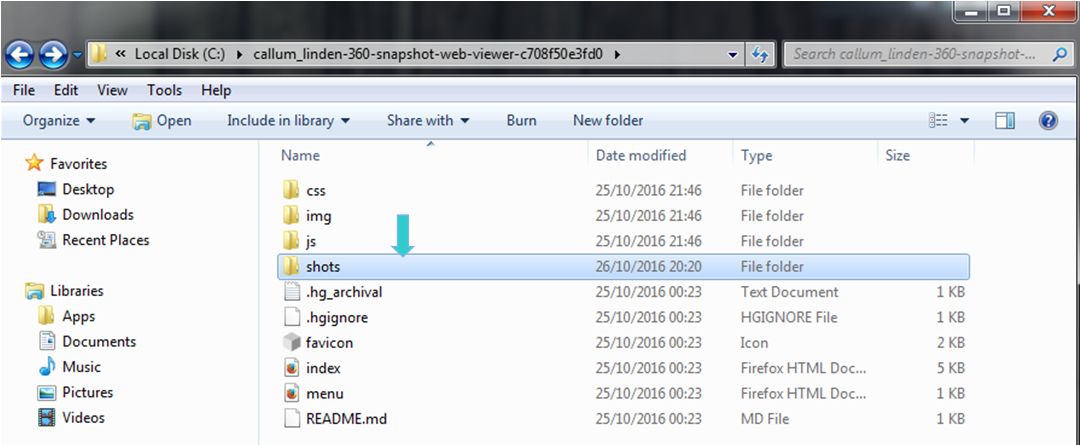
Web you have unzipped the web viewer package, you should have a folder looking like this - note the SHOTS folder, this is where you'll be wanting to save your snapshot sets
When you have unzipped the web viewer package, you should have a folder looking like this – note the SHOTS folder, this is where you’ll be wanting to save your snapshot sets (Windows environment)

Using the Viewer

When you have downloaded and installed the 360o snapshot viewer, proceed as follows:

  • Position your avatar  / camera at the centre of the area you wish to photograph. If you are using your avatar, not that you should “hide” it via removing all attachments and alpha-masking, or by using something like a “vanish” gesture.
    • Note that you can positioning your camera for a 360o snapshot simply by positioning your camera (e.g. using ALT-zoom or by flycamming).
  • Make sure you freeze the clouds in order to assist the image “stitching” process, and to avoid visual discontinuities in the finished image. Use Menu > World > Environment Editor >Sky Presets > Edit Presets. You should also avoid using Depth of Field.
  • Set your preferred windlight / time of day setting.
  • Turn your camera / avatar slowly around in a circle to view everything in the field of view around it, and allow everything to render.
  • Open the Snapshot floater and click on the 360 option – not that although this displays the filter options for snapshot, the filter effects are not currently captured when taking  360o shots.
  • When you are ready, Click Save to save the image set – you will be prompted to save a ZIP file to your hard drive.
    • Navigate to the location where you unzipped the web viewer files (above) and then save the ZIP file (with a suitable file name) in the SHOTS folder.

Continue reading “Hands-on: Second Life 360-degree snapshot viewer”
2016 SL project updates 42 (1): server, viewer

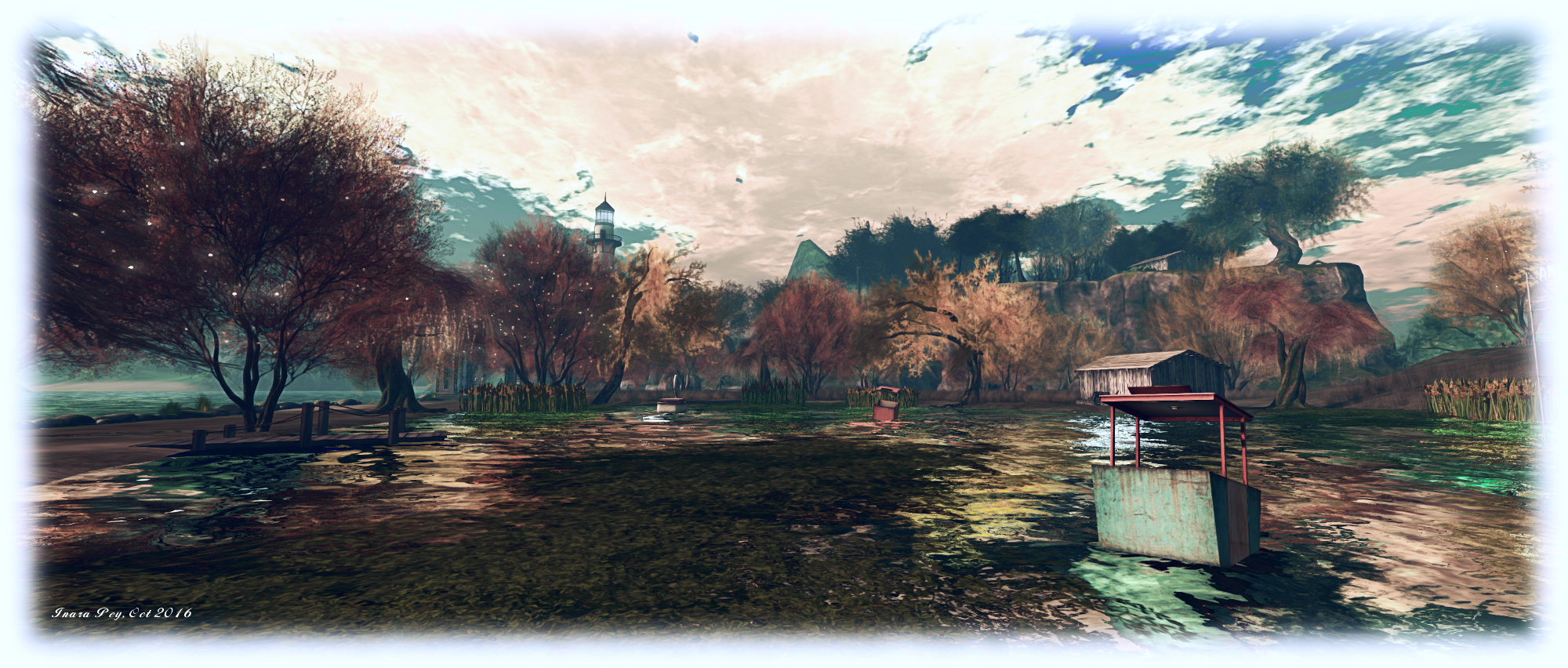
TaKe Heart; Inara Pey, October 2016, on Flickr TaKe Heartblog post

Server Deployments – Week #42

As always, please refer to the server deployment thread for updates or changes.

  • On Tuesday, October 18th, the Main (SLS) channel was updated with the server maintenance package previously deployed to the 3 RC channels, comprising the new Experience Key scripted sitting:
  • On Wednesday, October 19th, the three RC channels should all be updated with the same new server maintenance package, comprising internal simulator changes and a fix for (non-public) BUG-37758 “OBJECT_REZZER_KEY returns creator key of root key with all in-world copied objects instead of the agent who copied it.”

SL Viewer Updates

The Maintenance RC viewer updated to version 4.1.2.320461 on October 11th, shortly after my SL projects update for week #41.  Since then, there have been no further viewer updates, leaving the list of available official viewers as:

  • Current Release version: 4.1.1.320331 (dated October 4), promoted October 10 – formerly the VLC media plug-in for Windows RC
  • Release channel cohorts (please see my notes on manually installing RC viewer versions if you wish to install any release candidate(s) yourself):
    • Maintenance RC viewer version 4.1.2.320461, dated October 11th – over 70 crash fixes, improvements and other fixes
    • Project Bento  RC (avatar skeleton extensions), version 5.0.0.320160, dated October 7th
  • Obsolete platform viewer version 3.7.28.300847, dated May 8, 2015 – provided for users on Windows XP and OS X versions below 10.7.

Other Items

There has been discourse over feature requests via the JIRA, with some concern that requests are being closed without “proper” consideration, and that once closed, there is no further recourse for discussion outside of the weekly in-world meetings. The Lab gives assurances that all requests are considered and weighed by developers, QA team members and product people on a weekly basis. Things aren’t simply closed on receipt.

While they do not guarantee success, Simon Linden provided some pointers on filing feature requests which might help them gain attention:

  • Make sure it’s one idea per JIRA. multiple ideas (even if related) can cause confusion
  • The idea needs to be clear and specific and somewhat reasonable
  • Most important: explain why the idea is of benefit to Second Life as a whole – make a case that will stand out against the 10 or 20 other ideas that might be vying for the Lab’s attention at the time of submission.

2016 SL project updates 41 (1): server, viewer

Venta Silurum; Inara Pey, October 2016, on Flickr Venta Silurumblog post

As always, please refer to the server deployment thread for updates or changes.

  • There was no deployment to the Main (SLS) channel on Tuesday, October 11th.
  • On Wednesday, October 12th, all three RC channels should receive a new server maintenance package comprising the new Experience Key scripted sitting (Project Espeon). Note that at the time of writing, the release notes were awaiting update to reflect this.

SL Viewer

The VLC Media Plugin RC viewer was promoted to de facto release status on Monday, October 10th. Version 4.1.1.320331 includes a new media plug-in based on LibVLC, which replaces QuickTime as the media player in the WINDOWS version of the viewer. Other versions of the viewer will be updated to use VLC when their 64-bit versions are issued.

The leaves the current viewer pipeline as follows:

  • Project Bento  RC (avatar skeleton extensions) viewer version 5.0.0.320160, dated October 7th
  • Maintenance RC viewer version 4.0.9.320231, dated on October 4th – over 70 crash fixes, improvements and other fixes
  • Obsolete platform viewer version 3.7.28.300847 dated May 8, 2015 – provided for users on Windows XP and OS X versions below 10.7.

Premium Weapons Testing and New Sandbox Quad

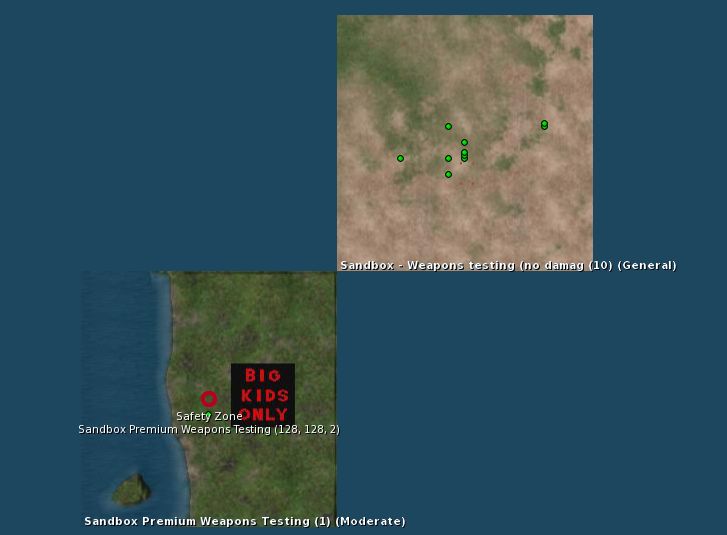
There is a new Premium users Weapons Testing sandbox available, which has been requested numerous times by Premium users. It sits kitty-corner with the existing Weapons Test sandbox.

The new Premium Weapons Testing Sandbox on the world map

There is also  a new 4×4 group of general sandboxes coming on-stream, with each of the regions is running on one of the four simulator channels (Main SLS, BueSteel RC, Le Tigre RC, and Magnum RC). These are designed to make easier for creators to make comparisons between the four underpinning simulator versions during product testing, etc. They are:

All have a General rating.

2016 SL project updates 40 (1): server, viewer

Neverland - Calas Galadhon Halloween
Neverland – Calas Galadhon Halloween – blog post

As always, please refer to the server deployment thread for updates or changes.

  • Tuesday, October 4th saw the Main (SLS) channel updated with the server maintenance package previously  deployed to the three RC channels, which includes a fix for BUG-40565, introduced as a result of the deployment of the week #38 server maintenance package.
  • There is no planned deployment / restart for the three RC channels, although there should be a new RC package available for week #41 (commencing Monday, October 10th).

SL Viewer

The Maintenance RC viewer was rapidly updated on Tuesday, October 4th, after only having been released on September 28th. Version 4.0.9.320231 see the addition of a Project Espeon fix (“Experience permission dialogue should include “Sit your avatar””), suggesting this project is making progress.  Overall, this viewer includes over 70 crashes and bug fixes and improvements – refer to the release notes for the full list.

Excluding this update, the remainder of the current crop of official viewers remains unchanged:

  • Current Release version: 4.0.8.319463 (dated September 9), promoted September 15 – formerly the Visual Outfit Browser RC viewer
  • Release channel cohorts (please see my notes on manually installing RC viewer versions if you wish to install any release candidate(s) yourself):
    • Project Bento (avatar skeleton extensions), version 5.0.0.319893, dated September 22nd
    • VLC Media Plug-in Viewer RC, version 4.1.1.319856, dated September 20th – replaces QuickTime in the Windows viewer with a media plug-in based on LibVLC
  • Obsolete platform viewer version 3.7.28.300847, dated May 8, 2015 – provided for users on Windows XP and OS X versions below 10.7.

2016 SL project updates 39 (2): server, viewer

Vecchi Amici
Vecchi Amiciblog post

Server Deployment – Recap

As always, please refer to the server deployment thread for updates or changes.

  • There was no deployment to the Main (SLS) channel On Tuesday, September 27th.
  • On Wednesday September 28th, all three RC channels should receive the same new server maintenance package, which includes a fix for BUG-40565, introduced as a result of the deployment of the week #38 server maintenance package.

SL Viewer

The VLC Media plug-in viewer didn’t make the jump to release status as had been anticipated, but should remain the next in line for promotion.

A new Maintenance RC viewer did arrive, however. Version 4.0.9.320038, released on Wednesday, September 28th, focuses on assorted crash fixes and stability fixes, with over 70 updates and fixes included. This has the current official SL viewer list looking as follows:

  • Current Release version: 4.0.8.319463 (dated September 9), promoted September 15 – formerly the Visual Outfit Browser RC viewer
  • Release channel cohorts (please see my notes on manually installing RC viewer versions if you wish to install any release candidate(s) yourself):
    • Maintenance RC viewer, version 4.0.9.320038, dated September 28th – 70+ fixes and updates
    • Project Bento (avatar skeleton extensions), version 5.0.0.319893, dated September 22nd
    • VLC Media Plug-in Viewer RC, version 4.1.1.319856, dated September 20th – replaces QuickTime in the Windows viewer with a media plug-in based on LibVLC
  • Obsolete platform viewer version 3.7.28.300847, dated May 8, 2015 – provided for users on Windows XP and OS X versions below 10.7.

Render Cost Investigations

This was first raised at the TPV Developer meeting on Friday, September 23rd, and again at the Bento User Group Meeting on Thursday, September 29th (although it is not Bento specific.

Vir Linden is leading an investigation into rendering cost and land impact of items (worn and in-world). This is as a result of JIRAs filed on the LI cost of various items not being correctly assessed, etc. It is not clear if any changes will result of the investigations, particularly where legacy content is concerned, but equally, it might be that some adjustments can be made to the rendering cost formulae. In particular, the Lab is interesting in learning about problematic content and JIRAs filed on LI  / rendering calculation issues (such as BUG-37631). Speaking at the Bento meeting on the subject, Vir had this to say:


2016 SL project updates 39 (1): server, viewer

The Shire; Inara Pey, September 2016, on Flickr The Shireblog post

It’s once again a light start to the week.

Server Deployment

As always, please refer to the server deployment thread for updates or changes.

  • There was no deployment to the Main (SLS) channel On Tuesday, September 27th.
  • On Wednesday September 28th, all three RC channels should receive the same new server maintenance package, which includes a fix for BUG-40565, introduced as a result of the deployment of the week #38 server maintenance package.

SL Viewer

Unless something untoward has happened with the latest RC version, it is anticipated the VLC Media Plug-in viewer will be promoted to de facto release status this week. A new maintenance RC is also anticipated. In the meantime, the current batch of official viewers remains unchanged from week #38:

  • Current Release version: 4.0.8.319463 (dated September 9), promoted September 15 – formerly the Visual Outfit Browser RC viewer
  • Release channel cohorts (please see my notes on manually installing RC viewer versions if you wish to install any release candidate(s) yourself):
    • Project Bento (avatar skeleton extensions), version 5.0.0.319893, dated September 22nd
    • VLC Media Plugin Viewer RC, version 4.1.1.319856, dated September 20th – replaces QuickTime in the Windows viewer with a media plug-in based on LibVLC
  • Obsolete platform viewer version 3.7.28.300847, dated May 8, 2015 – provided for users on Windows XP and OS X versions below 10.7.

Experience Scripted Sits

As per my blog post of September 23rd, Rider Linden is working on a new scripted sit capability for Experiences. The new LSL functions form Project Espeon (after the Pokémon character), and Rider has produced a proposal document on the new functionality, which can be read  in PDF format. The capability can also be tested on ADITI (the beta grid) in the following regions:  Leafeon or Umbreon or Sylveon, with test content is available on Leafeon. If anyone testing them has suggestions or feedback, please raise a JIRA against Project Espeon.