SL project updates 18/1: server, viewer

Asian Fusion: Oyster Bayblog post

Server Deployments

As always, please refer to the server deployment thread for the latest information  / updates.

SL Viewer

There have been no updates to the current viewer pipelines to start the week, leaving them as follows:

  • Current Release version: 5.0.4.325124, dated April 3rd – formerly the Maintenance RC viewer overview
  • Project AssetHttp RC viewer version 5.0.5.325825, dated April 27th – This viewer moves fetching of several types of assets to HTTP / CDN – overview
  • Project viewers:
    • Project Alex Ivy (LXIV), 64-bit project viewer version 5.1.0.504536, dated April 25th
    • 360-degree snapshot viewer version 4.1.3.321712, dated November 23rd, 2016 – ability to take 360-degree panoramic images
  • Obsolete platform viewer version 3.7.28.300847. dated May 8th, 2015 – provided for users on Windows XP and OS X versions below 10.7.

Region Crossings

There have been reports of worsening in vehicular region crossings recently (by coincidence, Caitlyn and I ran into so particularly unpleasant crossings over the most recent weekend). Simon Linden agreed to have a poke at server logs, time permitting, to see if there is any other change in crossing stats. He also mused on the potential impact of mesh bodies and attachments on such crossings, which constitute a considerable amount of additional data (including saving and restoring the state of scripts associated with them.

It was also pointed out that worn mesh attachments bring with them an (unneeded?) physics shape calculation, potentially adding to the load. This prompted a further discussion on whether any attachments should have a physics shape data used or calculated until such time as it is physically rezzed in-world.

As a first point of call, Simon repeated that as time permits, he’ll look into what goes into the region crossing calculations, and have a closer look at attachments physics calculations in general to she what is going on.

What Is the Lab Working On?

Things seem pretty quiet at the moment, but the Lab is working on a lot right now, although much of it is transparent to users, as Oz linden indicated at the Simulator User Group meeting on Tuesday, May 2nd:

At the moment, we happen to have a number of projects in flight that are either not good to discuss (security changes), or system upgrades that really shouldn’t be visibly different…. that’s unfortunate, but we’re getting started on (or getting ready to start on) some that will be much more interesting.

The recent changes to land access and control, together with the upcoming changes to allow region / estate staff to better managed Public Access regions are examples of more visible changes affecting users – or will be, once the viewer has been updated to handle the latter; and there a further changes to the likes of region-level ban lists coming down the pipe which will also bring visible changes to the viewer and provide better controls / support for land owners.

SL project updates 16/1: server, teleports and other bits

The Incredible 4 blog post

Server Deployments

As always, please refer to the server deployment thread for the latest information.

  • On Tuesday, April 18th the Main (SLS) channel received the server maintenance package previously deployed to the RC channels in week #15. This includes:
    • Several internal fixes and two new internal logging modes
    • Another adjustment to fix issues with off-line IM and Group Notice delivery reliability
    • Fixes an issue where large numbers of objects could be returned after a rolling restart.
  • On Wednesday, April 19th, the RC channels should be updated as follows:
    • BlueSteel and LeTigre should receive the improved region capacity and access capabilities
    • Magnum looks set to receive a new “secret” update, which has been under testing on the Snack channel (and will likely have Snack reabsorbed into it).

SL Viewer

There have been no viewer updates thus far this week, leaving the viewer pipeline as:

  • Current Release version: 5.0.3.324435, dated March 13 – snapshots to e-mail hotfix
  • Release channel cohorts :
    • Project AssetHttp project viewer version 5.0.4.325368 dated April 12th – This viewer moves fetching of several types of assets to HTTP / CDN – overview
    • Maintenance RC viewer version 5.0.4.325124 dated April 3rd – avatar rendering and other updates
  • Project viewers:
    • Project Alex Ivy (LXIV), 64-bit project viewer version 5.1.0.503537 dated March 17th
    • 360-degree snapshot viewer version 4.1.3.321712 dated November 23, 2016 – ability to take 360-degree panoramic images – hands-on review
  • Obsolete platform viewer version 3.7.28.300847 dated May 8, 2015 – provided for users on Windows XP and OS X versions below 10.7.

Other Items

Differences Between Teleporting and Physical Region Crossings

As we know, whether you teleport between one region and another or physically cross the boundary between two regions, you are performing a region crossing. However, there is a slight different in how they are handled. Rider and Simon Linden described the processes involved during the Simulator User Group meeting, which makes for interesting reading if you weren’t previously aware of the processes involved.

In referencing teleporting between regions, Rider said, “Teleport packs your avatar into a big ball of data and throws you at the destination.” It’s then left up to the destination region to determine whether or not you actually get in. Hence the teleport progress bar.

Simon then said of a physical region crossings, “They do a bit more pre-crossing checks to see if you go into the neighbour[ing] region than TPs do.” Rider Linden then added, “If the regions are adjacent, the sim you are on checks to see if it should smush you into that ball before it does.”

These pre-crossing checks are handled through your child agent on the neighbouring region, allowing the simulator running the region you’re currently in to “see” if you’re able to access the neighbouring region. If it believes you can’t, it won’t bother creating the ball of data about your avatar (and everything attached to it), reducing its workload.

When is a Region Not a Region?

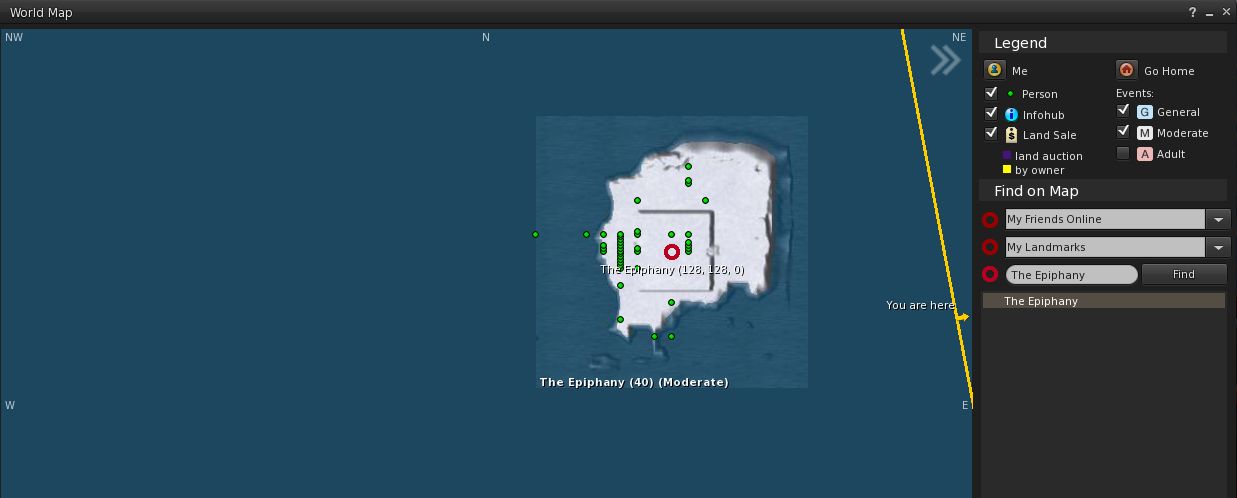
A curious topic came up at the meeting: when is a region not a region? The simple answer is probably “when you can’t see it”. But what about if you can – apparently – see it, at least on the map, and it doesn’t appear to have a name.

The mystery island as it appeared for some people using both the LL viewer and Firestorm

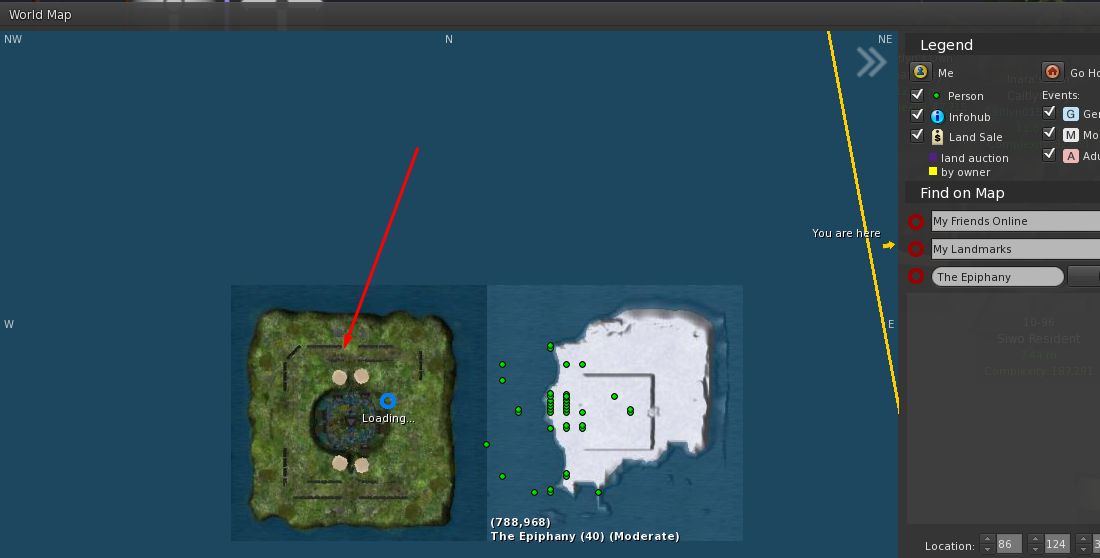
Whirly Fizzle spotted this phenomenon on the World Map with a region apparently adjoining The Epiphany, although her curiosity was piqued as it was apparently without a name. The mystery deepened when most of those at the meeting reported they couldn’t see any such region on their maps – although two or three besides Whirly could, on both TPVs and the official viewer (ruling on an issue in how a specific viewer is handling the map data).

What was equally mysterious, was that those who were able to see the unnamed island on the World map could also see it on the web SL map – while those who couldn’t see it on the world map also couldn’t see it on the web SL map.

As other saw the same area on the map – regardless of viewer

Several theories were put forward for the phenomenon, including it being a  non-updated map texture; a potential error in map tiling and loading;  an  old texture loaded and stuck at the  wrong LOD; and so on.  Running a quick check, Simon Linden couldn’t find any evidence for a region ever having been placed in any of the eight grid areas surrounding The Epiphany. He did, however, offer a possible explanation of what might have happened:

I do know the support team will do some interesting tricks sometimes … they will move one of their regions next to another to do some sort of work, then move it away. Perhaps that got captured there.

Either way, a curious little anomaly.

Mesh UUID Flipping via Script / UUID

Back in the mists of time as mesh support was being added to Second Life, there was the ability to change mesh assets via UUID / LSL. However, the ability was used most frequently as a means of animating meshes  – putting considerable stress of the rendering system in the process. Because of this, a wiki page on the subject was raised, and the ability to change mesh UUIDs via script was eventually removed altogether.

The Lab is currently considering implementing a means to animation meshes (something routinely discussed at the Content Creator’s User Group meeting). This would be a far more efficient and less stressful means of animating meshes where it to be taken up as project, and completely negate the need for animation via UUID flipping.

However, while allowing meshes to be changed through scripts / UUIDs has other potential uses, it is unlikely to be re-introduced even if animated meshes are introduced to SL, because anyone obtaining the UUID for a mesh could potentially download the “mesh” as a vnd.ll.mesh  file from the CDN, and could then theoretically reconstruct the original mesh item from that data (thus effectively stealing it).

SL project updates 2017 15/1: server, viewer

Sky Gardens, Holly Kai Park

Server Deployments

As always, please refer to the server deployment thread for the latest information.

  • The was no Main (SLS) channel deployment or re-start on Tuesday, April 11th.
  • On Wednesday, April 12th, the three RC channels should all receive a new server maintenance package which includes:
    • Several internal fixes and two new internal logging modes
    • Another adjustment to fix issues with off-line IM and Group Notice delivery reliability
    • Fixes an issue where large numbers of objects could be returned after a rolling restart.

It had been indicated that the new server OS build could be deployed to an RC this week. Whether this would be a “full” RC (BlueSteel, Magnum or LeTigre) or perhaps to a limited channel (as is the case with the increase avatar capacity updates, which are on McRib),  was made clear. More on this later in the week, maybe.

SL Viewer

The recent Voice RC, version 5.0.4.324770 was withdrawn some time on Monday, April 10th / Tuesday April 11th as a result of suffering a high crash rate.

The AssetHTTP project viewer was promoted to RC status with the release of version 5.0.4.325144 on Monday, April 10th.

This leaves the remainder of the current viewer list as:

  • Current Release version: 5.0.3.324435, dated March 13th – snapshots to e-mail hotfix download page, release notes
  • Release channel cohorts:
  • Project viewers:
  • Obsolete platform viewer version 3.7.28.300847 dated May 8th, 2015 – provided for users on Windows XP and OS X versions below 10.7.

New region and parcel access controls coming to Second Life

At both the Server beta meeting on Thursday, April 6th and the TPV Developer meeting on Friday April 7th, Grumpity Linden and Oz Linden revealed more about the upcoming changes to region and parcel access settings.

The server-side update for thee control are currently on the three RC channel (server maintenance package (17#17.03.31.325149) – but the changes as a whole will not come into effect until after there has been a significant UI update to the viewer.

So what is changing?

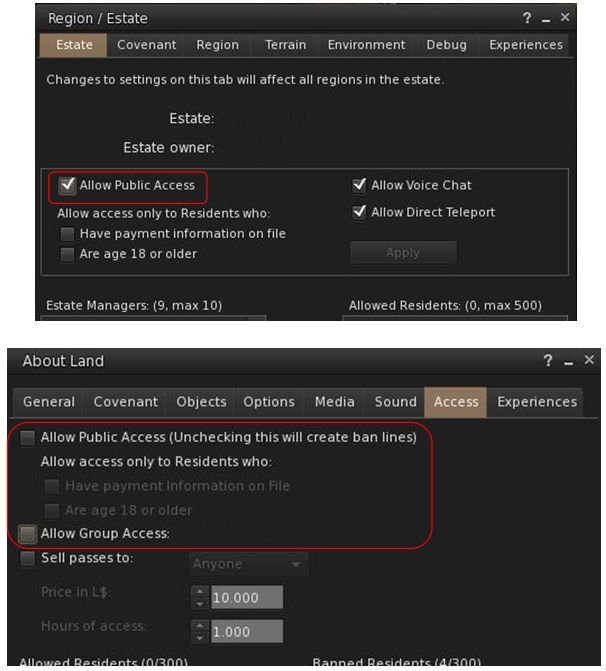
In short, the new controls – once they are available through the viewer – will mean that when a region is explicitly set to Public Access via the Region / Estate floater, parcel owners will no longer be able to unhceck Allow Public access or set other restrictive access (e.g. Group Only) in the About Land floater for their parcel – so no more ban lines on regions explicitly set to Public Access. However, parcel-level ban lists will still apply and if things like security orbs are allowed with the region in question, they will still work as well.

Note that no change will occur where Allow Public Access has not been explicitly set within the Region / Estate floater. In these instances, parcel owners will still be able to set their own access.

This change is being made for several reasons. For example, it is something many region owners (and those who sail / boat / fly  / drive through ostensibly public regions) have requested; it is also something many estates have in their covenant but cannot actually enforce; and so on.

With the upcoming changes, if an estate is set to Allow Public Access (top), parcel holders on that region will no longer be able to override the public access using the About Land access options (above). However,the parcel ban list and and installed security system will still apply

These changes mean that the viewer UI – as noted – will be undergoing some significant changes.  Exactly how extensive thee changes will be is unclear. However the Lab is conscious of the need to ensure there is no ambiguity in the controls, and that issues such as BUG-4994 which results in a parcel being set to Group access (and gaining ban lines) if both the Public and Group access options are checked, are also resolved as a part of the work.

At the Server Beta meeting on Thursday, April 6th, Grumpity Linden commented on the UI updates thus:

We are trying to find the best way to express the access sets most clearly … The UI is changing to better convey what your actual settings permit …

1) EO & EM can now force parcels to be no more restrictive than the Estate level setting.

2) UI for both Estate and Parcel access management is confusing. We’re making changes to make it less confusing. The weirdness where you check “Public access” and “Group access” and end up with group ONLY unless you also check “PIOF” and then you get group + public w/PIOF … that will not stand.

UI will grey out unavail options; also, estate level setting will include a warning dialogue to hopefully deter EM from messing with this override willy-nilly.

It is anticipated that a viewer (project or RC) with the required updates could be appearing in week #15 (week commencing Monday, April 10th).

The changes and the upcoming viewer UI updates were also discussed at the TPV Developer meeting, from which the following audio excerpts were extracted and put together.

These comments can be heard in full on the video of the TPV Developer meeting, commencing at the 4:45 time stamp.

SL project updates 2017 14/1: server, viewer

Orcadi Islandblog post

Server Deployments

As always, please refer to the server deployment thread for the latest information.

  • On Tuesday, April 4th, the Main (SLS) channel received the server maintenance package previously deployed to the three RC channels in week #13, comprising a small update to asset metrics stats logging.
  • On Wednesday, April 5th, the three RC channels should all receive a new server maintenance package which includes a new option in the estate settings which allows parcel owners to override the public access settings for all parcels in the estate. However, this change is pending a viewer update in order to make it visible to users.

SL Viewer

The Maintenance RC viewer updated to version 5.0.4.325124 on Monday, April 3rd. This viewer as a number of updates and improvements, which I reviewed in a recent post (albeit for the earlier version of the viewer).

Outside of this, the release of the LL viewer pipeline remains unchanged:

  • Current Release version 5.0.3.324435, dated March 13th – snapshots to e-mail hotfix
  • Release channel cohorts:

    • Voice RC viewer version 5.0.4.324770 released on March 20th – several improvements to voice
  • Project viewers:
    • Project AssetHttp project viewer, version 5.0.4.324828 dated  March 30th – This viewer moves fetching of several types of assets to HTTP / CDN – overview
    • Project Alex Ivy (LXIV), 64-bit project viewer, version 5.1.0.503537 dated March 17th
    • 360-degree snapshot viewer, version 4.1.3.321712 dated November 23rd, 2016 – ability to take 360-degree panoramic images – hands-on review
  • Obsolete platform viewer version 3.7.28.300847 dated May 8th, 2015 – provided for users on Windows XP and OS X versions below 10.7.

Region Capacity and Access

On Tuesday, April 4th the Lab announced increases of between 10% and 25% on the number of avatars can enter a region, the exact percentage depending on the region type. These percentages apply to the default maximum number of avatars each type of region (Full, Homestead and Open Space), and to the limit imposed by the region owner. They also include other changes – refer to the official blog post (or my own) for further information.

Commenting on the change at the Simulator User Group meeting, Oz linden pointed out the change was made as an attempt to respond to multiple requests made at the SUG meetings for accessing full regions to be “improved”. Hints were given that the approach might be further refined  / updated in the future.

Second Life Maintenance RC: Avatar Rendering updates and more

On Thursday, March 23rd, 2017, Linden Lab issued a new Maintenance release candidate viewer – 5.0.4.324882 – featuring a number of bug fixes and improvements.The viewer was actually a replacement for an earlier Maintenance RC, version 5.0.4.324646, which was withdrawn after it was noted it lacked some of the expected improved functionality.

In particular, this RC viewer brings some additional options for managing Avatar Complexity (aka Jelly Dolls), gives us a new option for checking the Grid Status page and offers a number of other nice nips-and-tucks to the viewer, as well as resolving a series of bugs.

As is my usual approach the following is not intended as an in-depth review of the RC, but is intended to highlight the core changes.

Avatar Complexity Rendering Updates

The re-named avatar complexity rendering options in their new sub-menu

There are several improvements to avatar complexity, which are outlined below.

The Options for how you render an avatar have been updated to Default (i.e. in accordance with your avatar complexity threshold setting); Always (i.e. always render the selected avatar) or Never (i.e. permanently render them as a grey imposter). These options have also been moved to a sub-menu on the right-click Avatar context menu (shown on the right).

Also, and following Firestorm’s lead, whatever setting you select for an avatar will now persist across all log-ins for the viewer, until either reset or your settings are cleared by a clean install or similar.

Finally, the viewer gets two new options for Avatar Complexity, located on the Preferences > Graphics tab. The first is a check box, Always Render Friends, which is pretty much self-explanatory: when checked your friends will always fully render, regardless of your Avatar Complexity threshold.

Graphics > Preferences: the new Avatar Complexity options

The second is an Exceptions button, which adds a further level of complexity control for how other avatars – including your Friends – are rendered in your view.

Using Avatar Rendering Exceptions

Clicking the Exceptions button opens a new floater, Avatar Render Settings, shown below left. This comprises a people filter for the list of names recorded on the floater (which is obviously blank when first opened), together with a + (add) button.

The Avatar Complexity Exceptions floaters

Clicking + will display a pop-up with two options:

  • Always Render A Resident
  • Never Render a Resident

Clicking on either of these will open the Choose Resident floater, shown above right. You can then use the Search, or Friends or Near Me tabs to select an avatar or avatars, adding them to the list on the floater. Clicking OK will add them to the Avatar Render Settings panel. The avatars will also be rendered in accordance with whichever option you used to launch the selection process (Always render or Never render).

Changing the Avatar Complexity setting for an avatar listed in your Exceptions floater – not Default will remove them from the list, as they will be rendered as per your Avatar Complexity setting

You can also update how any avatar in your Exceptions list is displayed.

To do this, simply open the list floater via Preferences > Graphics > Exceptions, locate the name of the avatar in question (use the filter if you have a lot of avatars in your exceptions), and right-click on the avatar’s name.

This displays a sub-menu of rendering options, with the currently selected option indicated by a tick. Click on either of the other two options to change it. Note that “Default” will remove the avatar’s name for your exceptions list and display them in-world in accordance with your overall Avatar Rendering Complexity setting.

Grid Status Display Toolbar Button

Maintenance RC 5.0.4.324882 adds a new Grid Status toolbar button to the viewer. This can be accessed via Me -> Toolbar or by right-clicking your toolbar to select Toolbar Buttons. Either of these routes will open your Toolbox floater. You can then drag the Grid Status button to the toolbar location of your choice (left, right or bottom of your screen) where it will be displayed.

The new Grid Status button

Clicking on the button will open the Grid Status page in the viewer’s built-in browser, regardless of your Preferences setting for how web content is to be displayed.

Other Improvements

In addition to the above, this RC viewer also includes the following improvements:

  • Inventory Offer messages now display the name of the object being offered to another avatar
  • Library items can now be worn via a right-click context menu, and not just drag & drop
  • The Snapshot floater will now remember what you did last, and open with that mode next time (until you next relog)
  • You can now see and change the type of block (Voice / Text / Particles) from within the block list in People floater
  • LLTextBox message lines will extend along with the length of the message now.

Bug Fixes

The release notes provides the following list of bug fixes with this release:

  • Some builds wouldn’t link to release notes. Now they do.
  • Other minor UI tweaks and adjustments
  • Removed several instances of legacy People API usage, thanks to Ansariel Hiller.
  • Inventory floater was missing UI for spawning new Inventory floaters. So now you can do it even if you don’t know the Ctrl+*Shift*+*I* shortcut.
  • Build floater used to hide behind other floaters due to wrong Z-priority. Not no more!
  • Appearance editor didn’t “Save as” as well as it should have, but now does.
  • Avatar animations wouldn’t play after several operations with editing and wearing objects, but do now.
  • Closing inventory window used to leave an orphaned context menu.
  • Active listings folder stayed active after everything was cut from it. We don’t need that confusion.
  • Teleport offers and Eject messages will show complete name when that’s what you’ve chose to see.
  • You can now remove friends even when you’re in a Groups floater looking at Members list.

Feedback

I’ve not driven this viewer for more than an hour thus far, so cannot give any feedback on performance / stability. In terms of the improved features, making Avatar Complexity settings persist between log-ins is a welcome addition to the viewer. Both the Always Render Friends check box and the Exceptions options are also nice additions. .

The Grid Status button is also a handy addition, and should provide help for those of us wanting to know what is going on with the grid (when suspecting something might be wrong), but who get a little annoyed at having to manually visit the grid status page in order to do so.