SL Project news week 44/3: mesh deformer

Testing is continuing with the latest release of the Mesh Deformer project viewer, which can be used to deform mesh items to either default or custom human shapes. While the pool of test items remains small, people appear to be testing using their own creations, with at least some feedback being given to the JIRA (STORM-1716), which remains open to comment. If you are testing the deformer using the latest project viewer, please be sure to provide feedback on your results – be they with default shapes or custom shapes – to the JIRA.

Some problems with breast fittings might be down to an incompatibility between Avastar and the viewer, which is currently being corrected

Most of the results obtained to date appear to be satisfactory, although some issues still remain with custom shapes. Darien Caldwell, working with Gaia Clary, has identified one issue which exists specifically with the Avastar add-in for Blender co-produced by Gaia.

Avastar is a Blender add-on for Second Life mesh creators and animators which provides a wide range of capabilities, including (for mesh creation): SL shape import into Blender, SL shape sliders support, support for attachment bones, and so on.

The issue has been that Avastar’s sliders have been based on a scale of 1-100, whereas the viewer’s sliders operate on a scale of 0-100 , leading to some scale miscalculations within Avastar which in turn have led to issues with mesh fitting over body parts such as breasts. According to Darien Caldwell, she and Gaia now have this “pretty well nailed” and an update to correct Avastar will apparently be out shortly (Update: please see Magus Freston’s comments at the end of this article).

This still leaves the broader deformation issue, as reported recently, which is still being looked into, and awaiting some feedback from Qarl.

Other issues outside of these which have arisen with the deformer have been largely the result of unrealistic expectations – that it will, for example, mimic facial morphs or hand movements closely or some changes to feet. However, in these situations, it is important to remember that the deformer was never developed to deal with these, as it works off the avatar’s bone structure, and facial features and hands don not have any bone structure within the avatar associated with them.

Time Frame for the Deformer

While progress with the deformer continues to look good, there remains no ETA as to when the code will appear in the release version of the official SL viewer.

The major reason for this is the ongoing problems with the Beta release channel for the viewer (of which more in the next update for this week!). As it stands, the deformer is positioned roughly at the back of the queue of releases which are being held as LL work to resolve the current crash issues with the Beta viewer. This means that, at least until the Beta issues are resolved, there is no official ETA for the deformer code reaching the release viewer. However, the latest revisions are starting to be incorporated into some TPVs.

In the meantime, and if you have been testing the project viewer, please remember to give feedback via the JIRA.

Performance Concern

While it is not actually an issue with the deformer per se, commenting at the Content Creation User Group on Monday 29th October, Siana Gearz highlighted a potential problem with mesh clothing utilising the deformer and avatar physics.

The concern is that the deformer uses the same morph-based schema as is used by the avatar physics system. This means that the GPU has to do a lot of additional calculations for the polygons in an item of mesh clothing to simulate movement (such as “bouncing boobs”) when avatar physics are in use. This obviously leads to a performance hit. So long as the polygon count in clothing is kept low, the impact is minimal, but the concern is that clothing build using high polygon counts to provide detail could have a larger impact on the viewer.

One possible way for this to be avoided, should it become an issue, is for clothing makers to optimise their mesh clothing with lower poly counts – and the forthcoming materials processing capabilities should go a long way towards helping with this.

Related Links

CHUI: no, not a Wookie, a viewer from LL – with feedback requested

Linden Lab have launched, somewhat unexpectedly, a new project viewer, called CHUI. While sounding like a character from Star Wars (CHU-EE, geddit? *Ahem*. Sorry), it stands for Communications Hub User Interface. The blog post states:

With so many ways for users to communicate with one another in Second Life, there are quite a few communications tools in the Viewer. To make it easier to find, learn and use these tools, today we released a project Viewer that introduces CHUI (Communications Hub User Interface). In addition to bringing most of these communications tools “under one roof,” CHUI also introduces some new and improved features.

Among the listed features are:

  • The Conversation Log: providing you have enabled the option to save chat and IM logs to your computer, this allows you to open the entire history of a conversation with another user held in the past 30 days directly in your viewer, or review off-line IMs received from both friends and non-friends
  • Expanded conference calls: with CHUI it is possible to add people to a conference call after it’s started, or add someone to an existing one-on-one IM session
  • The ability to easily move your voice connection between open conversations including nearby chat, private IM, conference chat or group chat. Click the “add voice” button on any conversation to move your voice connection to that conversation. Click the “hang up” button and your voice connection is returned to nearby chat.
  • The ability to access chat preferences in a single click from the Conversation window
  • Change the volume of a single person’s voice by simply clicking on that person’s speaking icon in the Conversations window
  • A multi-line chat entry box which expands as you type.
CHUI Conversation Log

These features primarily found in two floaters: Conversations Log and a revised Conversations floater. The Conversations Log window lists all recent and past conversations, allowing them to be to scrolled through and opened for reading. As I’ve only jut started using the project viewer, I’ve actually not investigated this in-depth. Clicking on a listed conversation will open in the Conversations floater, and the Conversation Log contains two buttons for sorting the listed conversations (by name, by date, etc.), and a gear cog button for access various options – start an IM, enter a voice call, view profile, etc., for a selected conversation in the list.

For those who use TPVs with tabbed IM capabilities, the revised Conversations floater will look remarkably familiar,  bringing as it does local chat and all IM conversations into a single floater panel. Any conversations in the Conversation Loge will also open here as well.

The Conversations floater

The panel includes a number of buttons. These again allow conversation to be sorted, closed individually, etc., and also include a number of additional options:

Add someone else to an existing IM conversation, and establish a conference call. This will open the Choose Resident Floater, allowing you to pick a friend, someone nearby or search for someone.

Start a Voice conversation with a person or hang-up from a Voice conversation (the icon will change on the button, depending on the status of the call)

Open the Choose Resident floater to select someone with whom to start an IM or Voice conversation.

Break-out any conversation into its own floater.

The Conversations floater can also be compacted down into one of three sizes, using the left / right double chevron arrows. These help reduce the amount of space the floater takes up on your screen when not actively in use. It can be expanded either using these buttons or using the right-pointing arrows next to the names in the conversations list.

The three compact views of the Conversations floater

Overall, this is a significant attempt to centralise in-world communications, and there are some nice features here, particularly in the extended Voice options.

For Linden Lab, this is very much experimental, as noted in the blog post itself, and they are asking for people’s feedback on the features:

We’ve been testing CHUI inside Linden Lab for some time, but any major redesign requires a lot of people using it to make it as smooth and useful as it can be. This is where you come in.

Please think about these questions as you use the CHUI project viewer:

  • Are the new features useful?
  • Do the functions you commonly use seem more streamlined, or do they require more clicks than before?
  • Are all of the functions, both old and new, easy to find?

We’ll ask you to complete a survey in approximately one week to gather your thoughts on these questions.

There is a publicly accessible JIRA (https://jira.secondlife.com/browse/chuibug) available for the viewer, and if you do try it out and find a bug, LL request you report it there.

Also tucked away in the blog post is news that blocked users and objects can now be viewed from within the People floater, rather than via a separate menu option, and can also be unblocked from here via the right-click context menu.

Related Links

Coming in November: Premium promotion, but not just the usual?

I was playing with Lumiya 2.3.2 this afternoon (review coming soon!), when the veritable Lord of Dee, Ciaran Laval tapped me via IM about what appears to be an upcoming premium promotion, which looks set to be going live on the 14th November.

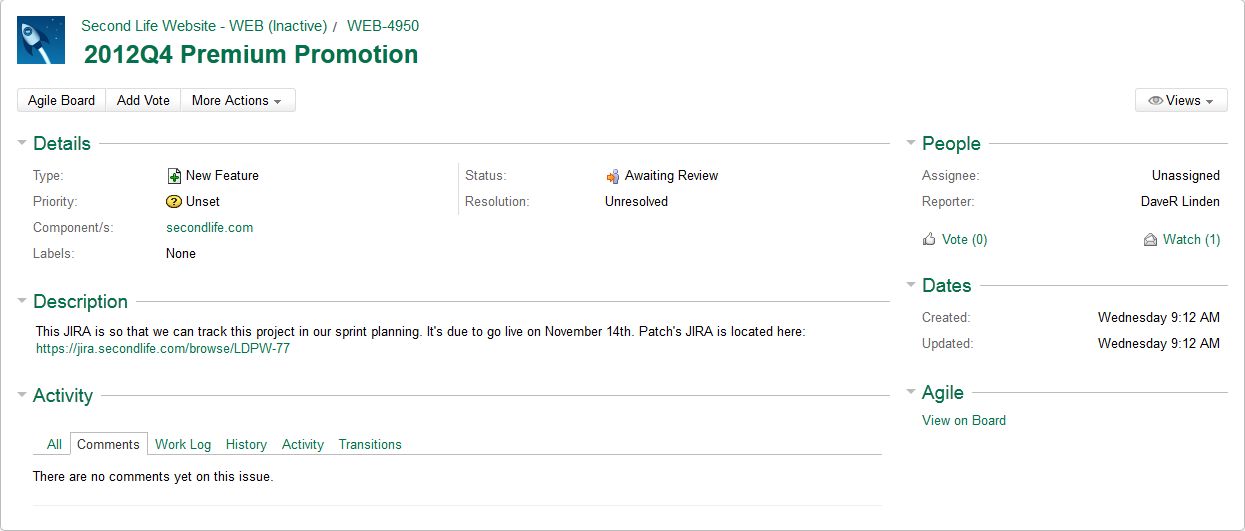
Ciaran spotted the news while taking a look through the JIRA, when he came across WEB-4950:

WEB-4590: click to enlarge

This is probably listed as a public issue in error, so I fully expect it to vanish behind the curtain next week. However, it raises interesting questions.  Why a JIRA for a promotional offer, and why a link to a Linden Department of Public Works JIRA (LDPW-77, closed to public access)?

Between them, these suggest that the promotion will be more than just the “typical” 50% discount on first payments when signing-up to quarterly membership, and that something in-world will play a part in the offer.

Now, the promo could simply be related to another premium gift, but given the last one was issued in late August, the time-frame seems a little short, premium gifts usually come out a little over once a quarter; we also have Christmas on the horizon, so I suspect that, as with last year’s sailing boat, we’re more likely to see the next gift in December.

There’s also the small matter of LL asking about what can be done to improve the Premium Wilderness Experience a few months back. While it remains open right now, could the offer be tied to a belated overhaul of this (which at the time of writing remains open). If so, it seems an awfully long time to get from the e-mail survey (May) to updating the experience, even allowing for protracted time frames at the Lab. There’s also the fact that while visited, the Wilderness Experience didn’t exactly set the SL world ablaze with positive reviews, and I rather suspect most of the feedback provided on the survey was at best lukewarm towards the whole idea. So I’m far from convinced LL are going to try to breathe life back into that specimen.

Premium Wilderness: too long in the tooth to inspire more interest?

I’m therefore leaning towards us seeing something new, and I’m tempted to lean even further (and risk toppling into error) towards it possibly being something akin to Linden Realms – that is, using the advanced creator tools. The “first set” of these was launched back in July 2012, and we’re still waiting for the updated permissions system associated with them to arrive. That the term “first set” was used in the blog post announcing their arrival, I’ve always wondered if LL LL have something else in the pipeline for the tools (beyond getting the permissions system sorted). So perhaps this promotion will see further tools added to the range and rolled out for Premium members to try in a new playground, a-la Linden Realms.

Guess we’ll find out on or around November 14th!

With thanks to Ciaran Laval.

Mesh upload patch enhancement for creators

Nalates Urriah drew my attention to a thread on SL Universe regarding the development of a new patch which should be of assistance to mesh creators making rigged mesh items. The patch is by Magus Freston and Gaia Clary, and is designed to solve a particular problem which exists between Collada file formats and Second Life. Magus describes the problem thus:

A limitation of the attachment points in the LL character is that many of them have names with spaces, like “Left Pec”. Collada 1.4 doesn’t handle bone names with spaces as space is used to delimit bone names. So the idea is to replace the spaces with an underscore for the collada file so you get “Left_Pec”, which of course SL doesn’t recognise. The patch just translates “Left_Pec” back to “Left Pec” at import time.

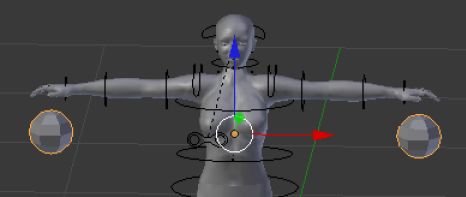
Posting initially to the Machinimatrix blog, where the raw code for the patch can be found, Magus and Gaia devised a test for the patch involving a mesh with two additional spheres which if imported successfully using skin weights, should appear hovering close to the hands and rotating as a result of an added animation.

Mesh uploader test item created by Magus Freston

The test files cane be obtained from the Machinimatrix blog thread, although they require registration / logging-in to the blog in order to see and download them.

Responding to Magus’ request for assistance, Darien Caldwell compiled a version of the Windows SL beta viewer incorporating the patch, and after a couple of bumpy starts, managed to import the mesh successfully and as expected. Since then several content creators have tried the patch and found it works, although a couple of warnings may be thrown up during the upload. The uploaded mesh can be correctly rendered in any mesh-capable viewer.

The test viewer is provided as a ZIP file for windows, not an installer. On unpacking, the contents should save to a default folder (at the time of writing “Test Build 341” – although you can obviously rename this). Once unpacked, open the folder and double-click on LINDENDEVELOPER.EXE to launch the viewer.

The uploaded mesh, with animation running, showing the expected result: the two spheres orbiting in front of my hands

Related Links

Piling it on: the network optimisation tests

Thursday October 11th saw a huge response to Oskar Linden’s request for assistance with network optimisation tests, with many people logging-in to Aditi to join is Beta User Group meeting (I actually made it for the first time myself, the time of his meeting is generally a little awkward for me). More were available on the IRC channel established for the test as well.

Oskar’s meeting place at Morris on Aditi.

Things got off to a rocky start; mid-way through the Beta UG meeting everyone received the royal order of the boot, and problems occurred attempting to log back in. It transpired that an SSL certificate had expired at LL’s end and had to be renewed (through until 2015). Even so, not everyone appeared to make it back (or at least, not with their primary accounts!). Maestro Linden did make it back with the rest of us, and immediately sought protection in a state-of-the-art anti-crash system from Ordinal Malaprop* created (or is that crated?). No amount of coaxing could get him out, either:

Darien Caldwell: you can come out of the box now Maestro. Crash is over ;p

Mæstro Linden (maestro.linden): I’ll come out when I feel safe 🙂

People getting back after the crash and finding we have a Maestro Linden-in the-box

The meeting also had some disruption from an unhappy camper or two complaining about bans. One of them made it back following the initial forced log-out, and as final preparations were made for the test, appeared to successfully crash the region. Shortly before this happened, concerns were raised that this individual may have been trying to disrupt the IRC test channel, as they appeared to be passing commands aimed at IRC in local chat (at one point a little later, a similar command appeared in the IRC channel, and I and a number of others were, coincidentally or otherwise, disconnected).

The testing itself proceeded pretty much as planned, with everyone logging-in to a specified region at more-or-less the same time, testing the network capabilities in handling a large number of log-in updates in a single region. From my perspective, this went well, and as one of the initial people to log-in, I didn’t appear to suffer from the kind of lag usually associated with moving around in a region where there are a large number of people arriving.

Following the en-masse arrival, we dispersed to two regions for a group chat load test. I cannot actually say how this went, as I arrived at my designated region, only to take three steps and crash (an issue at my end of the SL equation rather than anything else).

I made it back to participate in the IM tests, which comprised piling-on a mass of IMs to targeted avatars and then awaiting their reply. I think I was one of the first to IM and one of the last to get a reply, Again, not through any failure in the system, but simply because Pey’s Law affected the tester I was IMing – he replied on receiving my first message, but forgot to press ENTER to send :).

The final part of the test was a mass teleport to a specified region, again presumably to test how the network handled a large number of arrivials within a region. While this may have been a placebo effect from being on Aditi, the teleport itself seemed to me to be somewhat faster than is usual, with the progress bar merely flicking up on the screen and then vanishing as I arrived. Once, there I also found walking around with people people teleporting-in also did seem to be as prone to mini-freezes or stutters as can be the case. However, the load on the target region (selected at the last-minute due to problems with the intended destination) may have been lighter than hoped, as it had a cap of 21 on the number of avatars allowed into it, and a number of people did report they were unable to teleport-in as a result (there were probably around 40-50 listed on the IRC chat page).

Pile-on Test Medal

Overall the tests made for a fun social gathering, with a lot of good humour all around, and Oskar and his team apparently gathering the data they wanted.

Hopefully, there will be further follow-up on the overall intent of the tests and the results in an upcoming Sim / Server UG meeting. Oskar certainly appeared pleased with the outcome, and was on the main grid after the tests to hand out medals to the participants (providing they knew the sekrit password! 🙂 ).

 * With thanks to DD Ra for pointing this out; I missed checking the creator details earlier.

Network Optimisation: LL seek assistance

Linden Lab are in the process of changing the manner in which network traffic is handled within Second Life, and require assistance in testing the changes made to date in order to ensure various services are functioning correctly prior to rolling-out the changes to the grid as a whole.

To this end, Oskar Linden posted the following request in the Server forum late on Wednesday 10th October:

Linden Lab has made some changes to the way regions handle network traffic. We need your help to test. This will help us insure that regions are communicating appropriately over the network. Mainly we are concerned with agents entering via direct login, teleport, and region crossing. As well as other functions such as IMs, Voice, and Group chat.

Tomorrow, October 11th, at 4PM Pacific time (right after the server beta user group) we will conduct these tests with as many people as we have. Testing will take place on ADITI and require out of world communication we will be coordinating via IRC. This will require an IRC client connected to EFNET in the channel #sltest. If you don’t know how to do that you have until tomorrow afternoon to figure it out. 🙂

The details on the tests are here:

 – https://wiki.secondlife.com/wiki/Networking_Optimization_Pile_On_Tests

I hope you can come and help us test these new changes.

__Oskar

The tests will comprise three parts:

  • Direct log-in test to a pre-determined location on the beta grid.
  • A group chat test via the Second Life Beta in-world group.
  • A teleport test to a pre-determined location.

Note that Voice is also indicated as one of the services to be tested, but no details on what this will entail have as yet been included in the test notes – please check both the note and Oskar’s forum thread for possible updates on this ahead of testing.

Those wishing to take part in the tests will need to:

  • Be members of the Second Life Beta in-world group
  • Be able to log-in to the Aditi beta grid

The tests will be coordinated on IRC using the EFnet channel #sltest, and those involved in the tests will need to be able to access this channel either via the EFnet website or through an IRC client.

Accessing the #sltest channel on the EFnet website – note you do not require a registered account; you can access the channel using any suitable nickname

The tests are due to commence at 16:00 SLT.

Note that these changes are not related to the region lag issue sudden and massive lag spikes, as reported in the Server forum threads, but rather appear to be part of ongoing network-related work.