Petrol Sue, Jasper, Leah, Emrys and Dmitri – five of the new “fantasy” starter avatars. Credit: Linden Lab
On Thursday, September 1st, Linden Lab announced the release of a further set of ten new starter avatars.
Referred to as a set of “fantasy” inspired avatars, the new collection features five male and five female avatars based on the system avatar, but include mesh accessories. Two of the avatars are vampires, providing newcomers with the option to have such characters without having to opt for the fully mesh starter avies.
The ten avatars are paired off into five genres: the aforementioned vampire, plus magic (with an unabashed Harry Potter element to the male character of “Emrys”); cyber / sci-fi; post-apocalyptic (regulars at TPVD meetings may recognise “Petrol Sue”, as worn by Grumpity Linden at the meetings); and steampunk. All come with pets (or in the case of Leah and Jaxon, from the cyber / sci-fi theme, drones).
The Morgan avatar, one of the two “magic” themed avatars, and her familiar, Theo
Commenting on the new avatars, the blog post reads in part:
Over the years, we’ve continued to apply what we’ve learned about building techniques to our starter avatars, improving their aesthetics and optimizing them to load quickly. Our latest Fantasy starter avatars are vibrant examples of what we consider “balanced content” that is both performance-optimized and looks beautiful — they can save you time getting immersed in one of our many role-playing communities without unnecessarily lagging yourself or others. We know that content creators want to create optimized content for their customers, and we encourage creators to study these new avatars as examples of balanced content.
The blog post goes on to state that the avatars have been designed with Avatar Rendering Complexity in mind, and have been fine-tuned for “low ARC” scores. When testing on my system (i5 4590 with a GTx 970 GPU, the female avatars reported at between 8980 (“Leah”), through to 18,352 for “Petrol Sue”. The male avatars fell between 9,837 (“Emrys”) and 14,981 (“Jaxon”).
As with the last set of “system” (or “classic”) avatars (see here), these all use attached AOs, some of which continue to appear a little jerky during transitions (or lack thereof), suddenly flicking from one animation / pose to the next.
The new avatars can be accessed by going to Me (/Avatar) > Choose an Avatar > New Avatars (tab should be open by default). Once an avatar is selected, it is transferred to your inventory and worn.
To mark the release of the new avatars, the Lab also issued a promotional video:
Crap Mariner has been working on a new Arts wiki page on the SL wiki – on which I’ll have more in a future article – when he contacted me earlier in August to let me know that SL wiki editing had been locked to a limited number of permitted editors / users.
The locking has since become more widely seen, prompting Soft Linden to issue an e-mail update as a result of enquiries on what is happening, made via the open-source dev e-mail list. In the e-mail, Soft states:
There is a ridiculously persistent party who uses numerous wikis to promote fake Microsoft support phone numbers. Given the fraud or malware potential, we couldn’t let that keep returning.
There’s a less intrusive long-term solution in the queue, currently blocked by other work.
Hopefully, whatever is blocking the long-term solution will be cleared soon, allowing full edit access to the wiki to be restored.
In the meantime, those requiring urgent access to wiki pages to maintain data / information, are asked to create a support ticket (I’d suggest include which pages need to be accessed and why, rather than just raising a generic request to gain access). Third-party viewer developers who require wiki edit rights can also contact Oz Linden to request access to their wiki pages. If you only require access to update you profile or add a discussion point to a page, etc., it might be advisable to wait until after the wiki has been re-opened to all, rather than filing a support ticket.
This isn’t the first time the wiki had to be placed in lock-down. In October 2014, a lock-down was initiated while the wiki underwent an extensive security update, resulted in limited edit access for users through until January 22nd, 2015. Hopefully, this current period of lock-down, which started in early August, will not be for as long.
Update: August 16th: Merchants have been reporting a number of reported issues with the new search tool. The Lab has set-up a forum thread for general discussions on issues and problems. If you are experiencing issues with the new MP search, please join the discussion on the forum thread.
If you are noting specific issues which appear to be bugs, the Lab requests you add details to BUG-37670.When doing so, please provide the following: Affected Field: (Demo linking, Related Items, Quick Fill, etc.); Name of Product you are editing: (What is the name of, or link to, the item listing that you are trying to add a demo or related item); Search Term: (What is the exact search term you have entered to try to locate the Demo, Related, or Quick Fill Template); and if possible, provide a screenshot showing the empty search return showing the search text and the lack of results. The exception to this is “Adult rated items that contain profanity”.
First issued as a beta test in November 2015, the updated search has been undergoing refinement and improvement (and bug fixing!) since then, hence why it has taken some time to reach a release status.
The new search mechanism is designed to address some of the shortfalls inherent in searching for listings and products on the Marketplace, which can often by a frustrating and time-consuming, as anyone who has used it will be able to attest.
To achieve this, it is said to be a complete step away from the older infrastructure supporting Marketplace search, with the new system hopefully being faster and more robust. In particular, the Lab point to it having a learning algorithm intended to improve search results over time – essentially, the more search is used, the better it performs. The new search also supports the use of boolean operators – AND, OR, NOT – so users can hopefully set-up more focused search criteria.
During testing, the Lab took feedback from merchants and users into account, using it to further refine and improve the new system. This obviously doesn’t mean it is flawless, but the hope is the overall experience will be improved, and will continue to improve over time. Should anyone encounter significant bugs or issues, they are asked to file a bug report. There is also a pinned Commerce Forum thread where general discussions might be continued.
On Tuesday, August 2nd, the Lab blogged about recent and forthcoming updates to Second Life. It’s a curious post, offering a potpourri of news, some of which is liable to be familiar to many, some of which might be new / surprising / interesting, even for those of us covering Second Life to the best of our abilities.
First up on the post is Project Bento – the project to greatly enhance the avatar skeleton for use with mesh bodies and bits (human and non-human). I have, and am, covering this project through my Bento updates, so please excuse me if I refer you to those reports for specifics, if you’re unfamiliar with the project and want to know more. If you’re completely new to Bento, you might want to start your reading here.
Bento is still very much a beta project – the viewer-side code has yet to make it to Release Candidate status, with the project viewer still being worked on by the Lab. However, Bento is an interesting project, not only because of what it can bring to mesh-based avatars, but also because of the way in which it has been very much a collaborative project between the Lab and content creators and animators.
Aki Shichiroji demonstrates a wearable wyvern utilising Bento bones for animation. Inset: the model under development at a Bento meeting.
The Visual Outfits Browser (VOB) is next to get a mention. Again, this has a way to go to make it into a release viewer, but was issued as a Release Candidate on August 1st (version 4.0.7.318263). Simply put, this viewer allows you to use the Appearance floater to capture / upload / select images of your outfits and save them against the outfits in a new Outfit Gallery tab within the floater.
Also getting a mention is the QuickTime for Windows replacement viewer, also known as the VLC plug-in viewer, which sees the QuickTime media plugin for the Windows viewer replaced with a plug-in based on LibVLC. At some point in the future, LibVLC will also be used to replace QuickTime in the Mac version of the official viewer. I’ve previously covered both the VOB and VLC viewers in these pages., so feel free to follow the link to read more.
The Visual Outfits Browser (VOB) viewer is another of the forthcoming updates mentioned in the official blog post, and you can read my overview of the project viewer version of VOB
Other updates which are mentioned comprise the use of Experience Keys in the new user Social Islands, which I blogged about in April; the recent TLS 1.2 update, which affects using the viewer’s built-in web browsers for web cashier interaction – see my post here on the subject; the improvements to group bans to eliminate the problem of people banned / removed from a group still being able to use an active chat session; of the ongoing work with Marketplace search, the recent core HTTP updates, viewer and server bug-fixes and the ongoing work to improve server robustness.
The new Social Islands, which I covered in April, also get a mention in the official blog post
However, the two items most likely to be of interest are the new e-mail verification (all new users must new verify their e-mail address with the Lab in order to receive updates, etc), and the new Gaming Islands.
The latter are designed to introduce users to Skill Gaming in Second Life by providing demonstration games to play, information on Skill Gaming – what it is, who can play, who cannot play and why, how to get your account set to play Skill Games – and finally, a set of portal providing access to regions providing Skill Games in SL, which will be the subject of an upcoming article.
The new Gaming Islands – designed to introduce Second life users to Skill Gaming
On Wednesday, June 15th, 2016, the Lab updated their Web Cashier services to TLS 1.2.
The change, which has been highlighted through official blog posts (and reported through pages such as this blog) has been implemented as a part of both LL’s on-going compliance work and in response to an ongoing set of regulatory / compliance requirements which are global in scope (as explained by the PCI Security Standards Council).
However, there has been a certain amount of confusion over precisely how widespread the impact of the change will be, and what will or will not be affected.
To this end, and with the switched flipped, Whirly Fizzle and I have been trying older viewer (e.g. pre 4.7.7 Firestorm releases, the official obsolete platform viewer, Singularity) to find out what is and isn’t affected, and seeking feedback from the Lab.
This is what we’ve been able to determine:
If you have a web browser or viewer which supports TLS 1.2 (all recent official viewer releases and TPV updates should support TLS 1.2):
You will be able to continue to make in-world L$ transactions as normal
You will be able to carry out LindeX transactions and / or use the SL Marketplace through either your web browser OR the viewer’s built-in browser as usual
You will be able to add/edit payment info to your account.
If you are using a web browser which does not support TLS 1.2:
You will not be able to make L$ transactions on the LindeX via your browser
You will not be able to add/edit payment info to your account.
If you are using a viewer which does not support TLS 1.2:
You will still be able to buy L$ through the Buy L$ button / option in the top right corner of the viewer
You will still be able to PAY / BUY via right-clicking on other avatars or on in-world vendor systems
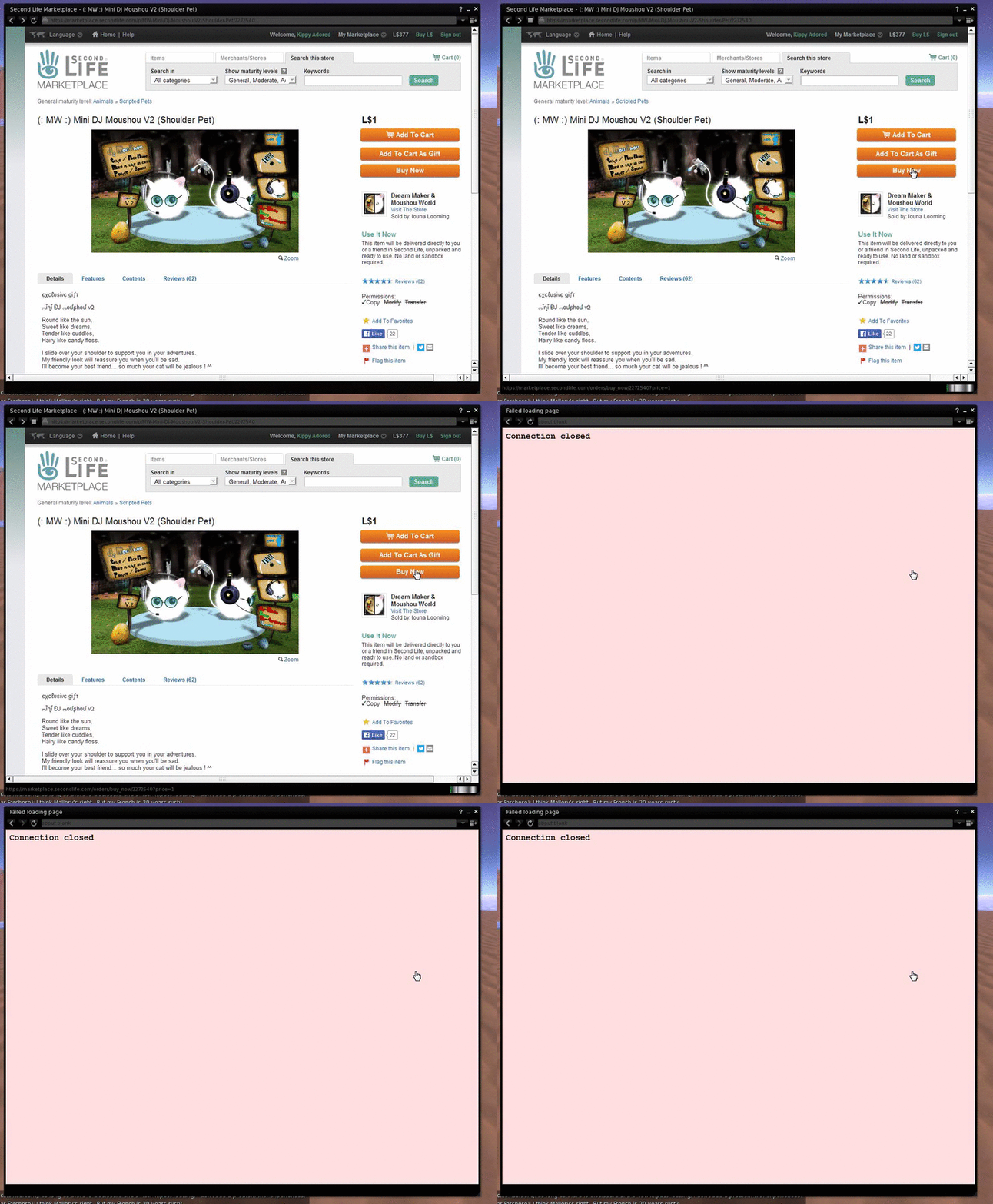
You will not be able to use your viewer’s built-in browser to perform LindeX transactions and / or make Marketplace transactions. Attempting to do so will result in a Connection Closed message:
With thanks to Whirly Fizzle for the screen capture
You will not be able to add/edit payment info to your account.
This should – at this point in time – be the extent of the impact (there might be further changes at some point in the future). If you do note any more, please feel free to provide specifics in the comments below.
My thanks to Whirly Fizzle for her assistance and support in putting this article together.
Project Bento, the Lab-initiated, collaborative project involving Second Life content creators to bring greater capabilities to mesh avatars and – potentially – rigged attachments – is now available on Agni, the Second Life main grid.
The news – not entirely unexpected, as the Lab has been gearing-up to make the move for the last few weeks – came via an official blog post on Tuesday, May 31st.
Project Bento has been in development for over a year, the initial phases of the work being carried out by the Lab behind closed doors, before a period of closed development involving a number of expert creators and tool makes – notably the Avastar team who produce the avatar plug-in for Blender, and Cathy Foil, who produces Mayastar, a similar plug-in for Maya. I was also invited to observe this initial work – my sincere thanks to Oz Linden for the opportunity – so that I could follow the project and report on its development, which I was able to start doing in December 2015, once the project had been publicly announced, and the project opened to greater input from content creators and animators.
An early Project Bento meeting. The project has involved staff from Linden Lab, notably Troy Linden, Oz Linden and Vir Linden, together with assistance from Alexa Linden, Simon Linden, Rider Linden, Aura Linden and others. It has also involved the folk from Avastar and Mayastar as well as many content creators and animators
At that time, Bento introduced over 90 additional bones to the avatar skeleton, with no fewer that 30 being added to avatars hands to allow for finger manipulation, and another 30 to the head for facial expressions. To further support the new additions, new attachment points were added to the skeleton and – most recently of all – a good number of the bones (particularly those in the face) were hooked-up the viewer appearance sliders, allowing them to adjust elements of suitably rigged mesh heads, etc.
Net result: the ability for mesh avatars to be far more expressive and customisable than before, and much, much better support for non-human avatars. There’s also the potential for a wide range of other uses – such as Aki Shichiroji’s wyvern pictured below, or rigged attachable pets – even the potential for gowns and other clothing to move naturally with an avatar’s movement.
Aki Shichiroji demonstrates a wearable wyvern utilising Bento bones for animation. Inset: the model under development at a Bento meeting (main image courtesy of Linden Lab)
Many of the possibilities for Bento are highlighted in a special promotional video released by the Lab and embedded at the end of this article, made with the full support for the creators who have been actively engaged in the project for the last 6-12 months.
It is important yo note that – as the official blog post states, this still a testing release of Project Bento: making it available to a wider audience than is possible when it is constrained to Aditi, and thus allowing further testing of things like overall simulator / grid performance with larger numbers of Bento avatars operating, looking out for other issues, etc., which may not have come to light during the Aditi testing, and also further refining and improving the viewer so it might progress to a release status.
Which brings up a further important point, again as the official blog post notes:
If you encounter Bento avatars and are not using the Bento Project Viewer, you may see some strangely behaving avatar animations and meshes. If you’re using a very old (i.e. no longer supported) viewer, encountering Bento content may even cause a crash.
Some TPVs have already starting integrating the Bento code into experimental versions of their viewers. However, if you are testing Bento, working with content which leverages Bento capabilities, you are best off using the official project viewer for the purposes of bug reporting, etc.
There is also a Project Bento User Group wiki page for those wishing to get involved in the project. However, please note that the meeting venue will likely be changing from Aditi to Agni now the project is available on the main grid.
Note, as well, that Project Bento is intended for use with mesh avatars and models – the capabilities are not intended to work with the default avatar form, as it was felt that attempting to do so risked potential content breakage and / or other issues which could impact the project.
Nevertheless, the new capabilities could herald a new era for mesh avatars within Second Life, with more realistic non-human avatars, greater dexterity with human-style avatars and even the potential for expressive, customisable mesh heads! So, welcome to the start of a new era for mesh avatars in Second Life.



 Inara Pey: Living in a Modemworld