On Friday February 10th, the University of Western Australia (UWA) kicked-off their fifth MachinimUWA Challenge under the title Seek Wisdom.
On offer are prizes totalling L$700,000 (approx. $3,000 US), including a top prize of L$130,000 and a UWA special prize of L$100,000, with eleven prizes in total on offer. The challenge is being co-sponsored by UWA, AviewTV, Philip Vought & The Tornado Gallery.
The Major Rule and Other Requirements
To quote from the press release on the Challenge:
Your machinima can be about whatever you choose, but there is one rule all entries must follow. The only requirement is that at least ONE of the 100 Treasures from UWA must form part of your story. These are actual treasures, however at least 17 of them exist on UWA land in Second Life. You may choose to include as many of the treasures as you like so long as there is at least ONE. Apart from this, feel free to film anything, anywhere. You may use props at the location, or maybe want to change the footage later during the post process, this is up to you… as long as the treasure or treasures you choose to be part of your Machinima can be recognised and form part of your storyline.
The recommended running time for entries is around 4 minutes 30 seconds in length. This isn’t a hard rule, but entries aiming for the UWA L$100,000 special prize, which will be awarded to the machinima that best captures the essence or spirit of 100 years of seeking wisdom at UWA, must fit within the recommended length.
Additionally, entrants are asked that they acknowledge the works featured in their submission and the lands in which the submission was filmed.
Completed entries should be uploaded to a suitable broadcast medium (e.g. Vimeo, YouTube, etc.), and links to the film sent to the UWA’s Jayjay Zifanwe and LaPiscean Liberty.
Closing Date for Entries
Midnight SLT, June 30th, 2012.
About the Theme
“Seek Wisdom” is the UWA’s own motto, found in its coat of arms, and was selected as the theme of the challenge to honour the new way education is delivered at UWA, “New Courses 2012.” The requirement to include at least one of the 100 treasures from the UWA in entries is to mark the university’s upcoming centenary in 2013.
Update April 2012: The flight limit has been raised to 5,000m.
Nalates Urriah keeps her finger on the pulse where all things server and scripting are concerned, as well as keeping an eye on other technical aspects of SL. Today she reports on server scripting, and carries an interesting little nugget on flight limits.
Apparently the Lab is considering whether or not to raise the current flight “ceiling” for unassisted avatars. As we’re all aware, if you fly without any kind of scripted / client-side assistance, you’ll start slowing down from around 165m onwards, and come to a complete halt at about 180-190m. To go any further, scripted / Viewer assistance is required.
I’ve no idea why this limit was set – there has to be some solid reasoning for it in the depths of time. However, for as long as I’ve been involved in SL, build height has (I think, my memory is getting fuzzy in some areas) always been at least 768m (prior to being raised to the current 4096m), so the brake-point at 180-190 to “natural” flight does seem rather arbitrary.
Simon Linden apparently puts forward an argument that raising the limit will shoot people using flight assistance systems into orbit. I’m not entirely sure I follow his logic. There is a plethora of flight assistance alternatives available across SL, from the ubiquitous Flight Feather or Flight Ring of old, through to fancy backpack attachments to options built-in to a range of tools such as Em Dash and Mystitool. Many of these include accelerators which allow the rate of vertical ascent to be adjusted by the user – some of them quite ridiculously so. Yet none, so far as I’m aware, have resulted in people ending up in orbit on the click of a button / key, even when employed at altitude. So would the removal of the current limit suddenly cause these tools to behave any differently?
It’s not even as if flight assistance tools are required, either. Firestorm bypasses the current limit by adding flight assistance to the LSL bridge. Milkshake (prior to being withdrawn from public use) demonstrated that it is possible to override the flight limit directly from within the Viewer without even resorting to any form of bridge attachment. Both of these capabilities tend to make the current limit somewhat pointless.
As it stands, and with maximum build height sitting at 4096m, it would make sense for LL to lift the limit to that altitude (as I’m sure they are only too aware). This would not only make mobility at altitude easier for all (especially around the more expansive higher-altitude builds where flying is allowed), it might even lessen people’s dependency on attachments, be they wearable or HUDs (not that this is a critical issue, given the threatened script limits project is now apparently shelved).
It’s not what I’d call a priority in any way shape or form, but it would potentially make people lives a little bit easier in-world; so if LL are considering the move – I for one say, “go for it – and push it to 4096!”
A new set of functions has been released by LL as a changeset, and is starting to find its way into SL Viewers.
Essentially, this functionality allows you to set thresholds above which avatars with a very heavy load (high-res textures, complex attachments (multiple prims, flexi prims, sculpts, and what have you), etc., – but not scripts, which are a completely different kettle of fish) will not be rendered by your Viewer. Instead, such avatars will appear as “grey ghosts”, similar to when they’ve been muted; however, IMs and chat can still be exchanged. This should theoretically reduce the load placed on the Viewer and a your system in terms of rendering, and lead to an improved SL experience.
It’s important to note that the functions only affect how such avatars are rendered in your world-view; they will still render normally in their own view, and for anyone who hasn’t set thresholds / has higher thresholds than you. Also, your avatar will remain visible in your view, no matter how you set the limits.
The thresholds are governed by two functions, initially released by LL as a set of debug settings:
RenderAutoMuteByteLimit – Maximum bytes of attachments before an avatar is automatically visually muted (0 for no limit)
RenderAutoMuteSurfaceAreaLimit – Maximum surface area of attachments before an avatar is automatically visually muted (0 for no limit)
These currently require numerical values to be entered. However, it is possible that they’ll find their way into at least some Viewers as Preferences options, possibly using sliders. Zena Juran has already opted for this approach with the latest release of the Zen Viewer (below).
Visual Auto-mute as presented in the Zen Viewer
The functions are supported by a new addition to the Develop menu: Render MetaData->Attachment Bytes. When active, This displays a set of figures over / near avatars, which can be used to help you to determine the byte and area thresholds you should set.
The approach has already come in for considerable discussion on the SLU forum, where opinion seems to be weighted towards the favourable.
Certainly, it can’t be denied that avatars can impact Viewer performance enormously, so any moves that enable the user to have a greater degree of control over what is hurting their SL experience is potentially a good thing. But lag is a very sensitive subject – as anyone who has encountered upsets in the past due to people using ARC as a Big Stick can testify.
This approach would appear to be a lot more beneficial than something like ARC and its successor, Avatar Draw Weight (or ADW) are concerned, as it should hopefully reduce the amount of finger-pointing and hostility that goes on when people have arbitrary figures in red floating over their heads like a glaring accusation of wrong-doing.
It’s also somewhat friendlier than the other alternative to “blocking” “overloaded” avatars: that of audio mute, which denies any communications capabilities where some might be preferred and which can, if done on a group basis, leave a poor soul ostracised in silence with no idea why.
There are, however, some drawbacks. On the minor side, it is possible that setting the options when entering a popular venue may well result in you finding one or more friends around you turn into grey ghosts – or that you end-up greyed-out in their view. This might in turn result in strained relations, but shouldn’t really be anything reasonable people can get past – and even joke about privately.
This isn’t necessarily a “one size fits all” solution as well; it is possible that, depending on the type of venues a person visits (in terms of popularity popularity, nature of the activities carried out, etc.), the thresholds may need adjusting from time-to-time in order to gain the best benefits / compromise in terms of performance benefits and visual appeal. This may limit the scope to which the new functions are used, as people are not always willing to fiddle around with sliders as they teleport around SL.
It also needs to be remembered that avatars aren’t the only load placed on the Viewer, and using functions like these might not help tremendously when moving around an environment that has dozens upon dozens of high-resolution textures all over the place (such as a store or mall). In this regard, the effectiveness of the system needs to be balanced against alternative approaches (such as the use of avatar imposters, or by simply turning-down your draw distance and turning down / off various options within the Viewer Preferences) in order to improve one’s in-world experience.
The biggest question-mark over the new controls, however, is that of effectiveness. If the results of playing with the new options is an improvement of a couple of fps in overall performance and/or a very slight improvement in rendering time, then it is unlikely that they are going to gain a lot of traction. But if people see a demonstrable improvement in their overall experience, then it is liable that the functions are going to prove more popular.
That said, anything tha moves us further away from the finger-pointing extremism that has been the plague of ARC /ADW, has to be a step in the right direction, doesn’t it? One possible benefit from this approach is a greater awareness and consideration of just how one’s own avatar might be impacting other people’s experience within SL, simply by seeing that it exceeds the thresholds one is setting against other avatars.
ProductTeam Linden (who he/she? is it Rhett in disguise?) has posted to the Technology Forum about a new option for presenting Inventory within the Viewer. Apparently, when the Viewer was split between the Basic and Advanced modes, moves were made to try to improve / simplify inventory presentation, but they never made it to a final cut of the Viewer.
Now they have, and Linden Lab is asking for feedback. The announcement reads in part:
For new users, managing and understanding inventory is often challenging. Drag and drop over large inventories can be problematic and daunting. New users are often confused about the meaning of certain system folders.
Today we have released a Project Viewer beta that includes this simplified presentation of inventory as an option. Before we consider any widespread changes to inventory, we want to know what you think about the Simple Inventory UI, noting that the target user is someone just starting out.
The Simple Inventory UI offers new users:
A simple display presenting only one folder at a time
Improved wayfinding and findability
Faster load of inventory items
The article then invites users to download a Project Viewer which includes the new Inventory presentation, and to provide feedback (via the SL forum), with any bugs that are found logged in the SINV Project JIRA. In doing to, the article notes:
It’s important to note that Simple Inventory was intended for Basic mode before Basic and Advanced modes were merged. It is still experimental and so it is unclear how it will function with extremely large Inventories, so if you have a large Inventory we don’t recommend using Simple Inventory as your only view.
There are also some incomplete features and some known issues, again as LL note.
So, what is it like? As I have a fairly extensive inventory that (if I say so myself) is well-managed and ordered that I’m in no mood to mess with, I tapped my CTA (Crash Test Alt) on the shoulder and took the Project Viewer for a spin.
Quick Tour
The Viewer has an initial release number of 3.2.8 (248008), and installs into is own folder but shares the standard cache and user folder locations as all other SL installations. Once started, the Viewer has the same funky blue/teal UI as the DD Project Viewer – so I assume this is to provide a simple means of recognising that you’re running a Project Viewer. Otherwise, the Viewer looks and behaves like a “normal” release.
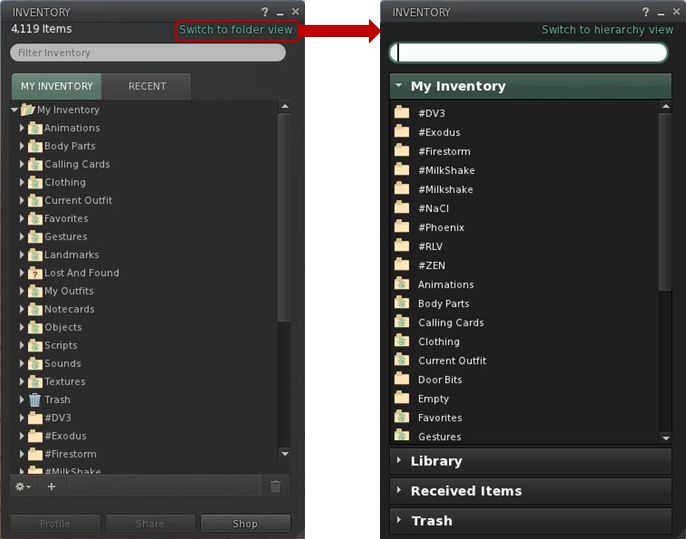
Opening Inventory initially reveals a familiar panel (for those that use the official Viewer), but one with a new SWITCH TO FOLDER VIEW link in the top right corner (below left). Clicking this brings-up the revised layout (below, right).
Inventory: from hierarchical view to folder view
Key points of the new layout:
Inventory is divided into clear sections: MY INVENTORY, LIBRARY, RECEIVED ITEMS (for the forthcoming Direct Delivery) and TRASH
You can have more than one section open at a time
Sections can be resized by hovering the mouse at the bottom of an open section so the cursor changes to a double-headed arrow. Click and hold the left mouse button to drag the sections beneath the open section up/down
Within a section, folders and contents are listed alphabetically (so system folders do not appear at the top of MY INVENTORY by default, and folders are not sorted to the top when mixed with objects)
As the view is not intended to be hierarchical, there are no arrowheads to the left of folders or any ability to open them within the displayed panel. Instead, opening a folder is now achieved in one of two ways:
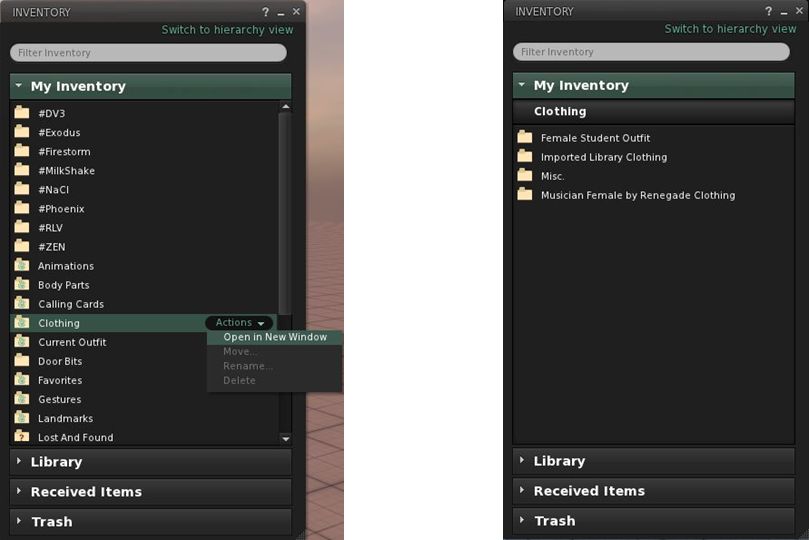
You can hover the mouse over a folder to highlight it with an ACTIONS option. Clicking this will displays context menu from which you can select OPEN IN NEW WINDOW (below, left)
You can double-click on the folder and have a new view of the contents slide neatly into the existing panel, replacing what was already there.
Note that to prevent accidents, system folders automatically have the options to move, rename or delete them disabled.
Whether you opt to open folders in a new window, or display them in the existing panel, the end result is the same in terms of what you see (below, right).
Opening folders: either hover the mouse over the folder and Click ACTIONS for a menu (l) or double-click a folder. The contacts will be displayed (r)Inventory breadcrumbs
If you opt to drill down through your folders by opening each in a new window, then navigating back and forth is a relatively simple matter of swapping between windows and closing those you’ve finished with.
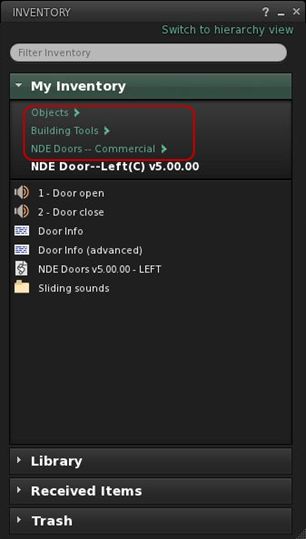
However, the system also makes it possible you to navigate up / down a set of nested folders within a single panel by adding breadcrumbs to the top of the panel (right) as you open each successive folder, allowing you to navigate back up the tree. At the same time, hovering the mouse over MY INVENTORY will reveal another ACTIONS option from which you can elect to go BACK TO TOP FOLDER.
Once in a folder, items can be highlighted and the ACTIONS menu used to manipulate them (e.g. wear, move, rename, delete) – again displayed options are context-sensitive (so if you are wearing an item, that option is not displayed, for example).
You can move items around your inventory in several ways:
Use the ACTION menu to select MOVE for an item / folder. This opens an additional window in which you can navigate to your desired destination (double-click through the required folders), before clicking MOVE TO SELECTED FOLDER to finish the task
You can also simply drag-and-drop items / folders within a panel
You can drag-and-drop between inventory windows
You can drag-and-drop between sections (between RECEIVED ITEMS and MY INVENTORY, for example) – the destination section does not have to be expanded in order to do so.
A couple of things I did notice during testing were that a) worn items are not highlighted / indicated in any way and b) there is no option to remove / detach a worn item. There also appears to be a bug, as selecting WEAR appears to ADD the selected item to your avatar, rather than replacing anything already worn – my CTA ended up clumping around in two pairs of boots….
Feedback and Thoughts
I don’t really have any issues with the functionality presented here per se. It works OK, the overall layout within a panel is fine, and (known issues and bugs notwithstanding), it all works pretty much as expected. There do appear to be some issues that do need addressing, however, and as LL asked for feedback on the system as presented (and allowing for the fact it is only an initial iteration, here’s mine:
Add the ability to see what is actually being worn or is attached to the avatar within the Folder View
As most people are likely to be moving folders from RECEIVED ITEMS to MY INVENTORY, it would make sense to move RECEIVED ITEMS above LIBRARY, to reduce the chances of a mis-click dropping items into the Library section
As currently supplied, the functionality is perhaps a little too limited – no ability to create sub-folders, for example, so the ability to organise one’s inventory is restricted to drag-and-drop into whatever is already there
Don’t be afraid of using menu options at the top of the inventory panel (File, Create, Sort, etc.) – they are lot more intuitive for users new or established than having options buried behind obscure “+” symbols and cog-wheel icons.
Also, if it is intended provide both views (Hierarchy and Folder) within the inventory panel of the a release Viewer at some point in the future, then I’d also suggesting ensuring that the top-level folder presentation is consistent between them (i.e. scrap the “system folders to top” default in favour of an alphabetical listing for the Hierarchy View), as this will assist familiarity in switching between views.
Thoughts
Candidly speaking, this alternative presentation comes across as yet another Linden curate’s egg. On the one hand, it cannot be denied that there are issues around how the inventory panel functions (the “high-speed scrolling” that can occur when trying to move an item from one folder to another, for example), and that things could be improved in terms of presentation. On the other, this approach is perhaps a little too simplistic to make a valid judgement at this point; too much functionality has been stripped away. Looking at it in the form presented, it’s hard to see the direction in which it’s liable to grow (if any) – which I think may be the issue LL are having, hence the low-key call for assistance.
I also cannot help but think LL “misunderestimate” new users here. While people are new to SL, it’s doubtful they are new to computers and things such as file management tools like Windows Explorer and the Mac Finder. After all, they’ve managed to find their way online, navigated the web to the SL website, found the Viewer download link, downloaded the Viewer, found the installer on their computer and installed it… As such, is understanding the nuances of inventory management that big an issue for them? I’m not convinced.
That said, there are undoubted benefits in some aspects of what is presented here: a “flat file” view may well be more to some people’s liking (providing it is better integrated with a hierarchical view as well), and the use of a pop-up “move” window could be preferable to some than relying on drag-and-drop – and it’s good to provide alternatives. I just can’t escape the feeling the perhaps LL are missing an opportunity. Given most people are liable to be familiar with the likes of Explorer and Finder, why not grab the bull by the horns and make inventory more approachable by presenting it in a similar manner to those tools – perhaps a two-panel display, with scrollable hierarchical view to the left, open folder view to the right with the associated drag-and-drop capabilities?
I’m not saying it would be easy to do (or even necessarily a short-term development). but were it possible to achieve, I’d venture to suggest it would meet with significant approach from established and new users alike.
I’ll certainly be keeping my eye on this to see how things develop. In the meantime, and given feedback is being sought, if you’ve not already taken a look at the Project Viewer, I’d encourage you to do so & pass your thoughts / suggests to LL via the forum.
Update 16th January:Charlar has added a comment to the JIRA that clarifies LL’s position on the alignment tool and puts concerns into perspective. The comment further makes it clear that from LL’s position, the opportunity to see the tool included in the official Viewer is far from closed, and Oz indicated in his comment from yesterday.
Update 15th January: The JIRA mentioned below has been re-opened, and Oz has requested any developers willing to take the alignment tool further to contact him directly. This clearly shows that the Lab is aware of feelings on the matter and are trying to meet people half-way, and full kudos to them on this. Qarl (Karl) has declined to update the code, but has stated it’s in the public domain, and others are welcome to do so.
Earlier in the month, Karl Stiefvater (do I still need to introduce him as the creator of the parametric deformer?) submitted an earlier piece of code he’d created – the prim alignment tool – to Linden Lab under a code contribution agreement.
I didn’t cover the contribution at the time, as Tateru had it very well covered. However to recap: Karl, formerly Qarl Linden, now Qarl Fizz, submitted the code to LL by way of a “Thank you” for a generous donation someone made towards the deformer project, as you can read on his website as well as Tateru’s blog (Tateru having steered the donation in the right direction).
The alignment tool does precisely what it says on the box: it aligns prims, as Karl’s own video demonstrates:
No fuss, no bother. It’s not a one-size-fits-all solution that is designed to fit every possible situation where prims (or linksets or objects) may need to be aligned, and it is not intended to be. However, it does provides a major benefit for builders in dealing with a specific set of issues that can otherwise be time-consuming to overcome. As such, it has been adopted by a number of TPVs, where it has proven to be highly popular.
But it has been rejected by Linden Lab under the original JIRA raised on it some 2 years ago by Nalates Urriah. As Lance Corrimal (himself the developer of the Dolphin TPV which uses the tool) and Tateru on her blog point out, the reason for the rejection appears to be primarily because the tool doesn’t perform tasks it was not designed to do and is thus “incomplete”.
The rejection notice as posted on the JIRA reads:
Thanks for making this effort. Alignment and snapping are an area where there are useful enhancements to be made.
However, we are not able to accept this contribution as it is.
These are the primary issues we found which resulted in that decision:
The feature should support the same modes as the other manipulation modes.
It does not work for non-mod permission objects. This functionality should work for all objects that the user can manipulate in-world.
It only supports World snap mode, not Reference and Local modes, unlike all our other manipulation modes
It packs and aligns to the face of the object bounding box. If objects are not cubes and do not share the same alignment, or aren’t aligned with the world coordinates (see above), the result of the operation is unexpected. Ideally the operations would use the actual shape of the object for aligning and packing.
There are also some coding implementation style issues that would need to be addressed. These can be covered in more depth after the functionality is dealt with.
In it’s current form, this is usable for purely prim-based builders under specific circumstances. It’s less useful for building with non-cube prims, mesh, sculpties. It’s minimally useful for building when the structure is not facing a global direction (ex: North, South, East, West). It’s not usable by non-building residents who need to place and organize purchased items.
LL obviously have the right to reject code that they feel is not in their best interests, or in the interests of the Viewer or their users. That’s a given and is fair enough. As such, and being of a generous nature, I have to say that there might be some mileage in some of the reasons given for the rejection (Jonathan Yap actually raises a couple of points within the JIRA). But, and again being fair to all, the rejection equally comes across as little more than nit-picking.
Take, for example, the remark that, “It’s minimally useful for building when the structure is not facing a global direction (ex: North, South, East, West).” On the surface, this might appear reasonable – until one remembers that the same is pretty much true for building as a whole in the Viewer at present – as anyone who has encountered prim drift can ably testify.
Then there is the comment, “There are also some coding implementation style issues that would need to be addressed. These can be covered in more depth after the functionality is dealt with.” This reads as not only nit-picking, but also to be putting the cart before the horse.
If Karl is in fact committing some basic errors in his approach to coding for the official Viewer, surely these should be addressed before embarking on any major functionality changes (were they to be agreed upon), in order to circumvent the risk that such “style issues” don’t lead to yet another rejection down the road?
Some have commented that the entire rejection smacks of a “not invented here” mentality. That may be the case, equally, there may be issues within the code as submitted we’re not privy to and which the note in the JIRA isn’t really helping to make clear. Even so, seeing this rejection I have to confess to being left with an uneasy feeling as to how the deformer tool is to be judged by the wider audience within LL. Time will tell on that, however.
As far as the alignment tool is concerned, I’m with Tateru on the matter and calling “time” on any hope of seeing it incorporated into the official Viewer, for precisely the reasons she states.
The Lab has entered into the spirit of New Year with an avatar makeover competition with a L$5000 first prize, plus runners-up prizes.
The announcement reads, in part:
An Image is Worth a thousand words – and sometimes it can be worth L$5000, too! Out with the old and in with the new – show off your dramatic Second Life makeovers with a before-and-after picture that highlights a new look you will be rocking this year in Second Life. There will be one grand prize winner (L$5000) and three runners-up (L$1000 each). Think of all the shopping you can do with that kind of allowance!
And goes on:
How to participate: Take a before and after image of your virtual makeover. It’s as easy as taking your before snapshot and placing it on a prim, then stand in front of it with your new look and taking another snapshot, or stitching together two images – one of you before your Second Life makeover, and one after. Save the image to your computer so you can upload your submission for the contest. Keep an eye out for the contest to go live in the People Forum.
The winners will be on the basis of popular voting by users – with only one vote per avatar. Entries will be available for viewing from today through to the 18th January.
…such a shame I completed my make-over in 2010; ah well, I can still be self-indulgent and publish a “before” and “after” set of pictures!
Me: before and after my 2010 makeover
IMPORTANT NOTE
Several people have IM’d me (and one has commented here) that they’ve been unable to submit entries, as the NEW ENTRY button on the contest pages is greyed-out, and they get a message “Sorry, you do not have permission to post media to this contest”.
If this happens to you, you need to sign-in to the forum pages (user name and password), using the link at the top right of the page (see below).
You’ll need to be logged-in to add your entry
Once you’ve logged-in, the button will be enabled, and you should be able to post your entry.
 On Friday February 10th, the University of Western Australia (UWA) kicked-off their fifth MachinimUWA Challenge under the title Seek Wisdom.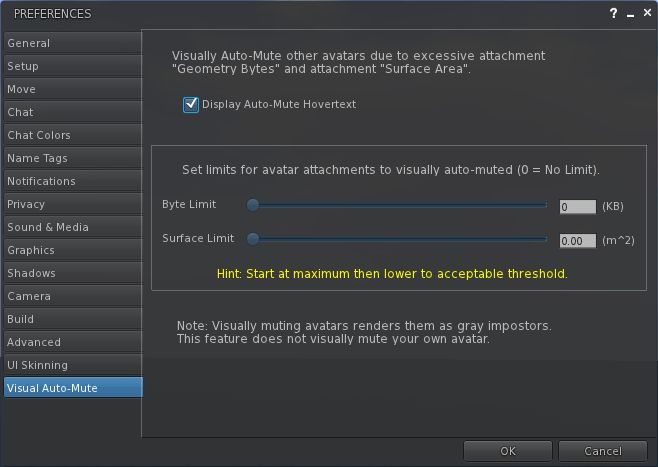



 Inara Pey: Living in a Modemworld