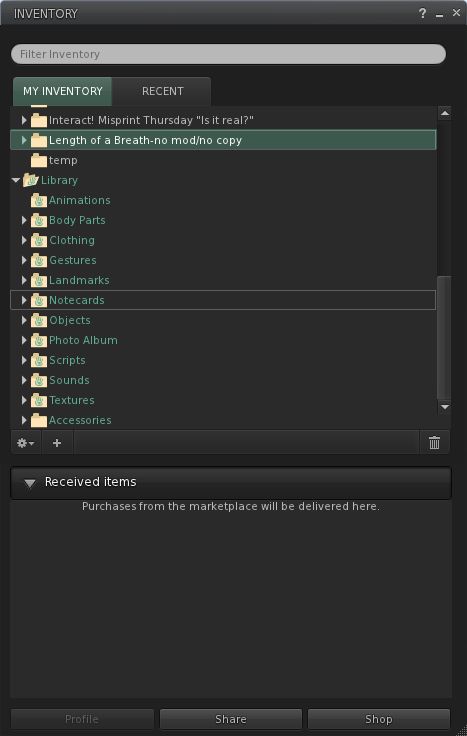
This slipped in under the radar yesterday – I almost missed it, but for a Reddit post from “Finethanks”: the Received Items Beta Launch.
Considered a part of Direct Delivery (and therefore technically already in beta), the Received Items functionality will actually be used to receive all incoming items reaching your inventory – notecards, snapshots, gifts, even items returned under parcel auto-return – as well as items being delivered via the upcoming Marketplace Direct Delivery system.
The blog post reporting the beta launch reads in full:
Look for Received Item in your inventory (Beta Viewer)
The Received Items Beta launches on Aditi today. Received Items is a new subsection of Inventory where all incoming items, including purchases, gifts, shared, and returned items, will be placed. Received Items is displayed in a separate section of your inventory panel in the Second Life Viewer, making it easier for Residents to see and manage incoming objects.
This Beta is a chance for Residents to try out these new capabilities. It also provides Second Life business owners with advance notice so they can plan for any additional communication or customer support around this upcoming change. The production deploy is currently planned for mid to late March, so please help to spread the word!
Because Received Items and Direct Delivery will use the new Received Items folder, both systems will launch together.If you would like to try out Received Items, please see the Received Items Beta instructions on the wiki. These instructions include pointers to Knowledge Base articles and ways to provide feedback.
You’ll need the latest SL Beta Viewer for testing, and may want to look at the Knowledge Base page as well. Aditi regions were testing is enabled are:
To access any of these regions, you’ll most likely need to log-in to Aditi first and then cut & paste he SLurls into your address bar, or use the World Map to reach them.
JIRA reports on the new functionality should be raised under the SVC project and categorised as “inventory”.
Direct Delivery (DD) – the mechanism that will replace Magic Boxes for merchants using the SL Marketplace and which should bring improvements to the overall delivery of items purchased on the Marketplace – is in open beta for people to try on the Beta (Aditi) grid.
Direct Delivery has been subject to many ups and down over the last twelve months, but this beta should bring it a step closer to reality. Given LL’s overall track record on the delivery of new Marketplace services, this is something that has merchants understandably nervous and concerned.
Documentation relating to the new system has also been updated, including the release notes and a set of getting started instructions – both of which are worth a read, although the latter are somewhat irritating (see below), and will be rationalised and clarified prior to DD going live.
For those (merchants especially – although it would seem those curious as to how purchasing goods using the new system can also have a bit of a go) wishing to try-out the system:
You’ll need to have the Direct Delivery Project Viewer (version 3.2.7.247349/dated 10th Jan or later), complete with its funky blur-tinted UI elements (new to this Project Viewer, or sign of another change coming to the UI?)
You’ll need to have an active account on Aditi and should log into that first if you’ve not done so in a while (indeed, you might want to change your password as per the linked instructions & force an account update if you haven’t)
You’ll need to be able to log-in to the Aditi Marketplace (this may throw up a security certificate warning, depending upon your web browser settings).
Testing Purchases
For those simply curious as to how they’ll be affected when purchasing goods, it’s very straightforward:
When logged into the Beta Marketplace, simply purchase any item commencing with “DD”.
Open your Inventory panel and click on the RECEIVED ITEMS tab at the bottom of the Inventory panel to expand it – and your purchased items should be in a folder, ready to be moved into the location of your choice in your Inventory.
Note: Items purchased on the Beta grid will only be available in your Beta grid inventory and purchasing them will not impact your Main grid L$ account balance. If your Beta grid account does not have a L$ balance, you can raise a support ticket. Funds cannot be transferred between the Beta and Main grids.
Direct Delivery: from the Marketplace to you (some Marketplace steps omitted) – click to enlarge
Testing Uploads (Merchants)
Items using Direct Delivery no longer need to be boxed-up – part of the idea being that people receiving goods will no longer need to rez a package in-world and unpack it (although if you wish to box items still (and some of the limitations of the system actually mean you may still need to), you can.). Nor do they require a Magic Box; instead they use a new addition to the Viewer – the Merchant Outbox – to upload goods to the Marketplace.
You can organise your items either in your inventory itself, or within the new Merchant Outbox panel (located in the ME menu on the Project Viewer) prior to uploading. Of the two options, the former is probably the preferred, given that anything organised solely in the Merchant Outbox will vanish as soon as it has been uploaded.
The basic steps are:
Open your Inventory and the Merchant Outbox (ME->MERCHANT OUTBOX).
Drag the items from your Inventory panel to the Merchant Outbox panel.
If required, organise items by folders in the Merchant Outbox (individual items dropped into the Merchant Outbox will automatically be placed in their own folders).
Click the SEND TO MARKETPLACE button.
You should get an on-screen confirmation when all items have been sent.
Click on My Marketplace (top right) and select MERCHANT HOME.
On the MERCHANT HOME page, click on MANAGE LISTINGS on the left (or click on INVENTORY at the top and then select MANAGE LISTINGS from the drop-down).
Your listings are displayed, with unassociated items at the top.
Use the ACTIONS option to the right of each item to create a new Marketplace listing in the usual way.
Obviously, multiple items can be uploaded via the Merchant Outbox, I’m using a single item purely for demo purposes.
From you to your Marketplace store & ready to be listed: Direct Delivery (click to enlarge)
Irritating
The tests themselves are easy to carry out. What is irritating is the lack of attention paid to the “getting started” instructions. Vis:
The instructions wibble on about downloading a Magic Box (this is testing Direct Delivery, right?) – a Magic box isn’t required for a basic test of the DD functions – either when purchasing goods or uploading them
They direct you to place the Magic box at one of two locations on the Beta grid – one of which is – or was during my testing – (wait for it) NO REZ (virtuatrade Campus S).
If mention of Magic Boxes is included for those who wish to carry out more involved testing (such as comparing what happens on uploading, how the system handles / differentiates items uploaded via either mechanism, etc.), then this should really be made clear in the instructions. Also, and as a minor quibble, why isn’t the Magic Box itself set-up as a DD item? That would kill two birds with one stone (get a Magic Box for more involved testing and test the receipt of DD items in a single pass).
There is also an error in the Selling in the Marketplace instructions which might lead some to get a little confused. These direct people to their MERCHANT HOME page, and then to click on MANAGE INVENTORY, when in actual fact the required link is MANAGE LISTINGS, which is located under the INVENTORY heading.
Feedback
I’m not entirely sure why this level of testing is now required, as it all seems very basic. But then, I wasn’t involved in the closed beta testing and I haven’t been keeping up with discussions on DD via the Merchant’s forum. As it stands – and leaving aside the inevitable amount of work required to shunt stuff from Magic boxes to the DD system, this process seems straightforward and easy to understand for merchants and consumers alike (“getting started” instructions for the Beta notwithstanding).
My tests here are, of course, pretty basic. It’ll be worth keeping an eye on the Merchants’ forum and the Beta thread to see if any major issues come out of the beta process, as well taking a read through the documentation listed below.
On November 3rd, a blog post appeared from Commerce Linden, referring to a further Beta of Direct Delivery. Unlike the first Beta, this appears open to all merchants. The blog post, appearing in the Commerce section – which doesn’t appear on people’s account dashboards, states:
“To improve the quality of upcoming releases, we are launching a Beta program for the Marketplace. Starting today, Aditi will be used as the Marketplace Beta testing grid.* All merchants will be able to test new features and bug fixes at least five days before each Marketplace release. In addition to the Marketplace Beta release notesthat are produced on the wiki, updates will be posted in the “Technical Announcements” section of the Marketplace Merchant Admin to alert merchants of current beta tests.”
The post continues:
“In December, all merchants will have the opportunity to purchase and list items using Direct Delivery on Aditi. We will be allowing a limited number of merchants to Beta test Direct Delivery in production before the official launch, which will not occur until after the New Year. If you would like to learn more about Direct Delivery, please see the updated Direct Delivery FAQ.”
This last paragraph will come as a relief to many, who were fearing LL might roll-out DD ahead of the Christmas season and inadvertently create issues for merchants as a result.
Alongside the new Viewer 3 UI that has reached the Development Viewer, further small steps have been taken with Direct Delivery (DD).
On the 18th October, DD related code previously released onto Le Tigre was rolled out on the main server release channel. Again, this does not mean that DD is now active, just that the road is being further prepared for DD’s arrival – or to allow for further code compatibility testing.
The code was rolled-out alongside an Agent Inventory update which means that any TPVs that have merged merged since Viewer 2.5.1 should experience much faster inventory response times than previously.
Direct Delivery: Received Items section added to the Inventory floater
Alongside of this, the latest Development Viewer, as well as getting the new UI shiny, also gets an update aimed at Direct Delivery: a new section in the Inventory floater called RECEIVED ITEMS.
Click on this, and you Inventory floater opens a new panel (left), wherein any items you purchase via the SL Marketplace will be delivered once Direst Delivery goes live, either boxed or in a folder hierarchy (or both, in some cases).
One assumes items delivered to this area can be drag-and-dropped into your main Inventory folders; as I’m not in the DD beta, I’ve actually no way of testing this. However, until the DD system is active, Marketplace deliveries will continue to be made as before, with items arriving in the main section of Inventory.
There is currently no corresponding new section (or folder) that can be used by the system to retrieve merchants’ items that are to be listed on the Marketplace. One assumes this is to prevent any confusion with people thinking DD is now active and thus trying to use the capability.
So, that’s another couple of steps forward, although the silence that has followed what are valid and reasonable questions on the project from merchants has now been going on for long enough to give the crickets leave to start chiruping.
Direct Delivery (DD), the means by which items purchased via SL Marketplace (and which in theory should make Magic Boxes as used by merchants a thing of the past eventually) took a step closer with the arrival of code on the Le Tigre release channel.
This does not necessarily signify that the new service is about to go live. It may signify that Linden Lab are pushing the code out for the purposes of production-side beta testing or perhaps for compatibility testing. News on the move is rather scarce. Brooke Linden promised to clarify the roll-out on the 4th October (when the code initially reached Le Tigre), but nothing further has been forthcoming from the Commerce Team.
New Delivery System
For those not in the know, Direct Delivery is intended to massively improve the way in which customers receive good purchased through SL Marketplace, and how merchants manage their SL Marketplace inventory locally. The beta for the system was originally announced back in April, although at the time the call was light on specifics.
So, in a very brief summary, for those purchasing items through the Marketplace it broadly means:
Recipients will no longer need to accept delivery of an object in order for the item to be successfully delivered in-world. Items will be delivered whether the recipient in in-world or offline, and a notification of arrival sent
Rolling restarts will not result in failed deliveries
Purchased items should be received in a new system folder, probably to be called “Incoming Items”, with purchases delivered to their own folder (or folder hierarchy) within this system folder
Failed deliveries as a result of multiple purchases through the Marketplace should cease.
For Merchants, the new system broadly means:
No requirement to use Magic Boxes (although support for Magic Boxes will continue for an unspecified period after DD has rolled-out)
No requirement to box items (although boxed items will continue to be supported)
Local management of inventory handled through a new system folder, probably to be called “Outgoing Items”. Items placed in this folder will be automatically retrieved and copied to the Merchant’s Marketplace inventory ready for listing (no copy items will be flagged as such and then moved to the SLM inventory once the merchant has OK’d the move)
Other aspects of the new system include:
To prevent over-inflation of local inventories as a result of large numbers of items being delivered into folder from the Marketplace, the number of objects a merchant can place in a folder will be limited. If a merchant is selling a large number of items in a single listing, they will be required to box objects within their folder hierarchy
The system will allow merchants to indicate to purchasers whether an item will be delivered boxed or unboxed
Merchants will no longer need to keep adding one unit to no copy item listings whenever one unit sells
Gifting and limited-quantity items will continue to be supported by DD.
There is also an API for the marketplace that is being developed with should also provide merchants with additional capabilities within the Marketplace. As well as Direct Delivery, work is ongoing to improve inventory services in general, including faster and more reliable inventory loading within the Viewer.
Concern
Overall, if implemented properly, these changes should benefit everyone.
However, it is fair to say that Linden Lab have not exactly covered themselves in glory when making massive changes to the Marketplace environment, as many of those involved in the switch-over from SL Exchange to SL Marketplace will testify. More recently, the Commerce team caused considerable consternation when making changes to the Marketplace.
Ergo, people are understandably nervous around the implementation of DD as a whole, the benefits it will bring notwithstanding. A number of merchants have already requested (via the Commerce Forum) than any formal roll-out of the new system be delayed until after the New Year, so that merchants face minimal disruption in the run-up to, and through, the busy Christmas period.
Yesterday Linden Lab rolled out an update to the SL Marketplace – and in the process managed to break several things:
When editing any listed item, merchants found themselves faced with both the item’s list name and all permissions set for it being wiped from listing details, thus requiring the info to be added again
Loss of information appearing in Merchant’s Transaction Histories following sales (such as the actual customer’s name…)
Loss of data from the Automatic Notification of Sale (ANS) e-mail merchants receive when a sale is made (such the actual amounts involved, pre- and post-LL’s commission).
This has understandably lead to a lot of consternation and anger both on the commerce forum and on individuals blogs. Various assurances have been given over aspects of the above errors, together with excuses made (such as the zeroing of balances in ANS being “A bug that was missed” in testing) – but the fact remains that issues have still not been fixed, nor have the changes been rolled back until such time as the code can be made fit-for-purpose. As a result, merchants are still – quite rightly – feeling hurt and betrayed.
I do not classify myself as a merchant in the same was as Darrius Gothly, Dartagan Shepherd or Pamela Galli – but I do feel their pain. Second Life is promoted on a number of unique attributes – one of which is the ability for people to “make real money”. If this is to be true, then the systems Linden Lab put before their customers to enable them to do so must be robust and capable of providing information people need in order not to fall afoul of legal requirements vis-a-vis earnings, etc.
But in reality, they’re not – not through and direct flaw in the software, but simply as a result of how things are being managed. This is perhaps where the philosophy of “put it out, test, polish, test, polish”, as described by Rodvik at SLCC 2011, falls down. Simply put, such a philosophy cannot work well where it impacts in people’s ability to generate income. As Blaze Nielsen comments:
“Brooke et al, I believe the great frustration we feel as merchants here is the methodology of using us as beta testers for your “upgrades”. Many of us have our livelihoods on the line. The money we use to buy food and gas and pay mortgages. For many this is far far [sic] more than a hobby. We see again and again and again sloppy code disrupting our businesses here while the bugs are ironed out. From the server, the client and the marketplace you obviously feel your tinkering can be done with the general population instead of in an isolated testing environment. This needs to be discussed at the highest level of management and the policy changed.”
An added issue here is that Linden Lab are introducing a new Direct Delivery system which could be exceptionally beneficial to merchants and customers alike. But this latest situation does little to inspire merchants with any sense of trust in LL’s ability to do so without causing further confusion and upset.
Update, September 16
Darrius Gothly reports that the majority of the issues encountered in the Marketplace update og the 13th have noew been fixed. He also gives considered thought on what went wrong – and is in all probability pretty close to the mark – and what needs to be done in the future to avoid similar cock-ups. It’s a recommended read for all those involved in content creation and sale, whether for business or as a hobby.