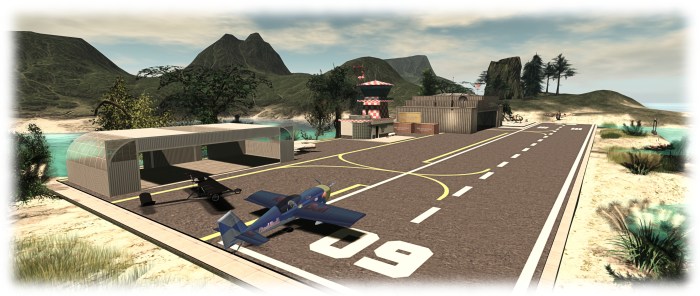
The Firestorm Gateway provides new users with essential orientation in using the viewer and the opportunity to learn about a range of SL activities, such as aviation – but it needs marketing and promotional support
The Firestorm team have announced they are seeking a volunteer to handle marketing and promoting Second Life to potential new SL users through the Firestorm Community Gateway and website.
The Firestorm Gateway is a part of a forthcoming trail programme being implemented by the Lab which will see up to 20 community-lead gateways active within Second Life and geared towards helping incoming new users get to grips with the platform more positively, and hopefully improving the chances that they’ll “stick”.
However, in order to attract new users into Second Life, the Gateway – and particularly its associated website – needs to be actively promoted to audiences beyond SL – hence Firestorm’s call for a marketing volunteer.
The marketing volunteer will be responsible for presenting and promoting the Gateway and – particularly the Gateway website – to potential audiences and target across the Internet, to encourage people
The Firestorm team is specifically looking for someone who is an existing user in Second Life with a solid grasp on what Second Life is and means to its residents, and who has extensive experience with internet marketing, including the use of social media tools.
The full list of requirements and the benefits offered in return are listed in the official Firestorm announcement, and those interested in applying are asked to send a note card with their information, experience and ideas to Jessica Lyon in-world, or via e-mail to jessica.lyon-at-phoenixviewer.com.
The Firestorm Gateway: partnering with MadPea Games
I recently covered the soon-to-be-launched Lab trail progamme which will see a new set of community gateways active within Second life and geared towards helping incoming new users get to grips with the platform more positively, and help them to start to engage in activities, thus hopefully improving the chances that they’ll “stick”.
The Firestorm team are one of the groups invited by the Lab to be a part of this new trial programme, and as I reported earlier in October, they will be launching their Gateway on Saturday, October 31st with a special party followed by a month-long Spooky Nights hunt which will take place across the five core regions of the Firestorm Gateway.
What I couldn’t reveal in that article, but am able to now, is that MadPea Games have agreed to partner with Firestorm to help get new users engaged in Second life.
A number of MadPea games will be available in the Firestorm Gateway regions
In a press release on October 28th, MadPea confirm they are providing Firestorm with a number of their vintage games which income new users will be invited to play free-of-charge, in order to present them with even more opportunities to learn about and engage in Second life.
Commenting on the partnership, Kiana Writer, CEO and Queen Pea of MadPea Games says, “We are all very excited about the opportunity of working with Jessica and her team and waving the flag for what is achievable for user-created content on the grid. There’s a huge learning curve when you enter SL for the first time and we believe Firestorm, along with their partners, are best placed to help guide new users through that arc.”
Jessica Lyon, speaking for the Firestorm team, said: “We are super excited to announce that we’ve formed a mutually beneficial partnership with MadPea Productions! Essentially MadPea will install some of their older games as free play in our environments, and in exchange new residents will learn about MadPea Games to become potential new customers. MadPea will also then be able to send their new users to our installations to learn how to play MadPea games.”
The Firestorm Halloween Party stage area
The Firestorm Halloween Party will kick-off at 13:00 SLT with a series of live performances running through until 16:00, when things will switch over the DJs, and the Spooky Nights Halloween Hunt will launch.
Topping the bill for the party are:
13:00 SLT – Mankind Tracer
14:00 SLT – Nance Brody
15:00 SLT – The Changhigh Trinity Sisters Fireshow
14:00 SLT onwards – DJ Quad
Over 150 well-known Second Life merchants have contributed to the hunt, and you can read a list of participating creators on the Firestorm post on the party, and also catch photos of some of the prizes on offer.
Four landing points will be in operation for the party, as follows:
For further information on the party and the Firestorm Gateway, please refer to the Firestorm blog post, or to find out more on the Gateway and the new Gateway programme, please refer to the articles in this blog.
The Firestorm Gateway regions: setting for a special Spooky Hunt, but merchant assistance sought
Firestorm will be opening their new Gateway regions to the public on Saturday, October 31st, with both a special Halloween party and the launch of their Spooky Nights Hunt, which will run through until Monday, November 30th.
The Firestorm Gateway is one of up to 20 new Community Gateways which will soon be opening as a part of a trial of a new Community Gateway programme initiated by the Lab, and which I previewed back in September.
The idea is to allow communities and groups within Second Life to build their own gateways focused on bringing new users into Second Life and to help get them started. These gateways will include web pages to attract new users to them, which will include a registration API to allow those users to sign-up to SL and create and account without necessarily having to go through the central registration process at secondlife.com.
The Firestorm Gateway regions, once officially opened, are intended to help incoming users gain familiar with SL, gain support, and experience some of the activities to be found in-world, such as socialising, flying, boating, playing games, and – as shown here – scuba diving and underwater exploring
The Firestorm party and Spooky Nights hunt do not mark the official opening of the new Gateway programme as a whole – the Lab will hopefully be announcing this is due course. However, they do present the opportunity for Second Life users to explore the Firestorm Gateway regions, five of which will be featured in the hunt, which will also serve as the first event designed to attract new users to Second Life via Firestorm’s website.
A special stage area has been created for the party on October 31st, which will feature Mankind Tracer and Nance Brody, among others. There will be more details on this announced by the Firestorm team in due course.
The Firestorm Gateway regions also include areas suitable for introducing people to role-play, etc. – and you can explore them once the Spooky Hunt opens on October 31st
The Spooky Nights Hunt will take place across the five activity regions of the Gateway, and it is hoped it will provide fun and interaction for both established and new users. Right now, and in support of the hunt, the Firestorm team are reaching out to Merchants who are willing to provide goodies as hunt prizes, with Jessica Lyon, the Firestorm project manager noting:
Although it is a Halloween hunt, the hunt remains open after Halloween. You can make a spooky gift or not.
If you are a Merchant interested in supporting the hunt, please hop over the Firestorm website and the Spooky Hunt application page for further information.
As well as participating in the hunt, newcomers and visitors will be able to explore all six of the Firestorm Gateway regions, which include an orientation region for people new to Second Life and a social area where people can meet and interact (and where questions on using Second Life can be answered). In addition, they’ll be able to participate in any of the activities offered across the regions. These are designed to present a broad feel for the things people can enjoy in Second Life, and include fly aircraft, sailing, jet skiing, scuba diving, playing games, etc. In addition, they can explore a simple role-play environment, or use the sandbox area to learn the basics of building.
The Firestorm Gateway opening will focus on a Halloween party of Saturday, October 31st, followed by a month-long Spooky Nights Hunt in the 5 activity regions of the Gateway
One of the most important aspects of any Community Gateway is providing volunteers who are willing to spend time in-world providing help and support for new users as they arrive. If you would be interested in supporting the Firestorm Gateway by becoming a mentor there, please send a note card with your name and relevant background information (e.g. whether you have been a mentor in the past, experience in helping newcomers and users, etc.), to Jessica Lyon.
To keep up to date with preparations for the party and the hunt, as well as with further news on the Firestorm Gateway, keep an eye on the Firestorm website. I’ll hopefully have more news on the Gateway programme itself as it is announced by the Lab and / or more Gateways come on-line.
If you are participating in the Gateway trial programme, and would like your Gateway to be previewed in this blog, please use the contact form to drop me a line, or contact me in-world.
Update:this release has seen further issues for those using Webroot anti-virus (problems include low FPS, high ping rates to the simulator, very slow rendering, etc.). If you have Webroot installed on your system and are experiencing issues, please try manually whitelisting the viewer’s cache folder.
Tuesday, August 18th saw the release of Firestorm 4.7.3.47323. This release comes a little later than had been planned, thanks largely to a series of last-minute blockers caused be assorted external influences (such as win 10 driver issues for Intel).
This is once again a major release, packing a huge amount into it, and which brings Firestorm pretty much to parity with the Lab’s code base. It also sees the return of the Linux 64-bit build to the fold.
Given the sheer number of updates in the release, I do not intend to cover everything here, but rather offer an overview of some of the more major / interesting changes, updates and fixes to be found in the release. for full details of all changes, and all due credits to contributors, etc., please refer to the official release notes.
As this is a full release, expect an announcement on the blocking of version 4.6.1 and 4.6.5 to be made once the dust from this release has settled.
Log-in Screen Updates: Text Mode and Remember User Name
Login Screen > Select Mode >Text
When enabled, this disables the viewer’s 3D rendering, allowing Firestorm to be used as a “text viewer” for low-end systems and launches the viewer with the in-world view blanked out, but all of the menu options and tool bar buttons accessible HUDs (which are not displayed) and other attachments can be manipulated via the Touch option in the Inventory context menu.
The Text Mode option, accessed from the Select mode drop-down on the right of the log-in / splash screen enables you to run Firestorm without 3D graphics on a low-end system – menus and buttons will still be accessible, as will floaters. The Remember user name check box (highlighted above left) is also a new feature, restoring the functionality last seen in Phoenix
The Remember Username check box has been added to Firestorm in response to a series of requests to bring back this functionality from the Phoenix viewer – see FIRE-5735.
Additional Log-in Screen Fixes
The issue of Remember Password box checking itself after a failed log-in attempt and refusing to uncheck itself (see FIRE-16535) has been fixed
Several focus issues within the login panel have been fixed (see FIRE-6930)
Lab Updates
The 4.7.3.47323 release brings Firestorm up to parity with the Linden 3.8.2 code base (with some additional updates from the current 3.8.3 code base). Chief among the LL updates are the following.
Viewer Build Tools Update
This release means that Firestorm is now built using the updated viewer build tools, notably Visual Studio 2013 for windows and Xcode 6.1 for Mac, with some additional tool improvements, all designed to provide improved performance and stability, as well as easing the viewer build process. Details on the new build tools can be found in my blog post on the subject, however the key points with this change are:
The Windows version of this viewer will not install on Windows XP systems, regardless of the Service Packs also installed (previous versions of the release viewer would install on Windows XP system which had Service Pack 3 installed)
The Mac version of the viewer will not install on any version of OS X below 10.7.
Attachment Fixes
Firestorm 4.7.3 includes the Lab’s Project Big Bird fixes for a wide range of viewer attachment loss issues, which tend to noticeably occur after regions crossings (physical or teleport), such as: attachments appearing to be detached in your view, but not to others, and vice-versa; attachments appearing to have detached from you, but showing as attached in Inventory, and so on. These also fix issues such as adding multiple attachments at the same time failing to attach everything selected, and attempting to wear an outfit with too many attachments failing.
Project Layer Limits
This changes how system clothing layers (shirts, pants, under shirts, jackets, etc.), are handled. Prior to this update, an avatar could wear a maximum of 5 items of any single layer – say the jacket – at one time. With this change, an avatar can wear any combination of layers up to a global maximum of 60 – so you can wear 1 pair of pants and 59 jackets if you so wish, or just 60 jackets, etc.
Note that this change does not apply to body layers – skins, shapes, eyes, etc., for which the limit is still one of each, nor is it applicable to attachments, which retain a limit of 38 per avatar.
Experience Keys / Tools
Firestorm 4.7.3 adds the full set of Experience Keys / Tools controls and floaters in the viewer. For those not familiar with Experience Keys / Tools, I offer my own overview from July 2015.
This update means that on entering an area where an Experience is running, Firestorm users will see the full permissions request dialogue, rather than an abbreviated version.
With release 4.7.3, Firestorm users can access the Experience floater and review information on those Experiences they have allowed, blocked, owned, etc., and display individual Experience profiles. Land owners can also display information on Experiences running / blocked on their land through World > Region Details and / or the About Land tab
In addition, Firestorm gains the additional Experiences-related panels and floater options. So users can now access the Experiences floater via Avatar > Experiences, and the Region and About Land floaters have also been updated to include Experiences tabs and information.
Viewer-Managed Marketplace (VMM) is designed to enable merchants to manage the creation and management of Marketplace product listings through the viewer, bypassing the need to use the Merchant Outbox (and have copies of items stored on the Marketplace inventory servers) or using Magic Boxes (as VMM fully supports the sale on No Copy objects). It was fully deployed in July 2015, and all merchants have had their Marketplace listings migrated to VMM, and should by now have also migrated their Magic Box listings and items to VMM.
Firestorm 3.7.3 now fully supports VMM functionality, providing the Marketplace Listings panel and hiding the Marketplace Listings folder by default.
Those still requiring information on VMM are referred to my blog posts on the subject, which also include links to the Lab’s official information resources.
Dragging Folders into My Outfits
A recent change to viewer functionality meant that it was no longer possible to drag and drop sub-folders of items into the My Outfits / Outfits folder – see BUG 9209 (FIRE-15603). This changed caused some consternation among those who use My Outfits to order their outfits. As a result of the use-cases supplied to the Lab within the JIRA, this has been reversed in an upcoming release, and has been cherry-picked for inclusion in Firestorm 4.7.3.
On Friday, July 17th, Jessica Lyon of the Firestorm team issued a blog post updating users on the progress of the upcoming release, together with an appeal for assistance.
The last release of Firestorm – which I overviewed here – was officially referred to as a “beta” release, as it was rolled out at a time when further updates were expected from the Lab which would prompt a further Firestorm release, possibly in short order. In particular, Firestorm were waiting for the following “big three” from the Lab to reach release status with the Lab:
Experience tools, (which were promoted to release status by the Lab at the end of June)
The Project Big Bird fixes for viewer-side attachment issues (promoted to the official release viewer on Tuesday, July 14th)
Viewer-Managed Marketplace (which the Lab have just announced as “released”, ahead of the start of the automated migration process for Merchants, despite the viewer code still being at RC status at the time of writing).
While the Firestorm post doesn’t commit to a date when the new release might appear, but does make it clear that the release is coming soon. Also, as well as these particular updates, the blog post indicates it will include additional fixes and updates from the Firestorm team and contributors – including updates from Kitty Barnett for RLVa (one of the most frequently requested updates), and other goodies beside – such as updates to the Unified Snapshot floater.
For those not overly keen on the preview pane in the Unified Snapshot Floater (above left), the next release of Firestorm should see the return of the “old” snapshot preview (above right), with the option to freely switch between the two via the arrow button
As well as hinting at what is to come, the Firestorm post also includes an appeal for help, as Jessica explains:
There was a time when Linden Lab had the interface translated in multiple languages, and we did, too, since we are based on the Linden code. However, as time passed, new additions to the interface were added, and the translation of these interface elements fell behind. Today most translated language interfaces actually contain more English than the chosen language, and it is becoming more and more difficult to merge these half-translated UI elements with upstream code.
Because of this, the team have decided to discontinue and remove translations which might be regarded as “incomplete” and for which they do not have the internal expertise to correctly maintain. These comprise: Chinese, Danish, French, Portuguese, Spanish, and Turkish.
However, the team is will re-introduce any of these languages if there are people willing to commit to providing UI translations for them, and maintaining the translations long-term. As such, the Firestorm team is looking to hear from volunteers willing to do so. However, as Jessica notes:
UI translation involves more work than merely providing the terms for the correct language. Volunteers must be comfortable with editing and properly formatting xml files or should be able to learn how to do so.
If you have the necessary language and technical expertise, and are confident you can provide the required commitment to update and maintain a viewer translation for one of the languages listed above, please read the Translating Firestorm wiki page for further information, and then express your interest directly to the Firestorm team via e-mail to admin@phoenixviewer.com.
Sunday, May 3rd saw the release of Firestorm 4.7.1.45325 Beta. This is another big update which brings Firestorm pretty close to being up-to-date with the Lab’s viewer.
However, it has been given a beta status as there are further important updates coming out of the Lab, such as fixes for AIS v3 attachment issues, the new Viewer-Managed Marketplace functionality, etc. As such, the Firestorm team will be working on a further release, which will be made available once the Lab has made these updates and new functionality generally available through their viewer release channel, and this will count as a “full” release of Firestorm.
Given the sheer number of updates in the release, I do not intend to cover everything here, but rather an overview of some of the more major / interesting changes, updates and fixes to be found in the release. for full details of all changes, and all due credits to contributors, etc., please refer to the official release notes.
As this is a beta release, there will be no blocking of any older releases of Firestorm until after the next “full” release is made.
Lab Updates
The 4.7.1.45325 release brings Firestorm up to parity with the Linden 3.7.26 code base (with some updates from the 3.7.27 and 3.7.28 releases). Given the last release (4.6.9) brought Firestorm to parity with the Lab’s 3.7.8 code base, this means this release includes a significant number of updates direct from the lab, which include, but are not limited to, the following.
Avatar Hover Height
The Lab’s Avatar Hover Height option is included in this release, allowing users to make on-the-fly adjustments to their Avatar’s relative position above the ground / the floor / an object it is sat upon, via a slider or spinner, with a range of +/- 2 metres. The option is accessible via the avatar right-click context menu / the pie menu, which displays the slider / spinner.
Avatar Hover Height allows for on-the-fly adjustments to your avatar’s relative position above the ground, etc.
Avatar Hover Height can be used whether you are standing, sitting, using a poseball, etc. However, note that it is a change to the graphical representation of your avatar – the option does not make any associated change the avatar’s height in terms of platform physics.
Default Permissions
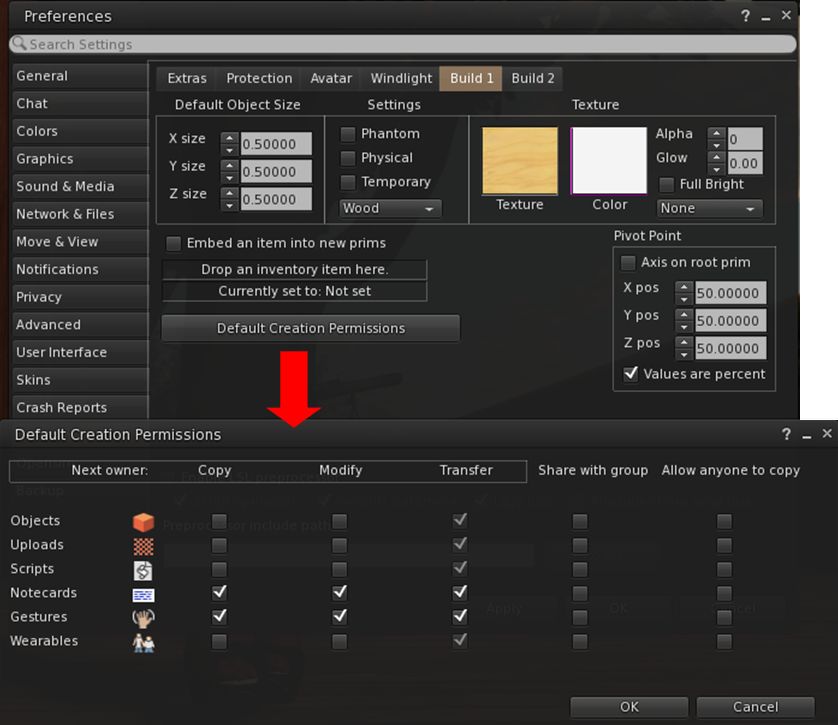
Firestorm 4.7.1 includes the new default permissions panel for setting the initial permissions on created items – objects, uploads, scripts, notecards, gestures and wearables. contributed to the official viewer by Jonathan Yap under STORM-68, the new panel can be opened via Preferences > Firestorm > Build 1 > Default Creation Permissions.
The STORM-68 default creation permissions are now integrated into Firestorm
Other Lab Updates of Note
GPU Benchmarking Feature: in common with the Lab’s viewer, Firestorm no longer uses the GPU table to define your GPU and initially set the viewer’s graphics. Instead, a test is carried out when the viewer is first installed to determine the GPU type and graphics settings are initially set as a result of this test. You can, of course set alter your graphics settings to suit your needs / load your settings for any saved presets you have
Server-side Appearance (SSA) polish / Advanced Inventory System (AIS v3): stability and performance improvements for SSA, including retry logic, removing redundant requests, detecting various appearance stuck conditions; the removal of code related to the old client-side baking framework; appearance bug fixes
HTTP Pipelining and faster inventory fetching: significantly improves the download of data (currently avatar baking information, texture data, and mesh data) to the viewer and improves inventory fetching and loading on logging-in
As HTTP fetching using HTTP is now used exclusively by SL (support for UDP fetching has been removed from the simulators), the option to disable HTTP Inventory has been removed from the Developer menu
Joint offsets in rigged mesh attachment fixes: removes the unpredictability from attaching multiple meshes with joint offsets which meant you could see yourself with different joint positions at different times, and the way you saw yourself might not match up to what others saw. Instead, wearing the same set of meshes should always produce the same joint positions, and the way you see yourself should consistently match the way others will see you. The process for removing attached meshes is also more robust, so you should be able to reliably get your old joint positions back after meshes are removed.
Obtain LSL syntax table from the simulator so that it is always up to date: see STORM-1831
Added glossy reflections for projectors: This feature makes use of the glossiness parameter to calculate the “gloss” of projector reflections – see STORM-2067
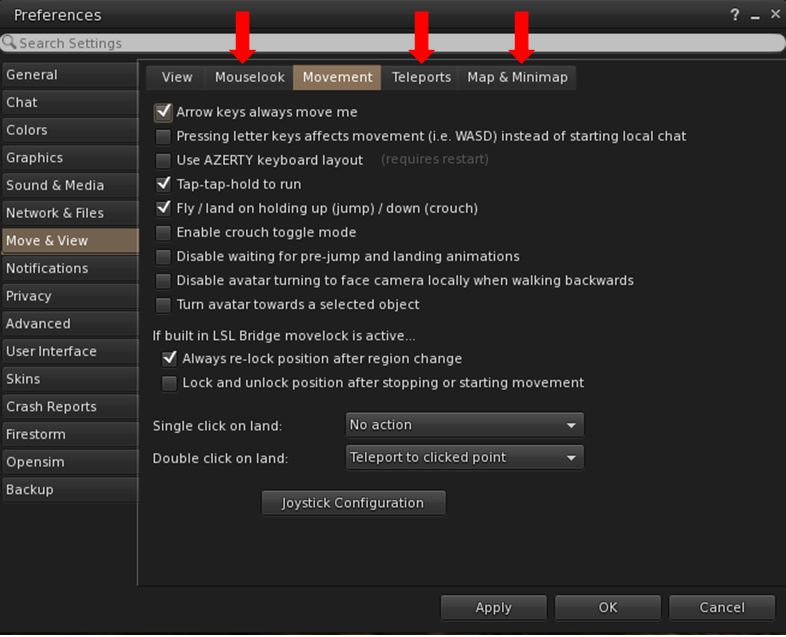
Perhaps the most noticeable update in this release is the complete overhaul of the Preferences panel, tabs and sub-tab. Every major tab in Preference has been revised and rationalised, and most of the sub-tabs have been revised / added-to, along with a number of new sub-tabs being added to various tabs.
Firestorm 4.7.1 sees the Preferences panel extensively overhauled, with revised tabs and updated / new sub-tabs, such as the new Mouselook, Teleports and Map & Mini-map tabs under Move & View
The result, while possibly confusing when first discovering a particular option has been moved, is actually a better, more logical set of Preferences tabs and sub-tabs.
Documenting all of them is beyond the scope of a review such as this, and the recommended means for finding options and to gain familiarity with the new layout is to use the Preferences search bar.