SL project news: week 51

Server Deployments week 51

Tuesday 18th December saw the Main Release channel get the maint-server release as deployed to Magnum in week 50, as Maestro Linden indicated might be the case during the Server Beta meeting on the 13th December. There have been some reports of teleport issues following the deployment, but these are thought to be a network-side issue, rather than a problem with the server code itself.

Release notes.

All three RC channels should be receiving the same package on Wednesday 19th December, 2012 which is also the Magnum deployment from week 50, with a single additional bug fix.

Release notes (for Magnum, but applicable to all three RC channels)

Forum thread for the deployments.

This is the last set of server-side deployments for 2012.

A low-key Simulator User Group meeting on 18th December, the last for 2012

SL Viewer Updates

The release version of the official SL viewer rolled to the 3.4.3 code on Tuesday 18th December, with the release of 3.4.3.268262. Among a range of updates, this release include the major GPU table updates seen in recent beta viewer releases, the additional graphics settings and the tiling fix for high-resolution snapshot (MAINT-638). This release also sees the return of JIRA numbers to the release notes, matching the recent beta viewer release notes update.
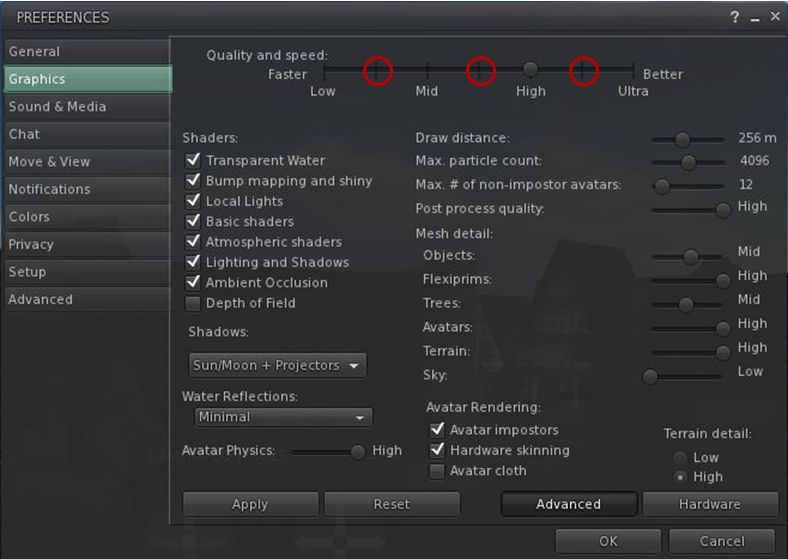
The new "intermediary" graphics settings intended to better represent the capabilities of different GPU classes
The new “intermediary” graphics settings intended to better represent the default SL capabilities of different GPU classes

The beta viewer should be moving to the 3.4.4 code with the next release, although it is not clear whether this will be before or after the holiday period.

Interest List Update

Andrew Linden has been tweaking and optimising his Interest list code. The first phase of the new interest list code is aimed at reducing the amount of information being sent to the viewer by the server. Speaking at the Simulator User Group meeting on the 18th December, Andrew commented, “Last week I managed to find an optimisation opportunity in my Interest List project, which shaves a few hundred usec off of some cases where there are a lot of Full Object Updates. So this would translate to better server FPS when in large groups of avatars or when in the presence of stuff that is generating lots of full updates.”

As I reported last time, object updates take three forms, Full, Terse and Delete. Full updates are generated when an object is seen for the first time, or which is undergoing a constant change in appearance / position. Terse updates are sent only when an object changes its appearance / position. Under the current Interest list system, both types of update are sent to the viewer, regardless as to where the viewer actually needs to process them. A primary part of Andrew’s work has been reworking the code so that updates – particularly terse updates – are only sent to the viewer when the object generating them is in the camera’s field-of view. This new optimisation work should further help reduce the number of updates being sent to the viewer regardless as to whether or not it has to process them.

Continue reading “SL project news: week 51”

LL announce “first set” of advanced creator tools now live

Yesterday, as I reported, Linden Lab rolled-out the first pass of the advanced creator tools across the main release channel for the grid. These are the functions that lead to an outbreak of griefing when they were first rolled-out on the Magnum Release Channel back in June.

Since then, the code has been revised – and now includes a “master switch” that allows Linden Lab to disable the functionality should anyone try to get up to mischief using the tools. The code was in fact enabled on both LeTigre and BlueSteel last week without major incident, and so the code was rolled-out to the main channel in an enabled mode on July 31st.

Today, LL has formally announced this initial release of the tools via a new blog post. This initial release comprises three new functions:

These functions should allow a range of new experiences to be created, some of which are demonstrated in the Linden Realms game, wherein the attachment option is used to attach the game HUD to avatars and the teleport options are used in conjunction with things like the rock monsters.

Linden Realms HUD (top left): attached using the full experience tools

The functions are also designed to be used with a new permissions system, which has yet to be rolled-out across the grid. This means that until the new permissions are rolled-out, some of the functions will not operate as transparently as they eventually will. For example, rather than something like a HUD being automatically attached to your avatar (as is the case with the Linden Realms game, which does use the new permissions system), you will be prompted to accept the object first (thus making you the owner) in order for it to attach.

It’s not currently clear as to when the new permissions system will be rolled-out, but with the “master switch” at their disposal, Linden Lab are confident that the kind of issues that marred the June RC roll-out can be avoided.

The official blog post includes a video from Torley.

SL Server roll-outs: creator tools and pathfinding

Update July 18th: The Magnum RC roll-out has been delayed until Thursday July 19th. Oskar may supply a reason on the deployment thread in the forums – keep an eye on that for updates (with thanks to Wolf Baginski).

Main Channel Release

Tuesday 17th July sees the a roll-out of LSL functions related to the Advanced Creator Tools. This release will see the addition of three new LSL functions (comments taken from the release notes):

  • llAttachToAvatarTemp(integer attach_point): Follows the same convention as llAttachToAvatar, with the exception that the object will not create inventory for the user, and will disappear on detach, or disconnect. It should be noted that when an object is attached temporarily, a user cannot ‘take’ or ‘drop’ the object that is attached to them. The user is ‘automatically’ made the owner of the object. Temporary attached items cannot use the llTeleportAgent or llTeleportAgentGlobalCoords LSL functions
  • llTeleportAgent(key agent_uuid, string lm_name, vector landing_point, vector look_at_point): Teleport Agent allows the script to teleport an agent to either a local coordinate in the current region or to a remote location specified by a landmark. If the destination is local, the lm_name argument is a blank string. The landing point and look at point are respected for this call. If the destination is remote, the object must have a landmark in its inventory with the teleport agent script. lm_name refers to the name of the landmark in inventory. This function cannot be used in a script in an object attached using llAttachToAvatarTemp
  • llTeleportAgentGlobalCoords(key avatar, vector global_coordinates, vector region_coordinates, vector: Teleports an agent to region_coordinates within a region at the specified global_coordinates. The agent lands facing the position defined by look_at local coordinates. A region’s global coordinates can be retrieved using llRequestSimulatorData(region_name, DATA_SIM_POS). This function cannot be used in a script in an object attached using llAttachToAvatarTemp.

The new LSL functions work with the current runtime permissions system and are precursor to future work with experience permissions. More information about the runtime permission is here:PERMISSION_TELEPORT.

The keen-eyed will note that these are the functions that were rolled-out to the Magnum RC channel in May, and which were subsequently abused for griefing purposes. However, Linden Lab have added a new capability to the functions  – what is described as an “on / off” switch which is available only to Linden Lab personnel, and which allows the functions to be enabled  / disabled (the functions were also rolled-out to the Le Tigre RC on July 11th with the “on / off” switch capability). As the release notes make clear, the functions are disabled by default in the roll-out, and will presumably remain that way until such time as the updated permissions system has been rolled-out.

The release also includes three bug fixes (again, as specified in the release notes):

  • SCR-342: llTeleportAgent() does not fail gracefully when specifying an invalid landmark name
  • SVC-7966: Magnum RC, llTeleportAgent gives a wrong message
  • SVC-7987: llTeleportAgent always points in the positive Y direction on teleport.

Pathfinding release: Magnum and Le Tigre

On Wednesday 18th July, the Magnum RC will get a further roll of the pathfinding code and Le Tigre will apparently get the same code as well. At the time of writing, the actual release note pages on the SL wiki for Magnum and Le Tigre still reflected the releases for July 11th and the forum post announcing the release did not show any specific changes from the forum post relating to the July 11th release. Any alternations which may have been made following the difficulties some initially encountered on the Magnum RC following that roll-out are therefore hard to identify. This ma change prior to the actual roll-out.

Related Links

Advanced user experience tools griefing update

Oskar Linden has provided an update / post-mortem on the recent bout of griefing that took place across the grid as a result of person or persons unknown abusing the advanced user experience code that was released onto the Magnum Release Channel two weeks ago.

The problem hit on Monday 4th June when the advanced teleport functions released to Magnum were used to teleport individuals or groups around the grid, with some people reporting they were teleported to the likes of The Cornfield, while others found themselves unexpectedly picked up and dropped into stores or meetings.

Linden Lab reacted rapidly to the issue, determining a fix for the exploit on the afternoon of the 4th (SLT) and deployed across the entire grid in a rolling restart that affected the main channel and all release channels.

The key points relating to the issue remain:

  • The exploit came about due to a permissions restriction within the advanced tools not working as anticipated
  • To prevent further misuse of the code, the advanced tools were also removed from the Magnum RC channel
  • Both the code and the associated test plans have been revised and are being run through LL’s QA process to better ensure the situation of the 4th June is unlikely to be repeated when the code is rolled-out once more
  • Coyot Linden estimates that the advanced experience tools project has been delayed by around 2-3 weeks as a result of these events
  • LL are at this point in time unclear as to when the tools are likely to be rolled back out onto a Release Channel; the slot assigned to the tools on the Magnum RC has now been taken by other security issues in preparation for their roll-out to the grid.

One immediate outcome of the griefing situation is that the teleport capability has been revised so that when someone is teleported, the function will tell them the name of the owner of the object that teleported them (thus allowing any potential abuser of the system to be reported to LL via an Abuse Report).

With thanks to Nalates Urriah.

Genie out of the bottle: advanced tools capability used for griefing

Update 11th June: Oskar Linden has provided further feedback on this situation. 

Update June 6th: Oskar Linden has confirmed that the Advanced Creation Tools capabilities that were rolled-out to the Magnum RC channel will remain disabled until at least next week, although no firm decision has been on re-enabling them.

Update June 5th 11:30 UTC: The rolling restarts completed at 03:39 UTC. At present, no further updates have been given on the forum post relating to the restarts, but this may change later during the course of today. Oskar Linden has reiterated that due to this rolling restart, there will be no main channel deploy today and that details on Wednesday’s RC deploys are still TBA. My apologies for late timing of this update; a small matter of real life prevented me putting my nose in front of the keyboard any sooner!

Last week saw elements of the new Second Life Advanced Creator Tools rolled-out to the Magnum channel. As I reported at the time, the tools were issued without the new permissions system, but with safeguards that (it was hoped) would prevent misuse.

Today, however, a party or parties unknown started to use teleport functions of the new tools outside of the Magnum Release Channel as a means of griefing. People first became aware of the issue as individuals and groups started finding themselves randomly teleported around the grid, which sparked speculation on Twitter. Later, messages started circulating in-world among groups, outlining issues, such as this one, sent out to the NCI Citizens Helper Group (with thanks to Raylene Gothly)

Ok to everyone, there is something seems grid wide, we do not know if its a bad code in certain sims or if someone has found a way to teleport grief. But its happening all over, so I’m not sure. however I’d like to let everyone know we are aware of this. Suddenly you are just teleported away, best to log off and relog to get out of it, as it seems to continue to teleport you, I was teleported 3 times when I relogged… Dont be frightened it just seems to be a mess up.

The only regions unaffected by the griefing tool appear to have been those on the Magnum RC (where the new teleport functionality has safeguards) and those sims that had script capabilities disabled. Messages were thus circulated to land holders to disable scripting in their regions to avoid the issue, at least until Linden Lab responded to the situation.

Linden Lab themselves commenced efforts to stop the problem with emergency rolling restarts across the grid, announced via a Grid status update and a forum post:

To solve a security issue with the Experience Tools that were deployed to Magnum last week we are doing an emergency simulator rolling restart deploy. This has already begun.

Regions on the following channels will be restarted with the fixed code:

Main Channel
BlueSteel
LeTigre

Magnum will not be restarted because the issue is not possible in Magnum regions. We will have no rolling restart Tuesday morning. The Wednesday morning RC channels will roll at the usual time.

We apologize for any inconvenience and appreciate your understanding.

I’ll update here when further information is available.

User Experience Tools: initial roll-out to Magnum RC

Today sees the first phase in rolling-out the new User Experience tools to the Main grid. As noted in the official release notes, the tools have been rolled-out to the Magnum Release Channel.

The new tools were previewed back in March in a rare SL blog post, which I covered at the time it was released. Today’s Magnum release adds three new LSL functions for User Experience:

  • llAttachToAvatarTemp (integer attach_point) — Follows the same convention as llAttachToAvatar, with the exception that the object will not create inventory for the user, and will disappear on detach, or disconnect. It should be noted that when an object is attached temporarily, a user cannot ‘take’ or ‘drop’ the object that is attached to them. Additionally, if this function is used with experience permissions, the user is ‘automatically’ made the owner of the object. If you use this function without the experience permission, the target MUST be the owner of the object for it to attach properly
  • llTeleportAgent (key agent_uuid, string lm_name, vector landing_point, vector look_at_point) — Teleport Agent allows the script to teleport an agent to either a local coordinate in the current region or to a remote location specified by a landmark. If the destination is local, the lm_name argument is a blank string. The landing point and look at point are respected for this call. If the destination is remote, the object must have a landmark in its inventory with the teleport agent script. lm_name refers to the name of the landmark in inventory
  • llTeleportAgentGlobalCoords (key avatar, vector global_coordinates, vector region_coordinates, vector look_at) — Teleports an agent to region_coordinates within a region at the specified global_coordinates. The agent lands facing the position defined by look_at local coordinates. A region’s global coordinates can be retrieved using llRequestSimulatorData(region_name, DATA_SIM_POS).

This initial roll-out does not include the expanded Experience Permissions System, as Oskar Linden points out in a forum post on this week’s server releases. Instead, the new functions work with the current runtime permissions system (specifically PERMISSION_TELEPORT), although plans are in-hand to roll-out the new permissions systme at some point in the future.

No details have yet been released on the Professional Creators Programme that was mentioned in the original preview blog post, but if you are interested in learning more about the tools, the Advanced Creator Tools Notification Group is still open to membership, and you are encouraged to join the Group.

Oskar notes that LL will be actively monitoring the forum thread announcing the roll-out, and anyone encountering issues with the new functions is encouraged to post feedback in the thread, cross-referencing any relevant JIRA they raise.

Given the functions are now on the Magnum RC, and people are being encouraged to provide feedback, this roll-out would appear to move the User Experience tools outside of the associated Closed Beta programme.

For ease of reference, here’s the video LL released with the original preview announcement:

Related Links