Linden Lab has issued a further brief update about the on-going Marketplace issues, to whit:
Today we updated Marketplace to address two of the top three outstanding issues:
WEB-4580: purchases are now delivered to recipients with the inventory name (which does not allow unicode characters). This will prevent future orders from getting stuck in the Being Delivered state due to this issue. In addition, all orders affected by this problem have been pushed through.
WEB-4587: updates have been made to support updating store search results, which we will process over the next week; we continue to work on the issue related to mismatched data on listings. We do know that this issue has existed since September 2010 (during the migration from Xstreet to the Second Life Marketplace).
We continue to work on the other Marketplace JIRAs and will provide additional updates as soon as possible.
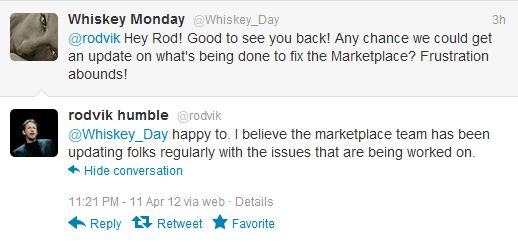
Menwhile, Rodvik has stepped in to defend how matters have been handled in terms of communications, stating on Twitter:
While it is true that the Commerce Team clearly engaged with individuals experiencing problems through the medium of e-mail exchanged, it is nevertheless also true that feedback on this matter in the broader sense has been severely lacking from the Lab, with little or nothing being posted to either the main forum thread on the WEB-4587 issues or the JIRA itself. This left many merchants both frustrated and feeling as if they’d been abandoned, while those who had received some feedback from the Lab via e-mail tried to pass on the information to a wider audience in lieu of LL doing so.
It is good that progress is being made – but equally, it would be nice if LL would do more to keep users openly informed. As those responding to Rodvik’s tweets note:
[UPDATE: April 5, 2012] We’ve identified two issues contributing to WEB-4587.
The first issue concerns mismatched data appearing on Marketplace listings. This impacts a very limited number of Merchants and has been occurring since the original migration from Xstreet to the Second Life Marketplace in September 2010. We continue to actively work on a resolution.
The second issue concerns incorrect listings appearing in search results. We have identified the issue and are actively working on a fix.
The information provided by Merchants on the forum and directly to the Marketplace development team helped greatly in identifying the root cause of these issues. Thanks to those who provided information.
We will continue to provide updates as we work through the issues.
There is no indication as to haw far along any resolution / fix for either issue might be – and probably wisely so. Event tentative dates might be taken literally and cause additional strain in LL / merchant relationships if missed.
That one of the errors dates back to the original migration from XStreet to the current SL Marketplace back in 2010 will come as no real surprise to merchants who have been impacted by the issue; it is a view that was aired as a part of ongoing discussions into the matter. It might event be fair to say – as the update hints – that it was such speculation and investigations by merchants themselves that may have helped Linden Lab confirm this particular root cause for the problems.
Even without potential dates for a fix or fixes to be rolled-out, the feedback from the Lab is to be welcomed. Hopefully, now issues have been identified and the line for updates has been re-established, the Commerce Team will take further steps to ensure the merchant community as a whole is kept informed of the situation through the Commerce forum.
Merchants are continuing to investigate the listing errors occurring on the SL Marketplace, with several confirming a suggestion put forward by Argus Collingwood on March 31st, and again suggested today that the issue appears to impact products with listing numbers in the 14xxxxx range. This has also been reported through the JIRA (WEB-4587)
It is currently unclear as to whether Linden Lab are looking into the possible connection, as apart from direct e-mails / e-mails with a handful of those impacted, the Lab and the Commerce Team remain largely silent on the issue.
Which is not to say they are sitting on their hands. As reported in an update here as well as on other blogs, the Lab has made a number of positive moves: extending the deadline for Direct Delivery migration /Magic Box retirement to the start of June; cancelling the overall timetable associated with DD originally published in the DD migration guide, and listing those JIRA they are actively pursuing. Merchants have also received assurances that LL are working to correct issues within support that have led to misleading or incorrect information being supplied to Merchants who have filed tickets on problems in direct response to requests from the Commerce Team.
However, the problem remains one of a need for more direct two-way communications. LL are assuring people the listing issue is being addressed as a “top priority”, yet the amount of information coming out of the Lab is limited. There has been no input to the JIRA from LL since March 29th – and no response to the idea of the issues being focused on items with listing numbers in the 14xxxxx range. Such is the silence of the Lab, that people are wondering if the associated forum thread is being read, and are trying to direct feedback to the JIRA to try to ensure it is being seen by the Lab.
As it stands, Merchants are trying to figure out matters and provide potential pointers to assist the Lab. The theories may be correct, or may be down to bizarre coincidence – and if correct, it’s entirely likely that the Lab have already made the connection and is working toward a solution. But given there is no concise feedback coming out of the Lab at all on matters, Merchants are still very much being left in the dark and to what might be the case.
Given the effort they are themselves putting into the matter, Linden Lab could at least meet them half-way and provide some form of feedback on what is happening and how useful the pointers may be. As I’ve said previously, detailed explanations are not required; but more direct feedback can only be a positive move on LL’s part on at least two counts:
It will reassure those worried about whether Merchants’ own feedback is being read by the Lab and looked into (if not already under investigation)
It will help underline the Lab’s commitment to resolving issues and working cooperatively with Merchants to address issues.
Update March 29th: Updates on payment problems (see below)
Update:As noted in the comments, it appears the Linux version of Niran’s Viewer is capable of running the Merchant’s Outbox without incident. If you’re a Linux user and keen to make the migration / stuck part-way through migrating, you might try it.
Issues are starting to be reported in relation to Direct Delivery.
Outbox Initialisation Failure
People are reporting that the Merchant Outbox is failing to initialise. The issue seems to be most closely related to Linux, but has also been reported for Windows and Mac, and JIRAs for all three have been created:
Outbox initialisation fails on Linux (JIRA VWR-28629)
Outbox initialisation fails on Windows (JIRA VWR-28630)
Outbox initialisation fails on Mac (JIRA VWR-28631) builds
I’ve used the Outbox on all current Viewers with the capability and using Windows 7 32-bit, with no issues. These currently are: the latest SL Viewer (3.3.0.251182), Firestorm 4.0.1, Niran’s Viewer (1.30+), and Zen viewer 3.3.2.0. However, I may have escaped issues for two reasons:
I am logged-in to my Merchant’s page on SL Marketplace
I use the English language version of the Viewers.
Linden Lab are still investigating problems, but if you are experiencing issues with the Outbox on Windows or Mac OS, you might try the following:
Ensure you are logged-in to your Merchant home page / manage listing page prior to trying to run the Outbox in the Viewer
Lance Corrimal suggests the Linux problem is related to an OpenSSL issue with Linux builds of the Viewer (which has impacted Linux users’ ability to upload snapshots to their profile feed).
If you do have repeated issues with trying to get the Merchant Outbox to work, and the suggested solutions above do not work, please visit the relevant operating system JIRA and logged your error, giving full details of your Viewer environment (available by option HELP->ABOUT (Viewer name), and copying the information given there.
Payment System Failures – Updated
There are also reports that some merchants who converted to Direct Delivery are experiencing issues over payment for transactions. While a similar issue existed prior to DD going live (transactions stalled at “being delivered”), the issue appears to be more noticeable now, with some merchants reporting that converting back to Magic Boxes seems to clear their particular problem.
A number of JIRAs are open on issues at present:
WEB-4441: Delivery status frozen with Being Delivered Status on marketplace transaction. 1399L lost and item never delivered (merged with WEB-4559, previously referred to in this article, now closed)
WEB-4580: Direct Delivery Issue – Item named with unicode characters causes order/payment system to fail
WEB-4596: Direct Delivery is hanging in “Being Delivered” rather than forwarding funds to Merchants even when the item has been paid for and received by the Customer. This is for NON-UNICODE Listings
So, Direct Delivery launched yesterday. I’ve been playing with it since then, and here’s some feedback and updates on what is being reported via the Merchant’s forum.
My Experience
Moving Goods to Folders
This was the most time-consuming task, mainly as I used it to re-order my business folders so that they can now be directly dragged-and dropped with each update. Inventory did get somewhat inflated, as I opted to move the originals of folders uploaded to SLM to my inventory and keep them as “master” copies into which I could drop updates, etc., ready for future uploads.
Uploading via the Merchant’s Outbox
Uploading a folder via Niran’s Viewer
Worked a treat using the SL Viewer, Firestorm and Niran’s Viewer.
Folders dropped into the Merchant Outbox folder would be duly processed and sent without incident, the only slight delay being the time required for the Outbox to initialise itself.
Once uploaded, those items set with the same original name as items in my listings auto-updated as anticipated, and those requiring a manual update (I took the opportunity to do some updating!) required around 4-5 seconds apiece to re-associate (although such was the demand on the Marketplace yesterday, this did at times take longer, prompting me to leave cutting-over much of my stock until this morning, UK time).
I will confess to keeping the old Magic Box items on file at the SLM end, under unassociated items, just in case! (I’m lucky, my total stock is just under 50 items.) I also started cautiously, a folder at a time, but confidence quickly grew that the system wasn’t about to do anything nasty and bumped over around 6 folders at a time.
Concerns with Direct Delivery
A number of concerns / issues have been raised via the Merchant’s forum.
Changes Mean Manual Association
An irritant with the new system is that if changes are made to the contents of a folder – such as the addition of new items, changes to a notecard, etc., – the folder, when uploaded to SLM is not automatically associated with an existing listing even if it retains the same name as an existing folder.
This means every time a change is made to the contents of a folder already listed on SLM, the merchant must manually associate the folder with the required listing and delete the older version of the folder when it appears in Unassociated Items – something that could add considerable time to the process when making multiple updates.
Deleting Unassociated Items
Some people have been reporting problems when deleting unassociated items. This can actually be time-consuming if done on an individual basis – and some merchants may find they need to remove some as they go, as there appears to be a limit of 100 unassociated items per merchant, it could get a little tedious. Sera Lok therefore suggests a solution in the forum.
The ANS Issue
At the time of launch, the Automated Notification System has not been enabled for Direct Delivery, and Linden Lab have only committed to turning this feature on in the “next couple of weeks”. Given the number of merchants who depend on ANS for records-keeping, and the fact the LL were repeatedly asked not to roll-out Direct Delivery whouth ANS being enabled for it, this is causing understandable reluctance with some in converting to Direct Delivery.
Destination Folder not Reported
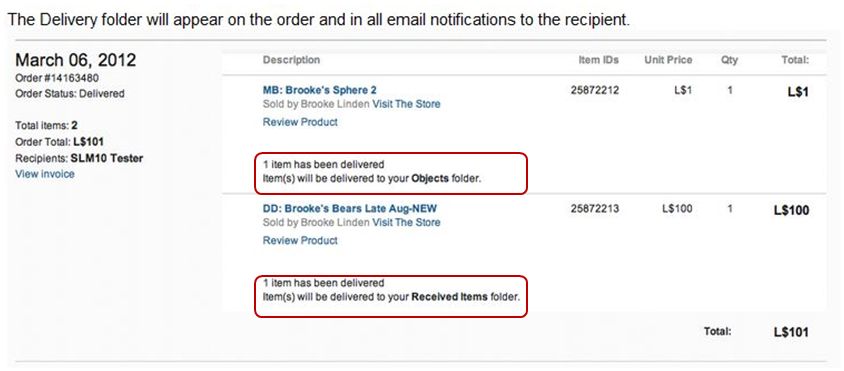
As part of the launch documentation for Direct Delivery, it was stated that: “The Delivery folder will appear on the order and in all email notifications to the recipient.”
The promised format for deliveries recorded on people’s Marketplace account histories
However, the functionality does not appear to have been rolled-out with Direct Delivery. Neither merchants nor recipients are informed of the purchase destination either in their account histories or in any associated e-mails relating to the transaction.
As deliveries are currently displayed in a person’s Marketplace account history (Marketplace->MyMarketplace->My Account->Order History
While this is not a show-stopper, a JIRA has been raised on the matter.
Recipients do, however, get an in-world notification that goods have been delivered to their Received Items panel / folder if they are logged-in to SL / when they log-in to SL (assuming they review all stored notifications!).
Viewer Support
At the time of my original report on Direct Delivery, all Viewers on my Viewer Round-up list supported Received Items, as did much older (pre-mesh) versions of Viewers I tested (Imprudence, Singularity, Astra).
The Merchant Outbox situation is slightly different. As it stands at the time of writing this piece, this is the situation with the Viewers I’ve checked:
Viewers supporting Merchant Outbox functionality: the SL Viewer, Firestorm 4.0.1, Nirans (currently 1.30, but has supported it for a while)
Catznip is working on an update to be released shortly (RL interrupted the schedule)
Cool Viewer, Dolphin, Exodus, Phoenix, RLV, Singularity and Zen all appear to require updates in order to display the Outbox.
If your preferred Viewer does not currently support Outbox functionality, the best thing is to keep an eye on the Viewer’s blog pages for word of any update.
Overall Response
The overall response has been muted. While concern over ANS may be holding merchants back from any migration and the manual association requirement notwithstanding, this has been one of SL’s quieter roll-outs. Certainly, there do not seem to have been any major SNAFUs or problems – but then, many merchants may still be holding off on conversions.
Personal Feedback
I resisted giving feedback in my main piece on Direct Delivery, as I wanted to keep it as factual as possible (and am still updating it to reflect the current situation). However, my core feedback after using the system is:
The Good
The migration process via a suitable Viewer is pretty seamless for the most part. Automated association worked fine where folder names were the same as item names; manual association was a couple of additional steps, but not overly time-consuming if updates are taken in batches
Delivery works to any Viewer, regardless of base code (V3 or V1 style) – Received Items appears either as a panel in your Inventory floater (V3-based Viewers) or as a folder (V1-style Viewers)
No hiccups were encountered in sending goods as gifts or with permissions ending up mangled
The Bad
No ANS. Given the manner in which merchants repeatedly campaigned for ANS to be active for Direct Delivery, the decision to roll-out without it is somewhat surprising. Should ANS support be delayed, one hopes LL will also delay the turning-off of Magic Box functionality to allow merchants time to migrate to DD without having to face an artificial time limit
Failure to auto-associate updated folders as a result of content changes. One can understand folders remaining unassociated following an actual change to the folder’s name, but leaving folders unassociated simply because contents have changed adds unnecessary overheads to the process of updating items.
Update: I’ve been informed that Viewers that have the Merchant Outbox as a folder may need a code port in order for it to work.
The long-awaited Direct Delivery system was launched today in what amounts to a very low-key announcement that hasn’t been promoted to the Featured News section of the blogs and people’s dashboard. In development for around a year or so, the system has been subject to a range of issues, technical and otherwise and – at time – a dearth of information coming out of the Lab, something which itself has caused no small amount of concern from merchants.
What is Direct Delivery?
New DD folders as they might appear in some TPVs.(Note the Merchant Outbox FOLDER as displayed may be non-functional in the early days of DD)
For those not in the know – and there are some going on the number of “What’s that?” I’ve received when asking if people are ready for its introduction – Direct Delivery is, in a nutshell:
A means by which content creators and merchants can manage the goods they sell through the SL Marketplace without the need to use Magic Boxes to store inventory in-world. Everything can be handled directly from within their inventory / within their Viewer
A new means by which anyone buying from the SL Marketplace will receive items they buy / received gifts other have brought for them via the Marketplace, using a new section of the inventory panel / a new folder called Received Items.
The system uses two new elements in the Viewer: the Merchant’s Outbox panel / folder and the Received Items panel / folder. Whether a panel or folder is used is the choice of the Viewer developer.
Torley is back (Go, Torley!) with a video overview of Direct Delivery:
Essential Information for Merchants
As a part of the launch, LL have announced the following for the overall migration from Magic Boxes to Direct Delivery:
April 2 through 13, 2012: In-world Q&A sessions on using and migrating to Direct Delivery
April 18, 2012: All listings priced L$10 and lower must use Direct Delivery
May 16, 2012: Magic Boxes no longer allowed for any Marketplace listing
ANS is currently NOT supported with Direct Delivery – it will be “turned on in the next couple of weeks”.
Receiving Goods via Direct Delivery
Until the launch of Direct Delivery, items from the Marketplace would require that you manually accept them (via an in-world pop-up) before they would be delivered to the OBJECTS folder in your inventory.
With the launch of Direct Delivery, this now changes:
Any items you purchase from the Marketplace – or which are bought for you as a gift – will automatically be received; there is no need for you to be on-line when they arrive
Items will be received into a new panel, called RECEIVED ITEMS, which is either a panel that will become visible at the bottom of your inventory floater when you have received one or more items from the Marketplace (most V3-based Viewers), or which will appear as a folder in your inventory (V1-style Viewers – see image above).
Direct Delivery: from the Marketplace to you (some steps omitted, example uses a V3-based Viewer with Received Items panel within the inventory floater) – click to enlarge
You can then drag and drop folders from the Received Items area into your inventory, from where you can rez items in-world as usual.
Notes:
If you don’t see Received Items ether as a panel in your Inventory floater or as a folder, then try following this link and obtaining your Direct Delivery Linden Bear (limited time offer from LL) – note you may have to log-in to SLM to get to the page. This will trigger a delivery to your Received Items panel / floater.
Until the 16th May, merchants can continue to use Magic Boxes if they wish, and some may opt to do so while Direct Delivery “beds in”. Where this is the case, please note that items purchased from the Marketplace will continue to arrive in the OBJECTS folder of your inventory.
Converting Magic Box Contents to Folders for Direct Delivery
Note that boxed items can still be delivered via Direct Delivery, if required – boxes will be delivered within their own folder.
You can convert your current Magic Box items ready for Direct Delivery as follows:
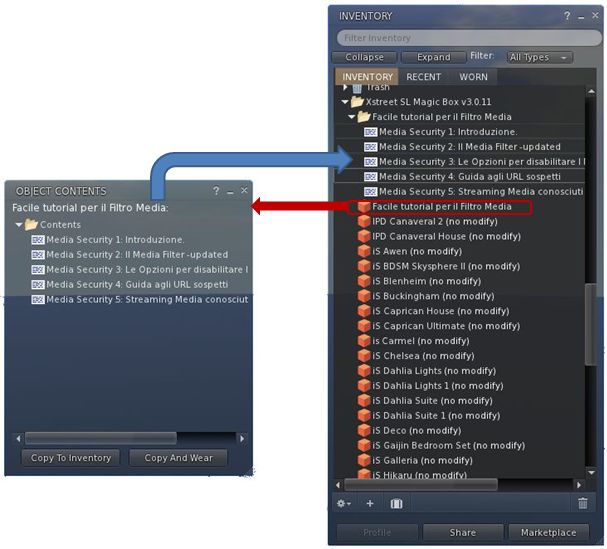
OPEN the magic box and COPY TO INVENTORY. This will create a folder of all the items in your magic box – including the Magic Box’s own scripts
Delete the Magic Box scripts, as they are not required
Drag the first item from the Magic Box folder in your inventory to the ground and:
EDIT it
Copy the name of the item from the General tab (highlight & CTRL-C)
Create a new folder in the Magic Box folder in your inventory and re-name it the same as your item (CTRL-V)
Open the Contents tab of the item in EDIT, and select / drag the contents from the item into the newly created folder in your Magic Box folder.
Make any required adjustments to the contents of the folder itself (i.e. if you have additional boxed items, these can be placed in suitably named sub-folders and the additional boxes themselves deleted)
Delete the original item from in-world and your Magic Box folder
Repeat for the next item.
This process is summarised in the diagram below.
Notes:
In order for your items to be automatically linked with your existing Magic Box listings, it is important that the folder is given the same name as the original item (hence the advised use of copy/paste above when creating the folder).
If a folder is named differently to the original item, it can still be linked to an existing listing, but this must be done manually.
Once you have converted your Magic Box items and uploaded them to the Marketplace (see below), there is no need to keep the Magic Box folder –you can upload to the Marketplace from anywhere in your inventory.





 Inara Pey: Living in a Modemworld