A closer look: Second Life viewer & simulator release processes

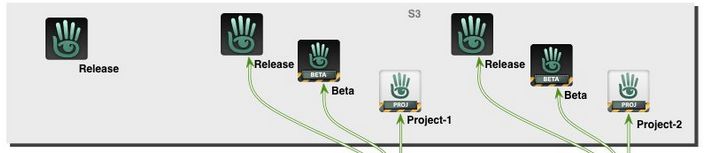
Part of the official viewer release process (see below for the full diagram). Credit: Linden Lab

Many of us are familiar with the Lab’s approach to viewer and simulator releases – but equally, many only have a passing understanding of what goes on. This was something reinforced to me as a result of in-world conversations I’ve had recently, so I thought I’d reach back to 2013, when I provided a guide to the viewer release process (see: New viewer release process implemented), and use that and some additional notes on simulator releases to try to provide and easy-to-follow overview of how the Lab manages official viewer releases and simulator updates.

The Viewer Release Process

Overview

Note: just to avoid any confusion, please remember these notes only apply to the official Second Life viewer supplied by Linden Lab (and which from the last Lab-derived comment on numbers (late 2016) I have could account for approximately 15%-20% of user usage).

The current viewer release process was introduced in July 2013 as a result of a number of issues occurring in 2012 that combined to produce a severe bottleneck in the Lab’s ability to make timely viewer releases and deploy everything from bug fixes to major new releases.

With it, the Lab can produce multiple versions of the viewer in parallel with one another, some of which may initially follow their own development / testing path independently of other versions, but which can, when they are ready, be tested for their suitability for promotion as the next de facto release viewer through direct monitoring of their performance and through comparison of that performance, one to the next.
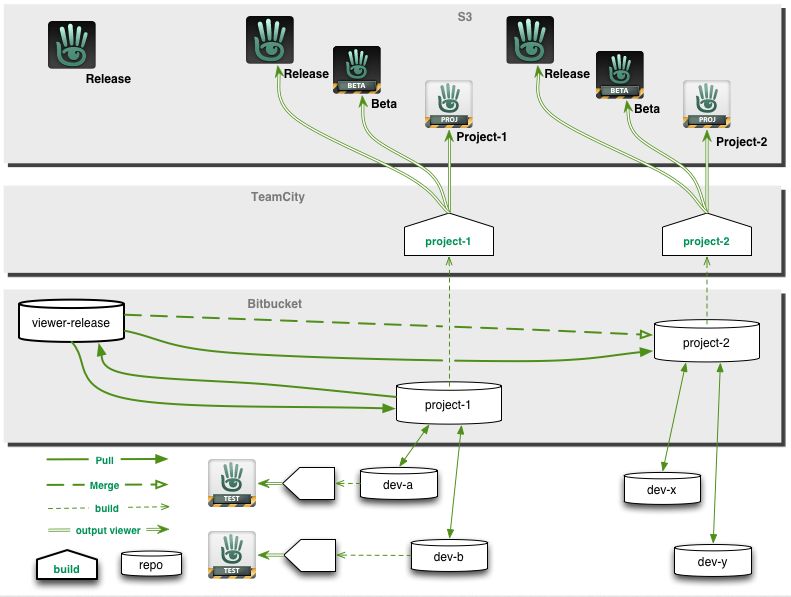
The Viewer Release and Integration Process is intended to allow viewers to be better developed tested and prepared for release in parallel. Image credit: Linden Lab

Types of Official Viewer

The process achieves this by allowing viewers to be developed on a rolling basis, defined by project internally, and which eventually appear for public use in one of two “pre-release” versions, as it were: Project viewers and release candidate viewers.

  • Project viewers are generally viewers dedicated to a single new feature, capability or function within the viewer. They are essentially “first look” / experimental viewers designed to expose new features and capabilities (and any new viewer UI that might come with them) to users interested in them, who can then test and provide feedback (including bug reports) to the Lab, allowing the feature or capability to be refined and improved.
  • Release candidate (RC) viewers are viewers considered to be close to the point where they can be promoted as the de facto release viewer.
    • They might be former project viewers that have progress to a point where the Lab is considering formally releasing them, OR they might start as RC viewers in their own right without ever having been a project viewer.
    • It is these RC versions that allow the Lab to gather statistics on the behaviour of individual viewers in order to help determine their suitability for promotion to full release status.

Broadly speaking, whether a viewer starts its public life as a project viewer or a release candidate viewer depends on what it contains. A viewer containing a major new feature – such as Animesh, Bakes on Mesh or EEP, for example – will generally make an initial public appearance as a project viewer for the reasons noted above. Maintenance releases, hot fixes, and things like updates to the viewer rendering system will – in general – tend to appear directly as release candidate viewers.

No viewer ever goes directly from project status to a full release – all project viewers will go by way of progressing first to being a release candidate, then being judged as ready for promotion to full release status.

Where to Find Them and How They are Handled

Both types of viewer appear on the Alternate Viewers Page, but how they are handled is somewhat different – and this is one of the important aspects in understanding them.

  • Project viewers are largely “independent” viewer versions.
    • Users must opt to visit the Alternate Viewers Page and select, download and install one.
    • Each project viewer installs into its own dedicated location (although they share the same settings files and cache locations as the release viewer), so they can be run alongside the release version of the official viewer, if installed.
  • Release candidate viewers are considered as “alternative release viewers”.
    • Release candidates are assigned a “cohort number” the Lab believes will present a reasonable cross-section of users.
      • When a release candidate viewer is made available, the system automatically triggers the viewer update process among randomly selected users on the current official release viewer, moving them to the release candidate.
      • When the cohort number for a release candidate viewer is reached, it is no longer made available for automatic download / installation.
      • Once a user has been selected to receive a release candidate version of a viewer, they will continue to receive updates for that particular RC on a mandatory basis until it is promoted to release status – they will not be selected to receive other RCs (or updates to others RCs) until the RC they have been using in promoted to de facto release status.
      • The reason for doing this is to allow the Lab to monitor the performance of individual viewer release candidates and capture data on things like performance, stability, crash rates, etc. This data, together with bug reports, etc., filed by users is then used to determine an individual RC’s suitability for promotion to release status.
    • Alternatively, users can opt to manually install any RC viewer that interests them directly via the Alternate Viewers Page. Again, by default, any RC viewer installed in this way will overwrite any existing installation of the official release viewer (unless an alternative installation location is provided by the user), and the user will thereafter receive updates for that RC.
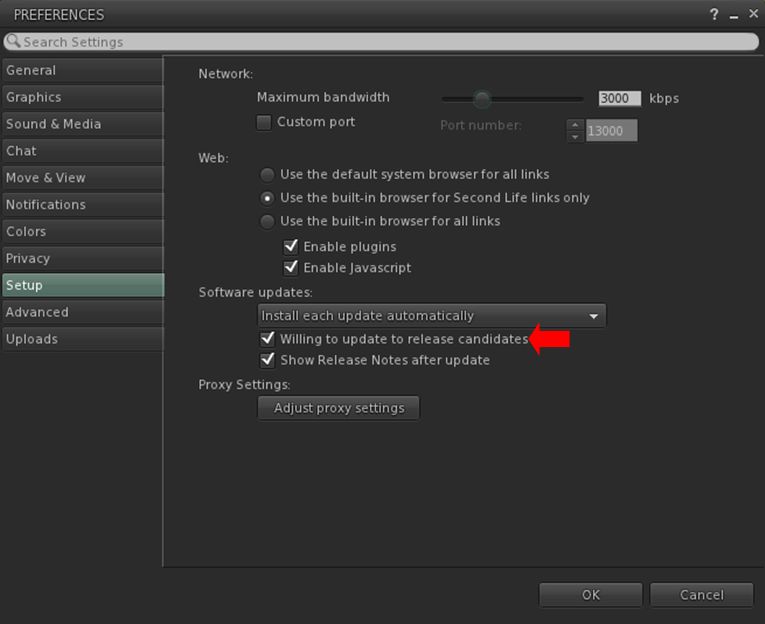
    • Note that users who do not wish to have RC viewers installed on their system can, if they wish opt out of the release viewer update loop from within their viewer, as shown below.
Users of the official viewer who do not wish to be involved in testing any release candidate viewers can opt out of the selection / download process by unchecking the Willing to Update to Release Candidates option in Preference. Note that having the option checked does not mean you will be subject to RC testing: users for each RC issued by LL are selected entirely at random from the poll of official viewer users.

How are Viewers Progressed to Release?

As noted above, project viewers follow defined path: they initially appear as a public project viewer, and then may go through multiple iterations of improvement, updates, added capabilities, bug fixes, etc., before they reach a point where the Lab determines they are ready for upgrade to release candidate status.

Release candidate viewers are more closely monitored by the Lab through their various cohorts, whilst similarly being subject to multiple iterations designed to remove bugs, help with performance, address further perceived shortfalls in functionality, etc., based on things like bug reports and feature requests from users.

While this approach means that multiple viewers can be developed, tested and readied for promotion to de facto release status, it often means that at any one time, there are several RC viewers vying for release. When this happens:

  • The Lab will select a viewer or promotion based on a number of factors, including stability, performance, number of remaining bugs / issues, the potential impact of said bugs issues, the urgency with which an RC needs to be released (e.g. an “late breaking” RC with a hot fix could well be promoted ahead of other RCs that have been available for longer) and so on.
  • Generally speaking, the Lab tries to promote no more than one RC to de facto release status every two weeks. However, depending on the overall state of individual RC viewers, the period between promotions can be longer.
  • Once a release candidate has been promoted to release status, the first order of business is to merge the code it contains into all over available RC viewers and then monitor them to see how they behave when built using the “new” release code, a process that also feeds back into determining which of them might next be promoted.

What this all Means in Summary

Simply, put, that official viewer and viewer updates can be produced on a rolling basis, with some starting as project viewers, others directly as release candidates, with the latter being objectively monitored both individually and in comparison with one another to determine which is best suited to become the next de facto release viewer.

Continue reading “A closer look: Second Life viewer & simulator release processes”

Wandering Spirits in Second Life

Diotima Art Gallery: Wandering Spirits

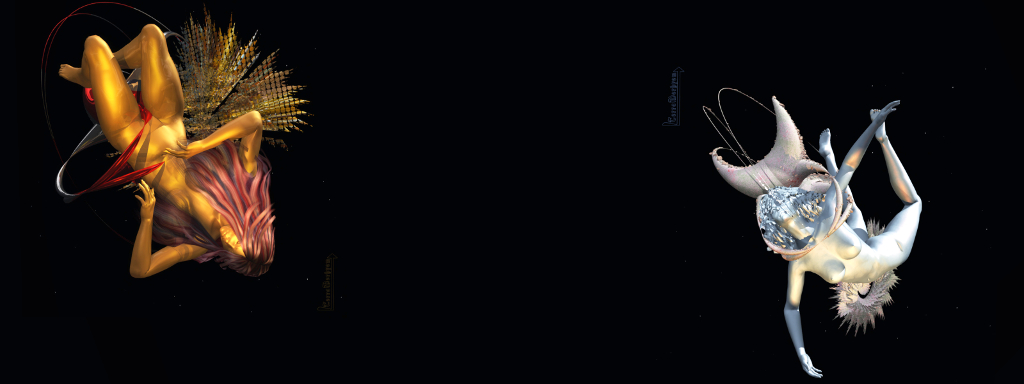
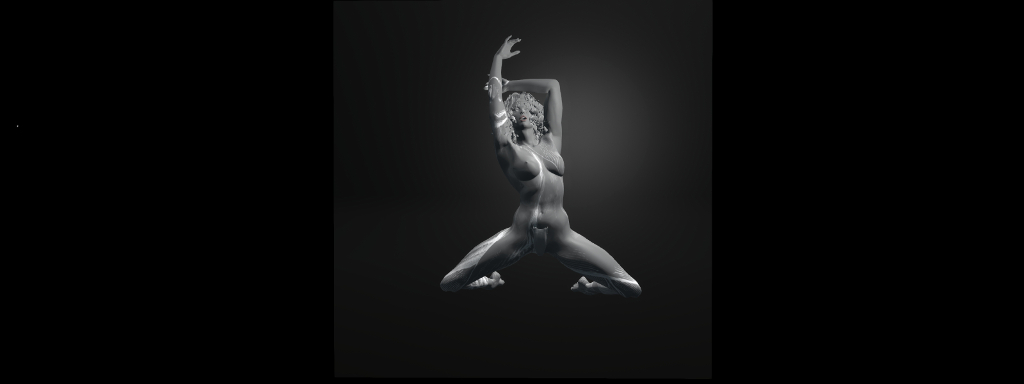
Recently opened (October 3rd, 2019), at Diotima Art Gallery curated by Red Bikcin is Wandering Spirits, an immersive exhibition of 2D art with 3D elements by TerraMerhyem. It offers a fascinating trip into the artist’s imagination.

I started reading science fiction, fantasy and heroic fantasy at the age of ten and since then I have continued; this literature is one of the elements that has shaped me. It has taken me to live other lives, it has trained me to live in other worlds and I have always had a tendency to escape from what is called the “real world” – through writings and poetry, dreams, art, music, images and imaginations, trance…

– TerraMerhyem describing the inspiration for Wandering Spirits

Diotima Art Gallery: Wandering Spirits

Set behind an animated piece and against an ebony backdrop, Wandering Spirits presents visitors with glimpses into the worlds of fantasy to which TerraMerhyem’s imagination has carried her – most with her character prominent within them, a Barbarella-like figure rendered within intricate, fractal-like creations and hanging against backdrops of aliens skies and liquid forms.

I have spent a lot of time imagining – and I have the ability to feel, sometimes deeply, what I imagine … It has happened to me to be a wandering spirit: I have sailed in unfathomable places; I have brushed against the suns floating in icy spaces; I have met other spirits and entities, also wandering – always beautiful … I have screamed in the dark (but I think the universe has been deaf to my cries).

– TerraMerhyem describing the inspiration for Wandering Spirits

Diotima Art Gallery: Wandering Spirits

Along with these 2D elements are 3D pieces: the models use to give form to the spirits within each picture perhaps; but I confess it is the 2D pieces that most fascinated me in their composite execution. Two of the fractal-like forms that feature in them also appear alone in a pair of pieces towards the front of the exhibition, where they are set against backdrops of what might be the surface of Titan when cleared of its dense atmosphere. These serve to give the fractal forms a sense of life such that they might be considered alien organics, floating over their mother world(s), alive – and perhaps even aware.

By presenting these strange forms, with their reflective coatings an appearance of life, these two initial pieces convey the impression that the creations, other with the others like them that appear in the images with the human “spirits” are also living, and perhaps conscious. Thus, rather than simply being a “prop” or element around the figure sharing an image with them, they become a living part of it; a companion, if you will – perhaps, even the other spirits TerraMerhyem imagines in her thoughts and dreams.

Diotima Art Gallery: Wandering Spirits

Nuanced and layered, Wandering Spirits is engaging and – as noted – fascinating to witness, both for its art and narrative, and for its presentation.

SLurl Details

Unconditional in Second Life

Unconditional, October 2019 – click any image for full size

Unconditional, designed by Tomisnotaboy and Moonsoul, is a Homestead region that has been garnering attention since it opened to the public in the past week – and rightly so. It is a visually stunning region, one that appears to have been brought together in a remarkably short period of time: the About Land floater suggests it arrived on the Grid on Tuesday, October 1st, 2019, yet it was open to all before the weekend had started!

The above should not be taken to mean the region has been in any way rushed – far from it; what is presented (although in part still a work in progress during our visits) is well put together, and offers a visually engaging setting that is rich in charm and flows naturally throughout.

Unconditional, October 2019

Unconditional love — in its most simplest form — means appreciating someone else for who they truly are. It means loving them when they are unlovable, and in spite of their imperfections and mistakes.

– from the region’s About Land description

Split into a number of islands, most of them low-lying, Unconditional presents the kind of place I think many of us would like to escape to and set up home, were we able to do so. Two houses are to be found on the region, both towards its eastern extreme, and to the south and north respectively. These have been placed by Chavonne McAuley, whom I believe is the region holder. Unfurnished at the time of out visits, both houses appeared to be open to the public, although the one to the north-east, and sitting on the highest point within the region, is placed within its own parcel and so may eventually be intended for private use.

Unconditional, October 2019

The island this house sits upon is the largest is the group, sitting above the rest as a pair of table-like hills that are home to both the house and a windmill that sits as if guarding the steps leading up to the house. The pairing of house and and windmill suggest this may once of been a working environment – perhaps a small farm (there are still geese and goats to be found here), but which has now been re-purposed.

Paths of various sorts run across the land here, perhaps the most fetching of them being an avenue of bent trees, reached from the house and windmill by a trail of cut log sections, that points the way to the western end of the island, a rocky bluff on which sits a little table of rock complete with brazier and seating – just one of many places to rest scattered throughout the region. A wooden board walk that also starts close to the windmill to present an alternative route west, stepping out and around the island’s northern cliffs, where waters tumble in a series of falls from a humped hill (which is also cut into by the sealed mouth of an old tunnel or shaft).

Unconditional, October 2019

To the west, the land falls away sharply, a little stone bridge connecting it to a sandy isle. Such is the narrow channel between isle and island, the two might have one time been a single mass, the gap between them created by a partnership of time and tide. Now this western lowland encircles a pond of  – presumably – fresh water, whilst itself is bounded by wetlands. The latter extend to the south and east in a haze of sun-bleached reeds and grasses through which winds a further board walk, this one offering the way to a stilted cabin standing above the reeds and water, a cosy deck – and at its end, a little sandy bar that almost forms the region’s centre.

The second house on the region looks, from a distance, to be a rather grand affair. It sits on its own island that has sea wall to one side and rocky shoulders on the other, allowing most of the island to offer a flat expanse of grass, rock and sand that forms a garden / yard space where, given the chairs and tables set out and the presence of a coffee / hot chocolate bar, visitors are more than welcome. Reached via a bridge connecting it to the larger island and its house, this is a place experiencing its own little pocket of weather: while the region as a whole sits in sunshine, here the rain falls lightly but persistently.

Unconditional, October 2019

The landing point for Unconditional sits on the long finger of a sand bar to the west of the region. Currently experiencing a low tide, the edge of this island has clearly been shaped by the action of tides rising and departing, as they have cut a low, but clear lip around much of the land in their back-and-forth passage. Linked to the rest of the region by yet another board walk (and rather novel tree trunk “tunnel”), this sand bar offers something of a different look and feel to the rest of the landscape, one that offers its own enticements and photographic appeal.

Rich in detail without ever feeling overcrowded, Unconditional really is a striking location for exploring, photographing and simply enjoying. Rezzing is open, but if you need props, etc., please remember to clean them up behind you.

Unconditional, October 2019

SLurl Details

With thanks for all the pointers: Shawn, Morgana, Wurfi, Miro!

2019 viewer release summaries week #40

Logos representative only and should not be seen as an endorsement / preference / recommendation

Updates for the week ending Sunday, October 6th

This summary is generally published every Monday, and is a list of SL viewer / client releases (official and TPV) made during the previous week. When reading it, please note:

  • It is based on my Current Viewer Releases Page, a list of all Second Life viewers and clients that are in popular use (and of which I am aware), and which are recognised as adhering to the TPV Policy. This page includes comprehensive links to download pages, blog notes, release notes, etc., as well as links to any / all reviews of specific viewers / clients made within this blog.
  • By its nature, this summary presented here will always be in arrears, please refer to the Current Viewer Release Page for more up-to-date information.
  • Note that for purposes of length, TPV test viewers, preview / beta viewers / nightly builds are generally not recorded in these summaries.

Official LL Viewers

  • Current Release version 6.3.1.530559, formerly the Umeshu Maintenance RC viewer, dated, September 5th – No change.
  • Release channel cohorts:
    • Love Me Render viewer, version 6.3.2.531296, released on September 30th.
  • Project viewers:
    • No updates.

LL Viewer Resources

Third-party Viewers

V6-style

V1-style

  • No updates.

Mobile / Other Clients

  • No updates.

Additional TPV Resources

Related Links

Space Sunday: life’s building blocks, black holes and moles

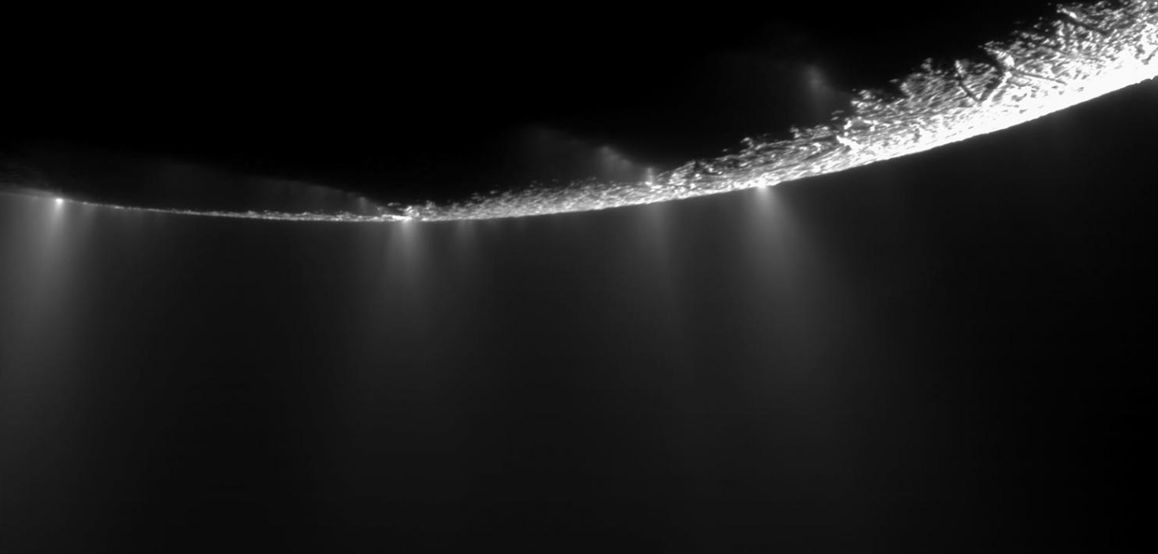
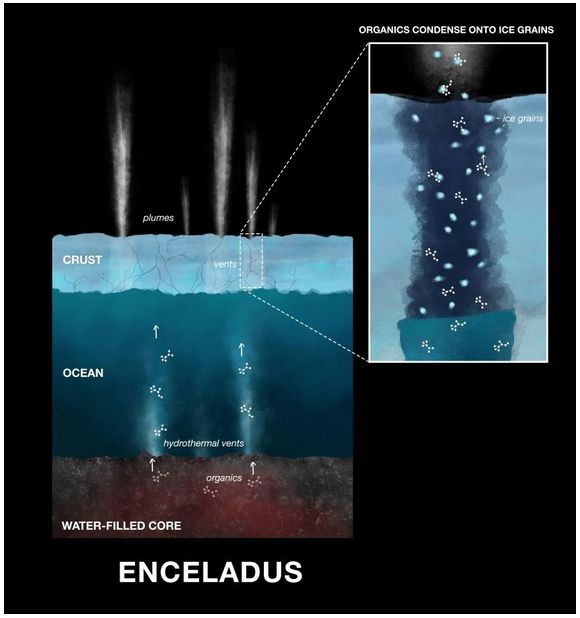
A dramatic plume sprays water ice and vapour from the south polar region of Saturn’s moon Enceladus. It’s known that these plumes contain organic material, and now have been shown to contain the possible precursors to the building block of life. Credit: NASA/JPL / Space Science Institute

Saturn’s moon Enceladus is one of several icy worlds within the solar system that likely harbour a vast ocean beneath its icy crust. We know this because the Cassini mission spotted geysers of vapour bursting out from its south polar region. Following daring passes through these plumes, rising hundreds of kilometres from Enceladus, the spacecraft was able to obtain samples that confirmed they comprised water vapour.

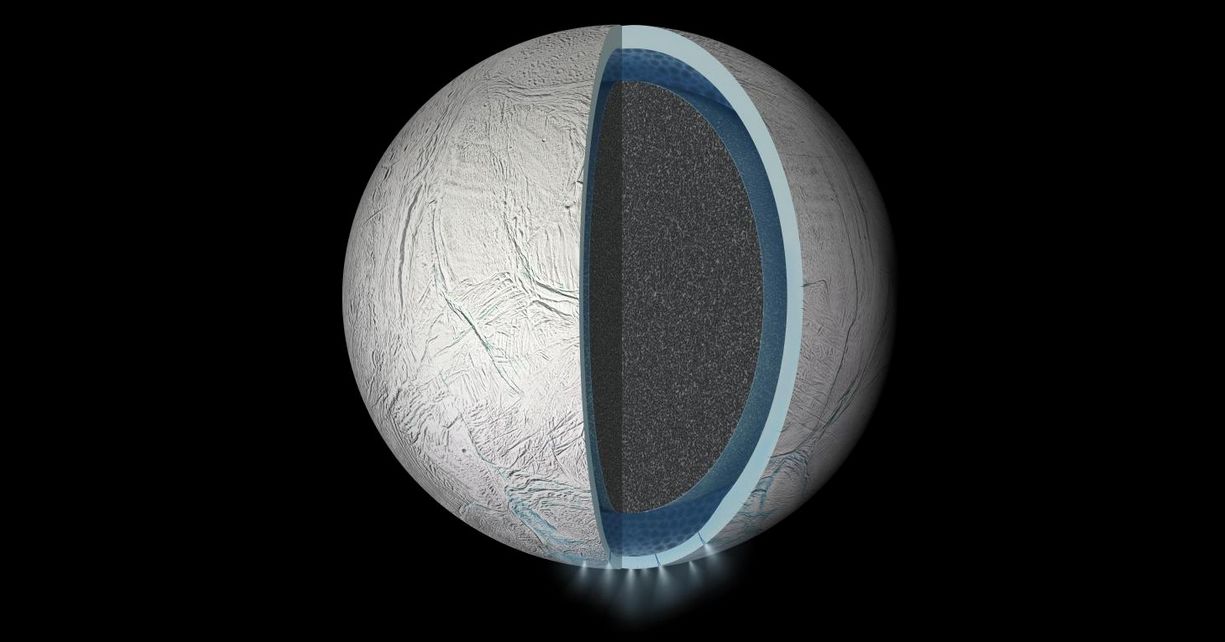
As I’ve noted in past Space Sunday articles, it is believed the vapour originates from a vast ocean under the moon’s ice, and that this ocean is kept liquid as a result of Enceladus being constantly “flexed” by the gravities of Saturn and its other moons, flexing that both causes the ridges and fractures seen on Enceladus’s surface and generates frictional heat deep within the Moon’s core. These heat could both keep the subsurface ocean liquid and also cause hydrothermal vents on the ocean floor. Such vents on Earth are sources of chemical energy and elements such as carbon, nitrogen, hydrogen and oxygen – the essential building blocks of life, and it has been suggested this could be the same on Enceladus.

An artist’s impression of the interior of Enceladus, showing the rocky core, ocean and icy crust. The geysers imaged by Cassini in the moon’s southern hemisphere are also show. Credit: NASA/JPL

2018, an international team based in Germany studying the data gathered by Cassini found the geyser plumes contained a range of organics. Now, as revealed in the October issue of The Monthly Notices of the Royal Astronomical Society. that same team have taken their studies further, finding evidence of organic compounds that could be the precursors to the actual building blocks of life. What’s more, these compounds are condensed within icy grains containing oxygen and nitrogen that are ejected any the geysers. On Earth, similar combinations of these compounds take part in the chemical reactions that form amino acids, core essential building blocks for life as we know it.

More excitingly, these reactions could be driven by the heat generated by hydrothermal vents, and on Earth, the oldest fossilised lifeforms have been found around such vents on the ocean floor, leading to the theory that they are the places where life first emerged on the planet.

If the conditions are right, these molecules coming from the deep ocean of Enceladus could be on the same reaction pathway as we see here on Earth. We don’t yet know if amino acids are needed for life beyond Earth, but finding the molecules that form amino acids is an important piece of the puzzle.

– Nozair Khawaja,  study, lead Free University of Berlin

In this illustration, you can see the organic compounds combining with the icy grains in the plumes emitted by Enceladus. Credit: NASA/JPL

Here we are finding smaller and soluble organic building blocks — potential precursors for amino acids and other ingredients required for life on Earth.

– Jon Hillier, study co-author.

That these basic compounds have been found in material released by Enceladus does not automatically mean that life is forming in its deep ocean, but their discovery does point to the potential of amino acids being formed beyond Earth, which could have significant import with regard to the search for life in the universe.

Currently – and as I’ve again reported – both NASA and ESA are planning mission to Jupiter’s moon Europa, another moon with the potential of having a warm, liquid water ocean under its mantle of ice. These discoveries with Enceladus point to it also being worthy of further and detailed study. NASA has mulled such a mission in 2015 and 2017 – the Enceladus Life Finder (ELF) – but it has yet to receive funding.

ELF is designed to orbit Saturn and make repeated passes through the geyser plumes of Enceladus in order to locate any biosignatures and biomolecules that might be present in the vapours. It is also intended to measure amino acids, and analyse fatty acids or methane (CH4) that may be within the plumes found in the plumes and that might be produced by living organisms.  These latest result may cause NASA to give the mission further consideration.

Could “Planet Nine” Actually be a Black Hole?

Planet Nine, the mysterious, yet-to-be-discovered world thought to be orbiting far out in the hinterlands of the solar system, and potentially responsible for the odd orbits of a number of bodies in the Kuiper Belt, is something I’ve written about numerous times in this column.

In my last piece on the subject, I noted a paper that suggested that gravity created by a large disc of dust and icy material orbiting well beyond the Sun might be largely responsible for the odd orbits of these trans-Neptunian Objects (TNOs). Now another paper suggests that if it is gravity responsible, it could actually be due to a black hole lurking on the fringes of the solar system.

Computer modelling showing how a possible large planetary body (“Planet Nine”, also “Planet X” and other names) could account for the eccentric orbits of several TNOs. Now a new paper suggests an ancient black hole might be responsible.  Credit: Caltech / R Hurt

The black hole in question is a primordial black hole (PBH), a hypothetical class of small black holes thought to have emerged soon after the Big Bang as a result of density fluctuations in the very early universe. It is believed that most PBHs have likely evaporated, but some with sufficient mass could still exist, wandering the galaxy, although none have thus far been directly observed.

In their paper, astronomers Jakub Scholtz and James Unwin suggest that a wandering PBH might have strayed close enough to our solar system to have been caught by the Sun’s gravity to orbit it at a distance between 300 and 1,000 AU. They note that there are certain similarities between the estimated mass of the object responsible for giving rise to the eccentric TNO orbits and that found in an excess in microlensing events.

Their hypothesis is that a PBH of around five Earth masses may have been captured by the Sun’s gravity – that’s well within the mass range hypothesised for Planet Nine. But finding it if it exists, will be problematic: a PBH of around 5 Earth masses would likely have a diameter of 5 cm (2 in), and have a Hawking temperature of approximately 0.004 K – making it colder than the cosmic microwave background (CMB) and thus exceptionally hard to detect.

The hypothesis is controversial, as Scholtz and Unwin note. However, they also suggest a way in which the idea could be proven or eliminated from consideration. PBHs are They propose a search for annihilation signals from the dark matter halo of the PBH. If it is annihilating, the halo would provide a powerful and localised signal offering a mix of X-rays, gamma-rays and other high-energy cosmic rays. If such a source were to be detected and found to be moving, it could be indicative of a local PBH.

Continue reading “Space Sunday: life’s building blocks, black holes and moles”

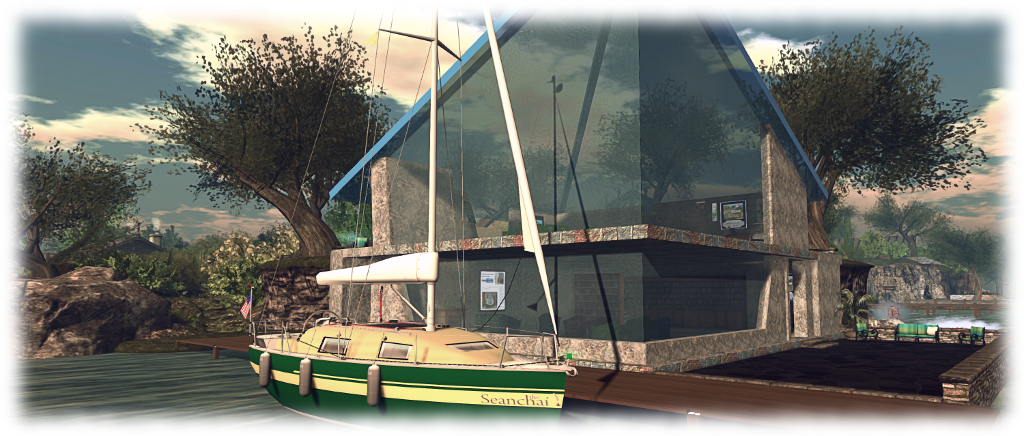
Ghostly and mysterious stores for October with Seanchai Library

Seanchai Library

It’s time to highlight another week of storytelling in Voice by the staff and volunteers at the Seanchai Library. As always, all times SLT, and events are held at the Library’s home at Holly Kai Park, unless otherwise indicated.

Sunday, October 6th 13:30: Tea Time Haunts

Da5id Abbot and Caledonia Skytower share some classics from the western shores of the Atlantic, with selections from American masters of horror, the macabre and ghostly tales, Edgar Allan Poe and Washington Irving.

On the summit of one of the heights of the Odenwald, a wild and romantic tract of Upper Germany, that lies not far from the confluence of the Main and the Rhine, there stood, many, many years since, the castle of the Baron Von Landshort. It is now quite fallen to decay, and almost buried among beech trees and dark firs ; above which, however, its old watch-tower may still be seen, struggling, like the former possessor I have mentioned, to carry a high head, and look down upon the neighbouring country…

– from The Spectre Bridegroom, by Washington Irving

Monday, October 7th 19:00: Moonheart

Gyro Muggins reads Charles de Lint’s 1994 novel.

When Sara and Jamie discovered the seemingly ordinary artefacts, they sensed the pull of a dim and distant place. A world of mists and forests, of ancient magic, mythical beings, ageless bards – and restless evil.

Now, with their friends and enemies alike–Blue, the biker; Keiran, the folk musician; the Inspector from the RCMP; and the mysterious Tom Hengyr; Sara and Jamie are drawn into this enchanted land through the portals of Tamson House, that sprawling downtown edifice that straddles two worlds.

Sweeping from ancient Wales to the streets of Ottawa today, Moonheart will entrance you with its tale of this world and the other one at the very edge of sight and the unforgettable people caught up in the affairs of both. A tale of music, and motorcycles, and fey folk beyond the shadows of the moon. A tale of true magic; the tale of Moonheart.

Tuesday, October 8th 19:00: The Spooky Classics

Halloween is approaching and for the next few weeks, Caledonia Skytower will be reading ghostly stories from some of the classics of the genre. Each week features a different author associated with tales of the macabre, Gothic, or just plain spooky. This week: M.R. James, with Caledonia Skytower.

Wednesday, October 9th 19:00 The Mysterious Woods of Whistle Root

11-year-old Carly Bean Bitters suffers a peculiar malady: she can only sleep by the light of day, and is awake through the night, spending her time up in the attic of her aunt’s house, awaiting the arrival of the dawn.

One night, she notes a strange squash that appears on her roof. Investigating, she comes across Lewis, a fiddle-playing rat. Lewis tells Carly the squash is a replacement for one of the rats in the group who has been abducted by owls.

He goes on to explain that until recently, the owls join with the rats dancing in the moonlight within the Whistle Root woods to the music played by Lewis and has band. But then something changed, and instead of dancing with the rats, the owls took to abducting them.

Grabbed by an owl herself, Carly find herself dropped into the woods where she meets the once happy community of rats, now gravely threatened by the hostile owls. At school, and struggling to stay awake, she also finds a strange note warning that the “Moon Child” is in danger.

Enlisting the help of another strange child, Green, who spend his time hiding under the library, Carly sets out to solve the riddle of the “Moon Child” and the reason for the owls’ change in behaviour – and along the way, discovers something unexpected about herself.

Join Faerie Maven-Pralou as she reads Christopher Pennell’s 2010 novel.

Thursday, October 10th 19:00 The Clay-shuttered Doors

Shandon Loring reads Helen R. Hull’s short story. Love may be eternal, but Lovers are mortal – aren’t they? Also in Kitely – teleport from the main Seanchai World grid.kitely.com:8002:SEANCHAI.