A wander through Gothbrooke Forest in Second Life

Gothbrooke Forest, January 2023 – click any image for full size

Sitting within one-eighth of a Full region (which utilises the Full Private region land capacity bonus) is Gothbrooke Forest, a public setting designed by Myka Winchester (Dremonawolfe) as, to quote the setting’s About Land description:

A gorgeous rustic themed forest complete with a serene pond and plenty of places to cuddle with your partner or simply take photos.

– Gothbrooke Forest

This is a gently relaxing setting, comprising a house – Cory Edo’s excellent Noa Ranch Cottage, which I’ve had my eyes on as a possible purchase for personal use (so get ready for a blog post on modding and using it that might be forthcoming) -, woodlands in autumnal colours, and a large body of water around which the trees have gathered.

Gothbrooke Forest, January 2023

The landing point sits close to the house at the eastern extreme of the parcel, alongside sign board offering group membership and / or a teleport up to the Mysteria store. At the time of my visit, I was not sure if the house was open to the public or not – while there were no signs to indicate it was not, I erred a little on the side of caution. However, Myka has since contacted me to let me know that it is indeed open for people to explore.

Running parallel to the front of the house is a gravel path leading to the first of the setting’s cuddle-spots: a small pergola among the trees. Here blessing can be had from the small figure of Buddha and which, under the shroud of Midnight, can be romantically lit by a parade of candles.

Gothbrooke Forest, January 2023

Before reaching it, a junction in the path leads west to the parcel’s waters (or back to the house if you prefer!). The waters are fed by tall waterfalls to the north, and as the path leaves the shade of the trees a wooden boardwalk stretches over them to what at first appears to be an island, but which is in fact a small headland jutting from the western extreme of the parcel. Steps can be found along the boardwalk allowing a descent into the waters, and rubber rings are available for floating around for those who wish to take a dip.

On the far side of the water, a mix of decks, gravel and log-supported paths climb up to a ring of trees and and an outdoor seating area beyond which sits a small café.

Gothbrooke Forest, January 2023

Prior to reaching the clearing, stone steps climb over the rocky headland and descend into a gravel-floored depression and another secluded spot for couples, this one furnished with a pallet table on which wine, cheese and crackers has been provided. It’s a cosy spot, but slightly spoiled by the fact that while the shrubs and logs ranged around the outer side of the depression give it a greater sense of privacy, they also block the view out over the water.

The latter extends two wet fingers into the land either side of the headland, both of them reach almost as far as where the café sits above them. Each is home to a water floater complete with its own sun shade. The café is a cosy place, two floors within a wood-framed building, and carrying with it hints of both Halloween and Christmas. As well as the outdoor seating, it offers comfortable armchairs downstairs and more traditional table-and-chairs seating upstairs.

Gothbrooke Forest, January 2023

The ribbons of land running along the north and south of the parcel to connect the eastern end with the house and the western end and the café offer no footpaths – which is not any loss to the setting. Instead they are rich in trees and rough ground, giving the entire setting a sense of being deep within a forest, as the parcel’s name suggests.

Small, rich in places to sit and pass the time, Gothbrooke Forest offers itself for a range of EEP settings (as well as its own – I actually used one of my custom settings in the images here), and multiple places to sit and relax. All of which makes for a pleasant and engaging visit for Second Life explorers.

Gothbrooke Forest, January 2023

SLurl Details

2023 SL SUG meetings week #3 summary

Aoi-ike, November 2022 – blog post

The following notes were taken from the Tuesday, January 17th, 2023 Simulator User Group (SUG) meeting. They form a summary of the items discussed and is not intended to be a full transcript. A video of the entire meeting is embedded at the end of the article for those wishing to review the meeting in full – my thanks to Pantera for recording it.

Server Deployments

  • On Tuesday, January 17th 2023, the simhosts on the Main SLS channel were restarted with no deployment, leaving them on simulator version 576542.
  • On Wednesday, January 18th, 2023: the RC simhosts should receive two new simulator updates:
    • 577628 – (Le Tigre RC Channel) an update for HTTP_CUSTOM_HEADER usage in llHTTPRequest(). Previously, a maximum of 8 custom headers were allowed, and each header had a hardcoded limit of 253 bytes. With this update, both of these limits have been removed; the only limitation is that the total custom HTTP header size must be under 4096 bytes.
      • The cryptographic signing utilities – potentially llHMAC (per BUG-233005) and llSignRSA and llVerifyRSA (per BUG-233009) had to be delayed due to “last minute snag” requiring a further look at the functions.
    • 577595 – (Bluesteel and Magnum RC channels) contains  stability improvements, fixes a few miscellaneous bug. It also fixes the bug preventing 30-second sound loops from being played back, and introduces new functions to the LSL API to allow for sound playback across any prim in a linkset. The new LSL functions include:

Available Official Viewers

This list reflects the current status of available official viewers on January 17th, 2023:

  • Release viewer: Maintenance P (Preferences, Position and Paste) RC viewer version 6.6.8.576863 Monday, December 12, 2022 – No change.
  • Release channel cohorts (please see my notes on manually installing RC viewer versions if you wish to install any release candidate(s) yourself).
    • Maintenance (Q)uality RC viewer, version 6.6.9.577418, January 4, 2023.
    • Performance Floater / Auto-FPS RC viewer, version 6.6.9.577251, January 4, 2023.
  • Project viewers:
    • PBR Materials project viewer, version 7.0.0.577486, January 11, 2023.
      • This viewer will only function on the following Aditi (beta grid) regions: Materials1; Materials Adult and Rumpus Room 1 through 4.
    • Puppetry project viewer, version 6.6.8.576972, December 8, 2022.

In Brief

  • As well as the crypto signing noted above, there are a couple of new functions coming down the pipe dealing with cryptographic hashing which are described as being useful for things like JWT or other HTTP auth schemes:
    • String llSignRSA(string privateKey, string msg, string digest);
    • Integer llVerifyRSA(string publicKey, string msg, string signature, string digest).
  • It has been suggested that the server-side of Pathfinding might be in line for a re-visit, although no time frame for when this might be or what it might comprise has been determined as yet.
  • It is reported that llRequestAgentData(id,DATA_NAME); is failing with increased frequency (the issue was first reported in BUG-231884), with other request functions also reported as having issues (e.g. llRequestSimulatorData incorrectly reporting a region’s online status until the region is restarted). It’s not clear at this point in time what is causing these problems, but server-side caching errors might be the cause of some.
  • A request has (again) been made for the servers to have valid SSL certificates. A Jira has been filed on this, and the engineering team are going to try to get it moved forward with TPTB.
  • BUG-227303 “collisions makes a script stop running and revert its mono status”, is now described a “high on the list” of things to be addressed.
  • BUG-10442 “llGetHTTPHeader does not accept custom headers” has been raised as something to be addressed given the upcoming release of Simulator RC 577628.
  • BUG-233107 “Objects failing to render is happening more frequently of late” continues to be an issue, an might be occurring more frequently for some, and its priority has been raised.
  • BUG-233140 “LSL Feature Request: PSYS_PART_TEXTURE_ANIM” a feature request relating to animated particles has been raised and accepted. Whilst seen as a 2nice to have”, and something that might spark renewed interest at poking at the particle system (viewer performance permitting) – it generated interest and discussion at the meeting.

Firestorm 6.6.8: Profiles, Local Mesh and more

On Monday January 16th, 2023 (PDT), the Firestorm team released version 6.6.8 of their viewer.

This is another release which might be described as more a maintenance update, intended to keep Firestorm in step with the current official viewer code base, together with  focus on bug fixes more than new features.

However, that said, there are some significant updates to be found in this release, both from Linden Lab (as with the incorporation of Legacy Profiles) and also from the Firestorm Team (notably the Mesh Preview Upload by Beq  Janus).

So, without further ado, lets get into things and see what’s what. And please note that as per all my articles on viewer updates and releases, this is not a full blow-by-blow breakdown of absolutely everything in the release; rather, it is intended to highlight the more significant updates and fixes people are liable to find useful, and offer some general notes .

Table of Contents


For a complete breakdown of changes, please see the official release notes for Firestorm 6.6.8.

Installation

  • There is no need to perform a clean install with this release if you do not wish to.
  • Do, however, make sure you back-up all your settings safely so you can restore them after installing 6.6.8.

Linden Lab Updates

Firestorm 6.6.8.68380 is fully merged up to the  Linden 6.6.7 code-base, plus some cherry-picked items from upstream, per the notes below.

Hotfix Releases

  • MFA / ToS Hotfix, viewer version 6.6.7.576223, November 2022 – ensures the viewer correctly required a double-entry of MFA tokens on launching the viewer and on accepting a Terms of Service update.
  • Modal Hot Fix, viewer version 6.6.4.575022, September 2022 – correcting a crasher within the viewer code.

Maintenance Nomayo Viewer Updates

Viewer version 6.6.5.575749, October 2022.

  • New Mini-Map options: Right click Mini-Map → North at top, Camera at top.
  • Hovering over the Mini Map now shows ownership information for the given parcel.
  • Fixed the right click freeze – BUG-232466FIRE-31927.
  • Fixed Texture position changes while using a HUD only updates after zooming out, BUG-232364.
  • Landmarks should now work more like other assets for cut/copy actions.
  • Animation uploads have joint name fixes.
  • Improved media playback responsiveness.
  • Crash fixes.

Nomayo Hotfix

Viewer version 6.6.6.575990, October 2022.

  • Fix for a transparency “alpha” blending issues in the above viewer release. In cases of many layers of textures that included transparencies, this would cause some of the lower layers to not render at all.

Maintenance Izzara Viewer Updates

Viewer version 6.6.4.574885, September 2022.

  • Improved reporting of spam and phishing attempts from the Group Chat and IM window with the addition of Report Abuse right-click option
  • Improved land sale option: when selling land, Sell land to “specific person” will show your own name in the “Near Me” list in the people picker – BUG-231954.
  • Ability to restrict media on a prim to this parcel via World → Parcel Details → Sound → Obscure MOAP – BUG-10416.
  • Media on a Prim fixes: media will no longer loop when it should not; audio for media no longer plays when the object is edited.
  • Fixed the Search floater opening without appropriate search results after performing a search from the NavBar
  • Fixed the “360 snapshot” floater not being refreshed after second clicking on the “World” → “360 snapshot” menu item.

Legacy Profiles

In 2022, Linden Lab made the formal transition back to present avatar profiles through an integrated floater within the viewer with the promotion of viewer version 6.6.3.574158 was promoted to de facto release status in August of that year (although the web-based version of profiles can still be accessed – with reduced functionality – via my.secondlife.com).

With Firestorm 6.6.8, Firestorm incorporates the Lab’s Legacy Profiles code into their existing Profiles floater, with some changes to the latter as noted below.

Firestorm Profiles floater: as it was (l) and as it is with Firestorm 6.6.8 (onwards) (r)
  1. These tabs / options / buttons have been renamed, but the functions remain the same, unless noted below. Note that Interests has been removed.
  2. The Web tab is renamed Feed and displays the user’s Second Life Feed (under my.secondlife.com).
  3. 2nd Life and 1st Life tab images:
    • The 2nd Life Profile picture has a revised aspect ratio.
    • Within your own profile: clicking the image swatch in either will open a texture picker, allowing you to select an image for either.
    • Within your own 1st Life tab are three buttons:
      • Upload Photo – allows you to upload an image from your computer to the 1st Life Tab to preview it (image must still be uploaded to inventory and applied, if it is to be saved & used).
      • Change Photo – opens a texture picker, allowing you to select an image from inventory to add to your 1st Life tab.
      • Remove Photo – removes any displayed image from the swatch.
  4. Display Name / Multi-option button:
    • When viewing your own Profile, the tool button to open the Display Name edit fields is opened.
    • When viewing the Profile of a Friend, displays a pop-up with the following check-box options:
      • See when I’m online.
      • Find me on the world map.
      • Edit, delete or take my objects.
      • Note that active options will appear in white on the displayed profile, and inactive will appear greyed out, for eas of reference.
    • When viewing the Profile on a non-Friend, this area is blank.
  5. Unknown: a new status option (alongside Online and Offline), displayed when the person concerned is not someone you have friended, and who has their viewer set to only show their on-line status to friends.
    • In addition, and to reduce drama, if a Friend is hiding their status, they will show as Offline, rather than the status in their Profile being blank.

Firestorm Updates and Improvements

Github Actions

Firestorm 6.6.8 is the first set of releases built through the GitHub Actions infrastructure rather than depending on individual developers. This is a significant shift in emphasis for viewer development – and one mirroring moves being made in the same direction by Linden Lab. Benefits include removal of single-person for feature development and providing a more reliable, repeatable build mechanism.

Building and Scripting – Local Mesh (Beta)

Firestorm 6.6.8 introduces Local Mesh as a beta implementation. Developed by Beq Janus, Local Mesh is intended to allow users able to upload mesh to preview their objects in-world (using a “surrogate” object, which can be as simple as a cube prim), and also see edits made to the .DAE file in real time.

  • The primary aim of this capability is to allow creators check their creations without having to go through the unpredictability of access to Aditi (the Beta grid) for such checks / tests, as well as presenting that real-time viewing of edits to the .DAE file.
  • The capability works for unrigged mesh, worn rigged mesh and Animesh, and once rendered, the object can have textures and materials applied for testing, as required.

Local Mesh follows the same basic principles as Local Textures, notably:

  • Meshes are only visible to you through the viewer instance used to apply them.
  • Meshes only remain visible to you during the current log-in session. A relog will both clear the list of Local Mesh Assets and reduce the “surrogate” object for any local mesh you have “rezzed” in-world to a basic shape.

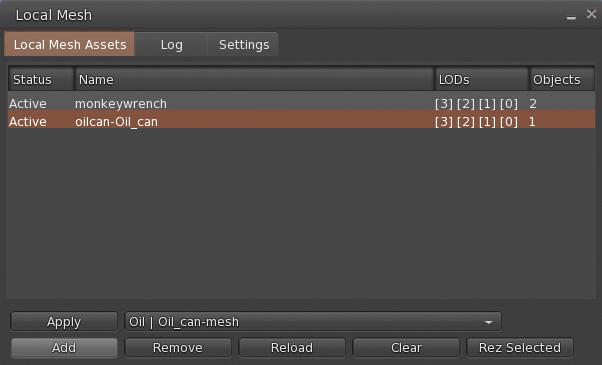
Local Mesh is accessed via the Build menu: Build → Local Mesh, which in turn opens a new floater, comprising 3 tabs.

The Local Mesh floater. Credit: Beq Janus
Local Mesh Assets Tab

Displays the current list of .DAE files obtained from your computer which are available for potential rendering in-world to view. Objects are listed in the middle section of the tab, together with their assigned LODs. When more that one file is listed, the highlighted file name is the one that will be acted upon.

This tab includes the following buttons:

  • Add: opens a file picker and allows you to navigate to and select a .DAE file from your computer. When the file is selected and Open in the picker is clicked, the file is added to the list of available .DAE files.
  • Remove: will remove the highlighted .DAE file from the Local Mesh Assets list and should clears any corresponding in-world object.
  • Reload: Re-loads the selected file in the Local Mesh list and reapplies it to the Mesh object inworld so use this to applies the most recent edits to your .DAE file to your in-world object.
  • Clear: Reverts a selected Local Mesh object inworld to it’s normal state (so, if a cube prim was used, the object will revert to a cube).
  •  Apply: if you have a suitable mesh in-world yo can select it and click this button to apply the properties of the file highlighted in Local Mesh Assets to it.
  • Rez Selected: will prompt you to rez a primitive in-world (via the Build floater, and then applies the properties of the file highlighted in Local Mesh Assets to the rezzed prim.
The Local Mesh workflow
Log Tab
  • Logging for Local Mesh
  • If the status of your Local Mesh file in the Local Mesh Assets list shows “Error” instead of “Active”, check the log for the cause of the error.
Settings Tab
  • Assume scale is in metres:- Ignore the cm scale units used by tools such as Maya,
  • LOD Suffixes: Choose a standard or manually edit
    • SL Standard – Lowest is LOD0, High has no suffix
    • Game Engine Standard – Unity.UES etc, Lowest is LOD3, High is LOD0
    • LOD names – English LOD names, Lowest is LOWEST, High is HIGH
Converting a Local Mesh to a Local Animesh
  • Right-click → Edit the required local mesh (in-world or worn).
  • Add your animations and control scripts to the object.
  • Select the Features tab in the Build floater and check the Animated Mesh option.
Additional Information

For a complete overview of Local Mesh functionality, please refer to Announcing Local Mesh, by Beq Janus, principal developer of the capability, and which can be found on her blog – which is a must-read for anyone interested in content creation and the technicalities of Second Life. In addition, the ? button of the Local Mesh floater will display web-based Help pages based on the floater tab in which the ? button is clicked.

Building and Scripting – General Updates

  • Build Floater: 
    • Face selection cycle now starts at face 1 instead of face 0 – FIRE-32282.
    • Shift+clicking the link/faces button now includes the next face/link into the selection (Build → Select Elements → “Include next part or face” / “Include previous part or face”) – BUG-232757.
  • Physics updates:
    • Mesh physics options in mesh upload preview floater
    • The bounding box now sets a physics cube around the entire mesh even if it is multi part in the mesh uplaoder.
    • eshes with a hull based (non triangle) user physics will not be convexified when scaled to below 0.5m – BUG-232869 and FIRE-32359.
  • Animation upload preview on own avatar should no longer fail when the Firestorm AO is enabled – FIRE-32315.

Continue reading “Firestorm 6.6.8: Profiles, Local Mesh and more”

Seanchai Library: Jan 16th-20th, 2023 in Second Life

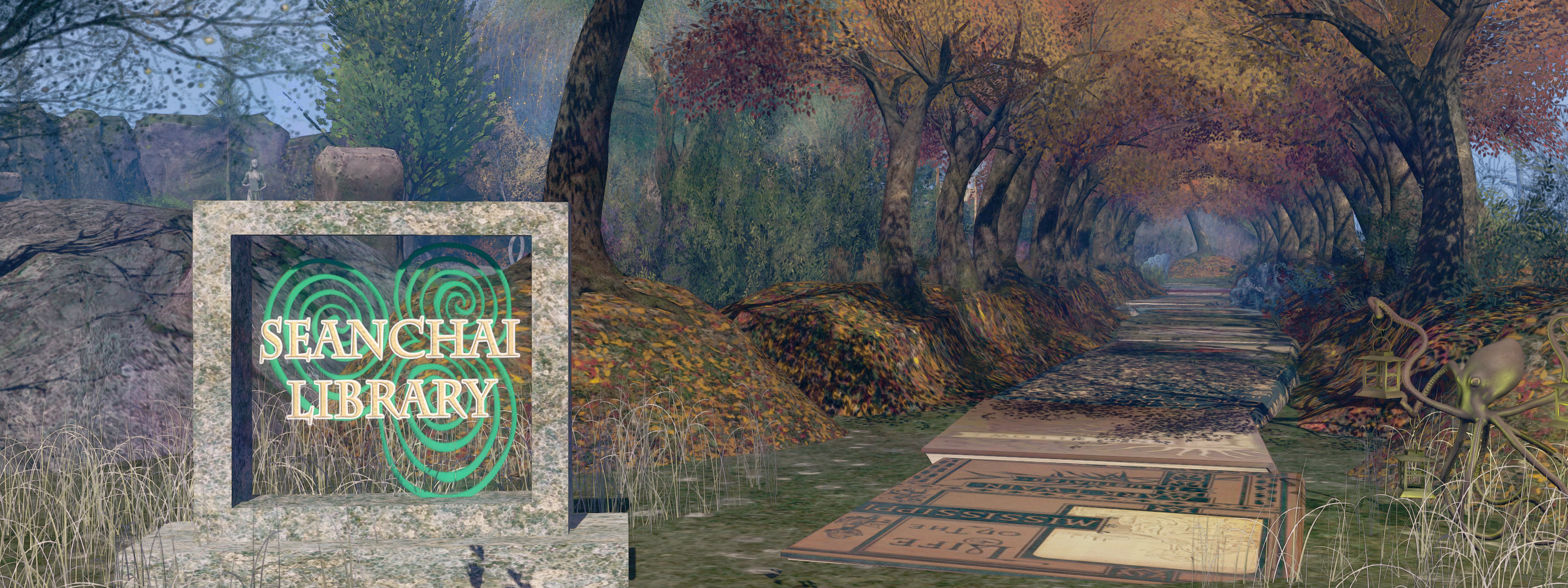
Seanchai Library

It’s time to highlight another week of storytelling in Voice by the staff and volunteers at the Seanchai Library – and this week previews the launch of a very special event.

As always, all times SLT, and events are held at the Library’s home in Nowhereville, unless otherwise indicated. Note that the schedule below may be subject to change during the week, please refer to the Seanchai Library website for the latest information through the week.

Monday, January 16th, 19:00: Fear Hound

In the slums of a city, a vagrant young man is drafted by a member of the city’s psi squad in a search for a trapped psychic radiating her fear to people for miles around.

With Gyro Muggins.

Tuesday, December 17th, 19:00: Cold Clay

It’s autumn in Shady Hollow, and residents are looking forward to harvest feasts. But then a rabbit discovers a grisly crop: the bones of a moose.

Soon, the owner of Joe’s Mug is dragged out of the coffeeshop and questioned by the police about the night his wife walked out of his life–and Shady Hollow–forever. It seems like an open-and-shut case, but dogged reporter Vera Vixen doesn’t believe gentle Joe is a killer. She’ll do anything to prove his innocence. . .even if it means digging into secrets her neighbours would rather leave buried.

Faerie Maven-Pralou reads the second book in the Shady Hollow series by Juneau Black, in which some long-buried secrets come to light, throwing suspicion on a beloved local denizen.

Wednesday, December 18th, 19:00: Seanchai Flicks

Films, popcorn and fun at the Seanchai cinema space.

Thursday, December 19th, 21:00: In Poe’s Shadow at the Castle Dracula Experience

With Shandon Loring.

The many aspects of Jules Farigoule in Second Life

Nitroglobus Roof Gallery, January 2023: JuleJules Farigoule – The Farigoule Collection

Opening on Monday, January 16th, 2023 in the Annex at Nitroglobus Roof Gallery, curated by Dido Haas, is The Farigoule Collection, a series of images and settings by Jules Farigoule which – as always for Nitroglobus – offers a fascinating take on the art and expressionism of the artist involved.

The easiest way to introduce the collection is to use Dido’s own words:

A while ago when meeting with Jules in his loft, which is really a superb tastefully made place, I asked him if he was willing to exhibit his awesome art collection at Nitroglobus.  At first he hesitated and told me he was neither an artist nor was this a ‘collection’, just images which he likes to have around him; a very subjective and personal selection. .. a set of images, gathered from meetings, friendships and by chance, from the serendipity of Jules’s long Second Life.

Dido Haas

Nitroglobus Roof Gallery, January 2023: JuleJules Farigoule – The Farigoule Collection

Now, on the surface, this may not sound so unusual – serendipity often plays a role in art, be in painting, drawing or photography, and in Second Life, photographs tend to focus on our personal moods or on the friends we make, the people we encounter and the sights we come across in our explorations. So what makes this collection so special?

Simply because, while it may not have any intentional theme or narrative thread, it is nevertheless something of a story about Jules – who hails from France – and his self-expression both in the physical world and within Second Life.

Some of the latter is expressed through the two settings occupying the floorspace of the Annex, and which offer a glimpse into Jules’ loft home in-world. Their simplicity of form and minimalism, coupled with the placing of the art on their walls and the sculptures, speak to a mind and eye driven by thoughts of beauty and balance, and something of a reverence for the female body – as well as the simple joy of taking photos.

Nitroglobus Roof Gallery, January 2023: JuleJules Farigoule – The Farigoule Collection

More broadly – and intimately – the exhibition as a whole offers insight into the dual nature of Jules’ time in Second Life, where both a male and a female avatar – Gaia Republic – are used (with Jules now being the primary and Gaia – although older – the “Alt”). The images from Second Life – outside of those Jules has on display within the “loft” sets which originate with other artists (including Dido herself) – come from both the persona of Jules and that of Gaia, and examining the differences in style, tone and subject between the two.

Most of the images by Jules, meanwhile present fair more structured results in which the more technical aspects of each – style, focus, presentation, cropping and production. Thus, there is perhaps a femininity reflective of Gaia that naturally comes to the fore within Mes copines, whilst Jules’ piece might be seen as leaning towards a more “masculine” expressionism.

Nitroglobus Roof Gallery, January 2023: JuleJules Farigoule – The Farigoule Collection

It’s subjective to be sure, and also subjective, given the technical skills required to produce Mes copines are as great as those seen within, say, ExMachina 04. More importantly, the contrasts speak to a person as ease within the skins of both Jules and Gaia, and makes for a delight layer of observation when viewing these pieces.

Mixed with the Second Life images are several which appear to have been brought into SL from the physical world, and these again offer insight into Jules’ outlook as an artist and the richness of his imagination.

Yet another engaging exhibition from Nitroglobus – and full kudos to Dido for persuading Jules to display his work, and to Jules for doing so.

Nitroglobus Roof Gallery, January 2023: JuleJules Farigoule – The Farigoule Collection

SLURL DETAILS

2023 SL viewer release summaries week #2

Logos representative only and should not be seen as an endorsement / preference / recommendation

Updates from the week through to Sunday, January 15th, 2023

This summary is generally published every Monday, and is a list of SL viewer / client releases (official and TPV) made during the previous week. When reading it, please note:

  • It is based on my Current Viewer Releases Page, a list of all Second Life viewers and clients that are in popular use (and of which I am aware), and which are recognised as adhering to the TPV Policy. This page includes comprehensive links to download pages, blog notes, release notes, etc., as well as links to any / all reviews of specific viewers / clients made within this blog.
  • By its nature, this summary presented here will always be in arrears, please refer to the Current Viewer Release Page for more up-to-date information.
  • Note that for purposes of length, TPV test viewers, preview / beta viewers / nightly builds are generally not recorded in these summaries.

Official LL Viewers

  • Release viewer: Maintenance P (Preferences, Position and Paste) RC viewer version 6.6.8.576863 Monday, December 12.
  • Release channel cohorts:
    • No updates.
  • Project viewers:
    • glTF / PBR Materials project viewer updated to version 7.0.0.577486 on January 11, 2023.

LL Viewer Resources

Third-party Viewers

V6-style

  • Kokua updated version 6.6.8.50080 (no RLV) and version 6.6.8.53435 (RLV variants) on January 15, 2023 – release notes

V1-style

  • No updates.

Mobile / Other Clients

  • No updates.

Additional TPV Resources

Related Links