Many of us reported last week that development on Kirsten’s Viewer had been suspended due to Dawny being ill. As a consequence of her illness, Kirstenlee has had to seek full-time employment as well as needing more time to care for her.
Today, Hamlet Au published an interesting piece on the fact that if the (approx. 8,500) users of Kirsten’s Viewer were to each donate $6.00, then work could continue on the Viewer for an entire year. That’s not $6 a month – it’s $6.00 per person in total, or 50c a month.
Let me be clear here – as Hamlet is – this is neither Dawny nor Kirstenlee asking for money – this is a suggestion coming from Hamlet following-on from a conversation he had with Dawny. It’s not entirely clear what Kirstenlee’s views are – although I’d be surprised if they were any different to Dawny’s; the Viewer has been a major part of their lives for a long time now, and they have both put heart and soul into it, together with the rest of the team.
Hamlet isn’t suggesting people start donating right away – but rather they use the Kirsten’s Viewer site to register moral support – with dollars possibly coming later, once details have been worked out, and potential options looked at.
The Firestorm team have released an optional update to the Firestorm 3 Mesh Beta release. The update is to deal with a couple of issues, as explained in the official blog post:
“A new bug was brought to our attention recently that effects region restarts while using our Metaharper skin in our Firestorm Mesh Beta. Basically, the region will fail to restart and be left in a state that only LL Support can fix. We traced the origin of the bug, fixed it and have updated our download files.
“If you are an Estate Manager who performs region restarts AND you use the Metaharper skin it is strongly advised that you download our updated version 3.0.1.22566 from our download links on this page. No other skin is effected by this bug. Alternatively, you can fix the issue yourself without installing this optional update by following the instructions listed on this page. http://wiki.phoenixviewer.com/doku.php?id=fs_region_restart_bug
“We have also patched a performance issue some people may be effected by which essentially drops performance when you have many IM windows open at once. If you have performance drops while having multiple IM windows open you may find an improvement with this optional update.
“If you do not fall into the above criteria there is no need for you to update or worry, aside from what’s listed above, nothing else has changed since our 3.0.1.22525 Mesh Beta.”
If you are affected by either of the above, download the update from here.
In a sad notice posted today, Kirstenlee Cinquetti has announced the end of line for the foreseeable future – if not permanently – of the outstanding Kirsten’s Viewer. The entry in full reads:
“You may have noticed that the client has not been updated in some time. Sadly Real Life events have taken an unfortunate turn which basically puts an end to any more development.The Plans for S22 have been shelved and the project has been marked as discontinued.
“Installers have been removed as they are now very outdated, the sourcecode will of course remain. The website and forums will stay up for as long is required. Also inworld groups will stay active. It is of course entirely your choice as to how long you continue to use the client, however I do stress that it will fall behind with features and it may be wise to seek alternatives in the near future.
“Dawny has been very Ill, and had to stop working. As you can imagine my priority is to support her in any way possible and that means I have to become the main bread winner, as much as I enjoy working on the client it’s obviously the first thing to go.
“Not much more to say…
“BUT finally I would like to wish everyone who has supported the project over the years, a huge hug and many thanks, Jabba, Altair and all the people who have put up with my ranting and raving and unusual colour choices in UI. 🙂
“Who knows what the future holds! But for now Kirstens Viewer goes into a deep sleep.
“Presses the Shut Down button, Drives spin down, silence……….
“Love to you all, KL”
This is a very sad day for Second Life and Viewer development. Over the years, Kirsten’s Viewer has set the benchmark for SL-related photography and machinima as well as being ground-breaking in many other areas, not the least of which was the development of the first Viewer 2 hybrid client that offered a usable interface well ahead of V2’s own at the time, and which has remained innovative and highly preferable to LL’s own offering. More recently, it became the first and, up until its suspension, only Viewer to support the upload of mesh objects outside of Viewer 3.x.
I’ve always enjoyed using Kirsten’s Viewer – it requires a fairly high-end machine, and at times my PC had struggled with it, but it has always given me faultless performance and the ability to enjoy elements of Second Life that just weren’t available to me through other Viewers – such as the initial iteration of dynamic shadows.
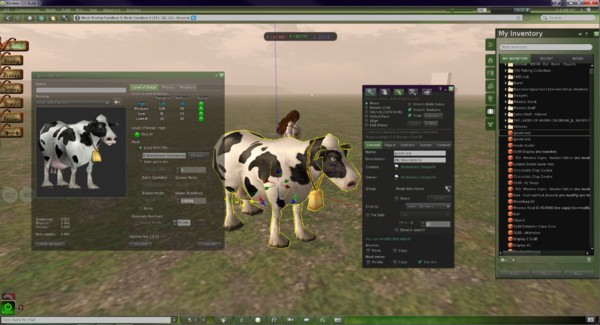
Happier times: Jabba Abbye’s screen capture celebrating the release of S21 Build 9 with mesh object rendering / upload support
I’d like to take this opportunity to thank Kirstenlee and the team for everything they have done and achieved with the Viewer, together with a personal message of best wishes and a return to health for Dawny. For now it is Adieu to Kirsten’s Viewer; perhaps we’ll meet again in the future.
Yesterday, the Phoenix / Firestorm team released a Beta version of Firestorm (officially called 3.0.1.22525), specifically aimed at mesh object rendering. The team is keen to emphasise that this is bordering on an “experimental” release, and urge anyone trying it out to read the accompanying release notes – of which more anon.
The release itself was almost destined not to take place; on Tuesday morning the team discovered a series of regression issues that needed to be resolved, then their service provider announced significant issues with their fibre, leaving the Phoenix servers only able to accept around 10 connections at a time!
Nevertheless, the team worked through issues and, following the fortnightly Phoenix Hour on MetaMix TV, the Beta was duly released. So – what is it like?
Starting Firestorm
The differences between this version and earlier releases are apparent from the moment you install and run Firestorm. On the log-in screen alone are three new features:
Log-in screen – new features
Log-in drop-down list: Firestorm gains the Phoenix username drop-down list with this release. If you use several alts, names and passwords can be retained by the Viewer and chosen from a drop-down list, making for easy selection. In a further nice touch, if you use the same name to log on to multiple grids, the Viewer will remember the specifics. For example, I have three entries under username: “Inara Pey”, which logs me into the SL Main grid; “Inara Pey @ Second Life Beta” which logs me in to aditi, and “Inara Pey @ InWorldz” which logs me in to InWorldz – the required Grid is automatically selected when I select the user name
Beneath the Username field is a new button – DELETE THIS ENTRY (arrowed). This removes the details of the selected avatar from your log-in records held by the Viewer – again, useful if you have multiple avatars and discard one, or if you no longer log-in to a specific grid
There is also now an option called DEFAULT SETTINGS. This allows you to select a default “UI” style with which to run the Viewer. By default, it is set to “Phoenix”. Clicking on the arrow to the right of the option displays the additional options of “V3” and “Hybrid” (boxed above).
Now, these have been described as setting different User Interface styles – and to a point, they do (setting V3, for example, will give you the familiar Sidebar tabs from Viewer 2.x/3.x); but if anyone is expecting “Phoenix” will deliver a full-blown Phoenix-esque V1.x UI will be in for a disappointment – the differences in presentation are far more subtle: “Phoenix” delivers a UI that is pretty much identical to the current Firestorm release UI, for example.
Firestorm 3.0.1 “V3” UI option
“Hybrid” refers to a new – and, I’d say cleaner – variant of the Firestorm UI developed for this release, which I’ve now set as my default (as far as possible – there is at least one issue with this release).
Firestorm 3.0.1 “Hybrid” UI option
As with the Viewer Modes in Viewer 2.x / 3.x, changing the default settings will require you quit and restart Firestorm. While this requirement is the same as the official Viewer when switching between Basic and Advanced modes, it would be nice if this could be automated if at all possible: clicking the OK button shutting down and restarting the Viewer in one convenient go.
Firestorm 3.0.1 “Phoenix” UI option
Navigation and other “Top” Bars
By default, both the Phoenix and Hybrid settings have the Navigation Bar at the top of the screen turned off, while the V3 option has it on, together with the Search bar. Speaking of the Search Bar, as there is an option to turn it off/on, it would be nice if this worked independently of the Navigation bar (currently turning Search on / off only makes a difference if the Navigation Bar is displayed). It’s a small thing, but would add to convenience of use.
The Favourites Bar is on by default in all three, and while I like the fact that in the Phoenix and Firestorm options it is on a transparent background, this may cause issues for some and it is frequently difficult to see against, say, the sky. I also like the Hybrid option’s transparency around the tool bar at the bottom of the screen; this is a nice touch and adds to the feeling that one has a greater in-world viewing area.
Of Sidebars and Pie Menus
The “V3” option of the UI obviously uses the V2.x/V3.x Sidebar and tabs, although options can be accessed from the toolbar at the bottom of the screen as well.
The “Hybrid” UI option uses the “tabless” Sidebar seen in earlier Firestorm releases, with options accessible from the toolbar buttons. In both cases, options can be “torn off” from the Sidebar and floated as independent windows, and will persist as such between log-ins.
The “Phoenix” UI option disposes with the Sidebar completely, and simply floats options in their own windows.
Both the Phoenix and Hybrid options utilise the Pie Menu by default – I would personally prefer the Context Menu were the default in the case of the latter, but I suspect I’d be in the minority for saying so! The V3 option uses the Context by default.
Major New Features
Volume Control Access
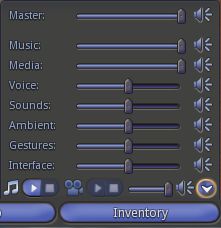
Volume Setting Controls
With this release, Firestorm inherits Phoenix’s quick-access panel for all volume control settings. Simply hover the mouse over the volume icon at the top right of the Firestorm window and the control panel will drop down.
All the expected options are there, with sliders, together with options to mute those that are frequently not used: streaming music, media and Voice.
Alongside the Quick Preferences button located down on the toolbar, this is perhaps one of the most eagerly awaited V1 TPV UI options to reach Firestorm.
Built-in Flight Assist
Adding to the client-side AO, Firestorm now sports a flight assist option. This is accessed through PREFERENCES -> FIRESTORM and then checking the ENABLE BRIDGE FLIGHT ASSIST option. As the option itself suggests, the Firestorm Bridge must be worn in order for the flight assist to work; furthermore, you should remove / turn off any other flight assist options before using the built-in flight assist, or you might experience all sorts of issues!
Camera Floater Updates
The camera floater receives an update in the new release, with the Phoenix and Hybrid versions receiving new buttons, while the V3 floater sits somewhere between the previous Firestorm version and the Viewer 3.x controls.
Camera floaters Viewer 3.x (left), Firestorm Beta, Firestorm “V3” and Firestorm “Phoenix” / “Hybrid” (right)
The layout of the new “Phoenix” / “Hybrid” floater makes it appear slightly larger on-screen, and also a little tricker to resize.
Contacts List Changes
The Contacts List has been updated to show whether friends have allowed you permission to map them / edit their items – all to the good. On the downside, a column to show Display Names has been added alongside user names, which tends to push out the size of the window unnecessarily.
Contacts List – a lot of screen space
It would be nice if there were an option to turn off either the user name column or the Display Name column in order to make the List less screen-consuming. If this could be coded, and reduce the amount of screen real estate lost to the window.
This is a summary report only, due to the circumstances of the release. A full review on the Firestorm Mesh Beta will be forthcoming, complete with a detailed list of all new features and an overview of fixes.
Following the Phoenix Hour today, the Phoenix Firestorm team have released a BETA version of Firestorm with mesh object rendering support.
The release is not to be regarded as a full release – more work is required.
Furthermore, the team has specifically requested anyone wishing to download the release to read the accompanying notesbefore downloading and trying the Viewer as there are some critical issues.
There is also a list of known bugs that Firestorm has inherited from Linden Lab. These are already known about and the team request people do not raise further JIRAs on them again, please read the list before reporting bugs.
Other points to note:
nVidia 400-series and above graphics cards may be prone to immediate crashing on running the Viewer if Basic Shaders are enabled. This again is a bug inherited from Linden Lab, and users of 400-series and above nVidia cards are asked not to enable Basic Shaders
The release should clear settings and cache as a part of the installation. If you wish to preserve chat and IM logs, and set them to the default locations, make sure you move them elsewhere first
Should settings / cache not be automatically cleared, people should go to PREFERENCES -> NETWORK & CACHE and use the button there to clear settings and cache and then relog
This release does not include the spell check option – this will be added in the final release; all effort has gone into responding to user demands to provide a version of Firestorm that can render mesh objects
Mesh uploads are not in this release – the code needs further work.
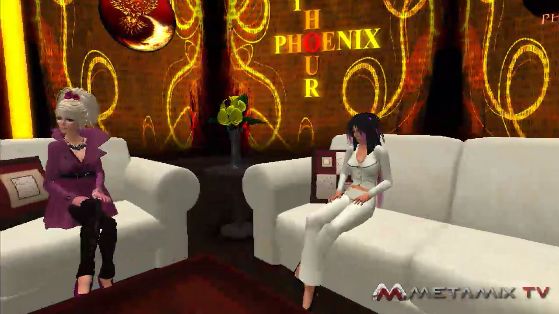
Jessica (r) and Phaylen at today’s show
The following feature are included in the release (not definitive):
There is a lot of exciting news coming out of the Phoenix / Firestorm team this week, as Jessica Lyon revealed during the fortnightly Phoenix Hour Metamix TV broadcast on Tuesday. Here are the highlights.
Phaylen (l) with Jessica
Hybrid with Mesh
The next release will be a true hybrid version for Firestorm, utilising code from the SL Viewer 2.6, 2.7 and 2.8 / 2.8.3 releases. It will include the capability to render mesh objects.
There is no actual release date for the new version – although Jessica hopes it will be in “The next couple of weeks.” The version is being referred to as 2.6 internally, as this was the code it was initially based on. However, given it has now developed into a hybrid encompassing several V2 releases, it is possible the version number will change to reflect the fact Firestorm is not tied to a specific Snowstorm build.
There are a couple of “blockers” to the release, one of which is getting the spell check tool into this release. This has hit a few problems, but the number of requests that have been received for its inclusion mean that it Jessica would prefer not to release the next version until the spell check is working.
Jessica Lyon discusses Firestorm
Beyond this, there are a number of other 2.6-related targets to be met, which (I gather) include regression fixes. However, rather than delaying the release unduly, the team may opt to release 2.6 with the major additions (mesh, the spell check, etc.) as a Release Candidate, then add the remaining 2.6 targets before moving it to a Full Release status.
Viewer Modes in Firestorm
Viewer 2 introduced the concept of Viewer “modes”: Basic or Advanced. The next release of Firestorm will introduce a similar concept of “modes”, but executed very differently, in that three interface modes will be supported:
Phoenix mode: the Viewer presents a Phoenix-like UI
Viewer 2 mode: the Viewer presents a Viewer 2/3 UI
Firestorm mode: the Viewer presents its own hybrid UI
Friends List Overhaul – Contact Sets
This is something that is bound to excite a lot of people – and it is also something LL have been thinking about, going on comments at SLCC 2011.
Firestorm will include the ability to group / categorise your friends and contacts.
Called Contact Sets, the new feature allows a user’s Friends list to be organised according to individual needs (e.g. all business contacts can be put into a set, close friends into another set; individuals can appear across multiple sets, etc.).
Additionally, users will be able to set Viewer tag colours for their Contact Sets, making it easier to identify people from a Contact Set when seen in their own in-world view or when looking at mini-map icons.
The feature also includes the ability to include people not on a user’s Friends list, however:
It will not give a user any additional privileges over someone they include in this way, so users will not be able to see the online status, etc., to “non-Friends list” people in a Contact Set
Any group Teleports, conference calls, etc., will not be seen by “non-Friends list” people in a Contact Set
Other Features
The next release will include a number of additional features, including:
The Phoenix Log-in Manager will be included, allowing users to quickly and easily log-in to Second Life using any of their avatar accounts, as is currently the case with Phoenix. Once an avatar has been logged-in through the Viewer, the information is retained by Firestorm and is available from a drop-down list in the log-in screen
The Grid Manager has been improved, thanks to code donated by the Kokua project, together with some OpenSim support code, allowing Firestorm to operate more smoothly with OpenSim grids
Selection beam customisation has been added to Firestorm, allowing you to customise your selection particle beam
Auto-correct has been ported from Phoenix into Firestorm. Auto-correct is a macro-like option which can also be used as an auto-complete tool: if you have terms you frequently use, such as referencing a web page (your blog?), you can use auto-correct to set up a suitable abbreviation & when you type the abbreviation, the full text is automatically inserted into the chat / IM bar
Viewer tags gain greater customisation in terms of how you see them; custom colours can be used, rather than being restricted to a pre-defined set
Volume control pop-up (Impudence example) to be in Firestorm
The volume control pop-up common to V1.x Viewers next Firestorm release, providing users with access to all volume control sliders. This will be accessible by clicking the volume control option at the TOP RIGHT of the Viewer window, rather than the bottom right, as with V1/x TPVs
Font options are to be introduced, allow users to change the font used in the Viewer. A warning here is that the Viewer is coded around the default font size, so if you change the font, words may not correctly display
Proxy options will be included in the next release,while scripts opened and edited from inventory will be able to save them in LSL or Mono
Additional skins will be provided with the next firestorm release. In addition, there is also documentation available on how to create a Firestorm skin this includes information on a competition for new skins to be officially added to Firestorm
Display Names will offer users t the abilityo alter Display Names for other people as they are seen in their own in-world view. So if someone has used ASCII to create an incomprehensible Display Name, you can change it to some readable for yourself, with the following important notes:
The change doesn’t impact the actual user’s Display Name as they or others see it
This doesn’t in any way affect another user’s user name
The new name will appear in asterisks, and is not persistent if the person concerned later changes their Display Name to something else.
Major Bug Fixes
Log-in bug: Firestorm can crash as a result of too many chiclet notifications being received while offline. The default for the number of chiclets the Viewer can handle was raised in the current release, and this is thought to have been the problem. The permitted number has been reduced to the LL default in the upcoming release. In the meantime, those experiencing this problem, there is a work-around in the Phoenix wiki
Screen blackout / freeze on teleport: the mini-lock-up that can turn the screen black and / or freeze things following a teleport has been linked to an issue with the LL code, but a fix is to be included with the next Firestorm release.
Other Notes
The Contact Set feature will be included in a Phoenix maintenance release around seven days after the release of Firestorm
There are other V1-based Viewers successfully integrate mesh rendering into their offerings, the code might be included in Phoenix in the future.
The full presentation can be seen on Metamix TV, complete with the Q&A session. Overall, these updates are almost exactly what people have been asking for – not just with Firestorm, but of linden Lab as well when it comes to the improvements to the Friends list. As such, Contact Sets idea in particular is liable to set Firestorm head-and-shoulders above other Viewer 2.x offerings and could potentially see a lot of people switching over to it.
 Many of us reported last week that development on Kirsten’s Viewer had been suspended due to Dawny being ill. As a consequence of her illness, Kirstenlee has had to seek full-time employment as well as needing more time to care for her.



 Inara Pey: Living in a Modemworld