Coming on top of yesterday’s tweet, there is good news for those who wish to see Kirsten’s Viewer continue.
Kirstenlee Cinquetti has announced that, following the outpouring of support for the Viewer, the team are going to try and obtain funding by going the Crowdfunder route.
In announcing the approach, Kirstenlee blogs:
Many of you have asked and wondered what the future would hold for the Viewer, well here is the answer..
After lots and lots of thought and quite a bit of behind the scenes activity we are going to go Crowdfunder!
The upshot of the whole deal is this, a target has been set to fund the entire project and it’s continued development for a period of one whole year. What happens remains to be seen, I can however reveal a few details of what does happen if we hit the target, and more critically what can occur if we exceed the funding target. If we seal the deal, almost instantly the binaries will become available for download the project will become active again and an updated and early build of S22 will become live.
If the funding target is achieved, it means that the binaries will be released once more, and work will immediately continue, with a list of juicy enhancements coming down the line over time:
Programmable camera positions
Enhanced photo making features
“Radical changes” to the user interface
Enhancements in the area of post processing and 3D vision
If the required funding level is exceeded, then the team will look into other aspects of Viewer development, such has obtaining a KDU licence, funding other developers, etc.
For those helping to fund the project, a special area of the Viewer’s website will be set up, providing preview access to builds and features, and where funders can vote on proposed new features and enhancements, etc. Rewards for funders will be based on their level of funding.
The project’s Crowdfunder page is now open. Using Crowdfunder is pretty much a win/win situation for all involved: if the target is reached, the project will go ahead; if the funding target isn’t reached, then money promised to the project will be refunded. So there’s no reason not to get involved!
At the start of September came news that Kirsten’s Viewer was effectively frozen as a result of Kirstenlee Cinquetti having to withdraw from the project in order to be better placed to care for partner Dawny Daviau.
While this news came a cause for regret, coupled with warm support for both Kirstenlee and Dawny, Hamlet Au put forward an intriguing idea to the community as to how the Viewer might survive. This resulted in a massive outpouring of further support for the Viewer, as evidenced in the KV blog, which prompted Jabba Aabye to post sincere thanks to all who had come forward, hinting that something may well be forthcoming, as he referred to the Viewer thus:
But there might be some light on the horizon. Tho it is not official yet, there is some hope growing it will work out and benefit all of us.
Not long after that post was made, I heard a rumour – and I emphasise the word rumour – that there had been a further code commit for Kirsten’s Viewer. A check on the Kirsten’s Viewer SorceForge page revealed that, on the day Jabba made the announcement, a subversion of the Viewer code – No. 1060 – was in fact committed. A total of 13 files were submitted to the SVN repository – most of which appear related to the forthcoming Direct Delivery mechanism / Inventory changes.
Obviously, the above is not indicative that there is about to be a further release of the Viewer; the commit could simply be related to placing work-in-progress into the repository pending the project being unfrozen at an unspecified point in the future.
However, earlier today, the following was sent out today via the Viewer’s Twitter account:
Given the upbeat tone of the Tweet (note the smiley), it would seem that some very welcome news may be in the offing where Kirsten’s Viewer is concerned, and the commit of the 22nd September may yet find its way into another release of the Viewer. Here’s to keeping fingers crossed that the forthcoming announcement carries some very good news.
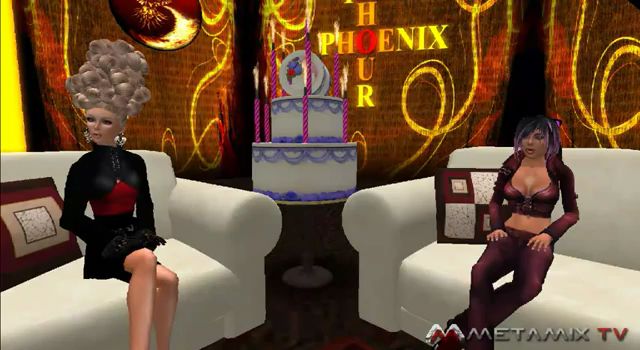
On the 4th October, the Phoenix Hour was on-air and had a sort-of celebration for it’s first birthday, having first aired in 2010, and moved home in the interim. A belated happy birthday from me to Phalen, Jess and all the team who work on the show.
Support Groups
Jessica kicked-off the meat of the show with a warning about “unofficial” in-world Support Groups for Phoenix/Firestorm.There are a number of such Groups operating in-world, some of which have proven to be problematic for Phoenix and Firestorm users who have joined them in the mistaken belief that they are a part of the Phoenix / Firestorm team. In order to help people avoid similar issues in the future, Jessica reiterated that “official” support teams will always have either herself (Jessica Lyon) or Ed Merryman as a Founder and / or in the Ownership. As such, when looking to gain “official” support, users should only join these Groups.
Phalen Fairchild (l) and Jessica Lyon filming The Phoenix Hour
Firestorm Update
V1 Functionality
Firestorm has surpassed Linden Lab’s Viewer 2(/3) usage hours, which demonstrates the Viewer has a very strong uptake. However, adoption among existing Phoenix users remains an issue of concern. To overcome this, the team will be carrying out further work on the Phoenix mode log-in option for Firestorm:
The toolbar at the bottom of the screen will receive further work, possibly to include text rather than icons in the buttons to help make it look more like Phoenix
Phoenix / V1 chat bar behaviour is to be included in the mode:
V1 Auto-hiding of the chat bar will be included (Preferences option), so that when ENTER is hit, the chat bar will slide off to the left of the screen (rather than behind the toolbar buttons, as with V1 behaviour); pressing ENTER again will display the chat bat once more
Similarly, pressing ESC will hide the chat bar and allow the WASD keys to be used for avatar movement, a-la V1 behaviour. Pressing Enter will display the chat bar once more for text entry
A major source of complaint from V1 users coming into Firestorm has been the use of chiclets in the V2 code. The team are looking into an option for users to replace the chiclets with V1 style dialogue boxes if they wish. Firestorm does currently display script menus in the top right and also V1-style notices appearing in the lower right-hand corner – although they do not currently stay open – and the team are looking to enhance this
A further issue with adoption from V1 has been identified with the menu bar – which is clearly very different in V3 Viewers from V1.To assist people in transitioning to the new menu system, the team have started looking at ways in which the V1 style menus can temporarily displayed in Firestorm for a period of around 30 seconds at a time.
The idea behind this is not to replace the V3 menu system, but to help people orient themselves with the new menus – the capability can be used to quickly find & use options under the V1 menu system (such as uploading an image) – once an option has been used, the menu bar will revert to V3 style. In this way, people can find much-used options without frustration, while learning the new menu system at their own pace. While details are yet to be finalised, the capability will most likely be enabled through a button on Firestorm’s menu bar.
As Jessica stated in the show, the Team are trying to provide means by which V1 users find it easier to orient themselves to using Firestorm without impacting the team’s ability to keep pace with V3 developments coming out of Linden Lab. To achieve this the team must balance changes within the Viewer’s functionality with the ability to merge such changes with the code base coming out of the Lab.
Jessica also indicated that not all of the above changes will be implemented in the next Firestorm release, although the chat bar changes will be there (and gave the impression things like hiding the chat bar may be common to all three of the Viewer’s log-in modes).
General Updates
Away from V1 adoption issues, Jessica reported that:
Spell check is finished and will be in the next Firestorm release, there are just a couple of bugs to iron out
Mouselook has been updated (notably for combat users) to include:
The ability to see beacons in Mouselook
Mouselook zoom – press and hold the right mouse button and use the mouse scroll wheel to zoom in / out
The ability to display local chat and IM history
The current “chat echo” behaviour that sees anything typed into the chat bar being repeated in the Local Chat window (if open) and vice-versa, has been fixed, allowing different comments to be typed into each of the chat entry bars
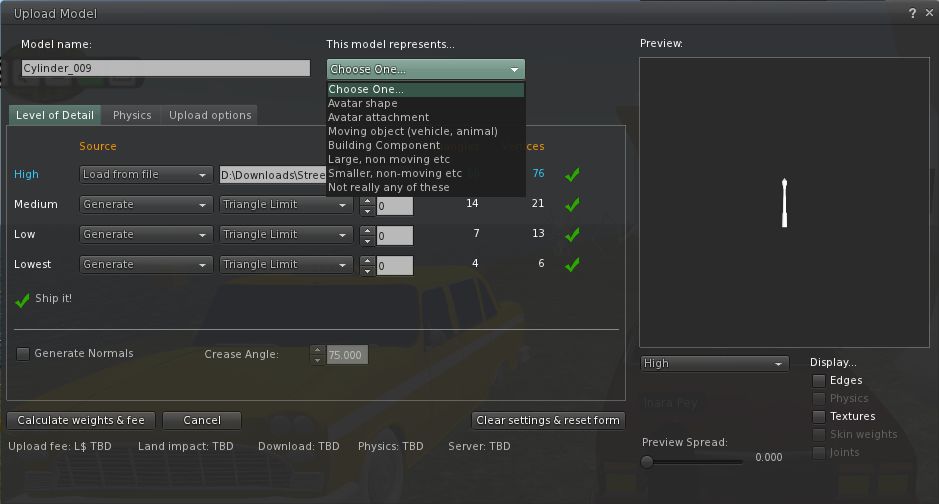
Nicky Dasmijn has been working on the mesh uploader, and it looks very much as if this will be in the next release of Firestorm – there was some doubt as to whether it would be finished in time for the next release when Jessica last mentioned it in The Phoenix Hour
Mesh uploads coming to Firestorm (image from Viewer 3 for representative purposes)
Similarly, the inventory “jump” issue has been fixed by Kitty Barnett and will also be in the next Firestorm release
Notecard find & replace will be included, together with a number of fixes to the text editor, including, it would appear, the cursor placement issue
Radar is to made available as a floater in its own right, rather than as a part of the Nearby People Sidebar tab / floater – work has just started on this, so it may not be in the next release
Anti-spam controls are to be included in Firestorm – but it is unclear if these will be in the next release or not
There are a number of AO bug fixes, although at the time of the show (4th October), the issue of the AO turning itself off when you log-in was still unresolved
Code Contributions
Jessica raised the issue that Phoenix / Firestorm is in some ways viewed as the “giant” in Viewer development and as being somehow untouchable – which is far from the case. While the team does have an extensive support network for users, the development side is actually quite small (thirteen developers in total, only some of whom are able to commit large amounts of time to the project).
Therefore, rather than being large and untouchable, the team actually welcomes contributions from other developers that can be incorporated into the Viewer. Such contributions don’t have to by major new features or bug fixes, as Jessica stated:
“You may think that you’re not worthy, or you’re not good enough – but you are. Trust me. Even the littlest, smallest contributions you can provide are sometimes really big impact things Even just a typo that you find in the interface … and you can fix that easily and submit it to us … The thing is, I can put Aaron on a typo, and he’s going to spend 15-20 minutes on that typo; but that 15 minutes of Aaron’s time can be spent on really complicated things, and I’d rather keep him on the more [high] impact stuff, the complicated things that only he can do, than to put him onto something small. But if you can supply us [with] a patch, we can right-click, commit, give you credit for it and suddenly it’s fixed and it hasn’t taken us any time at all.”
Jessica then went on to outline the contributions that have come from a number of people – and other Viewers – that have helped to improve Firestorm, culminating in a further statement that Firestorm would not be where it is today without the efforts of a lot of contributors outside of the core team, “So if you have something in your Viewer that improves your experience, I bet you it’s going to improve someone else’s. Send us a patch”.
Patches can be submitted via the Phoenix JIRA – you will require an account. There is also a mailing list available for developers and compilers to join. Note that this is not for asking questions on using the Viewer or for making suggestions for future features, etc – all of these should be handled through the usual support channels. The mailing list is purely for those actively engaged in Firestorm development, or who to assist in developing the Viewer (so it could be used to confirm whether or not someone is already working on fixing a particular bug or not, for example). Full credit for all patches / code used are given.
New Classes for Firestorm
There are new classes for Firestorm covering subjects such as troubleshooting, creating and using Contact Sets. Notification on these classes are provided through the Phoenix / Firestorm Support Groups.
When Will the Release be Made?
There are a number of things still to be sorted as core issues prior to the next release of Firestorm.
As previously indicated, there are a number of issues inherited from Linden Lab within the code, and for which the team are still awaiting fixes from the Lab
Jessica would personally like to see the issues of settings reverting and the Viewer locking up as “not responding” periodically for some to be fixed prior to the next release
As such, there is still not given date for the next release – too much depends upon Linden Lab in many respects.
A further issue for the team are the recently announced changes to the Viewer UI that are to be forthcoming from Linden Lab. At the time the show was recorded, little was known as to when these changes would start to be implemented by Linden Lab (or, in fact, what they would be), and Jessica was of the opinion that the team would likely release Firestorm prior to merging it with any UI updates coming out of LL.
However, given that some of these are now apparently due by the end of October (merging the Basic & Advanced modes, click-to-walk functionality, etc.), as indicated by Rodvik Linden speaking over on the SLU Forums, plans for Firestorm may have again been changed. As such, there is liable to be a further update on the release status for Firestorm at the next Phoenix Hour to take this particular matter into account, once more is known on LL’s plans.
Jessica was also unable to commit to supplying a date for the release of Phoenix with Mesh support. This has dependencies other than mesh (such as a complete update of the RLV system), which the team would like to see completed priority to making a further Phoenix release.
Finally, both Firestorm and Phoenix are also waiting on LL fixing the mesh-related OpenGL issues and graphics issues that are currently being investigated by Runitai Linden.
The next Phoenix Hour is schedules for 14:00 SLT on Tuesday 18th October.
The next update to Firestorm is still a little way off, in part due to the fact that the team is currently awaiting various fixes to known issues to filter through from Linden Lab.
In the meantime, the team are hard at work and, as well as fixing various Firestorm specific bugs and incorporating features that didn’t make it into the mesh beta release, are focused on addressing adoption issues – those things people have indicated are effectively show-stoppers where their adoption of Firestorm is concerned.
Missing in the mesh beta
While no date has been set for the next release (see comment re: Linden Lab fixes, above), here’s a summary of what to expect by why of Things to Come:
The Firestorm betas (both mesh and otherwise) currently tend to reset any Windlight settings following a relog or teleport, but a fix will be in the next release
The Contacts List (not the new Contact Sets feature) displaying both user name and display name in separate columns (something I reported on myself) in the mesh beta is in fact a bug, and will be corrected in the next release
The WORLD button for the ruler was removed from the Build floater during the beta mesh merge with LL’s code. This has proven unpopular among builders and the button (right) will be returned to the Build floater in the next release
The spell check feature, delayed from the mesh beta release, will be in the next release
Spell Check coming to Firestorm (Phoenix shown)
Further updates to the AO should be available with the next release
Web Profiles: with the increased functionality in Web Profiles, Firestorm will include an Preferences option (under the FIRESTORM -> GENERAL tab):
The option will be off by default for the V1 (“Phoenix”) mode of the Viewer
The option will be on by default for the V2 / V3 modes of the Viewer
Personal note: I assume this refers to displaying ones own Web Profile, given Firestorm already includes a link to other people’s Web Profiles as a part of the in-world Profile display
The inventory “jump” issue – whereby the cursor bar jumps within the inventory window (usually to the top) on receipt of a notification, etc., is being investigated but may not be completed in time for the next release
Mesh uploads: work is progressing on enabling mesh uploads in Firestorm. The code is the work of Nicky Dasmijn, who has contributed code to the Firestorm project over time, and the uploader will be available for other TPVs as well. Some additional points:
The upload most likely won’t be in the next release. It is still a work-in-progress
Even with mesh rendering coming to Phoenix, Jessica is not committing as to whether or not the upload will be ported to Phoenix.
The adoption issues the team are specifically addressing for the next release are:
Mouselook zoom will be incorporated into Firestorm (go to Mouselook, press & hold right mouse button and zoom in/out with mouse wheel) – this will be especially useful for those involved in combat games in SL
Text search in Notecards will be included
For the V1 (“Phoenix”) mode of the Viewer, the team are trying to get all dialogue boxes to display in the top right corner of the Viewer window by default. This includes Group notices and anything else that in a V1.x Viewer would appear in the upper right corner of the screen
A longer term aim is to possibly have the V1 (“Phoenix”) mode of the Viewer display a more Phoenix-like top menu when selected. This is not a high priority for the time being, and isn’t strictly seen as an adoption issue.
Again, no release date is available for the next update to Firestorm, as so much depends on Linden Lab providing fixes to known issues at their end. Also, not all of the above will be in the next immediate release, as per the notes.
The Catznip Viewer has been extensively updated in a new 2.8 release (2.8.0 (3)). Not only have the RLV capabilities been updated and a host of new features added and others enhanced, Catznip becomes the latest SL Viewer to support mesh object rendering.
Installation and Start-up
Like all Viewer 2.x /3.x Viewers, Catznip installs direct from the box as a standalone Viewer, and offers no changes or surprises along the way.
On start-up, Catzip joins Dolphin 3 in becoming one of the first Viewer 2.x/3.x TPVs to display the new SL log-in screen with the Destination Guide, etc., options. It’s good to see this option gaining wider traction – and it would be a joy to see it in Firestorm. Departing from the official Viewers, but in keeping with Viewer 2.x TPVs, Catznip dispenses with the Basic mode and keeps both feet firmly planted in the Advanced mode.
Once logged it, the UI looks very similar to that of Viewer 2.x/3.x with a modified toolbar.
Catznip toolbar (top) and the current Viewer 3.x toolbar
Interestingly, there in no Speak button by default on the Catznip toolbar – because Voice is off by default. However, the toolbar does include an inventory button which, as with Dolphin 3, opens an inventory window floater independent of the Sidebar (which can also be open at the same time).
Another nice touch with Catznip is that media is turned off by default on logging-in – a wise move given there is, unfortunately, no media filter.
Given its heritage, Catznip also has the RLVa menu displayed in the menu bar by default, although as with most RLV-capable Viewers, RLV itself – updated to 2.7 – is disabled on such time as it is turned on through Preferences.
A full list of updates is available from the Catznip website (see the note at the end of this piece on Catznip 2.6), but here are the most visible / user-related changes / differences to the official Viewer.
Preferences
Within Preferences, Catznip has everything common to the official Viewer, plus a few little tidbits and nips and tucks of its own:
General Tab: The SHOW MY FAVORITE LANDMARKS AT LOGIN option is moved from the Privacy tab to the General tab, just under the START LOCATION drop-down
Privacy tab: adds options to select whether you wish to clear one or more of the following: web cookies, teleport history, Search history and / or Navigation Bar history before you click on CLEAR HISTORY
Spell Check: allows you to enable the spell checker (words incorrectly spelt underscored in red, right-click to select options for correction / adding to dictionary). Language can be set to one of four options: British-English; Canadian-English, Australian-English and US-English
Skins tab: provides Starlight and Stardust skin options in a choice of colours
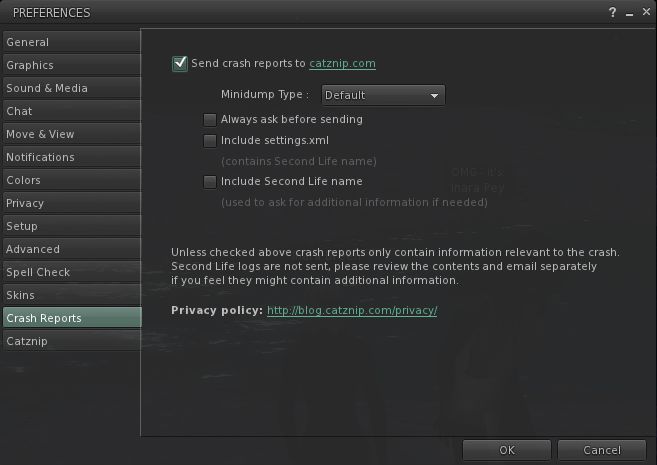
Crash reports tab: allows you to select whether or not crash reports should be sent to catznip.com, and the information the reports should contain
Crash report options
Catznip tab:
General: allows you to: use legacy multi-attach support (i.e. non-Linden “Emerald” system for multiple attachments); activate RLV support; adjust avatar offset; toggle object inspector on / off; toggle full screen windowed mode on / off
Chat: set your chat / IM preferences. An interesting item here is to enable a multi-line chat input option to the Nearby Chat floater
Multi-line chat input option
Inventory: allows you to: select the format preference for saving scripts (LSL or Mono); direct inventory you decline directly to trash; set notecard / texture options
UI: allows you to: display Group information either in the Sidebar or as a window floater; display an avatar’s Profile as a window floater or their Web profile (an additional nice touch is Web Profiles open on the ABOUT tab, rather than the person’s FEED tab – far more relevant); change the way in which script dialogues are displayed in the bottom tray; alter your My Outfits tab display between “Inventory” and “accordion” displays.
Jabba Aabye has posted over at Kirsten’s Viewer blog, on behalf of the entire team. The message is one of hope and thanks for all the support offered over the last few weeks.
On the Viewer in particular he states:
A lot of people have stepped forward to help, contribute and/or volunteer in a future plan for the Kirstensviewer-project. And not only the project, also for all the hard work that has been already done. But there might be some light on the horizon. Tho it is not official yet, there is some hope growing it will work out and benefit all of us. Details will come out in the coming weeks. Keep this website close to your mousepointer…
This is very encouraging feedback / news. Hopefully the team can find a way to keep the Viewer going and moving forward, especially after all the hard work they have put into things.
You can read Jabba’s post in full here. To him and the team as a whole, I’d again like to pass on my thanks for all of their efforts over the years. To KL and Dawny especially, I offer every best wish for now and the future.
 Coming on top of yesterday’s tweet, there is good news for those who wish to see Kirsten’s Viewer continue.