Kokua 3.7.1.30956: Fitted Mesh and refresh scene option

kokua-logoKokua, the SL and OpenSim v3-style viewer, updated on Tuesday February 18th to version 3.7.1.30956. With it came support for the Lab’s Fitted Mesh solution and the Facebook log-in hotfix.

As well as bringing the viewer up to parity with the Lab’s code base through to 3.7.1, this release also sees a set of updates from the Kokua team, the core of which can be summarised as:

  • The Mac version of the viewer (issued as a test version in January) is now available as a release version with this update, thanks to the help and support of Mac users
  • The Draw Distance slider on the status bar is now turned off by default as new users were apparently confusing it with a volume slider. It can be re-enabled via the debug setting ShowDDSlider (Advanced > Show Debug Settings)
  • The Windows version of Kokua now uses the FmodEx library for music streaming, and incorporates the avatar name in the title bar (port from Firestorm)
  • Opensim variable-sized regions and Aurora Sim regions are now supported
  • A number of issues with the UI have been resolved with assistance from CtrlAltStudio’s Strachan OFarrell.

Refresh Scene

Perhaps the most interesting update to Kokua with this release is a new Refresh Scene feature. This is primarily aimed at mitigating the missing prim issue, and can be accessed through both the Commands and Advanced menus or by pressing CTRL-ALT-SHIFT-R.
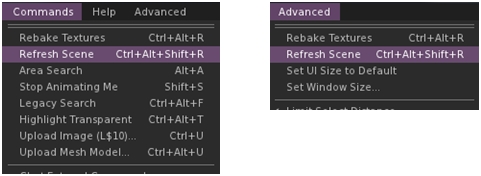
The Scene Refrsh option in the Command and Advanced menus
The Scene Refresh option in the Commands and Advanced menus

When selected, the option carries out a number of tasks:

  • Basic Shaders are deselected, increasing the viewer’s frame rate and allowing the viewer to more quickly pull-in the basics of a scene
  • A message is sent to the viewer log, allowing the viewer to run a little longer without the shaders
  • Basic Shaders are re-enabled to complete re-dressing the scene, which should now be correctly rendered.

Other Notes

There have been some reports in the comments following the release notes of issues running the 64-bit Linux version of the viewer on Ubuntu, which are apparently under investigation.

I did encounter initial issues running the viewer on 64-bit Windows using my Crash Test Alt, which saw the viewer repeatedly going non-responsive within a minute or so of logging-in. However, I confess to not having performed a clean install,  so this particular issue could have been as much my end as anything else. When I did perform a completely clean install, the issue went away. So if you do encounter issues, try a clean install, if you haven’t already.

All told, another nicely packaged update to Kokua, one which probably hides a lot more in the way of under-the-hood changes than might at first appear to be the case. The Refresh Scene option is an interesting approach to resolving the missing prim issue, and may well prove to have other benefits in the future as well.


Related Links

Feb 15th Firestorm Q&A video and transcript: next release and news

firestorm-logoOn Saturday February 15th 2014, the Firestorm team hosted a meeting to cover news on the upcoming release of Firestorm, projects they’re working on, and to answer audience questions.

While the meeting was recorded, the Firestorm team are aware that many of their users have hearing difficulties, and / or prefer to read text, so this transcript has been supplied on their behalf.

When reading, please remember:

  • This is not a word-for-word transcript of the entire meeting. While all quotes given are as they are spoken in the video, to assist in readability and maintain the flow of conversation, not all asides, jokes, interruptions, etc., have been included in the text presented here
  • If there are any sizeable gaps in comments from a speaker which resulted from asides, repetition, questions to others etc,, these are indicated by the use of “…”
  • Timestamps are provided as guidance should anyone wish to hear the comments in full from any speaker on the video
  • Questions /comments were made in chat while speakers were talking. This inevitably meant that replies to questions would lag well behind when they were originally asked. To provide context between questions and answers, questions in the transcript are given (in italics) at the point at which each is addressed by a member of the Firestorm team, either in voice or via chat.

Please note: This transcript is provided for informational purposes only. I am not an official member of the Firestorm team, and technical or support issues relating to Firestorm cannot easily be addressed through these pages. Such requests for assistance should be made through the in-world Firestorm Support groups or at the Firestorm support region.

The TL;DR Summary

Items here are presented in the order in which they are likely to be of interest to users, rather than chronologically. Timestamps in braces refer to times in the video where the relevant commentary can be heard. All sections are expanded upon in the main transcript – click on the timestamp to go to them.

  • [0:51:07] The next release of Firestorm will be out around March 9th – possibly a little before, possibly after. Some of what should be in it includes:
    • From LL: Fitted Mesh, HTTP (hopefully – see HTTP discussion), SLShare (Facebook support), Request teleport, New region restart warnings
    • RLVa 1.4.9, Animation Explorer, Area Search updates, revised Contacts Sets, Mmany mini-map updates (from Exodus), avatar shape XML import, group list .CSF export, materials support in object exporter, Phototools updates, anti-spam updates, and more
    • Major and minor bug fixes
  • [0:17:57] Firestorm Download Server: Firestorm have been forced to discontinue using Google cloud as their viewer download service due to reasons of costs following to changes to Google’s service. As a result, after looking at options for offering viewer downloads, the team has opted to invest in a dedicated download server of their own. This may lead to issues being experienced when downloading future releases of Firestorm. Details in the section Firestorm Download Server
  • [0:07:54] Cinder Roxley, one of the core Firestorm developers and open-source code contributors to the Lab, has departed Second Life, leaving something of a large hole in the Firestorm team
  • [0:07:54] Leap Motion: work is underway, now to be led by David Rowe (Strachan Ofarrell in SL), who develops CtrlAltStudio, who is partnering with Firestorm to carry the project forward. Work has started on camera manipulation, object manipulation and avatar movement. However, there is still a major amount of work to be done, at least some of which is contingent upon Leap Motion producing an releasing an update for the device itself. It is therefore unlikely any work on Leap Motion will be appearing in the near future, and certainly on in the next Firestorm release
  • [0:27:55] Voice issues: Vivox has offered to assist the Lab in dealing with at least some of the issues with SL voice. A new SDK (SLvoice plugin) is due to be released soon. If it arrives in time, it may be incorporated into the upcoming Firestorm release
  • [1:13:34] Mac issues: and update on matters for Mac users.
  • [0:41:02] HTTP: Tankmaster Finesmith has been merging the Lab’s HTTP updates into his own Firestorm repository. Depending on what happens the Lab’s HTTP viewer updates, Tank’s work may be merged into the upcoming Firestorm release and form a part of it
  • [1:09:40] mini Q&A session.

With thanks, as always, to North for the video.

Continue reading “Feb 15th Firestorm Q&A video and transcript: next release and news”

Black Dragon updates to 2.3.9.3

Blackdragon logoSunday February 9th saw the Black Dragon viewer updated to version 2.3.9.3. Dramatically referred to as an “emergency” update, the new version is another interim release, with major changes on the horizon as the viewer moves ever closer to the 2.4 version number.

To be honest, I’m not entirely sure quite what warrants this being called an “emergency” release. The quoted reasons for the update (HTTP and Fitted Mesh) haven’t exactly been hidden away by the Lab, but have been talked about openly for a while – and the code (while still being tweaked and banged on in the case of Fitted Mesh, admittedly),  has been available for poking-at. But anyaway, suffice it to say the new version is here, comprising a lot of nips and tucks, as listed in the change log with the release notes.

This isn’t intended as a full review, but more an overview of key changes.

The first of these is that the viewer is up-to-date with the Lab’s 3.7.0 code base, and so includes Fitted Mesh, which the Lab announced as officially released on February 10th.

Niran is a keen gamer, and as such put considerable work into his first viewer in adding options and controls other gamers would find familiar, such as offering more shooter game style camera placement, etc.

With this release of black Dragon, he’s put effort into enhancing the ability to map the viewer’s options and functions into game controllers – most notably the Xbox 360 controller. In carrying out this work, he notes:

  • Works with up to 16 buttons (for other controllers or joysticks)
  • Adds the ability to map zoom in/out/default, roll left/right, jump, crouch, toggle flycam, toggle run, toggle fly and Mouselook to available buttons
  • Certain mappings only work in either Avatar / Flycam or Build mode.

A video has been produced showing avatar movement using a game controller.

In another move to provide a game-like feel, Niran has duplicated the click-and-hold left mouse button and then use the mouse to rotate the camera / move your avatar to the right mouse button, as demonstrated in another video, which demonstrates the capability in conjunction with using the movement keys.

As noted, this is a duplication of the original left mouse button click / hold functionality, which can still be used by those who are already used to it.

Alongside of both of these, although not directly related to it, he has also added the option to disallow using Mouse-wheel to change values in spinners. Prevents some nasty problems with hover tips accidentally getting set to infinite.

In lin with recent LL RC and release viewers, this Release of Black Dragon includes a good number of MAINT, STORM and OPEN fixes and contributions  including STORM-1980, the updated region restart message and STORM-1981, the updates to avatar tracking beacons. All of these updates, together with Niran’s own fixes, additions, changes and tweaks can be found in the release change log noted above.

Related Links

Firestorm Q&A: Saturday February 15th

firestorm-logoThe Firestorm have been working hard on readying a new release of the viewer. Beta version of Firestorm 4.5.2 have been under beta evaluation for the last week or so, (and is looking good – the most recent version appears to have cured an issue I’ve had with Firestorm and my GTX 660 GPU, so right now I’m a very happy bunny).

There are still some decisions to be made, as a result, the next Firestorm Q&A session will be on Saturday February 15th. As per usual, the venue for the meeting will be the Phoenix Firestorm Support Island theatre, commencing at 16:00 SLT.

Jessica and the firestorm team promise "exciting news" at the next Q&A session
Jessica and the firestorm team promise “exciting news” at the next Q&A session

References to some “great news” and “exciting times are coming” within the blog post announcing the meeting has led to speculation as to what might be announced.

As well as working directly on the viewer, members of the Firestorm team have, as reported in these pages, been working on integrating Leap Motion into the viewer on behalf of the Lab and Leap Motion – so rumours have been circulating that the next release will include Leap Motion support, and it would seem that initial support for the device may be available in one form or another.

Those who use Firestorm for their SL photography may well have a nice little surprise waiting for them as well 😉 , as might Linux users.

However, the best way to be sure of what is coming is to attend the meeting. As usual, and on behalf of the team, I’ll be providing a transcript after the fact.

Lab releases SSA / AIS project viewer

On Tuesday February 4th, Linden Lab released the new Server-side Appearance (SSA) / Advanced Inventory System (AIS v3) Sunshine project viewer – version 3.6.14.285190.

The SSA "polish" / AIS v3 project viewer was released on February 4th
The SSA “polish” / AIS v3 Sunshine project viewer was released on February 4th

The SSA updates in this viewer primarily comprise:

  • Stability and performance improvements for SSA: retry logic, removal of redundant requests, detecting various appearance stuck conditions
  • Code cleanup with the removal of a lot of code related to the old client-side baking framework
  • Bug fixes, mostly appearance-related.

The AIS v3 updates require server-side updates to be deployed as well in order to be used. Once this has been done, users should note improved the reliability of outfit changes, including speed of changes and a further reduction in the failure rate experienced when changing outfits.

There is no current release date for the server-side support for AIS v3, and there will likely be further testing prior to a deployment being made; the Lab has actually been waiting for more TPVs to produce test viewers with the AIS code in order for this to happen. Hopefully, with the code now in a project viewer, more TPVs will be in a position to build test viewers for this purpose.

However, anyone wishing to specifically test the AIS v3 code, particularly if they have been experiencing outfit change issues, might want to try the project viewer on the four SunshineTest regions on Aditi.

Related Links

Lab issues Fitted Mesh release candidate viewer

Update January 22nd: As per the comments below, Oz Linden has posted the correct region restart sound to STORM-1980, and the sound is now included in the boday of this report.

On Thursday January 16th, Linden Lab issued a release candidate version of the Fitted Mesh viewer. Given the changes made to the avatar skeleton, the  release sees the viewer’s release number increment by 1, so the Fitted Mesh RC is version 3.7.0.285178.

The upgrade of the project to a release candidate status had been expected to come relatively early in 2014, given that Oz Linden gave a “last call” for issues in which he indicated that a release candidate would be forthcoming “after the holidays”. Speculation that the RC was at the status of Real Soon NowTM was heightened at the Open-source Developer meeting on Wednesday January 8th, when Oz further revealed that as far as the Lab was concerned, there were no further outstanding issues.

It is currently not clear as to how long the viewer will remain as a release candidate prior to promotion to the de facto release viewer.

STORM Contributions

As well as the Fitted Mesh updates, the new release candidate includes a number of open-source contributions from Jonathan Yap and Ansariel Hiller.

Jonathan’s contributions notably include the following, but please refer to the viewer release notes to see all of them:

STORM-1975: IM windows occasionally report false typing status – an annoyance to many for some time has been the situation whereby, during an IM conversation, the recipient of an IM will see the “…. is typing” message (where “…” is the other person’s name), even though the other person isn’t actually sending a message. This update should fix this issue.

STORM-1980: Region Restart Warning Changes – described in the release notes as “World-shaking improvement to region restart warnings”, STORM-1980 is designed to improve the awareness of region restarting message and add a default region restart sound. The sound is designed to be played automatically by the viewer on receipt of a region restart message, adding an additional warning of an approaching restart (for those with their viewer’s sound on!).

STORM-1981: Changes to Tracking Beacons – alters the behaviour of three types of tracking beacon: the avatar tracking beacon, the landmark tracking beacon and the beacon shown as a result of clicking on the map. Under these changes:

  • Beacons begin at a height of 0 metres and extend up to the maximum unassisted flight ceiling (5,020 metres)
  • The beacon colour is blue from 0 metres to the base height of the object being tracked, and red from 5,020 metres down to the height of the object being tracked
  • Users can optionally set the beacon to pulse towards the target object using the CheesyBeacon debug setting (Advanced->Highlighting). The blue beacon will pulse up towards the object, the red beacon will pulse down towards the object.

Ansariel provides two contributions in this release aimed at fixing a couple of issues in the UI:

  • STORM-1979: Groups count in groups list does not display if the floater is resized
  • STORM-1984: Mousing over UI elements does not make them light up.

Related Links