Updated log-in screen viewer reaches RC

The updated login screen viewer has made it past the experimental / project viewer status and is now a release candidate viewer, version 3.7.16.294345. This viewer, which I previewed while still a project viewer, features two log-in splash screens, one of which is seen by users logging-in to SL for the very first time, and one which is seen by returning users.

The “new user screen” provides a couple of hints as to what to expect when those coming to SL for the first time log-in.

The log-in screen displayed by the experimental viewer the *first time* a new user runs the viewer ready to log-in to SL
The updated log-in screen which is only seen by a user logging-in to SL for the very first time, and which provides some information on what to expect.

The more “regular” log-in screen which is seen by returning users (i.e. those who have previously logged-in to SL), has the log-in criteria fields moved to the top, and introduces a few changes, which I described last time around, but will re-cap here for convenience.

The most obvious of these is that the credentials area now has three independent log-in buttons:

  • At last location – as  most users will be familiar with, logs you in to your last location; you’ll also be logged in to that location if you type-in an avatar’s name and password and tap ENTER as per the current viewer log-in screen
  • My Favourite Places – a drop-down which lets you choose to log-in to your home location, or any landmark you have dragged and dropped into the viewer’s Favourites Bar / the My Favourites folder in your Inventory
  • The familiar Type a Location text entry box, allowing you to type-in the name of a specific region / sim to which you want to log in – this now works if you type a location and tap ENTER rather than having to then click the Log-in button.
The log-in / splash screen in the experimental viewer that is seen by user who have previously logged-in to SL
The updated log-in / splash screen users returning to SL will see

Note that on computers which are used to access Second Life with multiple accounts, the user name field now has an auto-complete function based on the initial letters of an avatar name entered into the field (providing Remember Me is checked). However, do note that this does not extend to the password field, which is not auto-completed on the basis of the user name field. When logging-in with different accounts, you will still need to manually enter the password for the account you’re using.

The reason the log-in screen has been revised is that during A/B testing, the Lab believe they noted a rise in user retention of 3-5% among those new users who were supplied with viewers using revised log-in layouts when compared to those who received the release viewer download with the current log-in screen. Speaking at the TPV developer meeting on Friday September 12th, Grumpity ProductEngine Linden also indicated that these may be the first in a series of changes to the viewer log-in, saying:

We’re going to be putting forward some changes to the newbie log-in screen and then the subsequent returning user log-in screen. They’re going to be gradual, and sometimes not as beautiful as we might like all at once; however, you can be assured that they’ve all been tested and that they perform better.

If this does mean further updates might be appearing down the road, it’ll be interesting to see what form they’ll take.

With thanks to Gibson Firehawk for pointing out the log-in auto-complete and location fix.

Firestorm turns four on the third

firestorm-logoOn Wednesday September 3rd, the Firestorm viewer turns four, and the team are inviting all who can to join them in a 4th anniversary party.

The blog post announcing the event reads in part:

September 3rd we turn four! Hard to believe but it has already been 4 years since we started developing viewers! First the popular Phoenix viewer and now of course the crazy popular Firestorm Viewer. Firestorm is by far  the most popular viewer used in Second Life and we have you to thank for that! After all… we couldn’t have done it without your support and encouragement! So as a show of our appreciation and with what is becoming a bit of a tradition for us… we have partnered with a couple of content creators to bring you some really cool free gifts AND organized a Rockin anniversary party with Rockin entertainment!

Things will kick-off at 13:00 SLT on Wednesday September 3rd, at the Phoenix-Firestorm support Island, where Mankind Trace (aka Seth Regan in the physical world) will be starting things with a live performance, and he’ll be followed by Firestorm’s Ed Merryman, who will be spinning the discs until the last avatar drops (which in 2013 added up to a 18+ hour party!).

Do keep in mind that the region’s capacity is liable to be limited, but people will be coming and going – so if you don’t get in the first time – try later!

To further mark the event, two special gifts will be on offer. The first of this is another Firestorm cat from KittyKats. This one is called FireBall, and like the 2013 kitty, is fully interactive – it can wander, follow and even be held –  and comes complete with a party hat, engraved collar and a cute matching bed!

The Firestorm 4th anniversary KittyKat and custom bike from
The Firestorm 4th anniversary KittyKat and custom bike from Desert Morning Motors

Also on offer for a limited time is a Firestorm themed Cafe style easy rider bike, donated by Desert Morning Motors. Inspired by the Classic American Motorcycles of the late 1930′s to the late 1960′s, and capture the spirit of the American chopper bikes. So get ready to be a Firestorm Easy Rider!

Locations for obtaining both of these limited-time gifts will be announced through the Firestorm blog on Wednesday September 3rd, and will doubtless be available at the party!

Which just leaves me to pass on congratulations and best wishes to Jessica, Ed, and the team on reaching their 4th anniversary!

Alchemy brews a new beta

Alchemy-logoOn Wednesday August 27th, the Alchemy team released further beta version of their v3-style viewer, which they refer to as a celebratory release, marking their inclusion in the Lab’s Third Party Viewer Directory.

As a beta, version 3.7.14.33534, the release obviously isn’t a full feature release; as Cinder notes in the blog post, it is still a work-in-progress, and the Alchemy team are still working on things. As such, this article is a rapid-fire overview of points-of-note, rather than an in-depth article.

The new release is available for Windows (32-bit and 64-bit) and Mac (64-bit), with Linux referred to as “coming soon”. I installed the Windows 64-bit version, which not only suited my system, it allowed me to run the new beta alongside the 32-bit version of the previous beta release, which I looked at back in April. Installation was smooth and direct, with the viewer firing-up automatically once installation had finished. No anti-virus flags triggered, just my usual firewall warning about the SLplugin for voice,

Starting the viewer revealed the most notable change to it – the UI font presentation. To quote Cinder’s blog post:

We’ve decided that Adobe® Source Sans Pro is a little nicer on the eyes, and Sovereign went to great lengths to push around the pixels and make everything fit just right.

The viewer certainly reflects this effort; font presentation is crisp and sharp (doubly so, perhaps on my new shiny monitor! 🙂 ), and everything fits the floaters, button, icons, toasts, etc., perfectly when using a default UI size, and it scales nicely with the UI size slider. Alongside of this, the UI itself has been generally refreshed, although some of the updates may not appear obvious to the eye.

Preferences

The additional move & view options in Preferences
The additional Move & View options in Preferences

Preferences get the same UI refresh as the rest of the viewer, and a couple of changes in the Move & View tab, which see the addition of two camera constraints check boxes (Disable Minimum Zoom and Disable Object Push), and a check box for Realistic Mouselook (which comes to Alchemy via NiranV Dean).

Toolbar Buttons

Alchemy 3.7.14 sees changes to the toolbar buttons available to users.

Alchemy Toolbar Buttons floater

Of particular note with this release is the addition of the buttons for sharing to Twitter and Flickr, the Region Tracker and Quick Settings buttons (both of which are examined later in this article), and the removal of the Windlight button.

Legacy Profiles

Alchemy's new legacy profile display - integrated into the People floater
Alchemy’s new legacy profile display – integrated into the People floater

Legacy profiles come to Alchemy with a completely fresh implementation of the profile floater, which has been neatly integrated into the People floater. Accessing your own profile can be done from the Me menu or the Profile button, as per usual, while accessing other people’s profiles can be done through the right-click avatar context menu, also as per usual.

All of these options open the new profile panel within the People floater, and the arrow at the top left of the floater will switch you back to the People panel display itself, allowing you to page back and forth between, say, Nearby People and individual profiles quickly and easily, and without opening additional floaters. Note that in this regard, your own avatar is listed in Nearby People, allowing you a further means of accessing your own profile information.

This entire approach is smooth and sweet, and followed through with all other means of accessing a profile (e.g. through the mini-map, and so on). Nor does it end there. The updated Profile display neatly organises the various tabs – Second Life, Groups, Interests, etc, vertically, with what might be the mostly common-used option buttons (Chat, Add Friend, Block) ranged at the bottom of the display, with a gear icon providing access to additional options – share, offer teleport, request teleport, Pay, etc.

Snapshot Floater Update

As I’ve recently reported, the official viewer is gaining a more unified snapshot floater (at the time of writing, available via the Snowstorm RC viewer version 3.7.15.293295). Given that this beta release of Alchemy is based on the Lab’s 3.7.14 release code, it doesn’t include the newer snapshot floater; instead it provides its own means switching to the Facebook, Flickr and Twitter floaters.

This has been achieved via the addition of three links (rather than buttons) at the foot of the snapshot floater itself. Clicking on any one of these will close the snapshot floater and open the required upload floater.

The Alchemy snapshot floater with the links to switch to the Flickr, Facebook orTwitter upload floaters (l); and the additional image size options
The Alchemy snapshot floater with the links to switch to the Flickr, Facebook or Twitter upload floaters (l); and the additional image size options

Continue reading “Alchemy brews a new beta”

Firestorm issue blocking warning for version 4.5.1

firestorm-logoFollowing the recent release of Firestorm 4.6.7 (see my overview for details), the Firestorm team has announced that Firestorm 4.5.1 will be blocked as from Friday September 12th, 2014.

The blocking of version 4.5.1  – which does not affect any of the more recent releases of Firestorm, is in keeping with the Firestorm team’s agreement with Linden Lab to only allow – as far as possible – only the most recent three releases of Firestorm to connect to Second Life.

Also unaffected by the block, and for the benefit of Mac users, is version 4.4.2 – in keeping with their promise to Mac users, Firestorm will not be blocking version 4.4.2 until such time as more of the Mac-specific bugs which have occurred in more recent SL viewer releases (and inherited by Firestorm and other TPVs) have been dealt with.

However, although the blocking is related to Second Life, please note that this announcement does mean that as from September 12th, Firestorm version 4.5.1 will no longer be able to connect to OpenSim grids as well.

If you want to know why Firestorm block versions, you can find an explanation on their blog. Similarly, if you wish yo know how Firestorm implement a block, you can do so via the Firestorm wiki.

In terms of the upcoming block, those users who are still running 4.5.1 are asked to update to a more recent very of Firestorm sooner rather than later. As the official blog post from the team notes:

If you wait until the last minute to update you will have a harder time reaching support since most people seem to wait until the last minute and then contact support for help.

Related Links

Kokua forks development and releases version 3.7.8 for OpenSim

kokua-logoNikcy Perian has announced that Kokua is to fork development between Second Life and OpenSim.

While both versions of the viewer will operate on either OpenSim or Second Life for the immediate future, due to an increasing numbers of issues the viewer has been experiencing in connecting to OpenSim-based grids as a result of recent SL-specific updates, the two will diverge over time, each focusing on fixes and updates specific to the gird type to which they are intended to connect.

Commenting on the move in a blog post accompanying the release of version 3.7.8.35024, Nicky states:

The release of Kokua.3.7.12 exposed some vulnerabilities of having one viewer handle both environments. The problem with Kokua-3.7.12 was that it could log on and perform well on some OpenSim grids but, would hang and then crash on others. Particularly troublesome was that it would crash on a standalone instance built from opensim git Master , OpenSim’s development track. Also, as reported by Inara Pey LindenLab is moving to content delivery network (CDN) for Meshes and Textures and plans drop UDP portocol once CDN is adopted. I suspect there will be a delay while the OpenSim core developers determine how best to approach those changes.

The comment relating to the Lab’s plans to introduce a CDN solution for texture and mesh fetching (and possibly more in the future), is interesting, as it also applies to those other TPVs which span both OpenSim and Second Life in terms of how they handle the changes as the progress (will they attempt to retain the UDP legacy code once the Lab start to remove it from their core code base? Will they also opt to fork?). As Nicky points out; there is also the question as to how the OpenSim core developers respond to the Lab’s move, and whether CDN capabilities will be added as an option for those grids as can afford it, or whether grids themselves might opt to add supporting code, depending on their needs and the perceived benefits.

Kokua 3.7.8.35024

In the meantime, and alongside the announcement, Kokua have released version 3.7.8.35024 for OpenSim. The version number reflects the fact that the more recent code releases from the Lab (3.7.9  AIS v3 updates; 3.7.10 – SL Share 2; 3.7.11 – Snowstorm contributions: and 3.7.12 – Maintenance release quick fixes) have all been removed from the viewer, leaving it based on the 3.7.7 (interest list updates)  and the 3.7.8 (Maintenance fixes) Linden code.

To assist those using Kokua on both OpenSim and Second Life, the OpenSim version of Kokua will (under Windows) install separately to the SL version – I assume the same is possible with the Mac and Linux versions, allowing for the differences in how software is installed on those platforms. This means that once the differences between the two versions of Kokua become more apparent, users will be able to move between them when logging between SL and OpenSim with relative ease.

In addition, the OpenSim release includes the following updates (please refer to the release notes for full attributions):

  • The chat text entry bar has tinted background based of the type of conversation. Nearby chat remains as white. The rest of the chat types are:
    • IM sessions are tinted red
    • Group chat sessions are tinted green
    • Conference sessions are tinted blue
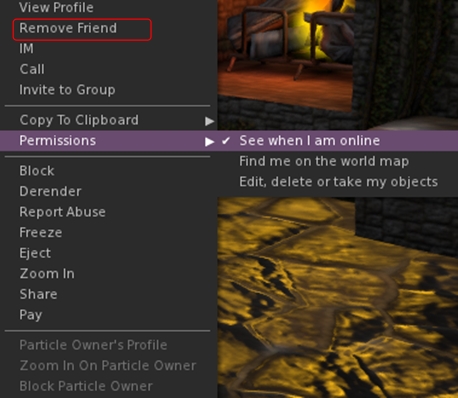
  • Added the following to the avatar context menu:
    • Remove friend
    • Grant or revoke permissions granted to a friend (see when you’re online, map you, etc) – only visible when clicking on a friend
The option to remove a friend from the avatar context menu (replaces Add Friend), and the Permissions sub-menu
  • Added the grant/revoke friend permissions sub-menu to the People floater right-click context menu (only visible when clicking on a friend’s name)
  • Added localhost Win Grid Proxy 127.0.0.1:8080 and localhost Local Grid 127.0.0.1:8002 to the default drop down list; also added Tangle Grid to the default grid selection.

Kokua 3.7.12.34831

Released on July 15th (and which I thought I’d written about at the time – my sincere apologies to Nicky) includes the changes noted above, and the additional LL code base updates (3.7.9-3.7.12) as listed above. Additional highlights for the release include (please refer to the release blog post for proper accreditation):

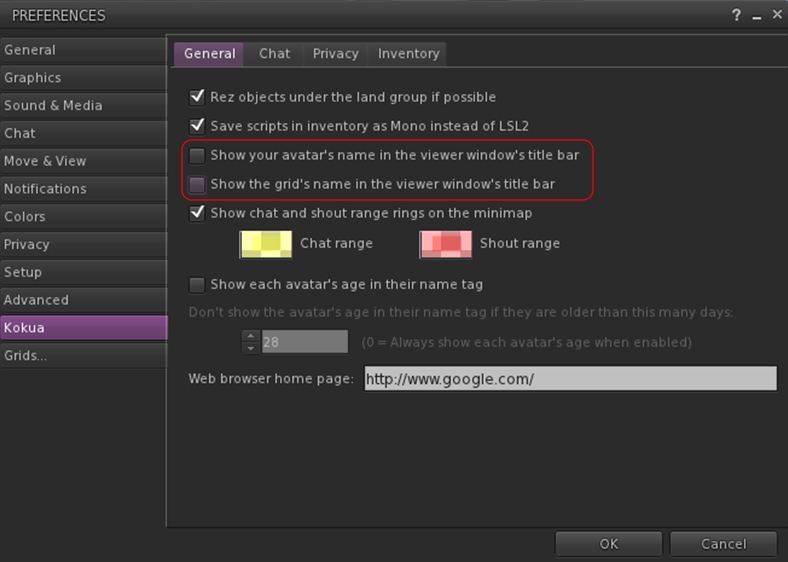
  • New Preferences option to display your avatar name and grid display in the program title bar (Preferences > Kokua – note these changes should only be set after logging-in; if set from the log-in splash screen, they will crash the viewer)
Kokua's options to display your avatar name and the grid name in the program title bar
Kokua’s options to display your avatar name and the grid name in the program title bar
  • Received Items folder now displays as a system folder in Inventory when Preference set (Preferences > Kokua > Inventory > Show the Received Items Folder in Normal Inventory), rather than appearing as a normal folder
  • Ported, with author permission, a change by Aleric Inglewood that prevents wearing of Inventory and Library root folders.

Both the 3.7.8 and 3.7.12 versions of Kokua work well on Second Life; both had a test-drive while I took my PBY6A for another trip around Blake Sea – where I encountered not one, but two other Cats! Both viewers are also available for the Kokua wiki download page – just scroll down for the 3.7.8 version.

Related Links

SL viewer to get unified snapshot floater

secondlifeUpdate, September 8th: The unified snapshot floater is now a part of the de facto release viewer.

Update, August 26th: The unified snapshot floater is now available in a release candidate viewer, version 3.7.15.293376

Niran V Dean is familiar to many as the creator of the Black Dragon viewer, and before that, Niran’s Viewer. Both viewers have been innovative in their approach to UI design and presentation, and both have been the subject of reviews in this blog over the years, with Black Dragon still reviewed as and when versions are released.

Once of the UI updates Niran recently implemented in Black Dragon was a more unified approach to the various picture-taking floaters which are becoming increasing available across many viewers. There’s the original snapshot floater, and there are the Twitter, Flickr and Facebook floaters offered through the Lab’s SL Share updates to the official viewer, which are now also available in a number of TPVs.

In Black Dragon, Niran redesigned the basic snapshot floater, offering a much improved preview screen and buttons which not only provide access to the familiar Save to Disk, Save to Inventory, etc., options, but which also provide access to the Flickr, Twitter, and Facebook panels as well.

He also submitted to the code to Linden Lab, who have approved it, and it is currently working its way through their QA and testing cycle and should be appearing in a flavour of the official viewer soon (see STORM-2040).

A test build of the viewer with the new, more unified approach is available, and I took it for a quick spin to try-out the snapshot-related changes. Note it is a work-in-progress so some things may yet be subject to change between now and release.

First off, the snapshot floater is still accessed via the familiar Snapshot button, so there’s no loking for a new label or icon. The Twitter, Flickr and Facebook floaters and buttons are also still available (so if one or other of them is your preferred method of taking pictures, you can still open them without having to worry about going an extra step or two through the snapshot floater).

Opening the new snapshot floater immediately reveals the extent of Niran’s overhaul – and as with Black Dragon, I like it a lot.

The new snapshot floater by Niran V Dean: note the button options for Flickr, Twitter and Facebook uploads

The increased size of the preview panel is immediately apparent, and might at first seem very obtrusive. However, when not required, it can be nicely hidden away by clicking the << on the top left of the floater next to the Refresh button, allowing a more unobstructed in-world view when framing an image (you can also still minimise the floater if you prefer).

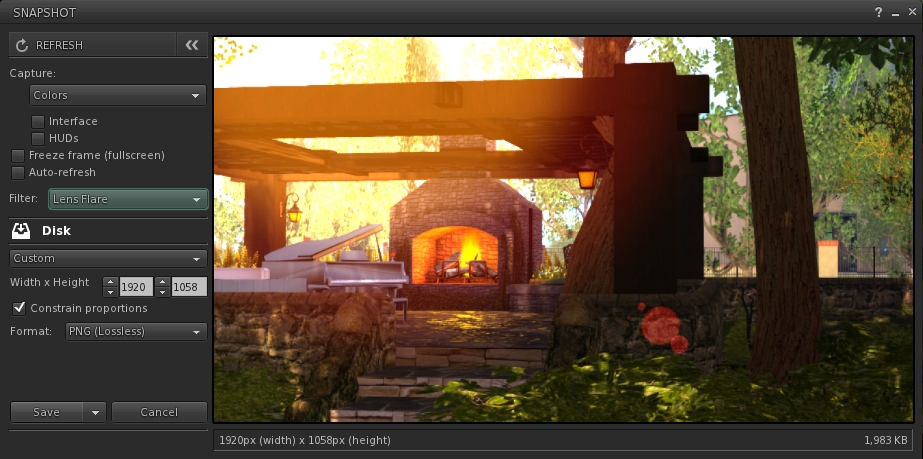
Beneath the Refresh button are the familiar snapshot floater options to include the interface and HUDs in a snapshot, the colour drop down, etc., and – importantly – the SL Share 2 filter drop down for post-processing images. The placing of the latter is important, as it is the first clue that filters can, with this update, be applied to snaps saved to inventory or disk or e-mailed or – as is liable to prove popular – uploaded to the profile feed.

With the new snapshot floater, you will be able to add filters to the snaps you save to disk or inventory, or which you e-mail or upload to your profile feed
With the new snapshot floater, you will be able to add filters to the snaps you save to disk or inventory, or which you e-mail or upload to your profile feed – here is a snap being prepared to save to disk with the lens flare filter added

Below these options are the familiar buttons allowing you to save a snapshot to disk, inventory, your feed or to e-mail it to someone. click each of these opens their individual options, which overwrite the buttons themselves – to return to them, simply click the Cancel button. Saving a snapshot will refresh the buttons automatically.

Within these buttons are those for uploading to Flickr, Twitter or Facebook. These buttons work slightly differently, as clicking any one of them will close the snapshot floater and open the required application upload floater.

While this may seem inconvenient over having everything in the one floater, it actually makes sense. For one thing, trying to re-code everything into an all-in-one floater would be a fairly non-trivial task; particularly as Twitter, Flickr and Facebook have their own individual authentication requirements and individual upload options (such as sending a text message with a picture uploaded to Twitter, and the ability to check your friends on Facebook. Also, and as mentioned earlier, keeping the floaters for Flickr, Twitter and Facebook separate means they can continue to be accessed directly by people who use them in preference to the snapshot floater.

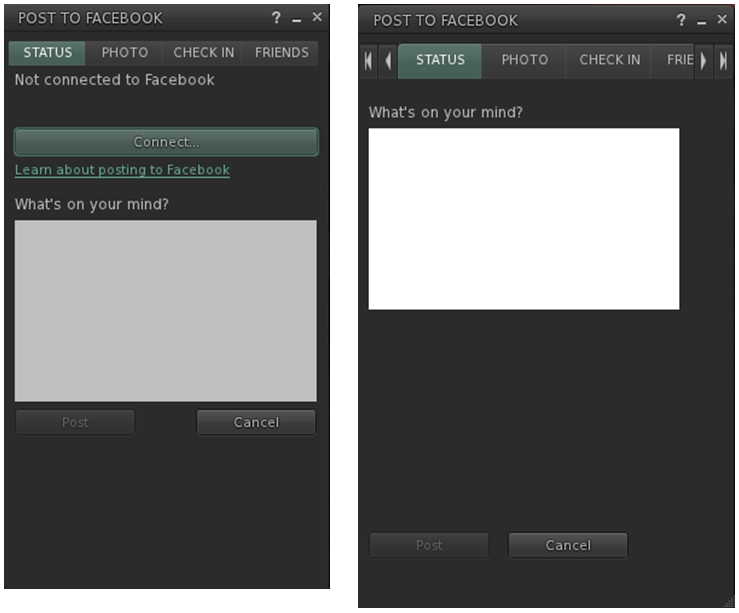
However, this latter point doesn’t mean they’ve been left untouched. Niran has cleaned-up much of their respective layouts and in doing so has reduced their screen footprints. The results are three floaters that are all rather more pleasing to the eye.

Niran's revised Facebook floater, left - note the new Connect button, removing a need for an extra tab; and the orginal floater  on the right
Niran’s revised Facebook floater, left – note the new Connect button, removing the need for an extra tab; and the original floater on the right

All told, these are a sweet set of updates which make a lot of sense. It may be a while longer before they surface in a viewer; I assume they’ll likely appear in a snowstorm update, rather than a dedicated viewer of their own, but that’s just my guess. Either way, they’re something to look forward to,

Kudos to Niran for the work in putting this together, and to Oz and the Lab for taking the code on and adding it to the viewer.