As indicated in my update to the Firestorm 4.6.9.42969 release review in this blog, a couple of issues have been found within that release, which may affect some Firestorm users.
As a result, the Firestorm team have released a hotfix update to the viewer, which includes fixes for those issues and offers three more the team has also implemented.
After releasing 4.6.9.42969 we discovered a few bugs that affect just enough users to warrant a hotfix update. However, if none of the issues addressed in this hotfix affect you personally there is no need for you to update to it.
We have replaced the 42969 links with the new version 42974 on our download pages.
As per the blog post, unless one of the issues addressed by the fixes above affect you, there is no need to update your version of Firestorm. None of the fixes should directly impact on the elements of the viewer included in my 4.6.9.42969 review.
Update Thursday, December 11th: There will be a hotfix update for Firestorm, which will likely be made available on Friday, December 12th. This is to correct a couple of issues related to voice and RLV/a discovered with the 4.6.9.42969 release, and will likely add some additional fixes as well. I’ll have a further report available once the update is available.
On Wednesday, December 10th, the Firestorm team announced the release Firestorm 4.6.9.42969.
This is a hefty update which brings with it a lot of new functionality, together with bugs fixes and assorted improvements and updates.
As always, the complete list of changes, together with all attributions, can be found in the release notes / change log, and I refer readers to that document for specifics on all contributors, FIRE JIRA links, etc. The following is intended as an overview of some of the more major / interesting changes, updates and fixes to be found in the release.
Note that as a result of the Firestorm team’s policy to keep only 3 versions running, version 4.6.1 will be blocked, most likely early in the new year. The advice from the team is that If you are on 4.6.1, to please update now. Version 4.4.2 will continue to remain for Mac users until all the major Cocoa Mac bugs have been resolved. However, if you are not a Mac user, then there really isn’t any reason for you not to have updated, and the team again ask that you update as well.
Lab Updates
This release sees Firestorm remain on a parity with the Lab’s 3.7.8 code-base. However, a number of updates and fixes have been cherry-picked from upstream (such as the group ban functionality – see below), particularly bug fixes and stability improvements – please refer to the change log for details.
Building and Scripting Updates
The new buttons for cycling through objects in a linkset
Some additional updates and tweaks have been made to assist builders and scripters:
There are two new buttons located in close proximity to the Edit Linked check box.
These buttons cycle forward or backward through a selected linkset, in the same way as the existing keyboard short cuts. note the buttons will only be active when Edit Linked is checked
The issue of the script editor failing to open scripts in copied objects (see VWR-27512), which has affected v2 and v3 viewers, is corrected with this release of Firestorm, and the fix has been contributed to Linden Lab for inclusion in the official viewer code
The build toolbar button should no longer be disabled when it shouldn’t be.
Communications Updates
Firestorm 4.6.9 brings with it a large number of features, updates and improvements to communications. These include, but are not limited to, the following.
Audio / Voice
Parcel media and audio now have a separate auto-play option (Preferences > Sound & Media > General > Allow audio to auto-play/Allow media to auto-play). Parcel audio should now auto-play correctly on logging-in
A reset voice button has been added to Preferences to help with fixing voice issues (Preferences > Sound & Media > Voice Settings)
The new voice reset button to help fix voice issues
You can now “zoom in” on a speaker using voice to hear them more clearly (Comm > Nearby Voice > Right click a name >Zoom in)
Voice level icons in the radar are now independent from other voice level icons
Sounds used for opening scrip dialogues can now be customised (Preferences > Sound & Media > UI Sounds 2 > Script Dialog)
The viewer now automatically adds http:/ to the music URL in the parcel audio panel.
Auto-response Updates
With Firestorm 4.6.9, auto-response messages are now localised. There is also a new option for an item of inventory to be automatically sent with your auto-response messages, when set. The selected item must be COPY / TRANSFER in order for this capability to work, and will be sent when one of the following is set:
Busy / do not disturb
Away
Autorespond
Autorespond to non-friends.
To set an item of inventory to be sent with auto-response messages, drag and drop a suitable item from your inventory and into Preferences > Privacy > Autoresponse > Autoresponse Item.
Firestorm 4.6.9 allows you to send an inventory item when auto-responding into incoming IMs. The item must be COPY / TRANSFER in order for this to work
In addition, this release fixes getting an IM from yourself to yourself saying “Autoresponse sent” if somebody answers from an off-line IM via email. Also, having both “Autorespond to non friends” and “Only friends and group can call me or IM me” set no longer results in you getting two new IM sound alerts for every non-friend IM plus the non-friend receives your auto-response twice for each IM sent.
Contacts List
The Contacts List floater has been revamped to match the look of the nearby chat and IM session floater, for a smoother and unique appearance. In addition, an option to pay someone directly from your Contacts List has been added to the right-click context menu (Comm > Contacts > Right click a name > Pay).
New to Firestorm 4.6.9 as well is the ability to choose which name columns should be displayed in the Contacts List. You can now choose between choose between user name, display name, full name, or a combination of these, and you can now display full names in your Contacts List as “Username (Display name)“. Finally, a option has also been added to hide the permissions columns (whether those in your Contacts List can see when you’re on-line, map you, etc.).
All of these options can be found under Preferences > Firestorm > General.
Update, Thursday, December 4th: Black Dragon 2.4.1.4 bug fix update released on Wednesday, December 3rd.
It’s been a busy week for Niran V Dean and his Black Dragon viewer, with no fewer than four updates between Thursday, November 27th and Tuesday, December 2nd.
The first of these updates – which lifted the viewer from version 2.4.0.4 to 2.4.1 came on Thursday, November 27th, and was quickly followed by two bug fix updates, 2.4.1.1 on the 27th and 2.4.1.2 on Friday November 28th. Then version 2.4.1.3, also a bug fix update, appeared on Tuesday, December 2nd.
The major part of these updates, appearing in version 2.4.1, is a complete overhaul of the UI. Gone is the ability to place toolbar button up in the top left of the menu bar area, the ink blots surrounding floaters and panels, etc. Instead, the UI presents a look heavily influenced by Valve’s Steam client. The result is a striking, charcoal grey finish to floater and panels, on which the white text shows up somewhat better than it did with the previous UI, together with bold white lines denoting fields, input boxes, etc., and individual headings to sections within a floater or tab highlighted in blue, all in a manner that works quite well.
Black dragon’s 2.4.1 UI design
There are a few immediately noticeable “Niran-isms” on display: the Favourites bar, for example, is now above the Navigation bar, rather than under it, as with most viewers. There’s also a nice incorporation of the notifications icon into the navigation bar area as well, over to the right of the screen. And, of course, the Dragon menu single point-of-access to the viewer’s menu tree is retained.
Given this release was an extensive overhaul of the UI, 2.4.1 and its subsequent releases didn’t bring too much in the way of new features to viewer, which is unsurprising – there’s work enough involved in getting the UI sorted for a release. There were a few issues following the initial 2.4.1 update – hence the release of 2.4.1.1 through 2.4.1.3, but looking at the release notes, most of these seem to have been nips and tucks rather than major “oopsie” fixes.
The updated preferences panel showing the crisper layout of the new UI
In terms of LL code updates, Black Dragon 2.4.1 through 2.4.1.3 see the viewer again reach parity with the Lab’s viewer, including implementing the benchmark viewer code and HTTP pipelining (I believe).
As always, for a full breakdown of updates, please refer to the Black Dragon change log, which lists changes from the most release release (in this case, 2.4.1.1) on down.
I did encounter a couple of minor problems with the viewer – although these may well be operator induced. Setting neither the “Show Network Stats” and “Show L$ Balance in Statusbar” options in Preferences > Interface seemed to do anything for me. I was particularly keen to try the latter, as I personally find having my account balance displayed in the Inventory floater nothing short of the PITA. But, other than these, the – admittedly brief – drive I did take with the viewer revealed nothing exasperatingly unpleasant or unexpected.
Overall, and interesting and clean UI update; one which I personally prefer to the last outing.
Update, December 7th, 2014: Kokua 3.7.22.35091 was released on December 5th. This update includes fixes for issue #292 noted in the review below, and for an issue with the automatic updater (issue #322.
Nicky Perian released the latest update of Kokua for SL on Sunday, November 30th.
Given the last Second Life specific release of the viewer was in July, the new release, version 3.7.21.35082 sees the SL version of the viewer bounce up to parity with a lot of recent LL viewer updates, as noted in the release notes. This being the case, please note that a clean install is highly recommended.
The Kokua 3.7.21 release sees the addition of the unified snapshot floater
In addition, the viewer also includes the following LL updates which, at the time of the Kokua release, are still at release candidate status within the SL viewer:
3.7.20 code base:
Attachments updates – adds some fixes to previously released changes in the way joint offsets in rigged meshes are handled & fixes some issues found with adding and removing attachments after the recent AISv3 deploy
GPU Benchmarking update – removes the need for the GPU table by performing a series of tests when first setting the graphics defaults for the viewer (note this code contains fixes for issues found with the original benchmarking code release in the official SL viewer)
3.7.21 code base:
Snowstorm contributions release – Japanese input; improved rendering of projectors; fixes for object editing bug when rotating and for crash on exit on OSX Yosemite in full screen mode, etc
Maintenance updates – a broad range of fixes for voice, privacy, rendering, texture animation, avatar distortion, inventory management, sounds, mouselook in Mac, and more
Group Bans now a part of Kokua with version 3.7.21.35082 – click for full size
Kokua Team Contributions
In addition the the merging and testing of recent code release from the Lab, Kokua 3.7.21.35082 includes the following contributions:
The viewer has been updated so it will no longer automatically start following a Windows install
Custom currency support has been added so that the local grid currency symbol will be displayed (original work by Armin Weatherwax)
New option to hide account balance in snapshots: Preferences > Kokua > Privacy > Do Not Show Money Balance on Snapshots (original work by Armin Weatherwax)
An option to open the movement controls has been added to View > Movement Controls.
In addition, Nicky notes:
On Linux Mint 17 32 bit, the load library path was not set correctly, and this has been amended for both 32-, and 64-bit.
The gridargs.dat file is no longer reader when starting kokua. Instead pass parameters along the command line (e.g. ./kokua –channel “‘Kokua XonXoff'”)
There are a few known issues with the release, all of which are being tracked via the Kokua ticket system. These include:
The option to display your avatar’s name in the viewer’s title bar ((Preferences > Kokua), should only be set after logging-in; if set from the log-in splash screen, they will crash the viewer – Issue #289
Teleport from SL search fails. Teleports from Legacy and Map searches work. Landmarks from inventory work. Issue #292
The YouTube media volume control doesn’t work –Issue #312
[RLVa] Names are not all gone in nearby chat list of names –Issue #314.
Pssst! The next release just might have group bans after all!
Jessica Lyon, project manager for the Firestorm team has officially announced the upcoming release of the next version of SL’s most popular viewer, although no actual release date is given.
A new release has been hinted at several times over the last few weeks, and the team is working hard to keep to a 3-monthly release cycle. At the moment, the upcoming release is focus of the Firestorm QA team and is being poked at by beta testers.
Releasing a viewer isn’t necessarily straightforward as might be thought; new features and shiny have to be measured against current code status, stability, and so on, and bugs and their fixes must be weighed against the opportunity to add new shiny or not. All of this made for a balancing act for all concerned; one in which – especially given the size of Firestorm’s user base – not everyone is going to come away happy when a release arrives.
There have been a lot of updates flowing out of the Lab during the past year, many of which have yet to find their way into Firestorm. But as Jessica notes, stability tends to win-out over trying to crowbar everything into a viewer release:
Firestorm is not, and has never been, a “bleeding-edge” viewer. We have always focused on quality over quantity, stability over shiny. Slow and steady wins the day. Despite complaints and objections, this strategy has helped make Firestorm the most widely used viewer in Second Life by a long shot. In code, almost anything new has bugs and kinks that need to be worked out regardless of who wrote it and how vigilant they were at it. That’s because despite how much testing you do, it isn’t until it lands in the hands of the many that the deepest rooted software glitches start to crop up. Knowing this is one of the reasons we do not merge in and release new features from Linden Lab right away.
While the updates coming out of the Lab have all be to the good, they’ve also not been without their own problems. The AIS v3 code updates, for example, resulted in some od bugs and issues of a non-trivial kind, some of which have only recently been fixed in the new Attachments RC viewer (version 3.7.20.296355) that appeared on Wednesday, November 5th. And while the CDN and the HTTP pipelining viewer have brought improvements to the majority of SL users, they also have generated some issues.
The SL Share 2 features for sharing photos with Flickr and Twitter, and adding post-process filters to images will probably not be in the next release of Firestorm
The upshot of this is that while the upcoming release of Firestorm will have new features, bug fixes and improvements, in order to keep code merges, etc., as straightforward as possible and avoid issues which may arise from cherry-picking features and updates from different LL releases, Jessica warns that when released, the new version of Firestorm will be without AIS v3, HTTP (although obviously, it will work with the CDN, just as all viewers do already), SL Share 2, and may not have group bans.
But it’s not all bad news, as Jessica notes:
But we absolutely will have plenty of other features, bug fixes and improvements worth updating for to which I’m very excited about!
Testing is still underway, so it will be another few weeks, most likely, before the new Firestorm release appears. When it does, if you’re a Firestorm user, please do keep in mind that if the feature you were really looking forward to isn’t in the release, it doesn’t men they’ve forgotten it or are ignoring it; they’re just trying to bring you the best, more reliable experience they can whilst trying to avoid showering you with unwanted bugs and issues.
I’ll of course have the usual review of the release when it appears.
Things are liable to be getting busy in terms of TPV viewer updates over the next month or two. As noted in this blog, the Lab has now released their HTTP pipelining code for the viewer, which TPVs are being encouraged to adopt as soon as they can, and there have been a spate of other updates and fixes for the viewer that already are, and will be finding their way into TPVs.
Two of the most recent v3-style viewer to update have been Black Dragon and the Restrained Love Viewer, and the following is a quick overview of the most recent releases for both of these viewers.
Black Dragon 2.4.0.3 and 2.4.0.4
Black Dragon received two release updates in the space of around 24 hours. The first came when NiranV Dean released version 2.4.0.3 on October 29th, and the second saw the release of version 2.4.0.4 on October 31st.
A blog post on Niran’s website outlines the principle changes which appeared in the 2.4.0.3 version of his viewer, summarising them as:
A fix for the viewer failing to correctly apply maturity settings
An experimental update to the Godrays feature by Tofu Buzzard so that they now cast a faked volumetric sunlight everywhere where light can fall
Godray default lowered to 32
A new option in Preferences > Display to switch between a new shadow softening kernel by Tofu Buzzard and the LL default
Keyboard shortcut for Depth of Field locking changed to CTRL-X in the hopes of correcting a clash with another (unknown) shortcut
Addition of Geenz Spad’s spotlight reflection changes.
The latest release(s) of Black Dragon see an experimental volumetic lighting capability added to the Godrays feature (images via the Black Dragon website)
The 2.4.0.4 release is, in terms of user functions, the same as the 2.4.0.3 release; the major difference is that he has the Lab’s HTTP Pipelining updates included (which Niran has, for some reason referred to as the “CDN code”).
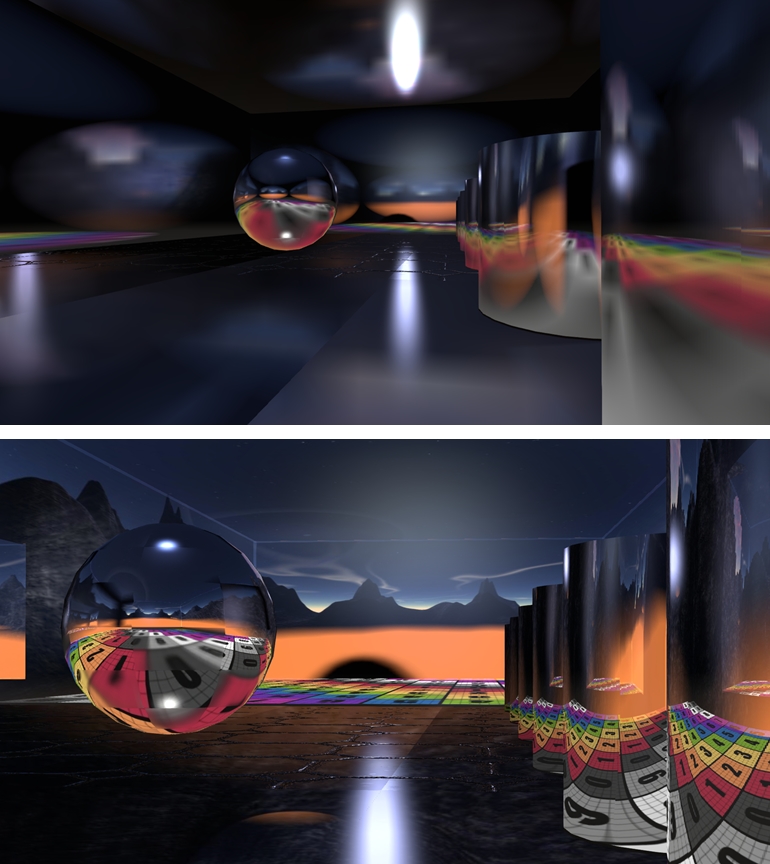
Geenz Spad’s work on glossy projectors can be found in JIRA STORM-2067. This corrects the tendency where, depending on a surface’s environment intensity, projected reflections they become more blurred as their intensity increases, they should become sharper for higher gloss values and more blurred for lower values.
Geenz’s work on projectors: as projected in the current viewer code (top) and in a viewer using Geenz Spad’s enhancements
As always, full details of all changes can be found in the change logs for the viewer.
This is another progressive step forward with Black Dragon, with Niran working to address issues as well as integrate updates from both LL and other developers which help further enhance the viewer and take it in a direction which matches the Lab’s important HTTP updates as well as enhancing the features Niran uses to help differentiate his viewer from other TPV offerings. Black Dragon users should be pleased.
 As indicated in my update to the Firestorm 4.6.9.42969 release review in this blog, a couple of issues have been found within that release, which may affect some Firestorm users.