Lab fails to align itself

Update 16th January: Charlar has added a comment to the JIRA that clarifies LL’s position on the alignment tool and puts concerns into perspective. The comment further makes it clear that from LL’s position, the opportunity to see the tool included in the official Viewer is far from closed, and Oz indicated in his comment from yesterday.

Update 15th January: The JIRA mentioned below has been re-opened, and Oz has requested any developers willing to take the alignment tool further to contact him directly. This clearly shows that the Lab is aware of feelings on the matter and are trying to meet people half-way, and full kudos to them on this. Qarl (Karl) has declined to update the code, but has stated it’s in the public domain, and others are welcome to do so.

Earlier in the month, Karl Stiefvater (do I still need to introduce him as the creator of the parametric deformer?) submitted an earlier piece of code he’d created – the prim alignment tool – to Linden Lab under a code contribution agreement.

I didn’t cover the contribution at the time, as Tateru had it very well covered. However to recap: Karl, formerly Qarl Linden, now Qarl Fizz, submitted the code to LL by way of a “Thank you” for a generous donation someone made towards the deformer project, as you can read on his website as well as Tateru’s blog (Tateru having steered the donation in the right direction).

The alignment tool does precisely what it says on the box: it aligns prims, as Karl’s own video demonstrates:

No fuss, no bother. It’s not a one-size-fits-all solution that is designed to fit every possible situation where prims (or linksets or objects)  may need to be aligned, and it is not intended to be. However, it does provides a major benefit for builders in dealing with a specific set of issues that can  otherwise be time-consuming to overcome. As such, it has been adopted by a number of TPVs, where it has proven to be highly popular.

But it has been rejected by Linden Lab under the original JIRA raised on it some 2 years ago by Nalates Urriah. As Lance Corrimal (himself the developer of the Dolphin TPV which uses the tool) and Tateru on her blog point out, the reason for the rejection appears to be primarily because the tool doesn’t perform tasks it was not designed to do and is thus “incomplete”.

The rejection notice as posted on the JIRA reads:

Thanks for making this effort. Alignment and snapping are an area where there are useful enhancements to be made.

However, we are not able to accept this contribution as it is.

These are the primary issues we found which resulted in that decision:

  • The feature should support the same modes as the other manipulation modes.
    • It does not work for non-mod permission objects. This functionality should work for all objects that the user can manipulate in-world.
    • It only supports World snap mode, not Reference and Local modes, unlike all our other manipulation modes
  • It packs and aligns to the face of the object bounding box. If objects are not cubes and do not share the same alignment, or aren’t aligned with the world coordinates (see above), the result of the operation is unexpected. Ideally the operations would use the actual shape of the object for aligning and packing.
  • There are also some coding implementation style issues that would need to be addressed. These can be covered in more depth after the functionality is dealt with.

In it’s current form, this is usable for purely prim-based builders under specific circumstances. It’s less useful for building with non-cube prims, mesh, sculpties. It’s minimally useful for building when the structure is not facing a global direction (ex: North, South, East, West). It’s not usable by non-building residents who need to place and organize purchased items.

LL obviously have the right to reject code that they feel is not in their best interests, or in the interests of the Viewer or their users. That’s a given and is fair enough. As such, and being of a generous nature, I have to say that there might be some mileage in some of the reasons given for the rejection (Jonathan Yap actually raises a couple of points within the JIRA). But, and again being fair to all, the rejection equally comes across as little more than nit-picking.

Take, for example, the remark that, “It’s minimally useful for building when the structure is not facing a global direction (ex: North, South, East, West).” On the surface, this might appear reasonable – until one remembers that the same is pretty much true for building as a whole in the Viewer at present – as anyone who has encountered prim drift can ably testify.

Then there is the comment, “There are also some coding implementation style issues that would need to be addressed. These can be covered in more depth after the functionality is dealt with.” This reads as not only nit-picking, but also to be putting the cart before the horse.

If Karl is in fact committing some basic errors in his approach to coding for the official Viewer, surely these should be addressed before embarking on any major functionality changes (were they to be agreed upon), in order to circumvent the risk that such “style issues” don’t lead to yet another rejection down the road?

Some have commented that the entire rejection smacks of a “not invented here” mentality. That may be the case, equally, there may be issues within the code as submitted we’re not privy to and which the note in the JIRA isn’t really helping to make clear. Even so, seeing this rejection I have to confess to being left with an uneasy feeling as to how the deformer tool is to be judged by the wider audience within LL. Time will tell on that, however.

As far as the alignment tool is concerned, I’m with Tateru on the matter and calling “time” on any hope of seeing it incorporated into the official Viewer, for precisely the reasons she states.

With thanks to Tateru Nino

Niran’s 1.10 release

Update: version 1.11 with an out-of-memory crash fix is now available. If you have downloaded 1.10 and are experiencing crash issues (memory use exceeding 1.25Gb), you might want to download this version.

Niran’s Viewer is one of the two most capable graphics Viewers in current development – easily standing shoulder-to-shoulder with Exodus (which has in some respects gained far more attention of late).

Niran’s hasn’t been without problems – simply because it is so advanced (possibly too advanced for some people’s tastes). While NiranV Dean has worked hard to present a range of graphics controls that are more intuitive (using settings such as “low”, “medium” and “high”, rather than numeric sliders, etc.), it is possible that people have been so used to the slider mechanisms may find his newer approach a little more confusing.

I’ve tried to follow Niran’s  development from Beta onwards because, well, I like it. Rather a lot. Things for me went a bit squiffy with release 1.02, which simply refused to work with my PC (or my PC with it, not sure which way around it was), and some of those issues carried over into 1.03.

Release 1.10 redresses all of that with a nice set of nips, tucks and updates that have so far given me a very pleasant ride and which again point to why those with a bent for photography, etc., in SL should take Niran’s Viewer for a spin. It is based on the very latest LL 3.2.7 (Project) code base, and includes all the latest Shining fixes to boot!

Graphics and Rendering

On the graphics / rendering front, Niran has re-worked the original sky glow defaults from V3 into the Windlight preset for the Viewer for those that find the Niran’s Viewer glow defaults a little too bright. You can find them under the Sky settings, with names such as “Realistic” should you wish to swap over to them in preference to the Viewer’s own glow defaults.

Niran’s Viewer glow default…
…and using the “Realistic” preset (V3 sky default)

Within the Graphics panel itself, NiranV has been fixing various bits and pieces – adding tooltips, etc., and also, God bless him, adding default (*) indicators alongside options so that it’s relatively easy to get back to a starting point when making adjustments. This I’ll treasure him for, as I’m no graphics expert, and have confused myself once or twice playing with settings on a number of Viewers.

UI

Clean UI

The most obvious difference in the UI for those who are familiar with Niran’s Viewer & who do a clean install), is that there are only 7 buttons on-screen by default, and these are both icons-only and moved to the left / right sides, potentially maximising the in-world view.

Visiting PREFERENCES->VIEWER->UI reveals the alpha / beta options have been expanded, with the ability to enable / disable the mesh parametric deformer alpha being added to the other options.

Alpha Beta options expanded

On the parametric deformer, NiranV notes, “For all you that wanted to disable it, you will now find the option to do so … untick it and re-wear any mesh or the whole mesh AV to make it update and look normal, the reason why it doesn’t auto update like in Exodus is easy, Qarl’s code adds an update to mesh nearly every second or less , this results in flickering mesh shadows and totally freaking Meshes on other people , i took that one out , contra is that you have to “refresh” it then , but it definitely works better :)”

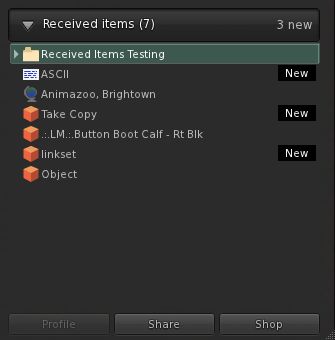
Received Items and Merchant’s Outbox both in Inventory

I took a quick plunge into the Beta grid to give the Direct Delivery options a go, now that the public Beta is underway.

Enabling the Received Items and the Merchant’s Outbox will add both to your Inventory panel (in difference to the official Project Viewer, which has the Merchant’s Outbox as a separate panel).

In testing the options, I found the Received Items side of things worked as expected. However, I was unable to test uploading goods, as the Merchant Outbox section refused to let me drop anything into it, which I’ve reported to NiranV.

This issue aside, I find NiranV’s approach to Direct Delivery more intuitive than LL’s – having the Merchant Outbox included in the Inventory panel means one doesn’t need to have yet another panel open and floating around, and dragging-and-dropping will be much easier. Other TPV developers, take note.

As a slight aside, don’t be confused if you see “Niran’s Viewer” popping up in place of “Second Life” (such as in the Merchant’s Outbox, which refers to “Niran’s Viewer Marketplace” rather than “Second Life Marketplace”) – this is the result of an accidental global replace of “Second Life” with “Niran’s Viewer” by one of NiranV’s colleagues on the project…

Opinion

Small, from an end-user perspective, but very welcome and tidy changes to the Viewer that do much to encourage its more widespread use. Performance-wise on my usual machine, and on my usual sims (the usual caveats in place), it ran well – better than 1.02, giving me performance on a par with Exodus with or without shadows enabled, and a very smooth run. There are still some things I feel are missing from the Viewer – but these are personal choices, and they won’t stop me from using this Viewer alongside Exodus in my fledgling attempts at SL photography.

If you’re into photography and / or machinima, then Niran’s is definitely a Viewer to take a look at.

Links

Direct Delivery beta

Direct Delivery (DD) – the mechanism that will replace Magic Boxes for merchants using the SL Marketplace and which should bring improvements to the overall delivery of items purchased on the Marketplace – is in open beta for people to try on the Beta (Aditi) grid.

Direct Delivery has been subject to many ups and down over the last twelve months, but this beta should bring it a step closer to reality. Given LL’s overall track record on the delivery of new Marketplace services, this is something that has merchants understandably nervous and concerned.

Documentation relating to the new system has also been updated, including the release notes and a set of getting started instructions – both of which are worth a read, although the latter are somewhat irritating (see below), and will be rationalised and clarified prior to DD going live.

For those (merchants especially – although it would seem those curious as to how purchasing goods using the new system can also have a bit of a go) wishing to try-out the system:

  • You’ll need to have the Direct Delivery Project Viewer (version 3.2.7.247349/dated 10th Jan or later), complete with its funky blur-tinted UI elements (new to this Project Viewer, or sign of another change coming to the UI?)
  • You’ll need to have an active account on Aditi and should log into that first if you’ve not done so in a while (indeed, you might want to change your password as per the linked instructions & force an account update if you haven’t)
  • You’ll need to be able to log-in to the Aditi Marketplace (this may throw up a security certificate warning, depending upon your web browser settings).

Testing Purchases

For those simply curious as to how they’ll be affected when purchasing goods, it’s very straightforward:

  1. When logged into the Beta Marketplace, simply purchase any item commencing with “DD”.
  2. Open your Inventory panel and click on the RECEIVED ITEMS tab at the bottom of the Inventory panel to expand it – and your purchased items should be in a folder, ready to be moved into the location of your choice in your Inventory.

Note: Items purchased on the Beta grid will only be available in your Beta grid inventory and purchasing them will not impact your Main grid L$ account balance. If your Beta grid account does not have a L$ balance, you can raise a support ticket. Funds cannot be transferred between the Beta and Main grids.

Direct Delivery: from the Marketplace to you (some Marketplace steps omitted) – click to enlarge

Testing Uploads (Merchants)

Items using Direct Delivery no longer need to be boxed-up – part of the idea being that people receiving goods will no longer need to rez a package in-world and unpack it (although if you wish to box items still (and some of the limitations of the system actually mean you may still need to), you can.). Nor do they require a Magic Box; instead they use a new addition to the Viewer – the Merchant Outbox – to upload goods to the Marketplace.

You can organise your items either in your inventory itself, or within the new Merchant Outbox panel (located in the ME menu on the Project Viewer) prior to uploading. Of the two options, the former is probably the preferred, given that anything organised solely in the Merchant Outbox will vanish as soon as it has been uploaded.

The basic steps are:

  1. Open your Inventory and the Merchant Outbox (ME->MERCHANT OUTBOX).
  2. Drag the items from your Inventory panel to the Merchant Outbox panel.
  3. If required, organise items by folders in the Merchant Outbox (individual items dropped into the Merchant Outbox will automatically be placed in their own folders).
  4. Click the SEND TO MARKETPLACE button.
  5. You should get an on-screen confirmation when all items have been sent.
  6. Log into your Marketplace account on ADITI.
  7. When logged into the Marketplace:
    1. Click on My Marketplace (top right) and select MERCHANT HOME.
    2. On the MERCHANT HOME page, click on MANAGE LISTINGS on the left (or click on INVENTORY at the top and then select MANAGE LISTINGS from the drop-down).
    3. Your listings are displayed, with unassociated items at the top.
    4. Use the ACTIONS option to the right of each item to create a new Marketplace listing in the usual way.

Obviously, multiple items can be uploaded via the Merchant Outbox, I’m using a single item purely for demo purposes.

From you to your Marketplace store & ready to be listed: Direct Delivery (click to enlarge)

Irritating

The tests themselves are easy to carry out. What is irritating is the lack of attention paid to the “getting started” instructions. Vis:

  • The instructions wibble on about downloading a Magic Box (this is testing Direct Delivery, right?) – a Magic box isn’t required for a basic test of the DD functions – either when purchasing goods or uploading them
  • They direct you to place the Magic box at one of two locations on the Beta grid  – one of which is – or was during my testing – (wait for it) NO REZ (virtuatrade Campus S).

If mention of Magic Boxes is included for those who wish to carry out more involved testing (such as comparing what happens on uploading, how the system handles  / differentiates items uploaded via either mechanism, etc.), then this should really be made clear in the instructions. Also, and as a minor quibble, why isn’t the Magic Box itself set-up as a DD item? That would kill two birds with one stone (get a Magic Box for more involved testing and test the receipt of DD items in a single pass).

There is also an error in the Selling in the Marketplace instructions which might lead some to get a little confused. These direct people to their MERCHANT HOME page, and then to click on MANAGE INVENTORY, when in actual fact the required link is MANAGE LISTINGS, which is located under the INVENTORY heading.

Feedback

I’m not entirely sure why this level of testing is now required, as it all seems very basic. But then, I wasn’t involved in the closed beta testing and I haven’t been keeping up with discussions on DD via the Merchant’s forum. As it stands – and leaving aside the inevitable amount of work required to shunt stuff from Magic boxes to the DD system, this process seems straightforward and easy to understand for merchants and consumers alike (“getting started” instructions for the Beta notwithstanding).

My tests here are, of course, pretty basic. It’ll be worth keeping an eye on the Merchants’ forum and the Beta thread to see if any major issues come out of the beta process, as well taking a read through the documentation listed below.

Links to Documentation

“Strewth! There’s a bloke down there with no strides on!”

Oz Linden has announced that due to a change to the inventory transfer protocol, a new inventory patch has been issued by LL.

Commenting on the patch, Oz states: ““We’re going to be deploying changes to the inventory backend soon that improve robustness and performance, but in testing those changes we found that existing viewers relied on certain things being strictly ordered.  With the new backend, that assumption does not always hold true.

“Changeset d327dcc8ae51 from viewer-development implements the viewer change needed to avoid race conditions.  It should be straightforward to apply to any viewer, and is safe to release before the changes are deployed (it is compatible with the services as they are now).”

The exact deployment date for the actual change to the inventory transfer protocol is unclear – longer than days, but less than a month. However, TPV developers are being encouraged to implement the patch sooner rather than later.

Commenting on the impact of not implementing the patch, Oz says, “I believe that there is no known risk of inventory loss or damage without the patch, but it is true that some operations can result in accidental nudity, which some users might be unhappy about.”

One side effect of this is that the patch will not be applied to the official 1.23.5 Viewer code by LL, and so that Viewer has been removed from the Viewer download page of the wiki. However, developers supplying Viewers based on the V1 code base will be able to port and apply the patch to their own code.

With thanks to Tateru Nino.

Milkshake ends

milk-1After a promising start, and with some great updates in release 3.2.6.7 (mesh deformer, Firestorm build floater, visuals and other elements from Exodus, etc.), Milkshake’s “public” development has ceased – which is a shame however you look at it.

I was in the middle of a review of the latest updates in 3.2.6.7, which included updates to Preferences as well as the inclusion of new code when word came in.I’d actually been discussing an issue with the release with Cinder when word came that, “Unfortunately, there will be no more public releases of milkshake, sad to say.”

I’m not privy to the exact reasons work has ceased on the public side of Milkshake and to pry into things to any great depth would not be fair on Cinder – she deserves her privacy as much as anyone else. But maintaining a Viewer *is* hard work – there are matters from getting time to develop / merge code options through to handling support and so on, all of which can take their toll. Cinder already has a busy in-world life, and it is clear that support issues were concerning her when the Milkshake User Support Policy was published. One cannot blame her for this; I seriously doubt that – even assuming I had the talent for Viewer coding – I’d want to pass over a large part of my in-world time to all the ancillary elements that go into maintaining a popular Viewer – not without a lot of help.

That said, there is no doubt I will miss the public Milkshake. It was shaping-up to be a handy Viewer with plenty of core features from other TPVs that strongly distinguished it from its core base of LL / Catznip. However, a little birdie tells me that it is not all sad news; the chances are, we may be seeing Cinder’s work adding flavour to Viewers elsewhere in the near future.

A Shining Dolphin 3.2.6

dolphin-logoIt’s getting to be hard work keeping up with Viewer releases!

Lance Corrimal has issued an update to Dolphin – 3.2.3 (22899), which he’s calling (a little tongue-in-cheek) the “Fellowship” edition in that, in quoting Tolkien, the development of this release is a “Tale that grew in the telling”!

Based on the latest release of RLV from Marine Kelley, and the official “Shining” 3.2.6 release from LL, the update brings Dolphin 3 bang up-to-date with the latest OpenGL fixes from the lab.

While conditions were not absolutely identical to my earlier “tests”, I made my usual Viewer UI and settings tweaks, and took the Viewer for a spin on my (now “standard”) “test” sims. The results were as follows:

  • High graphics, no deferred: averaged 46fps at 370m and 38fps at 22m
  • High with deferred ON: 21fps at 370m and 17fps at 22m
  • High with deferred and shadows ON (Sun + Moon + projectors): 12fps at both heights

On my home sim, and on my own, frame rates bounced around the 58-61fps mark while up at the house.

Updates

The core updates to the Viewer comprise:

  • Options to auto-accept / auto-open textures, photos and notecards (both via PREFERENCES->DOLPHIN VIEWER 3->INTERFACE)
  • Empty system folders (e.g. Objects, Notecards, etc) are hidden from your inventory list
  • The additional pop-up informing you that a landmark has been added to a folder can be suppressed (from Firestorm)
  • Firestorm’s inventory filtering options have been implemented in Dolphin, allowing inventory to be filtered by description, UUID, creator, name, etc; or can be filtered by combinations of words separated by “+”(e.g. Joe+Smith) (from Firestorm)
  • Debug level (verbosity) of log files can be configured (STORM-1790)
  • Default debug level has been changed to WARNING to make the logs less chatty

The ability to hide empty system folders is rather novel, and works automatically – once a system folder is empty, it is hidden (see right, and note there is no Landmarks or Notecards folder).

If you end up with an empty Body Parts, Clothing, Gestures, Notecards or Scripts folder, you can “unhide” it by creating a new item from the + button on at the bottom of the inventory panel – creating a new item will automatically un-hide the required system folder.

Similarly, creating a Landmark (or left-clicking on a Landmark in a notecard) will automatically unhide the Landmark folder, and so on.

Those who don’t use the system folders may find this capability useful to have and cuts down on the clutter in their inventory.

Selecting additional inventory search filters

In adopting the new Firestorm inventory filters, Dolphin appears to have adopted the accompanying issue that searching on creator, UUID, etc., isn’t particularly intuitive for the first-timer. To search by a specific additional criteria – UUID, creator, etc., – you must click on the gear button at the bottom of the Inventory panel and select the required option in SEARCH BY before you commence a search. It would be nice to see all the filters grouped into a single location in the future.

Lance notes a few other issues with the Viewer – so again, if you experience them, please don’t report them, as he’s liable to be already trying to sort things out where he can, or awaiting a fix from LL. He lists the known issues as:

  • “Textures with transparency have a grey background instead of the usual checkerboard pattern in any texture preview UI element (e.g. the preview window when you upload a texture, or when you open a texture from your inventory). Applied to prims, the textures will be fine. People, use the temp upload feature and check your new textures on a prim if you need to test something with transparency. This problem exists in all viewers that are based on the latest viewer-development code, even in the official Second Life viewer 3.2.4 from Linden Lab. There is already a JIRA for it: https://jira.secondlife.com/browse/VWR-28037. Please go and watch and vote.
  • “The alignment handles in the Build Tool all point upwards instead of inwards. The alignment tool still works the same way, it just looks funky.
  • “The automatic opening of incoming notecards and pictures is highly dependent on lag.
  • “There is still no Flickr uploader.”

Rendering

This release puts Dolphin back up in the list of “fast fps” Viewers for my system, and rendering on the whole is good, and I’m now getting a similar “pop-out” for sculpts already loaded in local cache (i.e. my furniture at home) on logging-in / teleporting home I get with some of the other recent Viewer releases. Shadows render well, although I’m still taking a bit of an additional performance hit with shadows and occlusion both active.

Overall, a nice set of updates that should please Dolphin regulars.

Related Links