Lance Corrimal is keeping up a rapid series of releases to his Dolphin Viewer, averaging around one release a week of late. Most have contained nips and tucks or have been driven by SL requirements such as Direct Delivery. However, at the beginning of March he rolled out the “Fujiyama edition” (version 3.2.9.23177), aimed specifically at SL photographers.
With his latest release, 3.3.5.23763, issued on Saturday April 28th and code-named “Fellini”, Lance adds functionality to his Viewer that is specifically aimed at machinimatographers – the code-name clearly being a reference to the late Italian film director Federico Fellini
The functionality in question comes in the form of an adaptation of Marx Catteneo’s machinima floater. In this the release is somewhat serendipitous for me, as I also linked to one of Marx Catteno’s marvellous videos on the 28th to highlight the architecture of this year’s Fantasy Faire.
In integrating the floater into Dolphin, Lance has modified it slightly so that information is tabbed for easier reference, especially when used on smaller screens, and while it may be aimed at the machinimatographer, it contains a lot of options that SL photographers are liable to find very useful.
The floater can be accessed in one of two ways:
via WORLD->MACHINIMA TOOLS in the menus
via a dedicated toolbar button called MACHINIMA TOOLS, which has a nice little movie camera icon (note that the button is not active by default, but must be dragged out of the Button Toolbox).
Using either option opens a compact panel, sized to display on laptop screen as well as larger monitors.
Machinima Toolbox with Graphic tab open
The toolbox essentially provides fast, single-point-of-access to a range of Preferences options as well as to a number of other panels and functions, allowing the machinimatographer / photographer to quickly and easily carry out a range of tasks such as enabling Windlight presets for the sky and / or water, adjusting their camera / flycam, enabling / disabling lighting and shadows, adding / adjusting depth-of-field, adjusting shadow and occlusion settings and much more besides.
Each of the tabs in the label is clearly laid out, and some benefit from having certain functions disabled (grayed out) until such time as their controlling option is enabled. In the Graphics tab, for example, the drop-down for selecting the required lighting types (None, Sun/Moon, Sun/Moon+Projectors), is disabled until the LIGHTING AND SHADOWS option is checked.
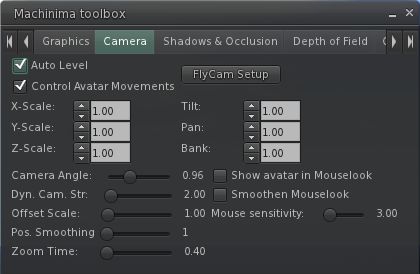
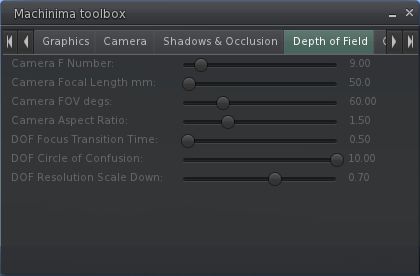
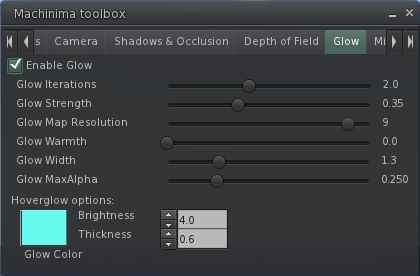
Rather than waste words describing each of the tab, here is a set of screen captures for the remaining tabs in the floater:
Camera settingsShadows & OcclusionDepth of FieldGlow“Miscellaneous” – currently derendering options
The derendering options are liable to prove useful for eliminating bystander avatars who are having a detrimental impact on camera movements, etc., when trying to shoot a video, while the “Miscellaneous” tab as a whole leaves room for further options to be added, should they be required / possibly requested.
Other Updates
As well as the machinima options, the blog post for the release notes the following updates are also included:
Getting a worn attachment into edit by right-clicking it in your inventory and selecting “Edit”-
Opening a Landmark on the map from your inventory, similar to what you can do from within the Places window.
Performance
I’ve not been able to thoroughly test the release in my usual manner due to time constraints elsewhere. However, in the tests I did perform, using my home sim as usual (3 others present in the sim) and both PC and Viewer set to my usual defaults (see the panel on the right of this blog’s home page), I found this release of Dolphin performed as well as other recent Viewer releases from the majority of 3.2-based TPVs. Running with deferred rendering off (no shadows / lighting enabled), the Viewer comfortably ran with an FPS in the mid-30s at 390m, with this increasing to the low 50s at altitude on my build platform (2850m). At ground level, the rate dropped very slightly to average at around 30-21 FPS.
Enabling deferred rendering and setting the lighting option to Sun/Moon+Projectors saw my frame rates fall to around 19-21 FPS at 390m, and to the mid-teens when at ground level. This was again pretty much in keeping with recent releases from the likes of SL and Firestorm.
Overall, an interesting new addition to Dolphin which should prove to be of interest to those interested in both video and photography.
Earlier this month I took a quick look at the Preview Release of Niran’s Viewer 1.33, focusing on the UI work NiranV Dean has been carrying out within the release – part of an ongoing project to provide a more efficient Viewer front-end. Today sees the launch for the final version of 1.33, and in NiranV’s own words, this is a “major, major release” for a wide range of reasons. As promised in my last report on the Viewer, I’ve taken time to have a nice, long play with the Windows version.
TPVD Listing
First and foremost, after a long and incredible development curve, Niran’s Viewer has been accepted for listing in the Third-party Viewer Directory and should appear there in the next week or so – congratulations to Niran on all the work that has gone into the Viewer, and to Tarnix for the development of the Linux version.
Two Versions
The 1.33 release comes in two flavours: without and with the Mesh Parametric Deformer. The reason for this is simple, the code doesn’t set well with the Viewer – which might be, as NiranV acknowledges, due to issues with the Deformer working on his development hardware, but which could also be related to conflicts between the code and the Viewer’s rendering pipe. However, as NiranV notes in his blog: “You should be able to experience the Deformer mostly normal if you activate Deferred, Shadows and Ambient Occlusion, meaning that the separate release is only for those who can run [in this mode] and [who] want to test it to give Qarl Feedback.”
Installation
The Windows installer package weighs-in at 40Mb, and now creates a desktop shortcut icon (yay! no more hunting through Explorer and shunting bits around). Installation itself is, as always, fast and smooth, with the change log displayed in the opening window for those who are curious but who haven’t actually delved into Niran’s blog to read the information there.
On start-up, and for the first time with Niran’s Viewer, I did encounter a virus threat warning from AVG. This is something that is not uncommon among Viewers, with a number of TPVs (and the odd release of the Official Viewer) throwing up warnings on occasion. It certainly be taken to mean the Viewer is up to mischief. LL themselves provide some guidance on avoiding false threats. As the alert was related to the slplugin.exe file (a common cause of false virus alerts), I felt confident in marking the alert as a false flag and continuing.
The UI
As mentioned above, the User Interface is very much one of the focal points of NiranV’s work on the Viewer, and I took a look at some of the upcoming features in my overview of the initial Preview release. As such this is the logical place to start with this look.
The first noticeable thing with this release is the on logging-in the UI is extremely clean and minimal. with both bars and buttons only appearing at the top of the window, rather than the top and left, as with earlier versions.
UI: functionally minimalist
The buttons displayed by default are Speak, Voice, People, Picks, Places, View, Inventory and Appearance, which represent an interesting mix and which, in a nod to Kirsten’s Viewer, are initially displayed in “S19” format. There’s still no option to left/right align buttons either at the top or the bottom of the window (or to the top/bottom of the window if you place buttons on either side of your world view), so I’ll keep pestering NiranV on this :).
If I’m totally honest, the top button bar is something I’m personally not overly keen on: when active, it actually blocks the uppermost section of the screen from use, so you can’t “dock” (or more correctly in the case of the 3.2 FUI align) floaters with the top bars: there will always be a gap. But this is just a personal niggle on my part.
A nice touch with Niran’s Viewer, for those who don’t use the top of the window for anything at all, is the ability to hide the Navigation Bar, etc., at the top of the screen completely when not in use (the mini-Location bar is automatically displayed in its place) by setting Preferences->User Interface Options->UI Customisation->HIDE TOPBAR AUTOMATICALLY. Introduced a couple of releases ago, this is still something I like rather a lot, given I don’t use the top button bar.
In terms of the button options, Niran’s Viewer presents pretty much the standard set of buttons that come with the Official Viewer, so there is not the massive range of buttons that are displayed by other TPVs – which itself isn’t really a problem. One Button that does make its debut with this release is the SCRIPT button, which opens the Script Information floater.
Colours
When it comes to colours, Niran’s Viewer presents the most customisable UI of any Viewer, something I’ve again covered in the past. With this release, NiranV adds a new tweak to the use of colour: to denote options in both menus and Preferences tabs which may result in Viewer issues and / or crashes, or which should be used with caution on the part of users unfamiliar with them. Those options where caution is advised are coloured orange with this release, with the more experimental / specialised options coloured red (see right). NiranV indicates that these colours may change with a future release, but the idea is certainly a good one in terms of being a visual indicator (although there is a risk colouring an option will encourage people to “click and see”).
In a slightly tongue-in-cheek move, NiranV has coloured the option to Exit the Viewer red because after all, as he says, it does close down the Viewer and logs you out of Second Life!
Fix it!
A new addition to UI floaters comes in the form a pin icon in the top right corner of most (not all) floaters. Called “Fix it!”, this locks a given panel in the position in which it is currently displayed on-screen. Once active, the floater cannot be accidentally dragged elsewhere on the screen. For those involved in activities such as photography, machinima and combat, I imagine this could prove a useful option. The option is also likely to appeal to those who like to have certain core panels (such as inventory) function in a similar manner to when the Sidebar was available (i.e. always appearing on the right of the screen), as they can “lock-in” the floaters to do so – although in the latter case, it should be noted that the functionality currently isn’t persistent between re-logs, although this should be fixed in a future update.
Frame Rates
All Viewers include the option to include a “lag meter” in the top right corner of the menu bar, which shows the Viewer’s performance in terms of a colour-coded graphics bar. NiranV has improved this by allowing you to toggle between the bar and a numeric frame rate display.
Again, this is only a subjective measure of performance, but for those puzzled as to whether the traditional bar is indicative of good or bad performance, the numeric display should help clarify matters.
Super Smooth
The bet way to describe using the Niran’s Viewer UI is smooth. That you’re in something very different to other Viewers is evident the first time you move your camera view – everything pans and slides very smoothly, almost as if you’re on a cushion of air, with motion gliding to a gentle halt. Of course, you can achieve the same in other Viewers by altering your camera movement options, but NiranV has done it for you, making the entire experience a lot .. well … smoother.
This approach can be seen elsewhere in the Viewer, particularly the way options and sub-panels in floaters slide gracefully in or out of view. Take a look at one of Niran’s excellent videos for a practical demonstration:
Preferences
Preferences are the clearest instance of significant changes to the UI. NiranV has done a considerable amount of work in this area to try to rationalise both the way in which Preferences presents options to us, and how we interact with it. A lot of this I covered last time around, but NiranV has continued to refine and improve.
Preferences: overhauls and rationalised
The first noticeable thing on the redesign – at least for those who used the Preview 1 release of 1.33, is that the Preferences panel now auto-sizes itself correctly according to your screen resolution; there are no more scroll options to the left / right of the panel as described in my look at the initial Preview release.
Those coming to Niran’s Viewer for the first time are liable to find the Preferences panel something of a “?!” moment when first opening it; who wouldn’t after the basic layout of the panel having remained pretty much unchanged (other than for custom tabs) almost since the dawn of time? However, I have to say that, with a couple of very minor reservations, NiranV has produced an alternative Preferences panel that makes a heck of a lot of sense and encourages fast, easy use.
At the top are five major category tabs, most of which are pretty self-explanatory. Each of these has up to three sub-tabs (displayed at the bottom of the floater) which help rationalise and order functions and options. Additionally, some tabs may have context-specific options that are only display when certain options are enabled (such as with advanced rendering in the Display and Audio tab, or many have additional toggle buttons on the right to shift between sub-groups of options.
This is a weekly summary of changes to all SL Viewers / clients of which I’m aware and which are in popular use across the grid / listed in the TPVD. Detailed links to said Viewers / clients can be found in my Viewer Round-up Page. The links supplied in this summary are either to change logs or to reviews within this blog.
Updates for week ending: 22 April, 2012
The SL Beta Viewer rolled to 3.3.1.254008 and Development Viewer rolled to 3.3.2.254043, which includes the new local textures viewer (textures can be used in builds, but will only be visible to you; other users will see them greyed-out) – both released on the 17th April
Dolphin reached a jumbo number, 3.3.3.23747, code-named “Armageddon”, which includes Linden Lab’s “local textures” solution integrated into it, replacing the code common to most TPVs (note this doesn’t replace the “temporary upload” option within the image upload floater), together with the single AO “button in a button” solution that has been appearing across V3.2 TPVs over the last few months. Lance explains the “Armageddon” code name in terms of a video clip, which kind-of has a link back to “747”…
Niran V Dean has rectified recent computer issues, making a 2nd PREVIEW release of version 1.33 of Niran’s Viewer. This includes a hosts of tweaks, a number of very cool additions (including two excellent camera presets and make a large number of fixes, include implementation of assorted STORM JIRA. I’ll be reviewing the full release of 1.33 in-depth in the near future
Cool VL Viewer rolled out 1.26.4.9. Among the changes made are a number of LSL support updates and a fix to the Linux version to prevent the Viewer crashing when uploading rigged meshes
This is a weekly summary of changes to all SL Viewers / clients of which I’m aware and which are in popular use across the grid / listed in the TPVD. Detailed links to said Viewers / clients can be found in my Viewer Round-up Page. The links supplied in this summary are either to change logs or to reviews within this blog.
Updates for week ending: 15 April, 2012
The SL Development Viewer rolled to 3.3.2.253914, prior to .253960 being pushed out as this summary was being prepared
Dolphin rolled over to , 3.3.3.23731, code-named “Issos”, which includes a new Preferences setting to determine how multiple menus from an scripted object are handled; a new RESET button on the Build floater to reset pivot offset points back to the centre of the object; fixes for how music fade is handled in teleports and mouse cursor appearance changes and for ensuring the avatar offset reset button in the status panel is correctly hidden in Mouselook
Zen Viewer rolled to version 3.3.2.7, which includes Boost (compile tool) updates
Cool VL Viewer rolled out 1.26.4.8 . Among the changes made is a backport of the V3.3 Runway Project code to improve avatar rezzing speeds
The Android Lumiya text client released version1.3.1, which I look at today, adding support for transactions and interaction with in-world objects
The Lumiya text client for Android, which I reviewed last month continues to be enhanced with new features. Version 1.3.1, released on the 15th April. These introduce the ability to interact (to some degree) with in-world objects and the ability to carry out payment transactions (i.e. pay other avatars or objects such as rental boxes). These are two potentially useful additions for those who are on the go, and need to access SL to pay tier, etc., but don’t have access to the computer.
Making Direct Payments to Others
You can now pay people directly on Lumiya quickly and directly. From the main screen, tap your phone’s menu button, then tap CONTACTS, select the person you wish to pay from your list of contacts (tap to highlight), then tap you phone’s menu button again and tap PAY to display the payment screen, as shown in the sequence below (some steps abbreviated for clarity, as they say).
Letting my test alt pay me (steps shortened for clarity)
Using Touch
The Touch option within Lumiya is a potentially useful addition to the client and works with menu-driven objects that respond to a left mouse click. When starting Lumiya now, there is a new button displayed at the top of the main screen – OBJECTS. Tapping this opens a list of objects available to you. Be default, this is “limited” to in-world “descriptive” objects, although you can opt to extend it to include your own attachments and “non-descriptive” objects (so prims simply called “object” will be listed for example).
Tapping on the name of an object will open-up a further dialogue box that provides general information on the item – description, creator, etc., and which includes a TOUCH button (below).
Interacting with objects
It’s here that things might get a little confusing. One might expect tapping TOUCH to open the objects dialogue box – but it doesn’t appear to. Instead, an easily missed prompt is displayed at the top of the screen informing you that you have a NEW MESSAGE IN CHAT.
To use the object’s menu, you now need to use your phone’s return key to get back to the Lumiya main screen to see the dialogue box and menu (right).
This is slightly cumbersome but given the way SL works and Lumiya is configured with (obviously) limited screen space, it’s understandable.
However, there are one or two other issues with the approach as implemented. The application polls the entire sim you’re on for touchable objects. This means that you can end up with a very long list of items which cannot be sorted. Also, this list appears to include any sub-components of an object that themselves contain a script. The not only lengthens the list of objects (increasing scroll time), it also risks annoying mis-clicks when trying to access an item.
Both of these issues are negated by the fact there is a search option at the top of the list, allowing you to focus results down to a handful of items – or even the item you want to touch, if you know it’s in-world name.
Paying an object (click to enlarge)
Paying an object is as straightforward as paying a person – once the object is selected from the list, click the TOUCH button from its information page, and a payment page is automatically opened (right).
Currently, the system is restricted to activating your own attachments; I’ve no idea as to whether it will be extended to include attachment on others, which some might find useful.
Channel Recognition and Timestamps
Lumiya 1.3.1also adds channel commands to its capabilities (so “/102 command” will be recognised, for example), and also adds timestamps to chat. The latter can be turned off by unchecking TIMESTAMP IN CHAT in the Settings options (phone’s menu button->SETTINGS).
Opinion
The addition of interaction capabilities to Lumiya definitely makes it more of an attractive offering, the listing issue notwithstanding. Those on the go who have an Android phone are likely to find having a payment option handy, while the ability to at least interact with objects helps improve the overall feeling of engagement with SL when one is unable to use a graphical Viewer.
We’ve all dreamed about running “full” SL on mobile devices; while there are some great text-based clients available for both Android devices and the iPhone which offer a lot of functionality, it’s fair to say that SL doesn’t always feel like SL when the graphical element is removed. Whether we will eventually see SL accessible via mobile devices and tablets on a regular basis is open to debate – although with the likes of Unity, it’s hard not to believe there will be a time when graphical access to SL via such devices will be available.
In fact, where the iPhone is concerned, it wasn’t that long ago that it looked as if graphical access to SL might not be that far away, as the video below shows.
This concept demo was developed by Comverse back in 2008. It made SL on the iPhone possible by using a server sitting between SL and the iPhone to handle all the hard number-crunching, with the results being streamed to the iPhone’s web browser, with inputs from the interface being sent back to the server for processing, prior to being sent to the SL servers. The go-between server clearly has an impact on response times, but as Tech Digest said at the time, it wasn’t bad for a proof-of-concept at the time.
Sadly, the project never seemed to go beyond this demo phase, and there is now no mention of it on the Converse website. Still, it’s interesting to contemplate where the idea might have gone, and whether it might yet simply prove to be an idea a little ahead of its time, technology-wise.
 Lance Corrimal is keeping up a rapid series of releases to his Dolphin Viewer, averaging around one release a week of late. Most have contained nips and tucks or have been driven by SL requirements such as Direct Delivery. However, at the beginning of March he rolled out the “Fujiyama edition” (version 3.2.9.23177), aimed specifically at SL photographers.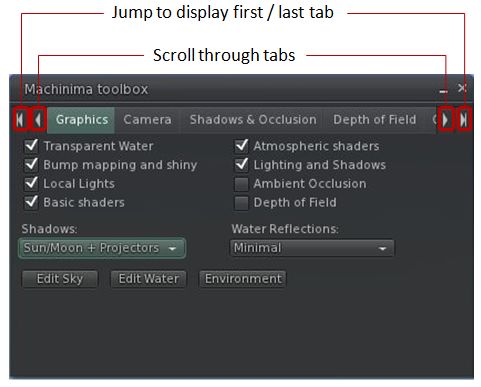





 Inara Pey: Living in a Modemworld