This summary is published every Monday and is a list of SL viewer / client releases (official and TPV) made during the previous week. When reading it, please note:
It is based on my Viewer Round-up Page, a list of all Second Life viewers and clients that are in popular use (and of which I am aware) and which are recognised as adhering to the TPV Policy
By its nature, this summary will always be in arrears
The Viewer Round-up Page is updated as soon as I’m aware of any releases / changes to viewers & clients, and should be referred to for more up-to-date information as the week progresses
The Viewer Round-up Page also includes comprehensive links to download pages, blog notes, release notes, etc., as well as links to any / all reviews of specific viewers / clients made within this blog.
Updates for the week ending: 24 February, 2013
SL Viewer updates:
CHUI development viewer continued to be updated, reaching release 3.4.6.270766 on February 23rd; no changes to the project viewer
Dolphin updated to 3.4.13.27316 on February 19th – core updates: improvements to feed profile page to better facilitate the Japanese language; all “Autopilot cancelled” messages optional; sourc code up-to-date with the LL dev viewer; internal fixes for the upcoming openSUSE 12.3 release
Kokua updated to release 3-4-5-25935 on February 18th – core updates: updated to LL 3.4.5 code base; port of client-side AO (Teapot / Firestorm); further OS Grids added to grid selection drop-down
Niran’s Viewer updated to 2.0.9 on February 19th – core updates: UI changes to the inventory and build floaters; slight changes to the rendering system; implementation of OPEN-162/ARVD-49
Metabolt updated to 0.9.64.0 (Beta) – February 23rd – core updates: interest list fix for nearby objects – release notes
Radegast updated to 2.8 on February 22nd – core updates: interest list fix for nearby objects; server-side baking support (see my quick test); a range of new features and improvements; bux fixes – release notes
Discontinued Viewers
Phoenix officially reached end-of-line for SL on December 31st – read more here
Zen viewer was withdrawn from the SL TPV directory and all repositories shutdown on January 27th, 2013.
Update February 25th: As per a comment from Jessica Lyon, Firestorm have now merged the Server-side Baking code and updates to RLVa into one of their private repositories.
On the 13th February, 2013, the Firestorm team hosted a question-and-answer session so they could outline the current status of the Firestorm viewer, the issues the team (and SL) are facing, and outline plans for both the immediate future and longer-term as well as address questions from the audience.
While the meeting was recorded, the Firestorm team are aware that many of their users have hearing difficulties, and / or prefer to read text. It is because of this that this transcript has been provided, otgether with the original recording itself. When reading it, please remember:
This is not a word-for-word transcript of the entire meeting. While all quotes given are as they are spoken in the video, to assist in readability and maintain the flow of conversation, not all asides, jokes, interruptions, etc., have been included in the text presented here
If there are any sizeable gaps in comments from a speaker which resulted from asides, questions to other speakers or requests for images to be displayed, these are indicated by the use of “…”.
Timestamps are provided as guidance should anyone wish to hear the comments in full from any speaker on the video
Questions were asked in chat during the meeting and while speakers were talking. This inevitably meant that replies to questions would lag well behind when they were orginially asked. Therefore, to provide context for both questions and answers, questions have been included in the transcript and timestamped at the point at which each is addressed by a member of the Firestorm team
The meeting proper commences at 16:36 into the video, and this is the point at which the transcript starts.
This summary is published every Monday and is a list of SL viewer / client releases (official and TPV) made during the previous week. When reading it, please note:
It is based on my Viewer Round-up Page, a list of all Second Life viewers and clients that are in popular use (and of which I am aware) and which are recognised as adhering to the TPV Policy
By its nature, this summary will always be in arrears
The Viewer Round-up Page is updated as soon as I’m aware of any releases / changes to viewers & clients, and should be referred to for more up-to-date information as the week progresses
The Viewer Round-up Page also includes comprehensive links to download pages, blog notes, release notes, etc., as well as links to any / all reviews of specific viewers / clients made within this blog.
Updates for the week ending: 17 February, 2013
SL Viewer updates:
Current release version updated to 3.4.5.270263 on February 14th – release notes
Development viewer updated to 3.4.6.270268 on February 14th
CHUI development viewer reached release 3.4.6.270520 on February 18th
Sunshine (server-side baking project) project viewer updated to 3.4.5.270409 on February 14th – wiki page
Cool VL updated on the 9th of February and again on the 16th to arrve at:
Lumiya released version 2.4.3 on February 16th – core updates: flexiprim support; teleport to selected avatar; improved notification settings; corrected attachment positions on avatars – release notes
Metabolt updated to 0.9.62.0 (Beta) – February 17th – core updates:creator UUID now displayed for objects in Object Manager; radar now displays all avatars in the region; upgraded to the latest version of libopenmv; optimisations and bug fixes – release notes
Discontinued Viewers
Phoenix officially reached end-of-line for SL on December 31st – read more here
Zen viewer was withdrawn from the SL TPV directory and all repositories shutdown on January 27th, 2013.
Update February 25th: As per a comment from Jessica Lyon, Firestorm have now merged the Server-side Baking code and updates to RLVa into one of their private repositories.
Update, 19th February: A transcript of the core part of the meeting, including Jessica’s Firestorm status overview and the Q&A session, complete with the video recording, is now available.
Update, 14th February: The initial video recording of the meeting is now available on YouTube, and an HD version will be available soon.
Wednesday February 13th saw the Firestorm team host an open meeting to discuss what is happening vis-à-vis Firestorm given all the various ongoing viewer-related projects currently underway (CHUI, materials processing, server-side baking, plus Firestorm’s own updates and improvements) – and when the next release is liable to hit the public at large,
Several members of both the Firestorm development and support teams were on-hand to field questions, with Project Lead Jessica Lyon leading things off with a 15-20 minute overview as to what is happening, where the viewer stands at this point in time, what the plans are for the immediate future and what we might expect to see in Firestorm in upcoming releases.
The Short Version
The Good:
Firestorm will be supporting all of the new viewer capabilities coming out of LL, although CHUI will require careful consideration as to what is adopted and how, as Firestorm already offers several similar options to those being added to the viewer by CHUI
Firestorm will be getting a range of new features (although not all at once) which include: further work on re-implementing legacy search capabilities, the ability to save and reload personal settings; more OpenSim support; new windlight settings; new UI skinning; further work on adding v1-style functionality
The Not-so-good:
Serious crash and other issues have also come to light in merging Firestorm with the latest LL 3.4.5 code which the team are endeavouring to resolve
Server-side baking (SSB) is the priority for the Firestorm team at present (as it is with other TPVs), as it has a major impact on how people will see things in-world, and it is the project which LL are emphasising. However, integration of the SSB code into TPVs (particularly those supporting RLVa) is not proving easy
The emphasis on work at the moment is overcoming bugs, issues and problems and trying to get Firestorm to a point where it is running the SSB code.
Taken together, the latter points mean that while a new version of Firestorm is in development, there will be something a further wait before it appears, and when it does, it my not have such a huge range of new features as has been found in previous releases and might suffer from stability issues.
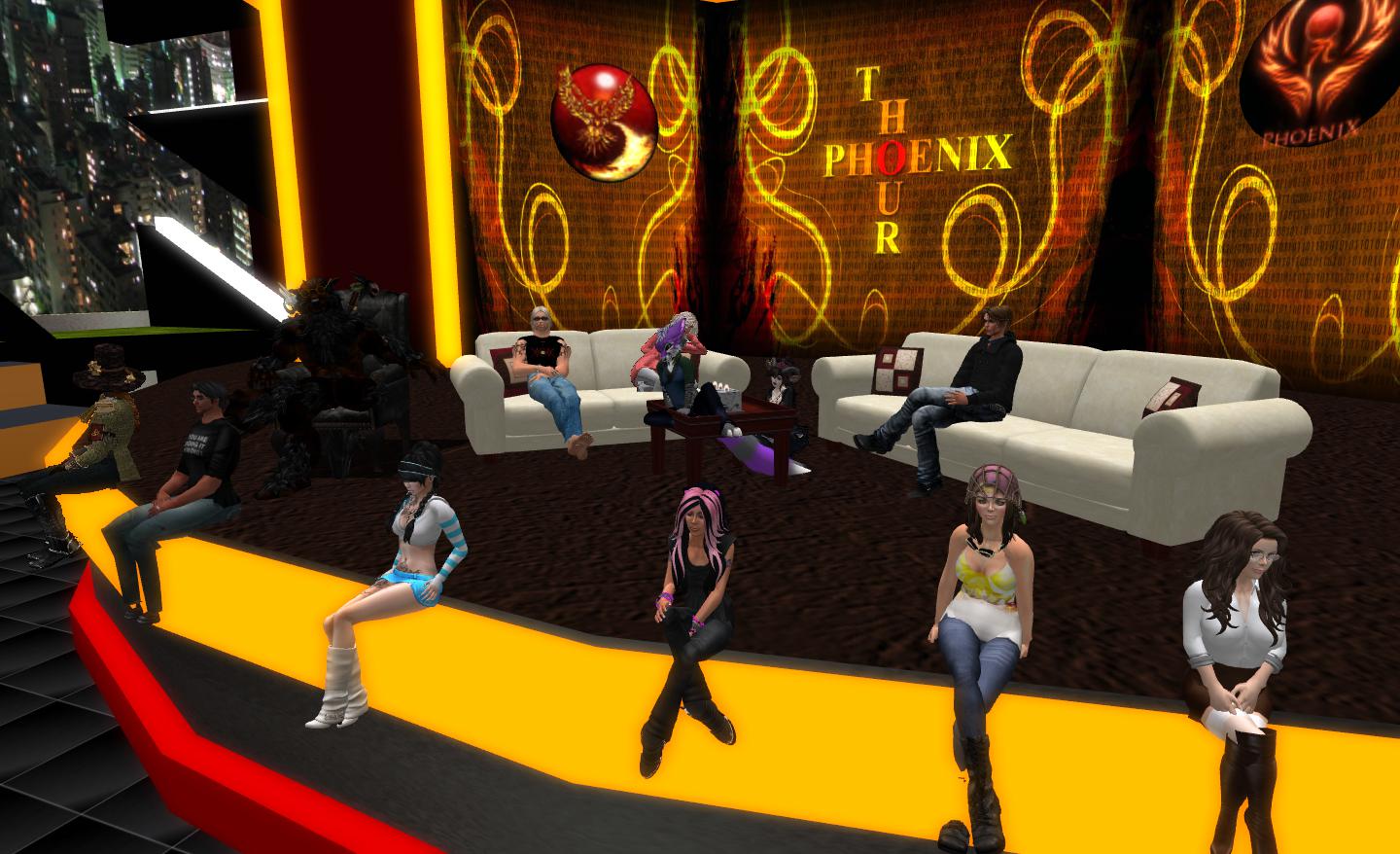
Jessica Lyon (seated centre, at the edge of the stage) with members of the Firestorm development and support teams, discusses Firestorm on Wednesday February 13th
Viewer Status
There are some serious issues within the Firestorm development code which are delaying progress towards a potential release. Firestorm has been merged-up to the Linden Lab 3.4.5 viewer code, and this has given rise to some severe problems for Firestorm (and is actually having an impact on other projects, as I reported earlier this week).
Commenting on the situation, Jessica Lyon pulled no punches, stating:
I’m going to be completely honest with you guys. Right now Firestorm, for us internally, is in pretty bad shape since our merge with Linden Lab’s TIP (3.4.5 code). There are a lot of bugs that we’ve inherited; there’s a lot of regressions which we’ve inherited. Ed [Merryman, lead for Firestorm Support] is crashing about two times a day – and for those of you know Ed, know that Ed never crashes. So if Ed is crashing on our recent builds, we’ve got some problems. We’ve got some log-out crashes, log-out things; log-in crashes … Basically, we’re not in great shape, and we’ve got a lot of fixing-up to do before we’re ready for a release.
As well as inheriting bugs, the merge has also highlighted bugs and issues within the Firestorm code itself which also need to be fixed. All of this adds up to recent builds for the viewer being “way worse” than the current release version in terms of stability and issues, and it is going to be a while before these issues are fully resolved.
Server-side Baking
Server-side baking is perhaps the most prominent viewer project underway at the moment, inasmuch as it is essential that all viewers connecting to Second Life be able to support it in order to avoid in-world experiences from being broken. Simply put, avatar skins and system clothing will not render on viewers which do not support SSB once the code is fully deployed, as shown below. )Things are somewhat more involved than that, and for those unfamiliar with the project, I’ve covered it in-depth in Avatar Baking: “and the clock has started!”. )
The SSB problem in part: I’m standing on an SSB-enabled region. On the left – as I appear to others who are using an SSB-enabled viewer; On the right, as I appear to others who are using a viewer which does not support SSB.
As it stands, Firestorm has yet to be merged with the Lab’s supplied server-side baking code for the viewer, although work has been underway within the team in a separate repository to the 3.4.5 code merge. A major problem here, as I again reported earlier this week, is that SSB has considerable (and negative) impact with RLVa. These problems are compounded by the fact that the test regions for SSB functionality are all on Aditi, which has considerable issues of its own at the moment, which are affecting people’s ability to reliably test code, and all have scripts disabled – which makes testing RLVa fixes alongside SSB somewhat difficult.
Currently, the Lab remains sympathetic to the issues TPVs are facing (and have offered help wherever practicable), and are not currently pushing a date by which TPVs must be ready for SSB to go live. They’ve also acknowledged that some of the problems TPVs are facing are down to delays on the Lab’s part, such as not making any bug fixes to the viewer code available until January 30th, some seven weeks into the planned eight-week window in which it had been hoped TPVs would be able to integrate the code. However, it is clear that TPVs are feeling under pressure to get SSB-capable versions of their viewers sooner rather than later.
Please use the page numbers below to continue reading this article
Jessica Lyon, project lead for the Firestorm team, has announced that there will be a limited capacity meeting on Wednesday 13th February at 13:00 SLT, to discuss the Firestorm project. The core part of the announcement reads:
Every once in a while, and probably not often enough, we host a Question and Answer session in Second Life for the Second Life community. The purpose is to give us the opportunity to update you all with what we are doing and give you the opportunity to have a say, ask questions you may have to the team, voice complaints, make requests and in general communicate with us directly. This Q&A will not be quite like our office hours. It will not be as formal, it will be far less structured, and it will not be streamed live.
Seating is limited to 70 avatars and is first come first serve. We will, however, try to record it and offer the recording for folks who couldn’t make it.
All are invited, fans and haters alike, people who use our viewers and those who don’t… everyone. All questions are welcome, we only ask that language be kept PG and folks be civil to each other.
Again, note that the meeting will not be streamed live. The venue for the meeting is the Firestorm Office Hours meeting place on the Phoenix Firestorm support region.
This summary is published every Monday and is a list of SL viewer / client releases (official and TPV) made during the previous week. When reading it, please note:
It is based on my Viewer Round-up Page, a list of all Second Life viewers and clients that are in popular use (and of which I am aware) and which are recognised as adhering to the TPV Policy
By its nature, this summary will always be in arrears
The Viewer Round-up Page is updated as soon as I’m aware of any releases / changes to viewers & clients, and should be referred to for more up-to-date information as the week progresses
The Viewer Round-up Page also includes comprehensive links to download pages, blog notes, release notes, etc., as well as links to any / all reviews of specific viewers / clients made within this blog.
Updates for the week ending: 10 February, 2013
SL Viewer updates:
Beta version updated to 3.4.5.270034 on February 6th – release notes
CHUI development viewer reached release 3.4.6.270209 on February 9th
Kokua released version 3.4.425654 r6 on Feb 6th – core updates: Advanced Build Tools floater offers Imprduence layout and elements from Firestorm; Metropolis Metaverse added to OpenSim grid list – release notes
Cool VL updated on the 9th of February and again on the 10th to arrve at:


 Inara Pey: Living in a Modemworld