This summary is published every Monday and is a list of SL viewer / client releases (official and TPV) made during the previous week. When reading it, please note:
It is based on my Viewer Round-up Page, a list of all Second Life viewers and clients that are in popular use (and of which I am aware) and which are recognised as adhering to the TPV Policy
By its nature, this summary will always be in arrears
The Viewer Round-up Page is updated as soon as I’m aware of any releases / changes to viewers & clients, and should be referred to for more up-to-date information
The Viewer Round-up Page also includes comprehensive links to download pages, blog notes, release notes, etc., as well as links to any / all reviews of specific viewers / clients made within this blog.
Updates for the week ending: June 23rd, 2013
SL Viewer
Current Release viewer updated to version 3.6.0.277516 on June 19th – core updates: materials processing – release notes
Second Life Beta version updated to 3.6.1.277611 on June 21st – core updates: materials fixes – release notes
Snowstorm (3rd party contributions) updated to 3.6.1277577 on June 19 (download)
Kokua 3.6.0.28975 was released on Friday 21st 2013, joining the in-development Black Dragon viewer (NiranV Dean) in becoming one of the first v3-style viewers to fully adopt Materials Processing.
I’ve been remiss in my coverage of Kokua’s development, which has been fairly steaming along over the last several months (the last update I gave was for Kokua 3.4.4 in January 2013), so this piece is a little bit of a catch-up on some of the major updates – such as SSB/A support – since then, starting with the 3.6.0 changes.
Straddling Worlds
Despite all the hoo-haw over the Lab’s move to sub-licence code libraries from Havok (a move which was incorrectly interpreted by some as being an attempt to stymie OpenSim), Kokua is one of the viewer which continues to happily straddle the SL / OpenSim divide by providing capabilities which work in both, as well as options specific to one or the other (such as SSB/A support for SL, and enhanced OSSL support and the ability ro disable SL’s build constraints for OpenSim use, for example).
Accepted onto the Linden Lab Thirty-party Viewer list in April, and listed in the Third-party Viewer Directory, Kokua avoids the Havok complication by providing pathfinding support without the navmesh visualisation capabilities (potentially no great loss to the vast majority of users) and by using the third-party mesh upload code for importing mesh objects, thus allowing it to comfortably span both environments.
3.6.0 Download and Installation
The Windows installer weighs-in at 36.3 MB, putting it towards the upper end of the installer list by file size, which is hardly surprising given the punch of extras the viewer includes. Installation itself was, for me, straightforward, the viewer neatly over-writing my previous version (I opted not to go my usual clean install route).
Firing-up the viewer yielded no anti-virus warnings from AVG Pro (which has recently being getting a little vociferous over SLplugin.exe of late with some viewer installations, despite having given it a pass in previous installs – the most recent flag going up with my installation of the latest SL viewer with materials support).
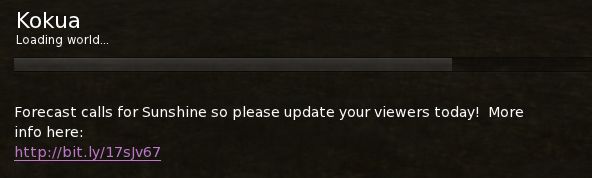
The current Kokua message of the day (MOTD) – coming from LL – raised a smile, using a little humour to underline the fact that SL users need to update their viewers.
A light-hearted reminder of the need for SL users to update to an SSB/A-ready viewer
Materials Processing Support
The release of Kokua 3.6.0 marks it as the first v3-style viewer to provide full viewer-side support for materials processing in for Second Life (if you’re on OpenSim, there are server-side updates required to make materials capabilities work, but there is already a preliminary effort to get these implemented).
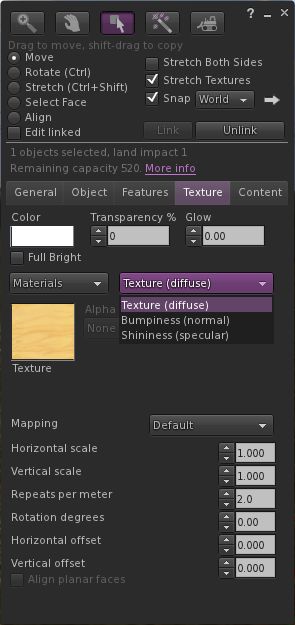
The updated Texture tab of the Build floater
If you’re not sure what materials processing means, please take a look at my primer provided for the SL viewer’s beta release.
As one would expect, materials support has been implemented as it is presented through the SL viewer: the Texture tab in the Build floater has been updated to provide support for normal and specular maps, which can be selected from a high-level drop-down (see right), and which include their own additional attributes (the “old” Bump and Shine options). Note that each materials map can be set with independent repeats and rotations.
Materials also includes some additional updates – the most noticeable of which is perhaps the ability to include an alpha mode when working with alpha masks. This can be set to one of:
None – the alpha channel is ignored, rendering the face opaque, or
Alpha blending – essentially the same as we currently have for any alpha texture, or
A 1-bit alpha mask with each pixel either 100% transparent or 100% opaque, with a cutoff setting to determine where the threshold is (alpha masks should render faster than alpha blending, and eliminate issues with alpha layer sorting), or
Emissive mask – so the alpha layer is interpreted as a per-pixel glow setting.
Materials support also includes gamma correction capabilities within the rendering system. This may cause scenes to render more darkly than in non-materials capable versions of Kokua, and as reported with the SL viewer, may cause some alpha rendering issues.
Graphics Updates
Materials Processing has seen various other changes made to the viewer to improve rendering, some of which have resulted in improvements to the GPU support table, and adjustments made to the graphics defaults themselves. While these may have been included in versions of Kokua prior to 3.6.0, they’re covered here for completeness.
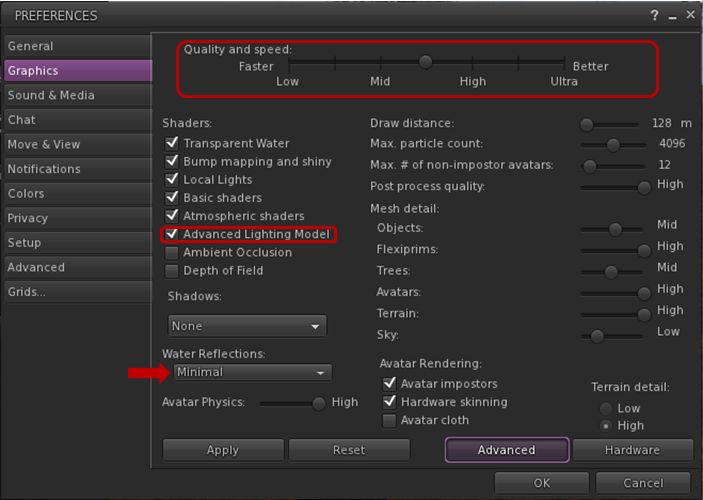
Graphics tab changes in Preferences and water reflections
First and foremost, the Quality and Speed slider now has seven pre-sets instead of four, adding mid-point settings between Low and medium, medium and high, and high and ultra. These are designed to better reflect the capabilities of supported graphics cards and to determine whether or not a card has the ability to support materials rendering by default (whether you actually want it to do so is up to you). As such, you may find that if you’ve not updated Kokua in a while, your default graphics setting is different from previous versions.
The other notable change (again, if you’ve not updated Kokua in a while and haven’t been following SL viewer changes over the last few months) is that the “lighting and shadows” check box has been renamed “Advanced Lighting Model” (ALM), and the option needs to be checked in order for you to see materials capabilities being rendered in your viewer.
Finally, and purely by way of a side note, if you enable ALM in SL and find you’re having issues with alphas rendering correctly with this release of Kokua (they appear entirely black), try changing Water Reflections (arrowed above) to anything other than Minimal. This may help resolve the issue for you. Another possible workaround for the “black alpha” problem is to disable ALM, click on OK to accept and close Graphics, then re-open Graphics and re-enable ALM.
Command Menu, Build Floater Updates and Look AT Options
The 3.6.0 release also sees a new Command menu implemented, which brings together those commands moved from other menus, popular commands and a number of chat commands imported from Firestorm and turned into menu options (such as “tp2cam” to teleport to your current camera location).
Additionally, the Build floater’s Object tab gets a port of the build parameters copy paste function from the (now defunct) Zen viewer as its implementation was newer than other LGPL licensed viewers, and which is completed with fine tuning tweaks from Firestorm.
This summary is published every Monday and is a list of SL viewer / client releases (official and TPV) made during the previous week. When reading it, please note:
It is based on my Viewer Round-up Page, a list of all Second Life viewers and clients that are in popular use (and of which I am aware) and which are recognised as adhering to the TPV Policy
By its nature, this summary will always be in arrears
The Viewer Round-up Page is updated as soon as I’m aware of any releases / changes to viewers & clients, and should be referred to for more up-to-date information
The Viewer Round-up Page also includes comprehensive links to download pages, blog notes, release notes, etc., as well as links to any / all reviews of specific viewers / clients made within this blog.
Updates for the week ending: June 16th, 2013
SL Viewer updates:
Materials Processing beta updated to version 3.6.0.277285 on June 12th and then to 3.6.0.277409 on June 14th (release notes)
A Beta Maintenance viewer, version 3.5.4.276827 was release on June 14th – core updates: lots of fixes and improvements (incl. updates to the ongoing ultra-high resolution snapshot issues, mesh improvements, etc.) – release notes
Catznip released version R8 on June 8th (missed from last week’s summary as a result of a website redirector error) – core updates: SSB/A and pathfinding – release notes
Littlesight Android client updated to version 1.4.0.1 on June 12th, no release notes
Lumiya updated to version 2.4.6 and then 2.4.7 on June 12th – core updates: general bug fixes; support for multiple attachments and clothing layers; in-world hovertext display; search places; updates SSB/A support; improved support for emotes in chat – release notes
Mobile Grid Client updated to 1.20.1185 on June 10th (and slipped into the week 23 report as a result) – release notes
Pocket Metaverse updated to 1.8.1 on June 10 (and slipped into the week 23 report as a result) – release notes
Depreciated / Discontinued Viewers
SL Development viewer – depreciated as of version 3.5.2.274629 April 24, 2013
Zen Viewer – discontinued by developer and no longer available, January 27th, 2013
Phoenix viewer – development and support ended on December 31st, 2012
Catznip slipped out R8 on June 11th. I actually missed it, as it appears the redirector to their wiki page was still pointing to the old blog, so when checking I was still seeing R7 as the last release; so I was a little surprised to check the link this evening and end-up at the Catnip wiki and see Catznip R8 sitting there and purring at me!
Anyway, the important thing is the release is here and sees Catznip join the ranks of Server-side / Appearance ready SL viewers, gain pathfinding functionality and become the latest viewer to offer full Havok support, as a part of the Lab’s Havok sub-licensing arrangement. As well as these two major updates, R8 gets a number of improvements and bug fixes.
Server-side Baking / Appearance
Not actually a lot to say here, other than “it works”!
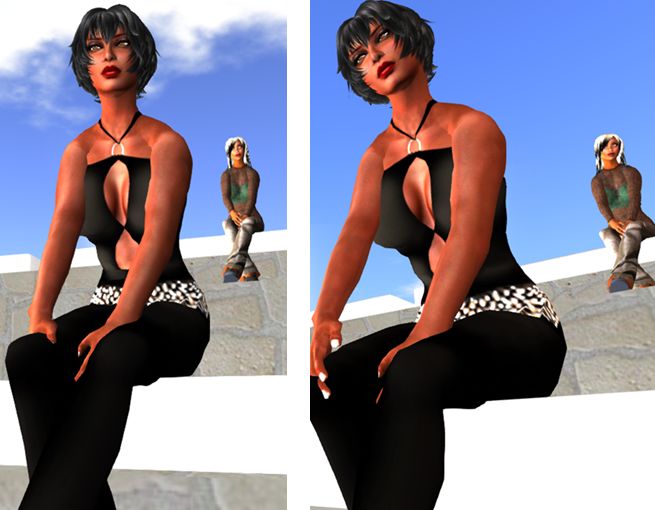
Catznip R8: SSB/A ready: (l) my Alt (at the back), running the SL SSB/A-ready viewer, renders correctly in Catznip R8, while (r) I render correctly in the SL SSB/A-ready viewer
When tested on an SSB/A enabled region, Catznip R8 rendered my Crash Test Alt (running on the official SL viewer, which is SSB/A ready) and my avatar correctly, as did the official SL viewer. No grey ghosts or clouds with either.
Pathfinding and Havok Sub-licensing
A major element missing for the last Catznip release – R7 – was pathfinding support. This wasn’t because the Catznip team have anything against pathfinding; they simply found time working against them, as I noted in my R7 review:
Catznip R7 does not include any pathfinding tools, as the team had enough on their hands getting all the updates, changes and fixes already planned for this release merged, tested and made ready for release. This doesn’t mean pathfinding is being ignored, however. Expect to see it in a future release.
R8 rectifies this. Not only does it provide the expected Linksets and Characters options, Catznip R8 becomes the latest SL viewer to sign-up to the Havok sub-licence agreement, meaning it also gains the ability to visualise the navmesh when working with pathfinding.
Pathfinding arrives in Catznip with the release of R8, and the Havok sub-license agreement means that the release includes navmesh visualisation
A further benefit with the agreement is that Catznip can also use the official Havok-powered mesh uploader.
Further Updates
In addition, Catznip sees the following added / updated:
Addition of a “Per user” option to the “Show friends permissions” in the friends gear menu to always show non-default permissions
Addition of an Edit Hover button functionality to show the shape editor, scrolled down to the “Hover” wearable param
Addition of a further toolbar at the top of the world view
Addition of a Close All Folders button to the inventory outfits view toolbar
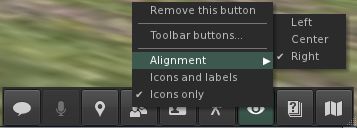
Addition of alignment options to toolbar buttons. Those at the bottom of the screen can be centred or left or right aligned, while those to the side can be aligned to the top or bottom of the screen as well as in the centre.
Catznip R8 adds left/right alignment to bottom toolbar buttons and Top/bottom alignment to side toolbar buttons
changed : highlight the currently worn outfit folder in bold
changed : rearrange the avatar inspector to add extra lines to the profile description
one extra line added by default through layout changes
two extra lines are added by expanding the textbox to fill the volume slider space if voice is disabled
changed : report more useful information about memory state in case of a crash
changed : allow multiple crashes to be selected in the “Crash reporting” preferences panel.
There are also a number of bug fixes which have been implemented by the Catznip team and / as a result of fixes coming out of the Lab; there are also a number of updates to RLV/a. For details on all of these, please refer to the R8 release notes.
Feedback
This isn’t a huge update compared to others, but it marks a significant step forward for Catznip both with the Havok su-licence support and, most importantly, the SSB/A support. I also have to admit I like the button alignment options (something we’re unlikely to see in the official viewer, but which is so very handy in making screen space more usable.
Given this release is to ready Catznip for the grid-wide deployment of Server-side Baking / Appearance, it is strongly recommended that if you are a Catznip user and have not updated, that you do so ASAP.
Performance-wise, Catznip R8 on my PC offers around the same performance as most viewer releases over the past few months. Running with Advanced Lighting Model off while in my home region with around four other avatars, FPS varies from the high 20 through the high 40s, depending on my altitude. When running with Advanced Lighting Model enabled but no shadows enabled, rates tend to range from the low teens through to high teens / low 20s.
Lumiya, the mobile client for Android devices saw two rapid-fire updates on June 11th. First came version 2.4.6, offering a lot of new and improved functionality, which was followed by 2.4.7 with a round of bug fixes which demonstrated again that no matter how hard you try to stomp on the little sods before a release, some of them will still be there to blow raspberries at you after a release…
Given the rapid-fire nature of the updates, I’ll be reviewing them all under the banner of the 2.4.7 release.
The Fixes
The under-the-hood fixes to Lumiya with this release comprise:
Minor inconsistencies with avatar shape rendering correctly
Fixed terrain rendering in regions with default terrain textures
Fixed a crash on clearing cache while connected
Updates for server-side baking compatibility.
Multi-wear / Multi-attach
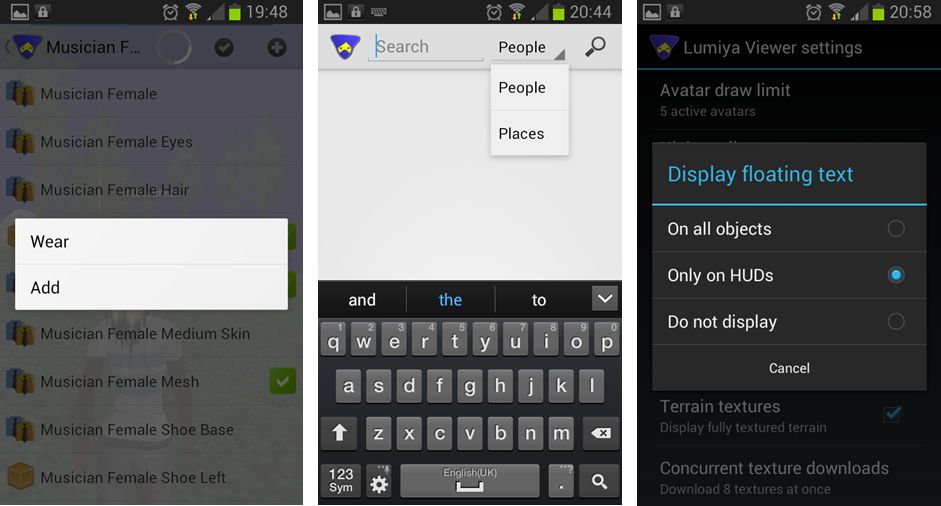
Lumiya now supports multi-wear for clothing at attachments.This is enabled via an ADD option appearing in the pop-up menu when selecting items from inventory or outfits to be worn / attached.
Currently, the order in which items on the same clothing layer are displayed is a little random (so if you wear shirt layer item 1 first and then shirt layer item 2, the second item might appear to be worn over the first, but the next time you add them in the same order, the second might appear to be worn under the first). There is also no ability to re-order items once worn, as is possible with a viewer.
At the moment, system clothing in Lumiya all utilises the same icon in inventory & outfits (a shirt icon), regardless of the layer on which it is worn. Alina does plan to improve this in time, however her attention is on other functionality right now.
Lumiya 2.4.7: (L) – The new ADD option for multi-wear, allowing additional clothing items to be worn on an occupied layer / attachments to be worn on an occupied point, a-la most viewers, and accessible from both inventory and outfits; (c) – the new Places search option, which can be selected from within Search; (r) – the three options available from within Lumiya’s settings for displaying hover text in-world
Search Places
Lumiya’s Search option has been expanded to incorporate places and well as people. You can toggle between the two on entering search (e.g. by selecting it from the menu displayed when tapping the Menu button on your device) by tapping on the displayed option (People is the default) and selecting the required option from the drop-down.
Emotes and Hover Text
Lumiya now supports emotes in chat (e.g. /me smiles) and will also now display hover text above objects. By default, this is only on for hover text associated with worn HUDs. This is to prevent smaller screens being over-run with lots of on-screen hover text (because you’re roaming through a breedables store, for example). However, it can be enabled for in-world objects (or disabled altogether) by tapping the Menu button on your device and then going to Settings and scrolling down to 3D View and tapping Display floating text. This will display a pop-up menu with three options: On all objects, Only on HUDs, and Do not display – tap the radio button for the desired option.
Feedback
All told, another nice little package of updates to Lumiya which again further increase its capabilities and which enhance it as a worthwhile alternative to a full-blown viewer for those who need to access SL while on the go and away from their computers. All of the additional functions are nice-to-haves, and the server-side baking / appearance updates ensure that Lumiya remains SSB/A-ready, once the latter starts to go live across the grid. There is something of a delay in changing / updating outfits as a result of SSB/A, so if you do try Lumiya for the first time, please bear this in mind and remember the app is doing an incredible amount of work in order to bring you both a mobile client and a functional in-world, real-time view of the world.
This summary is published every Monday and is a list of SL viewer / client releases (official and TPV) made during the previous week. When reading it, please note:
It is based on my Viewer Round-up Page, a list of all Second Life viewers and clients that are in popular use (and of which I am aware) and which are recognised as adhering to the TPV Policy
By its nature, this summary will always be in arrears
The Viewer Round-up Page is updated as soon as I’m aware of any releases / changes to viewers & clients, and should be referred to for more up-to-date information
The Viewer Round-up Page also includes comprehensive links to download pages, blog notes, release notes, etc., as well as links to any / all reviews of specific viewers / clients made within this blog.
Updates for the week ending: June 9th, 2013
SL Viewer updates:
Materials Processing beta updated to version 3.6.0.276961 on June 5th and then to 3.6.0.277049 on June 8th (release notes)
Niran’s Black Dragon beta updates to version 2.2.1 on June 4th – core updates: UI and skin changes
Moble Grid Client updated to 1.19.1182 (minor improvements on user interface) and then to 1.20.1185 (show elevation in nearby chat and nearby people list)
Pocket Metaverse updated to version 1.8.1 on June 10th – core updates: general bug fixes; improved About screen accessible from Settings screen, now displays device info (MAC address) necessary to provide Linden Support if user can’t log in
Depreciated / Discontinued Viewers
SL Development viewer – depreciated as of version 3.5.2.274629 April 24, 2013
Zen Viewer – discontinued by developer and no longer available, January 27th, 2013
Phoenix viewer – development and support ended on December 31st, 2012




 Inara Pey: Living in a Modemworld